

Short answer
A microlearning example is a short lesson, usually 2 to 5 minutes, built around a single learning objective. Common examples are a 2-minute welcome video, a branching compliance scenario, a deck of sales flashcards, and a job aid opened by QR code.
The 12 examples below are grouped by use case: onboarding, compliance, sales, product knowledge, soft skills, and frontline training. Each one shows the goal, format, length, why it works, and how to copy it.
When you search for microlearning examples, you’ll mostly find lists of formats: videos, quizzes, flashcards, and infographics. All these are good and useful, but they don’t really show you what a finished eLearning course looks like or why it really works.
In this guide, we list 12 real microlearning examples, grouped by use case, from onboarding and compliance to sales and frontline training programs. And for each one, you’ll see the goal, format, length, and how to build your own version of it.
Updated October 2026.
In This Article
- What is microlearning?
- Microlearning examples at a glance
- Microlearning examples by use case
- Common microlearning formats
- Teardown: a 4-minute lesson, screen by screen
- Benefits of microlearning
- When microlearning is not the right fit
- How to create your own microlearning lesson
- Common microlearning mistakes
What is Microlearning?
Microlearning is a training approach that delivers content in short, focused lessons, each built around a single learning objective. It’s a lesson that usually takes 2 to 5 minutes and can be a video, quiz, scenario, flashcard set, or job aid.
Learners can actually complete it on any device, often at the moment they need the skill.
For where the format is heading, see our guide to microlearning trends 2026.
Microlearning Examples at a Glance
Short on time? This table sums up all 12 examples. You can jump to the use case that will match what you’re building.
| Example | Use case | Format | Length | Best for |
|---|---|---|---|---|
| 1. Day-one welcome series | Onboarding | Short videos | 2 min each | Introducing culture and key people |
| 2. Role-specific checklist | Onboarding | Checklist with quick quizzes | 3 min per step | Getting new hires productive in week one |
| 3. Data privacy scenario | Compliance | Branching scenario | 4 min | Practising judgment calls, not memorising rules |
| 4. Safety refreshers | Compliance | Spaced-repetition questions | 1 min per day | Keeping critical procedures fresh |
| 5. Objection-handling cards | Sales | Flashcards | 2 min | Rehearsing before a call |
| 6. Product pitch practice | Sales | Video prompt and response | 2 min | Building confidence with new messaging |
| 7. Feature-release explainer | Product knowledge | Screen recording | 3 min | Updating teams on what changed |
| 8. Product walkthrough | Product knowledge | Interactive demo | 5 min | Learning a tool by using it |
| 9. Feedback conversation | Soft skills | Branching dialogue | 5 min | Practising difficult conversations safely |
| 10. Active listening lesson | Soft skills | Audio clip | 3 min | Learning on the move |
| 11. QR code job aid | Frontline | Mobile one-pager | 1 min | Help at the point of need |
| 12. Text-first lesson | Frontline | Text and images | 3 min | Teams with limited bandwidth or shared devices |
Microlearning Examples by Use Case
Each example below follows the same structure: goal, format, length, why it works, and how to copy it.
Onboarding Examples
1. Day-One Welcome Series
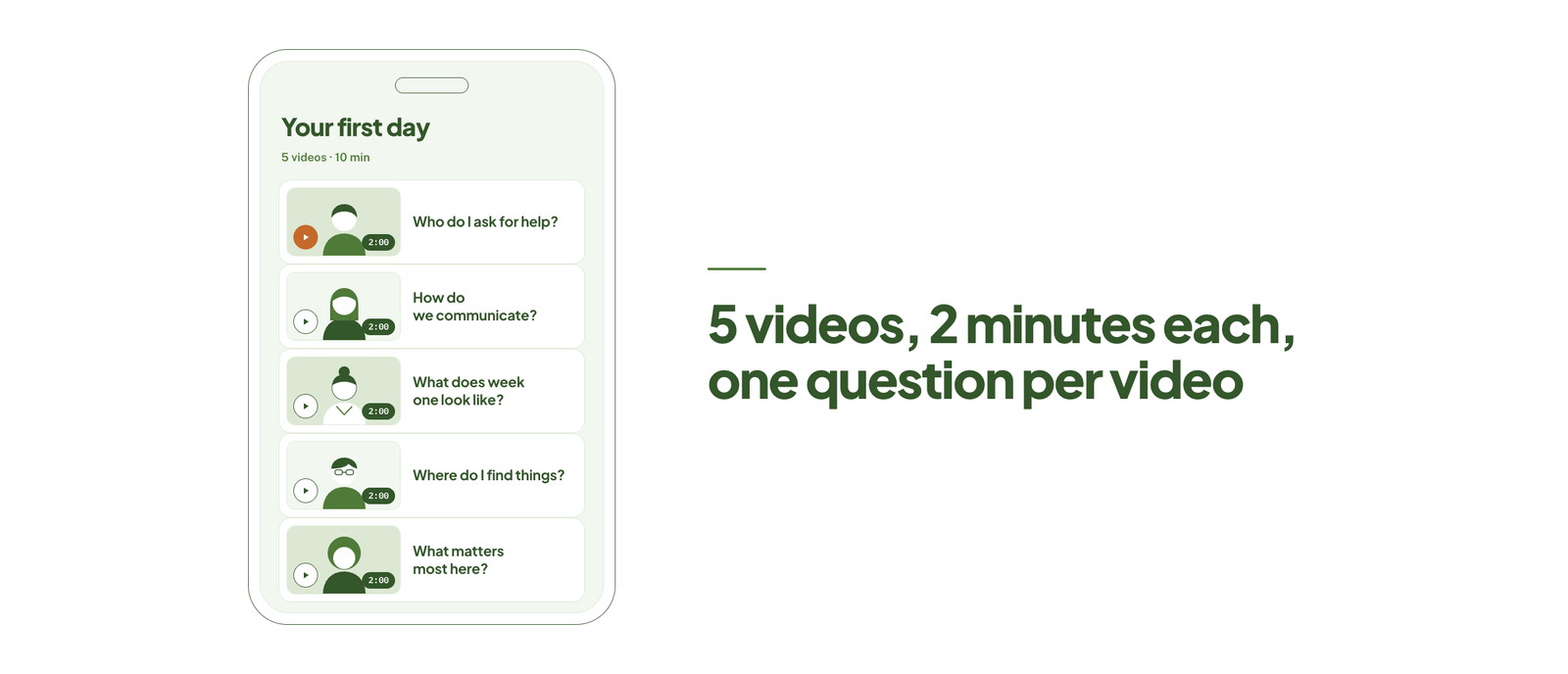 Goal: Help new hires feel oriented before their first meeting.
Format: Five short videos – each from a different team lead.
Length: 2 minutes each.
Why it works: Each video answers one question, like “Who do I ask for help?” New hires get faces and names without actually sitting through a long orientation.
How to copy it: You can list down five questions new hires ask most often. Then, record one answer per video on a phone, with no slides.
Short clips like these are the simplest form of video-based elearning, and our guide covers how to plan and record them.
2. Role-Specific Checklist
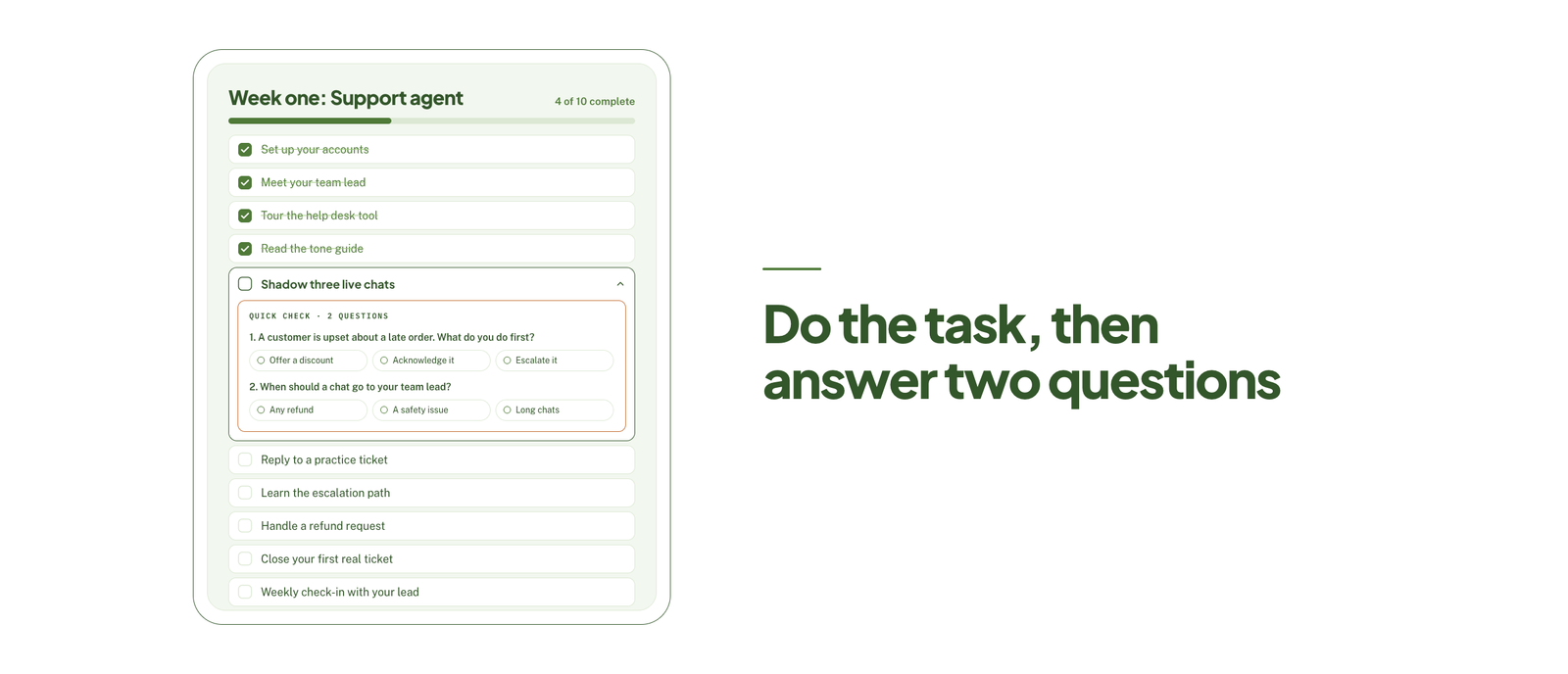 Goal: Get a new hire doing real work in the first week.
Format: Checklist where each step ends in a two-question quiz.
Length: 3 minutes per step.
Why it works: Learners can act first, then you can confirm if they understood. Progress is visible here, which can keep momentum up.
How to copy it: You can write the ten tasks a new hire must complete in week one. Then add two questions per task that will check the step was done correctly.
A checklist like this needs somewhere to live and be tracked. Our guide to choosing an onboard LMS covers the platforms built for it.
Compliance Examples
3. Data Privacy Scenario
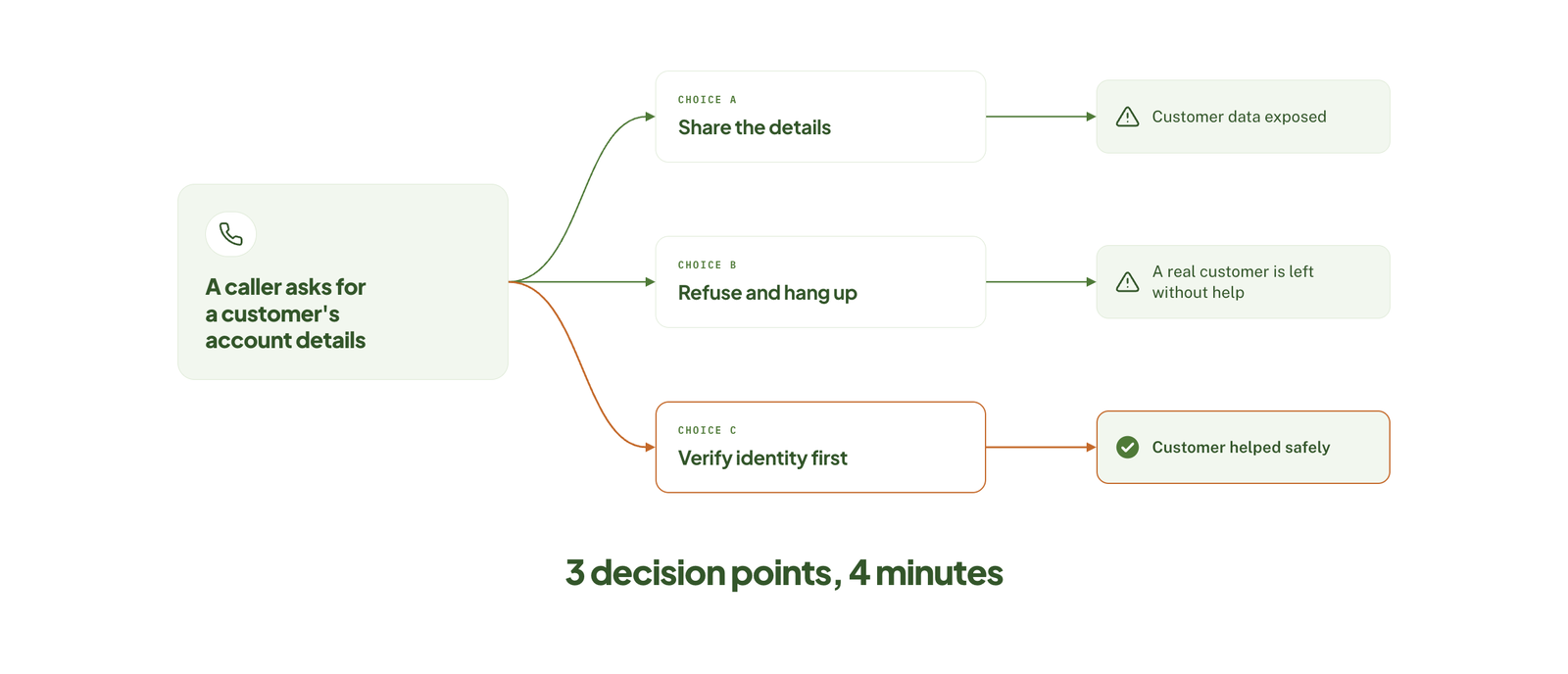 Goal: Teach employees to handle a customer data request correctly.
Format: Branching scenario with three decision points.
Length: 4 minutes.
Why it works: Learners can make the judgment call themselves and can see the consequence, which usually sticks better than just reading a policy.
How to copy it: You can take one real incident or near miss and turn it into a story with three choices, giving feedback on each wrong path.
Our guide to scenario-based elearning explains how to write branches and feedback that feel realistic.
4. Safety Refreshers
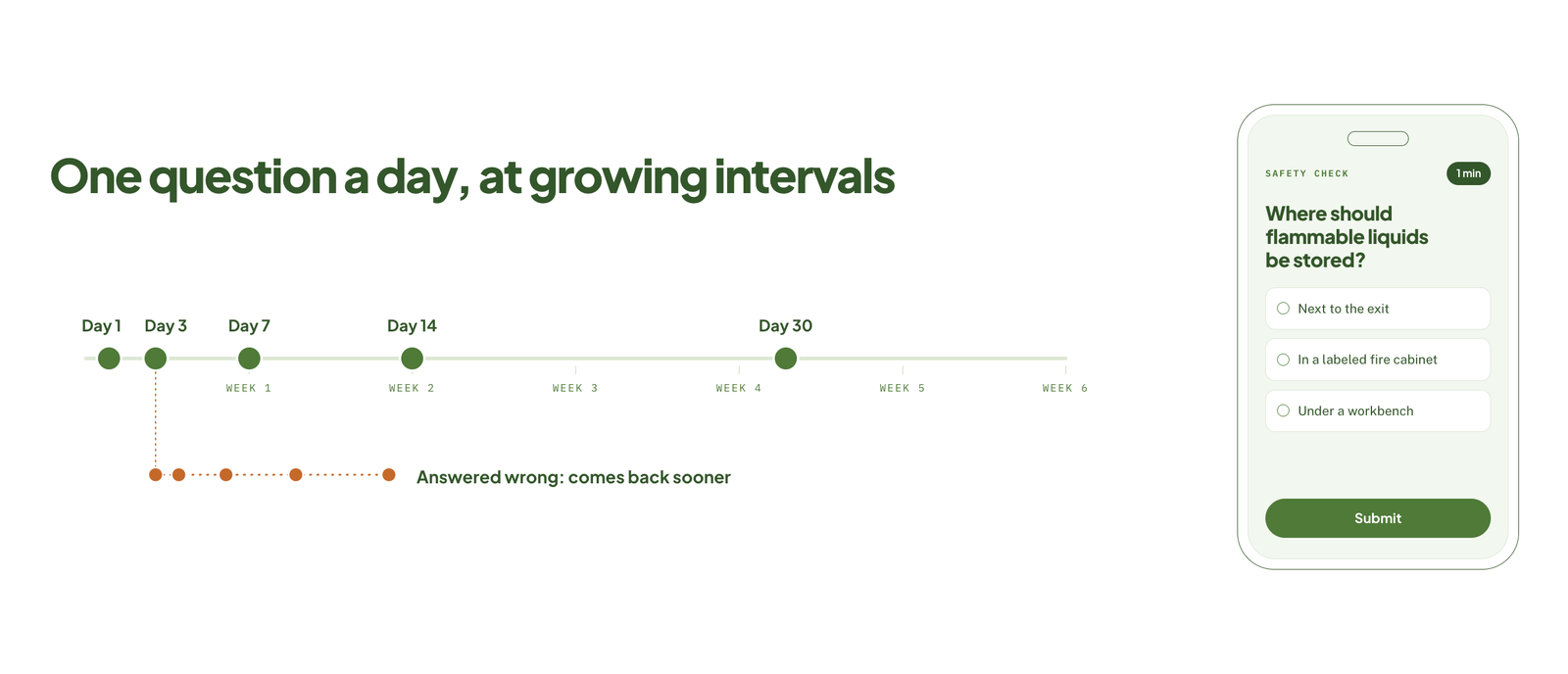 Goal: Keep critical procedures in memory between annual training.
Format: One question a day that is repeated at growing intervals.
Length: 1 minute per day.
Why it works: Spaced repetition can interrupt forgetting, given that questions answered wrongly come back sooner.
How to copy it: You can pull the 20 facts people must not get wrong. Then write one question per fact and schedule them over six weeks.
Refreshers work best as part of a written compliance training plan that sets out what must be trained and how often. If you need the lessons built for you, see our elearning safety training services.
Sales Training Examples
5. Objection-Handling Cards
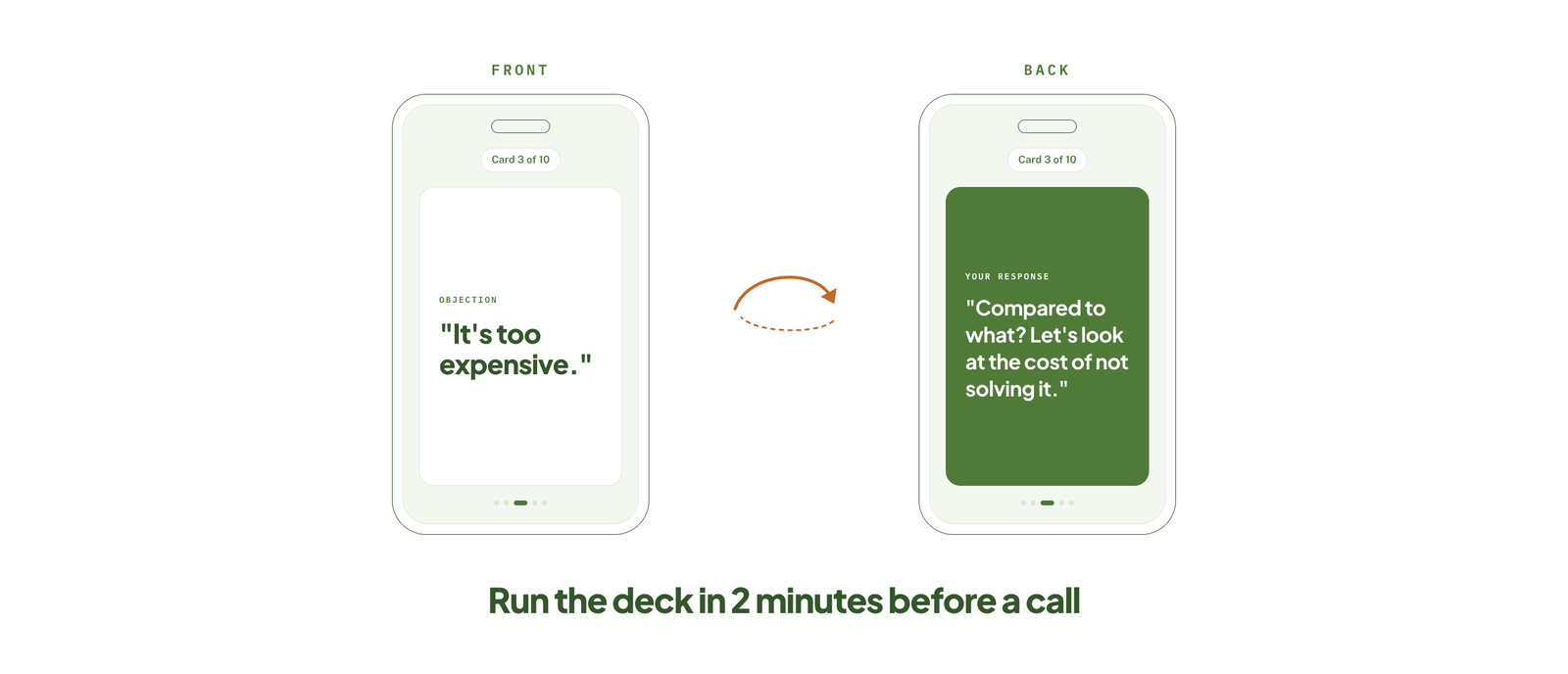 Goal: Prepare reps for the objections they can hear most.
Format: Mobile flashcards with the objection on the front and responses on the back.
Length: 2 minutes.
Why it works: Reps can run through the deck right before a call, when it matters most.
How to copy it: You can ask your top reps for their best answers to the ten most common objections, then put one on each card.
6. Product Pitch Practice
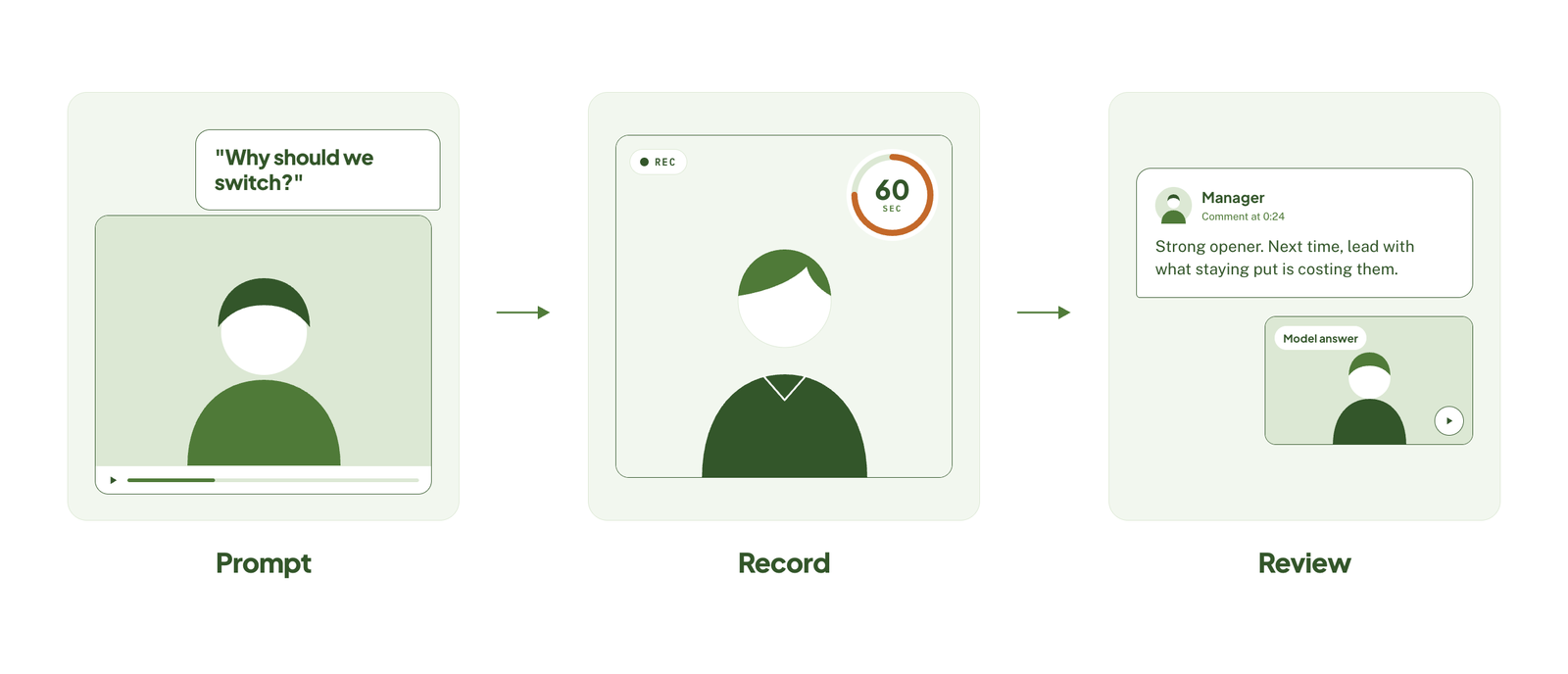 Goal: Build fluency with new messaging.
Format: Video prompt, that’s followed by the rep recording a response.
Length: 2 minutes.
Why it works: Saying the pitch aloud exposes gaps that reading never does, so that your managers can review recordings and coach.
How to copy it: You can record a customer-style prompt. Then ask your reps to respond in 60 seconds and share one model answer afterward.
For the wider program these lessons sit inside, see our guide to elearning sales training. If you want to add points and leaderboards to the practice, our guide to gamification in sales training shows how.
Product Knowledge Examples
7. Feature-Release Explainer
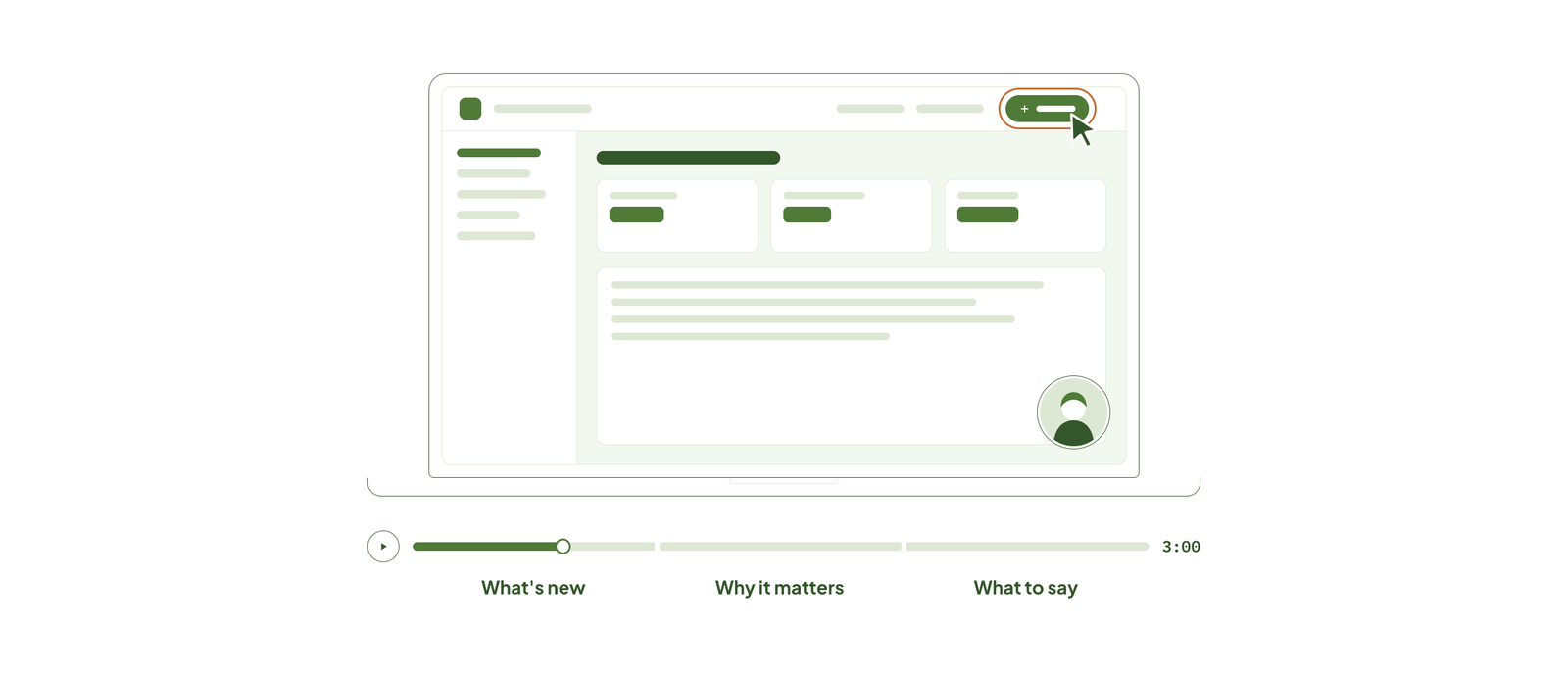 Goal: Update support and sales teams on a new feature.
Format: Narrated screen recording.
Length: 3 minutes.
Why it works: It can show what changed, who it affects, and what to tell customers, and nothing else.
How to copy it: You can script three points: what is new, why it matters, what to say, then record your screen in one take.
Explainers like this are one piece of a full product training program.
8. Product Walkthrough
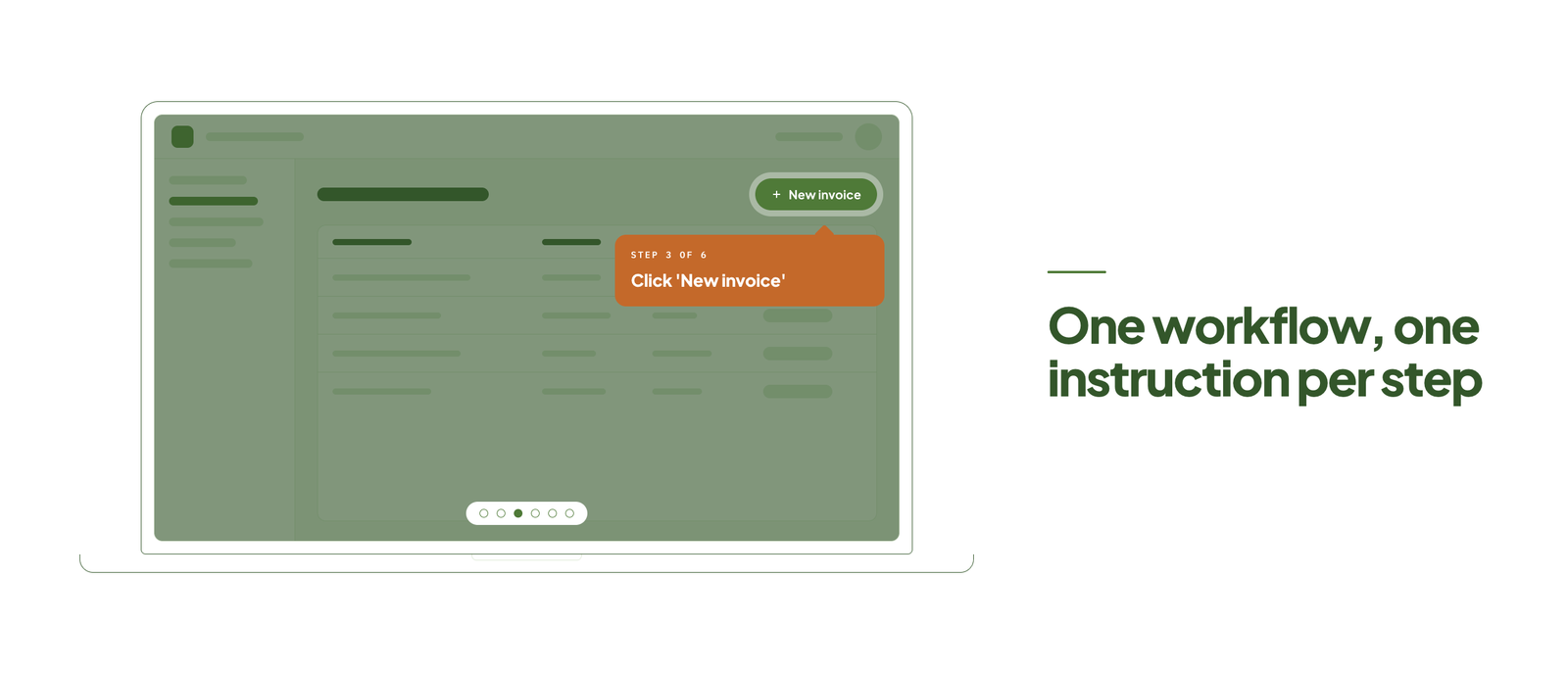 Goal: Teach a core workflow in a software tool.
Format: Interactive demo where your learner clicks through the steps.
Length: 5 minutes.
Why it works: Learners can practice in a safe copy of the real interface, so that their skill transfers directly.
How to copy it: You can choose one workflow, not the entire product. Then capture each screen and add a single instruction per step.
Our guide to elearning simulation covers how these click-through demos are built.
Soft Skills Examples
9. Feedback Conversation
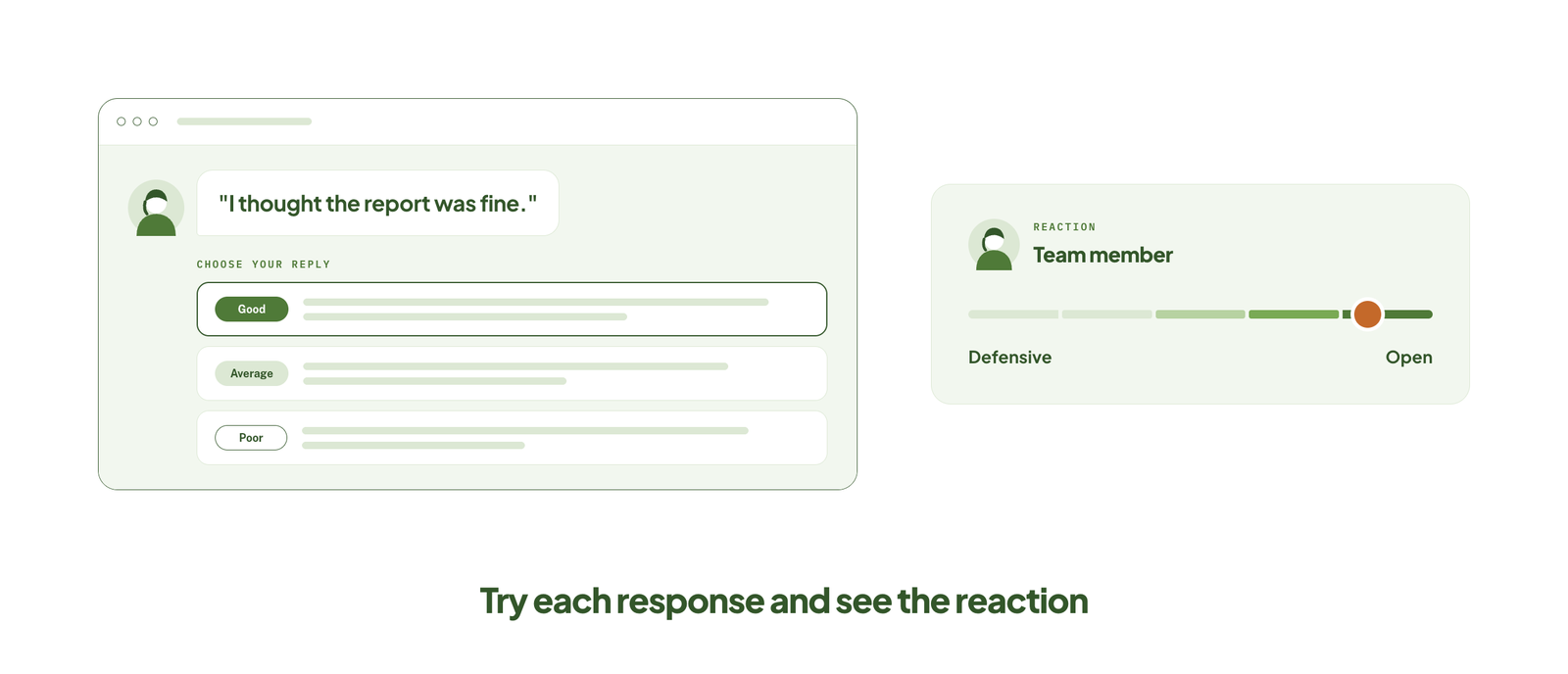 Goal: Help new managers give constructive feedback.
Format: Branching dialogue with a fictional team member.
Length: 5 minutes.
Why it works: Managers can try different approaches and see how the other person reacts, with nothing at stake really.
How to copy it: You can write one realistic conversation. And at each turn, simply offer a good, an average, and a poor response.
Short practice conversations like this fit well into leadership development elearning for new managers.
10. Active Listening Lesson
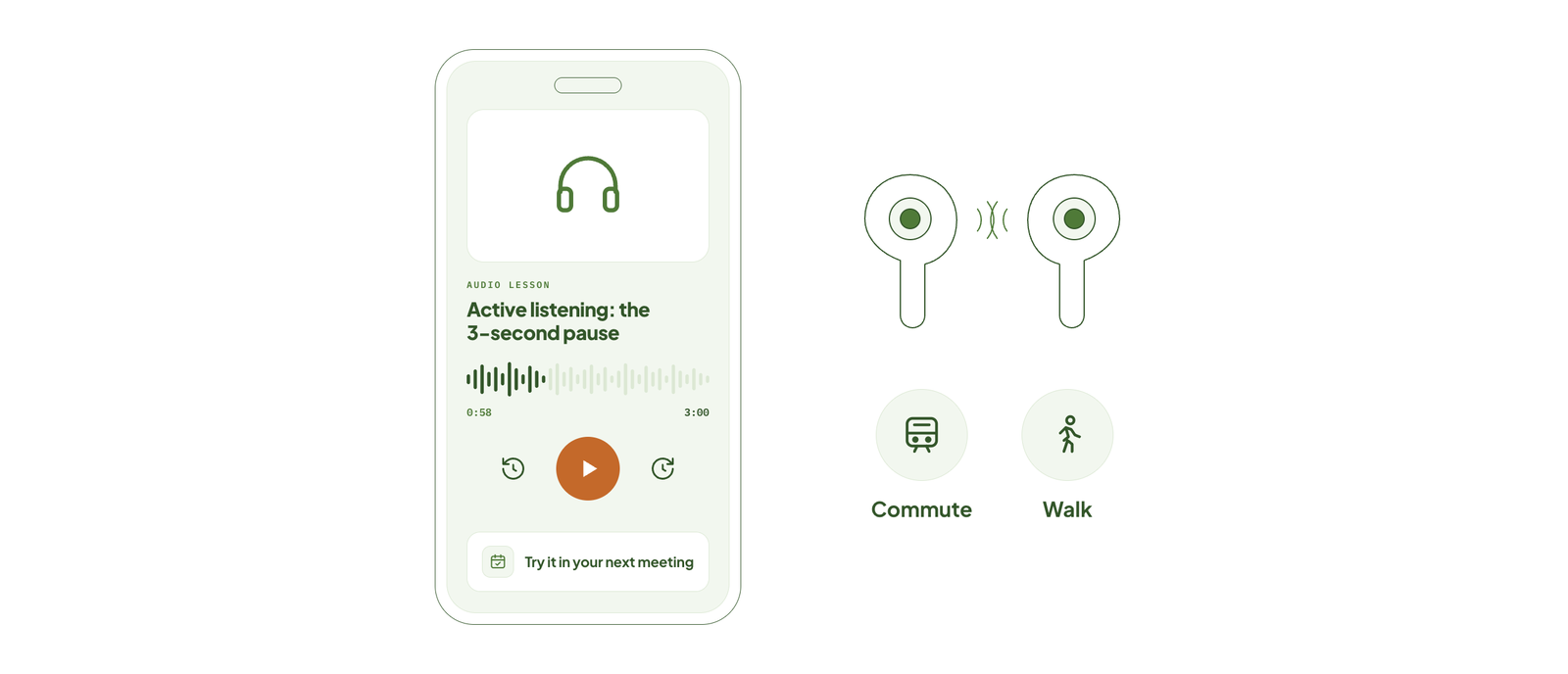 Goal: Introduce one listening technique learners can use the same day.
Format: Audio clip with a short reflection prompt.
Length: 3 minutes.
Why it works: Audio suits a skill about listening, and it can fit into a commute or a walk.
How to copy it: You can write one technique, play a short example, and end with a task to try in the next meeting.
Frontline and Deskless Worker Examples
11. QR Code Job Aid
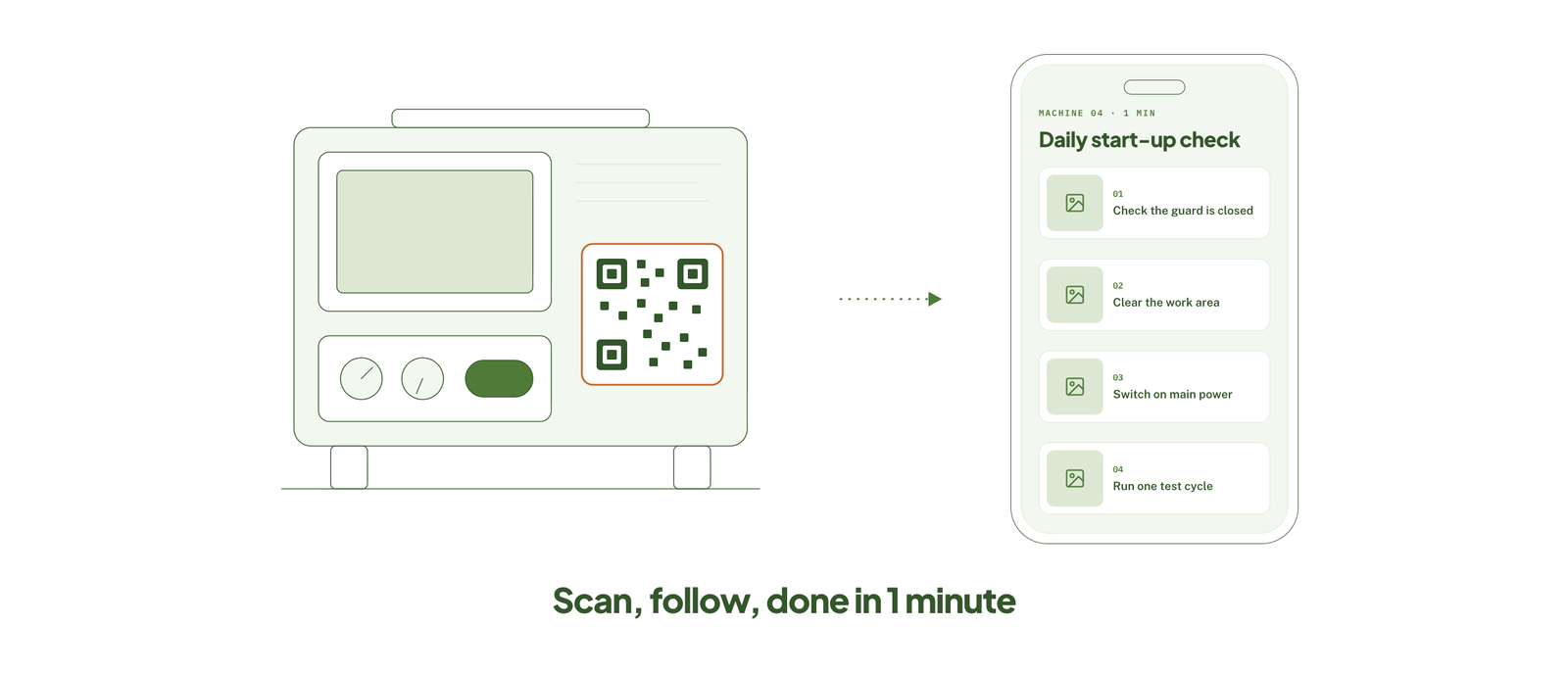 Goal: Give workers the steps for a task at the moment they do it.
Format: Mobile one-pager opened by scanning a code on the equipment.
Length: 1 minute.
Why it works: There is nothing really to remember and nothing to search for. The help here sits where the work happens.
How to copy it: You can choose one task people often get wrong. Then write the steps with photos and post the code at the workstation.
Job aids are a form of on-demand training, and our guide to mobile learning solutions explains what good looks like on a small screen.
12. Text-First Lesson
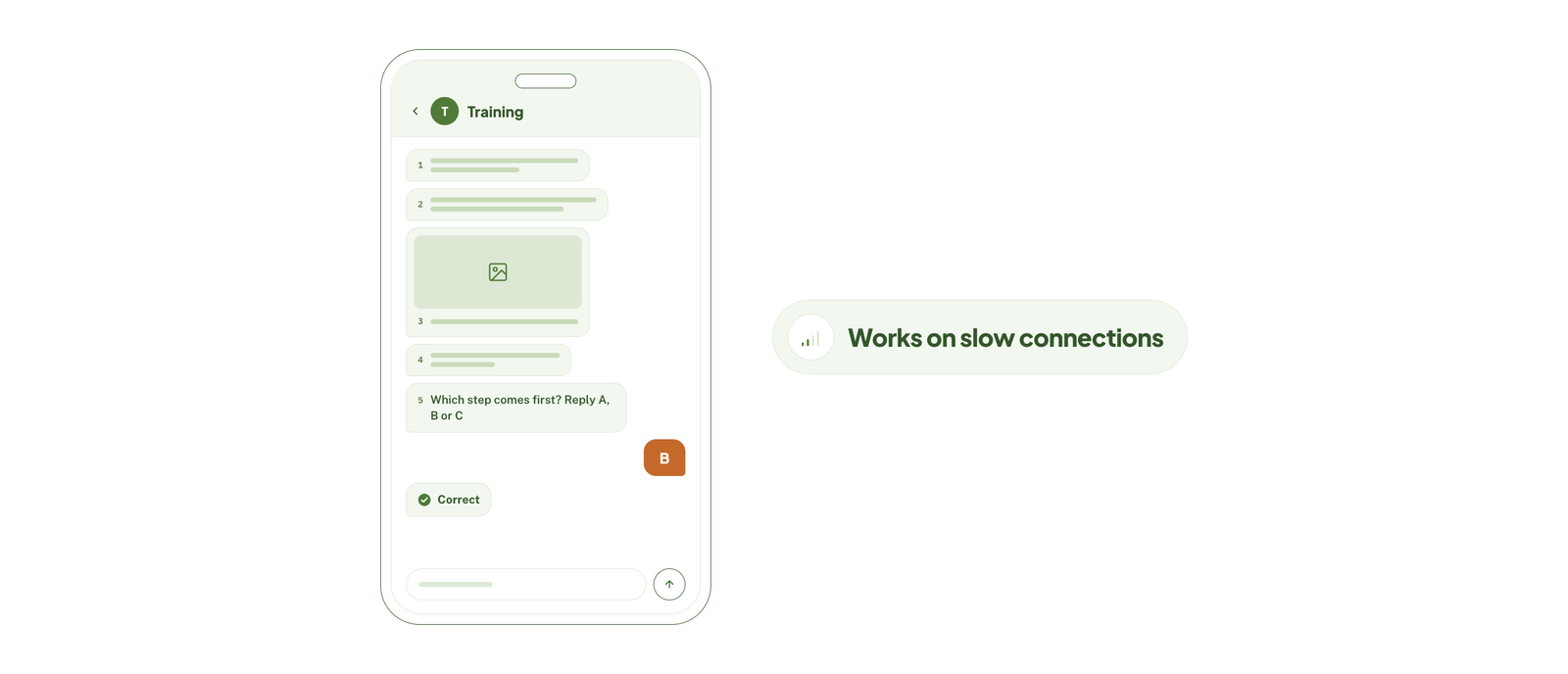 Goal: Train teams who have slow connections or shared devices.
Format: Text and compressed images, delivered through a messaging app.
Length: 3 minutes.
Why it works: It loads anywhere and can use a tool workers already open every day.
How to copy it: You can break the lesson into five short messages. Then end with one question that your learners reply to.
Text-first lessons are also the easiest to adapt for other languages. Our guide to multilingual elearning explains what a rollout involves, and elearning localization services can adapt the examples and images for each audience.
Common Microlearning Formats
The 12 examples above use nine formats between them. Pick the format from the task you’re teaching, not from what looks most impressive.
| Format | Use it when learners need to | Effort to build |
|---|---|---|
| Short video or screen recording | See how something is done | Low |
| Flashcards and spaced questions | Remember facts, terms, or responses | Low |
| Job aid, checklist, or infographic | Follow steps while doing the task | Low |
| Audio clip | Learn away from a screen | Low |
| Quiz or game | Check and reinforce what they know | Medium |
| Interactive demo or simulation | Practise a software or equipment task | Medium to high |
| Branching scenario or dialogue | Make a judgment call and see the result | High |
Quizzes and games are the easiest to overdo. Our guide to gamification in elearning covers when points and badges help and when they distract.
Teardown: 4-Minute Microlearning Lesson, Screen by Screen
A list of examples only gets you so far. Here is how example 3, the data privacy scenario, breaks down into six screens. The objective is one sentence: decide correctly whether to release customer data when someone asks for it by phone.
| Screen | What the learner sees | Why it’s there | Time |
|---|---|---|---|
| 1. Setup | A caller says he is a customer’s husband and asks for her account details. | Opens with the situation, not with objectives or policy text. | 20 sec |
| 2. First decision | Three options: share the details, refuse and hang up, or verify identity first. | Makes the learner commit before being told the rule. | 40 sec |
| 3. Consequence | What happens next for the option chosen, such as a complaint from the real customer. | Shows the result of the choice; the feedback is the teaching. | 40 sec |
| 4. Second decision | The caller pushes back and says it’s urgent. | Adds the pressure that causes real mistakes. | 40 sec |
| 5. Third decision | The learner chooses how to log the call and who to tell. | Covers the step people forget once the call ends. | 40 sec |
| 6. Wrap-up | The rule in one sentence, plus a link to the full policy. | States the rule last, once the learner has a reason to care. | 60 sec |
Notice what is missing: no welcome screen, no list of objectives, no policy history. Every screen either asks for a decision or responds to one.
To plan your own lesson this way, start from our elearning storyboard template and fill in one row per screen.
Benefits of Microlearning
The examples above work for the same few reasons:
- It fits into the working day – a 3-minute lesson can be done between tasks, so it doesn’t need a calendar slot.
- It supports memory – short lessons repeated over time are easier to recall than one long session.
- It’s quicker to build and update – when a policy or product changes, you replace one lesson, not a whole course.
- It works on a phone – which matters for frontline staff who don’t sit at a desk.
- It’s there at the point of need – learners can pull up the lesson at the moment they do the task.
When Microlearning Is Not the Right Fit
Microlearning isn’t a replacement for all training. It tends to fall short in three situations:
- Complex skills that build on each other – learning to code, manage a project, or operate heavy equipment needs longer practice and a structured path.
- First-time learning of a big topic – a new hire with no background needs the full picture first. Short lessons work better afterward, as reinforcement.
- Skills that need live practice and coaching – a 5-minute dialogue can introduce a technique, but it can’t replace role-play with a real person.
In these cases, use microlearning around the main course: a short primer before it, and refreshers and job aids after it.
How to Create Your Own Microlearning Lesson
- Pick one objective – write it as something the learner will do, such as “handle a refund request.” If it needs the word “and,” it’s probably two lessons.
- Choose the format that fits the task – use the formats table above. A procedure suits a job aid; a judgment call suits a scenario.
- Storyboard it – plan each screen before you build. Aim for one idea per screen and a decision or question within the first minute.
- Build it – most lessons here can be made with a phone, a screen recorder, or one of the best elearning authoring tools. If your source material is a slide deck, our guide on how to convert PowerPoint to elearning covers the steps.
- Test it on a phone – check load time, captions, and tap targets. Our guide to accessible elearning lists what to look for.
- Measure it – track whether people can do the task afterward, not only whether they finished. Our guide to elearning ROI shows how to connect training to results.
For the full design process behind longer programs, see our guide on how to create effective elearning courses.
Pro tip
Build one lesson before you plan a library. Pick the question your team gets asked most, make a 3-minute lesson that answers it, and send it to five people. Their feedback will tell you more about format and length than any planning session.
Common Microlearning Mistakes
- Chopping a long course into pieces – ten 5-minute slices of a 50-minute course is still a 50-minute course. Each lesson has to stand on its own.
- More than one objective per lesson – the lesson runs long and learners can’t tell what they were meant to take away.
- No practice or follow-up – a video with no question or task is information, not training. Add one thing for the learner to do.
- Lessons nobody can find – a library of short lessons is useless without clear titles and search. Name each one after the task it teaches.
- Ignoring mobile, language, and bandwidth – if the lesson won’t load on a shared phone on a weak signal, frontline teams won’t use it.
In one line
A good microlearning lesson teaches one thing, lets the learner practise it, and ends. Start with the task, pick the format that fits it, and keep everything else out.
Have the content but not the time to build it?
At eLearning Solutions Lab, we turn long courses, slide decks, and policy documents into short lessons like the ones above. Design, development, and QA are handled by one team. Send us your content and we’ll come back with a scope, a price, and a delivery date before you commit to anything.
Related Reading
- Scenario-based elearning services – branching lessons built for you.
- Rapid elearning services – short courses produced on a tight timeline.
- ILT to elearning services – turning classroom sessions into online lessons.
- Elearning development costs – what custom lessons and courses run to.
- Elearning trends – what is changing in workplace training.
- Best LMS services for small businesses – where to host and track your lessons.
The Author

Book A Discovery Call
Our Learning Advisors are happy to walk you through your project step-by-step — content, timeline, and fixed pricing.
Get Your Free QuoteNo obligation — just a focused conversation. Proposal within 24 hours.
You may also like
Software for Training Companies: Best Tools and How to Choose (2026 Guide)
Short answer Training companies need a training management system (TMS) to…
How to Choose an LMS: A 7-Step Guide (With Free Scorecard)
Short answer To choose an LMS, define your goals and learners first, then…