

Every L&D team will eventually hit the same wall of a stakeholder asking, “What did we actually get back from that training?” You may feel that eLearning is working, but proving it in dollars is another story.
This guide fixes that – so you’ll get the ROI formula, calculator you can use right now, and a fully worked example that takes real costs and benefits all the way to a final percentage.
Let’s get started.
What Is eLearning ROI?
Definition
eLearning ROI is a measure of the financial return you get from an online training program — whether built in-house or through custom eLearning development services — compared to what it costs to build and run.
In business terms, it answers one question: for every dollar spent on eLearning, how much value came back?
You calculate it with a standard formula:
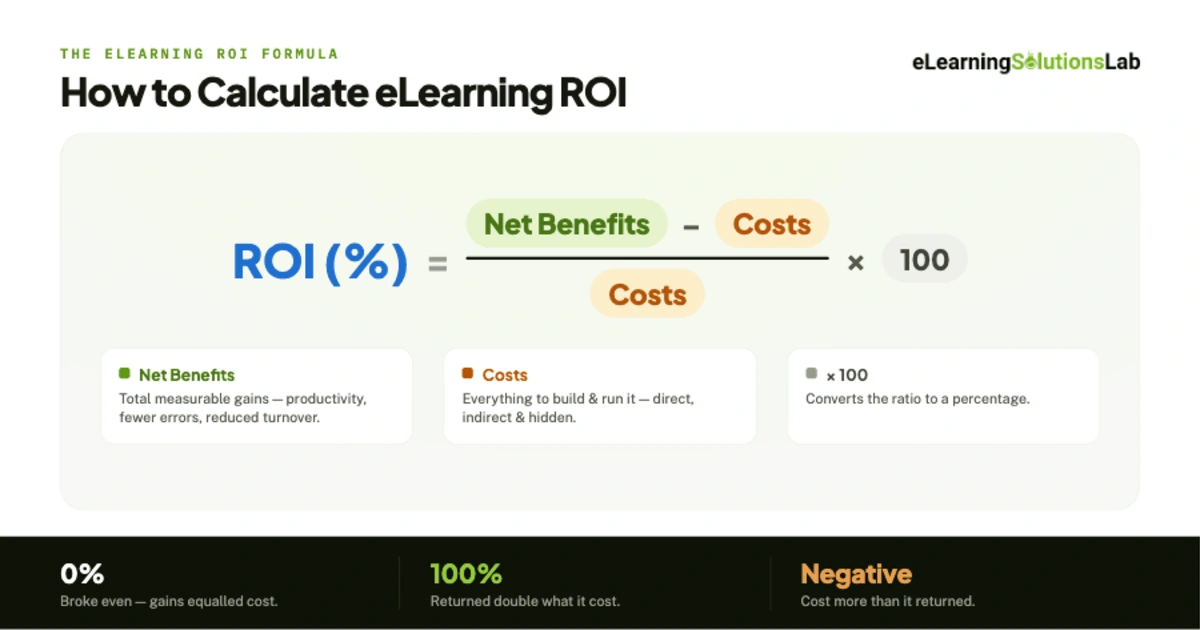
ROI (%) = (Net Benefits − Costs) / Costs × 100
Net benefits are total measurable gains from the training, so things like increased productivity, fewer errors, or reduced turnover, minus the costs to produce and deliver it.
A result of 100% means the program returned double its cost. A result of 0% means it broke even.
Here’s why eLearning ROI is trickier to measure than most business metrics. It doesn’t track a purchase or a transaction – it tracks a change in human behavior.
So the benefit of training only shows up later, when people do their jobs faster, safer, or better, which means you really have to connect a learning event to a business outcome that happened weeks or months down the line.
That connection is where most ROI measurement falls apart, and it’s what the rest of this guide is built to help you get right.
eLearning Costs: Full Checklist
You can’t just calculate eLearning ROI until you know what the program truly costs. A complete view of eLearning development costs means teams can’t count the vendor invoice and stop there, leaving out some staff hours, IT support, and learner time that never show up on a single line.
When you undercount your costs, you’ll overstate your ROI: the number may look great in the deck, but it falls apart under any scrutiny.
Start sorting every expense into three buckets: direct, indirect, and hidden – and you’ll capture the full picture.
Direct Costs
These are obvious, budgeted line items you’ll find on invoices and contracts, which include:
- Development – instructional design services, media production (video, audio, graphics), voiceover, translation, or localization
- Authoring tools – licenses for the best eLearning authoring tools and other software used to build courses
- LMS or licensing – platform subscription or per-seat fees, plus setup and implementation
- Content – off the shelf eLearning course libraries, stock media, or licensed material
Indirect Costs
These are real expenses that don’t arrive as a single invoice:
- Admin – enrollment, scheduling, tracking, reporting, and learner support.
- IT – integrations, provisioning, security review, and ongoing technical support
- Management time – hours L&D staff, SME, reviewers, and managers can spend scoping, building, and approving the program.
Hidden Costs
Invisible until you look for them, and often the largest of all costs:
- Learner time away from work – salaried hours employees spend on training instead of working. Multiply headcount × course length × average loaded hourly wage. For instance, for a 2-hour course taken by 500 people, this alone can dwarf your development spend.
- Maintenance or updates – content that goes stale as rules change and products evolve – so budget for periodic refreshes, not just the initial build.
- Opportunity cost – what your team could have delivered had they not been building this program (one reason some organizations weigh eLearning outsourcing against building in-house).
Pro Tip: Calculate total cost of ownership over the program’s full lifespan. So a course that’s cheap to build but expensive to maintain can look far better on day one than it does 18 months later.
eLearning Benefits: Tangible and Intangible
Costs are the easy half of the equation. Benefits are where actually the ROI is won or lost, given that the biggest gains from eLearning are often the ones that are hardest to put a number on.
So the discipline is to name every benefit, then push as many as possible from “obviously valuable” into “worthy exactly $X”.
Tangible Benefits
These could convert to dollars directly, which can make them the backbone of any ROI calculation:
- Reduced training time – eLearning typically takes less time to complete than the classroom equivalent. So fewer hours per learner can mean less salary spent sitting in training (headcount × hours saved × loaded wage).
- Lower travel or venue cost: no flights, hotels, meals, room rentals, or printed materials – for distributed teams, this is often the single largest savings.
- Fewer errors – better-trained employees who make fewer costly mistakes – you can tie this to rework costs, scrap, safety incidents, or compliance penalties avoided.
- Faster ramp-up – new hires can reach full productivity sooner – so you need to value the productivity gained across days shaved off time to competency.
- Reduced turnover – strong onboarding and development may improve retention. So multiply the drop in turnover by your cost-per-replacement (recruiting, onboarding, lost productivity).
Intangible Benefits
Harder to quantify this, but real, and often the reason leadership can fund the program in the first place. So don’t leave them out, assign a conservative proxy value where you can, and describe the rest qualitatively:
- Engagement – more relevant, accessible learning can actually lift completion and participation. So proxy it through completion rates or engagement-linked productivity.
- Compliance risk reduction – a consistent, trackable, up-to-date compliance training plan can lower the odds of a fine or lawsuit – so you need to value it as the probability of an incident × its expected cost.
- Consistency – every learner actually gets the same quality content, regardless of location or trainer – so standardization is hard to price but shows up as fewer variances and less rework.
- Employer brand – strong learning culture can aid recruiting and retention – so proxy it through improved offer-acceptance, or reduced hiring spend.
Pro Tip: Turn “soft” into countable. So for any intangibles, you need to ask three questions: What behavior does it change? What does that behavior cost or save? How confident am I in the link?
Cost Savings vs. Traditional or Instructor-led Training
This is the most persuasive framing for stakeholders: a side-by-side comparison against a method you’re just replacing – so instructor-led training can carry recurring costs that eLearning largely eliminates:
- Trainer fees – paid per session, every time, versus building an eLearning module once.
- Travel and venue – recurring for classroom delivery, near-zero for digital.
- Scheduling downtime – pulling whole cohorts off the floor at once versus letting learners train on their own schedule.
- Scalability – classroom cost may rise with every new learner, so eLearning cost per additional learner approaches zero.
Once built – especially when you convert existing sessions through ILT to eLearning services – an eLearning course can scale to 50 or 5,000 learners at almost no added cost, whereas instructor-led training can multiply with headcount.
Measurement Models: Kirkpatrick and Phillips
Every level in Kirkpatrick’s four levels will earn its keep when you know what to actually measure at each one and how the data feeds your ROI number. So here’s the applied version of it.
This model works as a chain: each level answers a harder question than the last, and the higher you climb, the closer you get to a number that the leadership or executive team cares about.
Level 1 – Reaction: Did learners find it relevant and worthwhile?
You can measure it with post-course surveys, but really skip vanity questions like “Did you enjoy it?” You can ask whether the content was relevant to their job and whether they intend to apply it.
Track completion rates and drop-off points – obviously, so where people quit tells you where the course is failing. So this is cheap to collect and worth having, but on its own, it will prove nothing about impact.
Level 2 – Learning: Did knowledge or skill actually increase?
You measure change by running a pre-test and a post-test, and comparing – let’s say, a 90% post-test score, which means little if they already knew 85% going in. So for skills, you can use scenario-based assessments built with scenario based eLearning services or practical demonstrations rather than just multiple-choice recall. This is where you can confirm the training has really taught something.
Level 3 – Behavior: Are they doing the job differently 30–90 days later?
This helps predict business results from eLearning. At this level, you measure it away from the course: on-the-job, like manager observations, performance data, quality or error rates, adherence to the new process, and 360 feedback. So if a behavior didn’t change, no amount of Level 1 enthusiasm will produce enough eLearning ROI. Build it in a delay – you’re measuring durable change.
Level 4 – Results: Did the business metric move?
You need to connect the behavior change to an outcome the organization already tracks – things like fewer safety incidents, higher sales, lower turnover, reduced rework, faster time to competency. All these key disciplines will then pick the target metric before you build the training, so you’re measuring it against a baseline instead of just hunting for a win.
Phillips’ Level 5 – Putting a dollar figure on it
Kirkpatrick’s Level 4 will tell you a metric moved, but it won’t tell you what that movement was worth to the business or how much of it the training actually caused. Philips adds a fifth level that will close both gaps:
- Convert the level 4 results to money – simply translate the outcome into dollars (e.g., 40 fewer errors × $500 per error = $20,000).
- Isolate the training effect – this is the step that makes Philips rigorous – other things can move business metrics too (like a new tool, market shift, a manager change – to give examples). Use a control group where possible, or trend-line analysis, or expert or stakeholder estimates of training’s contribution, and discount accordingly.
- Compare against fully-loaded cost – you can run the isolated, monetized benefit through the ROI formula.
Philipps is essentially Kirkpatrick Level 4 plus monetization plus attribution.
Interactive eLearning ROI Calculator
You can plug in what your program costs and what it returns, and this calculator gives you a defensible ROI figure in seconds – the exact number stakeholders ask for when they want to know what training actually earned back.
It uses the same formula from this guide: ROI (%) = (Net Benefits − Costs) / Costs × 100 — and factors in the cost most teams forget: the salaried hours learners spend away from their jobs.
How to use this
1. Enter your costs. Add development, platform/LMS fees, and your learner details — the calculator works out learner time cost for you (learners × hours × wage).
2. Enter your benefits. Estimate the annual value of travel saved, productivity gains, fewer errors, and reduced turnover. Conservative numbers make a more credible case.
3. Read your results. Click Calculate ROI and you’ll get total cost, net benefit, ROI %, and payback period — the results also refresh as you type.
eLearning ROI Calculator
Enter your program’s costs and benefits to see your return on investment.
Costs
Benefits (annual)
–
–
–
–
ROI = (Net Benefits − Costs) / Costs × 100. Figures are estimates — isolate training’s true contribution for defensible results.
The Author

Book A Discovery Call
Our Learning Advisors are happy to walk you through your project step-by-step — content, timeline, and fixed pricing.
Get Your Free QuoteNo obligation — just a focused conversation. Proposal within 24 hours.
You may also like

Skills Matrix Template: How to Build One (+ Free Excel & Google Sheets Templates)
When someone calls in sick, your project needs a specialist, or an auditor asks…
What is Skills Mapping? How to Build a Skills Map (With a Worked Example and Free Template)
You can ask most managers who on their team can run a paid campaign, analyze a…