

Short answer: Onboard LMS is a learning management system set up to deliver, automate, and track training for new employees, customers, or partners. It enrolls people in role-based learning paths, sends reminders, and shows you who has finished what.
Most organizations don’t actually need a separate platform for this – but they do need the right onboarding paths and courses inside your LMS.
In this guide, you’ll learn what an onboard LMS is, how it differs from HRIS and onboarding software, and which features actually matter.
In This Article
- What is an onboarding LMS?
- Who is an onboarding LMS for?
- Why use an LMS for onboarding?
- Must-have features of an onboarding LMS
- What to put inside your onboarding LMS
- How to choose an onboarding LMS
- How to set up onboarding in your LMS
- Onboarding global teams
- How to measure onboarding success
- Common onboarding LMS mistakes
What Is an Onboarding LMS?
An onboarding LMS is a learning management system that is used to train people when they join your organization, or when they start using your product.
It isn’t usually a separate type of software – it’s actually an LMS set up for one job: getting new people up to speed consistently and making sure you can prove they did.
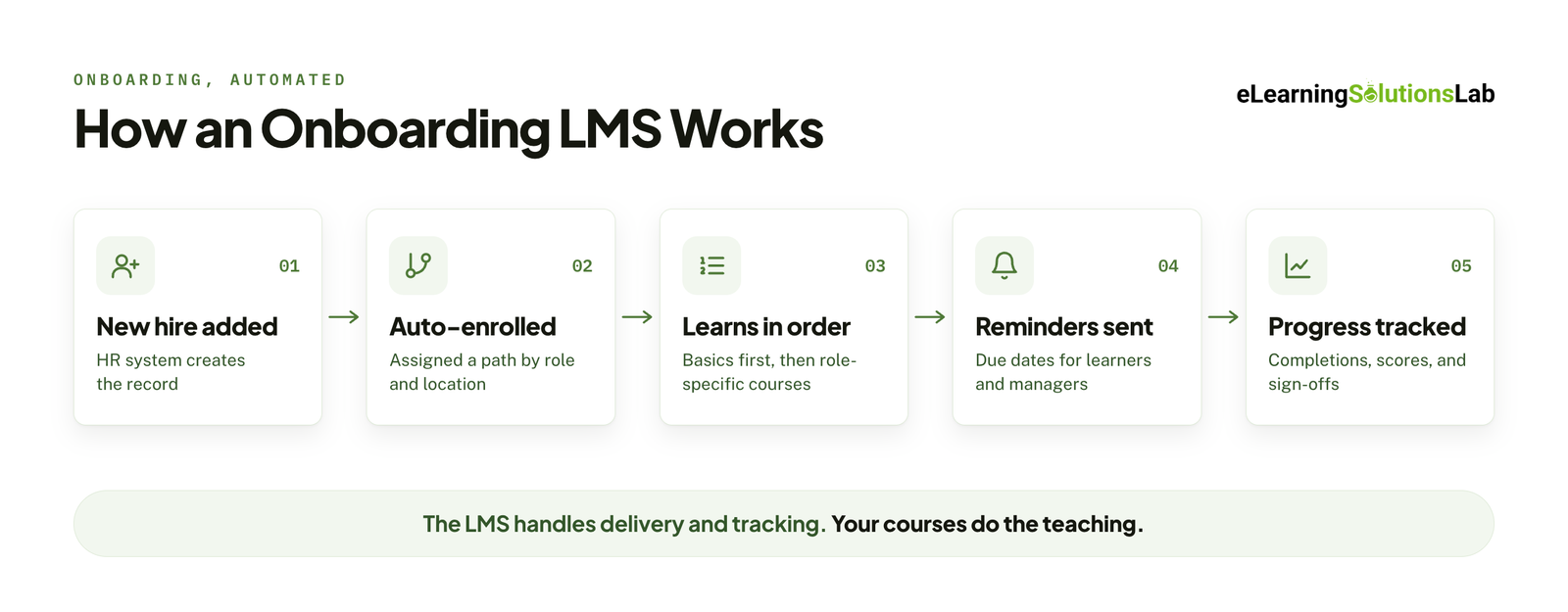
In practice, an onboarding LMS:
- Enrolls new hires automatically based on their role, department, or location, which is often triggered by your HR system.
- Delivers courses in a set order, so that people see the basics before the role-specific materials.
- Sends reminders and due dates to learners and their managers.
- Tracks completions, scores, and policy acknowledgments, which gives you a record for audits and compliance.
- Reports progress so that your HR and managers can see who’s on track and who’s stuck.
Your LMS can handle delivery and tracking, and your courses inside it do the teaching.
 Dedicated Onboard LMS vs. Using Your Existing LMS
Some vendors will just sell platforms that are built specifically for onboarding, and most organizations really don’t need one. If you already have an LMS for compliance or product training, it can almost certainly handle onboarding too. You’d therefore need to set up role-based learning paths, enrollment rules, and the right content.
A separate onboarding platform will truly make more sense when:
- You don’t have an LMS yet, but your onboarding is the main training need.
- Your current LMS can’t connect to your HR system, so every enrollment is pretty manual.
- You need to onboard customers or partners, and your internal LMS isn’t built for external users.
- Your workforce is mostly frontline or deskless, and your current platform doesn’t work well on mobile.
If you’re not sure you need a platform at all, our guide do I need an LMS walks through the decision.
Onboarding LMS vs. HRIS Onboarding vs. Onboarding Software
These three tools often get lumped together, but they truly solve different parts of the onboarding problem:
| LMS | HRIS onboarding module | Onboarding / preboarding software | |
|---|---|---|---|
| Main job | Delivering and tracking training | Paperwork, payroll, benefits, and contracts | Welcome experience, first-week tasks, checklists |
| Tracks learning? | Yes, including SCORM and xAPI courses | Limited, usually just task completion | Limited |
| Typical owner | L&D | HR operations | HR or people team |
| Best for | Role skills, compliance, product and systems training | Administrative and legal requirements | Culture, logistics, and early engagement |
These tools usually complement each other rather than compete with each other. One common setup would look like this: the HRIS creates the employee record, an integration enrolls them in the LMS, and the LMS delivers and tracks their training from day one. Our guide to LMS integration explains how these connections work.
Who Is an Onboarding LMS For?
An onboarding LMS is necessary for each of these groups, who might just need a slightly different setup.
New Employees
This is the most common use of an onboarding LMS – new hires will have to work through a structured path covering company culture, policies, compliance, the systems they’ll use, and skills their role requires. The LMS will make sure every hire gets the same core content, whether they start in January or July, and whichever manager they report to.
Internal transfers and promotions benefit too – as someone moving from sales into a team lead role needs onboarding for the new job, even though they already know the company.
Frontline and Deskless Workers
Examples of these are in industries like retail, hospitality, manufacturing, healthcare, and logistics teams. Their onboarding needs to work on a phone or on a shared tablet, usually in short sessions that will fit around shifts. For these teams, short mobile-friendly modules, offline access, and simple navigation really matter more than the LMS’ advanced features. Our guide to mobile learning solutions covers the main options.
Remote and Global Teams
When new hires are spread across cities, countries, and time zones, live onboarding sessions become hard to schedule and even harder to keep consistent. Your LMS will let people complete core training at their own pace, with live sessions kept for the moments that need them, including team introductions or Q&A with managers.
Global teams might also need content in more than just one language and training that truly reflects local rules. Multilingual elearning explains how to plan for that from the start.
Customers
Customer onboarding helps people start using your product correctly and effectively, which can lead to faster adoption, fewer support tickets, and better retention. It usually takes the form of short product walkthroughs, setup guides, and feature tutorials. Given that customers are external users, you’ll also need an LMS that supports external access, self-registration, and often your own branding. Our guide to customer onboarding training covers how to plan it.
Partners and Resellers
Resellers, distributors, franchisees, and channel partners essentially need to understand your products, sales process, and brand standards before they can represent you. Partner onboarding often includes certification, so your LMS needs to track assessment results and issue certificates. It also needs a way to push updates when products change. For franchise networks specifically, see elearning for franchises.
Which Setup Fits Each Group?
| Audience | Main goal | What matters most in the LMS |
|---|---|---|
| New employees | Productivity and compliance | Role-based paths, HRIS integration, manager visibility |
| Frontline workers | Fast, safe start on the job | Mobile access, short modules, offline use |
| Remote and global teams | Consistency across locations | Self-paced content, multi-language support, time-zone-friendly scheduling |
| Customers | Product adoption | External access, branding, self-registration |
| Partners and resellers | Certified, on-brand representation | Assessments, certificates, easy content updates |
Many organizations would start with employee onboarding and expand to customers or partners later. If that’s likely for you, you can check early whether your LMS can handle external users, given that switching platforms later is pretty expensive.
Why Use an LMS for Onboarding?
You can onboard people without an LMS (which most organizations normally do), and many small teams do, using shared folders, slide decks, and checklists in a spreadsheet. That pretty much works until you’re hiring every month, across more than one location, or in a regulated industry. Here’s what and where an LMS adds value:
Every New Hire Gets the Same Core Training
Without any system, onboarding quality depends on who’s in charge of it. For instance, one manager spends a full day walking a new hire through everything. And another points them to a shared drive and hopes for the best. Your LMS will deliver the same core content to everyone, in that same order, whoever their manager is and whenever they start. This way, their managers can still add the personal, team-specific parts on top.
New Hires Get Productive Faster
A structured learning path typically tells people what to learn first and what can wait. So instead of trying to absorb everything in week one, they simply get the essentials up front and build role-specific skills over the following weeks. This will shorten the time before they can truly work without constant help.
Less Admin for HR and Managers
When your LMS is connected to your HR system, new hires can be enrolled automatically on their start date, or even before it. Any reminder can go out on its own, and managers get notified when someone falls behind. In this situation, HR no longer has to email links, chase completions, or update tracking spreadsheets by hand.
Clear Record for Compliance
Many industries would need proof that new employees completed specific training like safety, data privacy, harassment prevention, or industry regulations. Your LMS records who completed what, when, and with what score, along with policy acknowledgments.
So when an auditor asks, the report can take minutes, not days. And if compliance is a big part of your onboarding plan, a compliance training plan can help you map requirements and deadlines before you actually build the content.
Onboarding That Scales
Essentially, delivering onboarding in person works for five hires a year. But it gets much harder at 50 hires, especially across several offices or countries. And self-paced courses in an LMS can scale without extra trainer time, so your onboarding training program quality doesn’t drop as hiring picks up.
Data to Improve Onboarding Over Time
Your LMS will show you where people drop off, which modules take longest, and which assessment questions most people get wrong. And that points you to the parts of your onboarding program that need fixing, rather than simply relying on guesswork or occasional feedback.
Must-Have Features of an Onboarding LMS
Whether you’re choosing a new platform or checking the one you already have, these are the features of an LMS to focus on.
| Feature | Why it matters for onboarding | What to check |
|---|---|---|
| Role-based learning paths | Different roles need different training, in a set order | Can you create separate paths by role, department, and location, and lock modules until earlier ones are complete? |
| Automatic enrollment | New hires should get their training without anyone assigning it by hand | Can enrollment be triggered by start date, job title, or a field in your HR system? |
| HRIS integration | Keeps the LMS in sync with your employee records | Does it connect natively to your HR system (such as Workday, BambooHR, or SAP SuccessFactors), or does it need a custom integration? |
| Mobile access | Frontline and remote workers often don’t have a desk or laptop | Is there a mobile app, and do courses work properly on a phone? Is offline access available? |
| SCORM and xAPI support | Lets you track completions and scores from courses built in any authoring tool | Which standards does it support (SCORM 1.2, SCORM 2004, xAPI), and does tracking work reliably? |
| Due dates and reminders | Keeps onboarding on schedule without manual chasing | Can you set due dates relative to the start date, and send automatic reminders to learners and managers? |
| Manager visibility | Managers need to know how their new hires are progressing | Can managers see their team’s progress without asking HR for a report? |
| Checklists and acknowledgements | Onboarding includes tasks and policy sign-offs, not just courses | Can you add tasks, document acknowledgements, or e-signatures to a learning path? |
| Reporting | Proves completion for audits and shows where onboarding breaks down | Can you filter reports by cohort, role, location, and date, and export them? |
| Multi-language support | Global teams need training in their own language | Does the interface support the languages you need, and can one course have several language versions? |
| Accessibility | Every new hire needs to be able to complete their training | Does the platform meet WCAG 2.1 AA or higher? See accessible elearning for what to test. |
| Security and data privacy | Onboarding involves personal employee data | Does it support single sign-on (SSO), and meet GDPR, SOC 2, or your region’s data residency rules? |
A note on SCORM and xAPI: if your courses don’t track correctly in your LMS, you lose most of the reporting benefits. So before you actually launch, you need to check your platform against the scorm compliance requirements your courses will rely on.
Nice-to-Have Features
These features can improve your onboarding experience, but they shouldn’t decide your choice of platform on their own:
- Mentor or buddy assignments that will pair new hires with an experienced colleague and track check-ins.
- Social and peer learning, including discussion boards or team channels, where your new hires can ask questions.
- Gamification, including points, badges, or leaderboards – these can help engagement for some audiences but might feel forced for others. See gamification in elearning for when it works.
- Built-in authoring tools for quick updates without opening a separate tool. They are actually useful for simple content but rarely a replacement for Storyline or Rise for more interactive courses. Our roundup of the best elearning authoring tools compares the main options.
- AI features, including generated quizzes, course summaries, or learning assistants. These can truly save time, but everything they produce should be reviewed by someone who knows the content before new hires can see it. AI for instructional design covers where that line sits.
- Surveys and feedback forms that will capture how new hires feel about their onboarding at 30, 60, and 90 days.
Features Don’t Replace Good Content
Any platform with every feature on this list will still deliver a poor onboarding experience if your courses inside it are text-heavy slides, outdated policies, or recordings of hour-long presentations.
What to Put Inside Your Onboard LMS
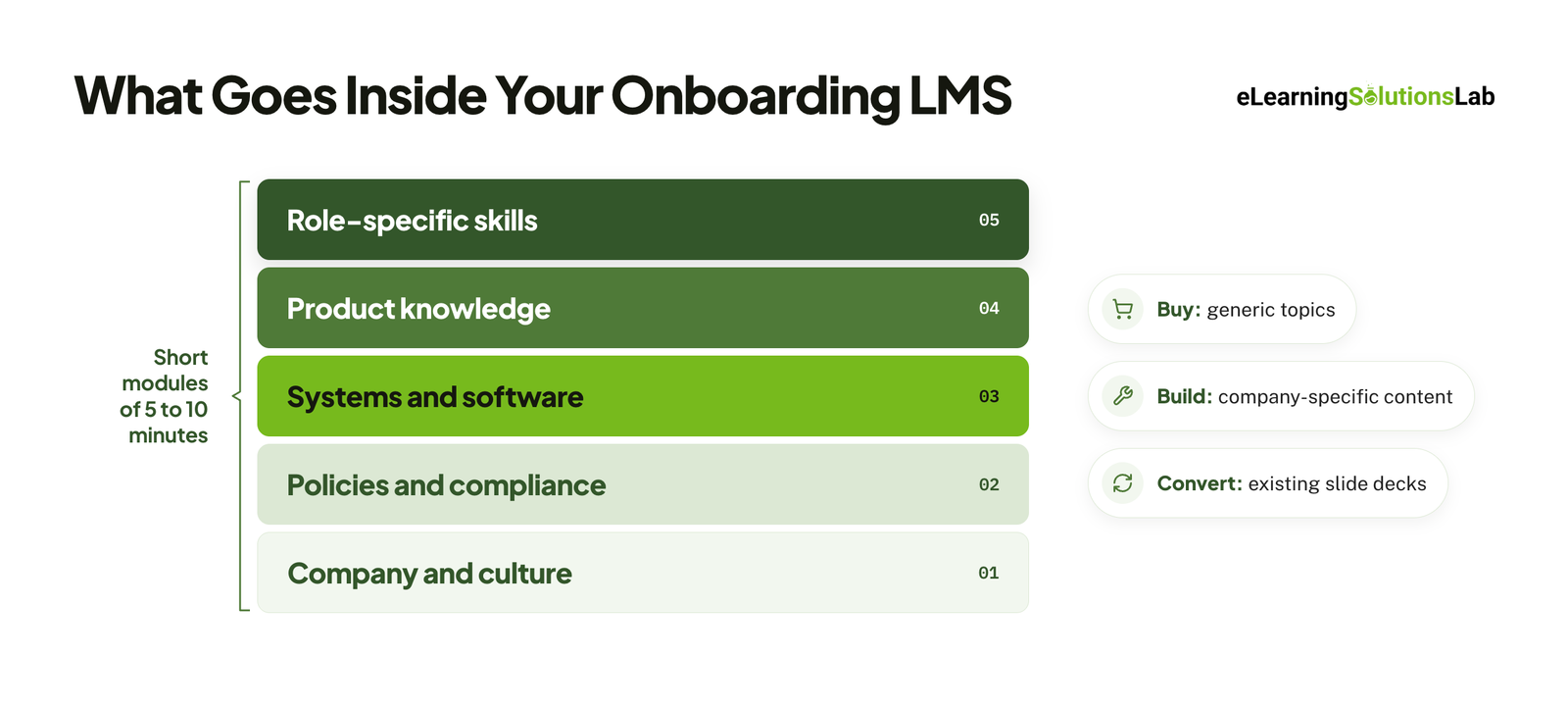 The LMS delivers and tracks onboarding, but the courses inside it do the actual teaching. Most onboarding programs combine five types of content:
| Content type | What it covers | Format that works well |
|---|---|---|
| Company and culture | Mission, values, how teams work, who’s who | Short welcome videos and a light interactive overview |
| Policies and compliance | Code of conduct, data privacy, harassment prevention, health and safety | Tracked modules with knowledge checks and acknowledgements. See our elearning safety training services. |
| Systems and software | The tools new hires use every day | Step-by-step practice, often built as an elearning simulation |
| Product knowledge | What you sell, who buys it, and why | Short modules within a structured product training program |
| Role-specific skills | The tasks, decisions, and conversations the job requires | Practice-based modules, such as scenario based elearning services |
Build, Buy, or Convert?
You don’t have to build every course from scratch. Most onboarding programs use a mix:
- Buy for generic topics like cybersecurity awareness or workplace ethics. Off the shelf elearning covers when a library course holds up.
- Build for anything specific to your company: culture, roles, processes, and products. Custom elearning content development explains what that involves.
- Convert onboarding slide decks you already have into tracked, interactive modules with convert powerpoint to elearning services.
Keep Modules Short
New hires are already taking in a lot. Short modules of 5 to 10 minutes are easier to fit into a busy first week, easier to finish on a phone, and easier to update when a policy changes. Microlearning services are built around this format, and rapid elearning services can turn simple onboarding content into mobile-friendly Rise courses quickly.
How to Choose an Onboarding LMS
If you’re choosing a new platform, or deciding whether your current one is good enough, work through these steps before you book any demos:
- List your audiences. Employees only, or customers and partners too? External users change the requirements.
- Map your must-haves. Use the features table above and mark each one as essential, useful, or not needed.
- Check your integrations. Confirm the LMS connects to your HR system, SSO, and any tools your new hires use.
- Test it on a phone. If any of your new hires are frontline or remote, try a real course on a real device.
- Compare pricing models. Per user, per active user, and flat-rate pricing can lead to very different costs as you grow. Our guide to affordable LMS systems covers the lower-cost options.
- Ask about support. Find out who helps with setup, integrations, and troubleshooting after launch, and whether you’ll need LMS support services on top.
- Run a pilot. Upload one of your own courses, enroll a small group, and check that tracking and reporting work before you sign a long contract.
How to Set Up Onboarding in Your LMS
Whether you’re using a new platform or the one you already have, the setup follows the same steps:
- Define what “onboarded” means for each role. Agree on what a new hire should be able to do by the end of onboarding, not just what they should have seen. If you need help turning that into clear objectives, instructional design services start here.
- Audit your existing content. List what you have, what’s outdated, and what’s missing.
- Map learning paths. Decide which modules everyone takes, which are role-specific, and in what order.
- Build or convert the content. Plan each module before it’s built – our elearning storyboard template is a good starting point. Then package it for your LMS; how to create scorm content explains that step.
- Set up enrollment rules and integrations. Connect your HR system so new hires are enrolled automatically.
- Add due dates, reminders, and manager visibility. Set due dates relative to each person’s start date.
- Pilot with one group of new hires. Collect feedback and fix anything confusing before a full rollout.
- Launch, then review regularly. Check completion data and feedback every quarter, and update content when policies or products change.
Onboarding Global Teams
Onboarding across countries adds a few things that a single-location program doesn’t need to think about:
- Language. Decide which courses need to be in which languages. Translating the text is enough for some modules, while others need visuals, examples, and voiceover adapted too. Elearning translation services cover the first case, and elearning localization services cover the second.
- Time zones. Keep core training self-paced, and schedule live sessions at times that work for each region.
- Local rules. Employment law, health and safety, and data protection requirements differ by country. Build a shared core path, then add country-specific modules.
- Data privacy. Onboarding stores personal data. Ask your LMS provider where data is hosted and how it meets GDPR and other regional rules.
How to Measure Onboarding Success
Completion rates alone don’t tell you whether onboarding worked. Track a mix of learning and business metrics:
| Metric | What it tells you | Where the data comes from |
|---|---|---|
| Completion rate | Whether new hires are finishing their onboarding | LMS |
| Time to completion | Whether the path is realistic for a new hire’s workload | LMS |
| Assessment scores | Which topics new hires understand, and which need better content | LMS |
| Time to productivity | How quickly new hires can work without constant help | Managers and performance data |
| Early retention | Whether new hires stay past their first few months | HR system |
| New-hire feedback | How new hires rate their onboarding and what’s missing | LMS surveys or HR check-ins |
Set a baseline before you launch, so you can compare results against how onboarding worked before. Elearning ROI covers how to turn these numbers into a business case.
Common Onboarding LMS Mistakes
- Front-loading everything into week one. New hires forget most of it. Spread content across the first weeks and months.
- Uploading slide decks and calling it onboarding. A long PDF in an LMS is still a long PDF.
- One path for every role. Everyone needs the same core, but roles need their own paths on top of it.
- Leaving managers out. The LMS handles training, but managers still need to check in and connect it to the real job.
- Ignoring mobile. If frontline hires can’t complete training on a phone, many won’t complete it at all.
- Never updating content. Outdated policies and old screenshots quickly undermine trust in the whole program.
For what a well-built course should include, see our guide to elearning development best practices.
Have the LMS, but not the onboarding courses?
At eLearning Solutions Lab, we turn your onboarding slide decks, policies, and SME knowledge into role-based, SCORM-ready courses that run in the LMS you already have. Instructional design, development, and QA are handled by one team. Send us your content and we’ll come back with a scope, a price, and a delivery date before you commit to anything.
Related Reading
- Do I need an LMS – how to decide whether a platform is worth it.
- LMS integration – connecting your LMS to HR and other systems.
- Customer onboarding training – onboarding the people who use your product.
- Custom elearning content development – a buyer’s guide to custom builds.
- Scorm compliance requirements – what has to be true for courses to track correctly.
- Elearning ROI – measuring whether training pays back.
The Author

Book A Discovery Call
Our Learning Advisors are happy to walk you through your project step-by-step — content, timeline, and fixed pricing.
Get Your Free QuoteNo obligation — just a focused conversation. Proposal within 24 hours.
You may also like
Software for Training Companies: Best Tools and How to Choose (2026 Guide)
Short answer Training companies need a training management system (TMS) to…
How to Choose an LMS: A 7-Step Guide (With Free Scorecard)
Short answer To choose an LMS, define your goals and learners first, then…