

Off-the-shelf courses promise speed, but L&D and HR teams know the trade-off here: generic scenarios, mismatched branding, and content that never quite fits with how your people actually work.
That’s why custom eLearning development services have become the go-to approach for many organizations that need online training to reflect their real processes, products, and culture – not just someone else’s template.
This guide walks you through everything you need to make a confident buying decision. We’ll also cover what others mostly skip: how to build and scale custom eLearning for global audiences.
So whether you’re scoping your first custom eLearning project or comparing top eLearning vendors for an enterprise rollout, you’ll leave knowing exactly what to ask for and what to expect.
What Is Custom eLearning Content Development?
Custom eLearning content development is the process of designing and building digital training from the ground up to fit a specific organization’s goals, audience, branding, and subject matter.
So instead of adapting to a pre-made course, every element — including learning objectives, scenarios, visuals, assessments, and interactions — is created around your actual workflows, products, and people.
The term covers a spectrum, so it helps to know where your eLearning project sits.
Custom vs. Customized vs. Off-the-Shelf – The Three Levels
There are three levels of customization in eLearning content development:
- Off the shelf – pre-built courses on common topics (compliance, software skills, soft skills) that you can license and deploy as-is. Fastest and cheapest, but generic – so your branding and specific processes won’t appear.
- Customized (semi-custom) – off-the-shelf or template-based content lightly modified with your logo, colors, examples, or a few swapped scenarios. A middle ground on cost and relevance.
- Fully custom – bespoke eLearning built entirely for you from scratch. Highest relevance and engagement and fully aligned to your objectives and brand, but the largest investment of time and budget.
The right level here depends on how unique your content is and how much engagement and accuracy matter. Niche, high-stakes, or brand-critical training almost always can justify fully custom; commodity topics often don’t.
When Should You Choose Custom eLearning?
Custom isn’t always the right call. So the investment pays off when your eLearning content is too specific, too important, or just too tied to your brand for a generic course to do the job.
So here’s how to tell which side of the line you’re on.
Signs custom eLearning is worth the investment:
- Your processes are unique. You’re training people on proprietary software, internal workflows, or products that no off-the-shelf course could possibly cover.
- Your stakes are high. Safety, regulatory compliance, or high-risk procedures where inaccurate or generic content can create real liability.
- Engagement has been the main problem. Completion rates and knowledge retention are low, given that the existing content feels irrelevant or boring to your learners.
- Brand and tone matter. You need actual training that will reflect your company’s voice, values, and visual identity, especially for onboarding or customer-facing teams.
- You’re training at scale or over time. A reusable, ownable asset that you can update and redeploy is more cost-effective long-term than actually relicensing generic content repeatedly.
- You have measurable performance goals. You actually need the training that is tied to specific business outcomes and objectives you can assess.
When off-the-shelf is good enough:
- The topic is universal and commoditized (general cybersecurity awareness, common compliance basics, or widely-used software).
- You actually need something deployed immediately with minimal budget.
- Your content hasn’t changed and doesn’t need to reflect your brand.
- It’s a low-stake, “check the box” type of requirement rather than just a performance driver.
Practical Rule of Thumb:
If getting the training wrong carries real cost: failed audits, safety incidents, poor performance, and wasted onboarding, custom usually pays for itself. If the content is generic and stakes are low, start with off-the-shelf eLearning and reserve your custom budget for what truly differentiates your organization.
Custom eLearning Development Process
Knowing how an eLearning project actually unfolds can help you scope timelines, budget realistically, and spot a vendor who has a disciplined process versus one who can improvise.
Most custom eLearning is built on one or two design frameworks, and then you can move through these five core phases.
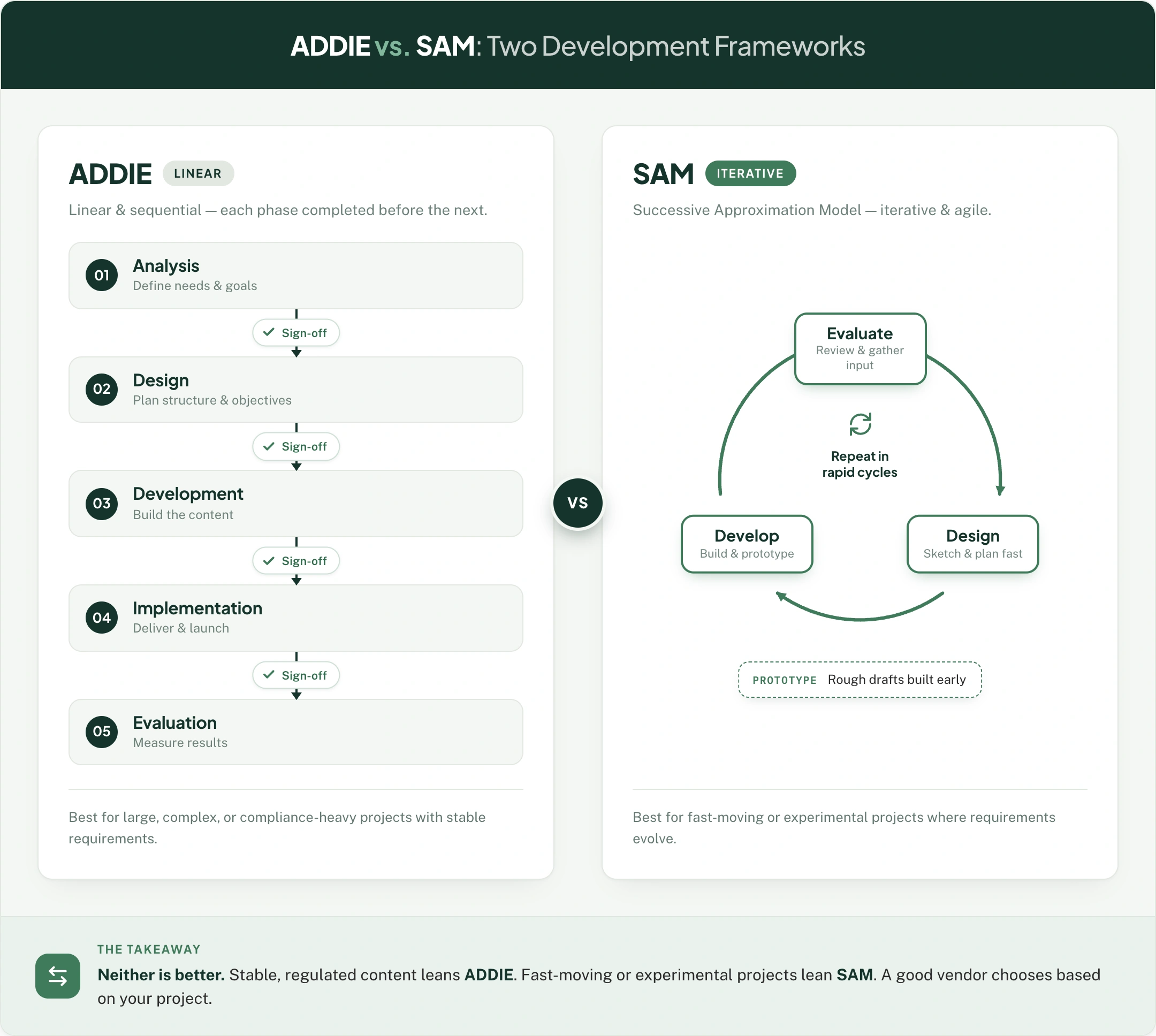
ADDIE vs. SAM – Two Development Frameworks
ADDIE stands for Analysis, Design, Development, Implementation, Evaluation. It is the traditional, linear model – for each phase is completed before the next can begin, with clear sign-offs along the way.
It’s predictable and well-suited to large, complex, or compliance-heavy eLearning projects where your requirements are stable and documentation matters.
SAM means Successive Approximation Model. It is iterative and agile, and it helps build rough prototypes early and can be refined through repeated cycles of feedback. It’s faster to work on a draft and better when the requirements are actually evolving, or stakeholders want to see and react to something quickly.
Neither is better – good eLearning vendors can choose based on your eLearning project. Stable, regulated content can lean ADDIE – fast-moving or experimental projects can lean SAM.
Five Core Phases
1. Needs Analysis and Discovery
Start by defining the performance gap, audience, learning objectives, and success metrics. This is where the eLearning project is scoped – skipping it is one of the most common causes of failed projects.
2. Design
You may create a content structure, write the storyboard, define interactions and assessments, and align on look and feel. You may typically approve a prototype or a sample module here before any full production activities.
3. Development (Build)
This eLearning course is produced in one of the best eLearning authoring tools: media interactions, voiceover, assessments, and branding that are all assembled into working modules.
4. Quality Assurance and Review
Functional testing across devices and browsers, LMS/SCORM testing, instructional review, and stakeholder feedback cycles.
5. Deployment and Evaluation
Launch the course on your LMS, then measure it against the success metrics defined in phase one: completion, knowledge gain, behavior change, and business impact. If an eLearning course has higher interactivity, more media assets, multiple languages, and heavy subject matter complexity, these will push for timelines to be longer. A simple module can move faster, while a richly interactive, localized course takes more.
Interactivity Levels (1–3) Explained
Not all eLearning is built to the same level of engagement, and interactivity is one of the biggest drivers of both eLearning development cost and effectiveness. Most eLearning vendors actually describe their work in three levels. And knowing each of them can help you ask for the right thing and understand why two quotes can differ so widely.
Level 1: Passive (“Page-Turner”)
The learner reads, watches, and clicks “next”. Content here is mostly text, images, basic narration, and simple knowledge check quizzes. There’s little to no decision-making.
Best for: Straightforward information transfer, awareness training, low-stakes compliance.
Cost and time: Lowest, but fastest to produce
Trade-off: Cheap and quick, but engagement and retention tend to be weak.
Level 2: Moderate (Interactive)
At this level, the learner participates. It includes clickable interactions, drag and drop activities, scenario-based eLearning services, tabs and hotspots, simple animations, and branching knowledge checks. And the learner here makes choices and gets feedback.
Best for: Most corporate training programs, including product knowledge, process training, and soft skills.
Cost and time: Mid-range. The most common choice for balancing budget and effectiveness.
Trade-off: Meaningfully more engaging than Level 1 without the actual cost of full simulation.
Level 3: Advanced (Immersive)
At this level, the learner experiences realistic, high-fidelity scenarios. This includes complex branching simulations, custom animations and video, eLearning gamification services, scored decision making with consequences, and sometimes software or environment eLearning simulation.
Best for:High-stakes, complex, or skills-based training like sales negotiation, eLearning safety training services, leadership decision making, and software simulation.
Cost and time: Highest and requires significantly longer development.
Trade-off: The strongest engagement and behavior change, but you pay for it in time and budget.
How Much Does Custom eLearning Cost?
eLearning development costs are the question every L&D buyer wants. But you can still anchor on realistic numbers, essentially.
Custom eLearning development is typically priced one of two ways: per finished hour of content (the industry’s common benchmark) or as a fixed package per course.
“Cost per finished hour” Benchmark
A “finished hour” can mean one hour of seat time for the learner, and it takes far more than just an hour to produce. AS a 2026 market reference, the cost per finished hour can generally track with the interactivity level:
These are broad agency-market figures. They’re actually useful if you want to ballpark budget, but they’re also why many L&D teams get surprised by quotes, so having a fixed eLearning package pricing has become an attractive alternative.
Fixed-package Alternative
Rather than an open-ended per-hour billing, a fixed eLearning package model gives you a defined scope, timeline, and price upfront – so you know exactly what you’re actually committing to before the real work begins.
At eLearning Solutions Lab, custom courses start at $1,500 with a delivery turnaround time of 5 to 7 weeks, and transparent tiers are:
This model really works, especially when you have existing content: PowerPoints, PDFs, webinar recordings – that all need converting into SCORM-ready, WCAG-accessible courses without the actual cost and timeline of a full custom agency build.
What drives the price up or down
Whichever pricing model you choose, these factors move the number:
Interactivity level – the single biggest driver (see the levels above).
Custom media – bespoke video, animation, voiceover, and illustration that add to the cost.
Source content readiness – polished, organized content is faster (and is cheaper) to convert than scattered raw material.
Revisions – more review cycles mean more time, and most packages define this upfront.
Languages and localization – each additional language can add production and QA time.
Subject matter complexity – highly technical or regulated content that requires more SME time and validation.
A practical budgeting tip here is to match the spend to the stakes. You can use lean, lower interactivity builds for straightforward content, and concentrate your budget on high-stakes, high-impact courses where the actual engagement genuinely changes performance.
Building eLearning for a Global Audience
If you’re rolling out training across regions, languages, and time zones, getting this right is the difference between an eLearning course that lands everywhere and one that only works at headquarters.
This is where many eLearning vendors fall short, and where the actual, right delivery model matters most.
Multilingual Content and Localization At Scale
eLearning translation services are not the same as localization. A translated eLearning course swaps the words. A localized course — the goal of proper eLearning localization services – adapts the examples, idioms, imagery, currency, names, and cultural references so that the content feels native to each audience, not foreign and bolted on.
When you’re deploying eLearning across many markets, the practical concerns are:
- Source design that’s built for translation. eLearning courses are designed with localization in mind: expandable text fields, separated on-screen text, and avoidance of text baked into images – that are all dramatically cheaper and faster to localize later. Retrofitting a course that has never been built for it is costly.
- Language coverage. You may confirm your eLearning vendor who can actually deliver the languages that you need. eLearning Solutions Lab can support 35+ languages, which really matters when you have a single rollout that spans multiple regions.
- Voiceover and subtitles. You can decide between AI and human voiceover per language, and budget for synced captions and subtitles where it’s actually needed.
- Consistency across versions. A localization workflow may keep every language version aligned as the master eLearning course is updated – so a fix in English, for instance, doesn’t leave twelve other versions outdated.
Regional Accessibility and Compliance
Accessibility isn’t optional here, and the requirements may vary by region. So building to a pretty recognized standard from the start will protect you legally and serve all your learners.
- WCAG 2.1 AA is the widely accepted benchmark, covering all screen reader compatibility, keyboard navigation, color contrast, and captions. (Every eLearning course eLearning Solutions Lab builds ships WCAG 2.1 AA accessible by default.)
- Different regions layer on their own requirements (such as Section 508 in the US), so you can confirm your courses if they meet the standards of every market you deploy in.
- Accessible design also improves the experience of everyone – clearer structure, better contrast, and captions that will benefit all learners – not just those who require accommodations.
Offshore and Time-Zone Delivery Models
How and where your eLearning courses are produced may affect cost, speed, and capacity.
- eLearning outsourcing through offshore and nearshore delivery can actually deliver agency-quality work at a fraction of US agency rates – and the reason fixed eLearning pricing packages start at $1,500 is even possible. The key here is an eLearning vendor with a mature instructional design process and quality control – not just lower labor costs.
- Time Zone Advantages can compress timelines, and work progresses while your team sleeps, and your review cycles can turn around faster.
- Asynchronous workflow matters rmore than just the location. An eLearning vendor with clear review checkpoints, structured handoffs, and responsive communication can make distance a non-issue – you send raw content and receive tested, ready-to-deploy courses.
Building a global audience isn’t just about adding languages at the end. It’s also about and purely designing for localization from day one – so building to accessibility standards by default, and choosing a robust delivery model that can scale across regions without scaling your costs.
Frequently Asked Questions
Do I own the course files after development?
You should clarify this before the actual signing. Owning the editable source files is the difference between a living asset you can update in-house and a static one you always have to pay the vendor to revise every time.
Can you convert our existing PowerPoints, PDFs, or webinar recordings into eLearning?
Yes, and converting these existing materials, often handled through ILT-to-eLearning services or convert PowerPoint to eLearning services, is one of the fastest and most cost-effective ways to clear a training backlog. You send the raw content, and it’s rebuilt into an interactive, SCORM-ready, accessible course.
Will the course work on mobile devices?
It should be. Responsive eLearning courses, often built with tools like Rise or with responsive design in Storyline and Captivate, can adapt to phones and tablets. You may confirm mobile responsiveness is included – especially if your learners will complete training in the flow of work.
The Author

Book A Discovery Call
Our Learning Advisors are happy to walk you through your project step-by-step — content, timeline, and fixed pricing.
Get Your Free QuoteNo obligation — just a focused conversation. Proposal within 24 hours.
You may also like
Software for Training Companies: Best Tools and How to Choose (2026 Guide)
Short answer Training companies need a training management system (TMS) to…
How to Choose an LMS: A 7-Step Guide (With Free Scorecard)
Short answer To choose an LMS, define your goals and learners first, then…