

Short answer
Training companies need a training management system (TMS) to run and sell instructor-led courses, a learning management system (LMS) to deliver online learning, or both. Decide which one comes first by how you deliver training, then shortlist tools by business model.
This guide compares 8 tools, including Arlo, accessplanit, Administrate, LearnWorlds, and TalentLMS, with pricing, limitations, and who each one is not for.
Running a training company means juggling course schedules, bookings, payments, instructors, venues, and certificates, usually across spreadsheets.
Having the right software can pull that work into one place, but the wrong type can just leave you paying for an employee learning platform that can’t take a booking.
In this guide, we explain the difference between a training management system and an LMS, compare the best tools for businesses that sell training programs, and show you exactly how to choose by business model.
Short on time? Jump to the comparison table.
Updated October 2026.
In This Article
- What is software for training companies?
- Quick comparison: best software for training companies
- Training management system vs LMS: what’s the difference?
- Key features to look for
- Best software for training companies
- Which software fits your business model?
- How to choose software for your training company
- How much does training company software cost?
What is Software for Training Companies?
Definition
Software for training companies is any platform that can help a business run and sell training courses.
It can handle both the commercial and administrative side of training, which includes scheduling courses, taking bookings and payments, managing instructors and venues, issuing certificates, and reporting on revenue.
Most training providers simply use a training management system, a learning management system, or both.
And that’s different from the software a company buys to train its own employees. An internal learning team cares about completion rates and compliance, while a training provider cares about those too, but also about filling seats, invoicing clients, and keeping delivery profitable.
In practice, this software can actually replace the patchwork that many training providers start with: spreadsheets for the course calendar, forms for bookings, accounting tools for invoices, and email for everything else. Bringing those jobs into one system can certainly cut the admin per course and give you one accurate view of what’s running, who’s booked, and what’s been paid.
Quick Comparison: Best Software for Training Companies
We cover 8 tools to help training providers with their main initiatives in running their business, from instructor-led course operations to selling eLearning. We chose tools that are built for, or have plans aimed at, organizations that sell training, and checked pricing in October 2026.
| Tool | Best for | Type | Delivery | Starting price | Free trial |
|---|---|---|---|---|---|
| Arlo | Small to mid-size providers selling public courses | TMS | Classroom, live online, eLearning, blended | $118 per admin/month billed annually, plus $2.15 per paid registration | 14 days |
| Accessplanit | Established providers running hundreds or thousands of courses | TMS | Public, in-company, eLearning, blended | Quote: setup cost plus license fee | Confirm with vendor |
| Administrate | Enterprise-scale instructor-led operations | TMS | Classroom, live online | Quote, based on annual learner count and admin team size | Demo |
| Training Orchestra | Complex scheduling, resources and logistics | TMS | Classroom, live online, hybrid | Quote | No |
| TryTami | Providers running a high volume of live sessions | TMS | Classroom, live online | Enterprise from $42,000/year, Pro on request | Listed, confirm with vendor |
| LearnWorlds | Selling online courses and running a branded academy | LMS | eLearning, live sessions | $24/month billed annually, plus $5 per paid enrollment | 30 days |
| TalentLMS | Simple eLearning delivery with basic selling | LMS | eLearning, live sessions through Zoom | $119/month for up to 40 users | Free plan: up to 5 users and 10 courses |
| SimpliTrain | Providers that want a TMS, LMS, and storefront in one system | All-in-one | Classroom, live online, eLearning | Quote, per active learner | Confirm with vendor |
Prices are in USD, and they exclude implementation fees, which most TMS vendors charge separately. You can jump to the full reviews below for pros, cons, and who each tool is not for.
Training Management System vs LMS: What’s the Difference?
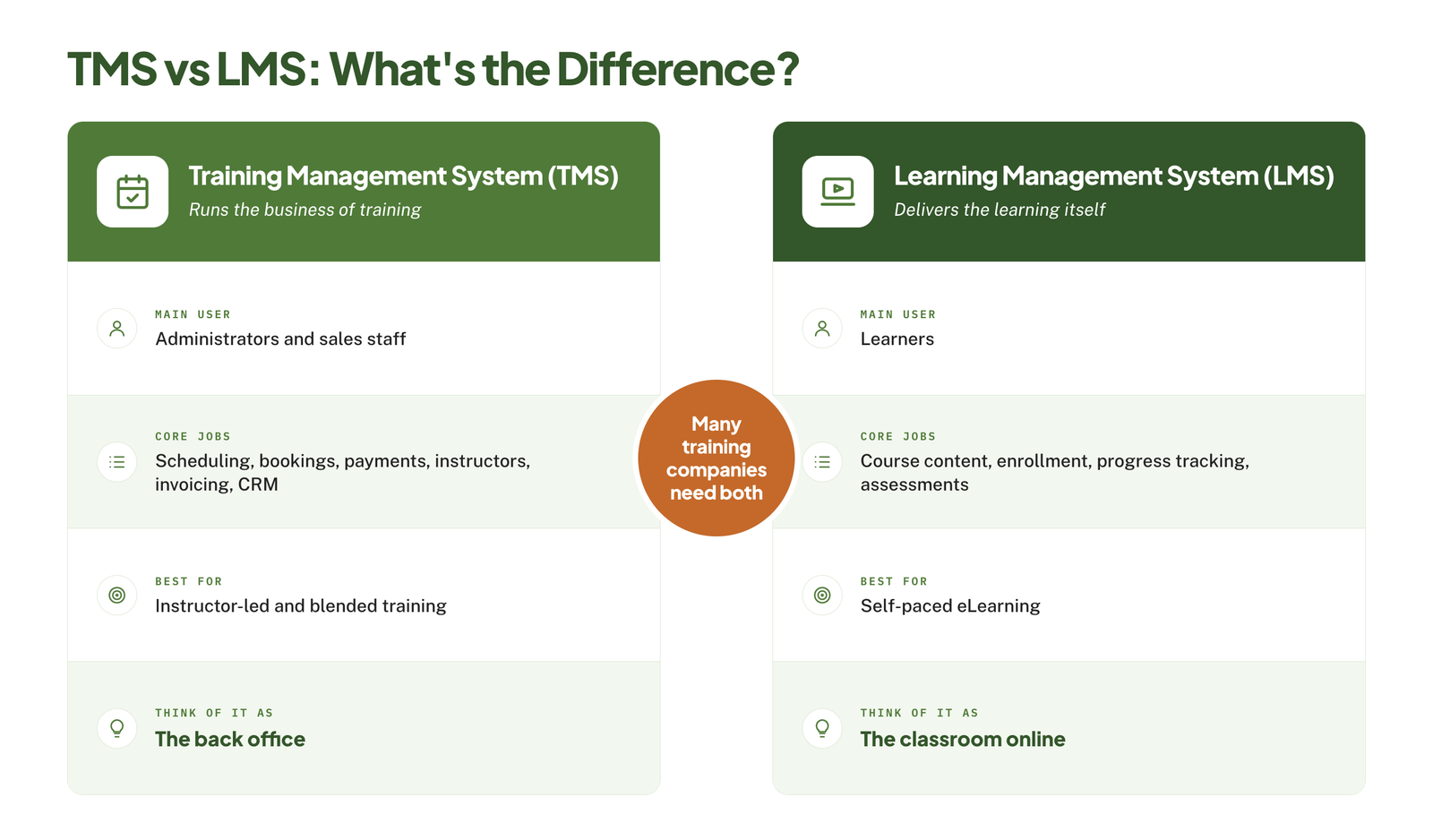
A training management system runs the business of training, whereas a learning management system delivers the learning itself. Many training companies need both, but which one comes first truly depends on how you deliver your courses.
What does a training management system do?
A training management system (TMS) handles the entire operations behind your courses. It schedules sessions, assigns instructors and rooms, takes bookings and payments, sends confirmations and reminders, issues invoices and certificates, and reports on revenue and attendance.
It’s genuinely built for the back office: administrators, coordinators, and sales staff who can keep courses full and running on time. If most of your training is instructor-led, in a classroom or live online, this is where the bulk of your admin work sits.
What does a learning management system do?
A learning management system (LMS) can host and deliver online learning. It can help store course content such as videos, modules, and quizzes, enroll learners, track their progress, and record completions.
It’s genuinely built for the learner. Most LMS platforms were designed for companies training their own staff, so they tend to be stronger on content and tracking but pretty light on the commercial side: public course calendars, checkout, invoicing, and instructor scheduling.
If all your courses run in a classroom, you may not need one yet. Our guide to the question “do I need an LMS” will help you decide.
TMS vs LMS At a Glance
| TMS | LMS | |
|---|---|---|
| Main purpose | Run and sell training | Deliver and track online learning |
| Main user | Administrators and sales staff | Learners |
| Core features | Scheduling, bookings, payments, instructors, invoicing, CRM | Course content, enrollment, progress tracking, assessments |
| Best for | Instructor-led and blended training | Self-paced eLearning |
Which one do you need, or both?
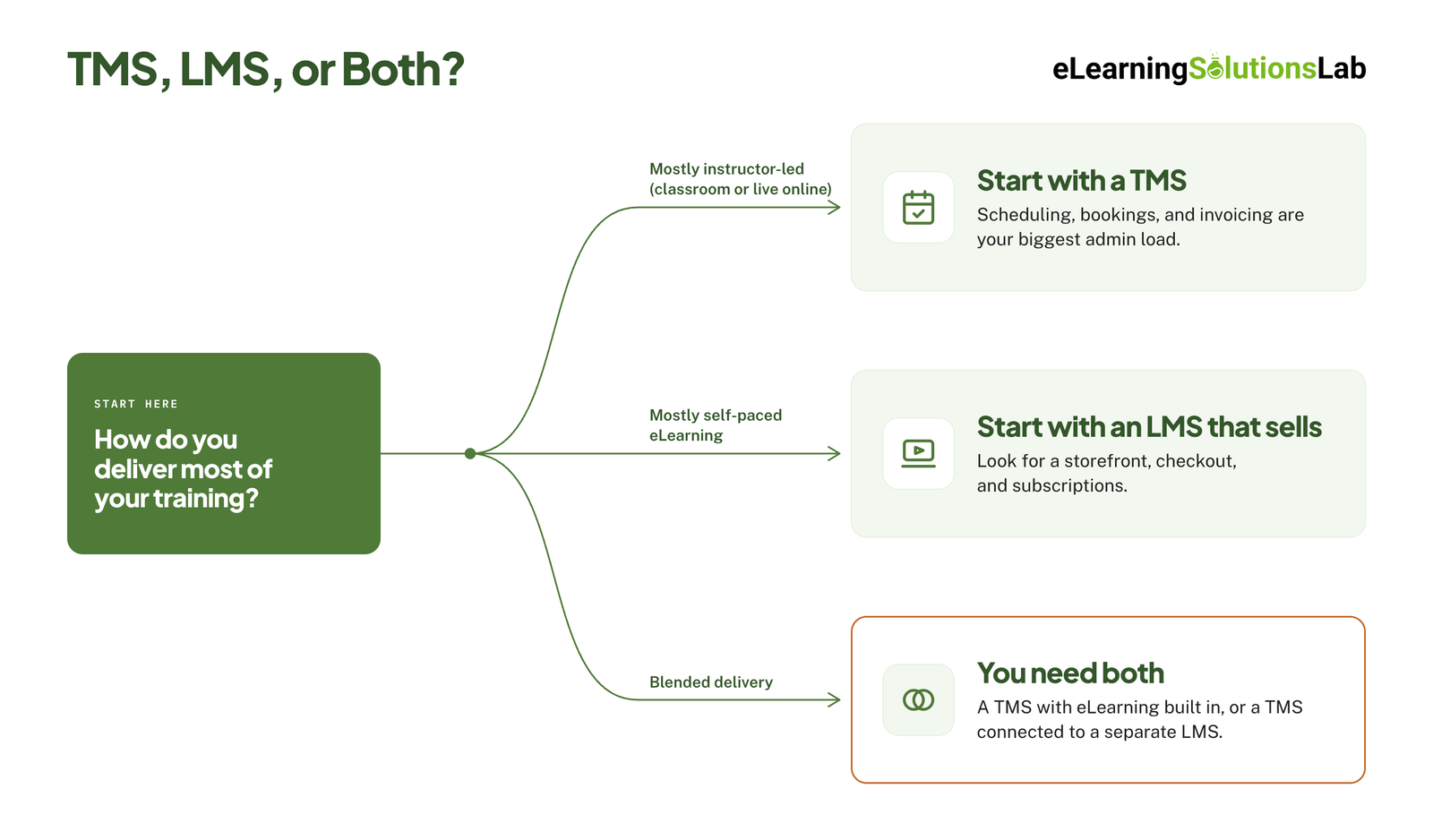
Mostly instructor-led courses – start with a TMS, as scheduling, bookings, and invoicing are your biggest admin load, and an LMS won’t handle them all.
Mostly self-paced eLearning – start with an LMS that has selling features built in, such as a storefront, checkout, and subscriptions. Our list of the best LMS for training companies covers more options.
Blended delivery – you’ll definitely need both – either you choose a TMS with eLearning built in, or you can connect a TMS to a separate LMS so that your bookings and learner records stay in sync. Our guide to blended learning software compares tools for combining the two.
Key Features To Look For
The right features depend on how you actually deliver training, but these 7 matter to commercial training providers. You can use them as a checklist when comparing tools.
Course Scheduling and Resource Management
You should be able to set up a course once and then schedule it many times, across different dates, locations, and delivery formats. You can look for a shared calendar that will show instructor, room, and equipment availability and flag clashes before you confirm a session.
Online Booking, Payments and Invoicing
Customers should expect to find a course, book it and pay in one visit. You can check that the checkout handles group bookings, discount codes, card payments and invoice requests, and that your invoices and credit notes are created automatically. Waitlists and simple transfers or cancellations will save your team a lot of emails.
CRM and Lead Tracking
Built-in CRM should keep your contacts, companies, inquiries, and booking history in one place. This really matters most if you sell private or in-house training, where you’re managing quotes and repeat clients instead of simply one-off bookings.
Instructor and Venue Management
Instructors actually need to see their schedule, accept assignments, and access attendee lists without calling the office. The system should also record qualifications, so that only approved trainers are assigned to a course, and track venue details and costs.
Certificates and Compliance Records
Certificates should be issued automatically once attendance or assessment is recorded. If your courses expire, like first aid or safety training, you have to look for renewal reminders. They will protect your learners’ compliance and bring repeat bookings back to you.
Reporting and Analytics
At a minimum, you need revenue by course, fill rates, attendance and outstanding payments. Profitability per course is one report many training providers lack, and it will show which sessions to run more often and which to drop.
Integrations
The training software should connect to the tools you already use: website, accounting package, video conferencing and email marketing. Without those links, your team just ends up re-entering the same data in many different places. Our guide to LMS integration covers the common connections and how each one is set up.
Best Software For Training Companies
Below are tools we group by type: training management systems first, then LMS platforms suited to selling courses, then all-in-one platforms. Each review covers who the tool suits best for, what it does well, where it falls short, and what it costs.
Training Management Systems
1. Arlo
Best for: Small to mid-size providers selling public courses
Arlo is built for training providers that can promote, sell, and deliver instructor-led, online, and blended courses. It combines scheduling, registration, payments, CRM, and a course website all in one system.
- What it does well – every plan covers public and private course management, classroom and webinar delivery, invoicing and checkout. Reviewers most often praise it for having registrations, scheduling, and reporting all in one place.
- Limitations – reviewers mention limits in the built-in website design, and at least one complains about the steep price increase. Usage fees apply per registration on top of the license.
- Pricing – from $118 per admin license a month billed annually, plus $2.15 per paid registration and $1.07 per free registration. Their implementation package is required on all plans. And there’s a 14-day free trial.
- Not for you if you run high volumes of free or low-priced sessions, where per-registration fees simply add up quickly.
2. Accessplanit
Best for: Established training providers running hundreds or thousands of courses
Accessplanit is a configurable TMS for training providers and internal training teams. It can cover course and resource management, online booking and payment, finance, CRM, and reporting.
- What it does well – it can handle open courses, in-company training, eLearning and blended programs. Reviewers publicly highlight the level of customization and the support team.
- Limitations – implementation takes about 90 days as standard. Some reviewers may find the back end complex and the range of features pretty overwhelming at first.
- Pricing – quote-based, with a setup cost plus a license fee. One directory lists a starting price of around £250 a month and a free trial, so you need to confirm both with the vendor.
- Not for you if you need to be live within a few weeks, or you run only a handful of courses a month.
3. Administrate
Best for: Enterprise-scale instructor-led operations
Administrate is an enterprise TMS that can help centralize and automate complex instructor-led and virtual training. It’s purely designed to sit alongside an LMS and add resource planning, scheduling, and data analysis.
- What it does well – it manages instructors, facilities, and equipment all in one place, supports multiple languages and currencies, and lets you sell training subscriptions and credits. Reviewers note that it caters to businesses selling training to external audiences.
- Limitations – some reviewers say it isn’t the most user-friendly, and one found that invoicing didn’t fit their setup. The vendor itself says it best suits live, high-value training with high learner volumes.
- Pricing – quote-based, set by annual learner count and admin team size.
- Not for you if you’re a small provider, as it’s priced and built for large operations.
4. Training Orchestra
Best for: Complex scheduling, resources and logistics
Training Orchestra manages instructor-led, virtual, and hybrid training, covering planning and budgeting, scheduling and logistics, instructor collaboration, sales, and reporting.
- What it does well – it can help automate complex scheduling, avoid conflicts, and track budgets, costs, and revenue in real time. It can also report revenue and performance per client and course.
- Limitations – it has no actual dedicated mobile app and no free trial. It’s aimed at large organizations whose instructor-led training has outgrown their spreadsheets.
- Pricing – quote-based.
- Not for you if your primary need is an online storefront and simple bookings, not resource optimization.
5. TryTami
Best for: Training providers running a high volume of live sessions
TryTami is a TMS for instructor-led training providers that helps bring class scheduling, instructor management, and billing into one system, with AI-powered automation for training administration.
- What it does well – it focuses on the operations of live instruction, with an AI training coordinator and training dashboards for reporting on costs and outcomes.
- Limitations – it’s a newer product with few public reviews, and a third-party roundup describes it as niche to providers running many sessions.
- Pricing – two plans, Pro and Enterprise. Directory listings put Enterprise from $42,000 a year, with a free trial listed.
- Not for you if you sell mostly self-paced eLearning, or if you’re really working with a small software budget.
LMS Platforms Suited to Selling Courses
6. LearnWorlds
Best for: Selling online courses and running a branded academy
LearnWorlds is an LMS that is built for creating, selling, and hosting online courses. Unlike most LMS platforms, selling is part of the core product: every plan lets you sell on your own domain with coupons and discounts.
- What it does well – higher plans add subscriptions, memberships, payment plans, certificates and live sessions through Zoom, Meet or Teams. The Learning Center plan adds full white-labeling and lets you run training for up to 10 client groups, which suits providers selling to several companies.
- Limitations – their Starter plan charges $5 per paid enrollment and leaves out certificates, SCORM, and live sessions. Plans cap monthly active learners at 1,000 to 2,000 below the custom tier. It’s also not a TMS, so you have to check how you’d handle classroom scheduling, venues, and instructor rosters.
- Pricing – starts at $24 a month billed annually, Pro Trainer at $79, and Learning Center at $249. And there’s a 30-day free trial.
- Not for you if most of your revenue comes from classroom courses.
7. TalentLMS
Best for: Simple eLearning delivery with basic selling
TalentLMS is a general-purpose LMS that is used widely for employee, customer, and partner training. It includes native eCommerce, so you can actually sell individual courses, bundles, and subscriptions through PayPal or Stripe.
- What it does well – every plan includes unlimited courses, SCORM support and custom branding options, and live sessions run through a Zoom integration. Branches will let you create separate training portals, which is useful for serving different client companies.
- Limitations – pricing is based on the number of actual users who log in each month, which can get really expensive if you sell to a large public audience. Its positioning is mainly for internal and customer training, so the selling features are much simpler than a dedicated course-selling platform.
- Pricing – the core plan starts at $119 a month for up to 40 users, Grow at $229, and Pro at $449. And a free plan covers up to 5 users and 10 courses.
- Not for you if you need course scheduling, instructor management, and invoicing for classroom training.
If you plan to bring existing SCORM courses into either platform, our guide to SCORM compliance requirements explains what a platform has to support.
All-in-One Platforms
8. SimpliTrain
Best for: Providers that want a TMS, LMS, and storefront in one system
SimpliTrain combines TMS, LMS, and learning experience features in a single platform. It’s genuinely aimed at training companies and enterprise learning teams that want to run instructor-led programs without stitching together separate tools.
- What it does well – it can cover instructor-led and virtual classes, a course marketplace and eLearning storefront, and learning paths. Its multi-tenant setup can support B2B providers delivering branded academies to multiple clients.
- Limitations – it has no user reviews on Capterra or GetApp yet, so there’s really little independent evidence of how it performs. Pricing and trial details also differ between directory listings.
- Pricing – quote-based. The vendor describes a hybrid model that charges per active learner, with unlimited content and courses.
- Not for you if you want a tool with a long track record and plenty of customer references.
Which Software Fits Your Business Model?
The right pick depends less on features and more on how you earn your revenue. Find the model closest to yours, then start your shortlist with the tools in the last column.
| Business model | Biggest admin load | Features that matter most | Tools to shortlist |
|---|---|---|---|
| Public scheduled courses | Filling seats and handling bookings, payments, and changes | Course website, checkout, waitlists, automated emails | Arlo, Accessplanit |
| Private or in-house training | Quotes, client accounts, and matching instructors to dates | CRM, resource scheduling, client portals, invoicing | Accessplanit, Administrate, Training Orchestra, TryTami |
| Self-paced eLearning | Building content and selling access at volume | Storefront, subscriptions, certificates, white-labeling | LearnWorlds, TalentLMS |
| Blended delivery | Keeping live sessions and online modules in one learner record | eLearning built into the TMS, or a reliable TMS-to-LMS link | Arlo, Accessplanit, SimpliTrain |
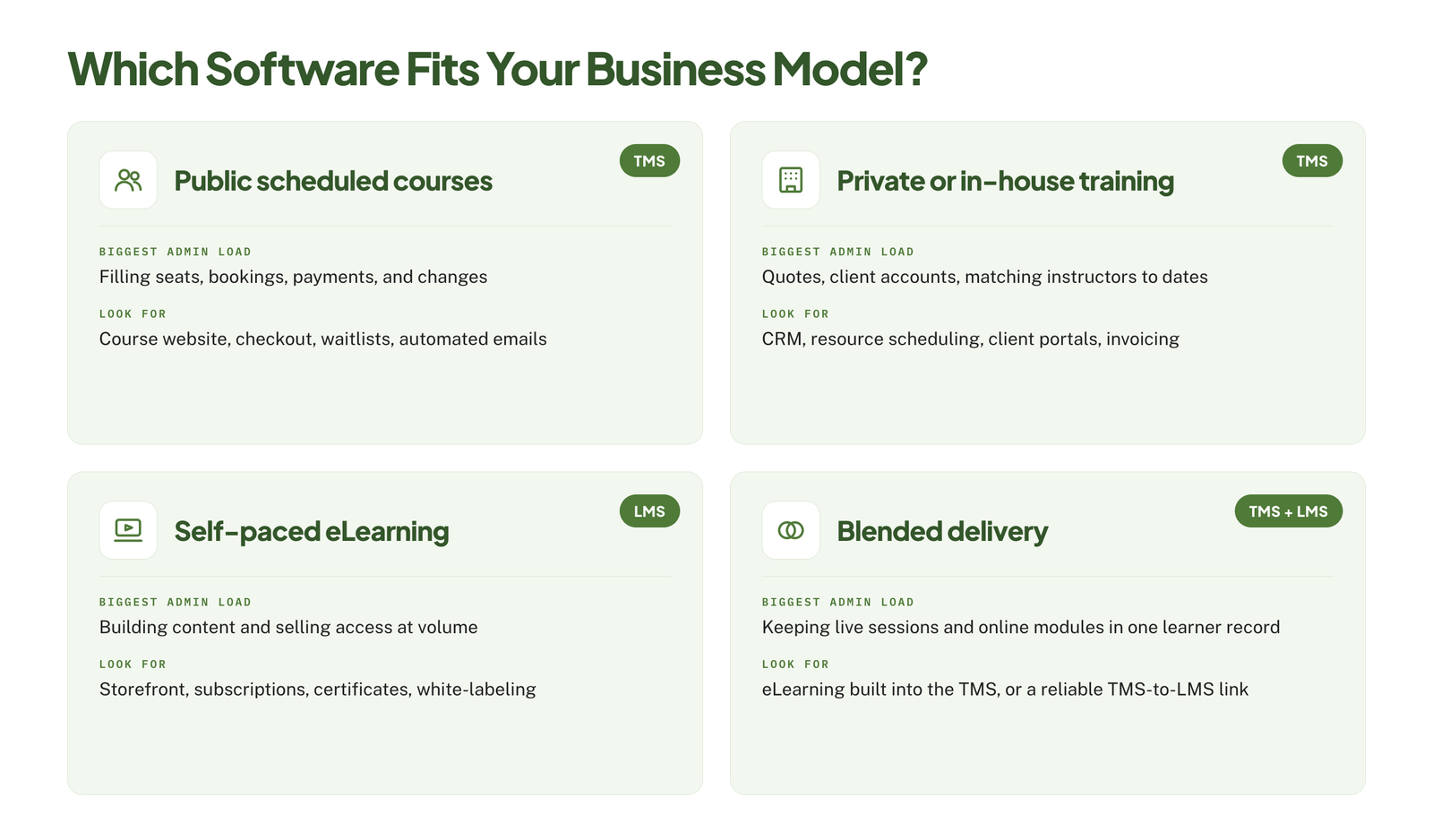
Your size narrows the list further. Administrate, Training Orchestra, and TryTami are built and priced for large operations, while Arlo, LearnWorlds, and TalentLMS publish prices a small provider can start on.
Two moves are common as training companies grow:
- Adding self-paced courses to a classroom business – on-demand training lets you sell the same expertise without a room or a date. If your material lives in slide decks and trainer notes, ILT to eLearning services can turn it into online courses.
- Widening the catalog – you don’t have to build every course yourself. Our guide to building an elearning content library covers when to buy, license, or create.
How to Choose Software for Your Training Company
Once you know your type of software and have a shortlist, these 6 steps will get you to a decision.
- Map your current process – write down every step from enquiry to certificate, and mark where your team re-enters data or chases people by email. Those are the problems the software has to solve.
- Split must-haves from nice-to-haves – use the 7 features above as your starting list, and keep the must-haves to what you would walk away over.
- Match the tool to your size – check the vendor serves providers like yours, and price it at the course volume you expect in 3 years, not today’s.
- Check integrations and data migration – confirm it connects to your website and accounting package, and ask how your contacts, bookings, and certificate history will move across.
- Run a trial with real courses – set up 2 or 3 of your actual courses, take a test booking and payment, and have an instructor and an administrator use it unassisted.
- Ask every vendor the same questions – so that you can compare answers side by side.
Questions to ask each vendor:
- What does implementation cost, and how long does it take?
- Which fees apply per registration, enrollment, or active learner?
- Which features shown in the demo are outside the plan we were quoted?
- Can you import our existing bookings and certificate records?
- How do we get our data out if we leave?
If an LMS is on your shortlist, our step-by-step guide on how to choose an LMS goes deeper on scorecards, demos, and contract terms.
Pro tip
List the three tasks that take your team the most time each week, and make the features that remove them your must-haves. Everything else is a nice-to-have.
How Much Does Training Company Software Cost?
Published prices for the tools in this guide run from $24 a month to $42,000 a year, and half of them only quote on request. What you pay depends mostly on the pricing model.
Pricing Models
| Model | How it works | Example | Watch out for |
|---|---|---|---|
| Per admin, plus usage | A license for each back-office user, plus a fee per registration | Arlo: from $118 per admin a month, plus $2.15 per paid registration | Usage fees on high-volume or low-priced courses |
| Flat tiers with learner caps | A fixed monthly price with a limit on active learners | LearnWorlds: $24 to $249 a month | Enrollment fees and missing features on the entry plan |
| Per active user | Priced by how many people log in each month | TalentLMS: $119 to $449 a month | Costs that rise with a large public audience |
| Quote-based | An annual contract sized to your learners, admins, or courses | Accessplanit, Administrate, Training Orchestra, SimpliTrain, TryTami | Setup fees and multi-year terms |
Hidden Costs
- Implementation – Arlo requires an implementation package on every plan, and Accessplanit charges a setup cost on top of its license fee.
- Payment processing – gateways such as Stripe and PayPal take their own cut of each sale, on top of any platform fee.
- Add-ons – features like eLearning hosting or a Salesforce integration can be priced separately from the core plan.
- Course content – the software holds your courses, but someone still has to build them. Our guide to elearning development costs shows what custom courses run to.
- Admin time – someone has to run the system. If your team doesn’t have the capacity, LMS support services can cover setup, troubleshooting, and ongoing help.
You can ask every vendor for a written quote that lists each of these items, including the ones priced at zero. If budget is your main limit on the LMS side, our list of affordable LMS systems is a good place to start.
In one line
Decide between a TMS and an LMS first, shortlist by business model, and test your top two or three tools with real courses and a real booking before you sign.
Picked your platform but need courses to sell on it?
At eLearning Solutions Lab, we build the online courses that training companies sell. Design, development, and QA are handled by one team. Send us your classroom materials and we’ll come back with a scope, a price, and a delivery date before you commit to anything.
Related Reading
- Best LMS services for small businesses – platforms and providers suited to smaller teams.
- Elearning delivery – the ways to get training to your learners.
- LMS administrator – what the job of running the platform involves.
- How to create SCORM content – building courses your LMS can track.
- Off-the-shelf elearning – ready-made courses you can add to your catalog.
The Author

Book A Discovery Call
Our Learning Advisors are happy to walk you through your project step-by-step — content, timeline, and fixed pricing.
Get Your Free QuoteNo obligation — just a focused conversation. Proposal within 24 hours.
You may also like
How to Choose an LMS: A 7-Step Guide (With Free Scorecard)
Short answer To choose an LMS, define your goals and learners first, then…
12 Real Microlearning Examples You Can Copy
Short answer A microlearning example is a short lesson, usually 2 to 5…