

SCORM compliance requirements typically shows up in most RFPs, LMS spec sheets, and authoring-tool feature lists. Real SCORM compliance covers exactly how content is packaged, how it talks to the LMS at runtime, which data it records, and, for SCORM 2004, how learners move through it. Some of those requirements fall on the content, and others fall on the LMS.
In this guide, we break down SCORM compliance requirements at the spec level for both SCORM 1.2 and SCORM 2004. And for each one, it shows who is responsible, how to test it, and what a pass looks like. It also covers any US and global rules that usually come bundled with SCORM in procurement, such as Section 508 and WCAG.
In This Article
- What SCORM compliance requires (quick answer)
- Which SCORM version the requirements apply to
- Content package requirements
- Run-time API requirements
- Data model requirements
- Sequencing and navigation (SCORM 2004 only)
- Content-side vs LMS-side requirements
- Conformance vs compatibility: how to test
- Common SCORM compliance failures and fixes
- US requirements: when SCORM is actually mandated
- Global requirements that travel with SCORM
- SCORM vs xAPI vs cmi5: when to move on
What SCORM Compliance Requires (Quick Answer)
To be SCORM compliant, your course must meet seven core requirements:
- Package the course as a ZIP file with imsmanifest.xml at the root, not inside a subfolder.
- Declare the course structure in the manifest. This will cover every resource, each SCO (sharable content object), and the order learners see them in.
- Locate the LMS’s JavaScript API. You can search the browser window hierarchy for the API object in SCORM 1.2, or API_1484_11 in SCORM 2004.
- Open and close each session correctly. You can use LMSInitialize and LMSFinish in 1.2, or Initialize and Terminate in 2004.
- Read and write the correct data model elements. These include completion status, success status, score, bookmark location, and session time.
- Follow sequencing and navigation rules (SCORM 2004 only). These rules are already defined in the manifest.
- Pass conformance testing, then verify in your target LMS. Passing a test suite doesn’t really guarantee a course behaves the same on every platform.
Compliance typically runs in both directions. Content has to make the right calls in the right order, and the LMS must provide the API, store the data, and enforce the rules.
Which SCORM Version Do the Requirements Apply To?
SCORM is a family of versions, and requirements differ between them – two are actually in active use today:
SCORM 1.2 was released by ADL in 2001. It’s the simplest version, and it remains one of the most widely supported. Nearly every LMS and authoring tool can handle this version reliably. But its main limitation is really in tracking: completion and pass/fail can share a single status field, and resume data may be capped at 4,096 characters.
SCORM 2004 was first released in 2004, and it was revised through four editions, ending with the 4th Edition in 2009. It actually separates completion from success, expands the data model, raises the resume-data limit, and can add sequencing and navigation rules. Though the catch here is that support in LMS implementations of 2004, especially for sequencing, may vary more than it does for 1.2.
| Version | Released | Key difference | Specify it when… |
|---|---|---|---|
| SCORM 1.2 | 2001 | Simple, one status field, 4,096-character suspend data | You need maximum compatibility across LMSs |
| SCORM 2004 (3rd Edition) | 2006 | Separate completion and success, sequencing | Your LMS supports it well and you need richer tracking |
| SCORM 2004 (4th Edition) | 2009 | Largest suspend data (64,000 characters), refined sequencing | Long courses need reliable resume, or rules require the latest edition |
Now, when writing requirements or an RFP, you need to always name the exact version and edition. If you’re still choosing the tool you’ll publish from, best elearning authoring tools compares how the main options handle each version.
Content Package Requirements
Every SCORM course starts as a content package, which is typically a ZIP file with a specific structure – the final output of elearning production. Now, if the package is wrong, the LMS will reject the upload before any tracking would happen.
ZIP Structure and Root Placement
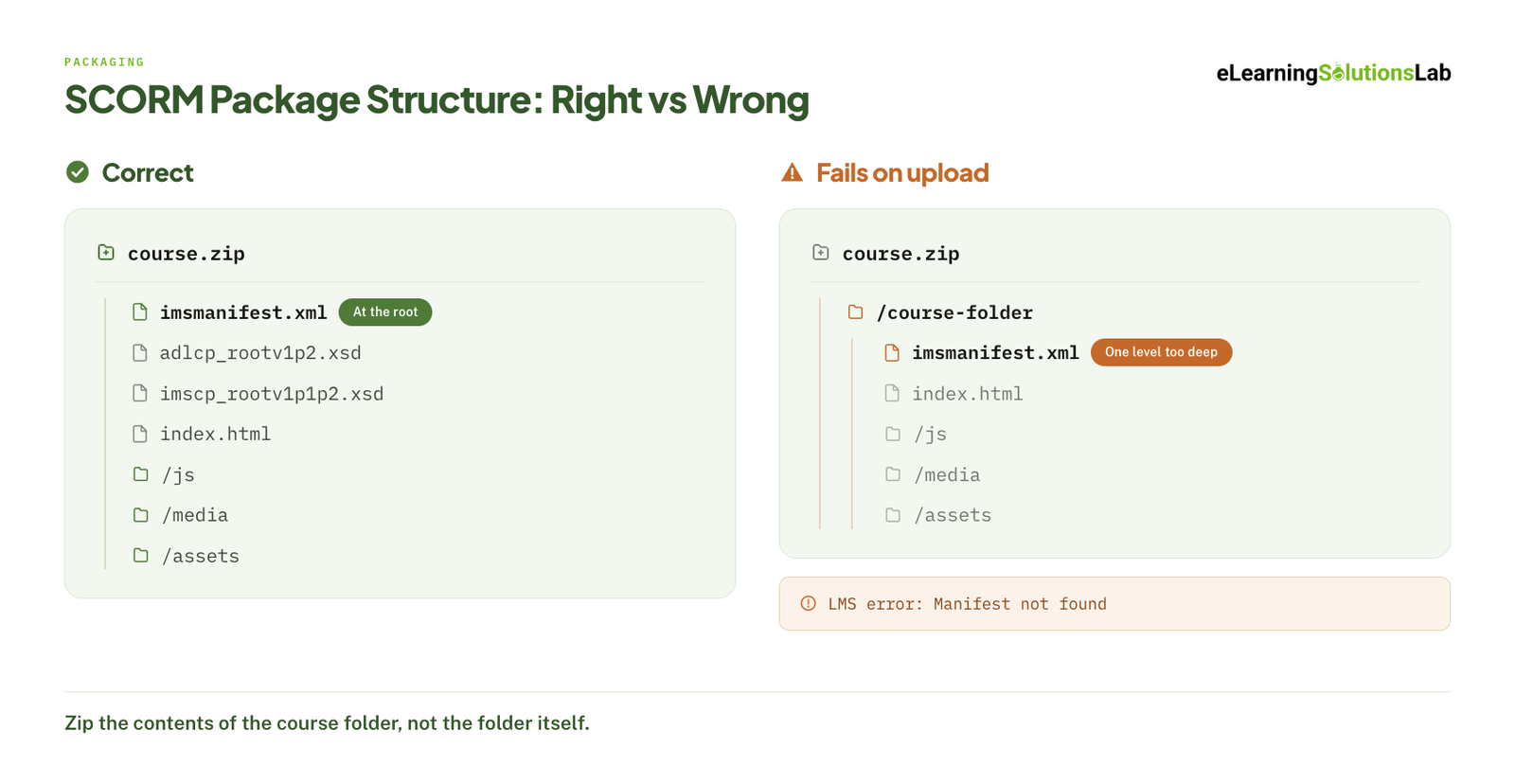 The imsmanifest.xml file must sit at the root of the ZIP, alongside your content folders. One of the most common failures is when you zip the parent folder instead of its contents; the manifest will end up one level too deep, and the LMS reports that no manifest was actually found.
The root should also hold any XSD schema files the manifest references. With authoring tools, they can add these automatically. So if you build any package by hand, you can check that the files are actually there. If you’re publishing from a tool instead, how to create scorm content covers the publish settings that break most often.
imsmanifest.xml File, Annotated
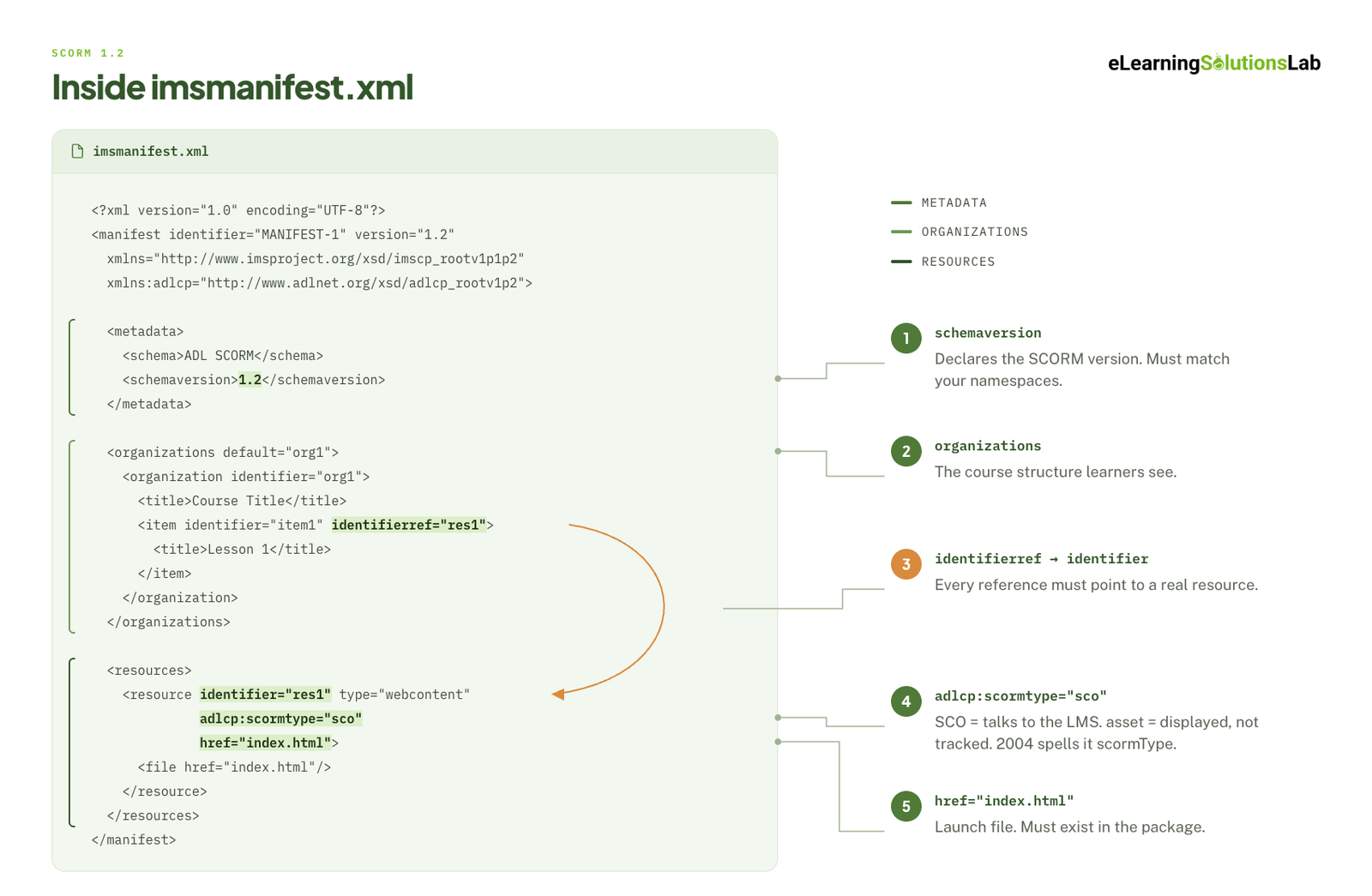 The manifest will tell your LMS what the course actually contains and how to launch it. So here’s a minimal SCORM 1.2 example:
<?xml version="1.0" encoding="UTF-8"?>
<manifest identifier="com.example.safety101" version="1.0"
  xmlns="http://www.imsproject.org/xsd/imscp_rootv1p1p2"
  xmlns:adlcp="http://www.adlnet.org/xsd/adlcp_rootv1p2">

  <!-- 1. Metadata: declares the SCORM version -->
  <metadata>
    <schema>ADL SCORM</schema>
    <schemaversion>1.2</schemaversion>
  </metadata>

  <!-- 2. Organizations: the course structure learners see -->
  <organizations default="org1">
    <organization identifier="org1">
      <title>Workplace Safety Basics</title>
      <item identifier="item1" identifierref="res1">
        <title>Module 1: Hazard Awareness</title>
      </item>
    </organization>
  </organizations>

  <!-- 3. Resources: the files, and which ones talk to the LMS -->
  <resources>
    <resource identifier="res1" type="webcontent"
              adlcp:scormtype="sco" href="index.html">
      <file href="index.html"/>
      <file href="js/scorm-wrapper.js"/>
    </resource>
  </resources>
</manifest>
Main points to check are the following:
- Identifiers must be unique, and every identifierref must point to a real resource.
- adlcp:scormtype=”sco” will mark a resource that will communicate with your LMS. An example of this would be a resource marked as asset is displayed but not tracked. SCORM 2004 will spell this attribute adlcp:scormType, with a capital T.
- Namespaces must match the version. A 2004 package will use different namespaces (for example, adlcp_v1p3) and a schemaversion such as 2004 4th Edition.
- href sets the launch file. It must really point to a file that exists in the package.
Metadata: Required vs Optional
Only the <schema> and <schemaversion> elements are required to help identify the package. Richer descriptive metadata, such as keywords, author, and duration, are all optional. And it’s useful for catalogs and content repositories, but it has no actual effect on tracking.
Run-Time API Requirements
The content package gets a course into the LMS. The run-time API is what lets the course report back while a learner takes it. This is where most tracking problems start.
API Discovery
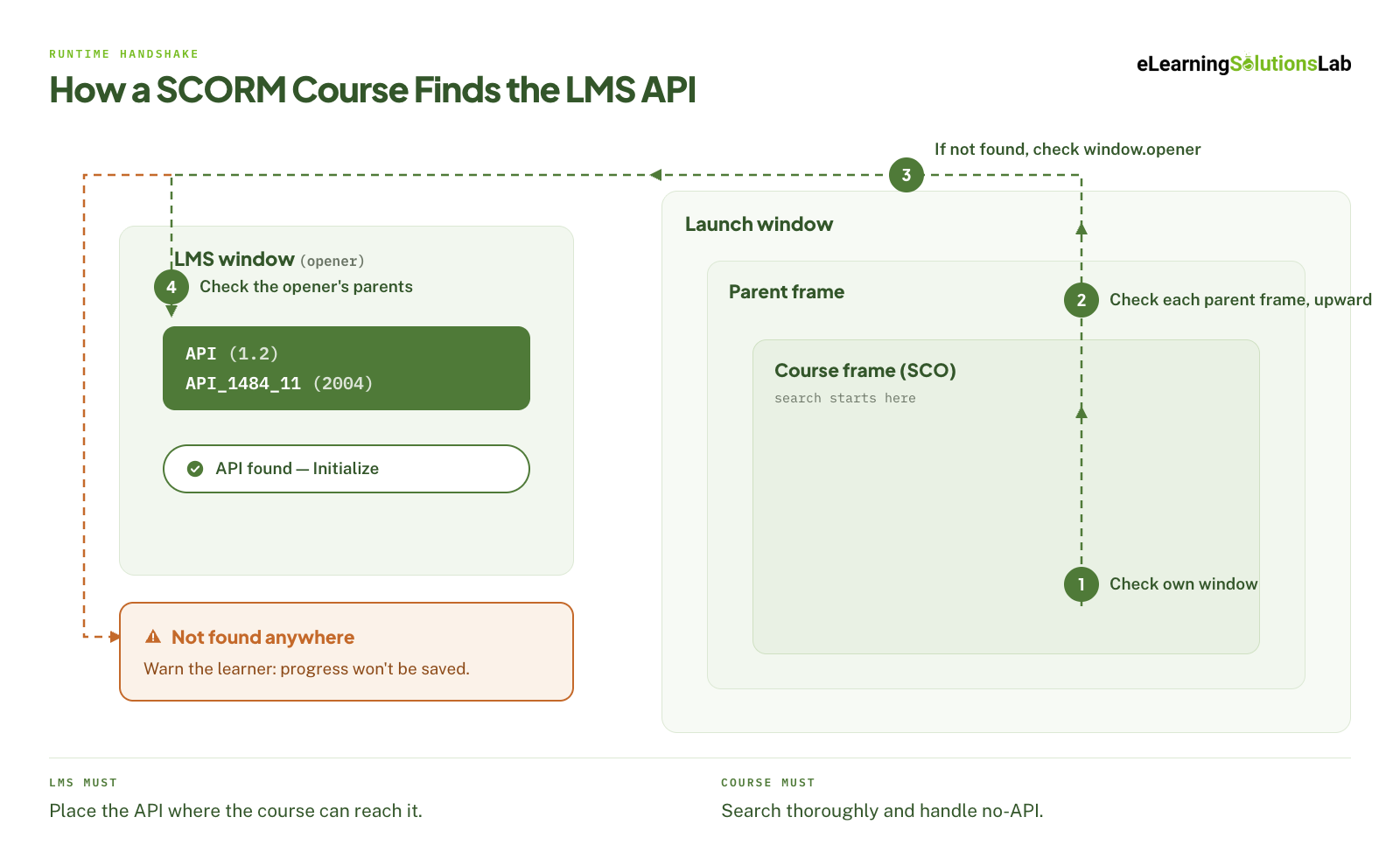 Your LMS will expose a JavaScript object, named API in SCORM 1.2 and API_1484_11 in SCORM 2004, so that the course must find the object before it can report anything to you.
Discovery actually works by walking up the browser window hierarchy – the SCO will check its own window first, then each parent frame in turn. If it doesn’t find the object there, it checks the window that opened it (window.opener), and then that window’s parents.
This will place requirements on each side – your LMS must place the API object in a window the course can reach, while your course must search thoroughly and handle the case where no API is found. Now, this usually means warning your learners that progress won’t be saved.
Core API Calls: 1.2 vs 2004
Both of these versions will define 8 functions with the same purposes but different names:
| Function | SCORM 1.2 | SCORM 2004 |
|---|---|---|
| Start session | LMSInitialize("") |
Initialize("") |
| End session | LMSFinish("") |
Terminate("") |
| Read a value | LMSGetValue(element) |
GetValue(element) |
| Write a value | LMSSetValue(element, value) |
SetValue(element, value) |
| Save to the LMS | LMSCommit("") |
Commit("") |
| Last error code | LMSGetLastError() |
GetLastError() |
| Error description | LMSGetErrorString(code) |
GetErrorString(code) |
| Error details | LMSGetDiagnostic(code) |
GetDiagnostic(code) |
All values will pass as strings, including numbers. And most calls will return the string “true” or “false”. And exceptions are GetValue, which can return the requested value, and the error functions.
Required Call Sequence and Error Handling
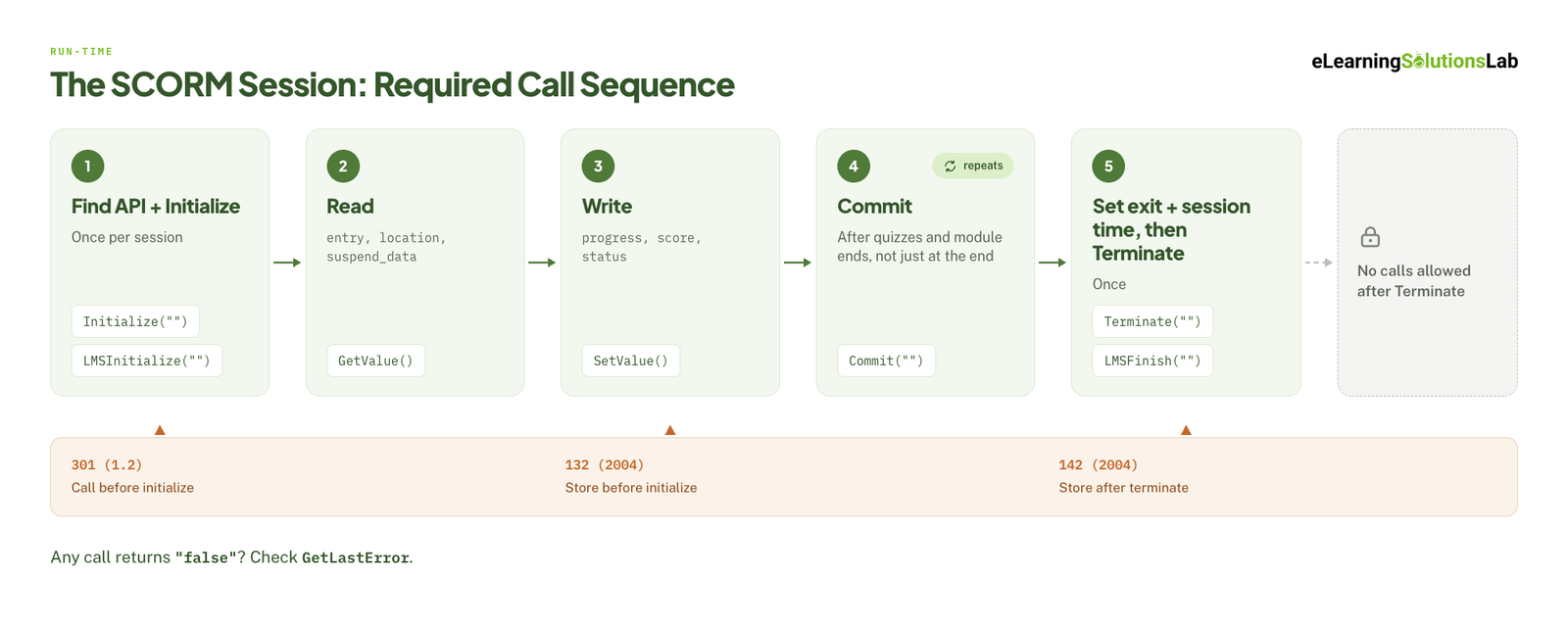 The specification enforces an order, and a conformant SCO follows this sequence:
- Find the API, then call Initialize once.
- Read any values it requires to resume, such as entry mode, bookmark location, and suspend data.
- Write progress, score, and status with SetValue as your learner works.
- Commit at meaningful points, such as after a quiz or at the end of a module. Don’t wait until the end, given that a closed browser tab can lose unsaved data.
- Set exit and session time, then call Terminate once.
After Terminate, no further calls are allowed. A robust course also calls Terminate when the window unloads, so that closing the tab still ends the session cleanly.
After any call that returns “false”, the SCO should genuinely check GetLastError. Error code 0 means no error. Other codes point to specific causes. For example, in SCORM 1.2, 301 means the course called a function before initializing. In SCORM 2004, 132 means the course tried to store data before initializing, and 142 means it tried after terminating – logging these codes during testing is the fastest way to find sequencing bugs.
Data Model Requirements
Your API calls carry the data, but the data model will define what that data is. It’s actually a fixed set of named elements, and your course must read and write them using the exact names and value formats the specification requires.
These are the exact elements that matter most for tracking:
| Purpose | SCORM 1.2 | SCORM 2004 |
|---|---|---|
| Completion | cmi.core.lesson_status |
cmi.completion_status |
| Pass/fail | Same field as completion | cmi.success_status |
| Score | cmi.core.score.raw (plus min/max) |
cmi.score.scaled (−1 to 1), plus raw/min/max |
| Bookmark | cmi.core.lesson_location (255 characters) |
cmi.location (1,000 characters) |
| Resume data | cmi.suspend_data (4,096 characters) |
cmi.suspend_data (4,000 characters in 2nd/3rd Edition, 64,000 in 4th Edition) |
| Entry mode (read-only) | cmi.core.entry |
cmi.entry |
| Session time | cmi.core.session_time (HHHH:MM:SS) |
cmi.session_time (ISO 8601, e.g. PT1H5M) |
| Exit | cmi.core.exit |
cmi.exit |
Why Does Status Tracking Differ Between Versions?
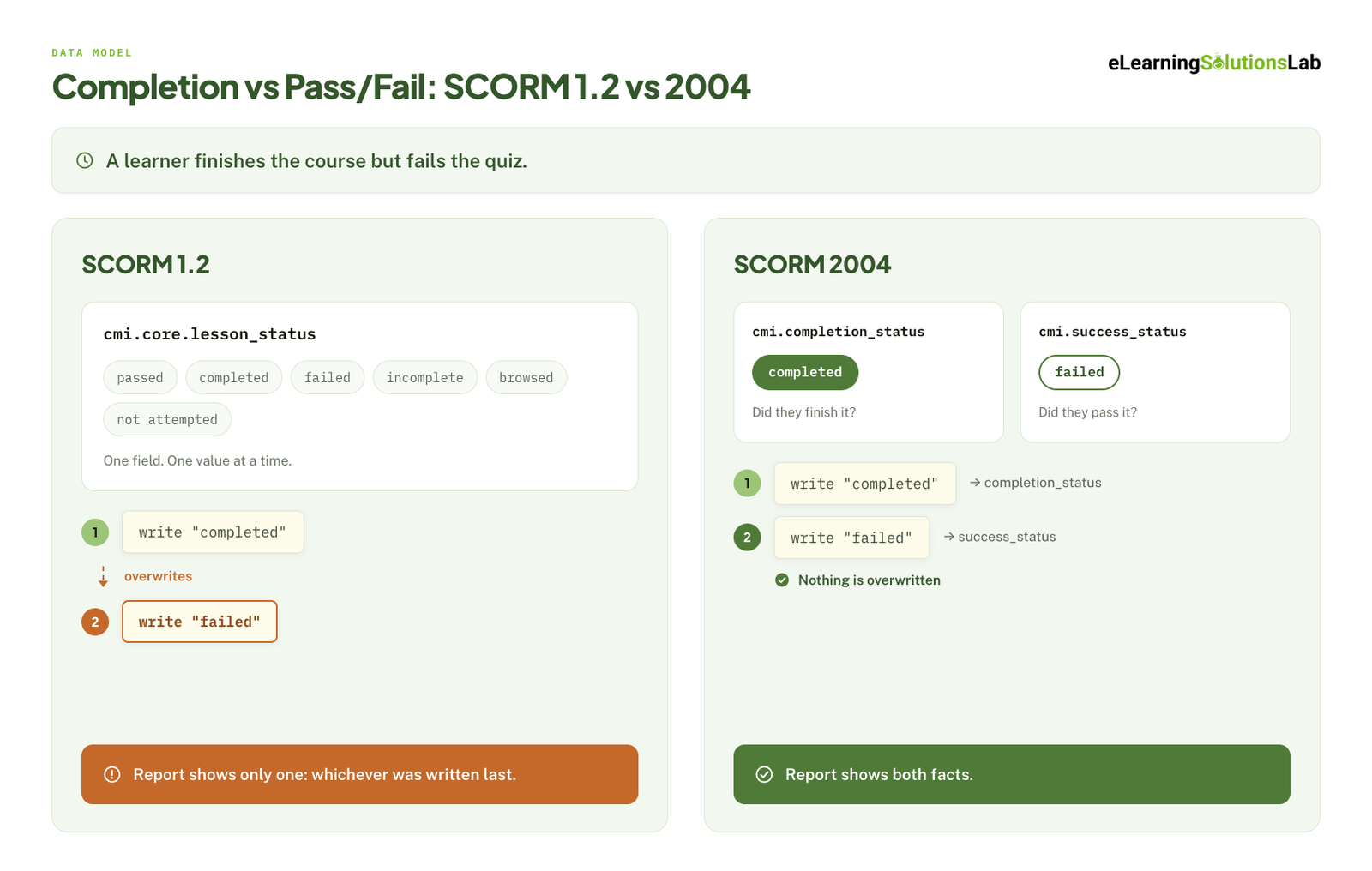 SCORM 1.2 uses a single field, lesson_status, for both completion and pass/fail. Its allowed values are passed, completed, failed, incomplete, browsed, and not attempted. A course can report “completed” or “passed,” but not both. This is behind many reporting disputes. For instance, if your learner finished the course but failed the quiz, they may appear as either “completed” or “failed,” depending on which value the course wrote last.
SCORM 2004 splits this into two fields. completion_status records whether the learner finished (completed, incomplete, not attempted, or unknown). success_status records whether they passed (passed, failed, or unknown). Reports that need both facts should definitely use 2004.
Resume Depends on Exit and Suspend Data
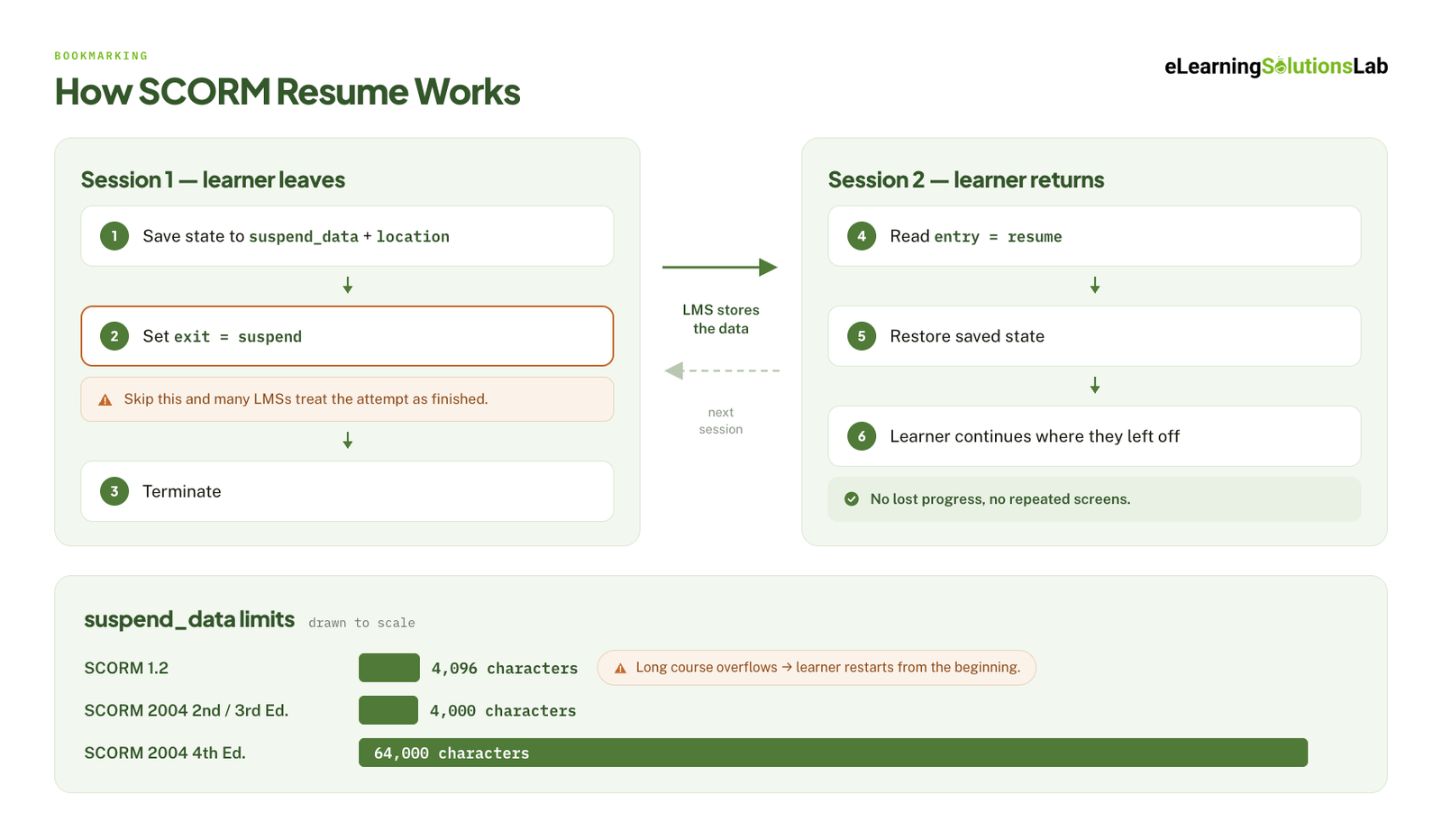 When you resume a course, it usually takes three things working together. The course must save its state to suspend_data and location. It must set exit to suspend before terminating. Then, in the next session, it must read entry, which returns resume, before it restores the saved state. Now, if the course skips the exit step, many LMSs will treat the attempt as finished and discard the saved data.
The character limits also matter here. Long courses, or courses that store every interaction in suspend data, can exceed 4,096 characters in SCORM 1.2. And when that happens, your LMS will reject the write or cut the data short, and your learner restarts from the beginning. If a course is long or saves a lot of state, you can compress the data or use SCORM 2004 4th Edition.
Sequencing and Navigation (SCORM 2004 Only)
SCORM 1.2 leaves navigation to your LMS and your course. SCORM 2004 will add a formal rule system, based on the IMS Simple Sequencing specification, that will tell the LMS which activities a learner can access and in what order.
Your rules live in the manifest, inside <imsss:sequencing> elements that are attached to items or whole organizations. They actually control four things:
- Navigation mode. “Choice” lets your learners jump to any activity from a menu. “Flow” moves them forward and back in a set order.
- Prerequisites. Precondition rules can hide or disable an activity until another one is completed or passed.
- Rollup. Rollup rules will define how results from individual SCOs can combine into an overall status for a module or course, such as “passed when all quizzes are passed.”
- Shared objectives. Global objectives will let one SCO read the result of another, for example, to skip content the learner has already mastered.
Your course can also request navigation itself by setting adl.nav.request to values such as continue, previous, or exitAll. This is definitely useful when your course provides its own Next and Back buttons.
In practice, sequencing is the least consistently supported part of SCORM. Some LMSs will just implement it fully, some partially, and some ignore it. You have to keep rules as simple as the design allows, and test every rule in each target LMS before you rely on it.
Content-Side vs LMS-Side Requirements
Most SCORM problems end in the same argument: the content vendor blames the LMS, and the LMS vendor blames the content. The fastest way to settle it is to know which side owns each requirement before anything goes wrong.
| Requirement | Version | Owner | How to test | A pass looks like |
|---|---|---|---|---|
| Manifest at ZIP root | Both | Content | Upload to SCORM Cloud and your LMS | Package imports with no errors |
| Valid manifest (unique IDs, matching namespaces) | Both | Content | Conformance test suite or import validation | No validation warnings |
| Expose the API object | API (1.2), API_1484_11 (2004) | LMS | Launch the course and check the debug log | API found on launch |
| Find the API | Both | Content | Launch in a frame and in a new window | Course connects in both launch modes |
| Correct call sequence | Both | Content | Review the API calls in the debug log | One Initialize, one Terminate, no calls after Terminate |
| Store and return values | Both | LMS | Set values, close, relaunch, read them back | Values persist between sessions |
| Completion and pass/fail status | lesson_status (1.2), completion + success (2004) | Content writes, LMS reports | Run a pass path and a fail path | Report shows the expected status for each path |
| Score | Both | Content writes, LMS reports | Complete the assessment with a known score | LMS score matches the course score |
| Resume | Both | Both | Exit partway through, then relaunch | Learner returns to the same place with state intact |
| Suspend data within the limit | 4,096 (1.2), 64,000 (2004 4th Ed.) | Content | Complete the longest path and check data length | Stays under the limit with room to spare |
| Session time | Both | Content writes, LMS totals | Time a session manually | Recorded time is correct and in the right format |
| Sequencing rules | 2004 only | Content defines, LMS enforces | Walk every rule path | Activities lock, unlock, and roll up as defined |
The content side covers everything the package does: its structure, its API calls, and the values it writes. The LMS side covers everything the platform does with them: exposing the API, storing data between sessions, enforcing sequencing, and turning raw values into reports. If the course data also has to reach another system, such as an HR platform, that’s an lms integration question rather than a SCORM one.
If a vendor builds your courses, write this table into the contract so the testing evidence is a deliverable, not a favor. elearning outsourcing covers what else belongs in that agreement.
Conformance vs Compatibility: How to Test
Conformance means the package follows the specification. Compatibility means it behaves correctly in a specific LMS. You need both, and they’re tested differently.
Conformance Testing
ADL publishes test suites for SCORM 1.2 and SCORM 2004 that check a package against the specification: manifest structure, API call order, and data model values. A conformance test is the right tool for catching spec errors, such as a wrong namespace, a missing Terminate, or an invalid status value. What it can’t tell you is how a particular LMS will interpret the parts the specification leaves open.
Real-World Testing in SCORM Cloud
SCORM Cloud, Rustici Software’s hosted testing environment, is the closest thing the industry has to a neutral reference LMS. A basic test run looks like this:
- Upload the ZIP. Import errors at this point almost always mean a manifest problem.
- Complete the course on the pass path. Answer the assessment correctly and finish every required screen.
- Complete a second registration on the fail path. This confirms the course reports failure, not just completion.
- Exit a third registration partway through, then relaunch. The course should resume where the learner left off.
- Open the registration results and debug log. Check status, score, time, and any API errors.
A package passes when every path reports the status and score you expect, resume restores the learner’s place and state, session time is recorded, and the debug log shows no errors. Build this test pass into QA for every release – elearning development best practices covers where it fits in the build cycle.
Test in Your Actual LMS
Passing in SCORM Cloud proves the package is sound. It doesn’t prove your LMS will treat it the same way. LMSs differ in how they launch content (in a frame or a new window), how they handle incomplete sessions, how they map “completed” and “passed” in reports, and how much of SCORM 2004 sequencing they support.
Run the same three paths in every LMS the course will live in, on the browsers your learners actually use. When your LMS behaves differently from SCORM Cloud, the cause is often a platform setting rather than a content bug, and lms support services can usually find it faster than a rebuild. If you’re still choosing a platform, test SCORM support before you sign – best lms for training companies compares the main options.
Conformance Is the Floor, Not the Finish Line
A vendor who says a course is “SCORM compliant” has told you it follows the spec. Ask instead which version and edition it was published to, which LMS it was tested in, and what the test showed. If the answer is a SCORM Cloud result plus a pass in your own LMS, you have evidence. If it’s a checkbox on a feature list, you have a claim.
Common SCORM Compliance Failures and Fixes
Most SCORM failures come from a short list of causes. When tracking breaks, start here:
| Symptom | Likely cause | Fix |
|---|---|---|
| “Manifest not found” on upload | The ZIP was created one folder too deep | Zip the contents of the course folder, not the folder itself |
| Upload rejected or version not recognized | Namespaces or schemaversion don’t match the version the LMS expects | Republish to the correct version. Tools covered in articulate elearning, like Storyline and Rise, let you choose it at publish |
| Course never shows as complete | Status never written, Commit missing, or status written after Terminate | Set status, Commit, then Terminate – and confirm the order in the debug log |
| Shows “completed” when the learner failed (1.2) | Completion was written to lesson_status after pass/fail | Decide which single value 1.2 should report, or move to SCORM 2004 for separate fields |
| Learner restarts from the beginning | Exit not set to suspend, or suspend data over the limit | Set exit to suspend on unload; compress state or use SCORM 2004 4th Edition |
| Score missing or wrong | Raw score written without min and max, or scaled score missing in 2004 | Write raw, min, and max; in 2004, also write scaled (−1 to 1) |
| Session time is zero or rejected | Time sent in the wrong format for the version | Use HHHH:MM:SS for 1.2 and an ISO 8601 duration (e.g. PT12M30S) for 2004 |
| “API not found” warning | Course launched in a window the API can’t reach, or a popup was blocked | Check the LMS launch setting (frame or new window) and the course’s discovery code |
| New attempt created on every launch | Course exits as normal instead of suspend, or LMS attempt settings are strict | Check the exit value the course sends and the LMS’s new-attempt rules |
US Requirements: When SCORM Is Actually Mandated
In the US, SCORM is rarely required by law. It’s required by contract, and the biggest source of that contract language is the Department of Defense.
DoD and DoDI 1322.26
The ADL Initiative, which created SCORM, sits within the DoD. The 2006 version of DoD Instruction 1322.26 required DoD distance learning to be SCORM conformant, which is a large part of why SCORM became the industry default.
The instruction was updated on October 5, 2017. The current version still accepts SCORM, but it also allows xAPI and encourages xAPI with a Learning Record Store where practical. For DoD work, SCORM remains an accepted answer, but check which standard and version the solicitation names. ADL keeps guidance on the instruction at adlnet.gov/dodi.
Federal, State, and Enterprise Procurement
Outside the DoD, there’s no general federal rule that eLearning must be SCORM. Agencies write it into RFPs so content will run in their LMS today and can move to another platform later. State agencies, universities, and most enterprise buyers do the same.
Section 508
The requirement that almost always appears next to SCORM in US public-sector RFPs is Section 508 of the Rehabilitation Act. It requires federal agencies to make the technology they buy, build, and use accessible, and the refreshed standards, in force since 2018, use WCAG 2.0 Level AA as the benchmark for web content.
For a SCORM course, that covers the player, the navigation, and every interaction inside the package, not just the text. The practical detail, including what screen readers actually do with an interactive module, is in accessible elearning.
Global Requirements That Travel With SCORM
SCORM is the same specification everywhere. What changes by region are the rules that sit next to it in the contract.
Accessibility: WCAG and EN 301 549
Outside the US, accessibility requirements usually point to WCAG, either directly or through a regional standard. In the EU, that standard is EN 301 549. Its current harmonized version (v3.2.1) incorporates WCAG 2.1 Level AA. Version 4.1.1, which incorporates WCAG 2.2, was published in September 2026 and is expected to take over once it’s cited in the EU’s Official Journal.
EU public-sector bodies have had to meet these requirements under the Web Accessibility Directive since 2020. The European Accessibility Act has applied to a range of private-sector products and services since June 28, 2025, including those sold by companies based outside the EU. If you’re building for any of these buyers, WCAG 2.2 AA is the safest target.
Localization
SCORM itself is language-neutral, but localized packages break in predictable ways:
- Encoding. Save the manifest and content files as UTF-8 so accented and non-Latin characters survive the upload.
- Layout. Allow for text expansion, and test right-to-left languages separately.
- Package structure. Decide early whether each language gets its own package, which is simpler to track and update, or shares one package with a language switcher, which is simpler to assign.
- Suspend data. Store IDs rather than text in suspend data, or multilingual courses can hit the limit faster.
multilingual elearning covers the design decisions, and when volume is high, elearning localization services handle the build and testing for each language.
Data Privacy
Every SCORM session passes personal data between the LMS and the course. At minimum, that’s the learner’s ID and name (cmi.core.student_id and cmi.core.student_name in 1.2, or cmi.learner_id and cmi.learner_name in 2004), along with scores and progress.
Under laws such as the EU’s GDPR, you need to know where that data is stored and who can access it. Ask two questions: where does the LMS host learner records, and does the course itself send data anywhere else, such as a third-party analytics script or a remotely hosted content server?
SCORM vs xAPI vs cmi5: When to Move On
SCORM is built for one situation: a learner, a browser, and an LMS. When training happens anywhere else, its limits show.
- Stay with SCORM when courses run in an LMS, you need completion, pass/fail, score, and time, and broad compatibility matters most.
- Consider xAPI when you need to track learning outside the LMS, such as mobile apps, simulations, offline work, or on-the-job performance. xAPI sends activity statements to a Learning Record Store (LRS), and it’s now standardized as IEEE 9274.1.1.
- Consider cmi5 when you want xAPI data but still launch courses from an LMS. cmi5 is an xAPI profile that defines packaging, launch, and session rules, so it works like SCORM on the front end while producing xAPI data.
Whichever you choose, confirm your LMS supports it before you publish – many platforms still support SCORM more fully than either alternative. And if your library is built on outdated packages, such as Flash-era SCORM courses with no editable source, changing standards usually means a rebuild. legacy content conversion services exist for exactly that situation.
Need SCORM packages that work on your LMS the first time?
We publish to the SCORM version and edition your LMS expects, test every package in SCORM Cloud and your own platform before handoff, and deliver the test results with the source files. Tell us your LMS and your tracking requirements, and we’ll come back with a build and test plan.
Related Reading
- How to create SCORM content – the publish settings that break most often on first upload.
- Custom eLearning development services – the production side, from storyboard to tested SCORM package.
- Best eLearning authoring tools – how the main tools compare on SCORM and xAPI output.
- LMS integration – moving learning data beyond the LMS.
- Accessible eLearning – Section 508 and WCAG conformance designed in, not remediated.
- Legacy content conversion services – for Flash-era and outdated SCORM libraries.
The Author

Book A Discovery Call
Our Learning Advisors are happy to walk you through your project step-by-step — content, timeline, and fixed pricing.
Get Your Free QuoteNo obligation — just a focused conversation. Proposal within 24 hours.
You may also like
Software for Training Companies: Best Tools and How to Choose (2026 Guide)
Short answer Training companies need a training management system (TMS) to…
How to Choose an LMS: A 7-Step Guide (With Free Scorecard)
Short answer To choose an LMS, define your goals and learners first, then…