

eLearning production is the end-to-end process of turning source materials: SME slides, documents, policies, and recorded sessions into a finished, trackable online course. It can run from needs analysis and content triage through storyboarding, media development, quality assurance, and packaging for an LMS.
It is also what you’re actually buying when a vendor quotes you for eLearning production, though that scope usually starts at the storyboard and stops really at the handoff.
So if you’re running the eLearning process, here are 8 stages and SME-to-storyboard sections that are worth your time. Whether you’re deciding whether to build in-house or hire out, you can go straight to the cost formula and your build-vs-buy scorecard.
In This Article
- What eLearning production actually means
- The eLearning production process, end to end
- How raw SME content becomes a learning design
- What a production-ready storyboard contains
- Production methods vs. instructional approaches
- What it costs and how long it takes
- In-house, outsource, or AI-assisted
- Accessibility, localization, and delivery
- Keeping the course current after launch
- How to vet an eLearning production partner
What eLearning Production Actually Means?
As a process, eLearning production is everything between an actual training need and an eLearning package that is sitting in your LMS: analyzing the performance gap, triaging what the SME source materials are, writing objectives, mapping screens, storyboarding, building media, testing, and publishing eLearning courses.
As a service, eLearning production is a scope of work with edges. Production quotes usually begin once objectives are agreed and storyboard templates exist, and end at SCORM handoff.
Three adjacent terms get used interchangeably, and they aren’t the same thing:
Instructional design is the decisions – what learners must be able to do, what evidence proves it, and how the content gets sequenced. It’s the layer our instructional design services engagement works through before anything gets built.
eLearning development is the build – turning an approved storyboard into a working module in Storyline, Rise, Captivate, or whatever the project calls for. Which tool you build it in is a decision of its own, and best elearning authoring tools compares the main options.
eLearning video production is one media type inside the larger process, not a synonym for it.
Production, properly scoped, contains all three: instructional design, eLearning development, and eLearning video production.
eLearning Production Process, End to End
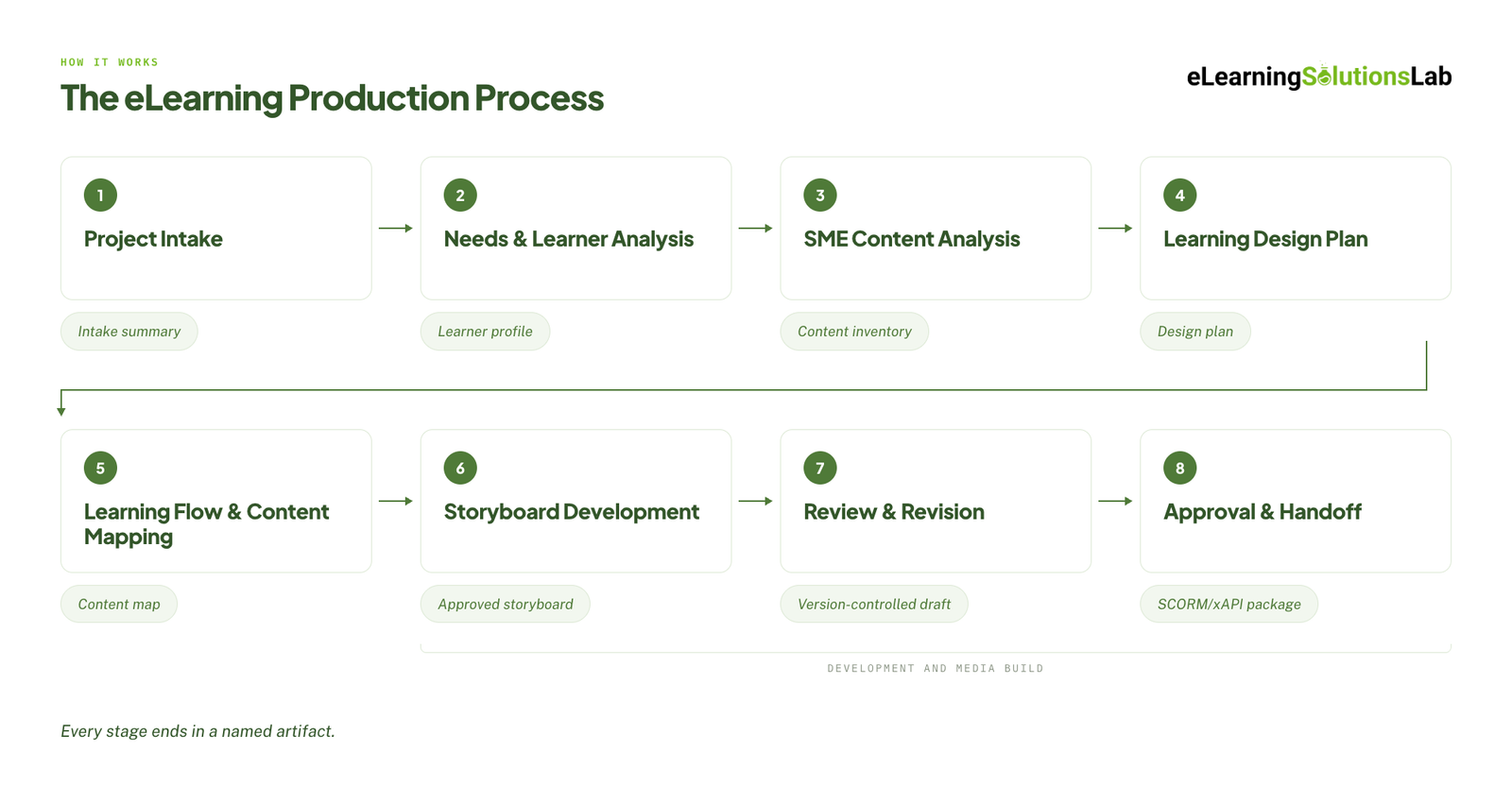 Here’s a full run of the eLearning production process, and what goes in and what comes out:
| # | Stage | What goes in | What comes out |
|---|---|---|---|
| 1 | Project intake | Client brief, SME source materials, brand guidelines, storyboard template, timeline and budget, technical requirements | Project intake summary |
| 2 | Needs and learner analysis | Business or performance problem, audience information | Performance and learner profile |
| 3 | SME content analysis | Raw SME materials, performance profile | Content inventory and SME question log |
| 4 | Learning design plan | Content inventory, learner profile | Learning design plan |
| 5 | Learning flow and content mapping | Design plan, content inventory | Content map |
| 6 | Storyboard development | Content map, design plan, brand and technical requirements | Approved storyboard |
| 7 | Review and revision | Draft storyboard | Reviewed, version-controlled storyboard |
| 8 | Approval and handoff | Signed-off storyboard, assets | SCORM or xAPI package, asset list, source files |
Stage 1: Intake
You have to record what’s missing. Confirm everything from topic, audience, deliverable, duration, modality, authoring tool, approvers, and accessibility requirements. Then, you can write down every question you couldn’t answer.
Stage 2: Needs and Learner Analysis
This stage is about the problem. You have to identify the performance gap and decide whether training can actually close it, establish what learners do now versus what they should do differently, and really find out where they’ll apply it.
Plenty of requests might fail here; catching that is worth more than any eLearning course.
Stage 3: SME Content Analysis
This is where the source materials are observed against the performance need (I’ll cover this in full in the next section).
Stage 4: Learning Design Plan
These include measurable objectives, evidence that proves each one, assessment methods, and instructional approach. And that objective’s verb will dictate the evidence: identify needs a correct selection, sequence needs steps in order, and select needs a decision in a realistic scenario.
Stage 5: Content Mapping
Content mapping is the bridge between plan and storyboard (more on this later).
Stage 6: Storyboard Development
It’s the handoff artifact – detailed enough that a developer can build the intended experience without guessing.
Stage 7: Review and Revision
The review and revision stage includes instructional design review, SME accuracy review, client review, accessibility check, technical feasibility check, then version control and approval. Each will have a different reviewer who can ask different questions.
Stage 8: Approval and Handoff
Final sign-off, then packaging SCORM or xAPI, asset inventory, and you can negotiate the source files early. If your team is publishing the package in-house, how to create scorm content covers the settings that break most often on first upload.
Development and media build will sit inside stages 6 to 8. The habits that keep each stage from quietly slipping are collected in elearning development best practices.
If a Stage Doesn’t Produce an Artifact, It Didn’t Happen
Most published versions of this process name activities – analyze, design, develop. Activities have no finish line, which is why they slip. Stages do, because each one ends in something a named person can open, read, and sign off. When a schedule starts sliding, the first question worth asking isn’t who’s behind; it’s which artifact hasn’t been produced yet.
How Raw SME Content Becomes a Learning Design
SMEs will give you what they know, in the order that they learned it. And that’s usually a dense deck, policy documents, or recorded sessions that contain definitions, technical detail, workplace context, examples, cautionary stories, and questions they normally ask in a room (script narrations).
When that source material is a slide deck – which it usually is – convert powerpoint to elearning services handle the conversion side of it, but the instructional work below still has to happen first.
There are three steps to turn raw SME content into an eLearning design:
1. Triage every topic against the performance need
You can read each piece of source content and give it one of these four labels:
| Label | Meaning |
|---|---|
| Keep | Learners need this to perform the task |
| Simplify | Important, but currently too detailed or technical |
| Resource | Useful as reference, not essential to the course |
| Clarify | Incomplete, confusing, or needs SME confirmation |
To give you an example, let’s apply it to a data handling policy:
| Content received | Label | What you do with it |
|---|---|---|
| Definition of personal data | Simplify | Explain it through three questions: what counts, who can see it, how long you keep it |
| The six lawful bases for processing | Keep | Group them rather than presenting all six at once |
| The legitimate interest test | Clarify | Do staff know when this applies? Ask the SME for a real decision they’ve had to make |
| History of the regulation | Resource | Place in an optional reference, or remove |
Everything that’s labeled Clarify goes into an SME question log; these are written as specific questions. You can record the answers and update the labels.
That log is the artifact that will get you out of the endless review loop later, given that it will show the SME exactly what you asked and what they agreed to.
The same cut can be expressed as must-know, should-know, reference-only, and remove. Either of these vocabularies works – as what matters really is that something gets removed.
2. Split each source item by instructional purpose
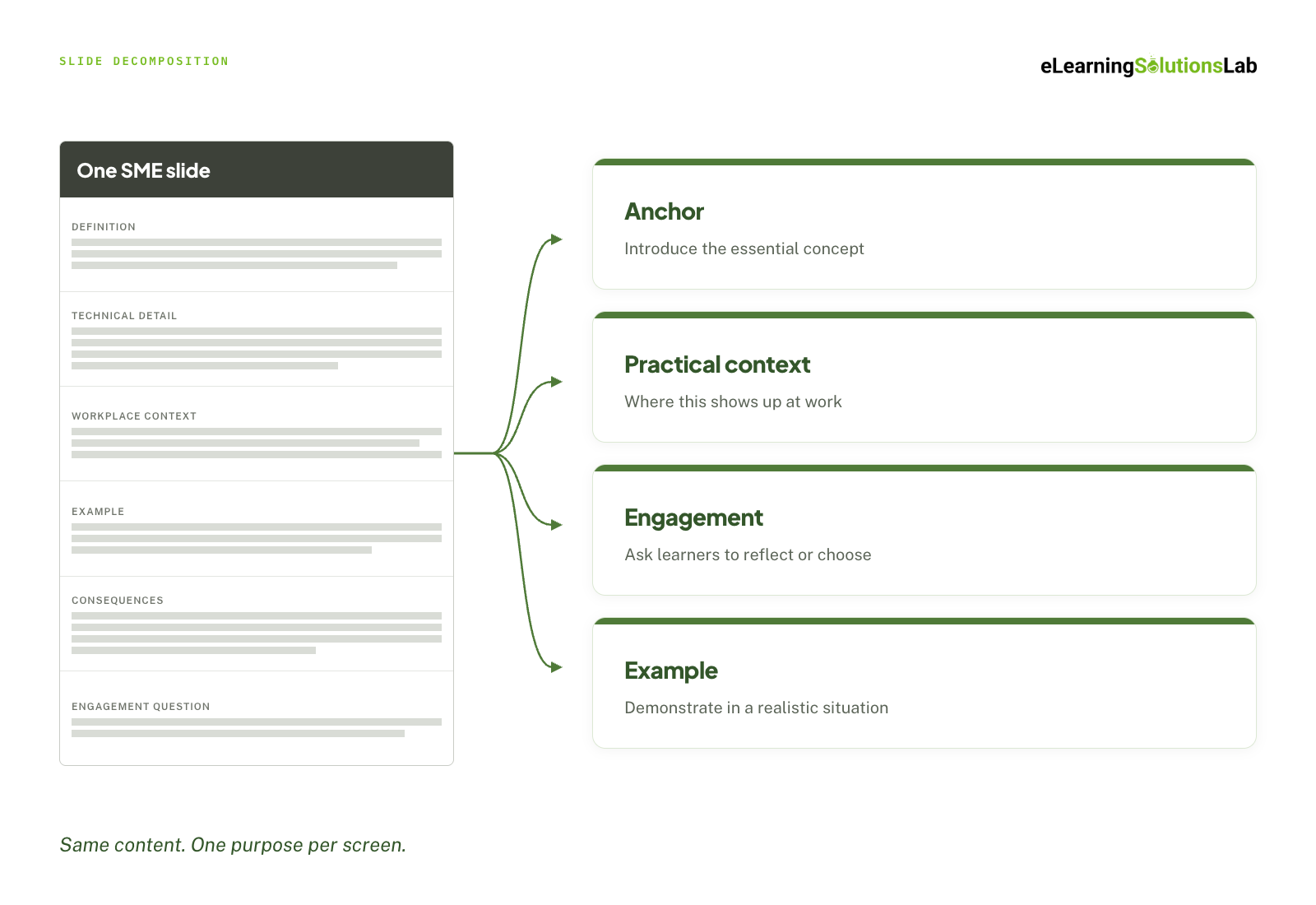 A single dense slide usually contains three or four different jobs – you have to separate them into:
- Anchor – introduce the essential concept or mental model
- Practical context – where this will show up at work and why it matters
- Engagement – ask learners to reflect, recall, or make a simple choice
- Example – demonstrate the concept in a realistic situation
One slide can become 3 to 4 screens, each with a single purpose. This is actually Mayer’s segmenting principle that’s applied literally, and the reason it works is Cognitive Load Theory: working memory handles a limited amount of new material at once, so accurate content delivered all at once is still content the learner can’t hold onto.
3. Map the screens before you storyboard
Before you write a single storyboard screen, you need to build a content map for the whole module: screen number, source reference, screen title, purpose.
It would usually take an hour, and it does four things. First, it keeps every screen traceable back to the source material. Second, it exposes repetition and gaps while they’re still cheap to fix at this stage. Third, it will show at a glance whether the module is all explanation and that there’s no learner action. And finally, it will force you to confirm that every screen serves an objective – anything that doesn’t gets cut before it costs development time.
What a Production-Ready Storyboard Actually Contains?
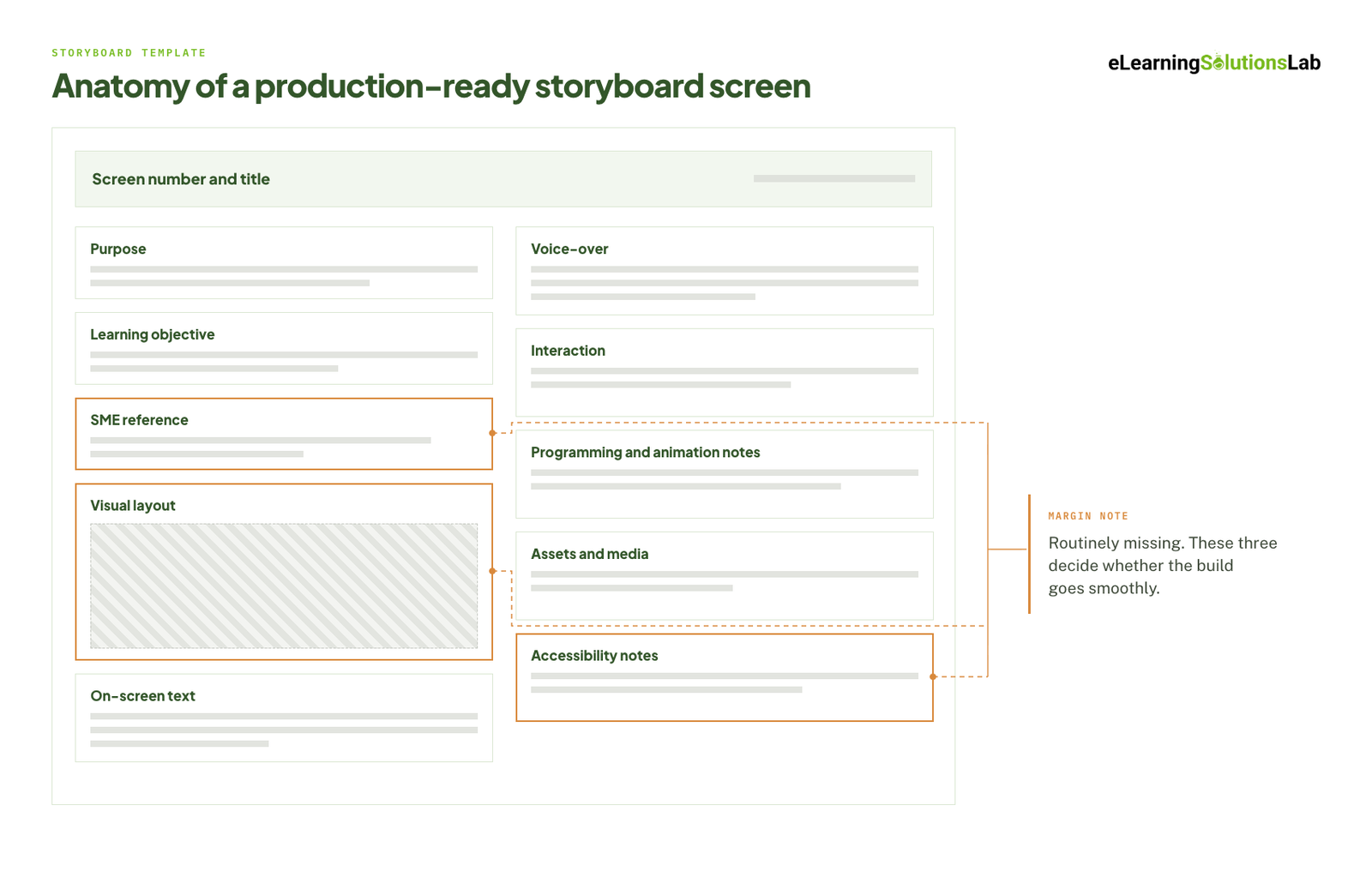 The storyboard is essentially the specification. Everything after it is execution against that spec, which can mean every ambiguity left in it becomes a developer’s guess, a rebuild, or a review comment a couple of weeks later.
A complete screen carries 11 fields:
- Screen number and title
- Purpose
- Learning objective
- SME reference
- Visual layout
- On-screen text
- Voice-over, when required
- Interaction
- Programming and animation notes
- Assets and media
- Accessibility notes
Most templates will just cover obvious ones, but these three elements are routinely missing – essentially important to having a solid eLearning production.
SME Reference
It’s a pointer back to the exact source slide, page, section, or timestamp the screen came from. It actually does more work than it looks like it should: things like reviewers will verify accuracy without hunting through a 60-slide deck, the SME can confirm their meaning survived the rewrite, and when the source material changes 18 months from now, you know exactly which screens are affected instead of simply re-reviewing the whole module.
It also helps in recording a design decision: when one source slide became four screens, and shared reference will show they came from the same place on purpose.
Visual Layout
Visual layout is what should appear on screen, where, and how the learner’s attention moves through it. This is exactly the design direction, like a labeled sketch or a rough mock-up, at the right level of fidelity.
Accessibility Notes
These notes are written per screen, at storyboard stage. All these also include reading order, text labels on every meaningful visual, confirmation that icons and color never carry information alone, animated content remaining available as text, pause and replay controls, keyboard focus indicators.
The Storyboard Readiness Checklist
Before any handoff, you need to run the storyboard against a readiness checklist:
- Every screen supports a learning objective
- All technical content has been verified
- Practice and assessment match the objectives
- On-screen text and voice-over have distinct jobs
- Visuals teach rather than decorate
- Interactions have clear instructions and feedback
- Programming notes are detailed enough to build from
- Accessibility requirements are documented
- Assets, sources, and licensing are recorded
- All stakeholder feedback has been resolved
- The final version has been approved
eLearning Production Methods vs. Instructional Approaches
You need to decide on both method (how things get built) and approach (how it actually teaches). You need to choose both independently.
Production Methods
| Method | Typical use | Relative cost | Update friction |
|---|---|---|---|
| Rapid authoring from templates | High-volume, text-and-graphics modules | Low | Low |
| Screencast | Software and system walkthroughs | Low | Medium – reshoot on any UI change |
| Animation and motion graphics | Processes, abstract concepts, anything with no filmable subject | Medium to high | Medium |
| AI avatar and synthetic video | Narrated explanation at volume, multi-language delivery | Low to medium | Low – regenerate from an edited script |
| Live action video | Behavioral modelling, culture, leadership presence | High | High – reshoot |
| Custom interactive build | Simulations, branching, complex practice | High | Medium to high |
Instructional Approaches
- Guided practice – demonstrate, then have learners do it with support, then without.
- Scenario – a realistic situation that requires a decision, with consequence-based feedback.
- Branching – a scenario whose path changes with each choice.
- Simulation – practice in a replica of the actual system or environment, which is what an elearning simulation gives you when the task is procedural.
- Microlearning – short, single-objective units that are usually for reinforcement or point-of-need, and the format microlearning services are built around.
The method will affect production costs and update friction, while the approach will determine whether behavior changes.
The approach follows what needs to be done, like remembering a fact, which needs a short explanation and a retrieval question. Another would be understanding a concept, which needs a visual model or comparison. And sorting things into categories needs a classification activity. And lastly following a procedure requires demonstration and practice.
Making a decision is the one that trips most builds – it needs a realistic situation with consequences, which is scenario based elearning services work rather than a quiz with better graphics.
Sequence It by Experience Level
With beginners, don’t open on a complex scenario – explain, show, guide, then release them into independent practice. With experienced learners, invert it: start with a realistic problem and supply the supporting information only when they need it. Same content, opposite order, and getting it backwards is a common reason a technically accurate module still feels unusable.
What eLearning Production Costs and How Long It Takes
Most published figures are useless because they quote a price without the assumption underneath it. The honest version is a formula, not a range:
Cost per finished hour = development hours per finished hour × blended hourly rate
Those are the two numbers every quote hides. The second one you can ask any vendor for directly. The first one depends entirely on how interactive the course is.
| Interactivity level | What it includes | Development hours per finished hour |
|---|---|---|
| Level 1 – passive | Text, graphics, simple audio, basic knowledge checks | Lowest band |
| Level 2 – limited interaction | Click-to-reveal, drag-and-drop, sorting, scenario-style questions | Roughly double Level 1 |
| Level 3 – complex interaction | Branching scenarios, custom animation, video, consequence-based feedback | Three to four times Level 1 |
| Level 4 – simulation | System simulations, serious games, immersive environments | Five times Level 1 and up |
What moves the ratio up: video, custom illustration, branching logic, translation, accessibility remediation after the fact, and SME availability. That last one is the one nobody quotes for, and it’s the most common reason a project runs long.
Calendar time is a different number from effort time, and it’s usually driven by review latency rather than build hours. A module that takes 90 hours to build can still take 10 weeks to deliver if each of the six review gates sits in someone’s inbox for a week. When you’re planning a timeline, count the reviews, not just the screens.
For current price bands by project type and region, elearning development costs breaks the numbers down in full.
Check the Date on Any Benchmark You’re Quoted
A large share of the per-hour figures still circulating in eLearning articles trace back to industry benchmark studies published over a decade ago, before rapid authoring tools, synthetic voice, and AI-assisted drafting changed the hour counts materially. If a vendor or an article gives you a development ratio, ask when it was measured. An undated figure is a guess wearing a number.
In-House, Outsource, or AI-Assisted
Every guide raises this question and almost none of them answer it with criteria. One thing narrows it immediately: only the generic layer can be bought ready-made, and off the shelf elearning sets out where that boundary usually falls. Anything tied to your own processes, systems, or policies is custom by definition, so the real question is who produces it.
| Approach | Works when | Breaks when |
|---|---|---|
| Produce in-house | Steady annual volume, an instructional designer with protected time, content that changes often enough that external turnaround can’t keep up | The designer is also the LMS admin and the accessibility reviewer. Quality drifts and nothing gets updated. |
| Outsource the whole build | Demand is spiky, the first version is large, or compliance and accessibility exposure is high enough to need specialists | No internal owner is named for updates, and no source files are handed over. The library ages out within a year. |
| Blend: outsource the build, keep the updates | Most cases. A partner builds the durable modules and the templates; your team owns edits inside those templates. | Editable project files and the storyboard of record aren’t in the contract. Put them there before the first build. |
| Staff augmentation | You know exactly what to build and have nobody free to build it – capacity is the constraint, not capability | The design decisions haven’t been made yet. Extra hands on an unscoped project produce more work, not less. |
If the gap is the build itself, custom elearning development services cover the production side, and rapid elearning services exist for the modules that turn over faster than a six-week build cycle can handle. If the gap is capacity rather than capability, staff augmentation for ld is usually the cheaper route. The trade-offs across all of these – control, cost, turnaround, and what you give up on each – are worked through in elearning outsourcing.
Where AI Actually Changes Production Hours
The honest version is narrower than the marketing and wider than the skeptics allow.
Hours genuinely compress in first-draft scripts, visual concepting, voice-over, translation, and alt-text drafting. In practice, that looks like writing a detailed prompt once the storyboard content is settled, generating the visual reference, and dropping the selected output into the visual layout field to guide development – and building the mock-up by hand when the generated version misses the intended concept.
Hours don’t compress in accuracy checking against the SME source, accessibility conformance, or instructional soundness. If anything, QA hours go up, because AI-generated drafts fail in ways that look plausible on a first read.
The working rule is simple enough to put in a contract: AI drafts, and a human closes out every stage. The handoff between them is where quality is won or lost, not in the generation itself. Which tasks are safe to hand over and which aren’t is set out stage by stage in ai for instructional design.
Accessibility, Localization, and Delivery
Three things decide whether a finished course actually reaches everyone it was built for, and all three are cheaper to decide before production than after.
Accessibility is a storyboard-stage decision. Reading order, text labels on every meaningful visual, icons and color never carrying information alone, animated content available as text, pause and replay controls, keyboard focus indicators, and WCAG 2.2 AA contrast on all text and controls. Specify them per screen in the storyboard. Retrofitting after development costs several times more, and reading order in particular can’t be fixed cleanly once the module is built. The full conformance picture, including what screen readers actually do with an interactive module, is in accessible elearning.
Localization is decided before storyboarding, not after. Text expansion breaks layouts that were designed tight. On-screen text burned into a graphic has to be rebuilt in every language rather than retranslated. Voice-over has to be re-recorded, not edited. Design the source files for reuse first – that’s the whole discipline behind elearning localization services, and where volume is high, elearning translation services run on translation memory so the per-release cost falls instead of repeating.
Delivery gets confirmed at intake, not at handoff. SCORM 1.2, SCORM 2004, or xAPI, tested against the actual LMS rather than the spec sheet. What “handoff” should include: the published package, the source files, the asset inventory with licensing, and the approved storyboard.
Keeping the Course Current After Launch
Almost nothing written about eLearning production covers what happens in month 18, which is when most libraries quietly stop being accurate.
Version control and approval is a production stage, not an afterthought. Every published module needs a version number, a date, and a named owner – and when nobody’s name is on it, it stops being updated after about two rounds of source changes.
This is where the SME reference field pays for itself. When a policy changes or a system gets a new interface, traceability tells you which screens are affected. Without it, the only safe option is re-reviewing the whole module, which costs enough that most teams simply don’t, and the course stays wrong.
Three things to negotiate before the first build, not after: who owns the source files, what an update costs, and who holds the storyboard of record.
Where a library has already aged out – built in a tool nobody licenses any more, or in Flash-era files with no editable source – rebuilding is its own project, and legacy content conversion services exist for exactly that situation.
How to Vet an eLearning Production Partner
Ten questions, and the answers tell you more than any portfolio:
- Who actually builds it – in-house team or subcontracted?
- Which authoring tool, and do we receive the editable source files?
- How many revision rounds are included, and what triggers a change order?
- Is SCORM, xAPI, and LMS compatibility tested on our LMS, or just published?
- Is WCAG 2.2 AA conformance designed in or remediated afterward?
- How many SME hours will this require from us, and at which stages?
- What storyboard format do we review, and who signs off at each gate?
- What does a post-launch update cost?
- What development ratio is this quote based on?
- Can we speak to a client from the last 12 months?
Red flags: a price quoted before any scoping conversation, “unlimited revisions”, no source files, no straight answer on accessibility, and no named review gates in the proposed schedule.
A real quote names the development ratio it assumes, the number of review rounds, the asset counts, and – most importantly – what’s excluded.
If you’re still building the shortlist rather than interrogating one, top elearning vendors is the place to start.
Want this process run on your content?
We run all eight stages – intake through SCORM handoff – with a named artifact at every gate, accessibility specified at storyboard stage, and source files your team can update after launch. Send us the SME materials and the performance problem, and we’ll come back with a content map and a build plan.
Related Services
- Instructional design services – objectives, content triage, and the storyboard before anything gets built.
- Custom eLearning development services – the production side, from storyboard to SCORM package.
- Rapid eLearning services – when source content exists and the deadline doesn’t move.
- Scenario based eLearning services – for the decision-making modules a quiz can’t teach.
- eLearning localization services – designed into the source files, not bolted on after.
- eLearning development costs – current price bands by project type.
- staff augmentation for ld – when capacity is the constraint rather than capability.
- Accessible eLearning – WCAG conformance designed in at storyboard stage.
The Author

Book A Discovery Call
Our Learning Advisors are happy to walk you through your project step-by-step — content, timeline, and fixed pricing.
Get Your Free QuoteNo obligation — just a focused conversation. Proposal within 24 hours.
You may also like
Software for Training Companies: Best Tools and How to Choose (2026 Guide)
Short answer Training companies need a training management system (TMS) to…
How to Choose an LMS: A 7-Step Guide (With Free Scorecard)
Short answer To choose an LMS, define your goals and learners first, then…