

Mobile learning solutions are tools and content that are designed to deliver training on phones and tablets, including mobile learning management systems (LMS), native learning apps, responsive courseware, and custom-built mobile learning. They genuinely let employees train anywhere, on their own schedule, without the need for desks or scheduled sessions.
In this guide, we’ll cover the three solution types side by side, their real cost ranges, a decision framework to fit your situation, and what implementation actually looks like once you’ve chosen.
In This Article
- What are mobile learning solutions?
- Why mobile learning matters now
- 3 types of mobile learning solutions
- Which solution fits your workforce?
- Where mobile learning works best
- Must-have features checklist
- What mobile learning solutions cost
- What implementation actually looks like
- Rolling out across countries and languages
- How to measure whether it worked
What Are Mobile Learning Solutions?
Mobile learning solutions are tools, content, and delivery methods that will let your employees complete training on a phone or tablet. They cover three things: learning platforms with mobile apps, courses built mobile-first, and training that’s delivered through messaging channels like SMS, Teams, or Slack.
The goal here is short, accessible training that can fit into a workday away from a desk.
Mobile Learning vs. Mobile-Friendly eLearning
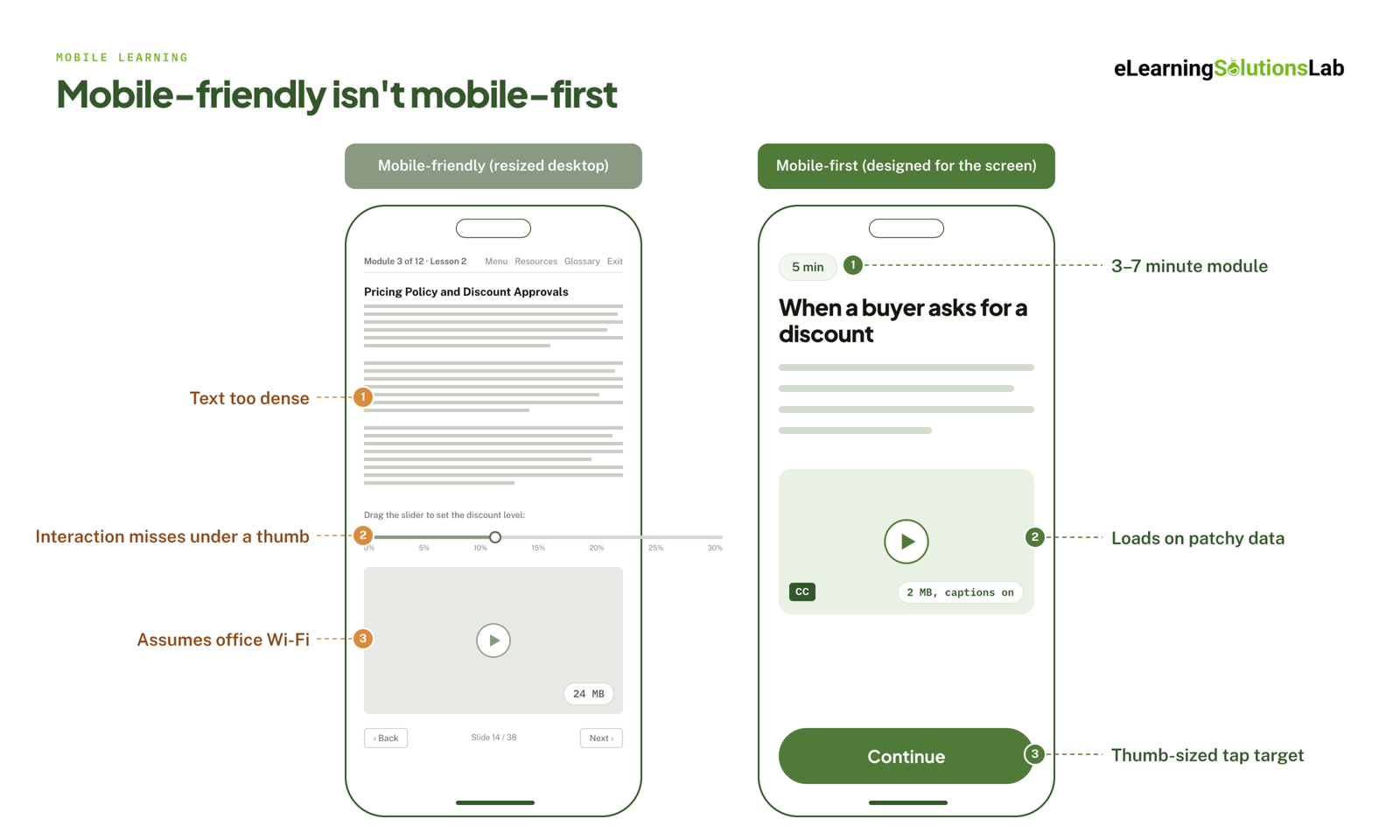 These terms get used interchangeably, and they shouldn’t be:
Mobile-friendly means that a course is built for desktop that can resize to fit a smaller screen. It technically works on a phone, but it’s usually still a 45-minute module with dense text, drag-and-drop interactions that misfire under a thumb, and a video that can assume office Wi-Fi.
Mobile-first means that the course was designed for the phone from the start: short modules, vertical layout, large tap targets, captions on by default, and media light enough to load on a patchy connection.
The distinction matters commercially, given that responsive authoring tools can let vendors claim “mobile-ready” without any real design change. So if you’re evaluating a provider, you need to ask to see a course on your own phone before you will agree to anything.
Mobile Learning vs. Microlearning
Microlearning is a content format, which means they are short, focused lessons that are built around a single objective, whereas mobile learning is a delivery context.
They may overlap constantly, given that short content suits small screens and stolen moments. But you can actually deliver microlearning on a desktop, and you can push a long compliance course to a phone (you just shouldn’t). You have to treat them as separate decisions: one about how you cut the content, and one about where it actually lands. If the format is what you’re deciding, microlearning trends 2026 covers where short-form content is heading.
Why Mobile Learning Matters Now?
Three shifts can drive the demand:
1. Most of the workforce isn’t at a desk
For instance, retail staff, nurses, drivers, field technicians, warehouse teams, and construction crews have no assigned computers – in general. For them, desktop training means being pulled off the floor into a back room, which is really expensive and rarely happens on schedule.
2. Training is needed at the moment of work
One good example of this would be a technician troubleshooting equipment who needs a two-minute job aid on-site, not a full one-hour course to complete next Tuesday. Mobile is the only channel, in this context, that can reach them where the task is. This is the core argument for on demand training: the training has to be available when the question comes up, not when the calendar says so.
3. Distributed teams broke the classroom
Hybrid and multi-site organizations can’t really rely on in-person sessions just to get everyone through onboarding or a policy update. Mobile can scale across time zones and shifts without having to schedule anything.
There’s a 4th reason that is less discussed: completion. Mobile training is easier to fit into any gap in the day, so it tends to get finished more often than desk-based equivalents. How much more is genuinely contested, and we come back to that in the measurement section, because it affects how you should read every number in a sales deck.
3 Types of Mobile Learning Solutions
Here are the 3 types of mobile learning solutions that are solving different problems, at different costs, and with different lengths of time to launch.
1. Mobile Learning Platforms (LMS and LXP Apps)
What it is: A learning management or experience platform with a native mobile app. Here, you get the delivery system: user management, course catalogs, assignments, notifications, reporting, and often an authoring tool. You still need content to put in it.
Who it’s for: Organizations without any learning platform, or teams who want to replace one that has no usable mobile app. It is a best fit when you’re training a large, distributed workforce on an ongoing basis and would need an admin and reporting layer as much as the training delivery.
Pros
- One system for delivery, tracking, and user management.
- Native apps that can handle offline access, push notifications, and downloads properly.
- Built-in authoring that gets you moving without a separate content vendor.
- Scales cleanly as headcount grows.
Cons
- Largest ongoing cost, usually priced per user per month or per active user.
- Implementation can run weeks to months, which will cover setup, SSO, data migration, and user provisioning. Connecting it to your HR system is a separate lms integration project in its own right.
- Built-in authoring that tends to produce templated courses that all look alike.
- Replacing an existing LMS is a political and technical project, essentially, not just a purchasing decision.
- You’re locked into one vendor’s roadmap and pricing.
Watch for: “Mobile-ready” may often mean a responsive web portal. You can ask specifically whether learners can download an app from the App Store or Google Play, and whether courses would work well with the phone in airplane mode.
Examples in this category: Docebo, 360Learning, Absorb, SC Training, Axonify, Learn Amp. If you’re at the shortlisting stage, best lms for training companies compares the main options, and affordable lms systems covers what’s available at the lower end of the market.
2. Custom Mobile-First Content Development
What it is: Courses that are designed and built for phones, and delivered as SCORM, xAPI, or cmi5 packages that can run in whatever platform you already have. You’re actually buying content, not just infrastructure. This may also cover converting existing desktop courses, PowerPoints, and PDFs into mobile-ready modules.
Who it’s for: Organizations that already have an LMS (and most do) and whose real problem is the content: courses that are built for desktop, a backlog of slide decks nobody has converted, or generic off-the-shelf material that doesn’t really reflect how the job actually works.
Pros
- No new platform, no migration, or no new licensing tier.
- Content that matches your processes, systems, and terminology.
- Usually priced per course, so the cost is predictable and stops when the project does.
- Fastest route to something live, and often a few weeks per course.
- Files are yours and will stay portable if you change platforms later.
Cons
- You might need a platform already, given that the content alone delivers nothing.
- Each course is a discrete project instead of a subscription layer.
- Updates may mean going back to the developer unless you actually hold the source files.
- Quality may vary enormously between providers.
Watch for: You need to ask who owns the source files when the project ends. If you don’t actually get them, every future edit is a paid change request. Also, you need to insist on seeing a sample course on your own phone. Ownership, testing, and handover all belong in the contract, and elearning outsourcing covers what else should be written into it.
One thing to confirm before you sign: whatever the vendor builds has to track properly in your platform once it’s on a phone. The scorm compliance requirements are the same on mobile as on desktop, but interrupted sessions are far more common, so resume behavior needs testing on an actual device.
This is the category we work in. We build SCORM-ready courses in 3-5 weeks at fixed prices starting at $1,500, including convert powerpoint to elearning services for existing PowerPoint and Word content.
3. Messaging-Based Delivery (SMS, Teams, Slack, WhatsApp)
What it is: Training that is delivered as short messages in a channel employees already use. There’s no app to download, no login, or any course to open. Lessons will arrive over days or weeks in a drip, which often has a question to reply to.
Who it’s for: Best for frontline, deskless, and high-turnover workforces where app adoption is the bottleneck, essentially. Also strong for any reinforcement: short nudges that will follow a formal course and will keep the materials alive.
Pros
- Near-zero adoption friction, given that there’s nothing to install or remember a password for.
- Reaches workers who have actually no company email address.
- Very high engagement, given that the message will land where attention already is.
- Fast to launch, which is often within days.
- Works on basic phones when delivered over SMS.
Cons
- Poor fit for complex, procedural, or highly interactive training.
- Tracking is essentially thinner than SCORM or xAPI, and may not really satisfy compliance auditors.
- SMS costs scale per message and per recipient.
- Uses personal phone numbers or personal accounts, which can raise consent and privacy questions.
- Easy to overdo, and message fatigue may arrive quickly.
Watch for: If the actual training has to stand up in an audit, you may confirm exactly what evidence of completion you will get and whether it can export into your system of record.
Examples in this category: Arist, Zoomi, and messaging features are all built into several platforms above.
Quick Comparison
| Platform (LMS/LXP) | Custom mobile-first content | Messaging delivery | |
|---|---|---|---|
| You’re buying | Delivery system | Courses | Delivery channel |
| Best for | No platform yet, or replacing one | Have a platform, weak content | Deskless, high-turnover, no email |
| Time to launch | Weeks to months | Weeks per course | Days |
| Cost model | Per user, per month or year | Per course, one-time | Per message or per user |
| Offline access | Yes, with a native app | Depends on the host platform | SMS yes, chat apps no |
| Tracking depth | Full | Full, via SCORM or xAPI | Limited |
| Content interactivity | Medium, template-driven | High | Low |
| Ongoing commitment | Subscription | None | Subscription or usage |
These Aren’t Mutually Exclusive
Most mature programs will use two of the three, and the combination is usually the right answer rather than a compromise. A common pattern is this: keep the LMS you already have, commission mobile-first custom courses for the training that actually matters, then layer messaging on top for reinforcement and quick policy updates.
The mistake to avoid is buying a platform to solve a content problem. If your courses are the thing failing on phones, a new LMS just gives you a nicer place to store courses that still fail on phones.
Which Solution Fits Your Workforce?
As we know, there are two variables that will do most of the work: who your learners are and how reliable their connectivity is. Budget, industry, and headcount will adjust the answer by any margin.
Step 1: Identify Your Primary Workforce Type
You start by selecting a group that represents the majority of the people you need to train. Let’s say, if you have two large, very different groups, you run this twice. Treating a warehouse crew and a head-office team as one audience is the most common cause of a rollout that satisfies neither.
| Workforce type | Defining traits | What breaks desktop training |
|---|---|---|
| Frontline / deskless | Retail, hospitality, warehouse, manufacturing; shift-based; often no company email | No assigned computer, and pulling them off the floor costs revenue |
| Field / mobile | Technicians, drivers, inspectors, home health; work alone, on site | Training is needed at the job, not before it |
| Distributed office | Remote and hybrid knowledge workers; company laptops and email | Nothing breaks, but attendance and completion drift |
| Contractors / partners | Franchisees, resellers, temps, agency staff; outside your systems | No SSO, no directory, high churn, and onboarding never stops |
| Global / multilingual | Multiple countries, languages, and data regimes | Translation cost and cadence, plus varying device and network quality |
If franchise or partner networks are your primary audience, elearning for franchises covers the access and consistency problems that come with training people who don’t work for you.
Step 2: Assess Connectivity
| Level | What it looks like | Implication |
|---|---|---|
| Reliable | Office or site Wi-Fi, decent mobile data | Anything works, so optimize for engagement rather than resilience |
| Patchy | Coverage that drops out; basements, rural routes, large sites | Needs download-and-sync, not streaming |
| Minimal / offline | Remote regions, restricted-device sites, low-cost data plans | Needs true offline or SMS, which rules out chat-app delivery |
Step 3: Read the Matrix
Find your row and column. Your first option listed is the primary recommendation, then the second is the supporting piece.
| Reliable connectivity | Patchy connectivity | Minimal / offline | |
|---|---|---|---|
| Frontline / deskless | Platform with native app + mobile-first content | Platform with offline sync + messaging reinforcement | Messaging (SMS), since nothing else reliably lands |
| Field / mobile | Mobile-first content in your existing platform + job aids | Native app with downloadable modules + offline job aids | SMS drip + printable or downloadable job aids |
| Distributed office | Mobile-first content in your existing platform, since the delivery layer is already there | Mobile-first content, media-light | Rare, so treat it as patchy |
| Contractors / partners | Lightweight platform with self-registration + short content | Messaging + downloadable content | Messaging (SMS) |
| Global / multilingual | Localized mobile-first content + your existing platform | Platform with offline sync + localized short modules | SMS in-language + offline packs |
You may notice that what the matrix does not recommend is often a new platform. Most organizations already own a delivery system, and the real constraint is mostly the content.
Three Situations That Come Up Constantly
“We have an LMS, but our courses don’t work on phones.” This is the most frequent case, and the answer is custom mobile-first content. You keep the platform and rebuild the courses that matter most. Don’t convert everything at once – start with the three or four courses with the highest volume or the highest stakes, and leave the rest until you’ve seen the results.
“Half our workforce doesn’t have a company email address.” Your problem is access, not content quality. Any solution that requires an account and a password will stall at adoption. So you lead with SMS-based delivery to reach them at all, then add formal courses later for the roles where audit evidence is required.
“Leadership wants training on phones, and we’re starting from nothing.” You need a platform, given that there’s no delivery layer to build on. But you sequence it properly: choose the platform first, launch with a small amount of genuinely good mobile-first content, and prove it before you scale the catalog.
A Note on Budget
Budget rarely changes which type you need. It changes how much you do at once.
If the matrix points you to custom content, a limited budget means three courses instead of twelve, not a cheaper category. If it points to a platform, a limited budget means a smaller initial user group, not skipping the platform. Buying the wrong category because it looked cheaper is how organizations end up paying twice.
Where Mobile Learning Works Best
Not every training program belongs on a phone. The use cases below are the ones where mobile consistently outperforms desktop delivery, and each one suits a different format.
| Use case | Why mobile wins | Format that fits |
|---|---|---|
| Onboarding | New hires can start before day one and before they have system access | Short modules released on a schedule |
| Compliance and policy updates | Reaches everyone quickly, with a deadline and an audit trail | Tracked SCORM modules under 10 minutes |
| Safety and field procedures | Available at the point of risk, not weeks before it | Job aids, checklists, short video |
| Sales enablement | Reps review between calls, in the car park, before the meeting | Scenarios, objection drills, one-page refreshers |
| Product knowledge | Updates land in days rather than the next training cycle | Microlearning with searchable reference content |
| Performance support | Answers a question during the task instead of teaching it in advance | Searchable job aids, 60-second video |
A few of these are worth expanding, since they have their own design rules. For regulated content, compliance training plan covers scheduling and evidence, and elearning safety training services covers the field and site side. For revenue teams, elearning sales training and product training program deal with the update cadence that makes mobile worth it in the first place. And if the audience is customers or partners rather than staff, customer onboarding training covers delivery to people outside your systems.
The use cases that travel worst to mobile are long simulations, software training that needs a desktop screen alongside it, and anything requiring extended writing. You can put those on a phone. Your learners just won’t finish them there.
Must-Have Features Checklist
Once you know the category, this is the list to take into demos and proposals. Ask for evidence for each one, not a yes.
Delivery and Access
- Genuine offline access. Can a learner download a module, complete it in airplane mode, and have progress sync when they reconnect? Test this yourself.
- Native app or web. Native apps handle downloads and push notifications properly. Web delivery avoids app-store friction and IT approval. Neither is automatically right.
- Push notifications and reminders. The single biggest driver of completion on mobile, and the fastest way to annoy people if it’s over-used.
- Sign-in that suits your workforce. SSO for staff with corporate accounts, and self-registration or a code-based join for everyone else.
Content and Tracking
- SCORM, xAPI, or cmi5 support. Confirm which version and edition, and confirm that resume works after an interrupted mobile session. The how to create scorm content guide covers the publish settings that break first.
- Reporting you can act on. Completion by team and location, time to complete, and assessment results exportable into whatever you already report from.
- Media that loads on bad connections. Compressed video, captions, and no auto-playing files over a few megabytes.
- Accessibility. WCAG 2.1 AA at minimum, tested with a screen reader on a phone rather than only on a desktop. accessible elearning covers what that involves in practice.
Mobile-First Design Rules
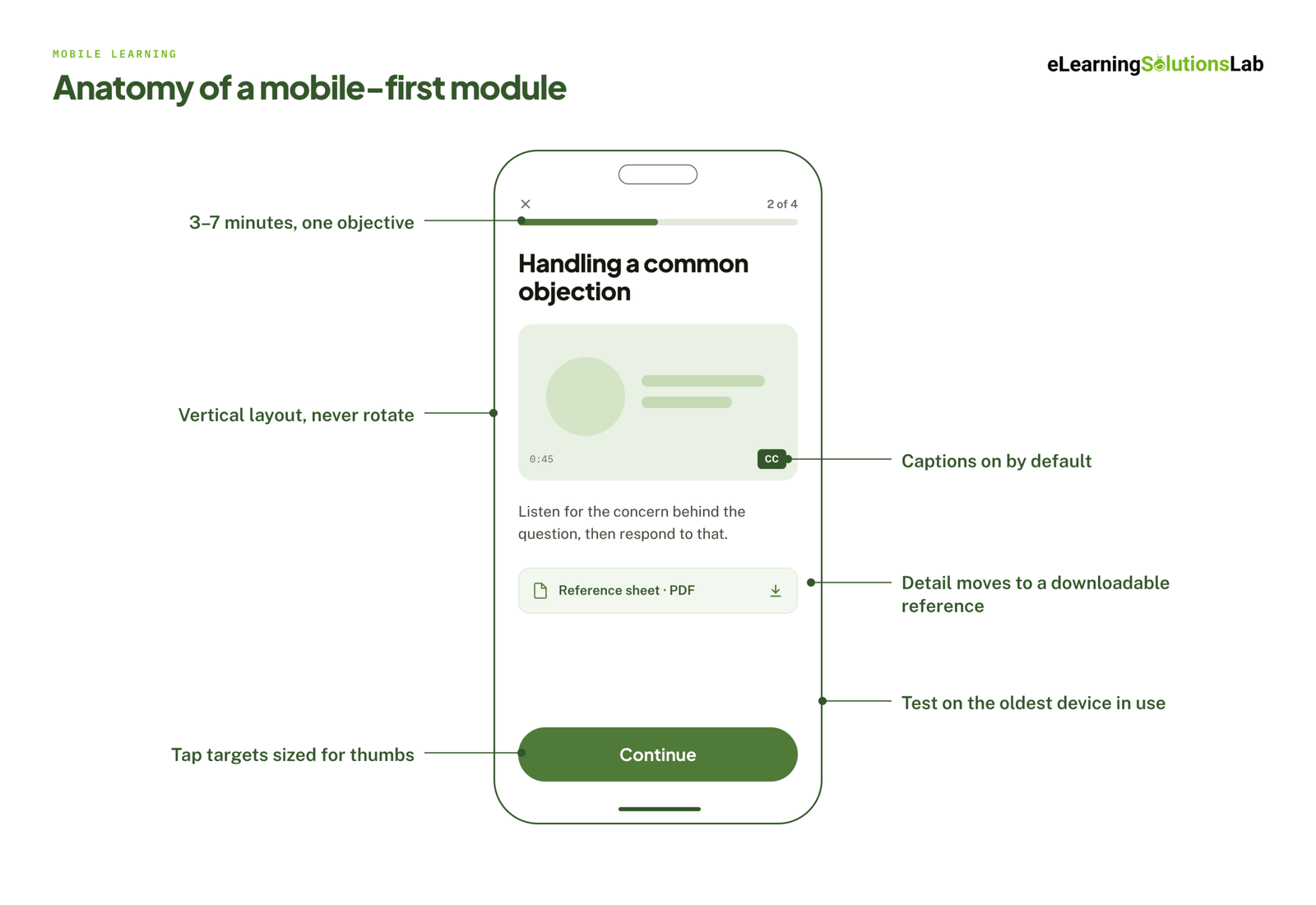 The features get you delivery. These rules decide whether anyone finishes:
- Modules of 3-7 minutes, with one objective each.
- Vertical layout, since nobody rotates their phone for training.
- Tap targets sized for thumbs, and no drag-and-drop that needs precision.
- Text kept short, with the detail moved into a downloadable reference.
- Captions on by default, because most mobile video is watched with the sound off.
- Testing on real devices, including the oldest phone in your workforce.
Where the content needs to do more than inform, scenario based elearning services and gamification in elearning both adapt well to short mobile sessions, since a decision point or a streak fits a phone screen better than a long branching simulation does.
What Mobile Learning Solutions Cost
Published pricing is scarce in this market, so treat the figures below as planning brackets rather than quotes. What matters more than the number is the shape of the spend: a platform is a recurring cost that grows with headcount, while content is a project cost that ends.
| Solution | How it’s priced | Typical planning bracket | What moves the number |
|---|---|---|---|
| Platform (LMS/LXP) | Per user per year, or per active user per month | Low single-digit dollars per user per month at volume, rising steeply for enterprise tiers | Headcount, SSO and integrations, implementation and support tier |
| Converting existing content | Per course, fixed | From around $1,500 per course | Source quality, length, how much rewriting the content needs |
| Custom mobile-first courses | Per course or per finished hour | Rises with interactivity, from simple modules to scenario and simulation work | Interactivity level, custom media, video, number of review rounds |
| Messaging delivery | Per learner per program, plus SMS charges | Lowest entry cost, but scales directly with message volume | Number of recipients, message count, country SMS rates |
| Localization | Per language, per course | A fraction of the original build, unless voiceover is involved | Voiceover vs subtitles, on-screen text volume, right-to-left layouts |
For a proper breakdown of what drives a content quote, elearning development costs goes line by line.
The Costs That Don’t Appear in the Quote
- Maintenance. Mobile content dates faster, because it’s usually tied to a product, a process, or a policy that changes.
- Device testing. Every additional device and OS version adds QA time.
- Internal time. Subject-matter expert review is the most underestimated cost in any course project.
- Data charges. If staff use personal phones on personal data plans, someone has to decide who pays.
- Translation cycles. Every update to the master course repeats across every language.
Build vs. Buy
Buy off-the-shelf when the topic is generic and non-differentiating, such as broad compliance or general soft skills. off the shelf elearning covers where the library approach holds up.
Build custom when the training covers your own process, your own systems, or your own product, which is most of what actually changes performance. If speed is the constraint rather than depth, rapid elearning services shorten the build cycle without moving you to a generic library.
What Implementation Actually Looks Like
Most failed mobile rollouts fail the same way: everything is built at once, released everywhere at once, and abandoned when the first completion report disappoints. The sequence below avoids that.
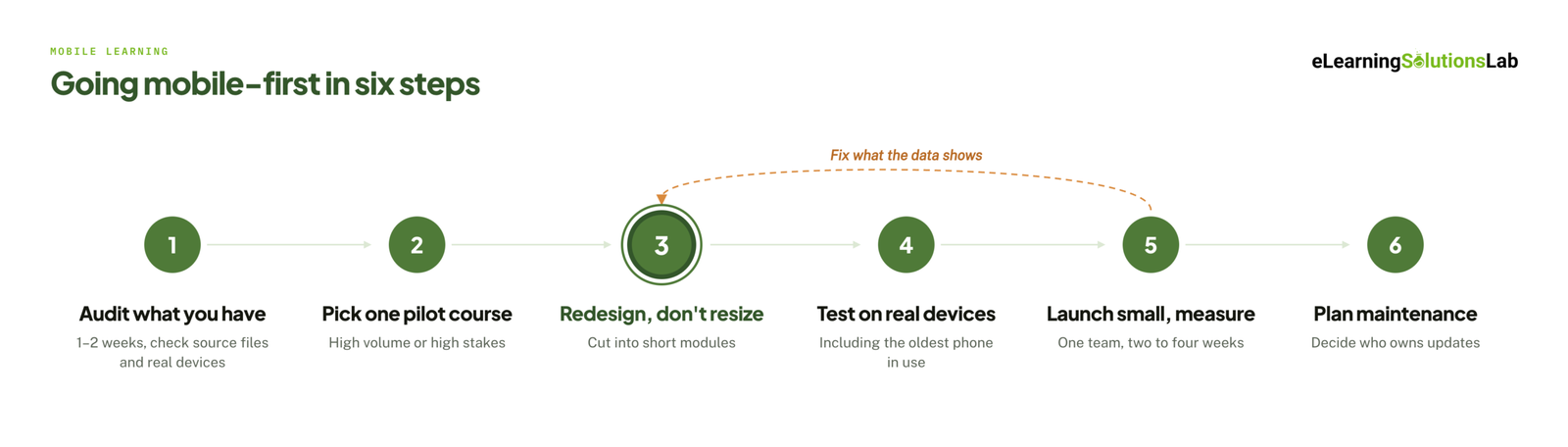 1. Audit What You Have (1-2 Weeks)
List your existing courses, then note which are current, which are mandatory, and which have editable source files. Courses without source files can’t be updated, only rebuilt, and legacy content conversion services exist for exactly that situation. Check what devices your workforce actually carries while you’re at it, since assumptions here are usually wrong.
2. Pick One Pilot Course
Choose something with high volume or high stakes, a clear business metric, and an audience that will give you honest feedback. One course, one audience. Resist the pressure to pilot five.
3. Redesign, Don’t Just Resize
This is the step that gets skipped. Cut the course into short modules, rewrite for a small screen, replace precision interactions, and move detail into downloadable references. If the training started life as a classroom session, ilt to elearning services cover that conversion specifically, and instructional design services cover the structural work of deciding what to cut.
4. Test on Real Devices
Not in a browser window resized to look like a phone. On the actual handsets your people carry, on mobile data, including the oldest device still in use. Test the interrupted session: start a module, take a call, come back an hour later, and confirm the learner resumes where they left off. elearning development best practices covers where this fits in the build cycle.
5. Launch Small, Measure, Then Scale
Release to one team or one site. Watch completion, drop-off points, and support questions for two to four weeks. Fix what the data shows, then extend. A pilot that proves the approach is worth more internally than a full catalog nobody finishes.
6. Plan the Maintenance Before You Need It
Decide who owns updates, how often content is reviewed, and where the source files live. If your platform is the weak point rather than the content, lms support services usually resolve configuration problems faster than a rebuild.
Rolling Out Across Countries and Languages
Mobile makes global rollout easier in one way and harder in three others. Easier, because you’re not shipping trainers anywhere. Harder, because device quality, network cost, language, and data law all vary by country.
Language and Localization
Translation is the obvious cost, but the structural decisions matter more. Decide early whether each language gets its own package, which is simpler to track and update, or whether one package carries a language switcher, which is simpler to assign. Allow for text expansion in layouts, and test right-to-left languages separately on a phone, where space is tightest.
multilingual elearning covers those design decisions, and when volume is high, elearning localization services handle the build and testing per language. Where the requirement is text only rather than full adaptation, elearning translation services are the narrower option.
Designing for Low Bandwidth
In many regions, learners are on prepaid data and mid-range Android devices. That changes the content itself:
- Keep modules and media small, and state the download size before a learner commits to it.
- Prefer audio with static visuals over full video where the teaching point allows.
- Make everything downloadable once and usable offline afterwards.
- Test on a throttled connection, not on office Wi-Fi.
Devices and Data Privacy
Two questions decide most of this. First, are people using company devices or their own? Personal devices mean you need a consent position on data, message frequency, and after-hours contact. Second, where are learner records stored? Every session passes a learner ID and name between the course and the platform, along with scores and progress, and under laws such as the EU’s GDPR you need to know where that data sits and who can reach it.
Ask any vendor where their data is hosted, whether the course itself sends anything to a third party, and what happens to records when a learner leaves.
How to Measure Whether It Worked
Completion rate is the metric everyone reports and the one that proves least. A completed module tells you the content was opened and clicked through. It doesn’t tell you the job changed.
Three Layers Worth Tracking
- Activity. Completion, time to complete, drop-off point. Useful for diagnosing content problems, particularly the screen where people quit.
- Learning. Assessment scores, retry rates, and score change over time. This tells you whether the content taught anything.
- Business. Time to competency, error and incident rates, sales ramp time, first-year retention, and ticket volume. This is the layer leadership funds. elearning roi covers how to connect the first two layers to this one.
Set your baseline before the pilot launches. Without a before number, any after number is an anecdote.
Be Careful With Vendor Completion Statistics
This market publishes wildly inconsistent engagement figures. Messaging vendors cite completion rates above 90% for SMS-delivered training while putting app-based learning far lower. Platform vendors publish their own high numbers against an “industry average” that is lower still. Both can’t describe the same thing.
The reason is that nobody is measuring the same event. Replying to a text message counts as completion in one system. Finishing a 20-minute tracked module with a passing assessment score counts as completion in another. The second is much harder, so it will always show a lower number.
When a vendor quotes a completion rate, ask three questions: completion of what, measured over what period, and out of which denominator – everyone enrolled, or everyone who opened it? If they can’t answer, the number isn’t evidence of anything.
What Good Looks Like After 90 Days
A working mobile pilot usually shows higher completion than the desktop equivalent, shorter time to complete, fewer “how do I do this” support questions, and at least one movement in a business metric you named before launch. If completion rose but nothing else changed, you’ve made the training easier to finish without making it more useful, which is worth knowing early.
Have courses that don’t work on phones?
We build and convert mobile-first SCORM courses that run in the LMS you already have – fixed price, fixed timeline, from $1,500 in 3-5 weeks. Send us a course that isn’t working on mobile and we’ll come back with a scope, a price, and a delivery date before you commit to anything.
Related Reading
- microlearning services – the format that suits small screens best.
- convert powerpoint to elearning services – turning an existing deck backlog into mobile-ready modules.
- scorm compliance requirements – what has to be true for mobile courses to track correctly.
- best lms for training companies – if you need the delivery layer as well as the content.
- elearning development costs – what actually drives a content quote.
- accessible elearning – WCAG conformance designed in rather than remediated.
The Author

Book A Discovery Call
Our Learning Advisors are happy to walk you through your project step-by-step — content, timeline, and fixed pricing.
Get Your Free QuoteNo obligation — just a focused conversation. Proposal within 24 hours.
You may also like
Software for Training Companies: Best Tools and How to Choose (2026 Guide)
Short answer Training companies need a training management system (TMS) to…
How to Choose an LMS: A 7-Step Guide (With Free Scorecard)
Short answer To choose an LMS, define your goals and learners first, then…