

Short answer
Video based eLearning is online training that uses video as the main way to teach, delivered inside a structured course with objectives, assessments, and tracking.
There are seven common formats: explainer and animated, screencast, scenario-based and branching, interactive, microlearning, talking head, and AI avatar video. The right one depends on what learners need to do afterwards, how often the content changes, and your budget. Cost and production time range from low and a few days for a screencast to high and several weeks for a branching scenario.
Video is now the default answer to almost every training request. It could cover everything from a two-minute screencast to a branching scenario with a full production crew, and the gap between them in cost, timeline, and results is huge.
In this guide, we break down what video-based eLearning actually is, which format fits your training goal, and what each one can realistically cost and take to produce. You will also find a step-by-step build process and how to measure whether it worked beyond completion rates.
Updated October 2026.
In This Article
- What is video-based eLearning?
- Video-based eLearning vs traditional slide-based eLearning
- Types of video-based eLearning (and when to use each)
- Benefits of video-based eLearning
- How to create video-based eLearning, step by step
- How much does video-based eLearning cost?
- How to measure the impact of video-based eLearning
What is Video Based eLearning?
Video-based eLearning is online training that uses video as the main way to teach, delivered inside a structured course with defined objectives, assessments, and tracking.
Learners can watch, interact, and be tested through a learning platform, so that organizations can measure who actually completed the training and what they learned.
In practice, video rarely stands alone. It is usually paired with knowledge checks, practice activities, downloadable job aids, or in-video questions that can help turn passive watching into active learning.
Organizations typically use video-based eLearning most often for:
- Onboarding – welcoming new hires and explaining culture, policies, and tools consistently across your locations.
- Compliance training – showing realistic situations where rules apply, instead of just simply listing the rules.
- Product training – demonstrating features and use cases for sales teams, partners and customers.
- Software training – walking through tasks on-screen – step by step.
- Soft skills – modeling conversations, including but not limited to feedback, negotiation, or handling customer complaints.
Video works best when it is one part of a planned program. Our guides to building a compliance training plan and a product training program show where it fits alongside other formats.
Video Based eLearning vs Traditional Slide-Based eLearning
Most eLearning programs still follow the traditional approach of a slide-based model, where learners click through screens of text, images, and occasional interactions that are often built in an authoring tool like Articulate Storyline or Adobe Captivate.
Video-based eLearning replaces much of that on-screen reading with something that learners can watch and respond to.
So neither approach is better in every case, but they truly differ in what they cost to make, how easy they are to update, and what kind of content they suit best.
| Factor | Video-based eLearning | Slide-based eLearning |
|---|---|---|
| Engagement | High for stories, demonstrations, and people-led content | Depends heavily on design; text-heavy slides lose attention quickly |
| Best suited to | Showing how something looks, sounds, or is done | Explaining concepts, reference content, and detailed information |
| Production effort | Higher up front: scripting, recording or animation, editing | Lower: built directly in an authoring tool |
| Update cost | Higher; changes often mean re-recording or re-editing | Lower; text and images can be edited in minutes |
| Interactivity | Needs to be added (in-video questions, branching, hotspots) | Built in: click-to-reveal, drag and drop, quizzes |
| Learner control | Linear by default; harder to scan or search | Easy to skim, revisit, and jump between sections |
| Tracking | Completion and watch time; richer data with interactive video or xAPI | Screen-level progress and quiz scores through SCORM |
| Bandwidth needs | Higher; can be a barrier on slow connections | Lower |
| Localization | Subtitles are simple; dubbing and on-screen text changes cost more | Text translation is relatively simple |
If you are choosing software for the slide-based side, our roundup of the best elearning authoring tools compares the main options.
Pro tip
You can use video for parts that will benefit from being seen – such as processes, conversations, or products in action – while you can use slides and interactions for the parts learners need to read, practice, or return to later. So here’s a typical blended module that might open with a two-minute scenario video, followed by a short interactive breakdown of the key points, and closing it with a knowledge check.
Types of Video-Based eLearning (and When to Use Each)
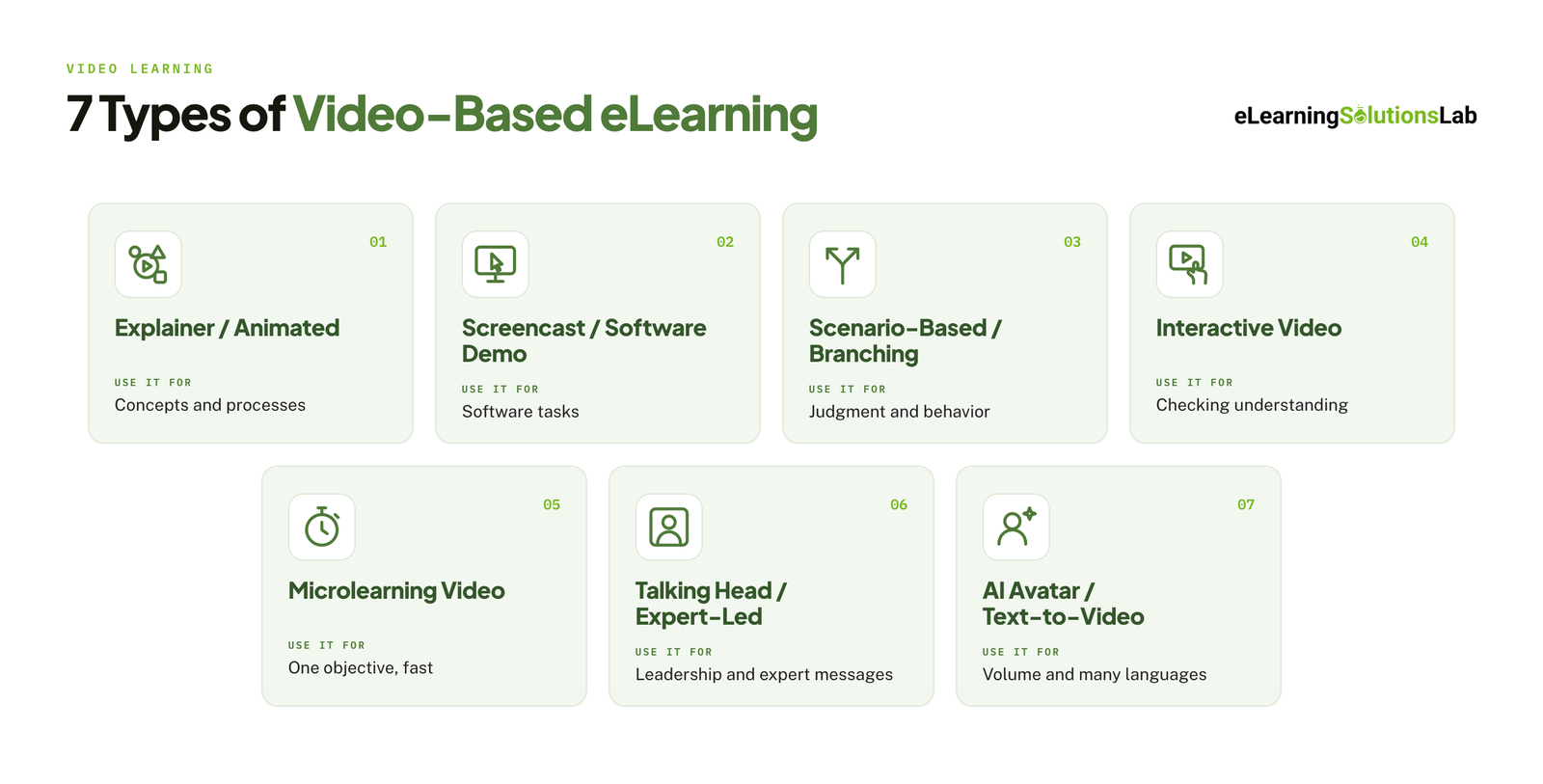
The right choice of video type definitely depends on what your learners need to be able to do afterwards, how often the content will change, and how much you can spend. You can use the table below to narrow down your options, then read the detail on each format.
| Format | Best training goal | Typical length | Relative cost | Typical production time |
|---|---|---|---|---|
| Explainer / animated | Explaining concepts, processes, and abstract ideas | 1 to 3 min | Medium to high | 3 to 6 weeks |
| Screencast / software demo | Teaching software tasks step by step | 2 to 5 min | Low | 1 to 3 days |
| Scenario-based / branching | Decision-making, compliance, soft skills | 3 to 8 min | High | 4 to 8 weeks |
| Interactive video | Checking understanding and keeping attention | 3 to 6 min | Medium to high | 2 to 5 weeks |
| Microlearning video | One objective, reinforcement, just-in-time help | Under 3 min | Low to medium | 3 to 7 days |
| Talking head / expert-led | Leadership messages, expert knowledge, culture | 2 to 5 min | Low to medium | 2 to 5 days |
| AI avatar / text-to-video | High-volume, frequently updated, or multilingual content | 1 to 5 min | Low | Hours to 2 days |
Lengths, relative costs, and production times are general guidance for a single finished video. Actual figures depend on complexity, review rounds, and how ready your source content is.
Explainer and Animated Video
Animated explainers actually use motion graphics, characters, or whiteboard-style drawing to simplify complex ideas that are hard to film, like how data moves through a system or why a policy exists – to cite an example.
They are well suited to abstract or sensitive topics, and they age well given that there are no real offices, people, or interfaces that can go out of date. The trade-off here really is cost, given that having custom animation can take skilled designers and several review rounds.
Use it when your concept is abstract, content will stay stable, and your brand polish matters most.
Screencast and Software Demo
A screencast records the screen while a narrator walks through a task – it’s the type of video that is fastest and cheapest format to produce, and it really matches exactly what learners will see when they do the task themselves.
The downside here is shelf life, given that every interface change can make the video inaccurate, so keep each one short and focused on a single task so it is cheap to replace.
When learners need to practice the task and not only watch it, an elearning simulation is the next step up from a screencast.
Use it when you are teaching a system, tool, or a digital process.
Scenario-based and Branching Video
Scenario videos will show realistic situations, often with actors, and ask your learners what they would do. In a branching version, for instance, each choice can lead to a different outcome, so your learners can see the consequences of their decisions.
This is, we think, the closest video gets to practice, which can make it effective for compliance, sales conversations, customer service, and management skills or any other soft skills needed in your organization. It is the most demanding format to script and produce, given that every branch needs to be written and filmed.
Our guide to scenario-based elearning covers how to plan the branches and write decisions that feel real.
Use it when your goal is judgment and behavior, not recall.
Interactive Video
Interactive video adds questions, clickable hotspots, chapters, or short activities on top of the footage. The video typically pauses and waits for your learner, which can turn watching into doing and gives you enough data on what your learners understood.
In reality, any format above can be made interactive, usually through an authoring tool or an interactive video platform. You can check that your LMS can play and track it before you commit to doing it. Our guide to LMS integration explains what to check.
Use it when you actually need evidence of understanding, or your learners tend to let videos play in the background.
Microlearning Video
Microlearning videos cover one objective in 2 or 3 minutes or less. They typically work as standalone refreshers, as a series that builds a skill over time, or as on-the-job support that people will look up at the moment of need.
Shorts don’t necessarily have to be simple to make: fitting one clear point into 90 seconds can take tight scripting.
For where the format is heading, see our roundup of microlearning trends 2026. If you would rather hand the production to a team, our microlearning services cover scripting through to LMS-ready files.
Use it when your learners are time-poor, mobile, or need reinforcement after a longer course.
Talking Head and Expert-led Video
This is where a person speaks to camera, sometimes with supporting slides or footage cut in. This video format puts a human face on the message, which can help build trust and is best for leadership announcements, culture content, and subject expert insights. It is pretty inexpensive to film, but it will depend on the presenter. A flat delivery or a long, unbroken take will actually lose attention quickly, so you have to keep it short and cut in visuals.
Use it when who is saying it matters as much as what is said.
AI Avatar and Text-to-video
AI video tools will help turn a script into a video with a synthetic presenter and voice, with no camera or studio. Updates are as simple as editing the text, and you can generate the same video in many languages.
That really makes the format practical for large content libraries, frequently changing material, and global rollouts. The downsides are emotional range and authenticity, given that avatars are less convincing for sensitive topics, storytelling, or anything that depends on real human presence.
AI is changing more than the video itself. Our guide to AI for instructional design covers scripting, storyboarding, and assessment writing, and our guide to multilingual elearning explains what a global rollout involves beyond generating new voice tracks.
Use it when volume, speed, update frequency, or language coverage really matter more than emotional impact.
Benefits of Video-Based eLearning
Video earns its place in most training programs when it does something other formats cannot do, so here are benefits that hold up in practice.
It Shows What Text Can Only Describe
Some things are easier to understand when you can see them, things like how to operate a machine, how a difficult conversation sounds, or where to click in a system, to give some examples.
Video carries movement, tone of voice, facial expression, and timing – all of which are lost in a written procedure. And for procedural and behavioral skills, that is its apparently biggest advantage.
It Can Improve Attention and Retention When Designed Well
Research on multimedia learning, most notably from Richard Mayer’s work, has consistently found that people can learn better from words and pictures together than from words alone, provided that the material is designed to avoid cognitive overload.
The conditions that really matter are short segments, narration paired with relevant visuals, and no decorative extras.
It Delivers the Same Message Everywhere
An instructor-led session can vary with the trainer, day, and room. For instance, a video gives every learner the same explanation, whether they are in head office or a remote site, whether joining this week or next year. And for compliance, safety, and onboarding, that consistency is often the main reason to choose video.
It Is Available on Demand
Your learners can watch when it suits them, pause, rewind, and return to a video at the moment they truly need it on the job. So short videos will work well on mobile, which can help frontline, field and deskless teams who are rarely at a computer.
Our guides to on-demand training and mobile learning solutions go deeper on both.
It Lowers Delivery Cost Over Time
Video costs more to produce than a slide deck, but once they’re made, they can be delivered to any number of learners at almost no extra cost. There are no trainer fees, travel, venues, or time away from work for each session – obviously. And the more learners you have and the longer the content stays valid, the stronger the cost-saving case will be.
It Makes Expertise Scalable
Your best subject experts can only be in one room at a time. Recording them once captures their knowledge and makes it available to everyone, including after they move on from the role.
In one line
Video pays off when the content needs to be seen, will reach many learners, and will stay accurate long enough to earn back what it cost to make.
How to Create Video-Based eLearning, Step by Step
The steps below apply to every format in the table above. What changes from one format to the next is how long each step takes. For how video fits into a full course build, see our guide to elearning production.
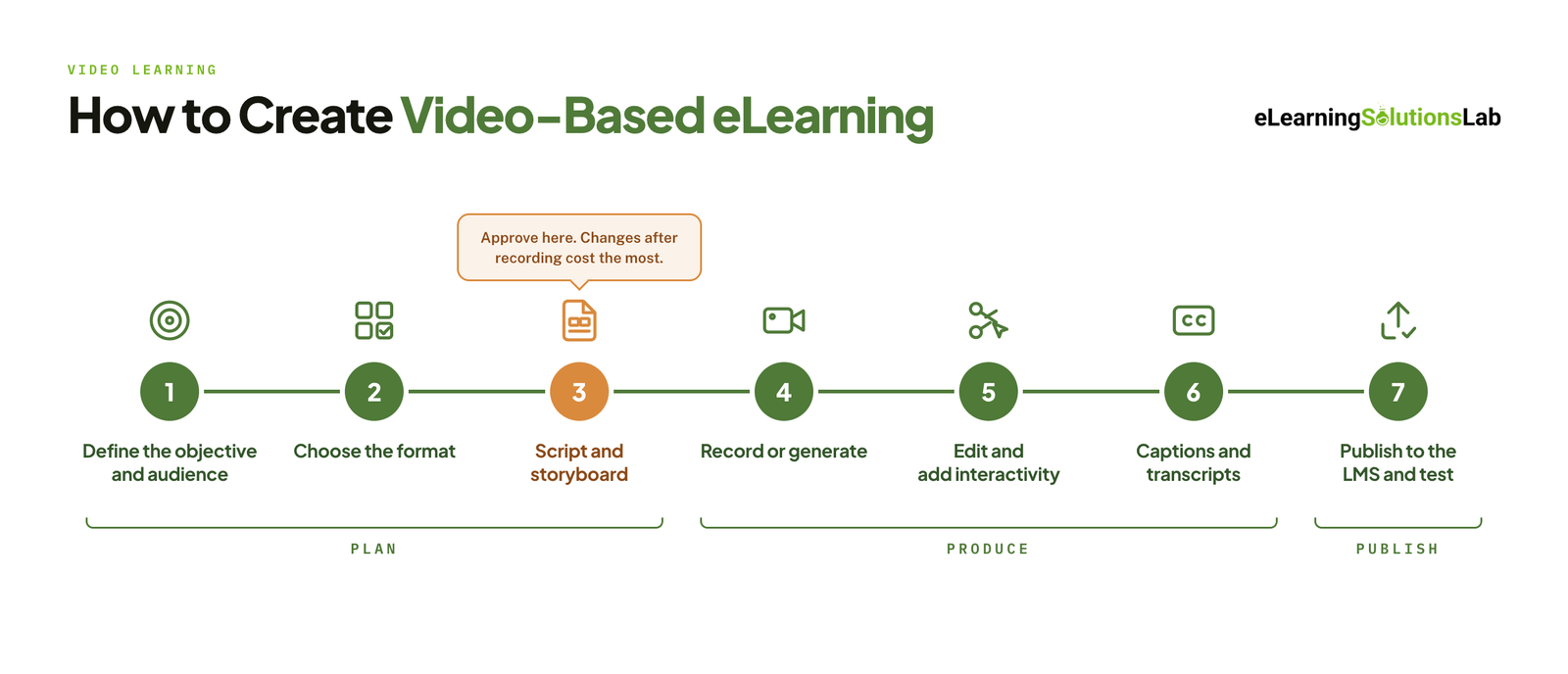 Define the objective and audience – write down what your learners should be able to do after watching, who they are, and where they will watch. One video should serve one objective.
- Choose the format – match the objective to a format using the table above. Check the budget and how often the content will change before you commit.
- Write the script and storyboard – the script sets what is said, and the storyboard sets what is shown at each moment. Get both approved before production, because changes after recording are the most expensive kind.
- Record or generate the footage – film on camera, capture the screen, animate, or generate with an AI avatar tool. Clean audio matters more than picture quality, so prioritize a good microphone and a quiet room.
- Edit and add interactivity – cut the footage, add on-screen text and graphics, then layer in questions, hotspots, or branching if the format calls for it.
- Add captions and transcripts – captions help learners in noisy or sound-off settings as well as those with hearing loss, and a transcript makes the content searchable.
- Publish to the LMS and test – package the video inside a SCORM or xAPI course, upload it, and test it as a learner to confirm that it plays on every device and reports completion correctly.
Several of these steps have their own guides:
- Our elearning storyboard template gives you a ready layout for step three.
- Our guide to accessible elearning covers captions, transcripts, and player requirements for step six.
- Our guide on how to create SCORM content walks through packaging for step seven.
If you have the subject expertise but not the scripting capacity, instructional design services can take the first three steps off your team.
How Much Does Video-Based eLearning Cost?
There is no single price for video-based eLearning, given that a narrated screencast and a filmed branching scenario are very different projects. The relative cost column in the format table above is the best starting point, and the factors below explain what moves a project up or down within its range.
What Drives the Cost
- Format and complexity – custom animation and filmed scenarios cost more than screencasts and talking head videos.
- Finished length – most pricing is worked out per finished minute, so a tighter script is a cheaper video.
- Talent and location – actors, voice artists, studio hire, and filming on site all add to the budget.
- Interactivity – each question, hotspot, or branch needs to be designed, built, and tested.
- Languages – subtitles are the lowest-cost option, and dubbing or re-recording costs more.
- Review rounds – changes made after recording or animation cost far more than changes made at the script stage.
- Source content – a clear brief and available subject experts shorten the timeline, while scattered or outdated material lengthens it.
In-house vs Agency vs AI-generated
| In-house | Agency or vendor | AI-generated | |
|---|---|---|---|
| Cost profile | Low cash cost, high staff time | Higher cost per video, little internal time | Low cost per video, usually a subscription |
| Best for | Screencasts, talking head videos, quick updates | Animation, scenarios, interactive video, large programs | High-volume, frequently updated, or multilingual content |
| Main limit | Team skills and available time | Budget and briefing effort | Emotional range and authenticity |
For budget figures across whole courses, see our breakdown of elearning development costs. If you are weighing an outside team, our guide to elearning outsourcing covers how to brief, price, and manage one.
How to Measure the Impact of Video-Based eLearning
A completion rate tells you that a video was played to the end. It does not tell you whether anyone learned from it. To judge impact, look at four levels of data.
- Completion and drop-off – check where learners stop watching as well as how many finish. A sharp drop at the same point usually means the video is too long or that section is unclear.
- In-video interaction data – track answers to embedded questions and choices in branching scenarios. These show what learners understood, not only what they watched.
- Assessment results – compare scores before and after the training, or against a group that has not taken it yet.
- On-the-job outcomes – link the training to a measure the business already tracks, such as error rates, support tickets, time to competence, or audit findings.
SCORM vs xAPI for Video Tracking
What you can measure depends on how the video is packaged. A SCORM package typically reports completion, time spent, and a quiz score to the LMS. xAPI can record finer detail, such as plays, pauses, replays, the point where a learner stopped, and each in-video answer, but your LMS or a learning record store has to support it.
Our guide to SCORM compliance requirements explains what a package needs to report correctly, and our guide to elearning ROI shows how to turn these numbers into a business case.
Need video-based eLearning that tracks in your LMS the first time?
At eLearning Solutions Lab, we script, produce, and package video-based courses in the format your LMS needs, then test the published package to confirm that completion and scores report correctly. Design, development, and QA are handled by one team. Send us your content and we’ll come back with a scope, a price, and a delivery date before you commit to anything.
Related Reading
- How to create effective elearning courses – the full course design process that video sits inside.
- Elearning development best practices – standards for building courses that are easy to maintain.
- Scenario-based elearning services – branching scenarios scripted and built for you.
- Elearning localization services – subtitles, dubbing, and adapted visuals for global audiences.
- Elearning delivery – the channels for getting courses to learners, compared side by side.
- Elearning trends – where video, AI, and microlearning are heading next.
The Author

Book A Discovery Call
Our Learning Advisors are happy to walk you through your project step-by-step — content, timeline, and fixed pricing.
Get Your Free QuoteNo obligation — just a focused conversation. Proposal within 24 hours.
You may also like
Software for Training Companies: Best Tools and How to Choose (2026 Guide)
Short answer Training companies need a training management system (TMS) to…
How to Choose an LMS: A 7-Step Guide (With Free Scorecard)
Short answer To choose an LMS, define your goals and learners first, then…