

Short answer: A sales training LMS is a learning platform built to onboard, train, and certify sales reps, and to show whether that training actually changes their results. The best ones connect to your CRM, give reps a way to practice pitches and objection handling, and report on ramp time and win rates, not just course completions.
Most sales teams don’t actually have a training problem – they mostly have an adoption problem. New sales reps sit through onboarding decks they forget by week three, product updates that they don’t typically open in PDFs, and LMS training that reports only 90% completion.
In this guide, you’ll learn what a sales training LMS does, how it differs from a corporate LMS and sales enablement platform, which features matter, and what these platforms typically cost.
We build sales training courses, not LMS software, so none of the platforms on this list is ours. Updated September 2026, including the Seismic and Highspot merger.
In This Article
- What is a sales training LMS?
- Sales LMS vs. corporate LMS vs. sales enablement platform
- Why generic LMSs often fail sales teams
- Key features to look for
- Global rollout: languages, data residency, and time zones
- How much a sales training LMS costs
- Which type of platform do you need?
- How we evaluated these platforms
- 10 sales training LMS platforms compared
- How to roll out a sales training LMS
- Common mistakes when choosing a sales LMS
What is a Sales Training LMS?
A sales training LMS is a learning management system that is set up for the way sales teams learn and work. Like any LMS, it can host courses, assign learning paths, run quizzes, and track progress.
The main difference here is what it’s built around: getting new reps productive faster, keeping experienced sales reps current on products and messaging, and linking training to what really happens in the pipeline and their sales motion and context.
In practice, a sales training LMS usually handles:
- Onboarding – role-based learning paths that can take new sales reps from the company story and ideal customer profile to the sales process, tools, and first calls.
- Product training – courses and short updates that can keep sales reps current when features, pricing, or positioning change.
- Skills practice – roleplay, recorded pitches, and scenario-based exercises for any discovery, objection handling, and negotiation, often with AI or manager feedback.
- Certification – checks that confirm a sales rep can pitch a product or run a process before they actually take it to customers, with recertification when things change.
- Reinforcement – short refreshers and knowledge checks that are spaced over weeks, so that your training isn’t forgotten after onboarding ends.
- Reporting – completions and scores, and on stronger platforms, training data that’s next to CRM metrics like ramp time, win rate, and deal size.
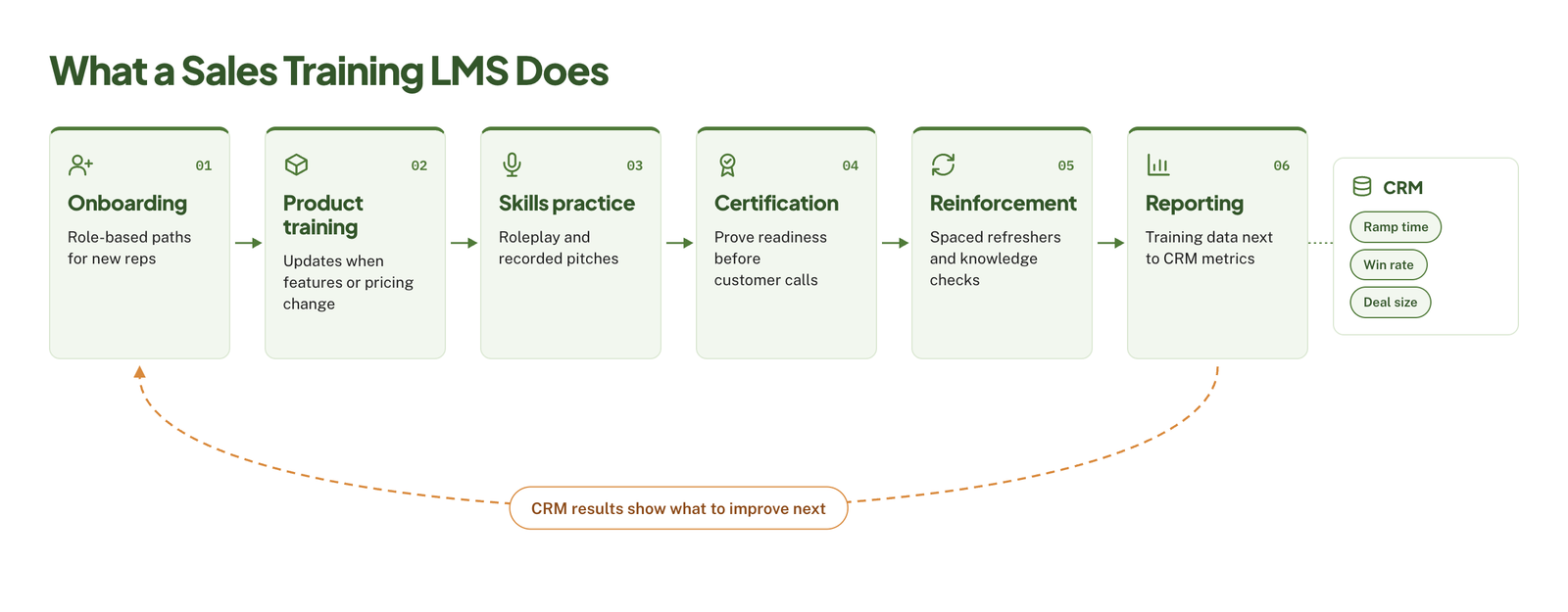 What makes it “sales” and not just an LMS: a generic LMS can simply deliver sales courses, but it can treat a sales rep the same as any other employee. A sales-focused platform can meet sales reps where they work, usually inside or alongside the CRM, keep content that’s short enough to finish between calls, and give managers a way to coach and measure performance.
The platform is only half of it, though. Our guide to elearning sales training covers how to design the courses and practice activities that go inside it.
Sales LMS vs. Corporate LMS vs. Sales Enablement Platform
These three terms often get used interchangeably, but they actually describe different tools built for different buyers. Knowing which one you actually need will narrow your shortlist faster and help you choose wisely to fit your needs.
Corporate LMS
Corporate LMS is built for company-wide training: compliance, policies, HR onboarding, and professional development. It’s usually owned by HR or L&D and is useful for assigning courses to large groups and proving completion for audits. What it usually isn’t built for is the pace and structure of sales, like frequent product updates, practice and coaching, and reporting that is tied to pipeline results.
Sales Training LMS
Sales training LMS is an LMS configured for sales onboarding, product training, and certification. It can keep the core LMS strengths, such as learning paths, courses, and tracking, and can add sales-specific features like CRM integration, roleplay, and rep performance reporting. These tools are typically owned by sales enablement or L&D teams.
Sales Enablement Platform
A sales enablement platform typically goes beyond training – it has to be associated with learning and coaching. The platform can manage sales content (decks, case studies, battle cards), show sales reps what to use at each stage of a deal, and track which content helps close the business. The platform is usually owned by sales or revenue operations, and it’s built to work in the flow of selling rather than simply as a separate place where reps go to learn.
| Corporate LMS | Sales training LMS | Sales enablement platform | |
|---|---|---|---|
| Main job | Compliance and company-wide training | Onboarding, certification, and skills | Content, coaching, and readiness during deals |
| Typical owner | HR / L&D | Sales enablement / L&D | Sales / RevOps |
| CRM integration | Rare or basic | Common | Deep |
| Practice and coaching | Limited | Often included | Core feature |
| Sales content management | No | Limited | Core feature |
| Reporting | Completions and scores | Completions plus rep performance | Content usage and deal impact |
| Best for | Company-wide training needs | Structured sales onboarding and certification | Large sales teams that need training and content in one place |
Do You Need Both?
Many companies do. And it’s a common setup to have both a corporate LMS for compliance and HR training, and a sales LMS or enablement platform for the sales team. In that way, compliance records can stay in one system, and sales reps get a tool built around how they work.
It doesn’t always make sense, though, if you operate with a small sales team, where your corporate LMS already supports SCORM and basic reporting, and your main problem is simply weak or outdated content – with this, better courses in the system you already have may do more than a new platform.
If you’re still deciding whether you need a platform at all, our guide do I need an LMS walks through the decision.
Why Generic LMSs Often Fail Sales Teams
Any generic LMS can host sales courses without any trouble. But the problems normally start after the launch, when sales reps stop logging in, and managers can’t tell whether their training programs truly made any difference. Here’s where it usually breaks down:
- Sales reps won’t leave their workflow to learn – they live in the CRM, inbox, and calendar. So having a separate learning portal with its own login becomes one more thing to ignore, especially when there’s high quota pressure.
- Content is one-size-fits-all – an enterprise account executive, an SDR, and a channel partner need different types of training programs, but a generic LMS often simply assigns everyone the same course. Sales reps quickly learn that most of it doesn’t apply to them.
- Completion rates measure the wrong thing. For instance, a sales rep who clicked through every slide has completed the course, but says nothing about whether they can actually handle a pricing objection or run a better discovery call.
- There’s no room to practice – sales is fundamentally a skill, and skills need rehearsal in actual context and situation. Most generic LMSs are built for reading, watching, and quizzing, so sales reps might learn about objection handling but will never have a chance to practice it before trying it on a real customer.
- Content goes stale fast – products, pricing, competitors, and messaging may change every quarter. When updating your course means a long rebuild, your LMS sometimes falls behind what sales reps actually need to say.
- Managers are left out – sales training sticks when managers can reinforce it through coaching. Generic LMS rarely gives them visibility into what their sales reps have learned or where they’re struggling.
- Training data sits apart from sales data – without a link to the CRM, you can’t see whether sales reps who finished onboarding ramp faster or win more deals, which just makes it hard to justify the budget.
If practice is the biggest gap, scenario based elearning services can turn objection handling and discovery calls into branching exercises reps rehearse before they talk to a real buyer.
Key Features to Look For in a Sales Training LMS
For each feature, you’ll find what good looks like and sets of considerations you may consider when looking for the right sales training LMS for your context and organization.
CRM Integration
The strongest platforms must connect to your CRM like Salesforce or HubSpot, in two directions. Given that sales reps can see and complete training from inside the CRM, and learning data flows back, this is where it helps in comparing with pipeline metrics. Our guide to LMS integration explains how these connections work.
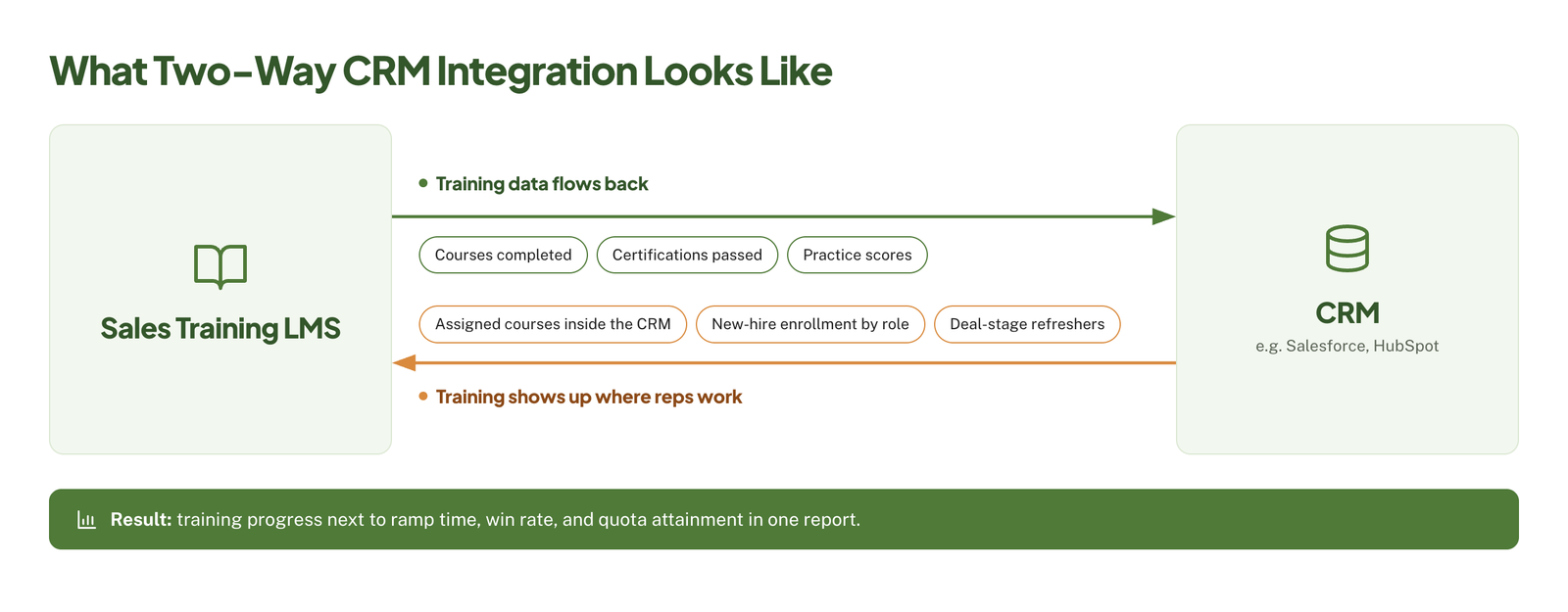 Ask the vendor: “Can you show me a report that puts a rep’s training progress next to their CRM performance data?”
Onboarding Paths and Ramp Tracking
You have to look for role-based learning paths that you can set up once and assign automatically, so an SDR, an account executive, and a sales engineer each get the right sequence in place. Having good platforms can also help track milestones like first call, first demo, and first closed deal, and this is where you can measure time to ramp.
Ask the vendor: “How would I set up different onboarding paths for three sales roles, and how do I track ramp time for each?”
Roleplay, Coaching, and AI Practice
Practice is where your sales training succeeds or fails. You have to look for recorded pitch practice, scenario-based exercises, and a way for your managers to review and score submissions. Many of these platforms can now add AI roleplay, where sales reps practice conversations with a simulated buyer and get instant feedback.
Ask the vendor: “Can I try the AI roleplay with one of our real objections, and who writes and maintains the scenarios?”
Microlearning and Mobile Access
Sales reps learn between meetings, on the road, and right before calls. Short modules of 5 minutes or less, a mobile app that works well, and quick search for just-in-time answers will all make training easier to fit into a sales day. Our microlearning services are built around this format, and mobile learning solutions compares the main ways to deliver it.
Ask the vendor: “Can a rep find and finish a two-minute product refresher on their phone in under a minute?”
Certifications and Reinforcement
Certification may confirm that a sales rep can pitch a product or follow a process before they actually take it to customers. Reinforcement will keep that knowledge from fading through spaced quizzes, refreshers, and recertification when something changes.
Ask the vendor: “When we launch a new product, how do we require certification and automatically recertify reps on the old one?”
Content Authoring and SCORM Support
You have to check two things: whether you can build quick content inside the platform, and whether it accepts SCORM or xAPI courses built in tools like Storyline or Rise. Built-in authoring is pretty fast for simple updates, but custom courses and simulations usually come from a dedicated authoring tool.
Now if your platform can’t track them properly, you’re locked into its own editor. Our guide to scorm compliance requirements explains what has to be true for courses to track correctly, and our roundup of the best elearning authoring tools compares the main options.
Ask the vendor: “Which SCORM and xAPI versions do you support, and can we test one of our own packages during the trial?”
Analytics Tied to Revenue
Completions and quiz scores are all bare minimum. Stronger platforms have to show training activity next to sales outcomes like win rate, deal size, quota attainment, and ramp time, broken down by team, role, or region. That’s the exact sales data you’ll need to justify your sales tech investment later. Elearning ROI covers how to turn that data into a business case.
Ask the vendor: “What would I show our CRO after six months to prove the training worked?”
Admin Effort
A platform is only as useful if your team can keep it current. So you have to look at how long it takes to update a course, assign content to a new hire, or pull a report. Make sure you ask whether the vendor can offer implementation support and who can handle ongoing admin.
Ask the vendor: “How many admin hours a week do customers of our size typically spend on the platform?”
Global Rollout: Languages, Data Residency, and Time Zones
If your sales reps are located in many countries and speak different languages, considering these areas in a global rollout can help you decide wisely when choosing your sales training LMS.
Interface Languages vs. Content Languages
These are exactly two different things, and vendors don’t always make the difference clear. Interface languages can cover the platform itself: menus, buttons, and notifications, while content languages can cover your actual courses, quizzes, and roleplay scenarios.
Your sales platform might offer its interface in 30 languages but couldn’t give you an easy way to manage translated versions of your own courses. Here, you need to look for features that will let you link language versions of the same course, assign the right version by region automatically, and report on all versions together. Multilingual elearning explains how to plan for that from the start.
Ask the vendor: “If we update the English version of a course, how do we track which translated versions are now out of date?”
Localizing Practice, Not Just Text
Translating slides is the easy part of the campaign, but sales conversations usually change from market to market, like how buyers raise objections, how direct a rep can be, how pricing is discussed, and which competitors come up.
Roleplay scenarios and AI practice definitely need to reflect that, or sales reps in other regions will just practice conversations they’ll never actually have.
Also, you have to check whether the platform’s AI roleplay and speech scoring can work in each language you need, and at the same quality as in English. Our elearning localization services cover what full localization involves, from scenarios to voiceover.
Data Residency and Privacy
Your sales training platforms need to store personal data: names, performance records, recorded roleplay videos, and sometimes voice recordings analyzed by AI. Depending on where your sales reps are based, laws like the GDPR in the EU and other national data protection laws can set rules on where that data is stored and how it’s processed correctly.
Before you commit, you need to confirm:
- Which regions the vendor can host your data in.
- Whether recorded videos and AI-processed audio can stay in the same region as the rest of your data.
- Which third-party AI providers can process rep recordings, and where.
- How long recordings are kept, and whether you can set your own retention rules.
You have to bring your legal or IT security team into this step early, given it’s much harder to change hosting regions after course and LMS launch.
Ask the vendor: “Where exactly is a rep’s recorded roleplay stored and processed, including by any AI provider you use?”
Time Zones and Live Training
Live onboarding sessions and scheduled coaching calls don’t usually work well across time zones. So you have to find strong self-paced paths, recorded sessions, and asynchronous coaching, where your managers can review and score practice recordings when it suits them best.
Regional reporting matters too, as your managers in each region should be able to see their own team’s progress without truly digging through global dashboards.
Global Rollout Checklist
- Interface available in every language your sales reps use
- Easy management of translated course versions
- AI roleplay and scoring tested in each language
- Data hosting available in the regions you need
- Clear answers on where recordings and AI processing happen
- Strong self-paced and asynchronous coaching options
- Regional permissions and reporting for local managers
How Much Does a Sales Training LMS Cost?
Most vendors in this space don’t publish prices, so the numbers below combine the few public price lists with independent estimates. Treat them as planning figures, not quotes, and check them against a real proposal.
Common Pricing Models
- Per user or per active user – you pay monthly or yearly for each rep with an account, or only for reps who log in during the billing period.
- Tiered plans – a fixed monthly price for a set number of users, with more features on higher tiers.
- Modular pricing – enablement platforms often price learning, AI roleplay, content management, and conversation intelligence as separate modules.
- Enterprise quotes – custom pricing based on user count and contract length, often with multi-year terms.
Typical Price Ranges
| Platform type | Typical pricing | Example |
|---|---|---|
| Self-serve LMS for small teams | Published plans, roughly $100–$450 a month | TalentLMS Core plan at $119 a month for up to 100 users |
| Mid-market LMS | About $3.50–$8 per user per month | 360Learning Team plan at $8 per user per month |
| Enterprise LMS | Quote only, often from around $25,000 a year | Docebo, Absorb, Litmos |
| Sales enablement platform | Quote only, often tens of thousands of dollars a year | Median contracts of about $32,000 a year for Seismic and $60,000 for Highspot, per Vendr buyer data |
The mid-market and enterprise LMS ranges come from an independent sales LMS review. Prices were checked in September 2026 and change often, so confirm them on each vendor’s site.
Costs That Catch Buyers Off Guard
- Implementation. Setup and onboarding fees for enterprise enablement platforms can run from about $10,000 to well over $100,000, according to Vendr’s buyer data.
- AI add-ons. AI roleplay and coaching are often sold as add-ons, credits, or top-tier features rather than included in the base price.
- CRM and SSO integrations. Some platforms charge extra for premium connectors, such as a native Salesforce app.
- Renewal increases. Multi-year contracts often include yearly price increases, so check the renewal terms, not just the first-year price.
- Admin time. Someone has to keep paths, content, and reports current, and that time is a real cost.
- Content. A new platform starts empty. Onboarding, product, and skills courses still have to be built or converted, and that’s often the largest cost of all. Elearning development costs breaks down what drives a content quote, and custom elearning content development explains what a custom build involves.
If budget is the main constraint, our guide to affordable LMS systems covers lower-cost platforms.
Which Type of Platform Do You Need? A Quick Decision Path
If you’d rather not compare every option, answer these four questions in order.
1. Do you already have a corporate LMS that supports SCORM and basic reporting?
Yes: go to question 2. No: go to question 3.
2. Is your main problem weak or outdated content, rather than missing features?
Yes: keep your LMS and invest in better sales courses first. No: go to question 3.
3. Do reps also need a place to find decks, case studies, and battle cards during deals?
Yes: shortlist sales enablement platforms. No: go to question 4.
4. Do you need training data linked to CRM outcomes, AI roleplay, or support for reps in several countries?
Yes: shortlist sales-focused LMSs with strong CRM, practice, and language support. No: a lower-cost LMS with good learning paths will likely cover you.
How We Evaluated These Platforms
We build sales training courses and don’t sell LMS software, so we looked at each platform from the point of view of a team that has to fill it with content and prove it works. Each platform was checked against the criteria in this guide:
- Sales-specific features – onboarding paths, certifications, and reinforcement.
- CRM integration – which CRMs it connects to, and how deeply.
- Practice and coaching – roleplay, video pitch practice, and AI feedback.
- Global support – interface languages and published data hosting regions.
- Pricing transparency – whether prices are published or quote only.
- What users complain about – the most common weakness in G2 reviews.
Our sources were each vendor’s own product, pricing, and security pages, plus user reviews on G2, all checked in September 2026. Where a vendor doesn’t publish something, such as hosting regions, we say so rather than guess.
10 Sales Training LMS Platforms Compared
The list covers both sales-focused LMSs and sales enablement platforms, since buyers usually compare the two. Each one is labeled so you can see which category it belongs to.
| Platform | Category | Best for | Pricing | AI roleplay | Published hosting regions |
|---|---|---|---|---|---|
| Docebo | Sales LMS | Enterprises training 250+ learners | Quote only | Yes (add-on) | US, EU, UK, Canada, India, Australia |
| TalentLMS | Sales LMS | Small and mid-size teams | Free plan; paid from $119/month | Yes | US |
| Absorb LMS | Sales LMS | Mid-market teams using several CRMs | Quote only | Partial | US, Canada, Ireland, Australia, China |
| Litmos | Sales LMS | Salesforce-centered sales teams | Quote only | Partial (video) | US, EU, Australia |
| 360Learning | Sales LMS | Collaborative L&D-led teams | From $8/user/month | Yes | Not published |
| Learn:Up by Confirm (formerly WorkRamp) | Sales LMS | SaaS teams training reps and customers | Quote only | Yes (separate product) | Not published |
| Mindtickle | Enablement platform | Large sales orgs focused on readiness | Quote only | Yes (two-way is an add-on) | US, Ireland, Singapore |
| Allego | Enablement platform | Regulated industries, multilingual teams | Quote only | Yes (included) | 12 data centers, incl. an EU instance |
| Seismic (incl. Highspot by Seismic) | Enablement platform | Enterprise content plus training | Quote only | Yes | Not published |
| Showpad (incl. Bigtincan Readiness, formerly Brainshark) | Enablement platform | Video-based readiness and coaching | Quote only | Yes (top tier) | Not published |
All ten integrate with Salesforce. Details were checked on vendor sites in September 2026.
1. Docebo
Category: Sales LMS
- Best for: Mid-size and enterprise companies training 250 or more learners, often employees, partners, and customers on one platform.
- Key sales features: A native Salesforce app (sold as a premium integration), a HubSpot connector, certifications and retraining, a mobile app, and SCORM, xAPI, and cmi5 support.
- AI roleplay: Docebo Roleplay lets reps practice pitches, discovery calls, and objection handling by voice or chat. It’s an add-on paid with AI credits.
- Pricing: Quote only, based on active users. Contracts usually run three to five years (Docebo pricing).
- Global support: 57 interface languages, and hosting in the US, EU, UK, Canada, India, or Australia.
- One honest weakness: Reviewers often mention a steep learning curve, complex setup, and reporting that’s harder to use than expected.
2. TalentLMS
Category: Sales LMS
- Best for: Small and mid-size sales teams that want to set up quickly and see prices up front.
- Key sales features: Salesforce and HubSpot integrations, learning paths, custom certificates, offline mobile apps, and SCORM, xAPI, and cmi5 imports.
- AI roleplay: Role Play, part of the Learning Playground launched in June 2026, lets reps practice client calls with an AI partner by typing or speaking.
- Pricing: Free for up to 5 users. Paid plans start at $119 a month for up to 100 users, or $95.20 a month billed yearly (TalentLMS pricing).
- Global support: AI course translation into 40+ languages. Data is hosted in the US.
- One honest weakness: Customization is limited, and some users note that courses built in TalentLMS can’t be exported as SCORM.
3. Absorb LMS
Category: Sales LMS
- Best for: Mid-market and enterprise teams that want training tied to CRM results, especially if they use more than one CRM.
- Key sales features: Pre-built connectors for Salesforce, HubSpot, and Microsoft Dynamics, AI-recommended learning paths, analytics linked to quota attainment, a mobile app, and SCORM and xAPI support.
- AI roleplay: Partial. Absorb Aura, launched in May 2026, delivers role plays and simulations, but there’s no standalone roleplay product.
- Pricing: Quote only, based on learner count.
- Global support: 34 learner interface languages, and hosting in Canada, the US, Ireland, Australia, or China, with data kept in the region you choose.
- One honest weakness: The admin interface can feel unintuitive, and some reports have to be combined by hand in spreadsheets.
4. Litmos
Category: Sales LMS
- Best for: Mid-size and enterprise teams onboarding AEs, SDRs, SEs, and CSMs who want training data inside Salesforce.
- Key sales features: Training completions and certifications visible in Salesforce records, onboarding paths assigned by role and hire date, product certifications, and video pitch assessments.
- AI roleplay: Partial. AI video assessments on the Platinum AI plan score recorded role-play scenarios, but reps don’t hold a live conversation with an AI buyer.
- Pricing: Quote only, across Foundation, Platinum, and Platinum AI plans (Litmos plans).
- Global support: 24 languages, and hosting in the US, EU, or Australia.
- One honest weakness: Reporting is the most common complaint, with reviewers describing it as clunky and manual.
- What’s changed: Formerly SAP Litmos. SAP sold it to Francisco Partners in 2022, and it now goes by Litmos.
5. 360Learning
Category: Sales LMS
- Best for: Small to mid-size teams, or L&D-led companies, that want one collaborative LMS for sales onboarding and company-wide training.
- Key sales features: A Salesforce tab with progress and scores synced back to Salesforce reports, video pitch recordings with coach feedback, certificate expiry alerts, an offline mobile app, and SCORM, xAPI, cmi5, and AICC support.
- AI roleplay: Yes, through AI Roleplay conversational activities.
- Pricing: The Team plan is $8 per user per month for up to 100 users, with no annual commitment. Business and Enterprise plans are custom (360Learning pricing).
- Global support: AI course translation into 60+ languages. Hosted on Microsoft Azure, but specific regions aren’t published.
- One honest weakness: Reviewers say the mobile app doesn’t match the web version, and custom reporting takes extra setup.
6. Learn:Up by Confirm (formerly WorkRamp)
Category: Sales LMS
- Best for: Mid-market companies, especially SaaS, that run employee onboarding, revenue enablement, and a customer academy side by side.
- Key sales features: Salesforce integration, onboarding paths, certifications, skills mapping, and SCORM, AICC, xAPI, and cmi5 support. The HubSpot integration covers the customer academy product.
- AI roleplay: Practice (formerly AI Simulations) is a separate product where reps rehearse calls with an AI prospect. Simulations can be added to learning paths.
- Pricing: Quote only.
- Global support: Current interface languages and hosting regions aren’t published.
- One honest weakness: Reporting is the top complaint on G2, with reviewers saying it’s hard to customize.
- What’s changed: Learning Pool acquired WorkRamp in October 2025, then rebranded as Confirm in August 2026. The employee LMS is now called Learn:Up.
7. Mindtickle
Category: Sales enablement platform
- Best for: Mid-market and large sales organizations that want readiness, coaching, content, and call insights in one place.
- Key sales features: Deep Salesforce integration, HubSpot support, onboarding programs, certifications, checklists, and iOS and Android apps.
- AI roleplay: AI Sales Role Play works in 25+ languages and supports screen sharing. The main packages include one-way role play, while two-way AI conversations are an add-on.
- Pricing: Quote only, across LMS, Readiness, Enable, and Transform packages.
- Global support: Learning content and recordings can be hosted in the US, Ireland, or Singapore. User profile and progress data is stored in Singapore, which is worth checking with your legal team.
- One honest weakness: Reviewers mention slow loading, especially with video-heavy content.
8. Allego
Category: Sales enablement platform
- Best for: Mid-market and enterprise teams, particularly in financial services and life sciences, that want learning, content, and conversation intelligence together.
- Key sales features: Salesforce integration, HubSpot and Marketo connections, 120+ integrations in total, mobile-first microlearning, and SCORM and LTI support for connecting to an existing LMS.
- AI roleplay: AI Role Play uses lifelike video avatars and supports 32 languages. AI features are included rather than sold as add-ons.
- Pricing: Quote only, per user per month billed annually. Contracts are typically three years, with one- and two-year options (Allego pricing).
- Global support: 12 interface languages, 12 data centers on AWS and Azure, and an EU-hosted option.
- One honest weakness: The content library can get cluttered as it grows, and implementation can take a couple of months.
9. Seismic (Including Highspot by Seismic)
Category: Sales enablement platform
- Best for: Enterprise and regulated companies that need sales content management and training in one system.
- Key sales features: Seismic’s Learning and Coaching module (formerly Lessonly) covers onboarding, coaching plans, and Salesforce integration. Highspot adds its own training, coaching, and 100+ integrations.
- AI roleplay: Seismic’s Role-Play Agent and Highspot’s AI Role Play. Highspot’s roleplay supports English, German, and French.
- Pricing: Quote only. Vendr’s buyer data puts median contracts at about $32,000 a year for Seismic and $60,000 for Highspot.
- Global support: Security certifications are published, but hosting regions aren’t.
- One honest weakness: Seismic reviewers most often mention navigation and search, while Highspot reviewers mention content overload.
- What’s changed: Seismic completed its merger with Highspot on August 18, 2026. Both products are still sold, and no migration plan had been announced when we checked.
10. Showpad (Including Bigtincan Readiness, Formerly Brainshark)
Category: Sales enablement platform
- Best for: Teams that rely on video-based readiness, pitch practice, coaching, and certification.
- Key sales features: Training embedded in Salesforce and Microsoft Dynamics 365, readiness scorecards, certifications, and iOS and Android apps with offline access.
- AI roleplay: RolePlayAI and CoachingAI, with roleplay on Showpad’s Advanced tier.
- Pricing: Quote only (Showpad pricing).
- Global support: Multi-language support with AI translation, but no language list or hosting regions are published.
- One honest weakness: Reviewers mention a steep learning curve, a dated interface, and limited custom reporting.
- What’s changed: Bigtincan bought Brainshark in 2021. Vector Capital then took Bigtincan private in 2025 and merged it with Showpad in October 2025, and the combined company runs under the Showpad name.
How to Roll Out a Sales Training LMS
Whichever platform you choose, the rollout follows the same steps:
- Define the outcomes. Agree on what should change, such as ramp time, win rate, or certification pass rate, and record a baseline before launch.
- Audit your existing content. List your onboarding decks, product sheets, and recorded sessions, and decide what to keep, rebuild, or retire.
- Connect the CRM and set up role-based paths. Build separate paths for SDRs, AEs, sales engineers, and managers, and check that learning data flows back to the CRM. If new-hire onboarding is part of the rollout, our guide to onboard LMS covers how to set it up.
- Build or convert the core courses. Start with onboarding and your main product lines. Existing slide decks can become tracked, interactive modules with convert powerpoint to elearning services, and a structured product training program keeps product updates consistent. For CRM and tool training, an elearning simulation lets reps practice in a safe copy of the system.
- Test your SCORM packages. Upload a course to the new platform and confirm that completions and scores track correctly. How to create scorm content explains how packaging works.
- Pilot with one team and one manager. Collect feedback on the paths, the content, and the practice activities before a full launch.
- Launch with managers involved. Give managers a coaching routine, such as reviewing one practice recording per rep each week.
- Measure and refresh. Compare results against your baseline every quarter, and update content when products, pricing, or messaging change.
Common Mistakes When Choosing a Sales LMS
- Choosing on features instead of adoption. A long feature list doesn’t help if reps won’t log in. Test the rep experience, not just the admin demo.
- Tracking completions instead of performance. If you can’t connect training to CRM results, you won’t be able to prove it worked.
- Buying the platform without budgeting for content. The platform starts empty, and weak content will undermine even the best system.
- Leaving managers out. Without manager coaching, training fades within weeks.
- Skipping the global checks. Languages, AI roleplay quality, and data hosting are much harder to fix after launch.
- Ignoring the contract terms. Multi-year terms, renewal increases, and paid AI add-ons can change the real cost significantly.
For what a well-built course should include, see our guide to elearning development best practices.
Have the platform, but not the sales courses?
At eLearning Solutions Lab, we turn your sales decks, product updates, and SME knowledge into onboarding, product, and skills courses that run in whichever LMS or enablement platform you choose, delivered as SCORM-ready packages. Instructional design, development, and QA are handled by one team. Send us your content and we’ll come back with a scope, a price, and a delivery date before you commit to anything.
Related Reading
- Elearning sales training – designing the courses that go inside your platform.
- Gamification in sales training – when points and leaderboards help reps, and when they don’t.
- Do I need an LMS – how to decide whether a platform is worth it.
- LMS integration – connecting your LMS to your CRM and other systems.
- Scorm compliance requirements – what has to be true for courses to track correctly.
- Elearning development costs – what actually drives a content quote.
The Author

Book A Discovery Call
Our Learning Advisors are happy to walk you through your project step-by-step — content, timeline, and fixed pricing.
Get Your Free QuoteNo obligation — just a focused conversation. Proposal within 24 hours.
You may also like
Software for Training Companies: Best Tools and How to Choose (2026 Guide)
Short answer Training companies need a training management system (TMS) to…
How to Choose an LMS: A 7-Step Guide (With Free Scorecard)
Short answer To choose an LMS, define your goals and learners first, then…