

Short answer
To choose an LMS, define your goals and learners first, then narrow the market with a written requirements list, a three-year budget, and a weighted scorecard. Test your top two or three vendors with real learners and real content before you sign.
The 7 steps below cover use cases, LMS types, features, real cost ranges, integrations and security, shortlisting, demos, trials, and contract terms.
Choosing a learning management system (LMS), the software you actually use to deliver and track training, should be simple enough. Instead, many have faced hundreds of platforms that all claim to be very easy to use, packed with features, and right for a business like yours.
Most advice doesn’t really help. This guide is different, as we walk you through 7 steps – from defining what you need to negotiating the contract.
By the end, you’ll have a clear process and the best approach to defend your buying choice.
Updated October 2026.
In This Article
- Quick answer: how to choose an LMS in 7 steps
- What is an LMS?
- Step 1: Define your goals, learners, and use case
- Step 2: Pick the right type of LMS
- Step 3: Build your requirements list
- Step 4: Set a realistic budget
- Step 5: Check integrations, security, and data migration
- Step 6: Shortlist vendors and score them
- Step 7: Run demos and trials, then negotiate
- After you sign: plan the implementation
- Common mistakes when choosing an LMS
Quick Answer: How to Choose an LMS in 7 Steps
To choose the right LMS for your organization, you have to start with your goals and learners, then narrow the market with your written requirements list, realistic budget, and scored shortlist. Here is the process in brief:
- Define your goals, learners, and use case – decide what the training must really achieve and who it serves.
- Pick the right type of LMS – choose between cloud and self-hosted, and between open-source and proprietary.
- Build your requirements list – separate must-have features from nice-to-haves.
- Set a realistic budget – account for pricing model, hidden costs, and total cost over 3 years.
- Check integrations, security, and data migration – you need to confirm the system fits your existing tools and compliance needs.
- Shortlist vendors and score them – cut the field to 3 to 5 and compare them on a weighted scorecard.
- Run demos and trials, then negotiate – test with real learners and real content before you actually sign.
Want to score vendors as you go? Download the free LMS scorecard.
What is an LMS?
A learning management system (LMS) is software that hosts your training content, assigns it to the right people, and records who completed what. Admins use it to build courses, enroll learners, and pull reports. Learners use it to find and complete their training on a laptop or phone.
Not every organization needs one. If you train a handful of people a few times a year, shared folders and a spreadsheet may be enough. If you’re unsure, our guide to the question “do I need an LMS” will help you decide before you spend time on vendors.
Step 1: Define Your Goals, Learners, and Use Case
Without having clear goals, you just end up comparing feature lists, and every LMS looks pretty good on a feature list.
What problem are you trying to solve?
You start by writing down the business problem in one or two sentences. For instance, “we need an LMS” is not a problem statement, but having “new sales hires take five months to hit quota” is.
Most LMS purchases typically fall into one of these use cases:
- Employee onboarding – getting new hires productive faster.
- Compliance training – proving that required training happened – on time.
- Customer education – teaching customers to use your product.
- Sales enablement – keeping your sales reps current on products and messaging.
- Academic or course delivery – running structured courses with grading.
Some use cases have platforms built for them. Our guides to choosing an onboard LMS and a sales training LMS cover those two. For compliance, a written compliance training plan tells you what the system has to track, and for customer education, our guide to customer onboarding training shows what a good program looks like.
Then, you can decide how you will measure success. You can either pick one or two metrics, like time to productivity, completion rates, audit results, or support ticket volume – to cite examples. Our guide to elearning ROI shows how to connect training to results.
Who are your learners and admins?
You have to answer these questions before you find any LMS vendor:
- How many learners will you have now, and in 3 years?
- Where are they? One office, remote, or spread across countries and languages?
- What devices do they use? Desk workers and frontline staff on phones actually need different things.
- Are they internal or external? Customers and partners definitely need separate branding, access, and often pricing.
- Who will run the system? Dedicated L&D teams can handle a complex platform, but a single HR generalist cannot – this is a reality.
Don’t skip the last question. Your admins will use the LMS every day, and if the system is pretty hard to manage, it will just be underused no matter how good it looks to your learners. If nobody owns the system yet, our guide to the LMS administrator role explains what the job involves.
How your use case changes what you need
| Use case | Priority features | Common pitfall |
|---|---|---|
| Employee onboarding | HRIS integration, learning paths, automated enrollment | Buying for content volume instead of automation |
| Compliance training | Certifications, expiry reminders, audit-ready reports | Weak reporting that fails an audit |
| Customer education | Custom branding, self-registration, e-commerce, CRM integration | Choosing an internal-training LMS that handles external users poorly |
| Sales enablement | Mobile access, short-form content, CRM integration | Content that reps can’t reach in the flow of work |
| Academic or course delivery | Grading, assignments, discussion tools, scheduling | Corporate platforms with thin assessment tools |
If you have more than one use case, rank them. The top one should drive your requirements in Step 3.
Step 2: Pick the Right Type of LMS
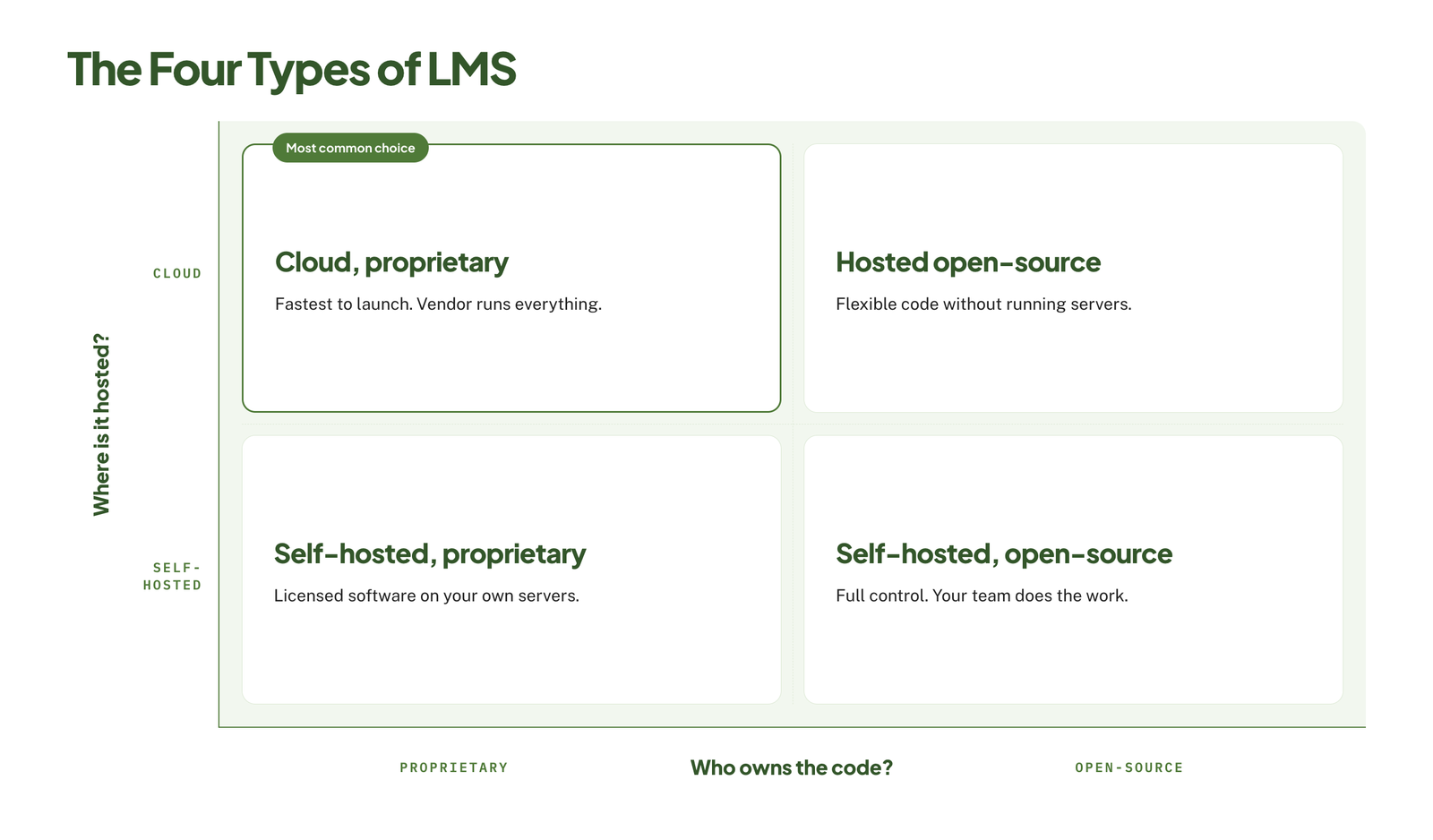
Before you start comparing LMS vendors, you need first to decide which kind of system you want. Two choices cut the market down fast: where the LMS is hosted, and who owns the code.
Cloud vs. Self-hosted
Cloud LMS (also called SaaS) is hosted by your LMS vendor. With this, you log in through a browser, and your vendor handles servers, updates, and security patches.
- Pros: Fast setup, no server maintenance, automatic updates, and predictable subscription costs.
- Cons: Less control over customization and data location, ongoing fees that can even rise with user count.
A self-hosted LMS runs on your own servers or private cloud. With this, your team installs, secures, and updates it.
- Pros: Full control over data, security, and customization.
- Cons: Requires in-house IT staff, slower to launch, and you have to carry the cost of hosting and upkeep.
Most L&D buyers today simply choose cloud, given that self-hosting only makes sense mainly when there are strict data rules or unusual customization that leave no other option.
Open-source vs. Proprietary
Open-source LMS, like Moodle or Open edX, has free, publicly available code. With this, you can change anything, but someone on your team has to do the work.
- Pros: No license fee, unlimited customization, and no vendor lock-in.
- Cons: You pay in developer time, hosting, and support, and the interface often needs work out of the box.
Proprietary LMS is owned and sold by your LMS vendor. With this, you pay for a license or subscription and get a finished product with LMS support.
- Pros: Polished interface, vendor support, and faster time to launch.
- Cons: License costs, limited customization, and much harder to leave.
Free code is not really a free system, given that you have to budget for hosting, setup, and maintenance before you can actually treat open-source as the cheap option.
Which type suits whom?
| Your situation | Best fit | Why |
|---|---|---|
| Small business, no dedicated IT | Cloud, proprietary | Quick to launch and nothing to maintain |
| Mid-size company with a small L&D team | Cloud, proprietary | Support and integrations matter more than deep customization |
| Large enterprise with complex needs | Cloud proprietary, or hosted open-source | Scale, integrations, and some customization |
| Strict data residency or security rules | Self-hosted, or a private cloud option | Control over where data lives |
| Strong developer team, tight license budget | Open-source | Trades license fees for internal effort |
| University or school | Open-source or an academic LMS | Built for grading, courses, and terms |
Step 3: Build Your Requirements List
Having a list of requirements can turn your goals into something that you can test vendors against. You have to keep it short; having a list of 80 features doesn’t really make sense, as every vendor will tick most of them.
Must-have Features
This requirements list can be turned into must-have features. A must-have feature is a feature you would walk away over. So if a vendor lacks it, they are off the list already. Simply aim for 8 to 12:
- Course creation and content support – built-in authoring, plus SCORM, xAPI, video, and document uploads.
- User management – groups, roles, and automated enrollment based on job, team, or location.
- Learning paths – courses sequenced into a program.
- Assessments and certificates – quizzes, pass marks, and certifications with expiry dates.
- Reporting – completion, progress, and scores, with scheduled and exportable reports.
- Mobile access – working mobile experience. Our guide to mobile learning solutions explains what good looks like on a small screen.
- Integrations – HRIS, single sign-on, and tools your team already uses.
- Notifications – automatic reminders for due and overdue training.
- Admin usability – everyday tasks done without any vendor help.
- Support – response times and channels that match your LMS needs.
Nice-to-have Features
Having this list will help improve your experience, but these features should not decide the purchase – you can simply use them as tie-breakers between finalists.
- Gamification (points, badges, leaderboards)
- Social learning (forums, comments, peer feedback)
- Content marketplace or bundled course library
- E-commerce for selling courses
- Custom branding and white-labeling
- Multi-language interface
- Advanced analytics and custom dashboards
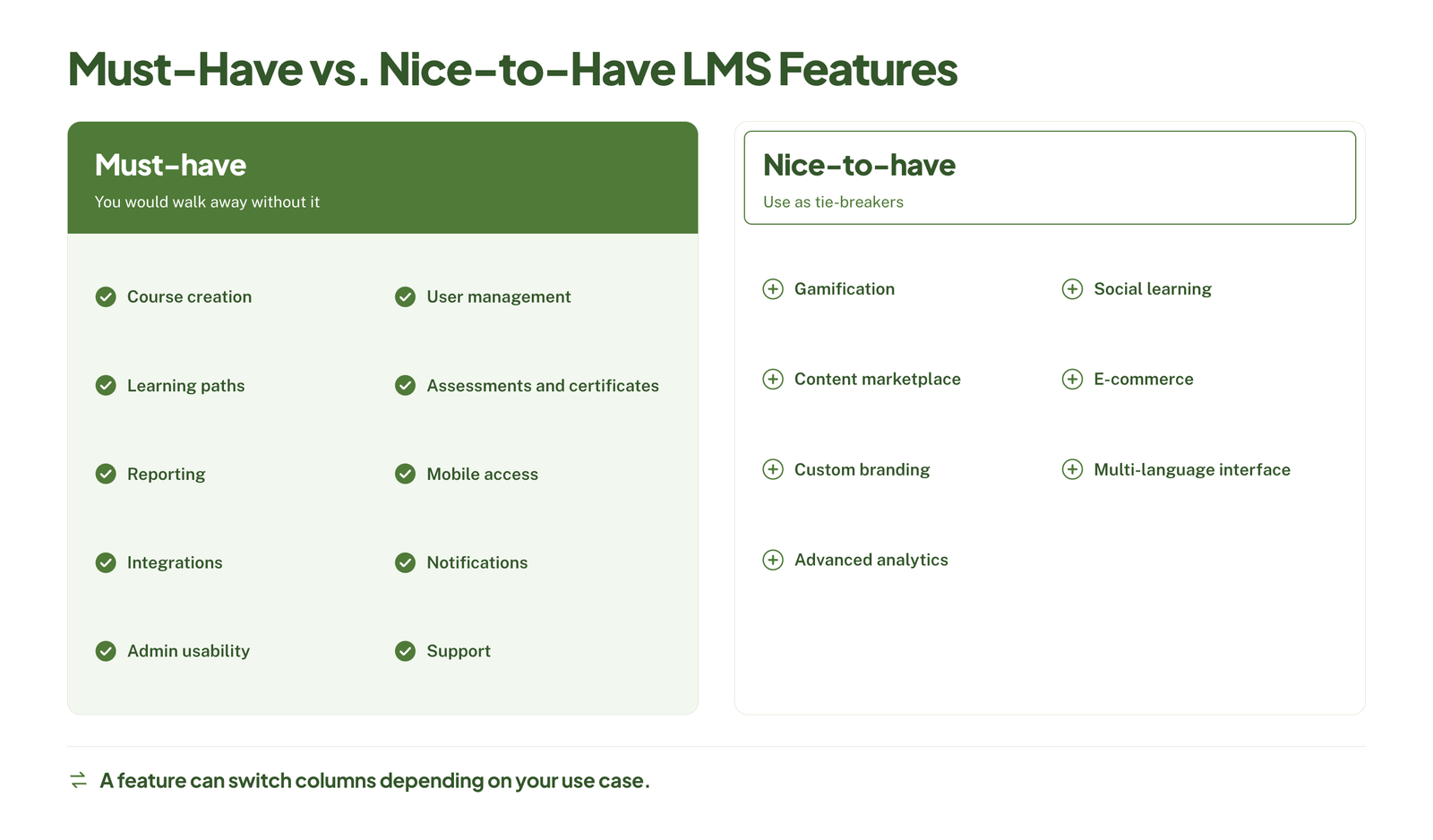 A feature can move between lists depending on your use. For instance, E-commerce is a nice-to-have for onboarding and a must-have for customer education.
Three of these are worth reading up on before you rank them. Our guide to gamification in elearning covers when points and badges help and when they distract. Our guide to multilingual elearning explains what training across languages involves. And our guide to building an elearning content library will help you judge whether a bundled one is worth paying for.
AI Features: What is useful and what is hype?
Most LMS vendors will simply advertise AI, as some of it can really save real time. But others are just labels on old features.
Often useful:
- Drafting quiz questions and course outlines from your existing materials.
- Translating and subtitling content.
- Search that answers your learners’ questions from your course library.
- Skills tagging and content recommendations, if you really have a large catalog.
Treat with caution:
- “AI-powered” recommendations in a library of 20 courses.
- Full course generation with no review steps.
- Predictive analytics with no explanation of what data drives them.
- Features on the roadmap.
You can ask every vendor these same three questions: Can I see it working on my own content? Is it included in my plan or priced separately? What happens to the data I put in?
For how AI is changing course design itself, see our guide to AI for instructional design.
Tie every requirement to a goal
For each must-have feature, you write the goal from Step 1 that it serves. If you can’t, it is simply not a must-have.
| Requirement | Goal it serves | Priority |
|---|---|---|
| HRIS integration with automated enrollment | Cut new-hire time to productivity | Must-have |
| Certification expiry reminders | Pass the annual compliance audit | Must-have |
| Leaderboards | None identified | Nice-to-have |
This list becomes the rows of your scorecard in Step 6.
Step 4: Set a Realistic Budget
You can set your budget around the total cost of running the system, not just the license fee alone.
LMS Pricing Models
Most LMS vendors use one of these four models:
| Model | How it works | Best for | Watch out for |
|---|---|---|---|
| Per user | A fixed rate for every account you create | Stable headcount where most people train regularly | Paying for inactive accounts |
| Per active user | You pay only for people who log in during the billing period | Seasonal staff, customers, or occasional learners | A higher rate per person, and each vendor defines “active” differently |
| Flat fee | One annual fee, usually tied to a user cap | Growing teams that want predictable costs | Minimum fees that are too high for small teams |
| Open-source | No license fee | Teams with developers | Hosting, setup, and maintenance costs |
The model really matters as much as the rate. Active-user rates tend to be higher than registered-user rates, so let’s say, if nearly everyone trains every month, you may just pay more than on a plain per-user plan.
What does an LMS cost?
Figures publicly available vary by source, but you can cluster them in these ranges:
- Per user – $2 to $15 per user per month on corporate platforms, according to Vector Solutions, as Selleo cites the same $2 to $15 range as a baseline for off-the-shelf cloud LMS licenses.
- Per active user – roughly $3 to $20 per active user per month.
- Flat fee – about $5,000 to $75,000 or more per year, depending on tier levels and user cap.
- Small-team plans – these cost more per head, actually. Capterra puts entry-level plans at around $8 to $51 per user per month, with enterprise products that can exceed $3,000 per month.
Here is what the per-user range actually means as an annual license bill:
| Learners | Annual license at $2 to $15 per user per month |
|---|---|
| 100 | $2,400 to $18,000 |
| 500 | $12,000 to $90,000 |
| 1,000 | $24,000 to $180,000 |
You can treat these as your outer bounds. Per-user rates usually fall as volume rises, so that larger organizations may tend to land in the lower half. Also, you can expect to pay annually and up front, even when the price is quoted per month.
If the lower end of these ranges is your limit, our list of affordable LMS systems is a good place to start.
Hidden Costs
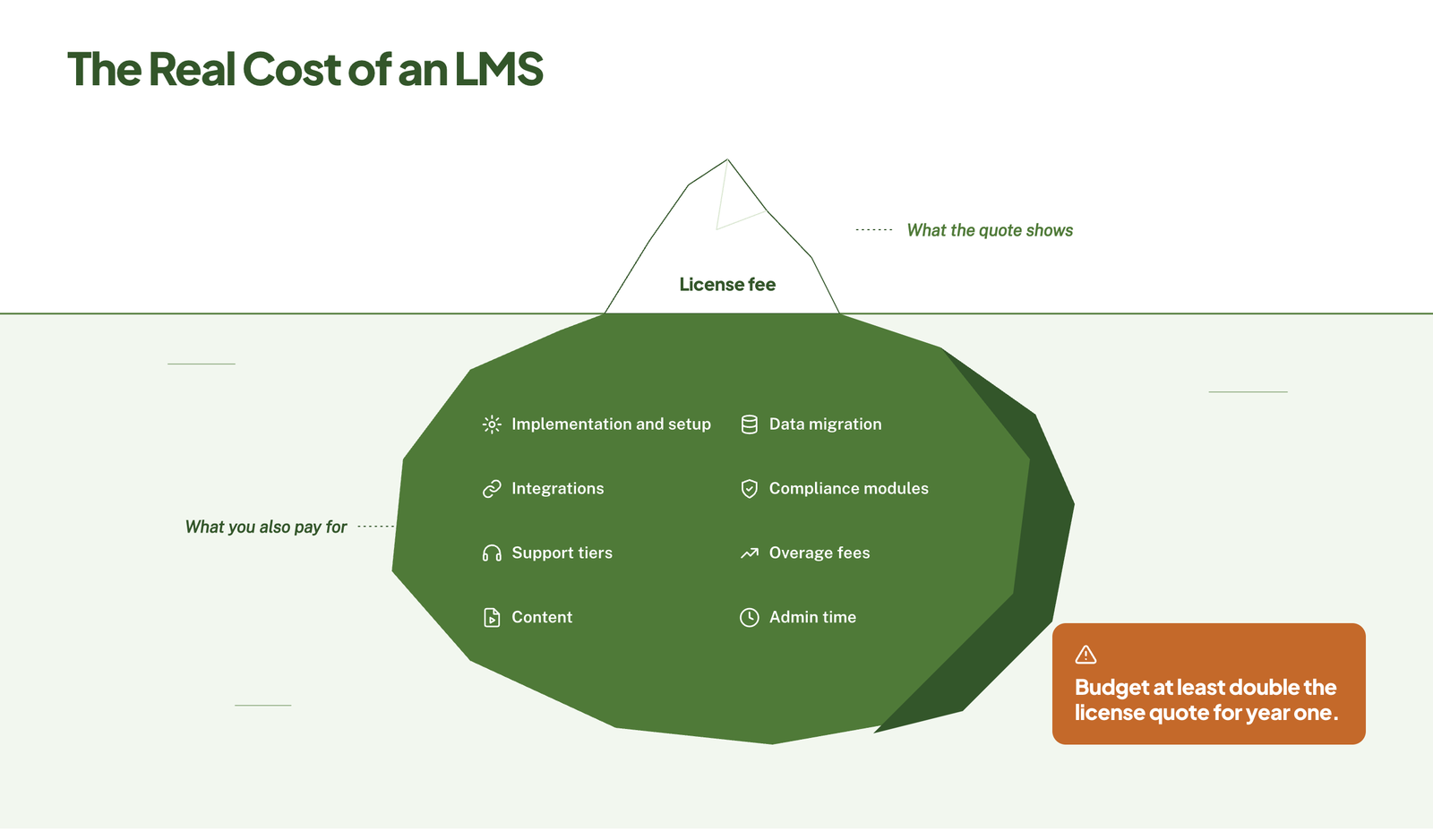 These are the charges that can turn a reasonable quote into a budget problem; consider these as hidden costs:
- Implementation and setup – People Managing People reports one-time fees of $1,000 to $10,000 for data migration, single sign-on setup, and admin training. TalentLMS, for instance, found setup fees from around €2,000 to more than €7,000 across the platforms it compared, with implementations that may take 6 to 12 weeks.
- Data migration – moving courses and learner records from your old system is often billed separately.
- Integrations – connections that are beyond the standard set can carry their own fees.
- Compliance modules – certification tracking and audit reports are often add-ons, at about $1 to $10 per user per month.
- Support tiers – phone support, named account manager, or faster response times that may sit in a higher plan.
- Overage fees – some contracts charge extra when headcount exceeds your agreed band, or for mobile app access.
- Content – off-the-shelf course libraries and custom course development are separate budgets.
- Admin time – someone has to run the system – you really have to count their hours as a cost.
You can ask every vendor for a written quote that lists each of these items, including the ones priced at zero.
Content is often the largest line outside the license. Our guides to off-the-shelf elearning and elearning development costs cover what bought and custom-built courses run to. If admin time is the constraint, LMS administration services can run the platform for you.
Estimating total cost of ownership over three years
You can use this formula for each vendor on your shortlist:
Formula
Three-year TCO = (annual license × 3) + setup + migration + integrations + content + (admin hours × hourly rate × 3)
How much do the extras add? Estimates here may differ, but they agree on the direction:
- Uteach, for instance, estimates that implementation and setup fees alone can raise first-year cost by up to 35%.
- Compono puts total cost of ownership at 2 to 3 times the license fee once content and implementation are included.
- Vector Solutions puts year-one cost at about 2.5 times the subscription quote after the setup, migration, admin labor, and content services.
Safe working rule: if you only have a license quote, you can budget at least double for year one.
Then, you can run two more checks before you move on:
- Model your growth – recalculate at the headcount you expect in year 3, not today’s.
- Ask about renewals – you can find out whether the price is fixed for the term and what cap really applies to increases afterward.
You can add the three-year figure to your scorecard. It is a good number to compare across vendors, not the monthly rate.
Step 5: Check Integrations, Security, and Data Migration
The next step is where you need to bring your IT and security team into the process.
Integrations
Start listing the systems your LMS must exchange data with, then you can ask each vendor how their connection works.
- HRIS – creates, updates, and deactivates learner accounts automatically as people join, move, or leave.
- Single sign-on (SSO) – lets learners log in with their work credentials, usually through SAML or OAuth.
- CRM – links training to customer or sales records, which really matters for customer education and sales enablement.
- Video conferencing – schedules and tracks live sessions in tools like Zoom or Microsoft Teams.
- Collaboration tools – send assignments and reminders where your team already works.
- Content standards – SCORM, xAPI, and LTI support, so that courses built elsewhere will run and report correctly.
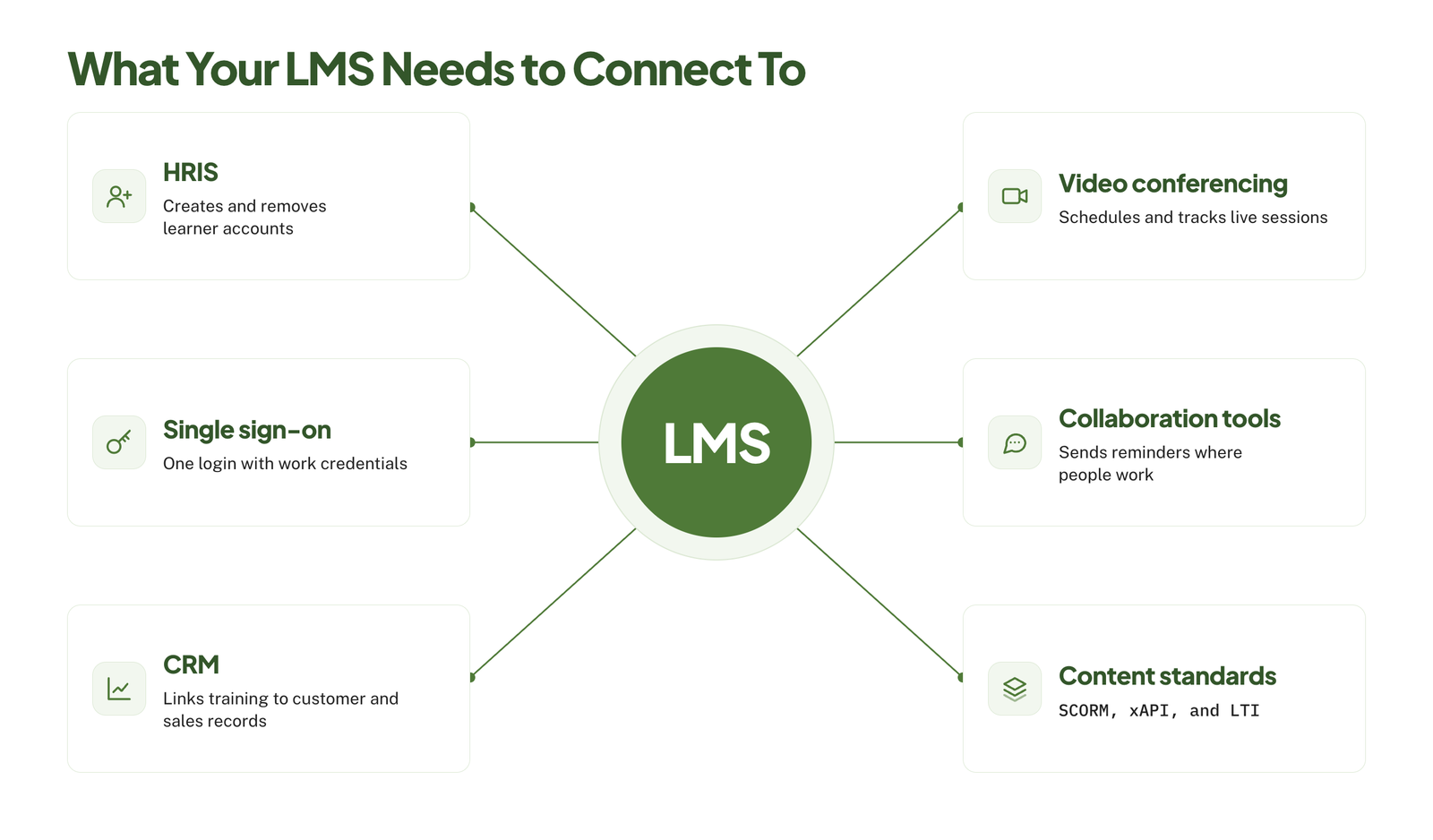 The reality is not all integrations are equal, so you need to ask which type each one is:
| Type | What it means | Risk |
|---|---|---|
| Native | Built and maintained by the vendor | Lowest |
| Connector | Runs through a third-party tool such as Zapier | May add a subscription and limit what data syncs |
| API only | Your developers build the connection | You carry the build and upkeep cost |
With this, you need to see the integration working, and ask what data moves, in which direction, and how often.
Our guide to LMS integration covers the common connections and how each one is set up. For content standards, our guide to SCORM compliance requirements explains what a platform has to support.
Security and Compliance
You can send each vendor a short security questionnaire that should cover at least these points:
- Certifications – a current SOC 2 Type II report or ISO 27001 certificate, available on request.
- Privacy law – GDPR compliance and a signed data processing agreement if you have learners in the EU or UK.
- Data residency – which country your data is stored in, and whether you can choose.
- Encryption – in transit and at rest.
- Access controls – role-based permissions, SSO, and multi-factor authentication.
- Audit logs – a record of who changed what, and when.
- Uptime – a service level agreement with a stated percentage and remedies if it is missed.
- Backups and recovery – how often your data is backed up and how fast it can be restored.
- Incidents – how quickly the vendor must notify you of a breach.
For instance, regulated industries have extra requirements, like HIPAA in US healthcare or 21 CFR Part 11 in life sciences. And if this one applies to you, you have to make it a must-have in Step 3.
Migrating content and learner records
Now, if you want to replace an existing system, you can plan your move before you choose the new one.
- Audit what you have – you can list your courses, formats, and learner records, given that most organizations can find that a large share of their content is outdated or unused.
- Decide what to move – you can migrate what is current and required, then archive the rest.
- Check format compatibility – SCORM and xAPI packages usually transfer cleanly. Your courses built in your old platform’s own authoring tool often do not, and may need to be rebuilt.
- Protect your records – completion histories and certifications matter most, especially for compliance purposes. You need to confirm the new system can import them with their original dates.
- Test before you commit – start asking for a trial migration of a few courses and a sample of learner records.
If older courses won’t import, legacy content conversion services can rebuild them in a current format.
Questions to ask each vendor:
- Do you handle migration, and what does it cost?
- Which formats can you import directly?
- Can you import historical completions and certificates?
- How long does a migration of our size usually take?
Also, you can ask your current vendor how you get your data out, in what format, and for how long after the contract ends. Then, you can ask the new vendor the same question.
Step 6: Shortlist Vendors and Score Them
At this step, you now have everything you need to cut the market down: use case, system type, requirements list, budget, and set of technical checks.
Getting from a long list to 3 to 5 vendors
You can start with a long list of 10 to 15 vendors. Then, you can build it from review sites, peer recommendations, and analyst or industry lists for your use case.
Then, you can apply your knockout criteria in this order, as each one is a pass or fail.
- System type – does it match your choice in Step 2?
- Must-haves – does it have every must-have from Step 3? One miss and the vendor is out.
- Budget – does a rough quote fit the 3-year figure from Step 4?
- Technical checks – does it pass on required integrations, security, and record migration from Step 5?
- Fit for your size – does your LMS vendor serve organizations like yours? You can ask for 2 or 3 customers of a similar size and use case.
Most of this can actually be done from vendor websites, pricing requests, and one short call.
How to use the weighted scorecard?
A weighted scorecard stops the best presenter from actually winning. It can help force you to decide what matters before you see any demos.
- Choose your criteria – use 5 to 9, then take them from your must-haves and your goals.
- Assign weights – you can spread 100 points across criteria according to importance, then agree on the weights as a group and lock them before your first demo.
- Score each vendor – you can use a 1 to 5 scale for every criterion, and write down what each number means so that everyone scores the same way:
- 1 = does not meet the need
- 3 = meets the need with workarounds
- 5 = fully meets the need out of the box
- Calculate – multiply each score by its weight, add results, and divide by 100. Your result is a score out of 5.
Here is a working example for a mid-size company where your main use case is employee onboarding:
| Criterion | Weight | Vendor A | Vendor B | Vendor C |
|---|---|---|---|---|
| Fit with primary use case | 25 | 4 | 5 | 3 |
| Admin usability | 20 | 3 | 4 | 5 |
| Integrations | 15 | 5 | 3 | 4 |
| Reporting | 15 | 4 | 4 | 3 |
| Three-year total cost | 15 | 3 | 3 | 5 |
| Support and implementation | 10 | 4 | 4 | 3 |
| Weighted score (out of 5) | 100 | 3.80 | 3.95 | 3.85 |
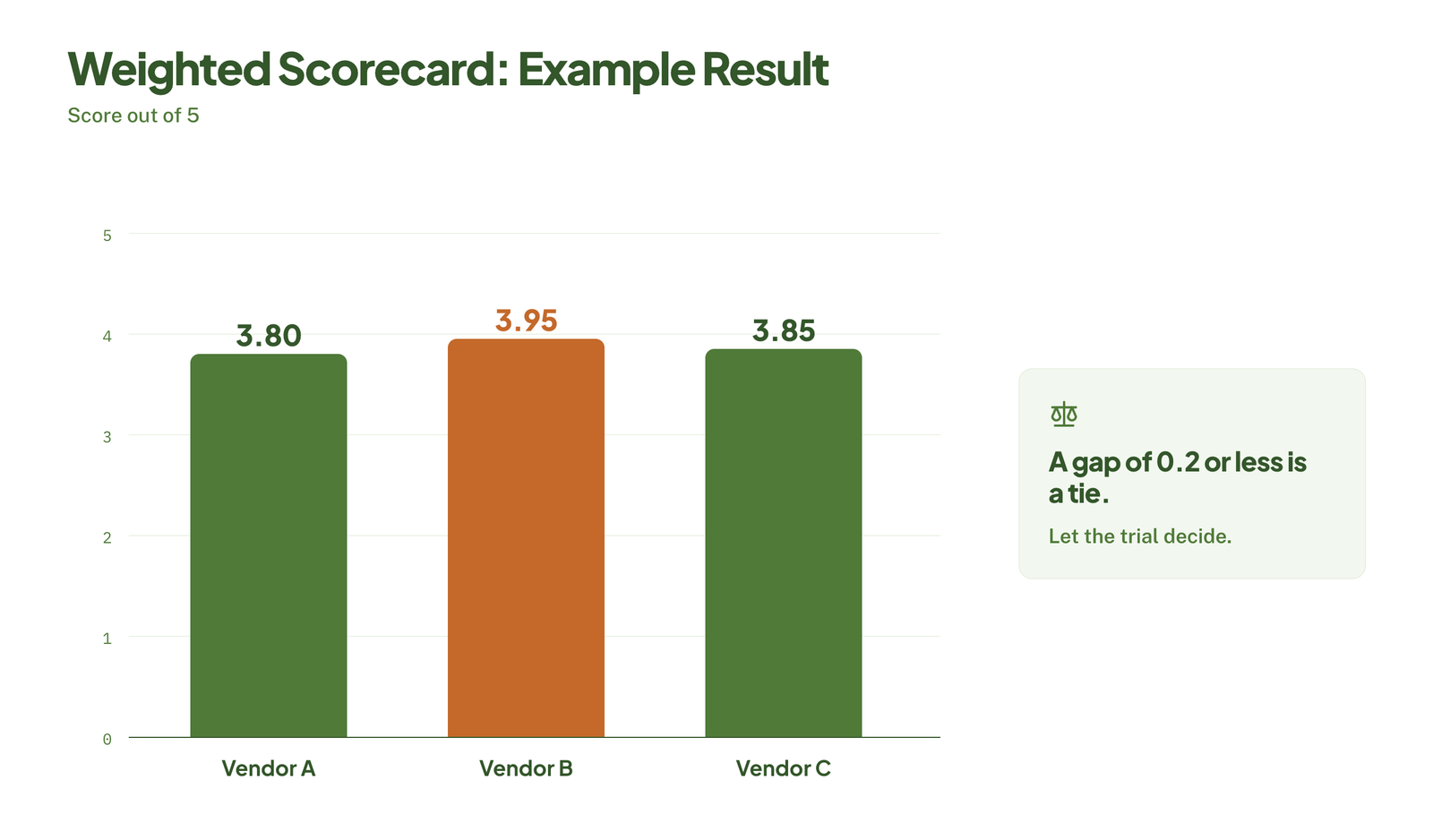 Vendor B leads, but not by much. That is pretty normal, and it leads to 3 rules for reading the results:
- Treat close scores as a tie – a gap of 0.2 or less is within the margin of error. So let the trial in Step 7 settle it.
- Look at where the points come from – vendor C is cheapest and easiest to manage but the weakest on the use case that can carry the most weight. Vendor B is the reverse on cost.
- Don’t adjust weights after scoring – if the result feels wrong, you need to discuss why, but changing the weights to get the answer you wanted defeats the purpose.
You can have each evaluator score on their own first, then compare. You may include at least one admin, one learner representative, and someone from IT. Large gaps between scorers usually mean a criterion is unclear, or people saw different things in that demo.
Download the free LMS scorecard to use this structure with your own criteria and weights.
Where to find honest reviews?
Vendor websites and case studies show the best outcomes. You can balance them with sources your LMS vendor doesn’t control.
- Review sites like G2, Capterra, and TrustRadius. You can filter by company size and industry, sort by most recent, and read the three-star reviews first – they tend to be the most specific about trade-offs.
- Peer communities. L&D groups on LinkedIn, Slack communities, and Reddit threads give blunt opinions. You can treat single comments as leads to check.
- Reference calls. You can ask each vendor for 2 or 3 customers that can match your size and use case, then you can ask them what went wrong.
- Your own network. One conversation with someone who has actually run the system for a year is worth more than just 50 short reviews.
Here are useful questions for a reference call:
- How long did implementation take compared with the estimate?
- What costs did you not expect?
- How is support when something breaks?
- What do your admins complain about?
- Would you choose it again?
Many LMS vendors will just reward customers for leaving reviews, which then pushes ratings up, and the references a vendor gives you are its happiest customers. With this, you have to look for patterns across sources instead of just relying on any one of them.
Step 7: Run Demos and Trials, Then Negotiate
The scorecard tells you which LMS vendors look right on paper. Demos and trials can tell you which one works for your people. Then take your top 2 or 3 through this step.
Demo Script: Questions and tasks to make every vendor show you
A standard sales demo can show the product at its best, on the vendor’s content, in the vendor’s order. You can replace it with your own script, and give every LMS vendor the same one so you can compare like with like.
You can send the script a week ahead, along with sample courses and a short list of test users. Then, you can ask the vendor to perform these tasks live:
Admin tasks:
- Upload our sample course and publish it.
- Create a learning path for a new hire in a specific role.
- Enroll a group automatically based on department or location.
- Set up a certification that expires in 12 months, with reminders.
- Build the report we would send to a manager each month, and schedule it.
- Deactivate a leaver and show what happens to their records.
Learner tasks:
- Log in through SSO and find assigned training.
- Complete part of a course on a phone.
- Search for a topic and show what comes back.
Technical and commercial questions:
- Show the HRIS integration working.
- Which features shown today are outside the plan we were quoted?
- Which features shown today are on the roadmap and not yet released?
- Who handles our implementation, and what does the timeline look like?
Three rules will actually make your LMS demo more useful:
- Ask for the plan you would buy – demos often run on the top tier.
- Watch the clicks – count the steps for everyday admin tasks.
- Score straight away – have each evaluator fill in the scorecard within the hour, before any impressions blur.
What to test in a free trial?
A trial is only worth running with real content and real people. You can ask for a sandbox or pilot on the plan you intend to buy, and run it for 2 to 4 weeks with a small group.
| Who | What to test | What to look for |
|---|---|---|
| 5 to 10 learners | One real course, on their usual devices | Can they log in, find it, and finish it without help? |
| 1 or 2 admins | The admin tasks from your demo script, unassisted | How long each task takes, and where they get stuck |
| A manager | Checking a team’s progress | Whether the reports answer their questions |
| IT | SSO and one key integration | Whether setup matches what the vendor described |
Also, you can test the things a demo can’t show easily:
- Support – send a real question through the normal support channel and time the response.
- Content import – upload a few of your existing courses, including one awkward one.
- Reporting – recreate a report you rely on today.
- Mobile – have someone complete a course entirely on a phone.
You can collect feedback with 3 short questions for learners and admins: what was easy, what was frustrating, and would you want to use this every week? You can update your scorecard with what you learn.
Contract terms to check
Once you have a preferred LMS vendor, you can keep your second choice active until the contract is signed. You negotiate better when you have a real alternative.
You may review these terms before you sign:
| Term | What to check |
|---|---|
| Contract length | Multi-year deals bring discounts but reduce flexibility. A one-year first term, or a multi-year term with an exit clause, lowers your risk. |
| Renewal | Whether it renews automatically, and how much notice you must give to cancel. |
| Price increases | A written cap on increases at renewal. |
| User counts | Whether you can reduce licenses as well as add them, and what overages cost. |
| Definition of a user | Exactly what counts as “active” or “registered,” and over what period. |
| Service levels | Uptime commitment, support response times, and remedies if they are missed. |
| Data ownership | Confirmation that your content and learner data belong to you. |
| Exit and export | The format you receive your data in, how long you have to retrieve it, and any fee. |
| Implementation | Scope, timeline, and deliverables written into the agreement. |
| Termination | Your right to leave if the vendor materially fails to deliver. |
Common points to negotiate:
- Discount for a longer term or annual prepayment
- Waived or reduced implementation fees
- Fixed price for the full term, with a cap after it
- Ramp, where you actually pay for fewer users during rollout
- Extra sandbox access, training, or support hours
LMS vendors often have more room at the end of their quarter or financial year. Timing your decision, in this context, can help, but don’t let your deadline rush you past the trial.
Make sure you have your legal or procurement team review the final agreement. The points above are a checklist of what to look for.
After You Sign: Plan the Implementation
Choosing the platform is half the job. A good LMS that is rolled out badly gets the same result as a bad one: nobody uses it. Plan these six things before launch day.
- Name an owner – one person is accountable for the rollout and has the time to do it. Shared ownership usually means no ownership.
- Agree the plan with your vendor – confirm the milestones, who does what, and the go-live date, and check them against the implementation terms in your contract.
- Set up and test the basics first – SSO, the HRIS sync, user groups, and branding. Test each with real accounts before any content goes in.
- Migrate and check your content – move the courses and records you chose in Step 5, then open every course and spot-check completion data.
- Pilot before you launch – run one team or one program through the system for a few weeks. Fix what they find, then open it to everyone.
- Tell people why – learners and managers need to know what the system is for, what they have to do, and by when. A launch email with a login link is not enough.
After launch, go back to the metrics you set in Step 1 and check them at 90 days. That tells you whether the system is solving the problem you bought it for, and it gives you evidence when the renewal comes round.
If your team doesn’t have the capacity to keep the platform running day to day, LMS support services can cover setup, troubleshooting, and ongoing help.
Pro tip
Launch with one program that matters, not your whole catalog. A single onboarding path or compliance course that works well builds more trust in the new system than 200 courses nobody has checked.
Common Mistakes When Choosing an LMS
- Buying on feature count – the platform with the longest feature list is rarely the best fit. Score vendors against your must-haves, not theirs.
- Ignoring the admin experience – buyers test the learner view and forget the people who run the system every day. If admins struggle, courses don’t get built and reports don’t get sent.
- Budgeting for the license only – setup, migration, content, and admin time can double the first-year cost. Compare vendors on the three-year figure.
- Skipping the trial with real users – a demo shows what the vendor wants you to see. Only a trial with your own content and people shows how it works for you.
- Leaving IT and security until the contract stage – a failed security review or a missing integration at the last step sends you back to the shortlist.
- Signing without exit terms – if the contract doesn’t say how you get your data out, leaving becomes slow and expensive.
- Choosing for today’s headcount – a system that fits 200 learners may be priced or built wrongly for 1,000. Recalculate at the size you expect in year 3.
In one line
The right LMS is the one that fits your main use case, your admins can run, and you can afford for three years. Decide what matters before you see a demo, score every vendor the same way, and test with real people before you sign.
Picked your LMS but have nothing to put in it?
At eLearning Solutions Lab, we build the courses that go inside your LMS. Design, development, and QA are handled by one team. Send us your content and we’ll come back with a scope, a price, and a delivery date before you commit to anything.
Related Reading
- Best LMS services for small businesses – platforms and providers suited to smaller teams.
- Best LMS for training companies – options for businesses that sell training.
- Blended learning software – tools for combining live sessions with online courses.
- How to create SCORM content – building courses your new LMS can track.
- Elearning delivery – the ways to get training to your learners.
The Author

Book A Discovery Call
Our Learning Advisors are happy to walk you through your project step-by-step — content, timeline, and fixed pricing.
Get Your Free QuoteNo obligation — just a focused conversation. Proposal within 24 hours.
You may also like
Software for Training Companies: Best Tools and How to Choose (2026 Guide)
Short answer Training companies need a training management system (TMS) to…

12 Real Microlearning Examples You Can Copy
Short answer A microlearning example is a short lesson, usually 2 to 5…