

Short answer
An eLearning content library is a collection of digital training materials that your organization can access from one place, most often a catalog of ready-made courses licensed from an eLearning content provider.
The term has three meanings: an off-the-shelf course library, an authoring asset library of templates and media, and the content repository inside an LMS. Course libraries are usually licensed by subscription, priced per user, per course, or as a full catalog. The right one depends on your topics, your learners, your LMS, and how much admin time you can give it.
Most content libraries are either of these two: one sells thousands of ready-made courses, and another offers templates and stock images for building your own.
A third, if there is one, just means a folder inside your LMS where your training files are stored.
So if you’re an L&D manager who is trying to work out what you actually need, that overlap makes it difficult to compare options or even ask the right questions.
In this guide, we explain each meaning of eLearning content library, how course libraries are priced and licensed, and how to judge whether one is right for your team and organization.
Updated October 2026.
In This Article
- What is an eLearning content library?
- Three meanings of “content library”
- What’s inside an off-the-shelf course library
- How eLearning content libraries work
- Pricing and licensing models
- Benefits and limitations
- Build vs buy vs blend
- How to evaluate an eLearning content library
- Considerations for global teams
What is an eLearning Content Library?
An eLearning content library is a collection of digital training materials that your organization can access from one place. It also means a catalog of ready-made courses licensed from a specific eLearning content provider.
If you are already at the stage of comparing vendors, our roundup of the top elearning content providers is the place to start.
Three Meanings of “eLearning Content Library”
Content library covers three different products, and they don’t really compete with each other, realistically.
Off-the-shelf Course Library
It’s the most common meaning of content library, wherein a provider builds a catalog of finished courses on widely needed topics, like workplace compliance, leadership, communication, and software skills, and licenses access to organizations.
You don’t really create anything, given that you simply choose the courses that fit, assign them to learners, and track completion from there.
These libraries suit best for topics that are much the same in every company. For instance, a course on data privacy or giving feedback doesn’t really need to be written from scratch for each employer.
Our guide to off-the-shelf elearning covers this model in more depth.
Authoring Asset Library
Here is the library that holds raw materials instead of finished courses. It also includes slide templates, stock photos, illustrated characters, icons, and interaction layouts that your instructional designers can use inside an authoring tool.
The audience is actually different here, given that course libraries are bought by L&D managers who need training delivered. Asset libraries are also used by the people building that training, and they usually come bundled with an authoring tool subscription.
Our roundup of the best elearning authoring tools notes which ones include an asset library.
LMS Content Repository
Some LMS or learning management systems use content libraries simply as the storage area where your organization’s own files are kept. Assets like courses, videos, documents, and quizzes can sit there so that admins can organize, reuse, and assign them.
How Do the Three Compare?
| Meaning | What it contains | Who uses it | How you get it |
|---|---|---|---|
| Off-the-shelf course library | Finished, ready-to-assign courses | L&D managers, HR, compliance leads | Licensed from a content provider |
| Authoring asset library | Templates, images, characters, icons | Instructional designers, course authors | Bundled with an authoring tool |
| LMS content repository | Your own uploaded or connected content | LMS admins | Built into the LMS |
The rest of this guide focuses on the first meaning, since that is what most people are looking for when they search the term.
What’s Inside an Off-the-Shelf Course Library
Catalogs can vary in size from a few hundred courses to tens of thousands, but most of these courses are built from the same ingredients.
Common Topic Areas
- Compliance – workplace safety, data privacy, anti-harassment, anti-bribery, and other training programs that regulators or insurers can expect.
- Leadership and management – coaching, delegation, performance conversations, and managing change.
- Soft skills – communication, time management, teamwork, and customer service.
- Digital and software skills – office tools, cybersecurity awareness, and data literacy.
- Industry-specific content – specialist libraries for verticals like healthcare, banking, manufacturing, and hospitality.
General content providers can actually cover the first four, whereas industry content tends to come from specialists, so some organizations license more than just one library.
For specific topic areas, see our guides to the top compliance elearning providers, leadership development elearning, and healthcare elearning solutions.
Formats
A single eLearning content library usually has these blended several formats:
- Video lessons, which are often with a presenter or animation.
- Microlearning like short modules of around 5 minutes on one idea.
- Interactive modules with scenarios, branching choices, and knowledge checks.
- Assessments and certificates of completion.
- Supporting material including but not limited to job aids, workbooks, and discussion guides.
Format matters as much as the topic. So an eLearning content library made up mostly of long video courses will actually suit a different workforce than one that’s built around short modules that can be completed on a phone.
Our guides to video-based elearning, scenario-based elearning, and mobile learning solutions explain what good looks like in each format.
Technical Standards
Courses that have to run in your LMS and report back to it must have their technical requirements set up:
- SCORM – long-established standard for packaging courses so that your LMS can launch them and record completion and scores.
- xAPI – a newer standard that can track a wider range of learning activities, including activities outside your LMS.
- Integrations – direct connections that can sync your provider’s catalog into your LMS, so that your new and updated courses can appear without any manual uploads.
You can ask which of these an eLearning content provider supports for each course, given that older titles in a catalog don’t always really match the newer ones.
Our guides to SCORM compliance requirements and LMS integration explain what to check before you sign.
How eLearning Content Libraries Work
When you buy an eLearning content library, it’s closer to subscribing to a service than just simply buying a product. You literally pay for access over a contract period, and your eLearning content provider maintains the content.
Delivery Options
There are two main ways your learners can reach the courses:
- Through the provider’s platform – your learners log in to your vendor’s own site or app, very quick to set up and requires no LMS, but your training records sit in a separate system.
- Through your own LMS – your courses appear alongside your existing content, and completions are recorded in one place. It’s pretty much done either by uploading your course files or by simply connecting the catalog through an integration.
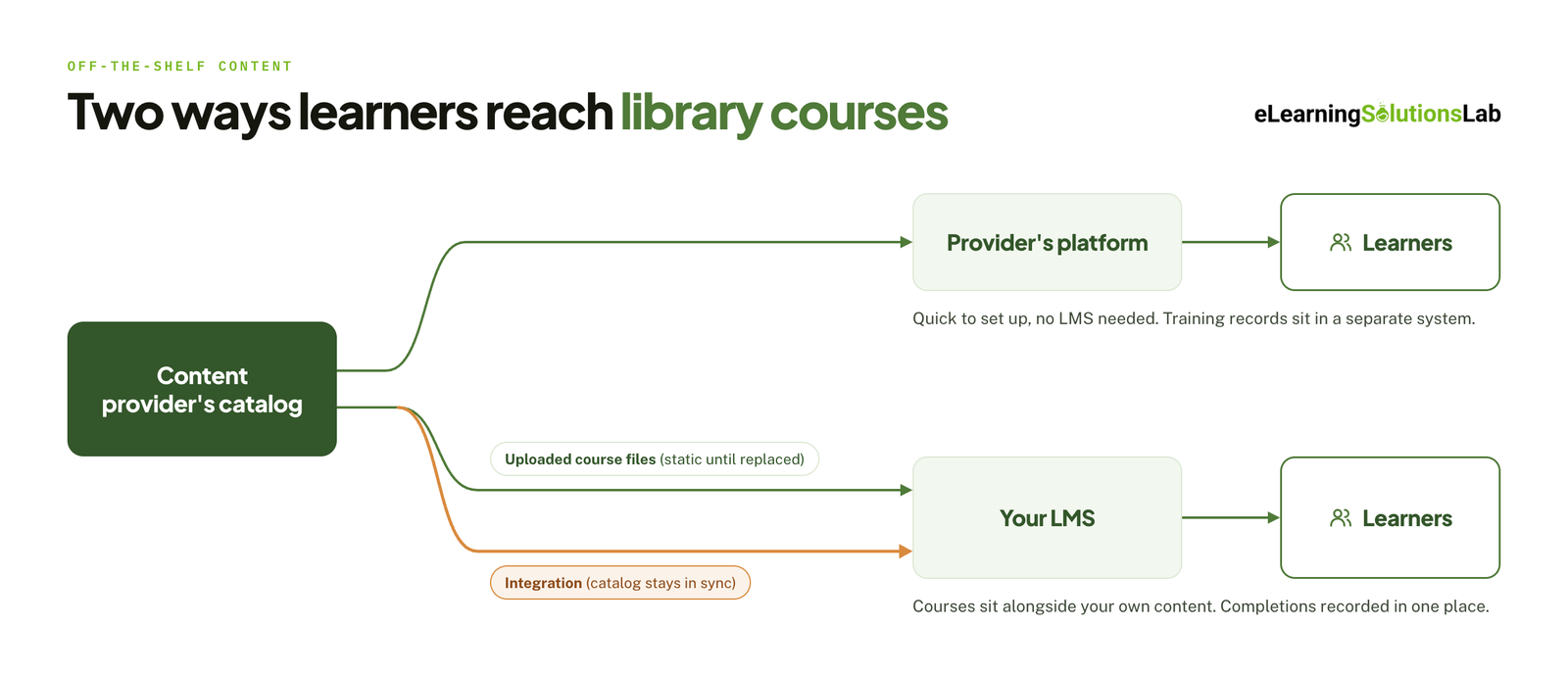 Uploaded files from your content library can stay as they are until someone replaces them. So having an integration can keep the catalog in sync automatically, which really matters once you have more than a handful of courses.
If you are not sure which route fits, our guide do I need an LMS walks through the decision, and our guide to elearning delivery compares the channels side by side.
How Is Content Updated and Retired?
eLearning providers can add your new courses, revise existing ones, and remove titles that are out of date. Like having compliance content that changes most often, given that it has to follow the law.
You can ask how you’ll be told about these changes. For instance, a retired course can break a learning path you’ve built, and a revised one may mean that your learners need to retake it.
A written compliance training plan makes it easier to see which assignments a change will affect.
What Do Admins Actually Have to Do?
An eLearning content library removes the work of you creating courses, but it doesn’t remove the work of actually running them, so someone on your L&D team still needs to:
- Curate – pick the relevant courses out of a catalog that may hold thousands.
- Organize – group them into learning paths by role, team, or goal.
- Assign – enroll your learners and set deadlines.
- Report – track your completions and chase overdue training programs.
- Review – check periodically whether assigned courses are still current.
Having a large catalog with no guidance can leave your learners to search for themselves, and most won’t actually do it. So you need to plan for that time before you actually sign, especially if one person manages training alongside other duties.
Our guide to the LMS administrator role sets out what that workload looks like week to week.
Pricing and Licensing Models
Most providers do not publish prices, so you will usually need a quote. What you can compare in advance is the licensing model, because it decides how the bill grows as your team does.
| Model | How it works | Best suited to | Watch out for |
|---|---|---|---|
| Per user, per year | You pay for every learner who has access to the catalog | Teams where most people will use the library regularly | Paying for seats that never log in |
| Active user | You pay only for learners who open a course in the billing period | Uneven or seasonal usage | Costs that are harder to forecast |
| Per course or bundle | You license selected titles or a topic pack | A narrow need, such as a set of compliance courses | The total climbing as you add titles |
| Pay per use or credits | You buy credits that are spent on each enrollment | Small teams and occasional training | Credits that expire unused |
| Enterprise or unlimited | A flat fee covers the whole organization and catalog | Large organizations with broad training needs | Multi-year commitments and renewal increases |
Model names and terms vary by provider. Always confirm what counts as a user and what happens at renewal.
What Drives the Cost
- Number of learners – the biggest factor in most quotes, usually with volume discounts at higher tiers.
- Catalog scope – a full catalog costs more than a curated collection or a single topic area.
- Contract length – multi-year terms lower the annual rate but reduce your room to switch.
- Delivery method – an LMS integration or SCORM files can be priced differently from access on the provider’s platform.
- Languages – translated versions are sometimes included and sometimes an add-on.
- Support and curation – some providers charge for help mapping courses to your roles and skills.
Hidden Costs to Plan For
- Setup – connecting the catalog to your LMS and testing that completions report correctly.
- Curation time – the staff hours needed to choose and organize courses, which recur every time the catalog changes.
- Unused content – most organizations use a small share of a large catalog, so cost per course actually used is the figure that matters.
- End of contract – access to the courses normally ends with the license, and learning paths built on them end with it.
To weigh a license against building your own courses, see our breakdown of elearning development costs.
Benefits and Limitations
A course library solves some training problems very well and others not at all. Knowing which is which helps you avoid paying for a catalog that sits unused.
Benefits
- Speed – courses are ready to assign on day one, with no development time.
- Breadth – one license can cover dozens of topics that would take years to build in-house.
- Lower cost per topic – the provider spreads production cost across many customers.
- Maintained content – the provider updates courses when laws or best practice change.
- Learner choice – people can explore topics beyond what they have been assigned, whenever it suits them. Our guide to on-demand training covers how to make that work.
Limitations
- Generic content – courses are written for every company, so they cannot reflect your products, systems, policies, or culture.
- Variable quality – large catalogs often mix strong recent courses with older, weaker ones.
- Limited customization – many providers do not let you edit courses or add your own branding and examples.
- Low uptake without curation – access alone rarely leads to learning.
- No ownership – you rent the content and lose it when the contract ends.
In one line
A content library is the right answer for skills that are the same in every company, and the wrong answer for knowledge that only exists inside yours.
Build vs Buy vs Blend
The choice is rarely all or nothing. Most organizations end up licensing some content and building the rest, and the question is where to draw the line.
| Buy (library) | Build (custom) | Blend | |
|---|---|---|---|
| Best for | Generic skills and standard compliance topics | Your products, processes, systems, and culture | Organizations with both kinds of need |
| Time to launch | Days | Weeks to months per course | Library first, custom courses added over time |
| Cost profile | Recurring license fee | Higher one-off cost, then maintenance | Smaller license plus targeted build budget |
| Relevance | General | Exact fit | High where it matters most |
| Ownership | Rented | Yours to keep and edit | Mixed |
A simple test is to ask whether a competitor could use the same course unchanged. If yes, license it. If no, it belongs on the build list.
Our guides to what is custom elearning content and bespoke elearning explain the build side in detail. If your team does not have the capacity to build, our guide to elearning outsourcing covers how to brief and manage an outside team, and rapid elearning services are an option when the custom courses are needed quickly.
How to Evaluate an eLearning Content Library
Course counts tell you very little. A catalog of 10,000 titles is not better than one of 500 if only 40 are relevant to your people. Use the checklist below with every provider you shortlist.
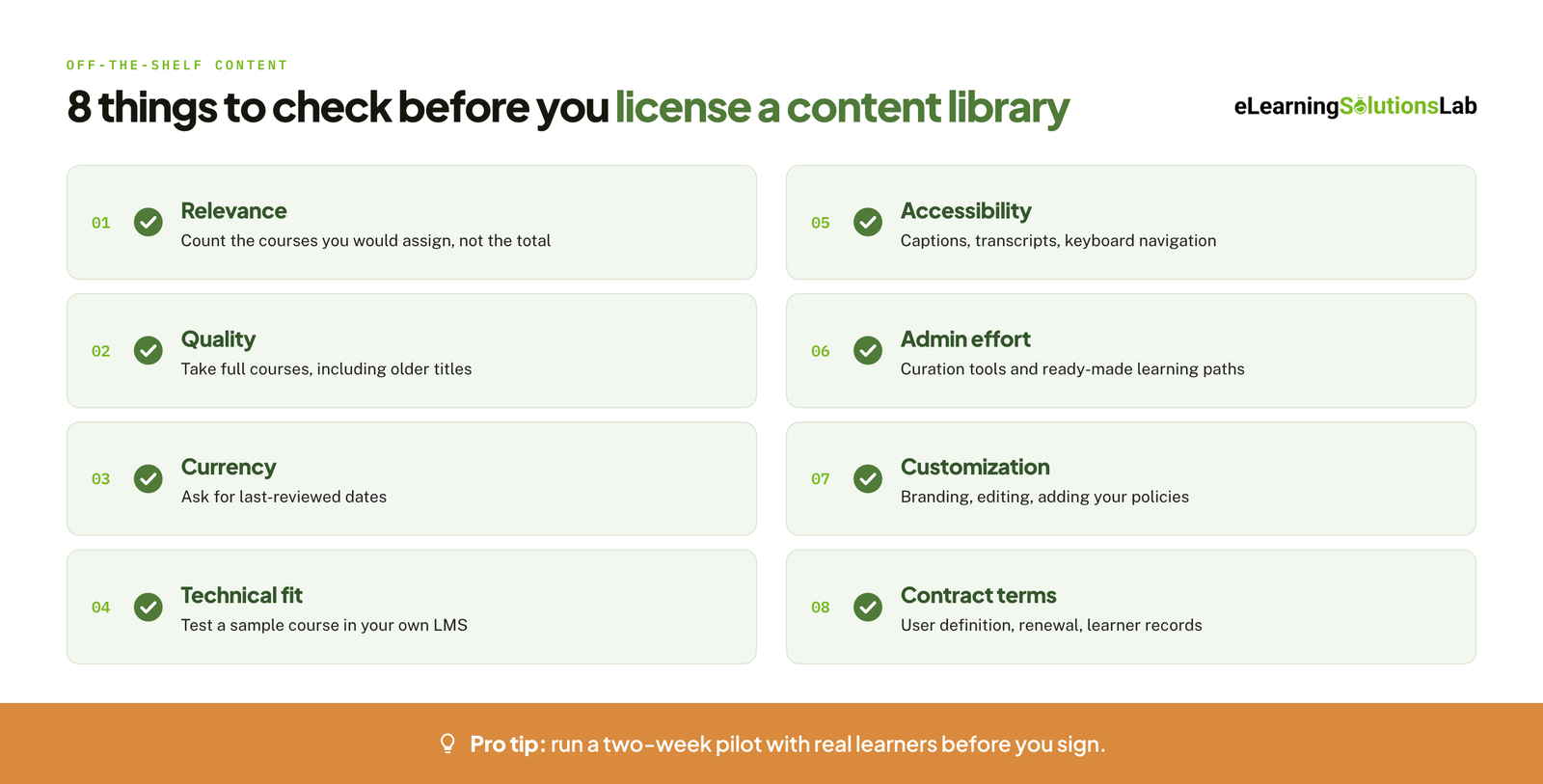
- Relevance – map the catalog against your actual training needs and count the courses you would assign, not the total on offer.
- Quality – take several full courses as a learner, including older titles, and not only the showcase demos.
- Currency – ask for the last-reviewed date of each course you plan to use, and how often compliance content is revised.
- Technical fit – test a sample course in your own LMS to confirm that it launches, tracks, and reports correctly.
- Accessibility – check for captions, transcripts, keyboard navigation, and screen reader support. Our guide to accessible elearning lists what to look for.
- Admin effort – ask what curation tools, ready-made learning paths, and skills mapping come with the license.
- Customization – find out whether you can add branding, edit content, or insert your own policies.
- Contract terms – confirm the definition of a user, the renewal terms, and what happens to learner records when you leave.
Pro tip
Ask for a pilot with a small group of real learners before you sign. Give them five or six courses you would actually assign, then collect their feedback and check the completion data in your LMS. A two-week pilot tells you more about quality and fit than any sales demo.
Once the library is running, track usage and outcomes and not only logins. Our guide to elearning ROI shows how to turn those numbers into a case for renewal or change.
Considerations for Global Teams
If your learners work in more than one country, a library that looks complete in English can turn out to be thin everywhere else.
Language Coverage
Ask how many of the courses you need are available in each language, since the headline number of languages often applies to only part of the catalog. Check also what has been translated. Subtitles alone are a different learner experience from translated narration, on-screen text, and assessments.
Our guide to multilingual elearning explains what a full rollout involves.
Translation vs Localization
Translation changes the words. Localization also adapts examples, images, names, currencies, and scenarios so that the course feels written for that audience. Off-the-shelf courses are usually translated and rarely localized, which matters most for soft skills and leadership topics where cultural norms differ.
Where a library falls short, elearning translation services and elearning localization services can fill the gap for the courses you own.
Regional Compliance Content
Compliance courses are written for a specific legal system. A data privacy or workplace safety course built for one country can be inaccurate in another. Ask which jurisdictions each compliance title covers, and expect to source some regional content separately or build it yourself.
Need the courses a content library can’t give you?
At eLearning Solutions Lab, we build custom courses for the training that is specific to your organization, such as your products, processes, and policies, and package them to sit alongside your licensed library in the same LMS. Design, development, and QA are handled by one team. Send us your content and we’ll come back with a scope, a price, and a delivery date before you commit to anything.
Related Reading
- Top elearning vendors – the wider vendor market, beyond content libraries.
- Custom elearning content development – how the build process works from brief to launch.
- Affordable LMS systems – lower-cost platforms to host a library and your own courses.
- Top blended elearning solutions – options that combine online courses with live training.
- How to create effective elearning courses – the design process for the courses you build yourself.
- Elearning trends – where content, AI, and delivery are heading next.
The Author

Book A Discovery Call
Our Learning Advisors are happy to walk you through your project step-by-step — content, timeline, and fixed pricing.
Get Your Free QuoteNo obligation — just a focused conversation. Proposal within 24 hours.
You may also like
Software for Training Companies: Best Tools and How to Choose (2026 Guide)
Short answer Training companies need a training management system (TMS) to…
How to Choose an LMS: A 7-Step Guide (With Free Scorecard)
Short answer To choose an LMS, define your goals and learners first, then…