

Short answer: Hire a freelancer for small, well-scoped tasks, a full-time designer if you have a steady year-round flow of courses, and an end-to-end development partner if you need finished, LMS-ready courses without managing the build yourself. Freelance rates typically run $20–100+ an hour, and a finished course costs roughly $240–$1,190 per learner minute at US benchmark rates, depending on interactivity. Use the hiring scorecard below to vet any candidate or vendor.
Most L&D teams don’t have an expertise problem; they have a bandwidth problem. The compliance update from last quarter still isn’t live in the LMS, new hires are training on outdated slides, and hours of SME content sit in a folder waiting to become a course.
In this guide, you’ll learn what eLearning designers actually do, how they differ from instructional designers and developers, what each hiring model generally costs, from freelancers to full development partners, and how to hire elearning designers. You’ll also get a vetting scorecard, interview questions, and a paid test-project brief, so your first hire isn’t a costly mistake.
In This Article
- What an eLearning designer does
- eLearning designer vs. instructional designer vs. developer
- When to hire an eLearning designer
- Hiring models compared
- How much it costs to hire an eLearning designer
- Where to find eLearning designers
- How to vet an eLearning designer
- Take the hiring scorecard
- The hiring process, step by step
- Freelancer, hire, or partner? A quick decision path
- If you work with a partner: what to look for
What Does an eLearning Designer Do?
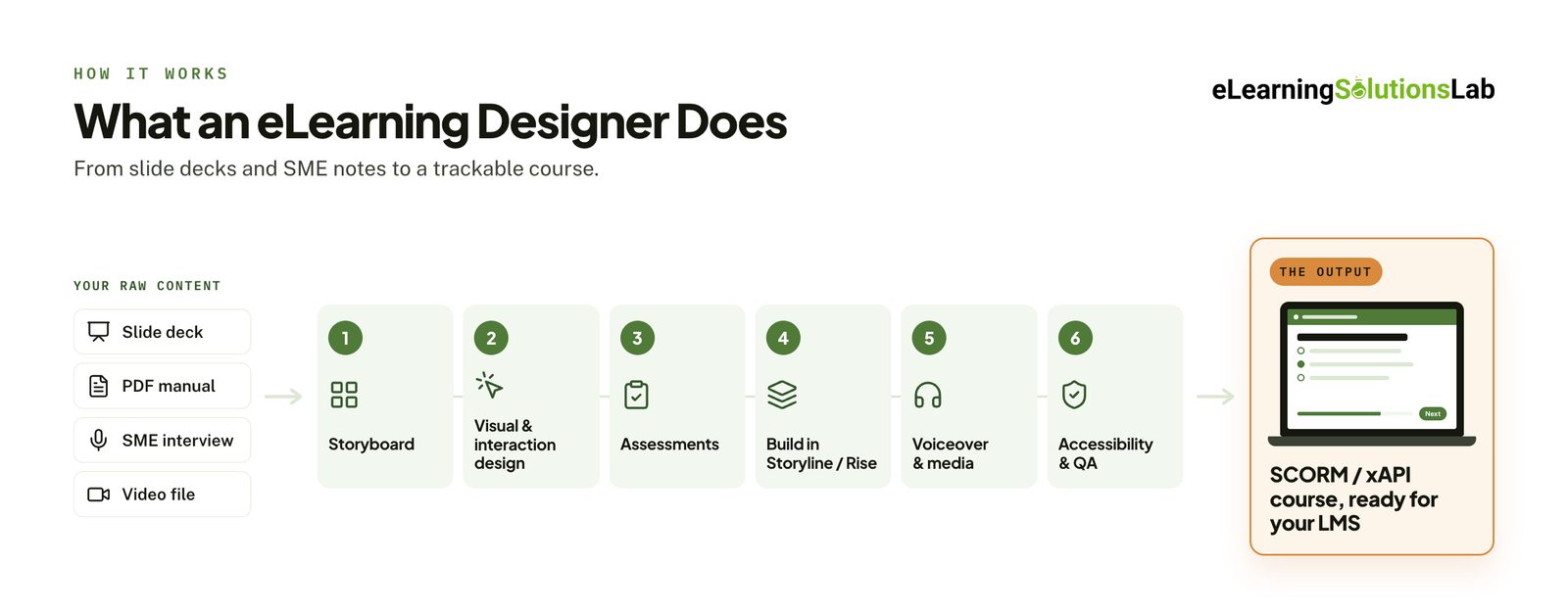 An eLearning designer turns raw training material, including slide decks, manuals, SME interviews, and recorded sessions, into online courses that people actually finish. They sit between the content and the learner, and their job is to make information clear, engaging, and easy to act on.
In practice, the role usually covers:
- Storyboarding – mapping each screen, interaction, and narration line before anything is built, so stakeholders can approve the flow early.
- Visual and interaction design – creating layouts, graphics, and clickable elements like tabs, drag-and-drops, and scenarios that keep learners engaged.
- Assessment design – building knowledge checks and quizzes that test real understanding, not memorization.
- Course building – assembling the course in an authoring tool, most often Articulate Storyline 360 for custom interactivity and Rise 360 for fast, responsive, mobile-friendly courses. Our guide to articulate elearning covers when to use each.
- Media production – adding voiceover, video, animation, or avatar-based content where it creates a better learning experience.
- Accessibility and QA – checking the course against WCAG standards, testing it across devices, and fixing bugs before launch. Accessible elearning explains what that involves in practice.
What you get at the end: a finished course packaged as SCORM or xAPI, ready to upload to your LMS and track completions, scores, and progress. If you’re new to the format, how to create scorm content walks through how packaging works.
eLearning Designer vs. Instructional Designer vs. eLearning Developer
These three job titles often get used interchangeably in job posts, but they describe different jobs. Hiring the wrong one is one of the most common reasons projects stall: you get a course that looks great but doesn’t teach, or one that’s well structured but never gets built. Here’s how they compare in practice:
| Instructional designer | eLearning designer | eLearning developer | |
|---|---|---|---|
| Core focus | What to teach and how people learn it | How the course looks and feels | Building the course so it works |
| Key tasks | Needs analysis, learning objectives, course structure, scripts, assessments | Storyboards, visual design, interactions, learner experience | Authoring, programming interactions, SCORM/xAPI packaging, LMS testing |
| Main tools | Word, PowerPoint, storyboard templates | Storyline, Rise, Figma, Adobe Creative Cloud | Storyline, Rise, Captivate, JavaScript, LMS platforms |
| Works closely with | SMEs and stakeholders | Instructional designers and SMEs | Designers and LMS admins |
| Hire when | Content is raw, unstructured, or lacks clear goals | Content is solid but dull, outdated, or off-brand | Designs are ready and just need to be built |
In smaller teams and freelance roles, these lines blur. Many professionals cover two of the three roles, and some market themselves as “full-stack” learning designers. When you review candidates, look past the title and ask what they personally owned on past projects: the learning strategy, the design, the build, or all three.
Do You Need One Role, or All Three?
It really depends on what you’re starting with:
- Only raw material (manuals, SME knowledge, or recordings)? You’ll need all three skill sets, starting with instructional design services before anyone opens an authoring tool.
- Existing courses that need a refresh? An eLearning designer may be enough.
- Approved storyboards? An eLearning developer can take it from there.
Most organizations building new training need the full chain. Hiring and managing three specialists, or finding one rare person who does it all well, is where many projects slow down. That’s why many L&D teams work with an end-to-end development partner instead: instructional design, development, and QA are handled by one team, and you receive a finished, LMS-ready course.
When Should You Hire an eLearning Designer?
Not every training need calls for outside help. Broad topics like general cybersecurity awareness or workplace ethics can often come from a library, and off the shelf elearning covers when that approach holds up. But some situations clearly signal that your team needs dedicated eLearning design skills, and waiting usually costs more than hiring.
Signs It’s Time to Hire
- Your course backlog keeps growing. Projects get pushed quarter after quarter because your L&D team is busy with facilitation, reporting, and stakeholder requests.
- A compliance deadline is coming. Regulatory or certification training has a fixed date, and there isn’t enough time or capacity to build it in-house. A compliance training plan helps you map deadlines before you brief anyone.
- You’re converting instructor-led training (ILT) to online. Turning a full-day workshop into self-paced eLearning takes redesign, not just uploading slides. Ilt to elearning services handle that redesign end to end.
- Your existing courses look dated. Old Flash-era modules, text-heavy slides, or courses that don’t work on mobile hurt completion rates and your brand. If the source files are gone, legacy content conversion services rebuild them in modern tools.
- You’re launching a new product or process. Sales, support, and partner teams need training ready on launch day, which is easier with a structured product training program.
- Your workforce is growing or spread across locations. Live training doesn’t scale across time zones, and onboarding needs to be consistent everywhere.
- Learners aren’t engaging. Low completion rates, poor assessment scores, or repeated questions about topics you’ve already “trained” on point to a design problem, not a content problem.
Common Projects eLearning Designers Take On
- Employee onboarding – consistent, self-paced programs new hires can finish before or during their first weeks.
- Compliance training – harassment prevention, data privacy, industry-specific regulations, and health and safety through elearning safety training services.
- Product and sales training – feature walkthroughs, objection handling, and customer scenarios. See elearning sales training for examples.
- Software and systems training – step-by-step practice on the tools your employees use daily, often built as an elearning simulation.
- Soft skills and leadership – branching scenarios that let learners practice conversations and decisions, a core part of leadership development elearning.
- Customer and partner education – courses that reduce support tickets and help people adopt your product, including customer onboarding training.
- Slide deck conversion – turning PowerPoint training into tracked, interactive modules with convert powerpoint to elearning services.
If two or more of the signs above apply to you, the question isn’t really whether to get help. It’s what kind of help fits your team, budget, and timeline.
Hiring Models Compared: Which One Fits Your Team?
Once you’ve decided to hire, the next decision is how to bring that help in. Each hiring model trades off cost, speed, control, and risk differently. There’s no single best option, only the one that fits your project volume, budget, and how much management time you have.
1. Freelance Marketplaces
Platforms like Upwork, Freelancer, and Toptal connect you with independent eLearning designers worldwide. Upwork and Freelancer let you post a job and compare bids quickly. Toptal pre-screens its talent and charges premium rates in exchange.
- Pros: Fast to start, flexible, pay per project or hour, and a huge talent pool.
- Cons: Quality varies widely, vetting falls on you, and one freelancer rarely covers instructional design, visual design, and development equally well. Availability can also disappear between projects.
- Best for: One-off or small projects with a clear scope, when you have someone in-house to manage the work.
Many L&D buyers are wary of marketplaces for good reason. Portfolios can be hard to verify, and a bad hire often isn’t obvious until the course is half built. If you go this route, a paid test project is essential.
2. Full-Time In-House Hire
This means recruiting a salaried eLearning designer onto your L&D team.
- Pros: Deep knowledge of your company, culture, and learners. Always available, and builds internal capability over time.
- Cons: The most expensive option once you add salary, benefits, authoring-tool licenses, and equipment. Recruiting often takes months, and there’s ramp-up time after that. You also pay for idle time when the project pipeline is quiet.
- Best for: Organizations with a steady, year-round flow of course development.
3. Staff Augmentation (Embedded Designer)
A vetted eLearning designer from an agency or talent service works inside your team, part-time or full-time, for a set period. You direct the work while the provider handles hiring, contracts, and replacements. Our guide to staff augmentation for L&D covers how these arrangements usually work.
- Pros: Faster than recruiting, lower commitment than a full-time hire, and many providers offer replacement guarantees.
- Cons: You still manage the day-to-day work and quality, and costs add up on long engagements.
- Best for: Temporary capacity gaps, parental leave cover, or a busy quarter.
4. End-to-End eLearning Development Partner
You hand over your raw material, such as slide decks, manuals, SME interviews, or recordings, and a specialist team returns a finished, LMS-ready course. The partner handles the entire process: instructional design, storyboarding, visual design, development, voiceover, accessibility, and QA. This is what most elearning outsourcing looks like in practice.
- Pros: Every skill set is covered by one team, with the least management effort for you. Pricing and timelines are predictable, and capacity scales up or down with demand.
- Cons: Less day-to-day control than an in-house hire, and it needs a clear brief and good SME access to succeed.
- Best for: New course builds, ILT conversions, compliance deadlines, and L&D teams with more projects than people.
5. Offshore and Nearshore Teams
Any of the models above can be sourced from lower-cost regions, such as Latin America (nearshore for US companies), the Philippines, India, or Eastern Europe.
- Pros: Significant cost savings. Time-zone differences can allow overnight turnaround, and many regions have strong English skills and Articulate expertise.
- Cons: Quality depends heavily on the provider, and overlap hours for communication need to be planned.
- Best for: Teams that want agency-level output on a tighter budget and pick a provider with a proven portfolio and a clear QA process. Our elearning solutions company Philippines guide covers what to check before you commit.
Side-by-Side Comparison
| Freelancer | Full-time hire | Staff augmentation | Development partner | |
|---|---|---|---|---|
| Cost | Low to medium | Highest | Medium to high | Medium (per project) |
| Time to start | Days | 2–4 months | 1–4 weeks | 1–2 weeks |
| Your management load | High | Medium | High | Low |
| Skill coverage | Usually 1–2 roles | 1–2 roles | 1 role per hire | Full team |
| Quality control | Your responsibility | Your responsibility | Shared | Provider’s responsibility |
| Scalability | Low | Low | Medium | High |
| Best for | Small, well-scoped tasks | Steady year-round volume | Temporary capacity gaps | New builds and backlogs |
Quick rule: if you need a person, hire a freelancer or an employee. If you need finished courses, work with an eLearning development partner.
How Much Does It Cost to Hire an eLearning Designer?
The cost depends on three things: who you hire, where they’re based, and how interactive the course needs to be. Here’s what each option costs in 2026. For a deeper breakdown of what drives a quote, see elearning development costs.
Freelance Hourly Rates by Experience
On the biggest marketplace, rates sit at the lower end. Upwork puts the median instructional designer rate at around $30 an hour, with most falling between $20 and $45. Rates outside marketplaces run higher, especially for specialists:
| Experience level | Typical hourly rate (US) |
|---|---|
| Beginner (building a portfolio) | $30–50/hr |
| Mid-level (3–5 years) | $50–100/hr |
| Senior or specialist (healthcare, compliance, gamification) | $100+/hr |
These tiers come from a global freelance rate survey, which also notes that specialization in complex industries commands premium pricing.
Full-Time Salaries (US)
Salaried roles vary widely by title and data source. Glassdoor puts the average eLearning developer salary at about $104,600 a year, with a likely range of $82K to $135K. PayScale reports a lower average of roughly $72,800 for instructional designers.
Salary is only the starting point. You also pay for benefits, equipment, recruiting time, and authoring tools: Articulate 360, iSpring Suite, and Adobe Captivate each cost around $1,400 per seat per year. You’re also paying during slow months when there’s no course in production.
Rates by Region
Where your eLearning designer is based changes the price more than almost any other factor:
| Region | Typical freelance/agency rate* | Time-zone fit for US clients |
|---|---|---|
| United States | $50–100+/hr | Full overlap |
| UK / Western Europe | $45–90/hr | Partial (mornings) |
| Latin America (nearshore) | $25–50/hr | Strong overlap |
| Eastern Europe | $25–50/hr | Limited overlap |
| Philippines / Southeast Asia | $15–35/hr | Overnight turnaround, flexible overlap hours |
*Indicative ranges. Quality varies within every region, so judge portfolios, not locations.
What Does a Finished Course Actually Cost?
Hourly rates only tell half the story. What really matters is the total cost of a finished course, and that depends on how much work sits behind each minute of learning. Chapman Alliance and Brandon Hall Group estimates put the average at around 80 to 300 production hours per finished hour of eLearning, depending on interactivity.
That’s why vendors price by interactivity level (custom elearning content development explains the three levels in more detail):
| Level | What the learner does | Cost per finished hour | ≈ Cost per finished minute |
|---|---|---|---|
| Level 1 – Basic | Reads, watches, clicks “next,” takes simple quizzes | ~$14,300 | ~$240 |
| Level 2 – Interactive | Click-to-reveal, drag-and-drops, scenarios, richer media | ~$26,400 | ~$440 |
| Level 3 – Advanced | Branching simulations, games, custom animation | ~$71,500 | ~$1,190 |
The per-hour figures are Chapman Alliance benchmarks adjusted for inflation to 2026. They’re planning figures, not vendor quotes, so expect real bids to vary by about 30% either way. Level 1 courses are often built quickly in Rise through rapid elearning services, while Level 3 usually means scenario based elearning services or full simulations.
Example: a 20-minute Level 2 compliance course would cost around $8,800 at US benchmark rates (20 × ~$440).
Costs That Catch Buyers Off Guard
- Accessibility. Building WCAG compliance in from the start adds roughly 10–20% to development effort. Retrofitting it later costs far more.
- Messy source content. When a designer has to interview SMEs or pull content out of disorganized manuals, the analysis phase grows and so does the bill.
- Review cycles. Every extra round of stakeholder feedback adds hours. Agree on the number of rounds before work starts.
- Voiceover, video, and custom animation. These are usually quoted separately from the core build.
- Translation and localization. Each language adds its own cost. Elearning localization services cover the full build and testing per language, while elearning translation services are the narrower option when only the text changes.
Before you compare quotes, set a baseline for what training costs you now. Elearning roi covers how to measure whether the investment pays back.
Where to Find eLearning Designers
Each channel attracts a different kind of talent, so match the source to what you’re hiring for.
Freelance Marketplaces
- Upwork – the largest pool of freelance instructional and eLearning designers, with a wide range of rates and skill levels. Good for small to mid-sized projects if you’re prepared to screen carefully.
- Freelancer – post a project and get competing bids quickly. It’s often cheaper, but quality is less consistent, so a test project is essential.
- Toptal – a pre-vetted network with a smaller, higher-priced talent pool. Suits companies that want screening done for them.
- Fiverr – best for small, fixed-scope tasks like converting a slide deck or building a single Rise module. Rarely the right fit for full courses.
Job Boards and Professional Networks
- LinkedIn – ideal for full-time and contract hires. Search titles like “eLearning developer” or “learning experience designer,” then check the portfolios linked in profiles.
- Indeed – broad reach for full-time roles, but expect to filter a high volume of applicants.
- ATD Job Bank – run by the Association for Talent Development, it attracts experienced L&D professionals.
eLearning Communities
- Articulate’s eLearning Heroes – a large community of Storyline and Rise users. Members share portfolio pieces and challenge entries, so you can see real work before reaching out.
- Instructional design communities and Slack or Facebook groups – good for referrals and honest recommendations, including which hiring sites actually work.
eLearning Agencies and Development Partners
- Specialist eLearning companies – instead of hiring an individual, you work with a team covering instructional design, development, media, and QA. Our list of top custom elearning development companies compares the main options.
- Staff augmentation providers – agencies that place vetted designers inside your team for a set period, usually with a replacement guarantee.
Quick Reference: Which Channel Fits?
| If you need… | Start with |
|---|---|
| A quick, small task | Fiverr or Upwork |
| A freelancer for a defined project | Upwork, eLearning Heroes, referrals |
| Pre-vetted senior talent | Toptal or a staff augmentation provider |
| A full-time team member | LinkedIn, ATD Job Bank, Indeed |
| Finished, LMS-ready courses | An eLearning development partner |
Wherever you find candidates, the source doesn’t guarantee quality. A strong profile on any platform still needs to be backed by a real portfolio and a test project.
How to Vet an eLearning Designer
This is where most hiring goes wrong. A polished profile and a few screenshots tell you very little about whether someone can turn your content into a course that works. Use these four checks, in this order.
1. Review the Portfolio Properly
Ask for links to live, clickable samples, not just screenshots or videos. Then click through them as a learner would.
What good looks like:
- Clear learning objectives that match what the learner actually does in the course.
- Interactions with a purpose: scenarios, decisions, and practice, not clicking for the sake of clicking.
- Consistent, readable visual design that works on mobile.
- Signs of accessibility, like captions, keyboard navigation, and good color contrast.
Red flags:
- Every sample is built from the same template with a new color scheme.
- Courses that are slides with a “next” button and a quiz at the end.
- They can’t explain what they personally built versus what a team built.
- No samples in the authoring tool you use, or broken links.
Our guide to elearning development best practices is a useful reference for what a well-built course should include.
2. Check the Technical Skills
| Skill | How to verify it |
|---|---|
| Authoring tools (Storyline, Rise, Captivate) | Ask for the source file of one sample, or see it built in the test project |
| SCORM/xAPI packaging | Upload their test package to your LMS and check that completion and scores track |
| Accessibility (WCAG) | Ask which WCAG level they build to, then tab through a sample using only the keyboard |
| Instructional design | Ask them to explain the objectives and structure behind one of their courses |
| Working with SMEs | Ask how they handle an SME who wants every detail included |
If your courses have to track correctly in a specific LMS, share scorm compliance requirements with candidates up front. And if you haven’t settled on a tool yet, best elearning authoring tools compares the main options.
3. Ask the Right Interview Questions
- Walk me through a recent project, from the first SME meeting to the LMS upload.
- How do you decide whether a course should be built in Storyline or Rise?
- An SME wants everything in the course. How do you decide what to cut?
- How do you make a course accessible, and how do you test it?
- Tell me about a SCORM tracking problem you had to fix.
- How do you know whether a course you built actually worked?
- How do you use AI in your workflow, and where don’t you use it? (AI for instructional design covers what good use looks like.)
- How do you handle feedback rounds and version control with multiple reviewers?
4. Run a Paid Test Project
A short, paid test is the most reliable way to see how someone works before you commit to a full course. Keep it small and realistic:
- What to send: a real 2–3 page process document or a short slide excerpt from your own training.
- What to ask for: a 3–5 screen storyboard, one fully built interaction, and a SCORM export.
- Time limit: 4–6 hours, paid at their normal rate.
- What to judge: the questions they ask before starting, how they structure the content, the quality of the interaction, accessibility, and whether the package tracks in your LMS.
The eLearning Designer Hiring Scorecard
Answer each question yes or no for every candidate or vendor, add up the points for every yes, then check the total against the results below. Some questions carry more weight because they’re the strongest predictors of a good hire.
| # | Question | Points if yes |
|---|---|---|
| 1 | Does their portfolio include at least three live, clickable courses? | 3 |
| 2 | Can they clearly explain what they personally built on each sample? | 3 |
| 3 | Did they pass a paid test project on time and to the brief? | 3 |
| 4 | Have they built courses in the authoring tool you use? | 2 |
| 5 | Do their samples include real interactions or scenarios, not just “next” buttons? | 2 |
| 6 | Can they explain how they build and test for WCAG accessibility? | 2 |
| 7 | Have they published SCORM or xAPI packages that tracked correctly in an LMS? | 2 |
| 8 | Did they ask about your learners, goals, and SMEs before quoting? | 1 |
| 9 | Are their terms clear on revision rounds, source files, and IP ownership? | 1 |
| 10 | Do they have at least a few hours of overlap with your working day? | 1 |
Maximum score: 20
What Your Score Means
0–9: Keep looking.
There are too many gaps to trust this candidate with a full course. A low score on questions 1–3 alone is reason enough to pass.
10–15: Proceed with caution.
They may be a good fit, but start with a small, paid pilot project before you commit to a full course or a long contract.
16 or more: Strong candidate.
They’ve shown real work, real process, and clear terms. Move to a contract, and agree on scope and review rounds in writing.
Tip: If two candidates score about the same, look at which questions they said yes to. A 14 that includes the test project is a stronger signal than a 14 built on time-zone fit and good communication.
The Hiring Process, Step by Step
Whichever model you choose, the process follows the same steps.
- Define the scope. List the courses, their length, audience, interactivity level, and deadline. If you’re not sure what you need, an elearning consultant can scope it first.
- Confirm where the course will live. Check which LMS you’re using and which standard it supports (SCORM 1.2, SCORM 2004, xAPI). If you don’t have a platform yet, do I need an LMS helps you decide.
- Get your content and SMEs ready. Gather source material and book SME time for interviews and reviews. This is the step that most often delays projects.
- Choose your hiring model. Use the comparison table and decision path in this guide.
- Shortlist by portfolio. Screen out anyone without live, relevant samples before you schedule calls.
- Interview and run a paid test. Use the questions and test brief above, then score each candidate on the scorecard.
- Agree on terms in writing. Cover scope, price, review rounds, timeline, source file delivery, and IP ownership.
- Start with a pilot. One short course or module shows how the working relationship runs before you scale up.
Freelancer, Hire, or Partner? A Quick Decision Path
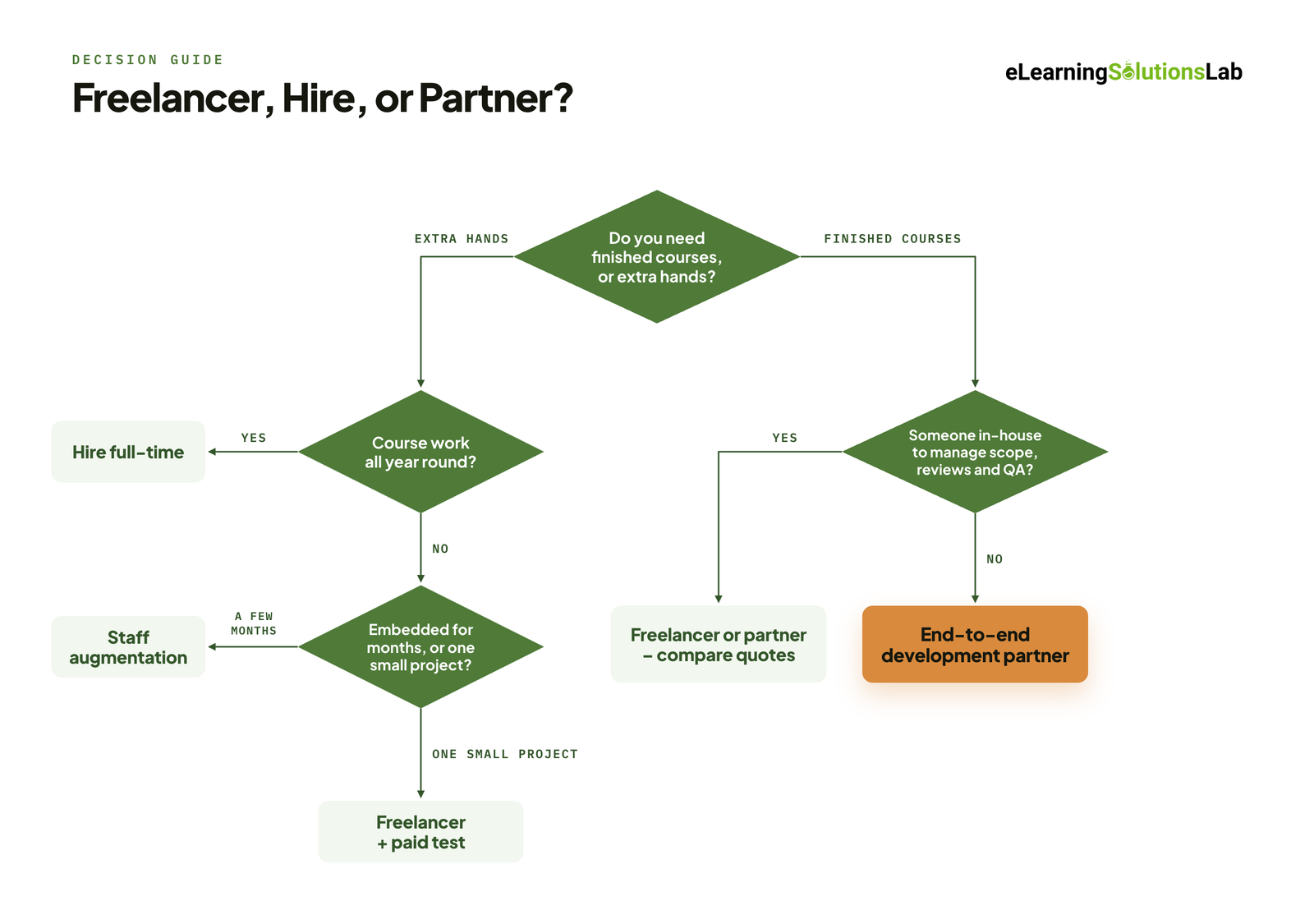 If you’d rather not compare every option, answer these four questions in order.
1. Do you need finished courses, or extra hands on your team?
Finished courses: go to question 4. Extra hands: go to question 2.
2. Will you have course development work all year round?
Yes: hire a full-time eLearning designer. No: go to question 3.
3. Do you need someone embedded for a few months, or for one small project?
A few months: use staff augmentation. One small, well-scoped project: hire a freelancer, and use the scorecard and a paid test.
4. Do you have someone in-house to manage scope, reviews, and QA?
Yes: a freelancer or a development partner can both work, so compare quotes. No: work with an end-to-end eLearning development partner.
If You Work With a Development Partner: What to Look For
If the answer points to a partner, take this list into your calls. Ask each vendor to show you, not just tell you.
- Relevant samples. Can they show courses in your industry or of the type you need, such as compliance, onboarding, or software training?
- Fixed scope and price. Is the number of revision rounds written into the quote, and what happens if you need more?
- Source files and IP. Do you receive the editable source files, and do you own the finished course?
- LMS testing. Will they test the package in your LMS before handover?
- Accessibility. Which WCAG level do they build to, and how do they test it?
- Communication. What are the overlap hours with your team, and how often will you get progress updates?
- A pilot option. Will they start with one short course so you can judge the work before a larger commitment?
At eLearning Solutions Lab, instructional design, development, and QA are handled by one team, with working hours that overlap with clients in the US, UK, and Australia. If you’re still comparing providers, our roundup of top elearning vendors is a good place to start.
Need finished courses, not another hire?
We handle instructional design, development, and QA as one team, and deliver SCORM-ready courses that run in the LMS you already have – fixed price, fixed timeline, from $1,500 in 3-5 weeks. Send us your content and we’ll come back with a scope, a price, and a delivery date before you commit to anything.
Related Reading
- Elearning outsourcing – how end-to-end outsourcing works and when it pays off.
- Elearning development costs – what actually drives a content quote.
- Staff augmentation for L&D – adding embedded designers to your team.
- Custom elearning content development – a buyer’s guide to custom builds.
- Accessible elearning – building courses everyone can use.
- Scorm compliance requirements – what has to be true for courses to track correctly.
The Author

Book A Discovery Call
Our Learning Advisors are happy to walk you through your project step-by-step — content, timeline, and fixed pricing.
Get Your Free QuoteNo obligation — just a focused conversation. Proposal within 24 hours.
You may also like
Software for Training Companies: Best Tools and How to Choose (2026 Guide)
Short answer Training companies need a training management system (TMS) to…
How to Choose an LMS: A 7-Step Guide (With Free Scorecard)
Short answer To choose an LMS, define your goals and learners first, then…