

Learning and development tools are software, templates, and frameworks that L&D teams can use to find skill gaps, design training, deliver it, and measure whether it worked.
They range from learning management systems (LMS) and authoring tools to AI video generators, quiz builders, and simple needs-analysis templates.
In this guide, we group tools by the stage of the training workflow they support, from needs analysis to measurement. This way, you can see exactly what each type of tool is for, decide which ones your team needs, and learn the right ones first.
Short on time? Jump to the L&D tool categories table.
Updated November 2026.
In This Article
What are Learning and Development Tools?
Learning and development tools are anything that can help an organization build its people’s skills in a structured, repeatable way. That includes the platforms that host and track training, software used to build courses, and templates and frameworks that can guide decisions before any content is made.
Working Definition
It helps to think of L&D tools in three layers:
- Software: platforms and apps like an LMS, authoring tool, video editor, or survey tool.
- Templates: reusable documents like needs-analysis forms, storyboards, learning-objectives worksheets, or evaluation surveys.
- Frameworks: models that shape how you plan and judge training, like ADDIE for design or the Kirkpatrick model for evaluation.
Most guides cover only the first layer. In practice, a really good template or framework will often save more time than new software, especially for small teams.
L&D Tools vs. HR Tools vs. General Productivity Tools
HR tools include payroll, recruiting, and HRIS platforms to manage your employee records and processes. Some include a training module, but learning isn’t their main job.
General productivity tools, like slide software, video calls, and shared docs, are widely used for training, but they weren’t built for it. They simply don’t track who completed what or whether anyone learned anything.
L&D tools are built around your learners and learning outcomes. They let you design, deliver, track, and improve training in one place, or across a connected stack.
How L&D Tools Map to the Training Workflow
The easiest way to work out which tools you genuinely need is to look at the job each one does. Most of your training projects move through the same seven stages, and each stage has its own type of tool.
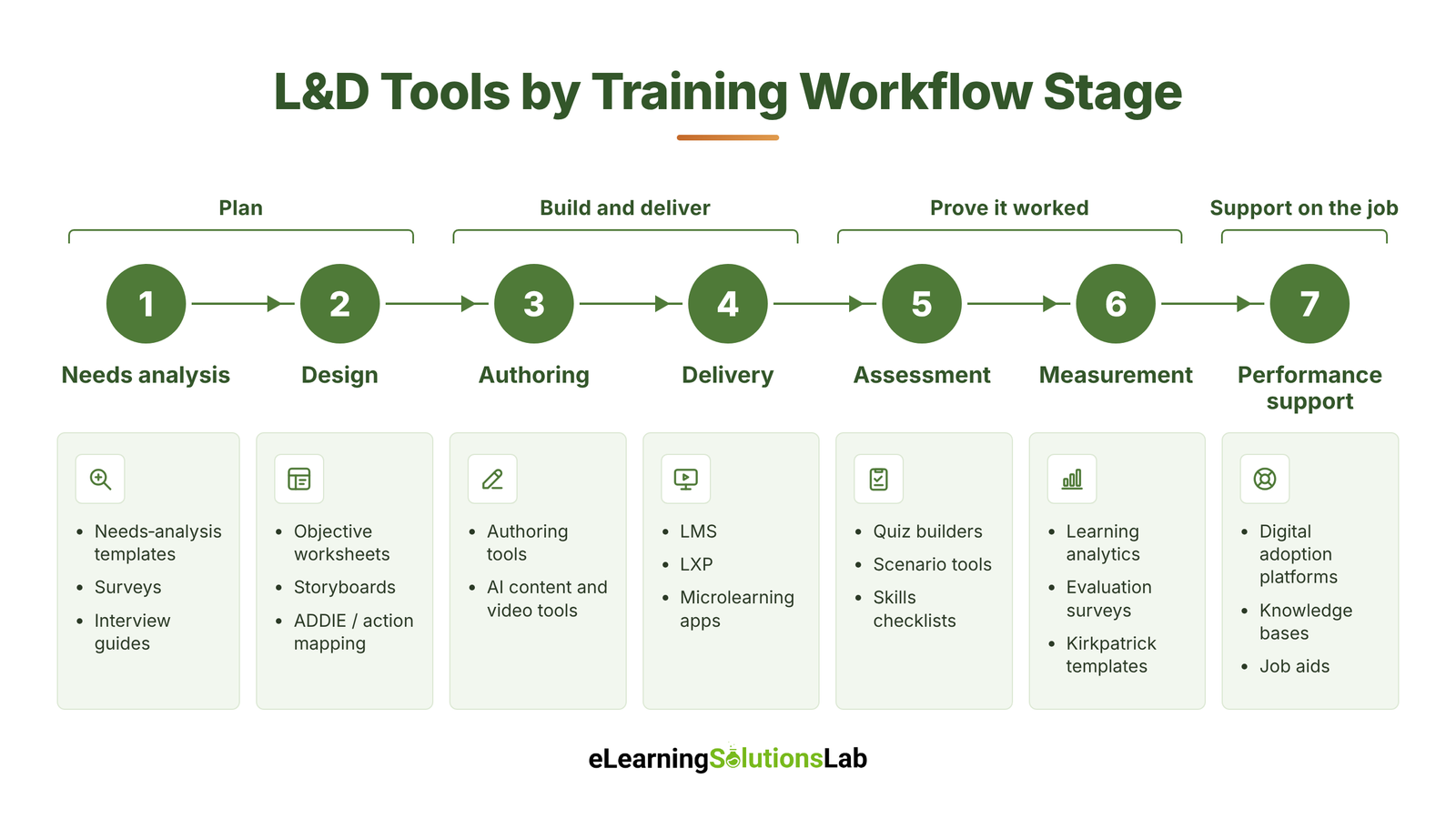 1. Needs Analysis
First, you need to confirm there’s a real skill gap and that a training program is the right fix.
Tools: Needs-analysis templates, surveys, and interview and focus-group guides.
2. Design
Next, you need to plan what your learners should be able to do and how you’ll actually get them there.
Tools: Learning-objective worksheets, storyboard templates, and design frameworks and learning models like ADDIE or action mapping.
3. Authoring
This is where the content actually gets built: courses, videos, simulations, and job aids.
Tools: Content authoring tools, plus AI content and video tools.
4. Delivery
This is the eLearning delivery stage, where a training program reaches your learners and their progress is tracked.
Tools: LMS, learning experience platforms (LXP), and microlearning apps.
5. Assessment
You check whether your learners can actually do what the training taught.
Tools: Quiz and assessment builders, scenario tools, and skills checklists.
6. Measurement
You genuinely need to find out whether your training changed behavior or business results.
Tools: Learning analytics, evaluation surveys, and Kirkpatrick-style evaluation templates.
7. Performance Support
Your learners get help at the moment they need it, on the job.
Tools: Digital adoption platforms, knowledge bases, and job aids.
Two things follow from this view
First, very few teams need a tool for every stage. For example, a solo practitioner might cover four stages with templates and one authoring tool.
Second, many problems blamed on the LMS actually start earlier, in needs analysis or design, where the right tool is often a simple template rather than more software.
8 Main Types of L&D Tools
L&D tools fall into eight categories. Most teams use three or four of them, and the table below shows you where each one fits.
| Category | What it does | Workflow stage | Typical buyer | Free options? |
|---|---|---|---|---|
| LMS | Hosts, assigns, and tracks training | Delivery | HR or L&D lead | Yes (open source) |
| LXP | Recommends learning from many sources | Delivery | Enterprise L&D | Limited |
| Authoring tools | Builds interactive courses | Authoring | Instructional designers | Yes (open source, basic tiers) |
| AI content and video | Generates scripts, video, and translations | Authoring | L&D teams of any size | Yes (free tiers) |
| Microlearning | Delivers short, mobile-first lessons | Delivery | Frontline and field teams | Yes (free tiers) |
| Assessment and quiz | Tests knowledge and skills | Assessment | Trainers and designers | Yes |
| Analytics and evaluation | Measures learning impact | Measurement | L&D leads and executives | Limited |
| Performance support | Gives in-the-moment help on the job | Performance support | IT, operations, and L&D | Rarely |
Learning Management Systems (LMS)
An LMS is where training programs live. You upload courses, assign them to people, set deadlines, and track who finished what. It’s usually the first tool a company buys, and it’s essential for eLearning compliance training, where you really have to prove completion.
Look for SCORM or xAPI support. SCORM is the long-standing standard that lets a course built in one tool run and report results in any compatible LMS. Before you buy, check the SCORM compliance requirements so completions are recorded correctly.
xAPI is its newer successor, and it can track learning that happens outside the LMS as well. Other features you need to check are reporting, LMS integration with your HR system, single sign-on, and a mobile app.
Examples: Moodle (open source), TalentLMS, Docebo, Cornerstone.
Learning Experience Platforms (LXP)
An LXP is built for discovery rather than just administration. Instead of simply assigning courses, it recommends content to each learner based on their role, skills, and interests. That content can come from your own library, external course providers, articles, and videos.
Larger organizations use an LXP when they want people to drive their own development. It often sits on top of an LMS rather than replacing it.
Look for skills mapping, personalized recommendations, content aggregation, and integration with your LMS.
Examples: Degreed, EdCast by Cornerstone, 360Learning.
Content Authoring Tools
Authoring tools are what you use to build the training itself: interactive eLearning modules, branching scenarios, simulations, and responsive courses that work on any device. They then export the finished course in a format your LMS can run, usually SCORM. If you’re new to this, here’s how to create SCORM content that tracks properly.
Instructional designers and eLearning developers spend most of their working day in these tools. Look for templates, interactivity options, accessible eLearning features, review and commenting tools, and SCORM or xAPI export. For a side-by-side comparison, see our roundup of the best eLearning authoring tools.
Examples: Articulate 360 (Rise and Storyline), Adobe Captivate, iSpring Suite.
AI Content and Video Tools
This is probably the fastest-growing category. These tools can help draft course outlines and scripts, generate quiz questions, translate content, and produce video-based eLearning with AI avatars and voiceovers. That makes it practical for a small team to produce in days what used to take weeks.
They usually work best as accelerators, not replacements, given that the output still needs an expert to review it for accuracy and sound instructional design. Look for editable output, language support, brand controls, and clear data-privacy terms.
Examples: Synthesia, Colossyan, and general AI assistants like ChatGPT or Claude.
Microlearning and Mobile Learning Tools
Microlearning tools deliver short lessons of a few minutes each, usually on a phone. They suit frontline, retail, and field staff who don’t sit at a desk, and they’re useful for refreshers that help your people retain what they learned in longer training. Many teams pair them with broader mobile learning solutions.
Look for mobile-first design, push notifications, spaced repetition, offline access, and simple authoring that subject-matter experts can use without help. For inspiration, browse these microlearning examples.
Examples: SafetyCulture Training (formerly EdApp), 7taps, Axonify.
Assessment and Quiz Tools
Assessment tools help check whether learning actually happened. They range from simple quizzes and polls to scenario-based questions and formal certification exams.
Many LMS and authoring tools include basic quizzes, but standalone tools can give you more question types, stronger analytics, and better security for high-stakes tests.
Look for varied question types, question banks, randomization, detailed results, and integration with your current LMS.
Examples: Google Forms and Microsoft Forms (free), Kahoot!, Questionmark.
Learning Analytics and Evaluation Tools
These tools help answer the question your leaders always ask: did the training work? They pull data from your LMS, surveys, and business systems to show completion, knowledge gains, and, ideally, changes in behavior or performance. That evidence is what lets you prove eLearning ROI.
Many L&D teams start with evaluation surveys and spreadsheets before buying a dedicated platform. Our guide on how to track employee training covers the metrics worth capturing. When you’re ready for a platform, look for xAPI data support, dashboards, links to business metrics, and survey templates built on the Kirkpatrick model.
Examples: Watershed, Explorance Metrics That Matter, and survey tools like Qualtrics.
Performance Support and Digital Adoption Tools
Performance support helps people at the moment they need it, without stopping work to take a course. Digital adoption platforms overlay guided walkthroughs and tooltips directly on top of software like CRM or HR systems. Knowledge bases and job aids cover non-software tasks.
These tools are especially useful during software rollouts and process changes. Look for in-app guidance, analytics on where users get stuck, and easy content updates.
Examples: WalkMe, Whatfix, and knowledge bases such as Guru or Confluence.
Free L&D Tools and Templates
You don’t really need a big budget to run solid training programs. Many L&D teams cover most of the workflow with free software and a few good templates, then pay only for the one or two tools they use every day.
Free Software by Category
- LMS: Moodle and Open edX are open source and free to use. You just pay for hosting and setup, or you host them yourself. If that’s too much admin, compare affordable LMS systems.
- Authoring: H5P and Adapt Learning are open-source tools for building interactive content.
- AI content: The free plans of general AI assistants can help draft outlines, scripts, and quiz questions.
- Video and visuals: Free plans of Canva and screen-recording tools can cover simple explainer videos and graphics.
- Assessment: Google Forms and Microsoft Forms handle quizzes and surveys at no cost.
- Measurement: A spreadsheet combined with a free survey tool is enough to run a basic Kirkpatrick-style evaluation.
Free tools come with trade-offs: limited reporting, fewer integrations, and more manual admin work. They’re usually ideal for pilots, small teams, and proving value before you ask for more budget.
Free Templates Every L&D Team Should Have
Templates are the most overlooked L&D tools, given that they cost nothing and can improve the quality of every project.
- Needs-analysis template: confirms the performance gap and its root cause before you build anything.
- Learning-objectives worksheet: turns vague goals into measurable outcomes learners can show.
- Storyboard template: plans screens, scripts, and interactions before development starts. Start with our free eLearning storyboard template.
- Evaluation form: collects reaction and learning data organized by Kirkpatrick level.
- Project intake form: captures what your stakeholders expect before work begins.
Where AI Fits in L&D Tools Today
AI now appears in almost every category of L&D tool, from authoring software to the LMS, and it’s one of the biggest eLearning trends this year. If used well, it can remove the slowest parts of training production. But when used carelessly, it produces content that looks finished but doesn’t teach anything.
What AI Does Well Now
- Drafting: it turns a topic or a source document into a course outline, script, or job aid in minutes, which gives your eLearning designers a first draft to improve. Our guide to AI for instructional design shows where this works best.
- Quiz generation: it produces question banks from existing content, including plausible wrong answers, which are usually the hardest part to write.
- Translation and localization: it adapts courses into multiple languages quickly, making global rollouts realistic for small teams. For high-stakes content, pair it with professional eLearning translation.
- Video: AI avatars and synthetic voiceovers can replace filming for many explainer and compliance videos, and they’re easy to update when content changes.
- Search and support: AI assistants inside an LMS or knowledge base can answer learners’ questions in plain language, drawing on your own materials.
Where It Falls Short
- Accuracy: AI can state wrong information confidently, so every output needs review by a subject-matter expert, especially for compliance, safety, and technical content.
- Instructional design judgment: AI can produce content, but it can’t tell you whether training is the right solution, which objectives matter, or how to change behavior on the job. Those decisions still belong to people.
- Data and privacy: uploading internal documents to an AI tool may expose confidential information. You need to check where data is stored, whether it’s used to train models, and what your IT and legal teams allow.
Practical rule
Let AI handle production speed and keep people in charge of decisions and quality.
Which L&D Tools Should You Learn First?
If you’re new to L&D, or moving into it from HR or teaching, the number of tools can feel overwhelming. You don’t need to learn them all. Hiring managers mostly look for a small core set, plus the skills that carry over from one tool to the next.
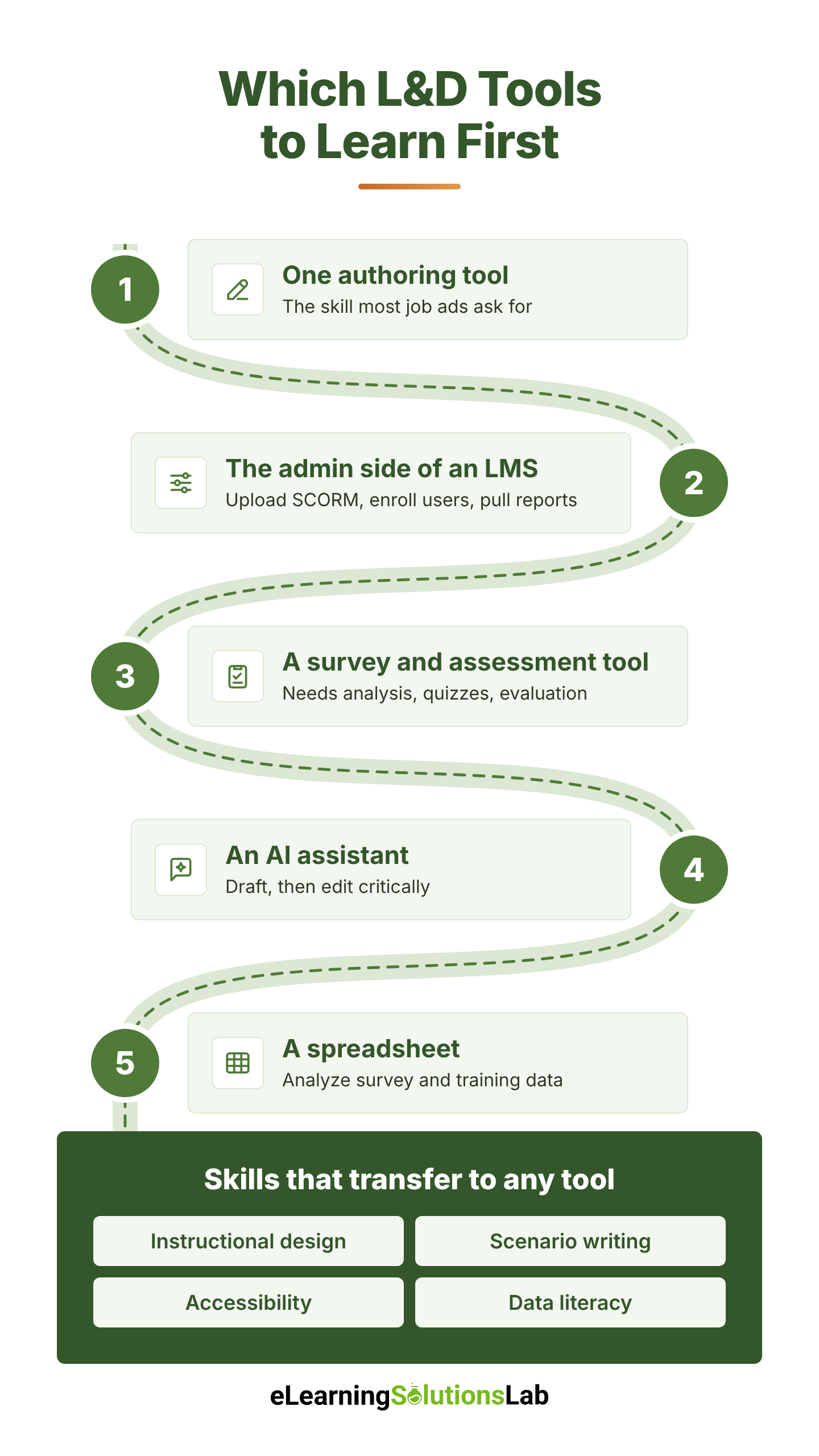 Here’s a practical order to learn them in:
- One authoring tool. This is the skill most job ads ask for. Articulate 360 is the most common starting point because it’s widely used and has a large community. Our guide to Articulate eLearning is a good place to begin.
- The admin side of an LMS. Learn how to upload a SCORM package, enroll users, set deadlines, and pull a completion report. These are the core tasks of an LMS administrator, and most platforms work in similar ways.
- A survey and assessment tool. Google Forms or Microsoft Forms is enough to practice needs analysis, quizzes, and evaluation surveys.
- An AI assistant. Practice drafting outlines, scripts, and quiz questions, then editing them critically.
- A spreadsheet. Basic formulas, filters, and charts let you analyze survey results and training data before you ever touch an analytics platform.
Tools change every few years. The skills underneath them don’t. Instructional design, writing realistic scenario-based eLearning, accessibility, and data literacy transfer to any platform. If you’re building your skills, our guide on how to create effective eLearning courses covers the fundamentals.
What Tools Does Your Team Actually Need?
The right stack depends on your team’s size, budget, and how much content you produce. The table below shows a typical starting point by team type, listed by tool category rather than brand.
| Workflow need | Solo L&D professional | Small or mid-sized team | Enterprise |
|---|---|---|---|
| Needs analysis and design | Free templates | Shared templates and an intake form | Standard templates, skills framework, project management tool |
| Authoring | One authoring tool plus an AI assistant | Authoring tool, AI video tool | Several authoring tools, AI video, translation workflow |
| Delivery | Free or low-cost LMS | Cloud LMS | LMS plus LXP, microlearning app |
| Assessment | Built-in quizzes, free forms | LMS quizzes | Dedicated assessment platform for certification |
| Measurement | Spreadsheet and surveys | LMS reports and surveys | Learning analytics platform linked to business data |
| Performance support | Job aids and shared docs | Knowledge base | Digital adoption platform |
Smaller teams should keep the stack lean and choose tools that do more than one job. If you’re in that position, our list of the best LMS services for small businesses is a good shortlist.
Tools are only part of the answer, though. When the workload outgrows the team, many organizations add capacity through staff augmentation for L&D or move larger projects to eLearning outsourcing instead of buying more software.
How to Choose L&D Tools: A Checklist
Before you sign up for any tool, run it against these questions. A tool that fails two or three of them will usually cost more in workarounds than it saves.
- Integrations: Does it connect to your HR system, single sign-on, and the tools you already use?
- Standards: Does it support SCORM, xAPI, or cmi5, so content can move between tools?
- Accessibility: Does it meet WCAG standards, so every employee can use it?
- Data and privacy: Where is data stored, and does it meet GDPR or other rules that apply to your workforce?
- Reporting: Can you get the reports leaders and auditors ask for without manual work?
- Admin effort: How much time will it take to run each week, and who will do it?
- Pricing model: Is it per user, per active user, or a flat fee, and what happens as you grow?
- Content costs: If you’ll build custom courses, have you budgeted for eLearning development costs as well as the software?
- Scalability: Will it still work if your team, course library, or number of regions doubles?
- Support: Is help available in your time zone, and is onboarding included?
If an LMS is on your list, use our LMS requirements checklist to confirm features before you sign a contract, and our guide on how to choose an LMS to compare your shortlist.
In one line
Map your training workflow first, pick one tool for each stage you actually need, and start with templates and free tools before you pay for more software.
Need help building your L&D stack?
At eLearning Solutions Lab, we design and build training for US and global teams. Our instructional design services and custom eLearning development services cover design, development, localization, and QA in one team.
Need somewhere to deliver and track it? Levantra LMS, our cloud based LMS, assigns courses by role or location, automates reminders, and reports on every completion.
See our custom eLearning development servicesBook a Levantra LMS demo
Related Reading
- Best eLearning authoring tools – comparing the top tools for building courses.
- How to choose an LMS – shortlisting platforms that fit your team.
- AI for instructional design – where AI speeds up course production.
- eLearning ROI – proving your training changes business results.
- eLearning storyboard template – planning courses before development starts.
The Author

Book A Discovery Call
Our Learning Advisors are happy to walk you through your project step-by-step — content, timeline, and fixed pricing.
Get Your Free QuoteNo obligation — just a focused conversation. Proposal within 24 hours.
You may also like
LMS Requirements Checklist: What to Include, How to Weight It, How to Verify It and
Having a useful LMS requirements checklist does three things: it ranks what…
LMS Adoption Strategy (2026): 90-Day Plan, KPIs and Free Template
Short answer An LMS adoption strategy gets employees using your learning…