

Quick answer
To track employee training, list each employee and the training their role requires. For each course, record the completion date, assessment score, and certification expiry, and store proof of completion. Then, review the records on a regular schedule.
A spreadsheet works well for small teams, whereas larger or compliance-heavy teams usually need HR software or an LMS. This guide includes a side-by-side comparison of four tracking methods, a decision guide by team size, step-by-step tracker setup with formulas, key metrics, a regional record-keeping overview, and a free tracker template.
Most HR and L&D teams track employee training the same way, with a spreadsheet, a few columns, and good intentions. Then certifications quietly expire, new hires slip through the cracks, and when an auditor or manager asks for any proof that someone finished their safety training, you’re digging through email for a certificate.
Learning how to track employee training doesn’t have to mean buying expensive software. It means knowing what to record, choosing a method that fits your team’s size and training needs, and checking the records often enough to catch problems early.
In this guide, we compare the four main methods to track employee training, help you choose the right one, and walk you through setting up a tracker step by step.
Short on time? Jump to the step-by-step tracker setup.
Updated October 2026.
In This Article
- Why tracking employee training matters
- What to track: essential fields
- 4 ways to track employee training (compared)
- Which method should you use? A decision guide
- How to set up a training tracker, step by step
- Key training metrics: formulas and examples
- Training records and compliance by region
- How to automate reminders and renewals
- Common training-tracking mistakes to avoid
- Free employee training tracker template
Why Tracking Employee Training Matters
Training only protects your business if you can prove it really happened. Good records can do four jobs at once.
1. They Keep You Compliant
Many industries require certain training, like safety, food handling, data protection, or harassment prevention. For instance, if a regulator, client, or insurer asks for evidence, a complete record answers the question in minutes rather than days.
2. They Catch Gaps Before They Become Problems
Having a tracker will show who is overdue, whose certification is about to expire, and which roles are actually missing required skills. That lets you act early instead of just finding out after an incident.
3. They Show Whether Training Is Worth the Investment
When you link completion and assessment to performance, you can see which programs actually change how people work, and which ones you can easily cut.
4. They Make Training Fair and Consistent
Clear records will make sure that every employee in the same role gets the same training, whatever their team, manager, or location.
What to Track: Essential Fields for Employee Training
Whatever method you actually use, the record for each person and course must contain the same core information. Get these fields right, and you can switch tools later without starting over.
Core Record Fields
These will tell you who needs what, and where they stand:
- Employee name and ID
- Role, department, and location
- Course or training name (use one consistent name across the business)
- Training type, like compliance, onboarding, or skills development
- Assigned date and due date
- Completion date
- Status: not started, in progress, completed, or overdue
Proof and Performance Fields
Completion alone doesn’t show that someone learned anything. You can add:
- Assessment score and pass/fail result
- Trainer or provider
- Proof of completion, like a certificate file, sign-in sheet, or link
Renewal Fields
For training that will expire, these are the fields that will prevent missed deadlines:
- Certification expiry date
- Renewal interval (for example, every 12 or 24 months)
- Next due date
Seeing It All at Once: Training Matrix
A training matrix puts employees in rows and required courses in columns, so you can spot gaps at a glance.
| Employee | Role | Fire Safety | First Aid | Data Privacy | Forklift Cert. |
|---|---|---|---|---|---|
| A. Santos | Warehouse Lead | ✅ Mar 2026 | ✅ Jan 2026 | ✅ Feb 2026 | ⚠️ Expires Nov 2026 |
| J. Reyes | Picker | ✅ Apr 2026 | ❌ Overdue | ✅ Feb 2026 | ✅ Jul 2026 |
| M. Cruz | Office Admin | ✅ Mar 2026 | — Not required | ⏳ In progress | — Not required |
The free template later in this guide includes both a detailed record sheet and a matrix view.
4 Ways to Track Employee Training (Compared)
There’s no single best tool for tracking employee training. The right choice will depend on how many people you train, what kind of training you run, and how much admin time you can spare. Here are four main options to track employee training.
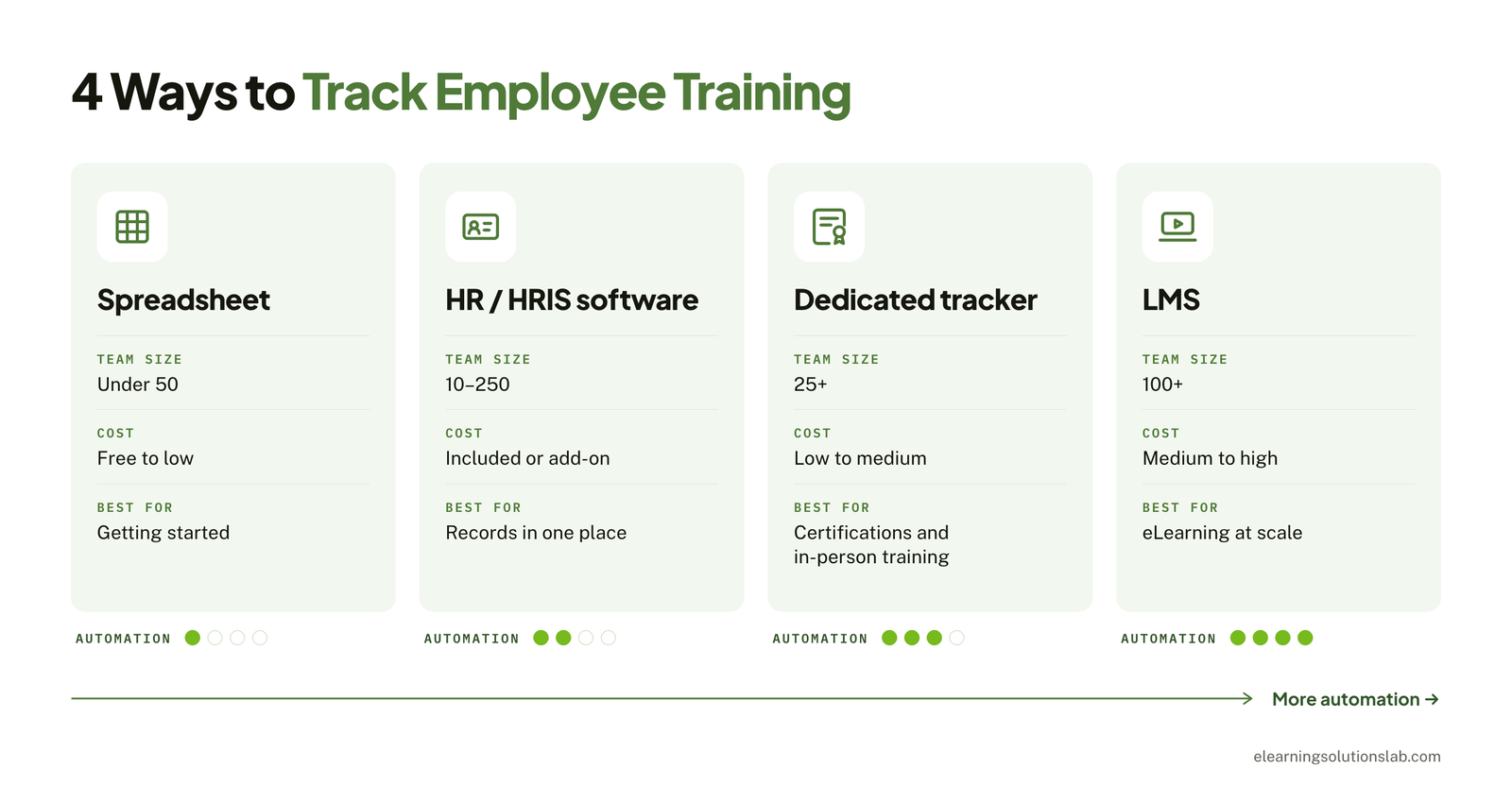
1. Spreadsheets (Excel or Google Sheets)
A spreadsheet is the fastest way to start tracking employee training. It’s cheap or free, and almost everyone already knows how to use one. With a few formulas and conditional formatting, you can easily flag overdue training and upcoming expiries automatically.
Where it falls short: Everything is entered by hand, so errors creep in. Version control can get messy when several people edit the file, and storing proof of completion means linking out to separate folders.
Most HR and L&D teams outgrow spreadsheets somewhere between 50 and 100 employees, or sooner if they manage many certifications.
Best for: Small teams, simple training needs, and getting started quickly.
2. HR or HRIS Software With Training Features
Many HR platforms include a training or learning module alongside payroll, leave, and employee records. If you already pay for one, this is often the easiest upgrade from a spreadsheet, given that training records can sit next to the rest of each employee’s file.
Where it falls short: Training features in HR software are usually basic. For instance, you may get records and reminders, but limited assessments, reporting, or course delivery.
Best for: Small and mid-sized businesses that already use an HRIS.
3. Learning Management System (LMS)
An LMS delivers online courses and tracks them automatically. It records enrollments, completions, quiz scores, and time spent, then turns that data into reports.
Many LMS systems today also handle certificates and renewal reminders. Most of that completion and score data comes from SCORM packages, so it’s worth knowing how to create SCORM content that reports results correctly.
Where it falls short: An LMS costs more and takes time to set up. So if most of your training happens in person or on the job, you’ll still be entering much of the data by hand, which can remove the main benefit.
Best for: Organizations churning out eLearning, large or distributed workforces, and those that already have formal development programs.
4. Dedicated Training Tracker or Training Management System
These tools focus on scheduling, recording, and certifying training rather than simply delivering courses. They tend to suit instructor-led sessions, field teams, and certification-heavy industries, ranging from construction and manufacturing to healthcare.
Where it falls short: It’s another system to maintain, it may not connect smoothly with your HR software, and it usually won’t host online courses.
Best for: Compliance-driven teams and organizations that run mostly classroom or hands-on training.
Side-by-Side Comparison
| Method | Typical cost | Best team size | Automation | Best for | Main limitation |
|---|---|---|---|---|---|
| Spreadsheet | Free to low | Under 50 | Low | Simple tracking, getting started | Manual entry and errors |
| HR / HRIS software | Included or add-on | 10–250 | Medium | Keeping records in one place | Basic training features |
| LMS | Medium to high | 100+ | High | eLearning at scale | Cost and setup effort |
| Dedicated tracker | Low to medium | 25+ | Medium to high | Certifications and in-person training | Another system to manage |
What About Manual Methods?
Some training can’t be tracked by software alone. On-the-job training, for example, is often confirmed with sign-in sheets, observation checklists, or manager sign-offs. These still count as records. The key is to capture them consistently, then log the result in your main tracker so you have one source of truth.
Which Method Should You Use? A Decision Guide
You can use the three questions below to narrow your options. If two answers point in different directions, go with whichever matters most to your business. For most L&D teams, that’s compliance risk.
By Headcount
- Under 10 employees: A spreadsheet is enough. Keep everything simple and focus on recording completion dates and expiries accurately.
- 10–50 employees: A well-built spreadsheet still works. If you already use HR software with training features, simply switch on that module instead. And if you’d rather skip spreadsheets entirely, there are affordable LMS systems built for small teams.
- 50–250 employees: Manual tracking starts to cost real time. Move to HR software or a dedicated tracker, and consider an LMS if you run a lot of online training. Our roundup of the best LMS services for small businesses is a good place to start comparing.
- 250+ employees: You’ll almost certainly need an LMS, a training management system, or both, all connected to your HR records. Our guide to LMS integration covers how that connection is set up.
By Training Type
- Compliance training (safety, licensing, data protection): Choose a method with reliable expiry alerts and easy access to proof. This is where spreadsheets most often fail.
- Onboarding: A checklist inside your HR software or tracker works well, given that the same steps will repeat for every new hire.
- Skills and career development: An LMS is the strongest fit, given that it can deliver courses, assess progress, and report on learning paths.
By Workforce
- Desk-based teams: Any employee training tracking method works, and online tools are easy to roll out.
- Deskless or frontline teams: Pick a tool with a mobile app or simple sign-off process. Otherwise, use paper or tablet sign-in sheets and log them centrally. Avoid systems that assume everyone has a work email and a computer. Our guide to mobile learning solutions covers the options for reaching these teams.
Quick Decision Flow
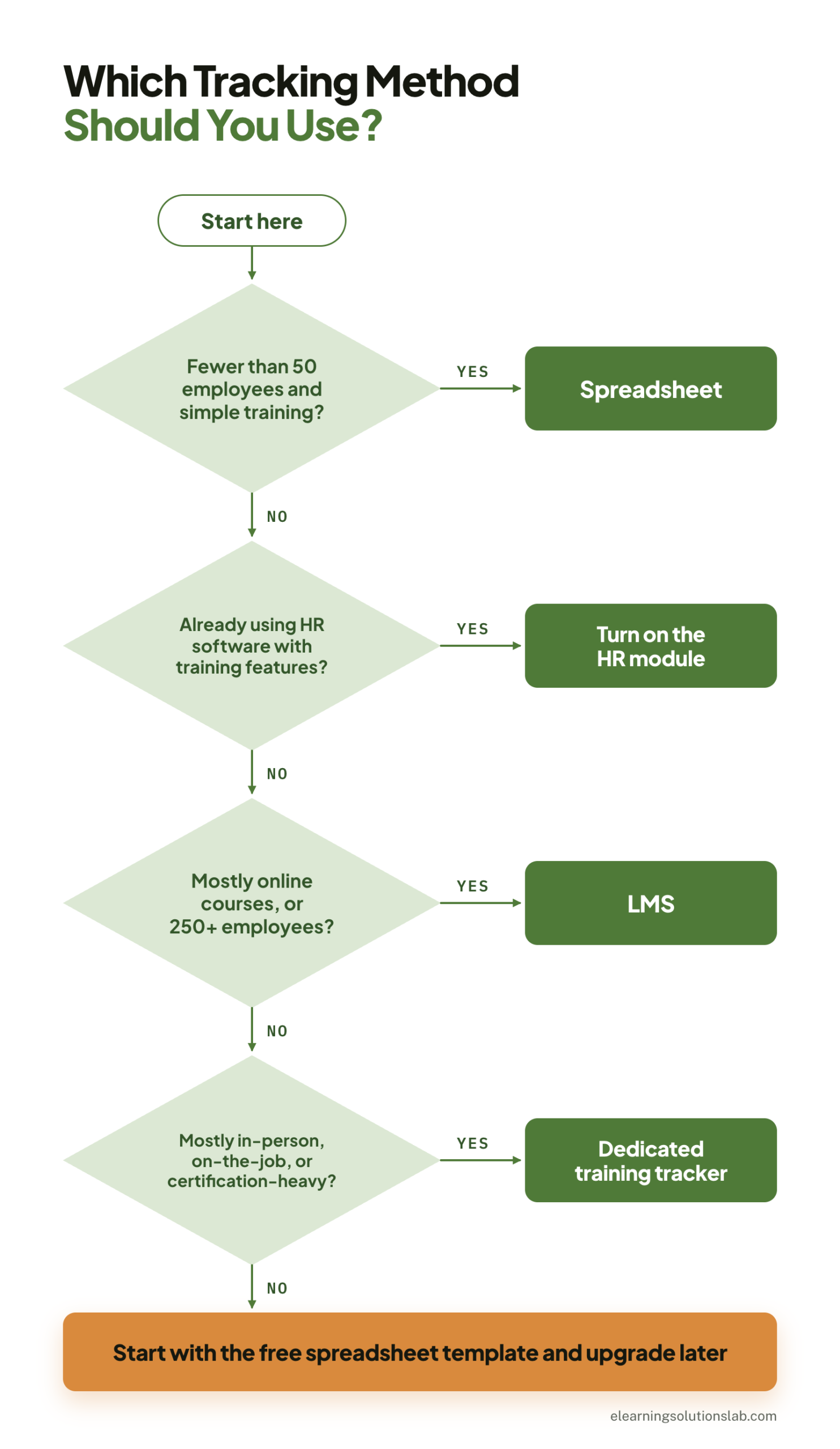
| If this describes you… | Start with |
|---|---|
| Fewer than 50 employees and simple training needs | Spreadsheet |
| You already use HR software with training features | The HR module |
| Mostly online courses, or 250+ employees | LMS |
| Mostly in-person, on-the-job, or certification-heavy training | Dedicated training tracker |
Not sure yet? Start with the free spreadsheet template below. The fields match what any software uses, so your data will move with you when you upgrade.
Quick self-check: have you outgrown your spreadsheet?
Count how many of these are true for your organization:
- More than one person edits the tracker, and versions don’t always match.
- You’ve missed at least one certification renewal in the past year.
- Pulling proof for an audit takes more than an hour.
- You manage more than 10 courses with different renewal intervals.
- Managers can’t see their own team’s training status without asking HR.
- You’re re-typing completion data from another system.
Three or more? It’s time to move to software. Our guide on how to choose an LMS walks through scorecards, demos, and contract terms. If you’re still weighing it up, see our guide to the question do I need an LMS.
How to Set Up a Training Tracker, Step by Step
This walkthrough uses a spreadsheet, but the same steps apply to any tool. The formulas work in both Excel and Google Sheets.
Step 1: List the Required Training for Each Role
Before you open a spreadsheet, decide what each role must complete. Write down the course name, whether it’s mandatory, and how often it needs renewing. This becomes your training requirements list, and it stops you from tracking courses nobody needs.
Step 2: Build Your Employee Roster
Create a tab listing every employee with their ID, role, department, and location. Pull this from your HR or payroll system if you can, so names and IDs match exactly.
Step 3: Create the Tracker Columns
On your main tracking tab, add one row per employee per course, with these columns:
| Column | Field | Column | Field |
|---|---|---|---|
| A | Employee | G | Completed |
| B | ID | H | Score |
| C | Role | I | Renewal (months) |
| D | Course | J | Next due |
| E | Assigned | K | Status |
| F | Due | L | Proof |
Use drop-down lists for Role and Course so names stay consistent. The free template adds optional columns after L, such as department, manager, attempts, manager sign-off, hours, and cost, without moving these core columns.
Step 4: Add Status Formulas and Conditional Formatting
Let the spreadsheet do the checking for you.
Next due date (column J):
=IF(OR(G2="",I2=""),"",EDATE(G2,I2))
Status (column K):
=IF(D2="","",IF(G2="",IF(AND(F2<>"",TODAY()>F2),"Overdue","Not started"),IF(AND(J2<>"",TODAY()>J2),"Expired","Completed")))
The first check keeps empty rows blank instead of flagging them as overdue. The free template also adds a Started column, so its status shows “In progress” too.
Then add two conditional formatting rules to the whole row:
- Red for overdue or expired:
=OR($K2="Overdue",$K2="Expired") - Amber for expiring within 30 days:
=AND($J2<>"",$J2>=TODAY(),$J2-TODAY()<=30)
Format columns E, F, G, and J as dates, or the formulas won’t calculate correctly.
Step 5: Record Completions and Attach Proof
When someone finishes a course, enter the completion date and score. In the Proof column, link to the certificate or sign-in sheet stored in a shared folder. Use one folder per course and a consistent file name, such as EmployeeID_Course_Date.
For training that renews, also keep a separate history tab and add a new row for every completion. That way, updating the completion date on the tracker doesn’t erase the record of past certifications. The free template includes one.
Step 6: Set a Review Cadence
A tracker only works if someone checks it. Filter the Status column each week for Overdue and Expired rows, and review amber rows monthly so renewals get booked in time. Each quarter, check that your requirements list still matches each role. In the free template, the Due Soon tab pulls all of this into one list, sorted by date.
Pro tip
Lock the formula columns (J and K) and give editors access to the data columns only. It’s the simplest way to stop one accidental paste from breaking every status flag in the sheet.
Key Training Metrics: Formulas and Examples
Most guides list training metrics without saying how to calculate them. The table below gives you a formula for each, grouped from simple participation through to business impact. Set your own baseline in the first quarter, then track the trend.
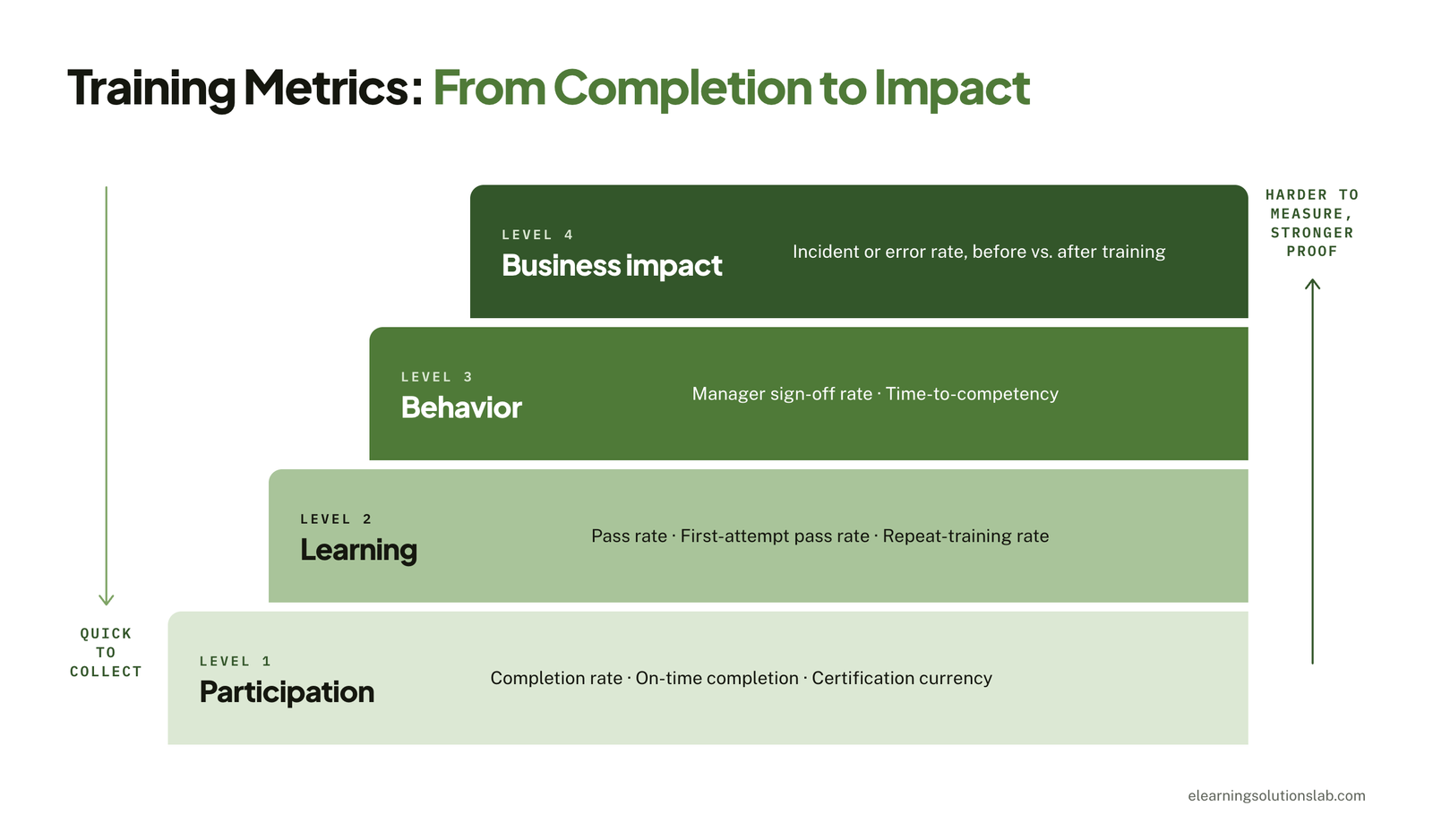
| Level | Metric | Formula | What it tells you |
|---|---|---|---|
| Participation | Completion rate | Completed ÷ assigned × 100 | Whether people finish what they’re given |
| Participation | On-time completion rate | Completed by due date ÷ assigned × 100 | How well deadlines are being met |
| Participation | Certification currency | Valid certifications ÷ required certifications × 100 | Your compliance exposure today |
| Learning | First-attempt pass rate | Passed on first attempt ÷ attempted × 100 | Whether the content and assessment work |
| Learning | Repeat-training rate | Employees retaking a course ÷ employees trained × 100 | Where knowledge isn’t sticking |
| Behavior | Manager sign-off rate | Employees signed off as competent ÷ employees trained × 100 | Whether training shows up on the job |
| Behavior | Time-to-competency | Average days from start or assignment to sign-off | How fast people become productive |
| Business impact | Incident or error rate | Incidents ÷ hours worked (or transactions), before vs. after training | Whether training reduces real-world problems |
A Worked Example
Say you assign a forklift refresher to 120 warehouse staff. By the due date, 96 have completed it, and 6 more finish the following week.
- Completion rate: 102 ÷ 120 × 100 = 85%
- On-time completion rate: 96 ÷ 120 × 100 = 80%
The 5-point gap tells you reminders are landing too late. Moving the first reminder from 7 days to 14 days before the due date is an easy fix to test next cycle.
Don’t Stop at Completion
Participation metrics are quick to collect, but they only prove that training happened. To show it worked, pair them with at least one behavior or business metric, and break every number down by team, location, and manager so a healthy average doesn’t hide a problem area. Our guide to eLearning ROI shows how to put a value on those changes.
Training Records and Compliance by Region
What you must record, and for how long, depends on your industry and where your employees work. The overview below covers the main rules to check in each region. If compliance training makes up most of your workload, build your tracker around a clear compliance training plan so every requirement maps to a role and a renewal date.
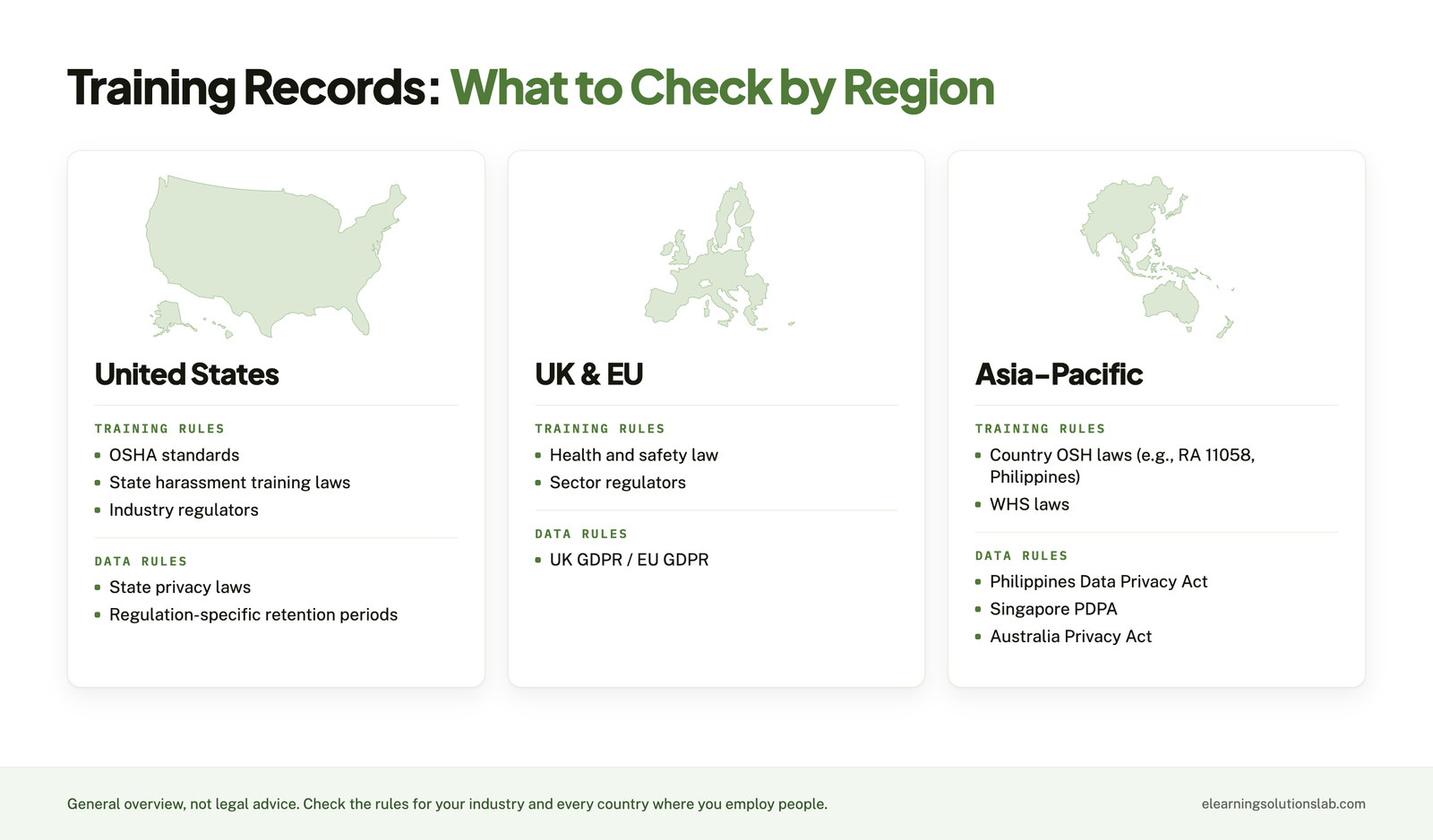
United States
There’s no single federal rule for all training records. Instead, requirements sit inside specific regulations. Several OSHA standards require documented training, and some spell out what the record must contain. For example, forklift operators must be certified with the operator’s name, training and evaluation dates, and the evaluator’s identity. Bloodborne pathogens training records must be kept for three years. Several states, including California, New York, and Illinois, also require harassment prevention training.
If you deliver safety courses online, eLearning safety training services can build them with completion and assessment tracking set up from the start.
United Kingdom and European Union
Health and safety law requires employers to provide adequate training, and keeping records is the practical way to show you did. Training records also contain personal data, so the UK GDPR and EU GDPR apply. That means having a lawful reason to hold the data, keeping it secure, keeping it no longer than necessary, and being able to share it with an employee who asks for their records.
Asia-Pacific
Rules vary widely by country. In the Philippines, the Occupational Safety and Health Standards law (RA 11058) requires employers to provide safety and health training, and the Data Privacy Act of 2012 governs how employee records are handled. Singapore’s PDPA and Australia’s Privacy Act 1988 set similar expectations for personal data, while local workplace health and safety laws set training duties.
| Region | Training requirements to check | Data rules to check |
|---|---|---|
| United States | OSHA standards, state harassment training laws, industry regulators | State privacy laws, regulation-specific retention periods |
| UK and EU | National health and safety law, sector regulators | UK GDPR / EU GDPR: lawful basis, storage limits, access requests |
| Asia-Pacific | Country OSH laws (e.g., RA 11058 in the Philippines), WHS laws | Philippines Data Privacy Act, Singapore PDPA, Australia Privacy Act |
How Long Should You Keep Training Records?
There’s no universal answer. A practical approach is to keep records for the length of employment plus whatever period the strictest rule that applies to you requires. Where a regulation sets a specific period, follow it for that training. Then delete or anonymize records once they’re no longer needed, especially in regions with strict data privacy laws.
Please note
This section is a general overview, not legal advice. Requirements change and vary by industry, so check the rules for your sector and every country where you employ people, and involve HR or legal before setting retention periods.
How to Automate Reminders and Renewals
Missed renewals are the most common tracking failure, and they’re also the easiest to prevent. How you automate depends on your method.
In a Spreadsheet
- Use the next-due and status formulas from the setup steps so expiring training is flagged automatically.
- Add the amber 30-day rule, and consider a second 60-day rule for training that takes time to book.
- Create calendar reminders for each renewal, or use Microsoft Power Automate (Excel) or Google Apps Script (Google Sheets) to send email reminders based on the next-due date.
In HR Software, an LMS, or a Dedicated Tracker
- Assign training automatically by role, so new hires get the right courses on day one.
- Set up recurring enrollments for training that renews on a fixed cycle.
- Turn on expiry alerts for employees, with escalation to their manager if the deadline passes.
- Schedule a monthly overdue report to HR and team leads.
Signs It’s Time to Move Off Spreadsheets
If you’re spending more time maintaining the tracker than acting on it, or renewals still slip despite your formulas, it’s time to switch. Plan the move with an LMS adoption strategy so the new system actually gets used. And if nobody on your team has time to run it day to day, LMS administration services can take over setup, enrollments, and reporting.
Our platform
Outgrown your spreadsheet? Track training in Levantra LMS
Levantra LMS is our cloud based LMS, and it covers the tracking jobs in this guide:
- For HR and L&D – enroll learners in bulk into separate groups by team, department, region, or cohort, then filter and export reports to CSV or Excel for audits and reviews.
- For managers – each manager sees only their own groups, so checking team status takes a minute.
- For proof of completion – every completion issues a branded certificate with a unique ID that anyone can verify online.
- For a lean team – setup is done for you and included in every plan, most teams are live in 3 to 4 weeks, and managed LMS administration can be added if you don’t have the capacity to run it.
Common Training-Tracking Mistakes to Avoid
Even a well-built tracker fails if these habits creep in.
- Tracking completion, not competence – a finished course doesn’t mean someone can do the job. Add scores or manager sign-offs for critical training.
- No proof stored – a date in a cell won’t satisfy an auditor. Link every completion to a certificate or sign-in sheet.
- Ignoring expiry dates – one-off records with no renewal field are how certifications lapse unnoticed.
- Inconsistent course names – “Fire Safety,” “Fire Training,” and “Fire Awareness 2026” become three courses in your reports. Use drop-down lists.
- One master file with open access – without edit controls, one bad paste can break the whole tracker. Lock formulas and limit editors.
- No clear owner – someone, whether an HR coordinator or an LMS administrator, needs to own the tracker and run the weekly review.
Free Employee Training Tracker Template
To put this guide into action, get our free employee training tracker. It turns every field, formula, and metric in this article into one working spreadsheet you can fill in and share with your team.
In one line
Track the right fields from day one, start with the simplest method that fits your team, automate renewals, and move to software before missed deadlines become compliance problems.
Ready to track training without the spreadsheet chaos?
At eLearning Solutions Lab, we offer Levantra LMS, our cloud based LMS that’s set up for you. Enroll learners in bulk into groups for each team, department, or location, give managers a view of their own groups, and export reports to CSV or Excel when an auditor asks. Every completion comes with a verifiable certificate. Setup is included in every plan, and most teams are training learners within 3 to 4 weeks.
We also build the courses you need to track, for Levantra or any platform you use. Design, development, and QA are handled by one team, and managed LMS administration can be added to any plan.
Book a Levantra LMS demoSee our custom eLearning development services
Related Reading
- Do I need an LMS – the signs you’ve outgrown simpler tools.
- How to choose an LMS – scorecards, demos, and contract terms for picking a platform.
- Compliance training plan – how to map mandatory training to roles and deadlines.
- eLearning ROI – how to measure and prove the value of your training.
- LMS adoption strategy – how to get people using a new platform after launch.
- LMS integration – connecting your LMS to HR and other systems.
The Author

Book A Discovery Call
Our Learning Advisors are happy to walk you through your project step-by-step — content, timeline, and fixed pricing.
Get Your Free QuoteNo obligation — just a focused conversation. Proposal within 24 hours.
You may also like
LMS Requirements Checklist: What to Include, How to Weight It, How to Verify It and
Having a useful LMS requirements checklist does three things: it ranks what…
Employee Onboarding and Training: A Practical Guide (+ Free 90-Day Plan)
A new hire's first week usually sets the tone for everything that follows. And…