

Having a useful LMS requirements checklist does three things: it ranks what matters most to you, it accounts for where your actual learners are, and it tells you how to verify each claim before you sign any contract or purchase a subscription.
In this guide, we’ll give you an LMS requirements checklist that’s built for both US and global teams. You’ll find requirements grouped by category, a region-by-region compliance matrix, and a free weighted scorecard template that you can use.
Updated October 2026.
In This Article
- What is an LMS requirements checklist?
- Why an LMS requirements checklist matters
- How to build and use an LMS requirements checklist
- LMS functional requirements
- LMS technical and integration requirements
- LMS security and compliance requirements: US vs. global
- LMS accessibility requirements
- LMS localization and global delivery requirements
- LMS reporting and analytics requirements
- LMS business and vendor requirements
- LMS requirements by organization type
- How to verify LMS requirements in a demo or pilot
- Free LMS requirements checklist and scorecard
What is an LMS Requirements Checklist?
An LMS requirements checklist is a structured list of features, technical capabilities, compliance standards, and business terms that your organization needs from a learning management system.
Teams can use it to agree on priorities, compare vendors consistently, and verify each vendor’s claims before actually signing a contract.
In practice, the checklist is the entire working document behind your LMS selection. It would help turn vague goals like “we need better compliance training” into specific, testable requirements, like “the system must automatically reassign expired certifications and report completion status by region.”
For each requirement in the list, it records:
- Priority – must-have, nice-to-have, or not needed.
- Weight – how much the requirement counts toward a vendor’s final score.
- Owner – who on your team is responsible for evaluating it.
- Verification method – how you’ll confirm the LMS vendor can actually deliver it.
LMS Requirements Checklist vs. Requirements Document vs. RFP
These terms are often used interchangeably, but they actually serve different stages of the buying process.
| Requirements checklist | Requirements document | RFP (request for proposal) | |
|---|---|---|---|
| Purpose | Capture, prioritize, and score requirements | Describe requirements, context, and use cases in detail | Formally ask vendors to respond with proposals and pricing |
| Audience | Internal selection team | Internal stakeholders and, sometimes, vendors | Shortlisted vendors |
| Format | Spreadsheet or scorecard | Narrative document | Formal document with questions, deadlines, and terms |
| When it’s used | Before and during vendor evaluation | Early, when defining scope | After the shortlist, before final selection |
Most teams start with a checklist, then it becomes the basis for both the requirements document and RFP, so that the work you put in here will carry through the entire selection process. For a look at the wider selection process, see our guide on how to choose an LMS.
Why an LMS Requirements Checklist Matters (and Where Most Go Wrong)
When you choose an LMS, your L&D team wants better learner engagement, IT needs clean integrations and SSO, the legal team wants data protection guarantees, finance wants predictable costs, and managers want reports that they can actually use. Without a shared checklist, each group evaluates vendors against its own criteria, and the loudest voice in the room tends to win.
Having an LMS requirements checklist will fix that. It would give everyone the same list to work from, so that your LMS vendor demos become more comparable. It would also help create a record of why you chose a platform, which can assist you when renewal comes around or when your leadership team asks whether the investment paid off.
Even so, there are still checklists that fail to do their job – here are the most common mistakes.
1. Listing every feature you can think of.
When everything is on the list, nothing really stands out, and some LMS vendors can score well by checking boxes you don’t actually care about. So having a shorter list of 15 to 25 ranked requirements will give you a clearer picture of which platform actually fits.
2. Treating every requirement as equal.
If your “custom certificate templates” count as much as “SSO with our identity provider,” your scores will just mislead you. You have to separate must-haves from nice-to-haves, and weight each category by its real impact on your organization.
3. Taking vendor answers at face value.
Almost every LMS vendor will say yes to SCORM support, mobile access, and robust reporting. But what those answers mean varies widely; essentially, each requirement on your checklist would need a way to verify it, whether that’s a live demo task, a sandbox test, or documentation such as a SOC 2 report or an accessibility conformance report.
4. Leaving compliance and localization until the end.
Data residency, privacy law, and accessibility requirements will often surface only during legal review, after your team has already fallen for a platform. So if you train learners in more than one country, these LMS requirements can simply eliminate vendors outright, so they belong on the checklist from day one.
5. Writing the checklist without the people who’ll use the system.
Admins, instructors, and learners will always notice problems that buyers miss, like how many clicks it takes to assign a course or whether the mobile app works on a slow connection. You may include at least one representative from each group when you build and test your list.
Avoiding these mistakes doesn’t require you to have a longer checklist, but having a more deliberate one would really help.
How to Build and Use an LMS Requirements Checklist (5 Steps)
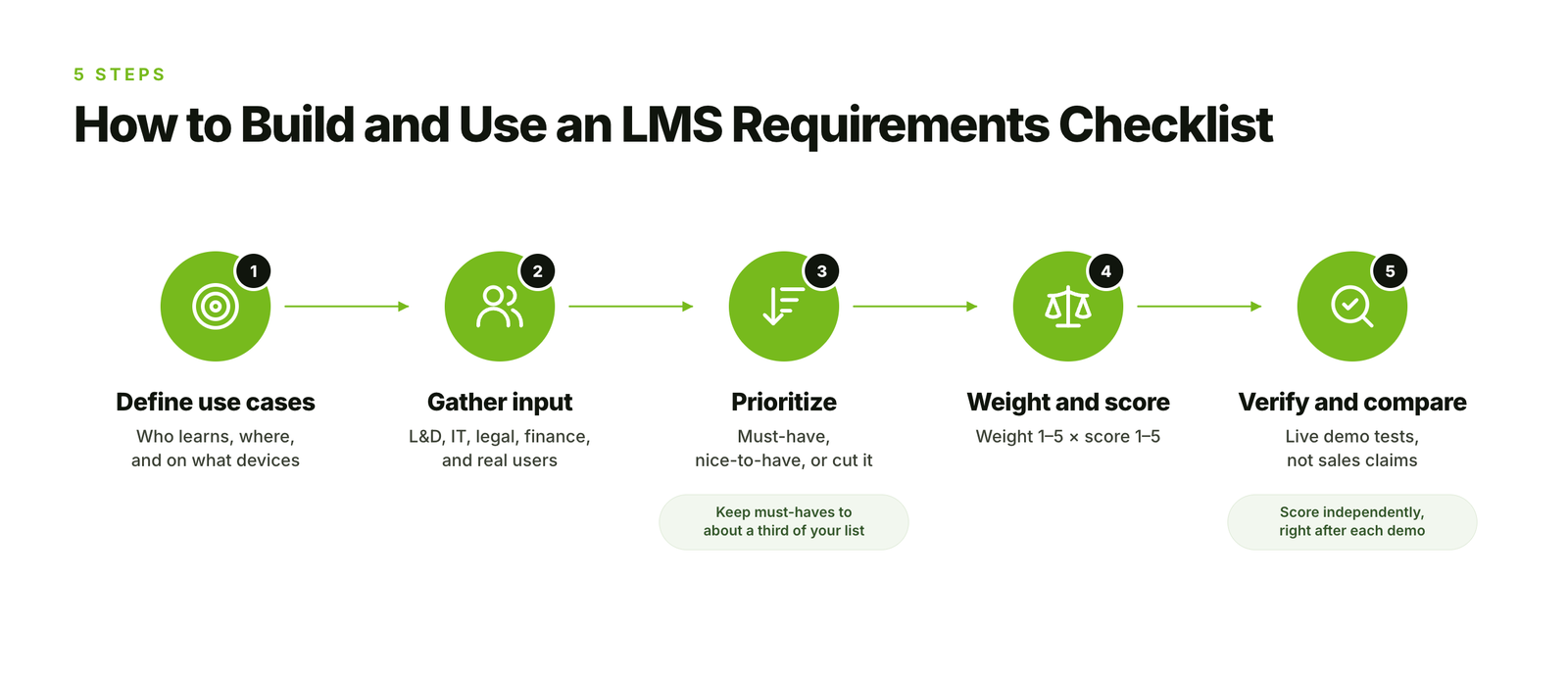 When you build a checklist that leads to a confident decision, it only takes five steps:
- Define your use cases and audiences.
- Gather input from every stakeholder group.
- Prioritize each requirement.
- Weight categories and set up your scorecard.
- Verify requirements in demos and score vendors side by side.
Step 1: Define your use cases and audiences.
You can start with who will learn on the platform and why, given that requirements will change a lot depending on your answer. For instance, an LMS for internal compliance training would need a strong HRIS integration and audit reporting, while having one for selling courses to customers requires you to have e-commerce, branding, and self-registration as your core requirements.
List each audience you plan to serve, like your employees, contractors, customers, partners, members, or students. Take note of where they’re located, what languages they speak, and what devices they can actually use. All these details will help drive many of your technical, compliance, and localization requirements later.
If you’re still unsure whether your training needs a platform at all, our guide on do I need an LMS can help you decide.
Step 2: Gather input from every stakeholder group.
You need to interview or survey the people who will buy, run, and use the system. At a minimum, you should include these key persons:
- L&D or training teams – content, delivery, and learner experience.
- IT and security – integrations, SSO, hosting, and data protection.
- Legal and privacy – data residency, contracts, and regulatory obligations.
- Finance and procurement – budget, pricing model, and contract terms.
- Admins, instructors, and learners – day-to-day usability.
You can ask each group what problems the current setup causes and what a successful LMS would let them do. Then write your requirements as outcomes – here’s an example: “managers can see their team’s overdue training without exporting data” rather than features like “manager dashboard.”
Step 3: Prioritize each requirement.
Sort every requirement into one of three groups:
- Must-have – an LMS vendor that can’t meet it is eliminated, regardless of their score.
- Nice-to-have – adds value and counts toward the score, but isn’t necessarily a dealbreaker.
- Not needed – remove it from your list of requirements.
You have to be strict with must-haves. If more than a third of your list ends up in that group, you’re probably not prioritizing here. So a common rule of thumb is to keep must-haves to the requirements you’d walk away from a contract over.
Step 4: Weight categories and set up your scorecard.
You can assign each category a weight from 1 to 5 based on how important it is to your organization. Then, score each vendor from 1 to 5 on how well they meet the requirements in that category. Then you multiply the two to get a weighted score, and add up the results.
Here’s a simplified example for you to visualize it better:
| Category | Weight (1–5) | Vendor A score | Vendor A weighted | Vendor B score | Vendor B weighted |
|---|---|---|---|---|---|
| Functional | 5 | 4 | 20 | 5 | 25 |
| Technical and integrations | 4 | 5 | 20 | 3 | 12 |
| Security and compliance | 5 | 5 | 25 | 4 | 20 |
| Localization | 3 | 2 | 6 | 4 | 12 |
| Business and support | 3 | 4 | 12 | 3 | 9 |
| Total | 83 | 78 |
Must-haves would sit outside the scoring. So you have to check them first as pass or fail, and only score vendors that pass every one.
Step 5: Verify requirements and score vendors side by side.
Don’t score vendors from sales calls or marketing materials. Instead, for each requirement, decide in advance how you’ll confirm it, like a task the vendor performs live in a demo, a test you run in a sandbox, or a document you request.
You need to score LMS vendors right after each demo, while details are fresh, and have every evaluator score independently before you compare results.
LMS Functional Requirements
Functional requirements would describe what your LMS needs to do for learners, instructors, and admins every day. This is actually where most of the checklists start, and where LMS vendors are most likely to answer yes to everything.
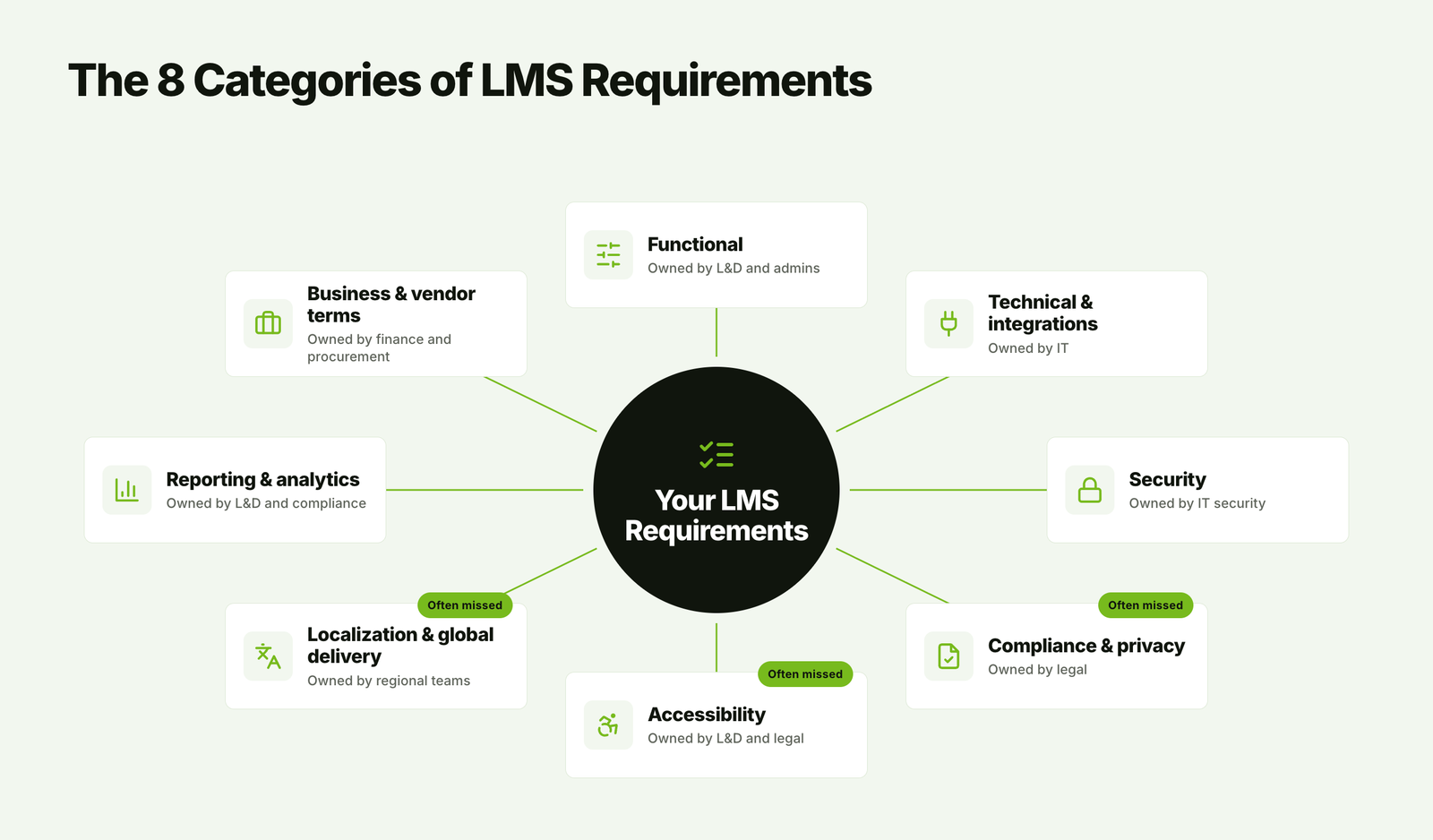 And for each area below, you can use the checklist items to decide what you need, then run the verification test to actually confirm the vendor can deliver it.
User and Audience Management
How your LMS organizes people will determine how easily you can assign training, control access, and serve different audiences from just one platform.
- Custom roles and permissions (learner, manager, instructor, admin, and others that you define).
- Groups or departments that will update automatically based on user attributes like job title, location, or hire date.
- Separate portals or tenants for different audiences, with their own branding and catalogs.
- Self-registration with approval workflows, if your external learners will sign up.
- Bulk user import and update by CSV or integration.
How to verify: You can give your LMS vendor a sample of 20 users with different roles and locations. Then ask them to create an automatic group rule live, like “all managers in Germany,” and show which users are added – an actual demo.
Content Creation and Management
Your L&D team needs to upload existing content, build new courses, and keep everything current without any constant help from the vendor.
- Support for your file types, including SCORM, xAPI, video, PDF, and slide decks.
- Built-in course authoring for quick updates, or compatibility with the authoring tools you already use.
- Version control, so that you can update a course without losing learner progress or completion records.
- Central content library with tags, search, and reuse across courses.
- Access to a third-party eLearning content library, if you actually plan to license off-the-shelf eLearning.
How to verify: You can bring one of your own SCORM packages and a video. Then upload both during the demo, publish an updated version of the course, and check whether your existing learners keep their progress.
If you don’t have a test package yet, our guide on how to create SCORM content walks you through it. And if you’re still picking a tool, our roundup of the best eLearning authoring tools compares the main options.
Learning Delivery
Delivery requirements can cover how your learners move through training, whether it’s self-paced, scheduled, or a mix.
- Learning paths that will sequence courses, with prerequisites and due dates.
- Automatic enrollment based on rules, like new hire onboarding or role changes.
- Instructor-led training scheduling, including sessions, waitlists, attendance, and room or instructor booking.
- Virtual classroom integration with tools like Zoom, Microsoft Teams, or Google Meet.
- Blended programs that will help combine online modules, live sessions, and on-the-job tasks.
How to verify: You can ask the LMS vendor to build a three-step onboarding path with one self-paced course, one live session, and one manager sign-off. Then, you can enroll a test user and walk through it as that learner.
If onboarding is your main use case, our guide to employee onboarding and training covers what a full program needs. And if blended delivery is a priority, it’s worth comparing dedicated blended learning software as well.
Assessments and Certification
If you need to prove that your learners completed training or reached a certain standard, then assessment and certification features matter more than almost anything else – these are elements like:
- Multiple question types, question banks, and randomized questions.
- Pass marks, retake limits, and timed assessments.
- Proctoring or identity verification, if your certifications actually require it.
- Automatically issued certificates with custom templates.
- Certificate expiry and automatic reassignment for recertification.
How to verify: You can set a test certification to expire in one day. Then confirm the next day that the system reassigned the training and notified the learner and their manager.
If your certifications are tied to regulations, map each one to a role and renewal date in your compliance training plan before you start testing vendors.
Engagement and Communication
Engagement features would help your learners start and finish training without constant reminders from admins.
- Automated notifications and reminders by email, in-app messages, or chat tools like Slack or Microsoft Teams.
- Gamification, like points, badges, and leaderboards, if it suits your culture.
- Social learning, which includes discussion forums, comments, and peer feedback.
- Personalized course recommendations based on each learner’s role or past activity.
How to verify: You can ask to see the full list of notification triggers and whether you can edit the message text, timing, and language of each one.
Not sure whether game mechanics fit your audience? Our guide to gamification in eLearning covers what tends to work and what doesn’t.
Mobile and Offline Learning
For frontline, field, or traveling staff, mobile access would often help decide whether training gets done at all.
- Native mobile app for iOS and Android, or fully responsive web experience.
- Offline access, with progress syncing once your learner reconnects.
- Mobile-friendly assessments, video playback, and SCORM content.
- Usable performance on slow or unstable connections.
How to verify: You need to download a course to a phone, switch to airplane mode, complete part of it, then reconnect. Then check that the completion appears in admin reports.
For more on reaching deskless and field teams, see our guide to mobile learning solutions.
E-Commerce (If You Sell Training)
You can skip this section if all your training programs are internal. Now, if you sell courses to customers, members, or partners, these requirements are often your must-haves.
- Course storefront with your branding.
- Payment processing through providers that will operate in your markets.
- Multi-currency pricing and local tax handling.
- Discount codes, bundles, subscriptions, and bulk seat purchases for organizations.
- Integration with your CRM or accounting system.
How to verify: You can complete a test purchase in a non-USD currency with a discount code, then you can confirm the order, tax, and enrollment appear correctly in reports.
If selling training is your core business, our list of the best LMS for training companies compares platforms built for it.
Functional requirements would tell you what your LMS can do, whereas technical requirements tell you whether it will work with the systems you already have.
LMS Technical and Integration Requirements
Technical requirements decide whether the LMS will fit into the systems, security setup, and content you already have. IT usually owns these, and they’re the requirements most likely to cause delays after you sign if no one checks them early.
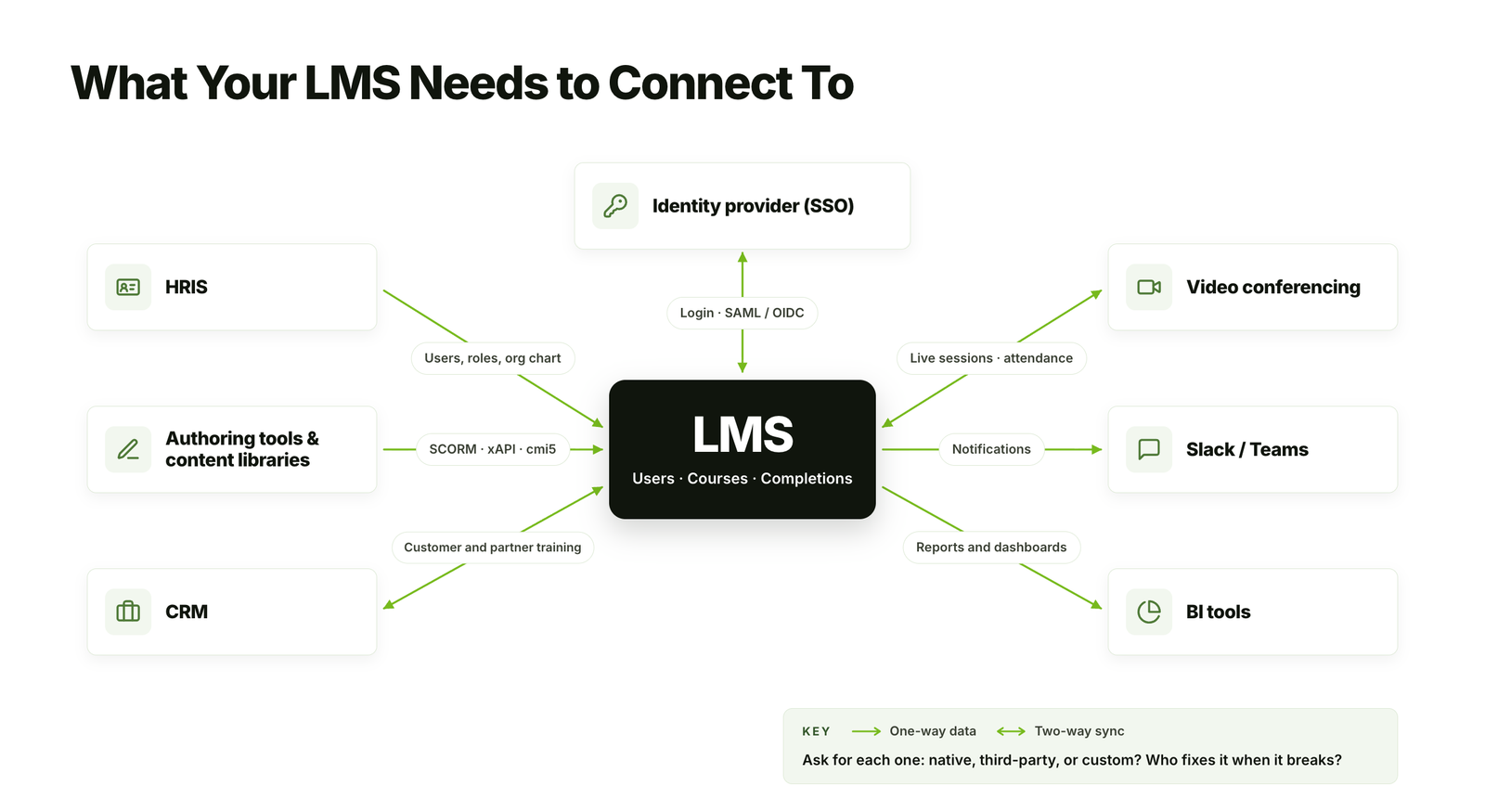 Deployment Model
Most organizations now choose a SaaS or cloud based LMS, where the vendor handles hosting, updates, and uptime. Self-hosted or private cloud options give you more control over data and customization, but your team takes on maintenance, security patches, and upgrades.
- Deployment options offered: multi-tenant SaaS, single-tenant or private cloud, or self-hosted.
- Hosting regions available, and whether you can choose where your data is stored.
- Update schedule, and whether you get advance notice of changes.
- A separate sandbox or staging environment for testing content and integrations.
How to verify: Ask for a written list of hosting regions, plus the release notes from the last three updates.
eLearning Standards Support
- SCORM 1.2 and SCORM 2004, which most authoring tools still export.
- xAPI (Tin Can), with a built-in or connected learning record store (LRS) for tracking activity outside courses.
- cmi5, which combines xAPI tracking with SCORM-style course launching.
- LTI 1.3, if you need to connect external learning tools or work in education settings.
- AICC, only if you have legacy content that still uses it.
A vendor saying it “supports SCORM” can mean anything from fully tracking scores, time, and bookmarks to simply launching the file. Our guide to SCORM compliance requirements explains what full support should include.
How to verify: Upload your own SCORM 1.2 and 2004 packages, complete them as a test learner, and check that scores, completion status, time spent, and resume points all appear correctly in reports.
Identity and Access
- Single sign-on (SSO) through SAML 2.0 or OpenID Connect, with your identity provider, such as Microsoft Entra ID, Okta, or Google Workspace.
- Automatic user provisioning and deprovisioning through SCIM or your HRIS.
- Multi-factor authentication (MFA) for admins, and optionally for learners.
- Separate login options for external learners who aren’t in your directory.
How to verify: Ask the vendor to set up SSO with a test account from your identity provider during the trial. Then deactivate that user in your directory and confirm their LMS access is removed.
Integrations
List the systems the LMS needs to exchange data with, and which direction the data flows.
- HRIS, such as Workday, SAP SuccessFactors, or BambooHR, to sync users, roles, and org structure.
- CRM, such as Salesforce or HubSpot, for customer and partner training.
- Video conferencing tools for live sessions.
- Chat and collaboration tools like Slack or Microsoft Teams.
- Content libraries, authoring tools, and payment platforms.
Check whether each integration is native, built by a third party, or needs custom development, since that affects both cost and who fixes it when it breaks. Our guide to LMS integration covers the most common setups.
How to verify: For each must-have integration, ask for a customer reference that uses it today, and ask how often user data syncs.
API and Data Access
- A documented REST API covering users, enrollments, courses, and completion data.
- Webhooks for real-time events, such as a course completion triggering an update in another system.
- Bulk data export in standard formats, such as CSV or JSON.
- Clear rate limits, with API access included in your plan rather than sold as an add-on.
How to verify: Ask for the API documentation before the demo and have a developer review it. Gaps in the documentation usually mean gaps in the API.
Performance and Scalability
- Total and concurrent users the platform can handle, compared with your peak load, such as an annual compliance deadline.
- An uptime commitment in the contract, commonly 99.9% or higher.
- Content delivery network (CDN) coverage, so video and courses load quickly in every region you serve.
- A public status page and incident history.
How to verify: Ask for 12 months of uptime history, and have learners in your farthest regions test video playback during the trial.
LMS Security and Compliance Requirements: US vs. Global
Your LMS will store personal data, training records, and sometimes assessment results that you rely on to prove compliance. Security requirements apply wherever your learners are, but compliance requirements depend on where they live and what industry you’re in. This is where most generic checklists fall short for global teams.
Baseline Security Requirements
These apply to every organization, regardless of location:
- Encryption of data in transit and at rest.
- Role-based access controls and audit logs of admin activity.
- Independent security audits or certifications, such as SOC 2 Type II or ISO/IEC 27001.
- Regular third-party penetration testing.
- A documented incident response and breach notification process.
- Data retention and deletion controls, including deleting a single user’s data on request.
- A published list of sub-processors that handle your data.
How to verify: Request the vendor’s most recent SOC 2 Type II report or ISO 27001 certificate, a penetration test summary, and a completed security questionnaire. Your IT team will usually have a standard questionnaire to send.
Compliance Requirements by Region
The table below compares what US buyers typically need with common requirements in other regions.
| Region | Key laws and standards | Data residency | What to ask the vendor |
|---|---|---|---|
| United States | State privacy laws such as California’s CCPA/CPRA, plus FERPA, HIPAA, and COPPA by sector. SOC 2 is the common security benchmark. | Rarely required by law, but federal agencies and some public-sector buyers require US hosting | SOC 2 Type II report, business associate agreement (BAA) if HIPAA applies, US hosting option |
| European Union | GDPR | Not strictly required, but transfers outside the EU need approved safeguards, and many buyers require EU hosting | Data processing agreement (DPA), EU hosting, sub-processor list, transfer mechanism such as Standard Contractual Clauses or the EU-US Data Privacy Framework |
| United Kingdom | UK GDPR and the Data Protection Act 2018 | Similar to the EU, with UK-specific transfer rules | UK transfer addendum or international data transfer agreement, UK or EU hosting |
| Canada | PIPEDA, Quebec’s Law 25, and provincial public-sector privacy laws | Some public-sector organizations require or prefer Canadian hosting | Canadian hosting option, support for privacy impact assessments |
| Asia-Pacific | Australia’s Privacy Act, Singapore’s PDPA, Japan’s APPI, India’s DPDP Act, and the Philippines’ Data Privacy Act | Varies by country and sector | Regional hosting, cross-border transfer terms, local breach notification timelines |
| China | Personal Information Protection Law (PIPL) | Local storage is often required, and platforms hosted outside China may load slowly or be blocked | China hosting or a local partner, performance testing from mainland China |
| Latin America | Brazil’s LGPD, plus other national privacy laws | Generally not required, but transfer safeguards apply | DPA that covers LGPD, Portuguese and Spanish language support |
If you train learners in several regions, the strictest requirement usually sets the bar. For example, a US company with employees in Germany will need a GDPR-compliant data processing agreement, even if most of its learners are in the US.
Industry-Specific Requirements
- Healthcare (US) – HIPAA, if training data includes protected health information, with a signed BAA.
- Education (US) – FERPA for student records, and COPPA if learners are under 13.
- Federal government (US) – FedRAMP authorization for cloud services.
- Life sciences – training records and electronic signatures that meet FDA 21 CFR Part 11.
- Financial services and other regulated industries – audit-ready records and retention periods that match your regulator’s rules.
Please note
This section is a general overview, not legal advice. Privacy and data protection requirements vary by location and change over time, so confirm the current rules with your legal or privacy team before finalizing your requirements.
LMS Accessibility Requirements
Accessibility applies to two things: the LMS itself, including both the learner and admin interfaces, and the content you deliver through it. An accessible platform can still serve inaccessible courses, so you need to check both.
The standards that matter most:
- WCAG 2.2 Level AA – the current version of the Web Content Accessibility Guidelines, and the target most organizations should set. Many laws still reference WCAG 2.0 or 2.1, and WCAG 2.2 builds on both.
- Section 508 (US) – requires federal agencies to buy accessible technology, and often appears in contracts with federal contractors and universities.
- ADA (US) – a 2024 Department of Justice rule under Title II sets WCAG 2.1 AA as the standard for state and local government web content, including online training. Private organizations can also face ADA claims over inaccessible websites and apps.
- European Accessibility Act (EU) – applies since June 28, 2025, to certain digital products and services sold to consumers in the EU, including e-commerce. It matters most if you sell training to individuals.
- Other regions – such as the Accessible Canada Act, Ontario’s AODA, and the UK’s public sector accessibility regulations.
Your checklist should include:
- A current Accessibility Conformance Report (ACR), usually based on a VPAT, for the version you’d buy.
- Full keyboard navigation, with visible focus indicators.
- Compatibility with screen readers such as JAWS, NVDA, and VoiceOver.
- Captions and transcripts for video, and an accessible media player.
- Sufficient color contrast, and text that resizes without breaking the layout.
- Built-in authoring tools that produce accessible content by default.
How to verify: During the trial, complete a full course using only the keyboard, then repeat it with a screen reader. Check the date on the ACR too, since an older report may not reflect the current product.
Our guide to accessible eLearning covers how to make the courses themselves meet these standards.
LMS Localization and Global Delivery Requirements
If your learners work in more than one country, the LMS needs to feel local to each of them. Translation is only part of it. Dates, currencies, time zones, and even page load speed affect whether global learners actually complete their training.
Language Support
- An interface available in every language your learners use, selected automatically from the user profile or browser.
- Multilingual courses, where one course holds several language versions and tracks completion as a single record.
- Right-to-left (RTL) language support for Arabic, Hebrew, and others.
- A translation workflow, including built-in or AI-assisted translation with human review.
- Notifications and certificates in each learner’s language.
Our guide to multilingual eLearning explains how to plan content across languages. For courses that need more than a word-for-word swap, eLearning translation services handle the language, while eLearning localization services adapt examples, currencies, and local rules for each market.
Regional Settings
- Local date, time, and number formats.
- Due dates and live sessions that display in each learner’s time zone.
- Region-specific course assignment, so each country gets its own required compliance training.
- Multi-currency pricing and local invoicing, if you sell training.
Global Performance and Support
- Fast loading in every region, through regional hosting or a CDN.
- Support hours that cover your time zones, in the languages your admins speak.
- Reliable mobile performance on the networks your learners actually use.
How to verify: Switch the interface to an RTL language and check that the layout flips correctly. Then assign a course with a due date to a test learner in another time zone, and confirm the deadline shows in their local time.
Ready to find an LMS and training content that fit your team?
At eLearning Solutions Lab, we build SCORM- and xAPI-ready courses that run on whichever platform you choose, for office, remote, frontline, and global teams. Our custom eLearning development services cover design, development, and QA in one team.
Need somewhere to deliver and track it? Levantra LMS, our cloud based LMS, assigns training paths by role or location, gives managers a view of their own teams, and issues verifiable certificates for every completion.
See our custom eLearning development servicesBook a Levantra LMS demo
LMS Reporting and Analytics Requirements
Reports are how you prove training happened and show whether it worked. They’re also where many platforms disappoint after purchase, because demos tend to show polished dashboards rather than the specific reports you need.
- Standard reports for completions, overdue training, assessment scores, and certification status.
- Custom reports you can build without vendor help, filtered by team, location, manager, or any user attribute.
- Scheduled reports sent automatically to managers or compliance teams.
- Manager dashboards that show only their own team’s progress.
- Audit-ready compliance records with timestamps, course versions, and certificate copies.
- xAPI data and export to business intelligence tools such as Power BI or Tableau.
- Historical records kept for as long as your regulators require.
How to verify: Before the demo, write down three reports you run today, such as “overdue compliance training by country and manager.” Ask the vendor to build them live, then schedule one for weekly delivery.
Our guide on how to track employee training covers which fields and metrics to capture. And when you need to connect training to business results, see our guide to eLearning ROI.
LMS Business and Vendor Requirements
Business requirements cover what the LMS will really cost, how the vendor will support you, and what happens if you leave. Finance and procurement usually own these, but they affect everyone.
Pricing Model
The most common LMS pricing models are:
- Per active user – you pay only for users who log in or take training in a given period. This suits large or irregular audiences.
- Per registered user – you pay for every account, active or not. It’s easier to predict, but costly if many users rarely log in.
- Tiered or flat pricing – a fixed fee for a user range or unlimited users. Check what happens when you move into the next tier.
- Add-ons – features such as e-commerce, extra portals, API access, or advanced reporting that cost extra.
If budget is a major constraint, our roundup of affordable LMS systems compares lower-cost options.
Total Cost of Ownership
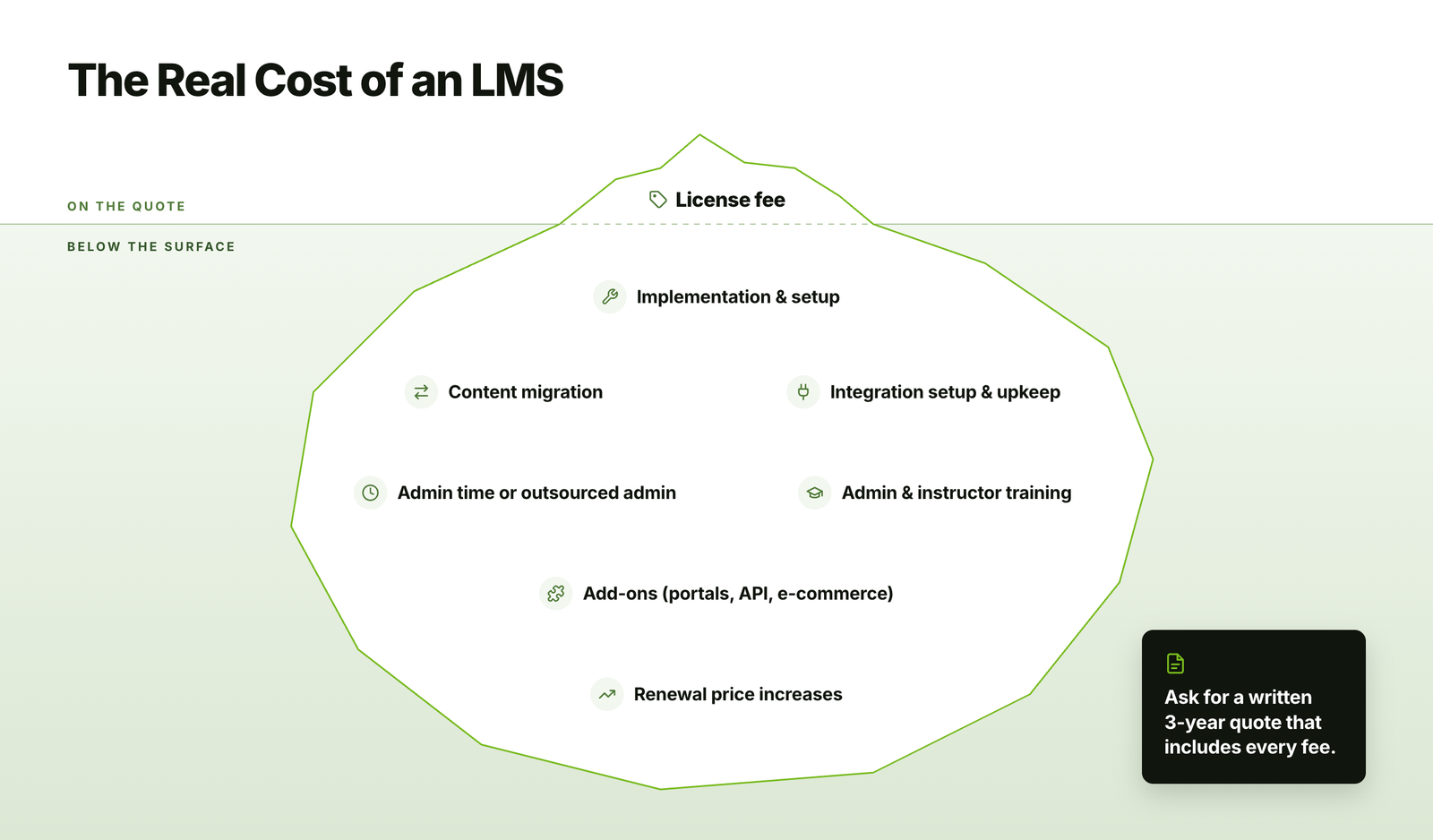 The license fee is only part of the cost. Over a three-year period, you should also account for:
- Implementation and setup fees.
- Content migration, including historical completion records.
- Integration setup and maintenance.
- Admin time, or the cost of LMS administration services if you outsource it.
- Training for admins and instructors.
- Renewal price increases, which are worth capping in the contract.
Support and Service Levels
- Support channels (email, chat, phone) and hours that cover your time zones.
- Response and resolution times in the contract, by issue severity.
- A named customer success manager, and whether that depends on your plan.
- An uptime commitment with service credits if the vendor misses it.
If your team won’t have in-house LMS expertise, ask whether the vendor or a partner offers ongoing LMS support services.
Implementation and Adoption
- A realistic implementation timeline, with milestones and clear responsibilities.
- Help migrating users, courses, and historical records.
- Admin training and documentation.
- Support for rollout and learner communications.
Choosing the right platform is only half the job. A clear LMS adoption strategy helps make sure people actually use it after launch.
Vendor Viability and Exit Terms
- A product roadmap, and how customer feedback shapes it.
- Customer references similar to you in size, industry, and region.
- Contract length, termination terms, and notice periods.
- A full export of your data, including users, completions, and certificates, in a usable format and at no extra cost when you leave.
How to verify: Ask for a written three-year quote that includes every fee, and speak with at least two references who have been customers for more than a year.
LMS Requirements by Organization Type
The same checklist categories apply to everyone, but priorities shift depending on who you’re training. Use this table to decide which requirements to move up your list.
| Organization type | Top-priority requirements | Often overlooked |
|---|---|---|
| Corporate (employee training) | HRIS integration, SSO, automatic enrollment, compliance tracking | Manager dashboards and mobile access for frontline staff |
| Customer and partner training | Branded portals, self-registration, CRM integration, e-commerce | Separate reporting for each customer account |
| Associations and membership organizations | Member database integration, payments, continuing education credits | Certificate verification for credit-granting bodies |
| Training companies | E-commerce, branded storefronts, multi-tenant portals, client reporting | Bulk seat sales to corporate buyers |
| Education (K–12 and higher education) | LTI, student information system integration, FERPA and COPPA | Accessibility obligations under Section 508 and the ADA |
| Healthcare and regulated industries | Audit trails, certification expiry, HIPAA, electronic signatures | Record retention periods |
| Small businesses | Ease of use, quick setup, predictable pricing | Room to grow without a costly migration later |
For more on specific use cases, see our guides to choosing an onboard LMS for new hires, building customer onboarding training, healthcare eLearning solutions, and the best LMS services for small businesses.
How to Verify LMS Requirements in a Demo or Pilot
Most LMS demos follow the vendor’s own script, which shows the platform at its best. To compare vendors fairly, send every shortlisted vendor the same script in advance, and ask them to complete each task live using your content and your scenarios.
Sample Demo Script
| Requirement | Demo task | What a pass looks like |
|---|---|---|
| SCORM support | Upload your own SCORM package and complete it as a learner | Score, completion, time, and resume point all appear in reports |
| SSO | Log in through your identity provider | Learner lands in the LMS without a second login |
| Automatic enrollment | Create a rule that assigns a course to all managers in one country | The right users are enrolled immediately, and new matches are added automatically |
| Recertification | Set a certification to expire and trigger reassignment | Training is reassigned, and the learner and manager are notified |
| Reporting | Build “overdue training by country and manager” | Report is built without vendor engineering help and can be scheduled |
| Localization | Switch the interface to another language, including an RTL language | Interface, notifications, and certificates all change correctly |
| Accessibility | Complete a course using only the keyboard | Every step works without a mouse |
| Mobile | Complete part of a course offline on a phone | Progress syncs once the phone reconnects |
Running a Proof of Concept
For larger purchases, a short pilot with real users will reveal far more than a demo. Keep it focused:
- Limit it to two or three finalists, for two to four weeks each.
- Use real content and a small group of real learners, admins, and managers.
- Agree on success criteria in writing before you start.
- Test your must-have integrations, not just the interface.
- Have every evaluator score independently using the same scorecard.
Red Flags to Watch For
- “It’s on the roadmap” for a must-have requirement.
- “We can build that for you” for something you need on day one.
- Demos that only use the vendor’s sample content.
- Reluctance to provide a sandbox, documentation, or security reports.
- Pricing that changes once you ask about specific features or user counts.
Free LMS Requirements Checklist and Scorecard
Use this template to turn everything in this guide into a working checklist. Mark your must-haves, set your weights, and share it with every evaluator before the first demo.
In one line
Rank your requirements, weight what matters most, check compliance and localization needs for every region early, and verify each vendor claim with a real test before you sign.
Ready to find an LMS and training content that fit your team?
At eLearning Solutions Lab, we build SCORM- and xAPI-ready courses that run on whichever platform you choose, for office, remote, frontline, and global teams. Our custom eLearning development services cover design, development, and QA in one team.
Need somewhere to deliver and track it? Levantra LMS, our cloud based LMS, assigns training paths by role or location, gives managers a view of their own teams, and issues verifiable certificates for every completion.
See our custom eLearning development servicesBook a Levantra LMS demo
Related Reading
- How to choose an LMS – the full selection process, from shortlist to contract.
- LMS integration – how to connect your LMS with HRIS, CRM, and other systems.
- SCORM compliance requirements – what full SCORM support should include.
- Accessible eLearning – how to make your courses meet WCAG standards.
- LMS adoption strategy – how to get people using your new platform after launch.
The Author

Book A Discovery Call
Our Learning Advisors are happy to walk you through your project step-by-step — content, timeline, and fixed pricing.
Get Your Free QuoteNo obligation — just a focused conversation. Proposal within 24 hours.
You may also like
Employee Onboarding and Training: A Practical Guide (+ Free 90-Day Plan)
A new hire's first week usually sets the tone for everything that follows. And…
Retail Staff Training: Practical Guide with a Free Plan, Checklist and Scripts
Quick answer To train retail staff, list the skills each role needs, set clear…