

When you search for learning models, you’ll always find the same five theories just repeated across dozens of guides, often alongside claims that don’t hold up most of the time. Many still tell you to match training to “visual” or “auditory” learners – others simply cite Dale’s Cone percentages that Edgar Dale never wrote.
That’s a problem when you’re the one designing the training. When you choose a model that’s built on weak evidence, it can cost time, budget, and learner trust.
In this guide, you’ll learn what a learning model is and how it differs from a learning theory. We also cover 12 of the most widely used frameworks, including Kolb’s cycle, Bloom’s taxonomy, and 70-20-10, with examples of how each one works in real training. You’ll also get a side-by-side comparison table and a simple framework for choosing the right model for your goals, audience, and format.
Updated October 2026.
In This Article
What is a Learning Model?
A learning model is a structured framework that can turn ideas about how people learn into a practical plan for teaching or training. It can help guide how your content is sequenced, how learners engage with it, and how progress is actually measured, so that your instructors and designers can create consistent, effective learning experiences.
Learning Model vs. Learning Theory
These two terms are often used interchangeably, but they actually do different jobs. A learning theory explains how learning happens, like through reinforcement, mental processing, or building meaning from experience, while a learning model applies a theory to design instruction.
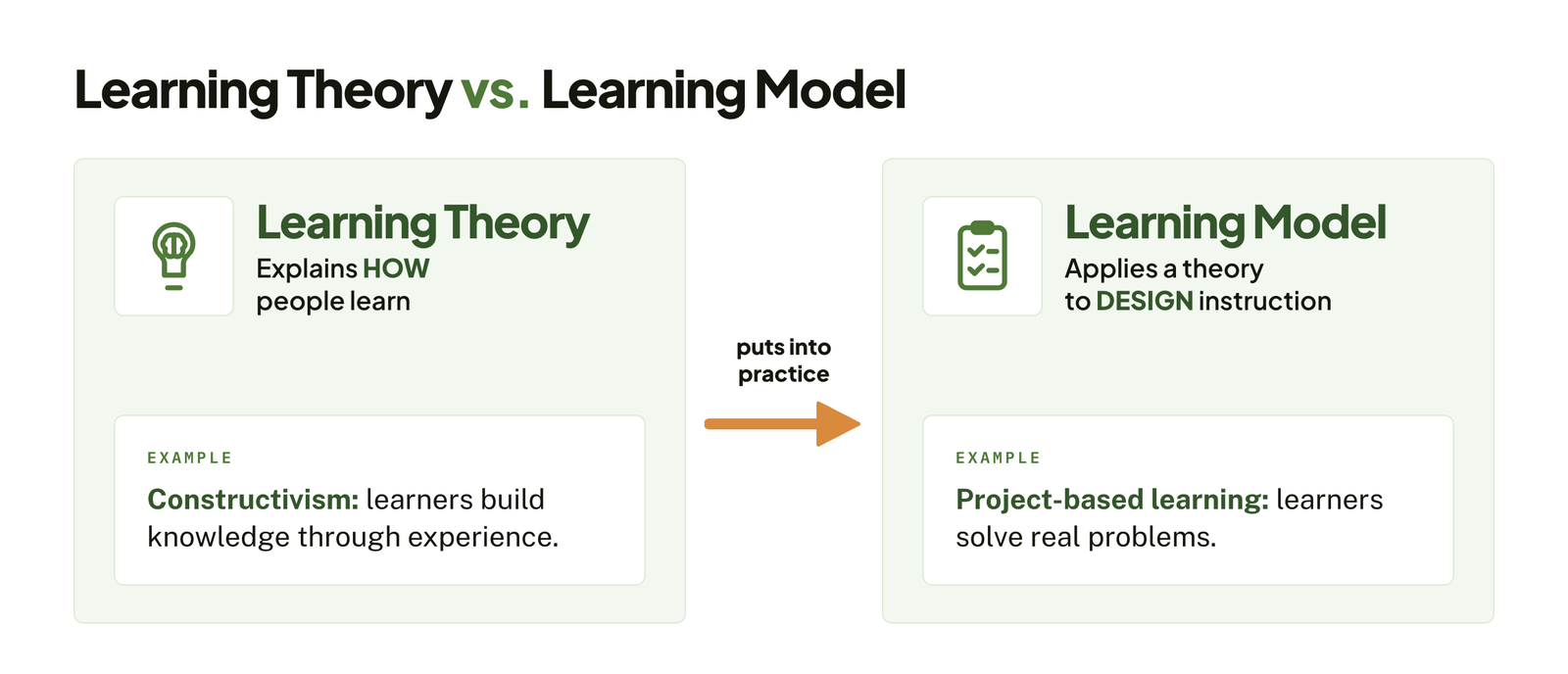
To give you an example, constructivism is a theory that says learners build knowledge through experience, whereas project-based learning is a model that can put that theory into practice by having your learners solve real problems.
Why Learning Models Matter
Learning models can give your training a clear structure instead of just leaving the design to guesswork. They can help you:
- Design consistently, so that every course can follow a proven structure rather than starting from scratch. Our guide to eLearning development best practices covers how to keep that structure across a whole catalog.
- Set measurable outcomes by linking activities to the specific goals you can assess. See our guide on how to track employee training for the metrics worth capturing.
- Improve engagement by matching activities to how people learn best for a given type of content.
- Communicate with stakeholders by giving your managers and subject-matter experts a shared language for how training works.
5 Foundational Learning Models
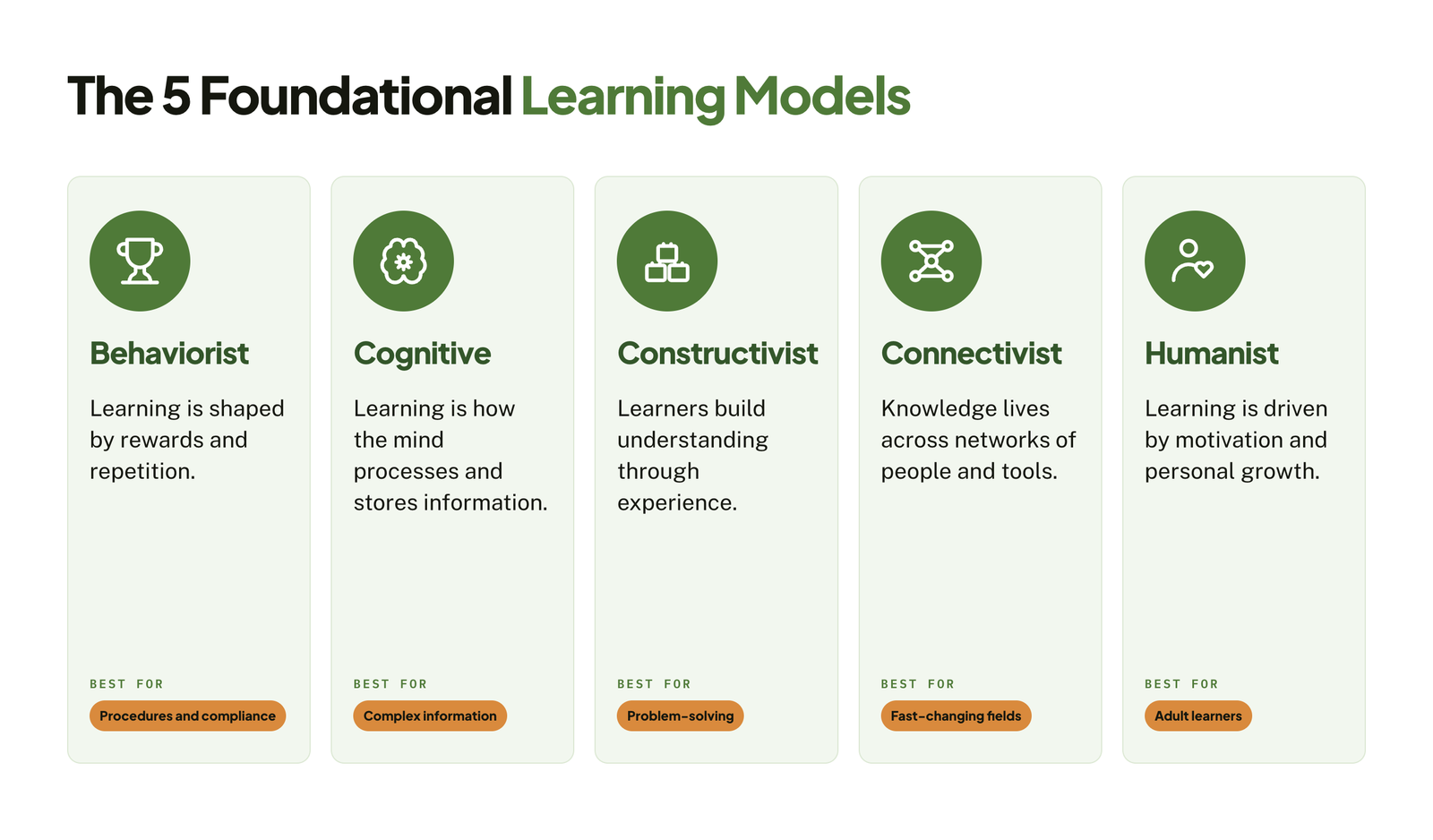
Most learning models trace back to five core theories of how people learn. So understanding these foundations will make it easier to see why applied frameworks like Kolb’s cycle or Bloom’s taxonomy work the way they do.
1. Behaviorist Model
The behaviorist model treats learning as a change in observable behavior that’s shaped by rewards and consequences. It grew out of the work of psychologists like Ivan Pavlov, John B. Watson, and B.F. Skinner.
Behaviors that are reinforced are repeated, and behaviors that aren’t reinforced usually fade. Learning will happen through practice, feedback, and repetition.
Example in training: A compliance course that gives instant feedback on each quiz answer, awards badges for completion, and requires learners to repeat modules until they reach a passing score. If you’re mapping courses like this to roles and renewal dates, start with a compliance training plan.
Strengths: Clear and measurable, which works well for procedures, safety rules, and skills that need to become automatic. Rewards like points and badges are also the basis of gamification in eLearning.
Limits: Focuses on what your learners do rather than what they understand – less effective for complex problem-solving or creative work.
2. Cognitive Model
The cognitive model looks at what happens inside your learner’s mind: how information is taken in, processed, stored, and recalled – this is often compared to how a computer processes information.
Learning is an active mental process. People organize new knowledge into mental structures called schemas, and they have limited working memory, so how information is presented really matters.
Example in training: A software training module that breaks a complex process into short steps, uses diagrams alongside text, and connects each new feature to tools learners already know.
Strengths: It can help designers reduce overload, structure content logically, and improve retention.
Limits: This can underplay the role of emotions, motivation, and social context in learning.
3. Constructivist Model
The constructivist model holds that your learners build their own understanding through experience and reflection, rather than passively receiving information – drawing on the work of Jean Piaget and Lev Vygotsky.
Knowledge is constructed, not just transferred. Your learners will make sense of new ideas by connecting them to what they already know, often through discussion and hands-on problem-solving.
Example in training: A leadership program where your participants work in small groups to solve a real business challenge, then reflect on what worked and why.
Strengths: It helps build deep understanding, critical thinking, and skills that can transfer to real situations.
Limits: Takes more time and facilitation. Beginners with little prior knowledge may struggle without enough guidance.
4. Connectivist Model
Connectivism is a newer model, introduced by George Siemens and Stephen Downes in the mid-2000s, that explains learning in a digital, networked world.
Knowledge lives not only in people’s heads but also across networks of people, tools, and information sources. So knowing where to find information and who to ask is a key skill.
Example in training: An onboarding program that connects new hires to internal experts, online communities, and a shared knowledge base, rather than relying on a single course. Our guide to employee onboarding and training covers what a full program needs.
Strengths: Fits fast-changing fields where information goes out of date quickly, and encourages lifelong, self-directed learning.
Limits: Less structured, and harder to measure – your learners would need strong digital and self-management skills to benefit.
5. Humanist Model
The humanist model puts your learners’ needs, motivation, and personal growth at the center. It’s rooted in the work of Abraham Maslow and Carl Rogers, and it shaped Malcolm Knowles’s ideas about adult learning (andragogy).
People learn best when they feel safe, respected, and in control of their learning, and when your content connects to their own goals.
Example in training: A professional development program where your employees choose their own learning paths, set personal goals with a coach, and apply new skills to projects they care about. This approach is common in leadership development eLearning.
Strengths: Boosts motivation and engagement, especially for adult learners.
Limits: It’s much harder to standardize across large groups – self-directed learning may not suit learners who need more structure.
7 Applied Learning Frameworks
The five foundational models above explain how people learn. The frameworks below put those ideas to work, giving designers and educators practical tools for planning, structuring, and delivering learning.
1. Kolb’s Experiential Learning Cycle
Kolb’s experiential learning cycle was developed by David Kolb in 1984, and it describes learning as a cycle built on experience. It draws heavily on constructivist ideas.
Your learners move through these four stages:
- Concrete Experience – doing something or having a new experience.
- Reflective Observation – reviewing and reflecting on that experience.
- Abstract Conceptualization – drawing conclusions and forming new ideas.
- Active Experimentation – applying those ideas to see what happens.
Example in training: A customer service team role-plays a difficult call, discusses what went well, identifies better techniques, and tries them in the next practice round. For remote teams, an eLearning simulation can recreate the same cycle online.
Strengths: It helps turn experience into lasting learning, and it works well for soft skills, leadership, and hands-on roles.
Limits: The full cycle takes time. Kolb’s related learning-style inventory is also less widely supported than the cycle itself.
2. Bloom’s Taxonomy
Bloom’s taxonomy, developed by Benjamin Bloom and colleagues in 1956 and revised by Lorin Anderson and David Krathwohl in 2001, organizes thinking skills from simple to complex.
The revised version ranks six levels: Remember, Understand, Apply, Analyze, Evaluate, and Create. Your learners build on lower levels before reaching higher ones.
Example in training: A sales course moves from recalling product features (Remember) to comparing products for a client’s needs (Analyze) to building a custom pitch (Create). Our guide to eLearning sales training shows how to build programs like this.
Strengths: It makes it easy to write clear, measurable learning objectives and match assessments to them.
Limits: It’s a classification tool rather than a full teaching method, so it works best alongside other models.
3. 70-20-10 Model
Based on research by the Center for Creative Leadership in the 1980s, the 70-20-10 model describes how professionals develop on the job.
Roughly 70% of learning comes from hands-on experience, 20% from other people (mentoring, coaching, feedback), and 10% from formal training.
Example in training: A new manager attends a short leadership course (10%), meets a mentor every two weeks (20%), and leads a real team project with stretch goals (70%).
Strengths: It reminds your organization that learning doesn’t end when a course does, and it encourages blending formal and informal learning.
Limits: The ratio is a guideline, not a fixed formula, so the right balance varies by role and industry.
4. ADDIE
ADDIE is an instructional design process model that was first developed in the 1970s at Florida State University for U.S. military training. It’s also one of the most widely used frameworks in L&D.
Courses are built in five phases: Analyze, Design, Develop, Implement, and Evaluate. In the Design phase, many teams map each screen with an eLearning storyboard template before development starts.
Example in training: An L&D team analyzes a drop in safety scores, designs objectives, develops an eLearning module, rolls it out, and measures incident rates afterward. That final step is where you connect training to business results, which our guide to eLearning ROI explains.
Strengths: It’s clear, thorough, and easy to manage, which is ideal for large or high-stakes projects. If your team doesn’t have the capacity to run every phase in-house, instructional design services can cover the full process.
Limits: It can be slow and rigid. Teams that need faster updates often use agile alternatives like SAM (Successive Approximation Model).
5. Merrill’s First Principles of Instruction
Merrill’s first principles of instruction were published by M. David Merrill in 2002, bringing together principles shared by many effective instructional approaches.
Learning works best when it is centered on real-world problems and follows four phases:
- Activation – connecting to what learners already know.
- Demonstration – showing the skill in action.
- Application – letting learners practice.
- Integration – helping learners use the skill in their own work.
Example in training: A data analysis course opens with a real reporting problem, shows an expert solving it, has learners solve a similar one, and then asks them to apply the method to their own team’s data.
Strengths: It’s practical and task-focused, which helps your learners transfer skills to the job.
Limits: It requires realistic problems and scenarios, which take effort to design. Scenario based eLearning services can help build them.
6. Socratic Method
The Socratic method is named after the Greek philosopher Socrates and teaches through guided questioning and dialogue rather than direct instruction.
Instead of giving answers, your facilitator asks a series of probing questions that lead learners to examine their assumptions and reason their way to conclusions.
Example in training: In an ethics workshop, a facilitator may ask, “What would you do here, and why?” then follow up with questions that test each answer against different scenarios.
Strengths: It builds critical thinking, reasoning, and confidence in discussion.
Limits: It depends on a skilled facilitator and works best in small groups, so it’s less suited to teaching basic facts or procedures.
7. Dale’s Cone of Experience
Dale’s Cone of Experience was introduced by Edgar Dale in 1946. It arranges learning experiences from the most concrete (direct, hands-on experience) to the most abstract (reading words or symbols).
Your learners benefit from a mix of experiences, given that concrete experiences can make abstract ideas easier to understand.
Example in training: A product training program that combines a hands-on demo, a short video, and a written guide, so your learners see the product in multiple ways. For the video layer, see our guide to video based eLearning.
Strengths: A simple way to think about choosing a mix of media and activities.
Limits: The cone is often shown with retention percentages, like “people remember 10% of what they read.” Those figures weren’t part of Dale’s original work, so treat them with caution.
Learning Models Comparison Table
You can use this table to compare all 12 models at a glance and narrow down which ones fit your training goals.
| Model | Best for | Strengths | Limits | Example |
|---|---|---|---|---|
| Behaviorist | Procedures, compliance, safety rules | Clear, measurable, builds habits | Little focus on understanding | Quiz with instant feedback and badges |
| Cognitive | Complex information, technical content | Reduces overload, improves retention | Underplays emotion and context | Step-by-step software tutorial with diagrams |
| Constructivist | Problem-solving, critical thinking | Deep understanding, real-world transfer | Time-intensive, harder for beginners | Group project on a real business challenge |
| Connectivist | Fast-changing fields, digital learning | Encourages networking and self-direction | Less structured, hard to measure | Onboarding through experts and communities |
| Humanist | Adult learners, personal development | Boosts motivation and engagement | Hard to standardize at scale | Self-chosen learning paths with coaching |
| Kolb’s Cycle | Soft skills, leadership, hands-on roles | Turns experience into lasting learning | Full cycle takes time | Role-play, debrief, and retry |
| Bloom’s Taxonomy | Writing objectives and assessments | Clear, measurable learning goals | Not a full teaching method | Sales course from recall to custom pitch |
| 70-20-10 | Workplace and leadership development | Blends formal and informal learning | Ratio is a guideline, not a rule | Course + mentor + stretch project |
| ADDIE | Large or high-stakes course design | Thorough, easy to manage | Can be slow and rigid | Safety training built in five phases |
| Merrill’s First Principles | Task-based, job-focused training | Strong skill transfer to the job | Needs realistic scenarios | Data course built around a real report |
| Socratic Method | Critical thinking, ethics, discussion | Builds reasoning and confidence | Needs a skilled facilitator and small groups | Ethics workshop driven by questions |
| Dale’s Cone | Choosing a mix of media | Simple guide to concrete vs. abstract | Popular retention percentages aren’t Dale’s | Demo + video + written guide |
No single model fits every situation, and many effective programs combine several. For example, you might use ADDIE to manage the project, Bloom’s taxonomy to write objectives, and Kolb’s cycle to design activities.
Are Learning Styles a Real Learning Model?
Learning styles are among the most popular ideas in education. The theory says that people learn best when teaching matches their preferred style, like visual, auditory, or hands-on. Several well-known models fall under this category:
- VARK – developed by Neil Fleming, it sorts your learners into Visual, Aural, Read/Write, and Kinesthetic types.
- Honey & Mumford – builds on Kolb’s work and groups your learners as Activists, Reflectors, Theorists, or Pragmatists.
- Gardner’s Multiple Intelligences – proposes different kinds of intelligence, such as linguistic, logical-mathematical, and musical. Howard Gardner himself has said this theory is not the same as learning styles.
What the Research Says
Many people do have preferences for how they take in information. The problem is the next step: research has not shown that matching instruction to a person’s preferred style leads to better learning.
In fact, a widely cited 2008 review by Harold Pashler and colleagues found little support for this “matching” idea, and later studies have reached similar conclusions.
That’s why learning styles appear here instead of in the main list of models. They’re useful for starting conversations about learner preferences, but they shouldn’t drive how your course is designed.
What to Do Instead
- Match the method to the content, not the learner. Teach map reading with maps and pronunciation with audio.
- Use multiple formats for everyone. Combining words and visuals tends to help all learners, and adding captions and transcripts is a core part of accessible eLearning.
- Build in proven techniques like retrieval practice (quizzing), spaced repetition, and real-world application.
Want training built on the right learning model from day one?
At eLearning Solutions Lab, our instructional designers match each course to the model that fits your goals, whether that’s scenario-based practice, microlearning, or a full blended program. Our custom eLearning development services cover design, development, and QA in one team.
Need somewhere to deliver and track it? Levantra LMS, our cloud based LMS, assigns training paths by role or location, gives managers a view of their own teams, and issues verifiable certificates for every completion.
See our custom eLearning development servicesBook a Levantra LMS demo
Modern and AI-Era Learning Models
The 12 models above are still the foundation of good training. But the way people learn at work has changed, and newer models build on those foundations to fit busy schedules, remote teams, and AI-powered tools. For a wider view of where the industry is heading, see our roundup of eLearning trends.
Learning in the Flow of Work
This model delivers learning at the moment of need, inside the tools people already use, instead of pulling them away into a separate course. It builds on connectivist and cognitive ideas: people learn by finding the right information quickly and applying it right away.
Example in training: A sales rep opens a 90-second guide on handling a pricing objection directly from the CRM, just before a client call. Our guide to on demand training explains how to set this up, and mobile learning solutions extend it to frontline and field staff.
Strengths: Fits real work, reduces time away from the job, and improves recall when it matters.
Limits: Works best for quick tasks and reference. Deeper skills still need structured practice.
Microlearning
Microlearning breaks training into short, focused units, usually a few minutes each, that cover one idea or task at a time. It draws on cognitive principles about limited working memory, and it pairs well with spaced repetition.
Example in training: A weekly series of three-minute videos and quizzes that reinforces a new safety procedure over a month. See our microlearning examples for more formats, or our microlearning services if you need modules built for you.
Strengths: Easy to fit into a workday, quick to update, and well suited to mobile learners.
Limits: Short modules alone can’t teach complex skills. They work best as part of a larger program.
Blended Learning
Blended learning combines online modules, live sessions, and on-the-job practice in one program. It puts the 70-20-10 model into practice by connecting formal training with real experience and feedback from others.
Example in training: A new manager program that starts with self-paced eLearning, continues with a monthly live workshop, and ends with a coached team project. Our list of top blended eLearning solutions compares providers that support this approach.
Strengths: Combines the flexibility of online learning with the depth of live practice.
Limits: Takes more coordination across formats, instructors, and schedules.
AI-Personalized and Adaptive Learning
Adaptive learning adjusts the path, pace, or content for each learner based on what they already know and how they perform. AI tools now make this easier to build, from generating practice questions to recommending the next module.
Example in training: A product course that skips sections a learner passes in a pre-test and adds extra practice where they struggle. Our guide on how to create an adaptive course walks through the setup, and our guide to AI for instructional design covers where AI helps most.
Strengths: Saves time for experienced learners and gives extra support to those who need it.
Limits: Needs good learner data and careful design, and AI-generated content still needs human review for accuracy.
How to Choose the Right Learning Model
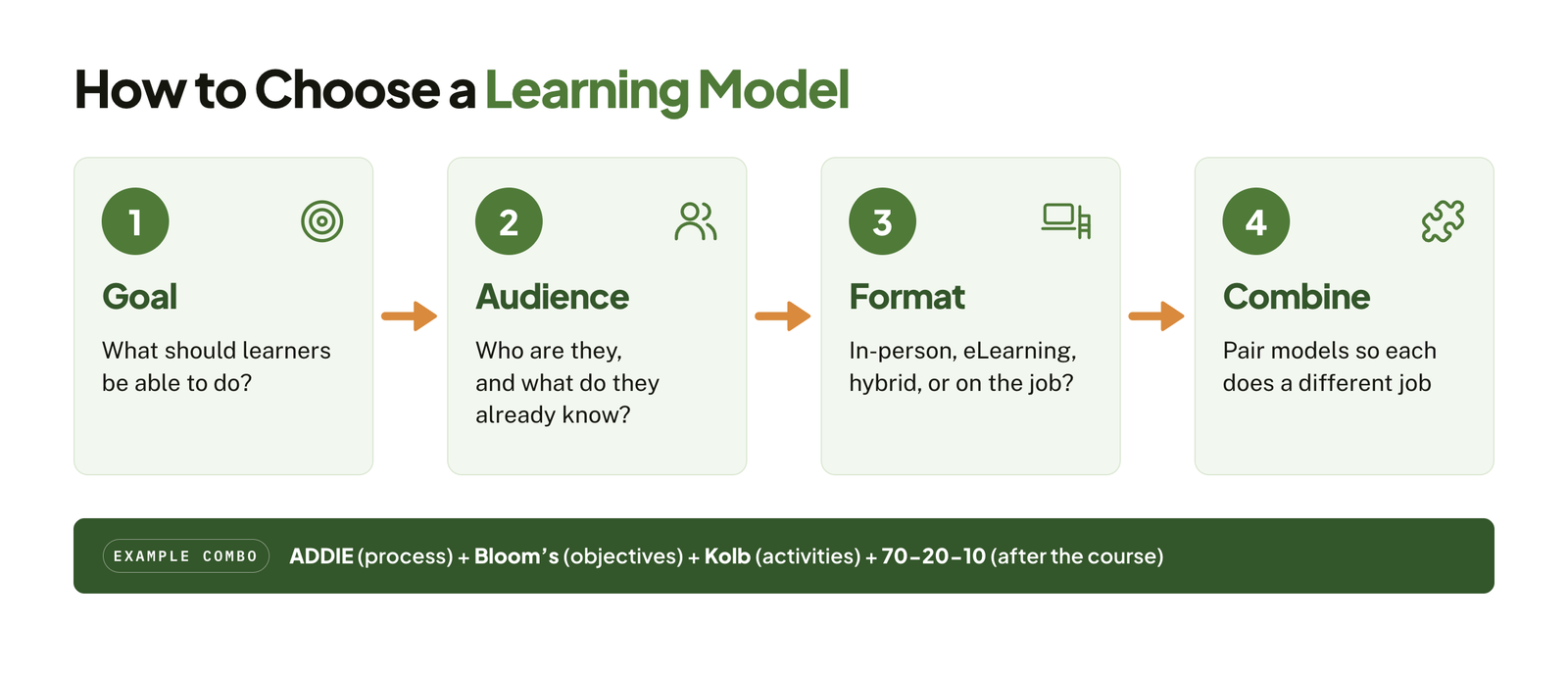
There’s no single best learning model. The right choice depends on what you want learners to do, who they are, and how you’ll deliver the training. Use the steps below to narrow your options.
By Learning Goal
Start with what learners need to be able to do after training.
| If your goal is to… | Start with | Example |
|---|---|---|
| Memorize rules or procedures | Behaviorist, microlearning | Safety and compliance training |
| Understand complex information | Cognitive, Merrill’s First Principles | New software or technical systems |
| Solve problems and make decisions | Constructivist, Kolb’s cycle | Customer escalations built as scenario based eLearning |
| Build soft skills or leadership | Kolb’s cycle, Socratic method, humanist | Coaching and feedback skills |
| Change on-the-job behavior | 70-20-10, blended learning | New manager development |
| Keep up in a fast-changing field | Connectivist, learning in the flow of work | Product updates for sales teams |
By Audience
- New hires and beginners – need structure and guidance, so cognitive and behaviorist approaches work well early on. Avoid fully self-directed models until they have the basics.
- Experienced professionals – respond best to humanist, constructivist, and Socratic approaches that respect what they already know.
- Frontline and deskless staff – benefit from microlearning and learning in the flow of work, delivered on mobile.
- Students and academic learners – often follow Bloom’s taxonomy for objectives, with constructivist activities for deeper understanding.
By Delivery Format
- In-person – suits the Socratic method, Kolb-style role-plays, and group problem-solving.
- eLearning – suits cognitive design, Merrill’s First Principles, and simulations.
- Hybrid – suits blended learning and the 70-20-10 model.
- On the job – suits learning in the flow of work and connectivist approaches.
Combine Models for Better Results
Most strong programs use more than one model, with each doing a different job. A common combination is:
- ADDIE to manage the project from analysis to evaluation.
- Bloom’s taxonomy to write clear, measurable objectives.
- Kolb’s cycle or Merrill’s First Principles to design the learning activities.
- 70-20-10 to plan what happens after the course ends.
For a step-by-step guide to putting this into practice, see how to create effective eLearning courses.
In one line
Choose a learning model by your goal, audience, and format, combine models where each does a different job, and skip ideas like learning-style matching that research doesn’t support.
Ready to turn the right learning model into training that works?
At eLearning Solutions Lab, we design and build SCORM- and xAPI-ready courses grounded in proven learning models, for office, remote, frontline, and global teams. Our custom eLearning development services cover design, development, and QA in one team.
Need somewhere to deliver and track it? Levantra LMS, our cloud based LMS, assigns training paths by role or location, gives managers a view of their own teams, and issues verifiable certificates for every completion.
See our custom eLearning development servicesBook a Levantra LMS demo
Related Reading
- How to create effective eLearning courses – a step-by-step guide from objectives to launch.
- AI for instructional design – where AI saves time in course design and where it doesn’t.
- Scenario based eLearning – how to build realistic practice into your courses.
- Microlearning examples – short-format training ideas you can adapt.
- eLearning ROI – how to connect training to business results.
The Author

Book A Discovery Call
Our Learning Advisors are happy to walk you through your project step-by-step — content, timeline, and fixed pricing.
Get Your Free QuoteNo obligation — just a focused conversation. Proposal within 24 hours.
You may also like
12 Real Microlearning Examples You Can Copy
Short answer A microlearning example is a short lesson, usually 2 to 5…
Scenario-Based eLearning: Complete Guide + Examples (2026)
Short answer: Scenario-based eLearning is a training approach that places…