


- Published
- Reading time
- 12 min
Filed under eLearningL&D Strategy
“Blended learning” gets used for almost anything that mixes a screen with a classroom. But a few videos added to a workshop isn’t really blended learning, and that’s where a lot of programs go wrong.
In this guide, you’ll get a plain definition, how it differs from hybrid and flipped learning, the 6 main models with a “best for” line for each, sample weekly schedules for schools, universities and workplaces, what the research actually says, and a step-by-step plan to set it up. You can also use the model picker to find the best fit for your setting, and download a free planner (no email needed).
Short on time? Jump to the blended learning model picker or download the free planner.
Updated November 2026.
In This Article
- What is blended learning?
- Blended vs. hybrid vs. online vs. flipped
- The 6 models of blended learning
- Blended learning model picker
- Examples with sample weekly schedules
- What the research says
- Advantages and disadvantages
- How to implement blended learning in 7 steps
- Tools and tech stack
- How to measure success
- Free blended learning planner
What Is Blended Learning?
Blended learning is a planned mix of online learning and face-to-face teaching, where both parts are designed to work together as one program. Learners usually get some control over the time, place, path or pace of the online part, and the in-person time is used for practice, discussion and feedback.
The most widely used definition comes from the Clayton Christensen Institute. It describes blended learning as a formal program where a student learns at least partly online, with some control over time, place, path or pace, at least partly in a supervised physical location, and where the two parts are connected into one learning experience.
That last part is the one people really miss. If the online modules and the classroom sessions don’t refer to each other, you don’t have blended learning. You simply have two separate courses that happen to cover the same topic.
In practice, blended learning looks a little different in each setting:
- K-12 schools – students rotate between online practice, small-group teaching and hands-on activities, often within one class period.
- Higher education – students watch lectures or read online before class, then use class time for problem-solving, labs and seminars.
- Workplace training – employees complete short online modules, then join live workshops, coaching or on-the-job practice to apply what they learned.
So the setting changes the schedule, but the idea stays the same: use online learning for what it does well (content, practice, self-pacing) and use people’s time together for what it does well (discussion, feedback, hands-on skills).
Blended vs. Hybrid vs. Online vs. Flipped Learning
These terms often get used interchangeably, but they really mean different things. Here’s the quick version:
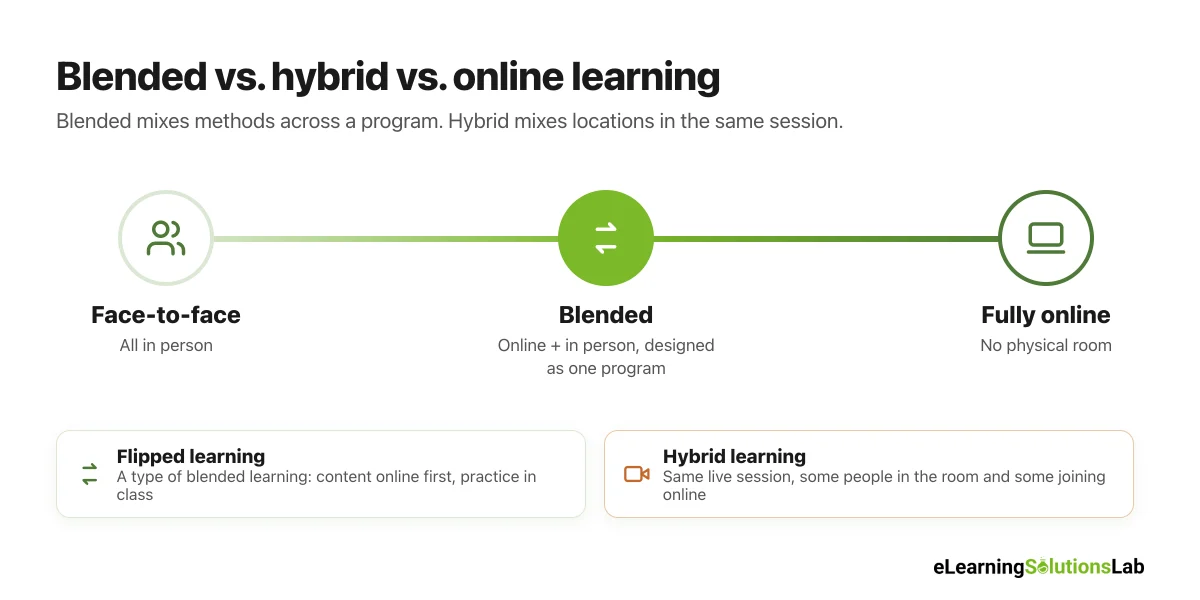
| Term | What it means | Who is in the room | Example |
|---|---|---|---|
| Face-to-face | All teaching happens in person | Everyone, every session | A two-day classroom workshop |
| Blended learning | Online and in-person parts designed as one program | Everyone, for the in-person parts | Online modules each week, plus a weekly practice session |
| Hybrid learning | Some learners attend in person while others join the same session remotely | Some people, while others join by video | A live class with 12 people in the room and 8 on Zoom |
| Flipped learning | One type of blended learning: content online first, practice in class | Everyone, for practice and discussion | Watch a 15-minute video at home, solve problems in class |
| Fully online | All learning happens online, live or self-paced | No one, there’s no physical room | A self-paced compliance course in an LMS |
The simple rule: blended is about mixing methods across a program, and hybrid is about mixing locations in the same session. A program can be both, for instance a blended course whose weekly live session is also run in hybrid mode.
The 6 Models of Blended Learning
Most blended programs follow one of the models described by the Christensen Institute. And you don’t have to pick just one. Here are the six you’ll see most often, with what each one looks like and where it works best.
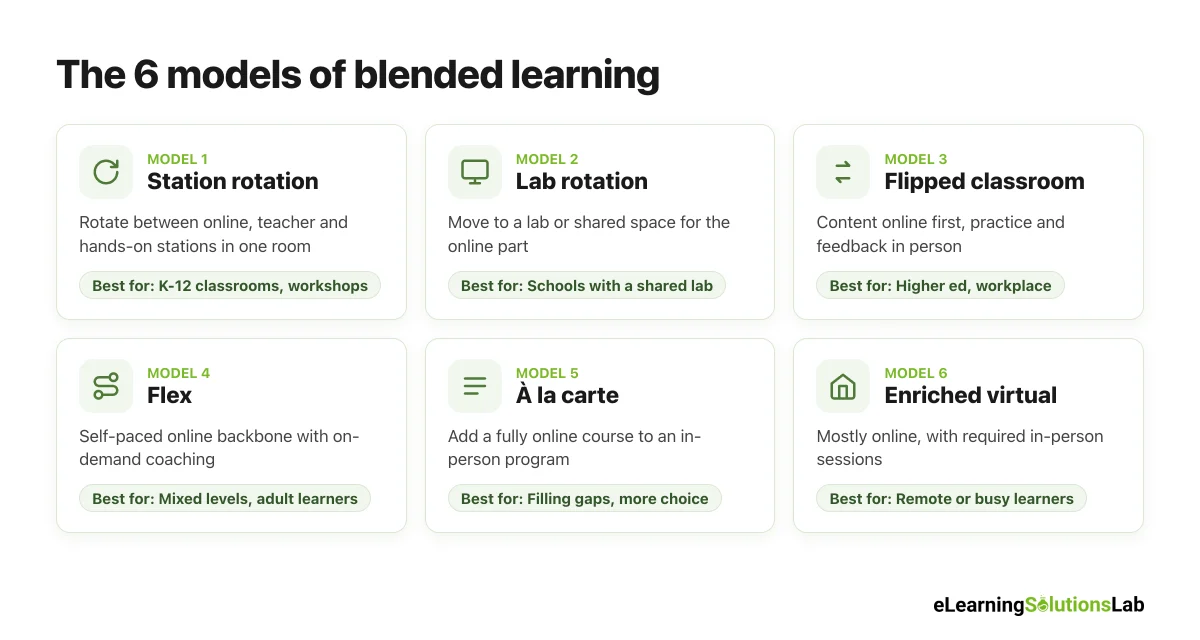
1. Station rotation
Learners rotate between “stations” inside one classroom on a set schedule, for example an online practice station, a small group with the teacher and a hands-on activity. At least one station is online.
Example: In a 60-minute math class, groups spend 20 minutes on adaptive practice, 20 minutes with the teacher and 20 minutes on a group task, then switch.
Best for: K-12 classrooms and workshops where you genuinely want small-group time without adding staff.
2. Lab rotation
Similar to station rotation, but learners move to a separate computer lab or space for the online part.
Example: Students spend three days a week in class and two days in the learning lab working through online modules with a support assistant.
Best for: Schools and training centers with a shared lab, and programs where devices can’t be in every room.
3. Flipped classroom
Learners cover new content online first (videos, readings, short modules), then use in-person time for practice, problem-solving and discussion.
Example: Nursing students watch a 12-minute video on a procedure before class, then practice it in the skills lab with an instructor.
Best for: Higher education and workplace training where live time is expensive, so that it’s spent on practice, not lectures.
4. Flex model
Online learning is truly the backbone here, and learners move through it at their own pace. Teachers or trainers are on hand to give support, small-group help or coaching when needed.
Example: In a learning center, adult learners work through online units on their own schedule, and a coach pulls people into short sessions when they get stuck.
Best for: Learners at very different levels, adult education, and credit recovery or upskilling programs.
5. À la carte
Learners take one or more fully online courses alongside their regular in-person program.
Example: A high school offers an online AP course it can’t staff locally, or an employee adds an online data course to their in-person leadership program.
Best for: Filling gaps in what you can offer in person, and giving learners more choice.
6. Enriched virtual
Learners do most of their work online and come in for required in-person sessions on a set schedule, for example once or twice a week.
Example: A professional diploma runs fully online, with a required in-person day every other Friday for labs, assessments and group projects.
Best for: Remote or busy learners who still genuinely need regular hands-on or social time.
What about “individual rotation”? It’s a seventh variant where each learner gets a personal schedule and only visits the stations they need. It’s less common because it usually needs good data and scheduling software, but it can work really well in flex-style programs.
If you want to see how these models map to specific software features, our guide to blended learning software goes through what each model needs from your platform.
Blended Learning Model Picker
You can use this quick picker to see which model usually fits your situation best. Choose your setting, where your learners are and how much self-pacing you need.
Best-fit model
Station rotation
Learners rotate between online, teacher-led and hands-on stations inside one room.
Sample week: Mon-Thu: 3 x 20-minute stations per class. Fri: whole-class review.
It’s a starting point, not a rule. Many programs combine two models, for instance a flipped course with an à la carte option.
Blended Learning Examples (With Sample Weekly Schedules)
Most guides list examples without showing what a week actually looks like. So here’s one sample week for each setting.
K-12 example: station rotation in a primary classroom
A Grade 4 class uses station rotation for math, four days a week. The teacher spends most of their time with the small-group station, given that it’s where they can really see who’s stuck.
| Day | Station 1: online (20 min) | Station 2: with the teacher (20 min) | Station 3: hands-on (20 min) |
|---|---|---|---|
| Monday | Adaptive math practice | New concept: fractions on a number line | Fraction strips with a partner |
| Tuesday | Short video + 5-question check | Re-teach for students who struggled Monday | Fraction board game |
| Wednesday | Adaptive math practice | Word problems in small groups | Build-a-recipe task |
| Thursday | Online quiz (results go to the teacher) | Targeted help based on quiz results | Peer explain-it station |
| Friday | No rotation | Whole-class review and reflection | Choice activity |
Higher education example: a flipped university course
A first-year statistics course replaces two of its three weekly lectures with short online videos and quizzes. So class time goes to worked problems in small groups.
| When | Online (before class) | In class | After class |
|---|---|---|---|
| Monday | Two 10-minute videos on confidence intervals + a short quiz | – | – |
| Wednesday | – | Quick recap of quiz results, then worked problems in groups of four | Post one question you’re still unsure about |
| Thursday | Reading + practice set with instant feedback | – | – |
| Friday | – | Lab session: run an analysis on real data with a tutor | Submit a one-page lab write-up |
In India, for instance, the University Grants Commission published a concept note in 2021 proposing that higher education institutions could teach up to 40% of each course online and the rest in person, which is essentially this kind of model at national scale.
Workplace example: a 4-week new manager program
A company replaces a three-day classroom course for new managers with a 4-week blended program. Each week combines short online modules, one live workshop and a real task on the job, so that people truly practice what they learn.
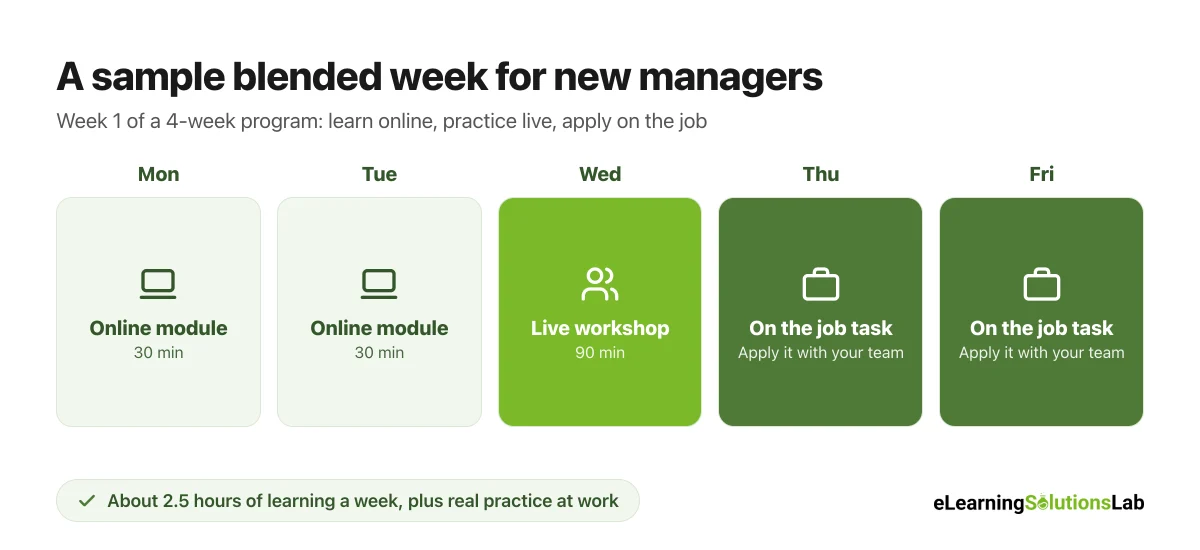
| Week | Online (about 1 hour) | Live workshop (90 min) | On the job |
|---|---|---|---|
| Week 1 | Module: running a great one-on-one | Role-play one-on-ones in pairs, with feedback | Hold one-on-ones with two team members |
| Week 2 | Module: giving useful feedback | Practice feedback conversations on real scenarios | Give one piece of feedback using the model |
| Week 3 | Module: delegating and setting goals | Rewrite real team goals in small groups | Set one goal with each team member |
| Week 4 | Module: handling difficult conversations | Branching scenario debrief and peer coaching | Plan and share a 90-day team plan |
This kind of program works well in onboarding too. Our guide to employee onboarding and training shows how to spread it over the first 90 days.
What the Research Says About Blended Learning
The best-known evidence comes from a 2010 meta-analysis prepared for the U.S. Department of Education by SRI International. It compared online, blended and face-to-face instruction across dozens of rigorous studies.
| Comparison | Average effect size | What it means |
|---|---|---|
| Purely online vs. face-to-face | +0.05 | No meaningful difference |
| Blended vs. face-to-face | +0.35 | A moderate advantage for blended learning |
So blended learning came out ahead. But the researchers also pointed out an important catch: the blended groups often got extra learning time and extra materials that the face-to-face groups didn’t. In other words, the benefit probably comes from better design and more practice, not from technology on its own.
In practice, two more things are worth knowing:
- Most studies involve adults. The review found very few rigorous studies with K-12 students, so results for schools should be read with care.
- Design matters more than the mix. Programs tend to work best when the online and in-person parts are tightly connected, with practice and feedback in both.
That’s really the takeaway for anyone planning a program: blending only helps if it adds better practice, feedback or flexibility. If it just moves the same lecture online, you typically won’t see a difference.
Advantages and Disadvantages of Blended Learning
| Advantages | Disadvantages and challenges |
|---|---|
| Flexibility – learners cover content when and where it suits them. | Tech access – not every learner has a reliable device or internet. |
| Better use of live time – in-person sessions focus on practice, not lectures. | More design work up front – both parts have to be planned together. |
| Personal pacing – people can repeat what they need and skip what they know. | Self-discipline – some learners fall behind on the online part. |
| More data – online activity shows who is stuck before the next session. | Trainer workload – facilitators need time and training to run a new format. |
| Lower delivery cost at scale – less travel and fewer full-day sessions. | Two systems to manage – schedules, rooms and platforms all need to line up. |
| Stronger results – research tends to favor well-designed blended programs. | Easy to get wrong – if the parts don’t connect, results usually drop. |
But most of the disadvantages can genuinely be handled with planning. For instance, a short “how this program works” session at the start, a weekly rhythm learners can predict, and a simple check on device access before launch usually solve the biggest problems.
How to Implement Blended Learning in 7 Steps
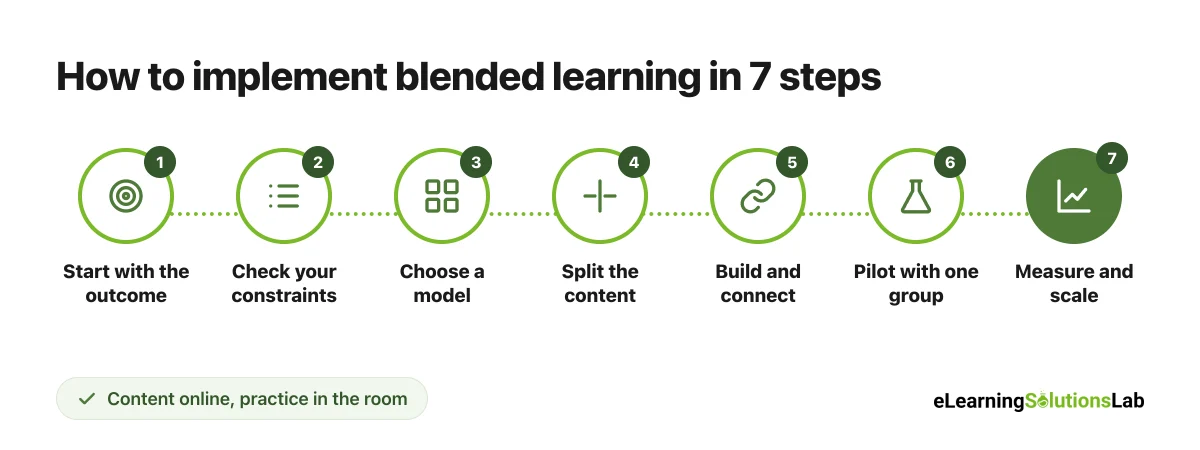
Step 1: Start with the outcome
Write down what learners should be able to do at the end, and how you’ll know. “Managers can run a structured one-on-one” is much more useful than “managers understand coaching.”
Step 2: Check your constraints
List what’s fixed: where learners are, how much time they really have, what devices and internet they use, and which rooms, trainers or labs are available. And in practice, these constraints usually choose your model for you.
Step 3: Choose a model
You can use the model picker above as a starting point. Then sketch one typical week.
Step 4: Split the content
Put content that’s best learned alone online (explanations, demos, knowledge checks), and keep in-person time for what needs people (practice, role-play, discussion, feedback). Here’s a simple test: if a session is mostly one person talking, it can probably go online.
Step 5: Build and connect the pieces
You have to build the online parts as short modules and link every live session to them, given that disconnected pieces are the most common reason blended programs fall flat. Start each session with a quick recap of the online work, and end each module with a task that people bring to the next session.
Step 6: Pilot with one group
You can run the program with one class, cohort or team first. Collect completion data, quick feedback after each week, and notes from trainers on where people got stuck.
Step 7: Measure, adjust and scale
Fix what didn’t work, then roll it out to more groups. Keep checking the measures in the next section, so that you know it’s still working as it grows.
To give you a concrete example, at eLearning Solutions Lab, we don’t simply convert a classroom course into online modules. We map each learning goal to the place it’s best learned, online or in person, in the storyboard, so that every module sets up a live activity and every live session builds on a module.
Blended Learning Tools and Tech Stack
You don’t actually need a lot of tools to start. Here’s a vendor-neutral view of what most blended programs use:
| Tool type | What it does in a blended program | Examples |
|---|---|---|
| LMS | Hosts online modules, tracks progress, schedules live sessions and sends reminders | Moodle, Canvas, TalentLMS, Docebo |
| Authoring tool | Builds the online modules, quizzes and scenarios | Articulate 360, Adobe Captivate, iSpring Suite, H5P |
| Virtual classroom | Runs live online sessions when people can’t meet in person | Microsoft Teams, Zoom, Google Meet |
| Assessment tool | Checks knowledge before and after live sessions | LMS quizzes, Google Forms, Kahoot |
| Collaboration space | Keeps discussion going between sessions | Teams or Slack channels, LMS forums, Padlet |
| Video platform | Hosts short lecture and demo videos with captions | YouTube (unlisted), Vimeo, Panopto |
If you’re choosing a platform, our guides on how to choose an LMS and the best eLearning authoring tools can help. And for a wider list of providers, see our roundup of top blended eLearning solutions.
How to Measure the Success of Blended Learning
You have to measure both parts of the blend, not just course completion. A simple set of measures typically covers four levels:
| Level | What to measure | Where to get it |
|---|---|---|
| 1. Engagement | Online completion, attendance at live sessions, time spent | LMS and attendance reports |
| 2. Learning | Quiz and assessment scores, quality of practice tasks | LMS reports, rubrics |
| 3. Application | Whether people use the skill on the job or in the next course | Manager or teacher observations, follow-up tasks |
| 4. Results | Grades, time to proficiency, quality, sales or other business numbers | Student records, HR or business systems |
These levels line up with the Kirkpatrick model of evaluation. The clearest evidence usually comes from comparing a blended group with a group that took the old version of the course, on the same measures.
Free Blended Learning Planner (PDF)
Free download – no email needed
Blended Learning Planner
A printable planner with the 6 models side by side, a model picker grid, a blank weekly schedule to fill in, a “what goes online vs. in person” split, and a launch checklist, so that you can plan your first blended program in one sitting.
In one line: blended learning means designing online and in-person learning as one program, so pick the model that fits your learners, put content online and practice in the room, and measure whether people can actually do more at the end.
Planning a blended learning program?
At eLearning Solutions Lab, we design blended programs where every online module and live session works together, from the first storyboard to the launch.
See our blended learning solutions, or explore our custom eLearning development services for the online modules.
Related Reading
- Blended learning software – what your platform needs to support each model.
- Top blended eLearning solutions – approaches, tools and providers compared.
- eLearning delivery – 7 delivery methods and how to choose.
- Social eLearning – adding peer learning to the online part of the blend.
- Learning models – 12 frameworks behind good course design.
- Microlearning examples – short modules that fit between live sessions.
The Author

Book A Discovery Call
Our Learning Advisors are happy to walk you through your project step-by-step — content, timeline, and fixed pricing.
Get Your Free QuoteNo obligation — just a focused conversation. Proposal within 24 hours.
You may also like
What is a Learning Experience Designer? Role, Skills, Salary and How to Become One (2026)
If you've seen "learning experience designer" on a job board and wondered…
What is VILT? A Practical Guide to Virtual Instructor-Led Training
VILT sounds like a simple acronym. But search for it and you'll get an IT…