


- Published
- Reading time
- 14 min
Filed under eLearningInstructional Design
Most employees already learn from each other. They ask a colleague how to handle a tricky customer, share a shortcut in a team chat, or watch how a senior rep runs a call. Social eLearning brings that kind of peer learning into your online training, so it happens on purpose instead of by accident.
The problem is that most guides on the topic stay at the level of theory. In this guide, you’ll get a plain definition, 10 real workplace examples, a step-by-step plan for adding social features to the LMS you already have, and a simple way to measure whether it’s actually working.
Short on time? Jump to the 10 social eLearning examples.
Updated November 2026.
In This Article
What is Social eLearning?
Social eLearning is online training that has learners learn with and from each other, not only from the course. It adds discussion, peer feedback, shared examples, live sessions and group activities to digital courses, so people can ask questions, compare approaches and apply what they learn together.
In practice, a social eLearning program usually combines two things:
- Structured content – the modules, videos and assessments in your LMS that everyone needs to complete.
- Social activities around that content – a discussion prompt after a module, a peer review of a practice task, a live Q&A with an expert, or a channel where people share how they used what they learned.
The content gives everyone the same foundation. And the social layer is where people actually work out how it applies to their own job.
Social eLearning vs. Social Learning Theory vs. Collaborative Learning
These three terms often get used interchangeably, but they really mean different things:
| Term | What it means | Example |
|---|---|---|
| Social learning theory | A psychology theory (Albert Bandura, 1977) that people learn by watching others, copying what works and seeing the results | A new hire learns how to calm an angry caller by listening to a colleague do it |
| Social learning | Any learning that happens through other people, online or face to face | Job shadowing, mentoring, a team lunch-and-learn |
| Social eLearning | Social learning designed into digital training, usually inside an LMS, LXP or collaboration tool | A course where each module ends with a discussion prompt and a peer-reviewed task |
| Collaborative learning | Learners working together toward a shared output | A cohort building a joint process improvement plan |
In short: social learning theory explains why it works, and social eLearning is how you build it into your online training.
The Theory Behind It: Bandura and 70-20-10
Bandura’s Social Learning Theory in Brief
Albert Bandura’s social learning theory says that people genuinely learn a lot by watching others. For that to happen, four things need to be in place:
- Attention – the learner notices the behavior. In eLearning, that might be a short video of an expert handling a real situation.
- Retention – they remember it. Discussing it with peers or writing down how they’d use it helps it stick.
- Reproduction – they try it themselves, ideally in a safe practice activity with feedback.
- Motivation – they have a reason to keep doing it, such as recognition from peers or a manager, or seeing it work on the job.
So good social eLearning is designed around these four steps. Watching an example covers attention. Discussing it supports retention. Practicing and getting peer feedback covers reproduction. Recognition and visible progress drive motivation.
How the 70-20-10 Model Connects
The 70-20-10 model comes from research by Morgan McCall, Michael Lombardo and Robert Eichinger at the Center for Creative Leadership. It suggests that people get roughly 70% of their development from on-the-job experience, 20% from other people, and 10% from formal training. The numbers are a rule of thumb, not a precise measurement. But the idea is really useful.
Most eLearning only serves the 10%. And social eLearning can let your digital training reach into the 20% (learning from others) and connect to the 70% (applying it on the job).
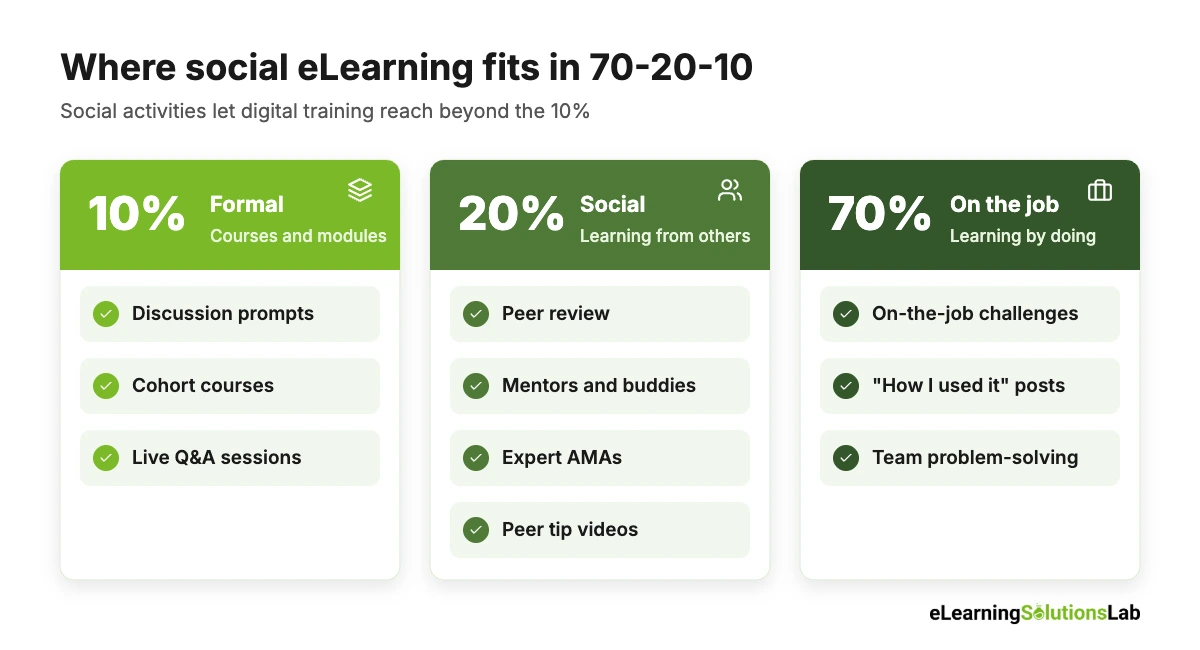
| Part of 70-20-10 | What it covers | Social eLearning activities that support it |
|---|---|---|
| 10% – formal | Courses, modules, workshops | Discussion prompts inside modules, cohort-based courses, live Q&A sessions |
| 20% – social | Learning from peers, managers and experts | Peer review, mentoring, communities of practice, expert AMAs, peer-made tip videos |
| 70% – experiential | Learning by doing on the job | On-the-job challenges with shared reflections, “how I used it” posts, team problem-solving threads |
10 Social eLearning Examples
Here are 10 social eLearning activities that actually work in real workplaces. Each one includes what it is, a concrete example, and what you need to set it up.
1. Cohort-based learning
A group of learners starts a course on the same date and moves through it together, with weekly deadlines and a shared discussion space.
Example: Twelve new team leads start a 6-week leadership course together. Each week, they complete a module, then join a 45-minute live session to discuss how it played out with their own teams.
What you need: Fixed start dates, a group space in your LMS or Teams/Slack, a facilitator.
2. Discussion prompts after each module
A short, open question at the end of a module that asks learners to apply the content to their own work.
Example: After a data privacy module, learners answer: “Name one place in your team’s daily work where customer data could be shared by mistake.” Answers become a list of real risks for the compliance team.
What you need: A forum or comments feature, and someone to reply to posts in the first week.
3. Peer review of practice tasks
Learners submit a piece of work and review one or two colleagues’ submissions against a simple checklist.
Example: Sales reps upload a 2-minute recording of their product pitch. Each rep reviews two other pitches using a 5-point rubric and leaves one specific suggestion.
What you need: A peer assessment tool (for example, Moodle’s Workshop activity) or a simple shared folder and form.
This works well alongside scenario based eLearning, where learners compare their choices after a realistic practice task.
4. Communities of practice
An ongoing group of people who do the same kind of work and share questions, examples and fixes.
Example: Store managers across 40 locations share a channel where they post what worked for staff scheduling, merchandising and training new hires.
What you need: A named owner, a clear purpose, and a few regular prompts to keep it active, given that communities without an owner tend to go quiet.
5. Peer-made video tips (user-generated content)
Experienced employees record short videos showing how they do a task.
Example: Warehouse leads film 60-second clips on safe pallet stacking. The best clips are added to the official onboarding course.
What you need: A phone, simple guidelines, and a quick review step before content goes live.
6. Ask-me-anything (AMA) sessions with experts
A live or text-based Q&A where learners can put questions to a subject matter expert or leader.
Example: A product manager hosts a 30-minute AMA after a product launch course. Questions are collected in advance, and the recording is added to the course.
What you need: A scheduled slot, a question form, and a recording.
7. Mentoring and buddy programs
Each learner is paired with a more experienced colleague for regular check-ins during a course or onboarding.
Example: Every new hire gets a buddy for the first 90 days. The LMS sends both of them a short conversation guide after each onboarding module.
What you need: A pairing process, check-in prompts, and a way to log meetings.
8. Team challenges and leaderboards
Teams earn points for completing activities, sharing tips or solving scenarios, with progress shown on a leaderboard.
Example: Regional sales teams compete over a month to complete a product course and post real customer wins using the new pitch.
What you need: Points and badges in your LMS. Reward team progress, not just individual speed.
For more on getting points and badges right, see our guide to gamification in eLearning.
9. Shared scenario and case discussions
Learners work through a realistic scenario, then compare their choices and reasoning with peers.
Example: Nurses complete a branching patient scenario, then discuss in a small group why they chose different next steps.
What you need: A scenario-based activity and a facilitated discussion space.
10. “How I used it” posts
A short post a few weeks after training where learners share how they applied what they learned.
Example: Thirty days after a customer service course, agents post one call where they used the new de-escalation steps and what happened.
What you need: An automated reminder and a place to post. And when managers react to posts, it really makes a big difference.
Where to start: if you only pick three, start with discussion prompts after each module, peer review of one practice task, and “how I used it” posts. They need little setup, work in almost any LMS, and give you real evidence that people are actually applying the training.
Benefits and Limits of Social eLearning
Benefits
- Better application on the job – discussing how a skill applies to real work genuinely bridges the gap between the course and the job.
- Higher engagement and completion – cohorts, deadlines and peers who notice when you go quiet keep people moving.
- Captures tacit knowledge – experienced staff can share the know-how that never makes it into a manual.
- Faster answers – learners can ask a question and get help from a peer, rather than waiting for a trainer.
- Content that stays current – peer tips and examples keep a course fresh between formal updates.
- Works for remote and global teams – people in different locations and time zones can still learn from each other.
Limits and How to Handle Them
| Limit | How to handle it |
|---|---|
| Empty forums (“nobody posts”) | Seed each space with prompts, and have a facilitator or manager reply to early posts |
| Wrong or outdated advice spreads | Assign an expert to moderate, and mark verified answers |
| Some people don’t want to post publicly | Offer small-group or private options, and never make posting the only path |
| Extra time for learners | Keep activities short (10-15 minutes) and tie them to real work tasks |
| Hard to prove value | Set your success measures before launch (see the measurement section below) |
| Compliance and privacy risks | Set clear posting rules, especially for customer or patient data |
How to Add Social eLearning to Your Existing LMS: 6 Steps
You don’t actually need a new platform to start. Most LMSs already have discussion, group and peer review features, and the rest can run in Microsoft Teams or Slack.
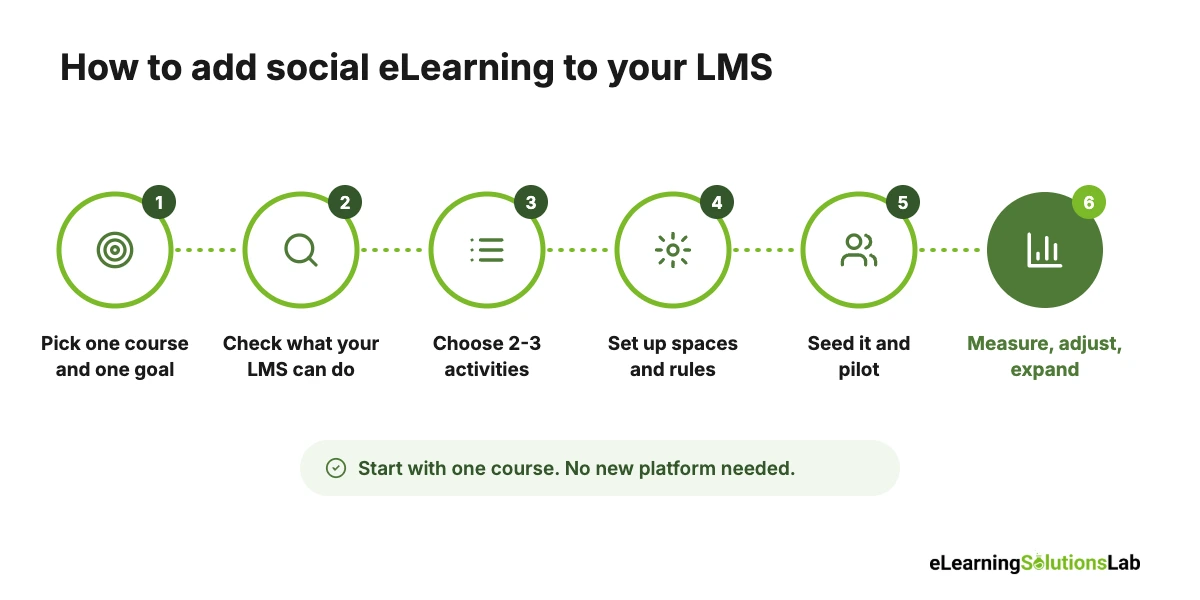
Step 1: Pick one course and one goal
You can start with a course where people really need to apply something on the job, such as onboarding, sales, customer service or leadership. Write down the one behavior you want to see more of, for example, “reps use the new discovery questions on every first call.”
Step 2: Check what your LMS can already do
Simply list the social features you already have: forums or comments, groups, peer assessment, live session integration, points and badges, user-uploaded content. Note anything missing that you’d need to run in Teams or Slack instead.
Step 3: Choose two or three activities
You can pick from the examples above. Match each one to a stage of the course: a discussion prompt after a key module, a peer-reviewed practice task in the middle, and a “how I used it” post 30 days after completion.
Step 4: Set up the spaces and the rules
You have to create the group or channel, write two or three posting guidelines (be specific, be kind, no customer data), and name an owner who will reply to posts and keep things moving.
Step 5: Seed it and launch with a pilot group
Ask a few experienced people to post first, so that the space isn’t empty. Run it with one team or one cohort, and get managers to join in, even just by reacting to posts.
Step 6: Measure, adjust, then expand
After the pilot, check the measures in the next section. Keep the activities that got real participation, drop the ones that didn’t, and roll out to the next course.
To give you a concrete example, at eLearning Solutions Lab, we don’t simply add a forum at the end of a course. We build the discussion prompts and peer-review tasks into the storyboard, so that every social activity is tied to a specific module and learning goal.
If your LMS is still new to your teams, our LMS adoption strategy guide covers how to get people logging in. You can also automate the prompts and reminders behind these activities with automated training workflows.
Social eLearning Activity Planner
Use this simple planner to map each activity to your course before you build anything:
| Activity | When in the course | Owner | Time for learners | What success looks like |
|---|---|---|---|---|
| Discussion prompt | End of module 2 | Course facilitator | 10 minutes | 60%+ of learners post a reply |
| Peer review of a practice task | Middle of the course | Facilitator + peers | 20 minutes | Every submission gets 2 reviews |
| Expert AMA | Week 3 | Subject matter expert | 30 minutes | 15+ questions asked |
| “How I used it” post | 30 days after completion | Learner’s manager | 10 minutes | 40%+ share a real example |
How to Measure the Impact of Social eLearning
Few teams measure social eLearning well, which makes it hard to keep budget and support. So the fix is to set your measures before launch and track them at four levels, from activity to business results.
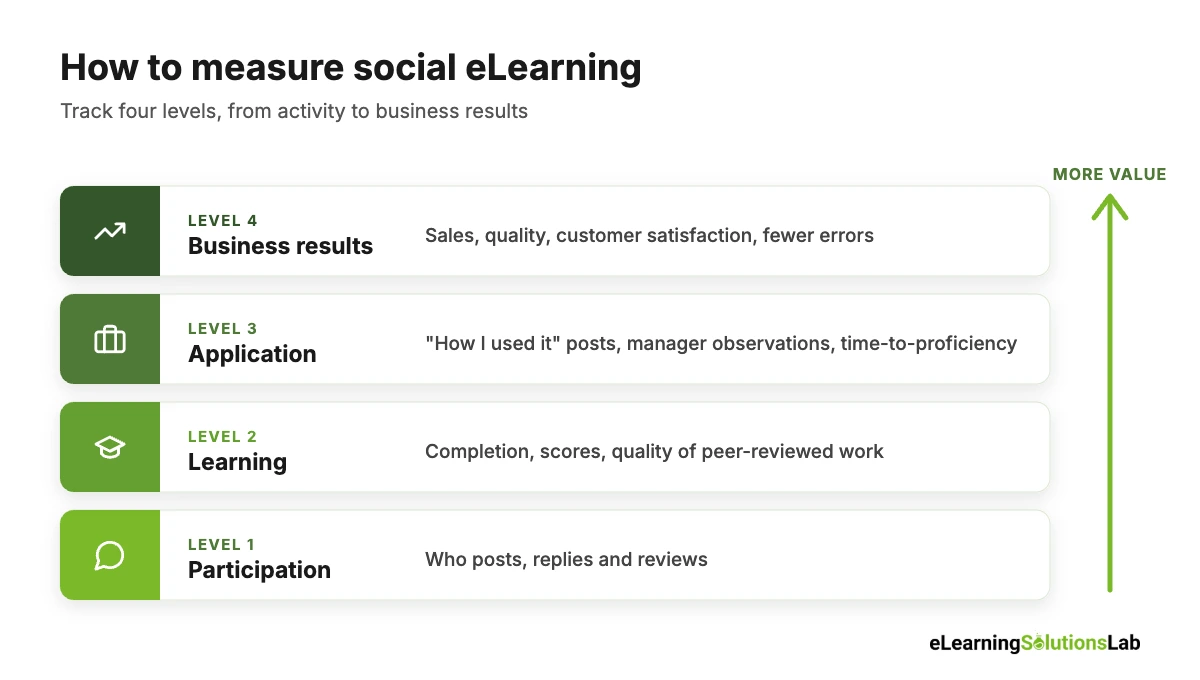
| Level | What to measure | Where to get it |
|---|---|---|
| 1. Participation | Share of learners who post, reply or review; posts per learner; replies per post | LMS or Teams/Slack analytics |
| 2. Learning | Completion rate, assessment scores, quality of peer-reviewed work | LMS reports, rubric scores |
| 3. Application | “How I used it” posts, manager observations, time-to-proficiency for new hires | Posts, manager checklists, HR data |
| 4. Business results | Sales, quality, customer satisfaction, fewer errors or support tickets | Business systems, compared with a group that didn’t take part |
Compare against a baseline. The clearest evidence typically comes from comparing a cohort that had the social activities with one that didn’t, on the same course. For instance, if new support agents in the social cohort reach target call quality in 6 weeks instead of 8, that’s two weeks of faster productivity per hire.
Simple ROI formula: ROI (%) = (value of the improvement – cost of the program) ÷ cost of the program × 100. Include facilitator and moderator time in the cost, not just software.
These levels line up with the Kirkpatrick model of evaluation. For a deeper look at putting a number on training value, see our guide to eLearning ROI.
Social Learning Platforms and Features Compared
Most articles on this topic recommend one product, usually the author’s own. In practice, the right tool really depends on what you already have. Here’s a neutral comparison by tool type:
| Tool type | Best for | Typical social features | Examples | Watch out for |
|---|---|---|---|---|
| LMS with social features | Teams that want everything in one place | Forums, groups, comments, peer assessment, badges, leaderboards | Moodle, TalentLMS, Docebo, iSpring Learn | Social features vary a lot by plan and are often basic |
| Collaborative learning platform | Peer-created content and cohort learning | Peer authoring, reactions, Q&A, cohort spaces | 360Learning | May overlap with an LMS you already pay for |
| LXP (learning experience platform) | Large organizations with lots of content | Content sharing, expert profiles, recommendations, user-generated content | Degreed, Docebo | Needs active curation to stay useful |
| Workplace chat tools | Communities of practice and quick Q&A | Channels, threads, video calls, polls | Microsoft Teams, Slack | No completion tracking unless connected to your LMS |
| Community platforms | Customer, partner or member learning | Discussion spaces, events, member profiles | Circle, Discourse | Separate login and a separate place to manage |
Questions to ask before you buy:
- Which social features are included in our plan, and which cost extra?
- Can we moderate posts and mark expert-verified answers?
- Does participation (posts, reviews, replies) show up in reports?
- Can we run discussions in Microsoft Teams or Slack and still track them?
- Can learners upload their own videos, and can we review them before they go live?
If you’re comparing platforms more broadly, our guide on how to choose an LMS includes a free scorecard.
Social eLearning FAQ
Can you give me an example of social learning?
A common example is a new employee learning to handle a difficult customer by listening in on an experienced colleague’s calls, then trying it and getting feedback. In eLearning, the same thing happens when learners watch an expert video, discuss it with peers, practice the skill, and get peer review on their attempt.
What is an example of eLearning?
Any training delivered digitally counts as eLearning, such as a self-paced compliance course in an LMS, a short product video, a quiz on a phone, or a live virtual workshop. It becomes social eLearning when learners interact with each other as part of it.
What is the 70-20-10 rule for learning?
The 70-20-10 rule suggests that roughly 70% of workplace learning comes from experience on the job, 20% from other people, and 10% from formal training. And social eLearning helps formal training connect to the other 90%.
Is social eLearning the same as collaborative learning?
Not quite. Collaborative learning means working together toward a shared result. Social eLearning is broader and includes any learning from others, such as discussions, peer feedback, mentoring and expert Q&A.
Do I need a special social learning platform?
Usually not. Most LMSs include forums, groups and peer review, and Microsoft Teams or Slack can cover the rest. A dedicated platform makes sense when peer-created content or large communities are central to your program.
Are there social eLearning courses or certifications?
Yes. Several universities, L&D associations and online course providers offer short courses on social and collaborative learning design. Look for ones that include hands-on design practice, not just theory.
In one line: keep your structured courses, then add a few short social activities around them, such as a discussion prompt, a peer review and a “how I used it” post, and measure whether people actually apply what they learned.
Want courses that get people learning from each other?
At eLearning Solutions Lab, we design courses with the social layer built in: discussion prompts, peer-reviewed practice tasks, cohort activities and scenario discussions that run inside your LMS.
Our custom eLearning development services build the courses, and our instructional design services make sure every social activity supports a real performance goal.
Explore custom eLearning developmentSee our instructional design services
Related Reading
- Gamification in eLearning – what works and what backfires with points and leaderboards.
- Scenario-based eLearning – realistic practice that sparks good peer discussion.
- Blended learning software – tools for mixing live, social and self-paced learning.
- Employee onboarding and training – where buddy programs and cohorts work best.
- Kirkpatrick model of evaluation – measuring training from reaction to results.
- Microlearning examples – short formats that pair well with peer tips.
The Author

Book A Discovery Call
Our Learning Advisors are happy to walk you through your project step-by-step — content, timeline, and fixed pricing.
Get Your Free QuoteNo obligation — just a focused conversation. Proposal within 24 hours.
You may also like
What is a Learning Experience Designer? Role, Skills, Salary and How to Become One (2026)
If you've seen "learning experience designer" on a job board and wondered…
What is VILT? A Practical Guide to Virtual Instructor-Led Training
VILT sounds like a simple acronym. But search for it and you'll get an IT…