


- Published
- Reading time
- 11 min
Filed under eLearningInstructional Design
If you’ve seen “learning experience designer” on a job board and wondered whether it’s just a fancier name for an instructional designer, you’re not alone. Sometimes it really is just a new title. But in many teams, the LXD role genuinely is broader: it borrows from UX design, learning science and instructional design to shape the whole experience a learner has, not just the course content.
In this guide, you’ll get a plain definition, what an LXD actually does day to day, how the role compares with instructional design and UX design, the skills and tools you need, current US salary ranges, a step-by-step path into the role, and what hiring managers look for in a portfolio. You can also download a free LXD skills checklist and job description template.
Short on time? Jump to LXD salary data or download the free checklist and template.
Updated November 2026.
In This Article
- What is a learning experience designer?
- What an LXD does day to day
- LXD vs. instructional designer vs. UX designer
- Core skills and tools
- How AI is changing the role in 2026
- LXD salary in 2026
- How to become a learning experience designer
- Portfolio: what hiring managers look for
- LXD career path
- Where to Find Learning Experience Designer Jobs
- Free skills checklist and job description template
What is a Learning Experience Designer?
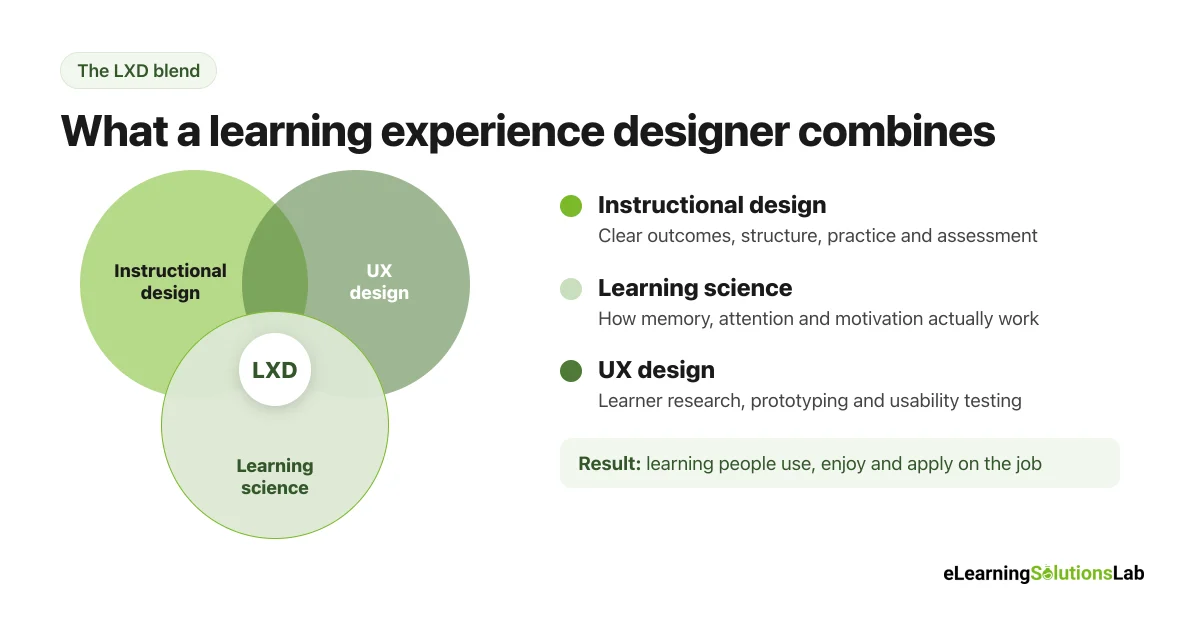
A learning experience designer (LXD) designs learning that people actually want to use and can apply on the job. They combine instructional design, learning science and UX design to shape the full learner journey, from the first touchpoint to on-the-job practice, and they test and improve it based on real learner behavior.
In practice, that means an LXD asks three questions at once: What do people need to be able to do? How do people actually learn? And what would make this easy and worth their time? An instructional designer typically focuses on the first two. An LXD adds the third, and treats the learner as a user.
What a Learning Experience Designer Does Day to Day
Most LXDs spend their week on a mix of research, design and collaboration. Typical responsibilities include:
- Learner research – interviewing learners and managers, reviewing data and building simple learner personas or journey maps.
- Defining outcomes – turning a business problem into clear performance goals and picking the right learning approach.
- Designing the experience – mapping the whole journey (pre-work, eLearning, live sessions, job aids, follow-up), not just one course.
- Prototyping and testing – building wireframes or rough prototypes, then watching real learners use them before full build.
- Writing and storyboarding – scripts, scenarios, storyboards and microcopy.
- Working with SMEs and developers – getting accurate content from experts and handing clear specs to developers and media teams.
- Measuring and improving – checking completion, assessment and behavior data, then iterating.
Here’s what that tends to look like on a real project, from kickoff to launch:
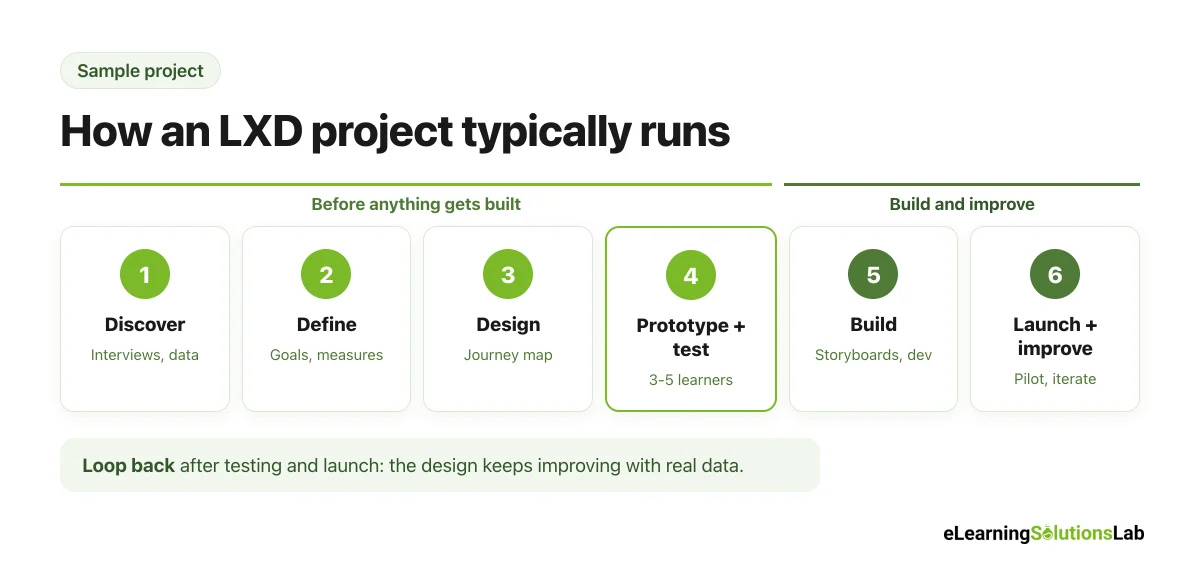
| Phase | What the LXD does | Typical output |
|---|---|---|
| 1. Discover | Interviews learners and managers, reviews data, clarifies the business goal | Problem statement, learner personas |
| 2. Define | Turns the problem into performance goals and success measures | Learning outcomes, measurement plan |
| 3. Design | Maps the full learner journey and picks activities and formats | Journey map, design document |
| 4. Prototype and test | Builds a rough prototype and watches 3 to 5 learners use it | Tested prototype, list of changes |
| 5. Build | Writes storyboards and works with SMEs, developers and media | Courses, job aids, live session guides |
| 6. Launch and improve | Runs a pilot, reviews data and feedback, and iterates | Results review, version 2 updates |
You can see how much of the work happens before anything gets built. That’s really the biggest difference from a pure eLearning developer role.
Learning Experience Designer vs. Instructional Designer vs. UX Designer
This is the question people ask most, and the honest answer is that the roles overlap a lot. Many job ads use “instructional designer” and “learning experience designer” for nearly the same work. But when teams use both titles, the differences usually look like this:
| Learning experience designer | Instructional designer | UX designer | |
|---|---|---|---|
| Main focus | The whole learner journey and how it feels to use | Content, structure and assessment of the learning | How people use a product or app |
| Core question | “Will people use this and apply it?” | “Will people learn what they need?” | “Can people use this easily?” |
| Typical process | Design thinking plus ID: research, prototype, test, iterate | ADDIE, SAM or similar | Design thinking, user research, usability testing |
| Typical outputs | Journey maps, prototypes, blended programs, courses | Storyboards, courses, assessments, facilitator guides | Wireframes, prototypes, interface designs |
| Common tools | Figma, Miro, Storyline, Rise, LMS, AI tools | Storyline, Rise, Captivate, LMS | Figma, research and analytics tools |
| Success measured by | Use, satisfaction and on-the-job behavior | Learning outcomes and completion | Usability, conversion and retention |
So which is it in practice? Read the job description, not the title. If the role mentions learner research, prototyping, user testing or journey mapping, it’s typically an LXD role. If it’s mostly storyboards and Storyline builds, it’s usually instructional design or eLearning development, whatever the title says.
Core Learning Experience Designer Skills and Tools
You don’t need every tool on this list. But you do need to be solid in each skill area, given that hiring managers tend to test the skill, not the software.
| Skill area | What it looks like | Common tools |
|---|---|---|
| Learning science and ID | Writing objectives, managing cognitive load, designing practice and assessment | ADDIE, SAM, Bloom’s taxonomy |
| Learner research | Interviews, surveys, personas and journey maps | Video calls, survey tools, Miro or FigJam |
| UX and visual design | Wireframes, layout, accessibility and usability testing | Figma, Canva, Adobe tools |
| Authoring and development | Interactive courses, microlearning and video | Articulate Storyline and Rise, Adobe Captivate, Camtasia |
| Writing | Scripts, scenarios, instructions and microcopy | Docs, storyboard templates |
| Learning technology | Publishing to an LMS or LXP, tracking and reporting | LMS, SCORM, xAPI, analytics dashboards |
| AI tools | Drafting, prototyping and AI-powered practice | Generative AI assistants, AI video and voice tools |
The soft skills truly matter just as much: stakeholder management, saying no to “just add more content,” and explaining your design decisions in plain language. For instance, being able to explain why you chose a scenario over a quiz is often what separates a mid-level LXD from a senior one.
How AI Is Changing the LXD Role in 2026
AI hasn’t replaced learning experience designers, but it has really changed where their time goes. In practice, most LXDs now use AI tools to:
- Draft first versions of scripts, scenarios, quiz questions and job aids, which they then edit and fact-check with SMEs.
- Summarize SME interviews, documents and survey responses during analysis.
- Generate placeholder images, voiceover and video for prototypes.
- Build AI practice tools, like chat-based roleplays for sales or customer service conversations.
So the work shifts away from producing content and toward deciding what learners actually need, checking accuracy, and designing the experience around the content. The LXDs who tend to stand out now are the ones who can design with AI (prompting, reviewing, building AI-powered practice) while keeping the learning science sound. For more detail, see our guide to AI for instructional design.
Learning Experience Designer Salary in 2026
There’s no single official salary figure for LXDs, given that the US Bureau of Labor Statistics doesn’t track the title separately. So here are the most useful current data points, side by side:
| Source | Role tracked | Figure | Date |
|---|---|---|---|
| ZipRecruiter | Learning experience designer | $84,648 average | Aug 2026 |
| Jobicy | Learning experience designer | $84,000 median (middle 50%: $68,900 to $103,200) | Jul 2026 |
| Orbyt | Senior learning experience designer | About $102,000 national average | Apr 2026 |
| Devlin Peck survey | Instructional designer | $83,347 average ($85,452 for corporate roles) | 2024 |
| US Bureau of Labor Statistics | Instructional coordinators (closest official category) | $74,720 median | May 2024 |
Pulling those together, here’s a realistic way to think about US pay by level:
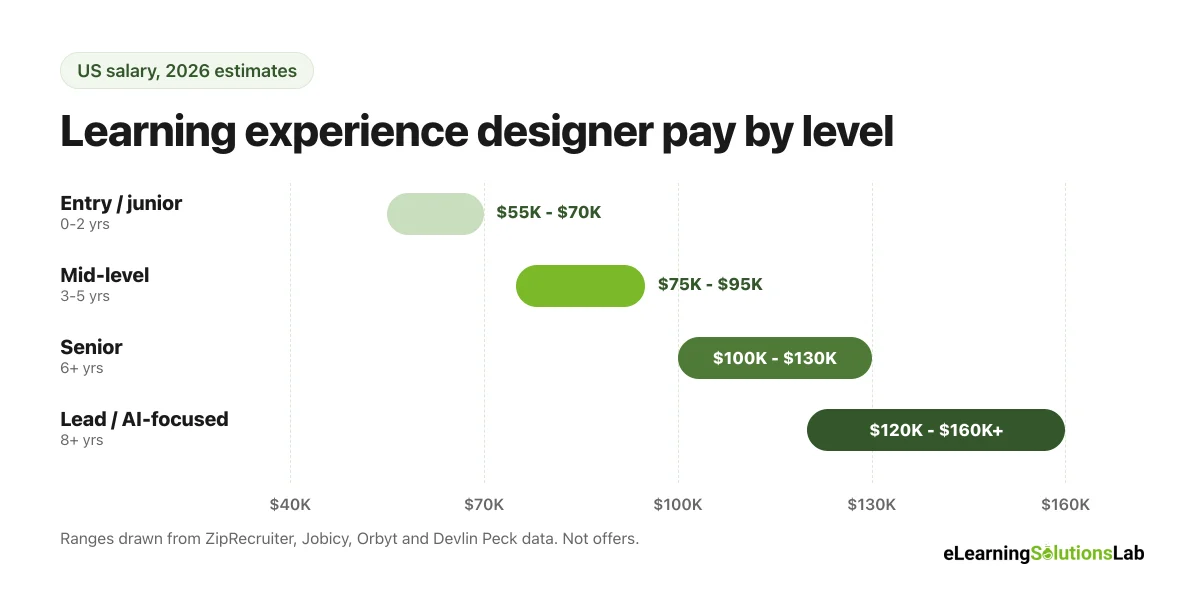
| Level | Typical experience | Typical US salary range |
|---|---|---|
| Entry-level or junior LXD | 0 to 2 years | $55,000 to $70,000 |
| Mid-level LXD | 3 to 5 years | $75,000 to $95,000 |
| Senior LXD | 6+ years | $100,000 to $130,000 |
| Lead or principal LXD, AI-focused roles | 8+ years or specialist skills | $120,000 and up |
These are estimates from salary aggregators and self-reported surveys, so treat them as ranges, not offers. Pay typically depends on industry, location, company size and portfolio strength.
Do learning designers make a lot of money? Compared with the US median for all jobs, yes: most experienced LXDs and instructional designers earn well above it. Corporate roles tend to pay more than higher education and K-12, and senior or AI-focused roles can pay considerably more.
Remote and global pay: fully remote US roles usually pay close to national rates. Outside the US, pay is typically lower in absolute terms. For instance, Jobicy’s July 2026 data puts the average LXD salary at around CA$72,400 in Canada and about US$28,300 in India.
How to Become a Learning Experience Designer
There’s no single required degree. Most LXDs come from teaching, instructional design, UX design, training or communications. Here’s a step-by-step path that genuinely works:
Step 1: Learn the foundations
Get the basics of learning science (cognitive load, retrieval practice, spacing) and a design process like the ADDIE model or SAM. Then add UX basics: user research, personas, wireframes and usability testing.
Step 2: Pick up the core tools
Learn one authoring tool well (typically Articulate Storyline or Rise), one design tool (Figma or Canva) and the basics of an LMS. You don’t need to master everything at once.
Step 3: Build 2 or 3 portfolio pieces
Hiring managers usually care more about your portfolio than your certificates. You have to show your process, not just the final product, so build small, complete projects (more on this below).
Step 4: Consider a certificate (optional)
Certificates and courses can give you structure and feedback, for instance an LXD or instructional design course from a university, Coursera or a specialist bootcamp. But they tend to help most when they push you to build portfolio work.
Step 5: Get entry-level experience
Look for titles like eLearning developer, instructional design associate, training coordinator or junior instructional designer. Freelance, volunteer and internal projects count too. If you’re a teacher or trainer, you can often move into an L&D role inside your current organization first.
Step 6: Show LXD-specific skills
Once you’re in, look for chances to do learner interviews, journey maps, prototypes and user tests. Those are the skills that really move you from “course builder” to learning experience designer.
LXD Portfolio: What Hiring Managers Look For
A strong LXD portfolio isn’t a gallery of pretty slides. Hiring managers want to see how you think. Here’s what they typically look for in each piece:
- The problem – what performance issue the project solved, and for whom.
- Your research – what you learned from learners, and how it changed the design.
- Design decisions – why you chose this format, structure or activity, with the learning science behind it.
- Prototypes and testing – early versions, what testing showed, and what you changed.
- The final product – a working sample, not just screenshots.
- Results – even simple ones, like test feedback or completion data.
Example of an annotated portfolio piece: say you redesign a 45-minute compliance course on data privacy. A weak write-up just shows the finished course. A strong one walks through the story: learner interviews showed staff already knew the rules but didn’t spot real-life risks, so you replaced most of the content with five short scenarios based on real incidents. Then you show the first prototype, the two things a usability test revealed (people skipped the intro and missed the “next” button), what you changed, and the result: a 15-minute course with clearer decisions. That walkthrough tells a hiring manager far more than the finished course alone.
To give you a concrete example, at eLearning Solutions Lab, we don’t simply hire for Articulate skills when we bring on learning designers. We ask candidates to walk us through one project’s design decisions and what they’d change now, given that how someone explains their thinking usually tells us more than the polish of the final product. If you’re on the hiring side, our guide to hiring eLearning designers covers how to vet portfolios.
Learning Experience Designer Career Path
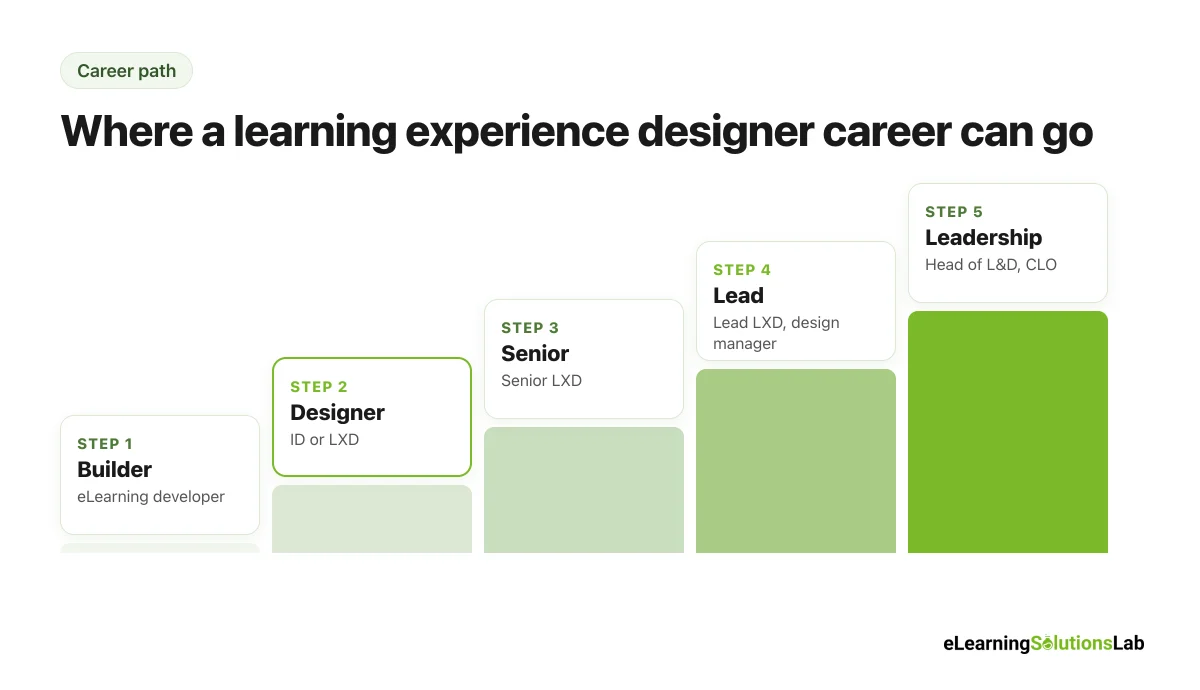
A typical path looks like this, though people tend to move between steps in different orders:
| Stage | Typical titles | Main focus |
|---|---|---|
| 1. Builder | eLearning developer, instructional design associate | Building courses from someone else’s design |
| 2. Designer | Instructional designer, learning experience designer | Designing courses and learner journeys end to end |
| 3. Senior | Senior LXD | Complex programs, learner research, mentoring |
| 4. Lead | Lead or principal LXD, learning design manager | Design standards, team leadership, stakeholder strategy |
| 5. Leadership | Head of learning, L&D director, CLO | Learning strategy, budget and business outcomes |
Some LXDs also move sideways into UX research, product design, learning technology or LMS administration, given how much the skills overlap.
Where to Find Learning Experience Designer Jobs
Job titles vary a lot, so you have to search more widely than “learning experience designer”. In practice, the same work shows up under several names:
- Titles to search: learning experience designer, instructional designer, learning designer, eLearning developer, digital learning designer, L&D specialist.
- Where: LinkedIn and general job boards, company career pages, eLearning agencies and freelance platforms.
- Remote roles are common for LXD and instructional design work, given that most of it is done on a computer.
- Agencies and consultancies are a genuinely good first step, because you build a varied portfolio quickly.
To see what employers look for, read our guide on how to hire eLearning designers.
Free LXD Skills Checklist and Job Description Template (PDF)
Free download – no email needed
Learning Experience Designer Skills Checklist and Job Description Template
A printable PDF with a skills self-assessment by level, a portfolio checklist, and a ready-to-edit LXD job description you can use for hiring or for planning your own growth.
In one line: a learning experience designer combines instructional design, learning science and UX to design the whole learner journey, and the fastest way into the role is a small portfolio that shows your research, design decisions and testing.
Need learning experience design without growing your team?
At eLearning Solutions Lab, our learning designers handle the research, journey design, prototyping and build, so that your team gets learning people actually use.
Explore our instructional design services, or add designers to your team with L&D staff augmentation.
Related Reading
- How to hire eLearning designers – costs, hiring models and a vetting checklist.
- ADDIE model – the 5 phases with a worked example.
- AI for instructional design – where AI fits in the design process.
- Scenario-based eLearning – a core LXD technique.
- Free eLearning storyboard template – plan your next build.
- Skills matrix template – map skills across your L&D team.
The Author

Book A Discovery Call
Our Learning Advisors are happy to walk you through your project step-by-step — content, timeline, and fixed pricing.
Get Your Free QuoteNo obligation — just a focused conversation. Proposal within 24 hours.
You may also like
What is VILT? A Practical Guide to Virtual Instructor-Led Training
VILT sounds like a simple acronym. But search for it and you'll get an IT…
Top eLearning Companies in the Philippines (2026 Guide)
Looking for the top eLearning companies in the Philippines? Here's the thing:…