


- Published
- Reading time
- 11 min
Filed under eLearning DevelopmentInstructional Design
Almost every guide to the ADDIE model says the same thing: five phases, a short paragraph on each, then a list of pros and cons. That’s useful for a quiz. But it doesn’t really show you what ADDIE looks like when you’re actually building a course.
So this guide does it differently. You’ll get a plain definition and a short history, then each of the 5 phases with its key questions, deliverables, roles and typical time share. Then we’ll take one real project, a customer support onboarding course, through every phase and show the actual outputs. You’ll also see how ADDIE compares with SAM and agile, where we stand on the “is ADDIE outdated?” debate, and you can download a free ADDIE template, no email needed.
Short on time? Jump to the worked example or download the free ADDIE template.
Updated November 2026.
In This Article
What is the ADDIE Model?
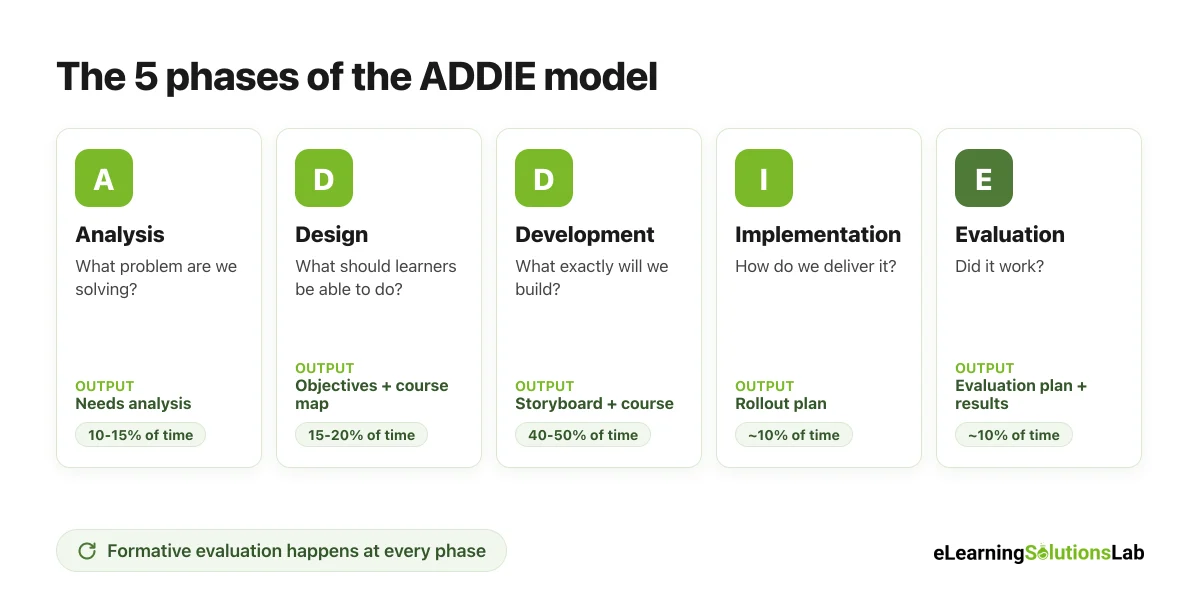
The ADDIE model is a five-phase framework for designing training and courses: Analysis, Design, Development, Implementation and Evaluation. Instructional designers use it to move from a business or learning problem to a finished, tested course, checking the work at every phase so that the training actually solves the problem.
In practice, each letter answers one simple question:
| Letter | Phase | The question it answers |
|---|---|---|
| A | Analysis | What’s the problem, who are the learners, and is training the right fix? |
| D | Design | What should learners be able to do, and how will we teach and assess it? |
| D | Development | What exactly will we build, and does it work? |
| I | Implementation | How do we deliver it to learners and support them? |
| E | Evaluation | Did it work, and what should we improve? |
ADDIE is used in corporate training, higher education, schools, government and the military. And most other instructional design models, including SAM, really build on the same five activities in a different order or rhythm.
Where ADDIE Came From
ADDIE has its roots in a 1975 project at Florida State University’s Center for Educational Technology, carried out for the U.S. Army. The team produced the Interservice Procedures for Instructional Systems Development (IPISD), a step-by-step method for building military training that could also be applied to any training program.
Here’s the surprising part: the original documents didn’t actually use the word “ADDIE.” The acronym came into use later as a handy label for the five phases, and nobody seems to have invented it on purpose. So when people ask “who invented the ADDIE model?”, the honest answer is that it grew out of the FSU and U.S. military work, rather than coming from a single author.
The 5 Phases of the ADDIE Model
Here’s what really happens in each phase: the questions you have to answer, what you hand over at the end, who’s involved and roughly how much of the project time it usually takes.
1. Analysis
This is where you figure out what problem the training needs to solve, and whether training is truly the answer.
- Key questions: What’s the business goal? What are people doing now, and what should they be doing? Is the gap caused by missing knowledge or skills, or by something else, like tools, incentives or unclear processes? Who are the learners, and what constraints do you have?
- Deliverables: A needs analysis, learner profile, list of constraints and a measure of success.
- Who’s involved: Instructional designer, project sponsor, subject matter experts (SMEs), managers and a few learners.
- Typical time: About 10 to 15% of the project.
2. Design
Now you plan the learning experience on paper, before anyone builds anything, given that changes on paper are far cheaper than changes in a finished course.
- Key questions: What should learners be able to do at the end? What’s the best format (eLearning, live, blended)? How will you know they can do it? What’s the order of topics?
- Deliverables: Learning objectives, a course map or design document, an assessment plan and sometimes a prototype screen.
- Who’s involved: Instructional designer, SMEs, the sponsor for sign-off.
- Typical time: About 15 to 20%.
3. Development
This is where the course actually gets built: scripts, storyboards, media, interactions and assessments.
- Key questions: Does every screen support an objective? Is the content accurate? Does it work on every device and in the LMS? Is it accessible?
- Deliverables: Storyboard, finished course or materials, facilitator guide (if any), and alpha and beta versions reviewed by SMEs and pilot learners.
- Who’s involved: Instructional designer, eLearning developer, graphic designer, voiceover talent, SMEs for review.
- Typical time: Usually the biggest share, about 40 to 50%.
4. Implementation
You deliver the course to learners and make sure it runs smoothly.
- Key questions: Is the LMS set up correctly? Do learners and managers know what’s expected? Are facilitators ready? What happens if something breaks?
- Deliverables: LMS setup, launch communications, facilitator training and a pilot or phased rollout plan.
- Who’s involved: LMS administrator, L&D team, managers, facilitators.
- Typical time: About 10%.
5. Evaluation
You check whether the training worked and what to improve. And it’s not only the last step: good teams evaluate at every phase.
- Key questions: Did learners like it and learn it? Are they using it on the job? Did the business measure move? What should we change?
- Deliverables: Evaluation plan, survey and assessment results, a short impact report and a list of revisions.
- Who’s involved: Instructional designer, L&D, managers, the sponsor.
- Typical time: About 10%, spread across the whole project.
The time shares are typical ranges, not rules. A simple compliance update may skip most of the analysis, while a brand-new program may spend much more time there.
Worked Example: One Course Through All 5 Phases
Here’s ADDIE applied to a real-world style project, so that you can see what each phase actually produces.
The project: A software company hires about 40 customer support agents a quarter. New agents currently take around 10 weeks to reach target quality scores, and the support director wants that down to 6 weeks. The L&D team is asked to build a new onboarding course.
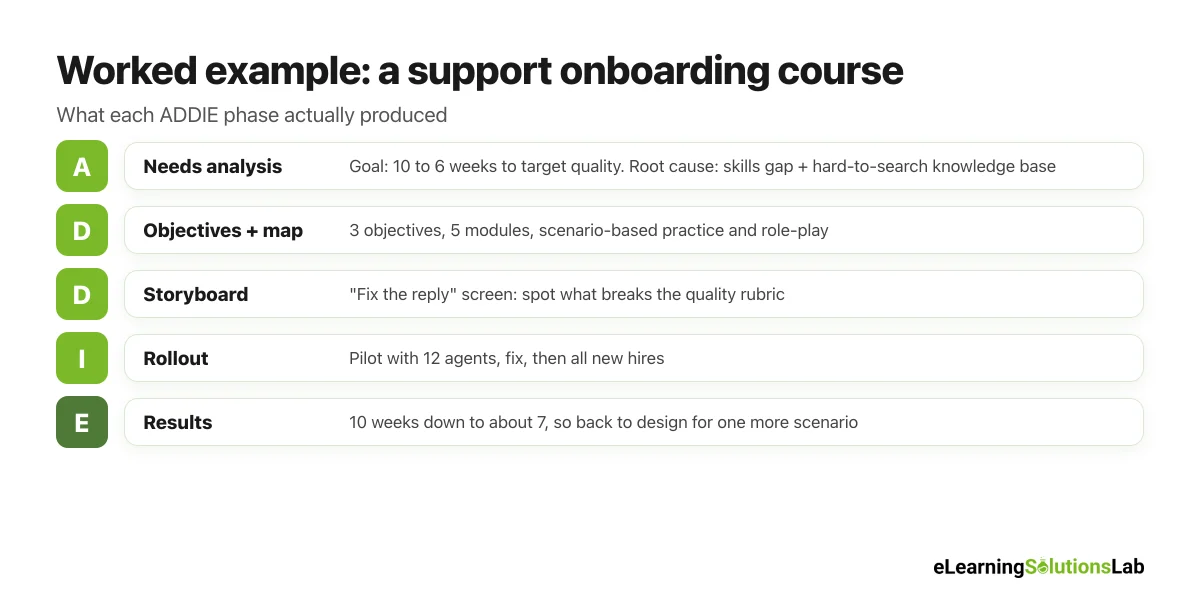
Phase 1: Analysis output – the needs analysis
| Item | What the team found |
|---|---|
| Business goal | Cut time to target quality from 10 weeks to 6 weeks for new support agents |
| Current performance | New agents score about 62% on the quality rubric in week 4 (target: 85%) |
| Root causes | Not knowing the 10 most common ticket types, weak written replies, and a knowledge base that’s hard to search |
| Training can fix | Ticket diagnosis, writing replies, de-escalation |
| Training can’t fix | The knowledge base search (flagged to the support director as a separate fix) |
| Learners | About 40 hires a quarter, mostly remote, many in their first support job |
| Constraints | Agents can spend about 2 hours a day on training in weeks 1 to 2; LMS already in place |
| Success measure | Average quality score and weeks to reach 85% |
Notice the root cause row. Half the problem was a knowledge base nobody could search, which no course can fix. So the team flagged it to the support director, and the course focused on the skills gap. That’s exactly the kind of thing analysis is for.
Phase 2: Design output – objectives and course map
The team wrote three objectives. By the end of the course, new agents will be able to:
- Diagnose the 10 most common ticket types using the troubleshooting flow.
- Write a reply that meets the 5-point quality rubric.
- Calm an upset customer using the 4-step de-escalation model.
| Module | Objective | Format | Assessment |
|---|---|---|---|
| 1. How support works here | Context for all three | 15-minute eLearning + team lead welcome | Short quiz |
| 2. The 10 ticket types | Objective 1 | Scenario-based eLearning (40 min) | Diagnose 8 sample tickets |
| 3. Writing great replies | Objective 2 | eLearning + peer review (45 min) | 3 replies scored on the rubric |
| 4. Handling upset customers | Objective 3 | Branching scenario + live role-play (60 min) | Role-play with a team lead |
| 5. First live tickets | All three | Shadowing + coached tickets (week 2) | 10 tickets reviewed by team lead |
Phase 3: Development output – a storyboard snippet
Here’s one screen from the storyboard for module 3. If you want a full template, see our eLearning storyboard template.
| Screen | On-screen text | Narration | Interaction |
|---|---|---|---|
| 3.4 Fix the reply | “Here’s a customer’s question and a draft reply. What’s missing?” | “This reply is polite, but it’s missing two things from the rubric. Can you spot them?” | Learner clicks the parts of the draft that break the rubric; feedback explains each one |
The team ran an alpha review with two SMEs, fixed 23 comments, then ran a beta with five current agents before launch.
Phase 4: Implementation output – the rollout plan
- Week 0: LMS set up, enrollment automated from the HR system, team leads briefed on their coaching role.
- Weeks 1 to 2: Pilot with one cohort of 12 new agents, with a daily 10-minute check-in.
- Week 3: Fixes from the pilot, then rollout to all new hires.
Phase 5: Evaluation output – the evaluation plan
| Level | What we measure | How and when |
|---|---|---|
| 1. Reaction | Was the course relevant and clear? | 3-question survey at the end of each module |
| 2. Learning | Can agents diagnose tickets and write replies to standard? | Scenario scores and rubric-scored replies in week 2 |
| 3. Behavior | Do they use the skills on real tickets? | Team lead review of 10 live tickets in weeks 3 and 6 |
| 4. Results | Did time to target quality drop? | Quality scores by week, compared with the last 3 cohorts |
After two cohorts, new agents reached target quality in about 7 weeks instead of 10. That’s not the 6-week goal yet, so the team went back to design and added a second practice scenario for the hardest ticket type. And that loop back is really how ADDIE is meant to work.
This is an illustrative example based on a typical onboarding project, so that you can see the outputs side by side.
Formative vs. Summative Evaluation in ADDIE
Evaluation in ADDIE comes in two types, and you genuinely need both.
| Formative evaluation | Summative evaluation | |
|---|---|---|
| When | During the project, at every phase | After the course has launched |
| Purpose | Improve the course before it’s finished | Judge whether the course worked |
| Examples | SME reviews, prototype tests, alpha and beta pilots | Surveys, assessments, on-the-job observation, business metrics |
| Who uses it | The design and development team | Sponsors, managers and L&D leaders |
Summative evaluation usually follows the four levels of the Kirkpatrick model of evaluation: reaction, learning, behavior and results. For the bigger picture on proving value, see our guide to eLearning ROI.
Pros and Cons of the ADDIE Model
| Pros | Cons |
|---|---|
| Clear structure – everyone knows what happens next and what each phase delivers. | Can be slow – if run as a strict waterfall, months pass before anyone sees the course. |
| Starts with the real problem – analysis stops you building training nobody needs. | Late feedback – learners and stakeholders may not react until development is nearly done. |
| Easy to explain – stakeholders quickly understand the five phases. | Heavy documentation – some teams over-produce design documents. |
| Good audit trail – useful for compliance, safety and regulated training. | Hard to change mid-way – changes in later phases can be costly. |
| Works for any format – eLearning, live, blended or job aids. | Evaluation gets squeezed – it’s often the first phase cut when time runs out. |
ADDIE vs. SAM vs. Agile
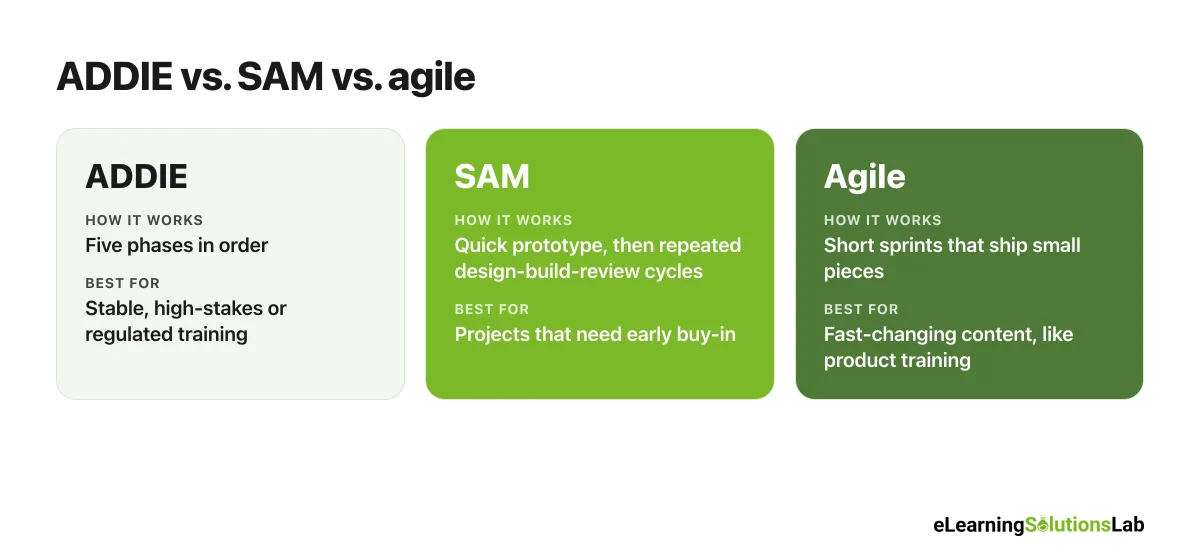
ADDIE isn’t the only option. The two alternatives people compare it with most are SAM (the Successive Approximation Model, created by Michael Allen) and agile approaches borrowed from software development.
| ADDIE | SAM | Agile | |
|---|---|---|---|
| How it works | Five phases, each building on the one before | Short repeated cycles of design, build and review, starting with a quick prototype | Short sprints that deliver small pieces of a course, reviewed with stakeholders |
| Best for | Stable content, high-stakes or regulated training, large programs | Projects that need stakeholder buy-in fast, or where requirements are unclear | Fast-changing content, like software or product training |
| Strengths | Thorough, easy to manage and document | Early prototypes, fewer late surprises | Quick releases, easy to change direction |
| Watch out for | Slow and rigid if run as a strict waterfall | Scope creep if reviews never end | Can lose the big picture without a clear plan |
Which should you use? You can use ADDIE when the content is stable, the stakes are high or you need a clear audit trail, for instance compliance, safety or certification training. SAM usually fits better when you need to see and react to a working version fast. And agile makes sense when the content keeps changing, such as product training for software that ships every two weeks. In practice, many teams simply run ADDIE with SAM-style prototypes inside the design and development phases. For a deeper side-by-side comparison, including one course planned both ways and a free decision checklist, see our guide to ADDIE vs. SAM.
For a wider comparison of frameworks, see our guide to learning models.
Is ADDIE Outdated?
It’s one of the most common questions about ADDIE, and the debate comes up again and again among instructional designers. Our view: ADDIE isn’t outdated, but the strict “waterfall” version of it usually is.
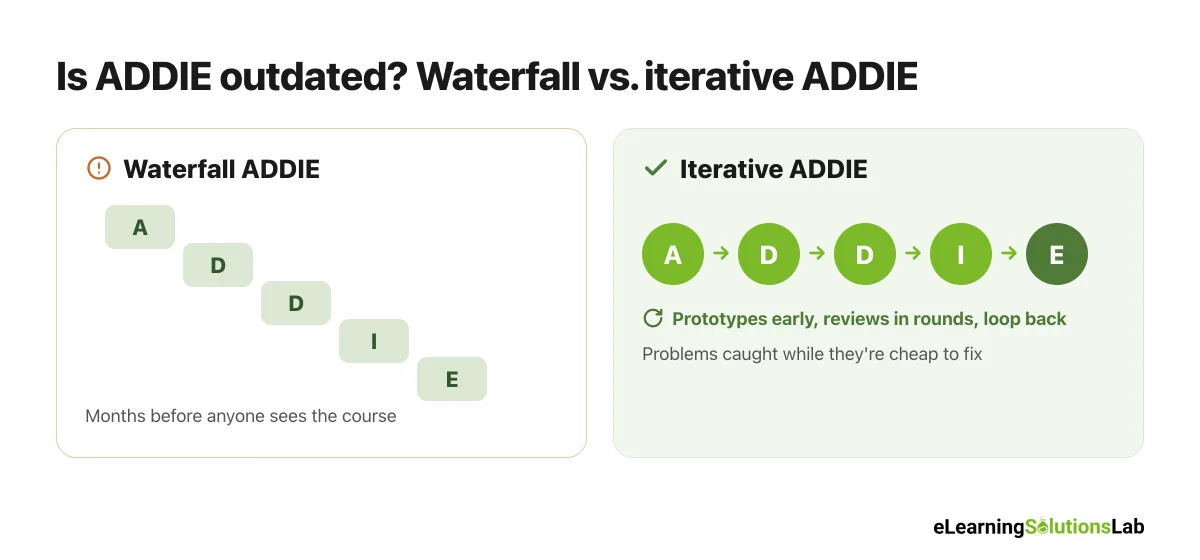
The criticism is fair when ADDIE is run as five locked stages: months of analysis, a giant design document, a build nobody sees until the end, and an evaluation that comes too late to change anything. That version really is slow.
But that’s not how most good teams use it today. In practice, modern ADDIE looks like this:
- Short, focused analysis – days or a couple of weeks, not months.
- Prototypes early – a clickable sample screen in the design phase, so that stakeholders react to something real.
- Development in rounds – alpha, beta and gold versions, with reviews between each.
- Evaluation at every phase – not just at the end.
- Loops back when needed – like the worked example above, where results sent the team back to design.
So the five activities in ADDIE are still the backbone of almost every training project. What’s changed is the rhythm.
To give you a concrete example, at eLearning Solutions Lab, we don’t simply run ADDIE as a checklist. We keep the analysis short, show clients a working prototype early in design, and build in two review rounds during development, so that problems get caught while they’re still cheap to fix. Our instructional design services page explains how that works on real projects.
Free ADDIE Model Template (PDF)
Free download – no email needed
ADDIE Model Template
A printable template with a phase-by-phase checklist, a needs analysis table, an objectives and course map planner, a storyboard grid and an evaluation plan, the same outputs as the worked example above, ready for your own project.
In one line: ADDIE is a five-phase way to go from a real performance problem to a tested course, and it works best when you keep analysis short, prototype early and loop back whenever the evaluation tells you to.
Need a team that runs ADDIE the modern way?
At eLearning Solutions Lab, we take projects from needs analysis to evaluation, with early prototypes and review rounds built in, so that you see the course long before launch.
Our instructional design services cover analysis and design, and our custom eLearning development services handle the build.
See our instructional design servicesExplore custom eLearning development
Related Reading
- Learning models – 12 frameworks, compared and evidence-rated.
- Kirkpatrick model of evaluation – the four levels for the Evaluation phase.
- eLearning storyboard template – the key Development deliverable.
- How to create effective eLearning courses – design tips for every phase.
- AI for instructional design – speeding up analysis and development.
- Employee onboarding and training – more on onboarding programs like the example.
The Author

Book A Discovery Call
Our Learning Advisors are happy to walk you through your project step-by-step — content, timeline, and fixed pricing.
Get Your Free QuoteNo obligation — just a focused conversation. Proposal within 24 hours.
You may also like
What is a Learning Experience Designer? Role, Skills, Salary and How to Become One (2026)
If you've seen "learning experience designer" on a job board and wondered…

Top eLearning Companies in the Philippines (2026 Guide)
Looking for the top eLearning companies in the Philippines? Here's the thing:…