

When someone calls in sick, your project needs a specialist, or an auditor asks for training records, do you know right away who can step in? Most managers don’t. Skills live in people’s heads, in old spreadsheets, or nowhere at all, so there are gaps that stay hidden until they cause a problem.
A skills matrix fixes that – it’s a simple grid that maps every person on your team against the skills the work requires, scored on a clear proficiency scale. In one view, you can see where you’re strong, where you’re exposed, and who actually needs training next.
In this guide, we explain what a skills matrix is, how to rate skills consistently, and how to build one in Excel or Google Sheets in five steps. You’ll also get free templates, including filled examples by role.
Short on time? Jump to the free skills matrix template.
Updated November 2026.
In This Article
- What is a skills matrix?
- Why use a skills matrix?
- Four levels of a skill matrix
- What to include in a skills matrix template
- How to create a skills matrix in Excel or Google Sheets
- Free skills matrix template (Excel)
- Skills matrix examples by role
- How to use your skills matrix results
- Common skills matrix mistakes to avoid
What is a Skills Matrix?
A skills matrix is a grid that shows which skills each person on a team has and how well they can perform each one. Your employees are listed down one side, skills needed for the work run across the top, and each cell holds a proficiency score.
Your managers and HR teams use a skills matrix to spot skill gaps, plan training, and make sure critical tasks never depend on just one person. It’s also the simplest starting point for skills mapping across a whole organization.
How a Skills Matrix is Laid Out
Most skills matrices follow the same basic structure:
- Rows list the people – an individual employee, or a role if you’re planning ahead of hiring.
- Columns list the skills: technical tasks, tools, certifications, or soft skills the job requires.
- Cells hold a rating, usually on a 0–4 scale, and are often color-coded so that their strengths and gaps stand out at a glance.
- Summary rows at the bottom total how many of your people can perform each skill, showing your coverage and your risk.
You can read across a row to see one person’s skill profile. Then read down a column to see how well your team covers that skill.
Skills Matrix vs Competency Framework vs Skill-Will Matrix
These terms are often used interchangeably, but having each tool can help answer a different question:
| Tool | What it shows | Best for |
|---|---|---|
| Skills matrix | Each person’s proficiency in specific skills | Gap analysis, training plans, cross-training, staffing |
| Competency framework | The behaviors and skills expected for each role or level | Defining job standards, hiring criteria, career paths |
| Skill-will matrix | One person’s ability vs their motivation for a task, on a 2×2 grid | Deciding whether to direct, guide, motivate, or delegate |
In practice, they actually work together. A competency framework defines what good looks like, whereas a skills matrix measures where each person stands, and a skill-will matrix helps you decide how to manage each person on a given task.
Why Use a Skills Matrix?
A skills matrix can turn scattered knowledge about your team into one view you can act on. Here’s what it helps you do.
Spot Skill Gaps at a Glance
Color-coded ratings can make weak spots obvious. So if a whole column is red, the team lacks that skill. If only one cell in a column is green, you’re just relying on a single person. Either way, you need to see the problem before it really shows up as a missed deadline or a quality issue.
Plan Training Where it Matters Most
Instead of sending everyone to the same course, you can target training programs at the specific skills and people with the biggest gaps. That makes your entire L&D budget easier to justify, given that every training decision traces back to a gap in the matrix, and it gives you a baseline for measuring eLearning ROI later.
Cross-Train and Reduce Single Points of Failure
When only one person can run a key process, a resignation, vacation, or sick day can stall the work. Having a skills matrix can show exactly where you need backups, so you can pair experienced staff with your learners before any gap becomes urgent.
Plan Succession and Staff Projects
Need someone to lead a new project or step into a senior role? This skills matrix can help show who already has the skills and who is close, which makes your staffing and promotion decisions faster and easier to defend.
Support Audits and Compliance
In regulated industries such as manufacturing, healthcare, and food production, you often need proof that your people are trained and qualified for the tasks they actually perform.
Having a skills matrix with assessment dates and certification expiry columns can give auditors a clear record – commonly used as supporting evidence for standards like ISO 9001. It pairs naturally with a compliance training plan and the completion records from your eLearning compliance training.
Four Levels of a Skill Matrix (Proficiency Scale Explained)
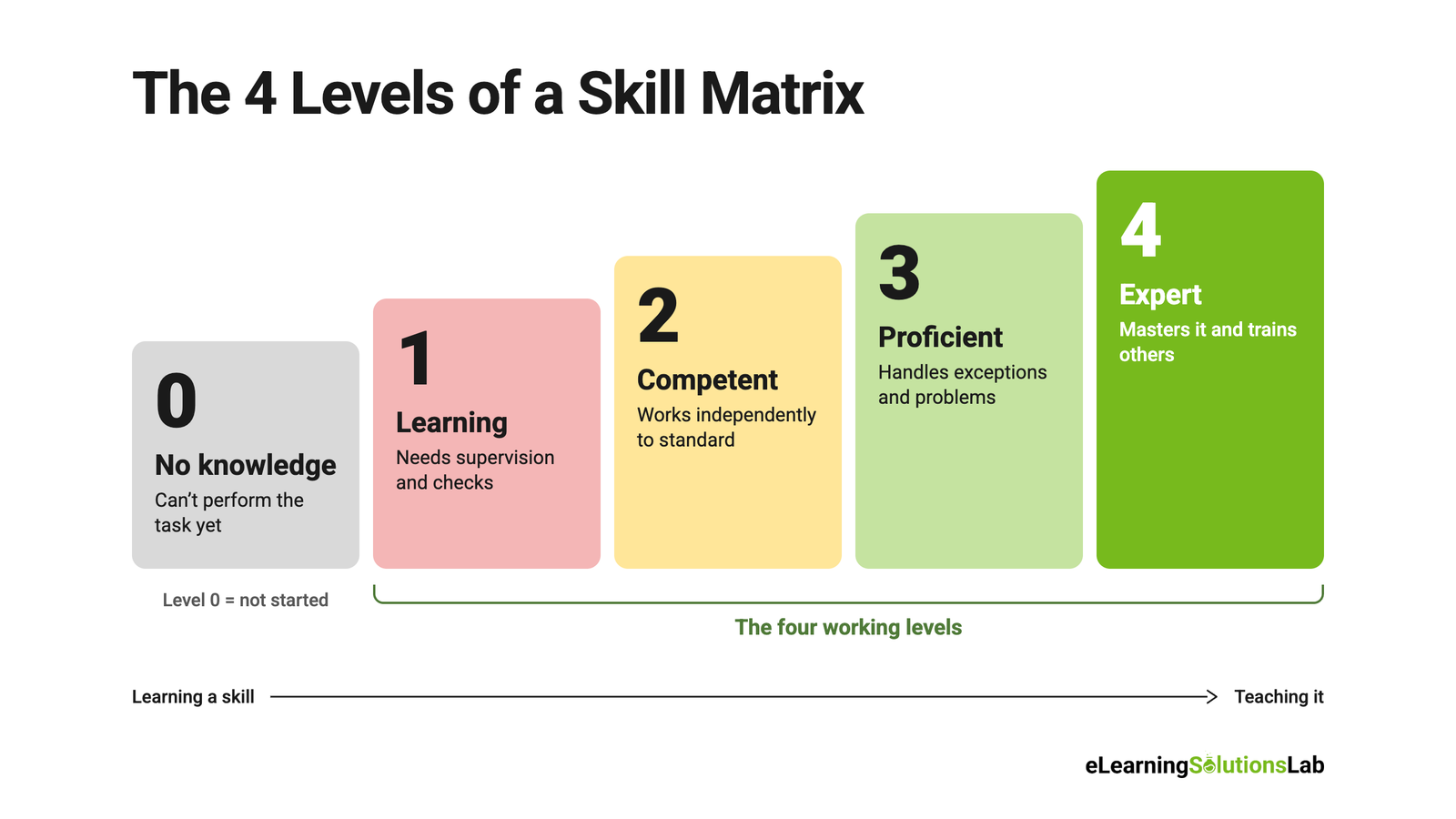
Most skills matrices will rate proficiency on a scale with four working levels, plus a zero for “no knowledge” – these levels describe a clear path from learning a skill to being able to teach it. Here’s the scale that’s used in our templates:
| Level | Name | What it means | What you’d observe | Color |
|---|---|---|---|---|
| 0 | No knowledge | Has no training or experience in this skill | Can’t perform the task | Grey |
| 1 | Learning | Has basic knowledge but needs supervision | Performs the task with guidance and checks | Red |
| 2 | Competent | Performs the task independently to the required standard | Completes routine work without help | Yellow |
| 3 | Proficient | Handles complex cases, exceptions, and problems | Solves issues others escalate | Light green |
| 4 | Expert | Has mastered the skill and can train others | Coaches colleagues, improves the process | Dark green |
When people talk about “the four levels,” they usually mean levels 1 through 4. Level 0 simply marks a skill someone hasn’t started yet.
0–4 vs 0–5 vs 1–4 Scales
- 0–4: most common choice; it’s simple, easy to agree on, and separates “can do it alone” from “can teach it”.
- 0–5: adds a top tier, which is often for recognized authority or certified trainer. It suits technical or regulated roles where expertise has formal grades.
- 1–4: drops the zero and leaves cells blank for untrained skills, quicker to fill in, but blank cells are easy to mistake for missing data.
You can choose one scale and use it across the whole organization so that all scores are comparable between teams.
Writing Clear Rating Criteria
A scale only works if everyone reads it the same way. For each level, you may describe what the person can actually do, not how confident they feel.
For example, “completes a changeover in under 20 minutes without help” works better than “good at changeovers”. You can ask your employees to self-rate, then have your manager confirm the score. Where you can, you can check it against observed work, test results, or certifications.
Practical rule
Rate what people can observably do, not how confident they feel, and use the same scale in every team.
What to Include in a Skills Matrix Template
A good skills matrix template captures enough detail to be useful without becoming a chore to maintain.
You can start with the essentials, then add some optional columns only if you’ll use them.
Required Columns
- Name: employee, or role if you’re planning ahead.
- Role and team: so you can filter and compare across departments.
- Skills: one column per skill, each scored on your 0–4 scale.
- Last assessed date: shows how current each rating is. Ratings older than 6–12 months should be reviewed.
Optional Columns
- Target level: proficiency each role needs, which really makes gap analysis possible.
- Interest or willingness: whether the person wants to develop the skill – it’s pretty useful for cross-training and for skill-will decisions.
- Certification and expiry date: essential in regulated work, where an expired certificate means the person can’t perform the task.
- Training due: next planned course or coaching session.
Summary Rows and Totals
You can add these at the bottom of the grid to turn their individual scores into team-level insight:
- Coverage per skill: how many people are rated level 2 or higher.
- Bench strength: how many people are rated level 3 or higher, which means they could cover or train others.
- Risk flag: highlights any skill with fewer than two people at level 3 or above.
Hard Skills vs Soft Skills: One Tab or Two?
Hard skills, like operating a machine, using software, or following a procedure, are easier to rate objectively. Whereas soft skills like communication and problem-solving are harder to score consistently.
So if you track both, put them on separate tabs. This would keep technical ratings clean and make it clear that soft skill scores rely more on judgment. And for most teams, you can start with hard skills and add soft skills once the process is working.
How to Create a Skills Matrix in Excel or Google Sheets (5 Steps)
You can build a working skills matrix in under an hour. These steps work in both Excel and Google Sheets, and where the menus differ, both are shown.
1. Start From the Work, Not the Skills
Don’t begin by brainstorming a list of skills. List the tasks and outcomes each role is responsible for, such as “processes refunds,” “runs line changeovers,” or “deploys code to production.” Then ask what skills each task requires. This keeps the matrix tied to real work and stops it from filling up with vague skills nobody can rate. Aim for 10–20 skills per team.
2. Define Your Proficiency Scale
Use the 0–4 scale above, with one sentence describing what each level looks like for your team. Put this key in a separate tab or a header row so everyone rates against the same definitions.
3. Set Up the Grid and Add Dropdowns
Put names in column A, roles in column B, and one skill per column from column C onward. Then restrict the cells to valid scores so nobody types “3.5” or “good”:
- Excel: select the rating cells → Data → Data Validation → Allow: List → Source:
0,1,2,3,4 - Google Sheets: select the rating cells → Data → Data validation → Add rule → Criteria: Dropdown → enter 0, 1, 2, 3, 4
4. Add a Heat Map With Conditional Formatting
Color-coding turns the grid into a picture you can read in seconds.
- Excel: select the rating cells → Home → Conditional Formatting → Highlight Cells Rules → Equal To. Add one rule per level: 0 grey, 1 red, 2 yellow, 3 light green, 4 dark green.
- Google Sheets: select the rating cells → Format → Conditional formatting → Is equal to, enter a level, and pick a color. Click Add another rule for each level.
5. Add a Gap Summary
Below the grid, add formulas that count coverage for each skill. For a skill in column C with ratings in rows 2–20:
- Coverage (level 2 or higher):
=COUNTIF(C2:C20,">=2") - Bench strength (level 3 or higher):
=COUNTIF(C2:C20,">=3") - Risk flag:
=IF(COUNTIF(C2:C20,">=3")<2,"At risk","OK")
Drag the formulas across to every skill column, then color the risk flag row so “At risk” shows in red.
Excel vs Google Sheets: Which Should You Use?
Choose Google Sheets if several managers need to update the matrix, or if you want live sharing and version history without emailing files around. Choose Excel if your organization works in Microsoft 365, needs offline access, or wants pivot tables and Power Query for larger teams. Both handle everything in this guide.
Free download
Skills Matrix Template (Excel)
A filled team example, a blank matrix, and ready-made versions for manufacturing, IT and engineering, customer support, and boards. It also includes an automatic gap analysis, a training plan, a certification tracker, and a one-page dashboard. Enter your details and we’ll email it to you instantly.
Skills Matrix Examples by Role
A blank grid is a good start, but a pre-filled example saves time and shows what “good” looks like. Each version in our template comes with 10–15 relevant skills already listed. Delete what doesn’t apply and add your own.
Employee and Team Skills Matrix
Use this for any team that doesn’t fit a specialist template, such as office, operations, or project teams. It’s also useful during employee onboarding and training, when you need to see what a new hire can already do.
Sample skills: core software (CRM, ERP), reporting and data entry, process documentation, quality checks, customer communication, project coordination, scheduling, problem-solving, compliance procedures, onboarding new staff, presenting to stakeholders.
Manufacturing / Lean Skills Matrix
Production teams use skills matrices to keep lines running and to show auditors that operators are trained. Safety-critical skills here usually need the highest targets and the most frequent reviews, backed by eLearning safety training.
Sample skills: machine operation (by machine or line), changeovers / SMED, first-article inspection, preventive maintenance, lockout/tagout, forklift operation, 5S, standard work, root cause analysis, SPC charting, material handling, safety procedures.
IT and Engineering Skills Matrix
Engineering teams use the matrix to staff projects, plan on-call rotations, and avoid knowledge silos in critical systems.
Sample skills: primary languages (Python, JavaScript, Java), cloud platforms (AWS, Azure, GCP), CI/CD pipelines, databases and SQL, API design, security practices, testing and QA, incident response, monitoring, infrastructure as code, code review, system architecture.
Customer Support Skills Matrix
Support teams use the matrix to route tickets, build shift coverage, and decide who can handle escalations. Product knowledge columns are often the first to show gaps after a release, which is where a product training program helps.
Sample skills: product areas (by module or product line), live chat, phone support, email support, ticketing system, troubleshooting, billing and refunds, escalation handling, de-escalating upset customers, knowledge base writing, second-language support.
Board Skills Matrix
Boards of directors use a different kind of skills matrix. It maps each director’s expertise and experience against what the board needs to govern well, and it often tracks diversity and independence alongside skills. Board matrices are usually self-assessed and reviewed annually, often before director recruitment.
Sample areas: finance and audit, legal and regulatory, risk management, industry experience, strategy, governance, technology and cyber, HR and remuneration, ESG and sustainability, international markets.
How to Use Your Skills Matrix Results
A completed matrix is only useful if it leads to decisions. Here’s how to turn the scores into action.
Run a Skill Gap Analysis
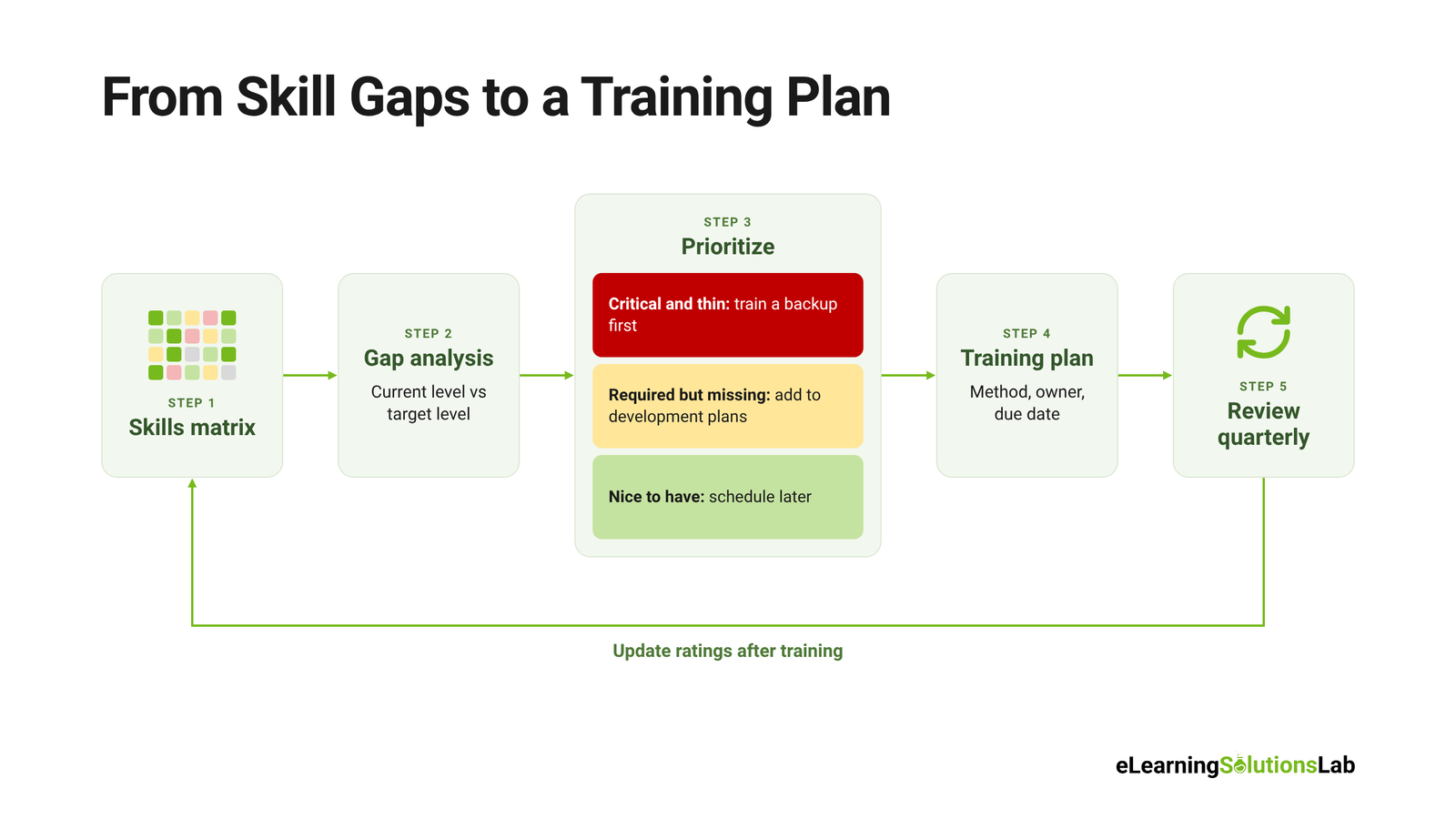
Compare each person’s current level with the target level for their role. A positive difference is a gap to close. Then look at the team view: which skills have the biggest total gaps, and which have fewer than two people at level 3 or above? Those are your priorities.
Build a Training Plan From the Gaps
Not every gap needs closing right away. Rank them by business risk:
- Critical and thin: essential skills with only one competent person. Train a backup first.
- Required but missing: skills a role needs that the person doesn’t have yet. These go into individual development plans.
- Nice to have: skills that would help but don’t block work. Schedule these later.
For each priority gap, set the training method, an owner, and a target date. Short, focused gaps often suit microlearning services, while judgment-heavy skills like escalations or safety decisions are better built through scenario-based eLearning. To keep records in one place as training is completed, see our guide on how to track employee training.
Plan Cross-Training and Backups
Use the “bus factor” test: if one person left tomorrow, which tasks would stop? Any skill where only one person scores 3 or higher is a risk. Pair that expert with someone at level 1 or 2, and give them regular time to work together until the learner can perform the task independently.
Use it for Succession Planning
Filter the matrix by the skills a senior or critical role requires. Anyone already at level 3 in most of those skills is a potential successor, and people at level 2 are candidates for development, for example through leadership development eLearning. This makes succession conversations based on evidence rather than gut feel.
How Often to Update it
- Quarterly: review and confirm ratings with each employee.
- After training: update scores once the new skill has been demonstrated on the job.
- When roles change: add or remove skills when people move, join, or leave, or when processes change.
- Before audits: check that assessment dates and certifications are current.
Common Skills Matrix Mistakes to Avoid
Most skills matrices fail for the same few reasons. Avoid these and yours will stay useful long after the first build.
- Tracking too many skills: a matrix with 60 columns is hard to read and quickly goes stale. Keep it to the 10–20 skills that matter most, and use separate tabs if you need more detail.
- Using vague level definitions: if “level 3” means different things to different managers, the scores can’t be compared. Define each level by what the person can observably do.
- Relying on self-ratings alone: people tend to overrate skills they’re confident in. Use self-ratings as a starting point, then have a manager confirm them.
- Building it once and never updating it: an outdated matrix gives false confidence. Assign an owner, schedule quarterly reviews, and keep the “last assessed” date visible.
- Using it as a performance review tool: if low scores hurt pay or reviews, people inflate their ratings. Present it as a tool for planning training and support.
- Collecting data without acting on it: if gaps are found but no training follows, people stop taking the process seriously. Tie every review to at least one concrete action.
In one line
Start from the work, rate on one clear 0–4 scale, review quarterly, and turn every gap you find into a training action.
Found the gaps? Let’s close them.
At eLearning Solutions Lab, we turn skill gaps into training that works. Our instructional design services and custom eLearning development services cover design, development, localization, and QA in one team.
Need somewhere to deliver and track it? Levantra LMS, our cloud based LMS, assigns courses by role or location, automates reminders, and reports on every completion.
See our custom eLearning development servicesBook a Levantra LMS demo
Related Reading
- Skills mapping – connecting skills data to roles across your organization.
- Learning and development tools – the software and templates that support each stage of training.
- New hire checklist – a structured start for every new employee.
- eLearning storyboard template – planning courses before development starts.
- eLearning ROI – proving your training changes business results.
The Author

Book A Discovery Call
Our Learning Advisors are happy to walk you through your project step-by-step — content, timeline, and fixed pricing.
Get Your Free QuoteNo obligation — just a focused conversation. Proposal within 24 hours.
You may also like
What is Skills Mapping? How to Build a Skills Map (With a Worked Example and Free Template)
You can ask most managers who on their team can run a paid campaign, analyze a…
How to Track Employee Training: 4 Methods + Free Tracker (2026)
Quick answer To track employee training, list each employee and the training…