


- Published
- Reading time
- 6 min
Filed under Instructional DesignLMS & Platforms
Give a new employee access to a library of 200 courses and say “take what you need”, and most will take almost nothing. Not because they don’t really care, but because they don’t know where to start, what matters most, or what order makes sense. A learning path solves that by turning a pile of courses into a clear route.
So here’s a practical guide to learning paths. You’ll get a simple definition, how learning paths differ from courses and curricula, the main types, the benefits, a step-by-step way to build one, three sample paths you can adapt, and how to set them up in an LMS. You can also download a free learning path builder, no email needed.
Short on time? Jump to the definition, see the 7 steps or download the builder.
Updated November 2026.
In This Article
What is a Learning Path?
A learning path is a planned sequence of courses, activities and assessments that guides a learner toward a specific goal, like getting up to speed in a new role, earning a certification or building a skill. It tells people what to learn, in what order, and what “done” looks like.
A learning path can be as short as three modules for a new tool, or as long as a six-month leadership program. What makes it a path, rather than a list, is the clear goal, the order, and the milestones along the way.
Learning Path vs. Course vs. Curriculum
| Course | Learning path | Curriculum | |
|---|---|---|---|
| What it is | One unit on one topic | A sequence toward one goal | The full learning plan for a role or group |
| Scope | Minutes to hours | Days to months | Months to the whole role |
| Example | Handling refunds | New support rep: first 30 days | Customer service rep curriculum |
| Where it lives | A file or module in the LMS | A sequence set up in the LMS | A plan, delivered through paths and programs |
In practice, a curriculum is usually the plan for a whole role, and learning paths are how you deliver parts of it in an LMS. Our guide to training curriculum development covers the bigger picture.
Types of Learning Paths
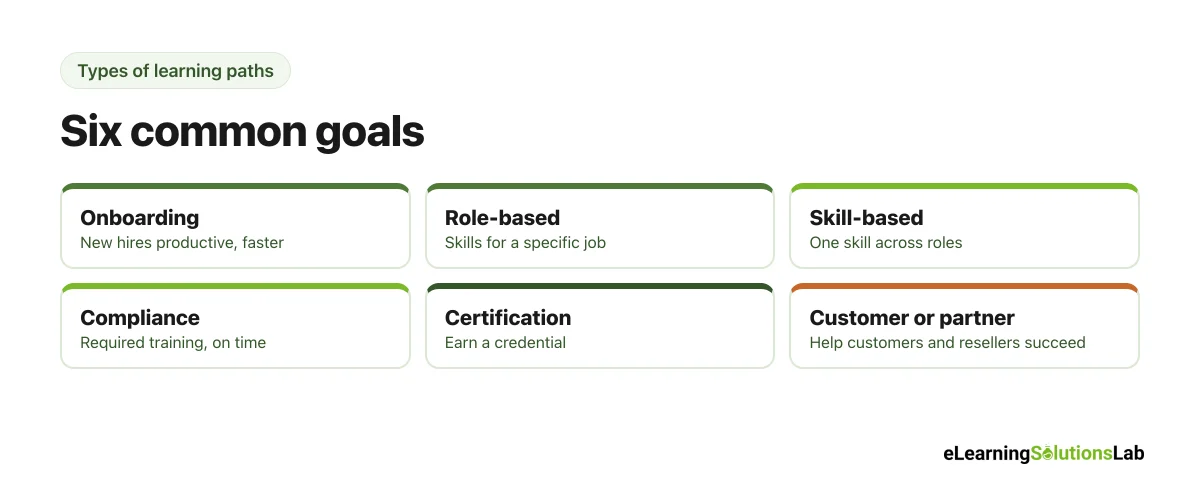
| Type | Goal | Example |
|---|---|---|
| Onboarding path | Get new hires productive | First 30 days for new sales reps |
| Role-based path | Build the skills for a specific job | Warehouse team lead essentials |
| Skill-based path | Develop one skill across roles | Data literacy foundations |
| Compliance path | Meet required training on time | Annual safety and privacy refreshers |
| Certification path | Earn a credential or internal certification | Certified product specialist |
| Customer or partner path | Help customers or resellers succeed | Partner onboarding academy |
Benefits of Learning Paths
- Clarity for learners – people know exactly what to do next, so that they don’t waste time guessing.
- Faster ramp-up – new hires reach competence sooner when the most important skills come first.
- Consistency – everyone in the same role gets the same foundation.
- Less admin – assign one path instead of ten separate courses.
- Visible progress – learners and managers can see how far along someone is.
- Motivation – milestones, badges and certificates give people a reason to keep going.
How to Build a Learning Path (7 Steps)

- Define the goal. What should people be able to do at the end? For instance, “handle standard customer calls independently”. You can write it like a learning objective.
- Know the audience. What do they already know? Experienced hires might skip the basics.
- List the skills needed. Break the goal into the skills and knowledge it requires.
- Find or build the content. Check what you already have before building anything new.
- Sequence it. Start with what people need first, and put prerequisites before the things that depend on them.
- Add milestones and checks. Short knowledge checks, practical tasks and manager sign-offs along the way.
- Set it up, launch and review. Build it in your LMS with due dates and reminders, then check completion and results after the first group.
You have to keep momentum, given that long paths tend to stall. A good rule of thumb: keep each step in the path short (typically 5 to 20 minutes), and mix formats. So a path that’s just eight long eLearning modules in a row usually loses people halfway through.
Learning Path Examples
Here are three sample learning paths you can adapt:
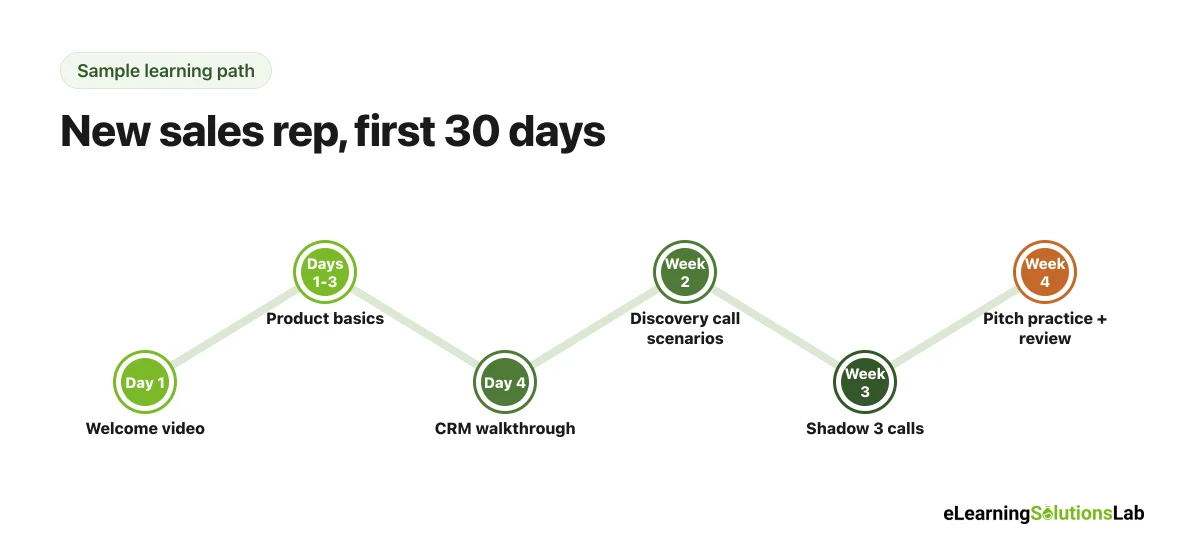
| Path | Steps | Ends with |
|---|---|---|
| New sales rep (30 days) | Welcome video, product basics, CRM walkthrough, discovery call scenarios, shadow 3 calls, pitch practice | Recorded pitch reviewed by manager |
| New people manager (90 days) | Manager essentials, giving feedback, one-to-ones, hiring basics, handling performance issues, peer cohort session | Feedback role-play and manager sign-off |
| Food safety for new staff (1 week) | Hygiene basics, temperature control, allergens, cleaning schedule, practical checklist | Certificate and on-shift observation |
Notice how each path mixes formats and ends with something practical, not just a final quiz. And each one is genuinely short enough that people can see the finish line from the start.
Learning Paths in an LMS
Most modern LMSs support learning paths. Here’s what’s worth looking for:
| LMS feature | Why it matters |
|---|---|
| Sequencing and prerequisites | Steps unlock in the right order |
| Automatic assignment | Paths go to the right people by role or start date |
| Due dates and reminders | Keeps people moving without manual chasing |
| Mixed content types | Courses, videos, PDFs, quizzes and live sessions in one path |
| Progress tracking | Learners and managers see how far along people are |
| Certificates and badges | Recognize completion and milestones |
| Reporting | See where people stall, so you can fix that step |
If you’re looking for a simple LMS with learning paths built in, Learnwick LMS includes learning paths with due dates, reminder emails and overdue reports, plus optional points, badges and a leaderboard, and certificates with a verification code. It’s built for teams of about 5 to 1,000 learners, with a free plan for up to 30. Our guide on whether you need an LMS covers the basics if you’re still choosing.
To give you a concrete example, at eLearning Solutions Lab, we don’t simply drop a client’s existing courses into a path in alphabetical order. We map the first 30, 60 and 90 days of the role with the client, reuse whatever existing content truly fits, cut what doesn’t, and build short new modules only for the gaps. So the path feels like one designed journey rather than a list of leftovers.
Learning Paths vs. Learning Pathways (and Other Names)
You’ll see a few names for the same idea, and it can get confusing. In practice, they mostly mean the same thing:
- Learning path – the most common term in corporate training and LMS platforms. It’s a set sequence of courses and activities toward one goal.
- Learning pathway – often used in schools and universities, and sometimes for longer, more flexible routes that let learners choose between options.
- Learning journey – usually puts more weight on the experience over time, including coaching, practice and on-the-job tasks, not just courses.
- Curriculum or track – common in certification programs and role-based training.
But the label really doesn’t matter as much as the structure. You have to define the goal, the order and how you’ll know someone actually got there. If you’re mapping paths to roles, our guide to skills mapping is a good place to start.
Free Learning Path Builder (PDF)
Free download – no email needed
Learning Path Builder
A printable PDF to plan a learning path: goal and audience, a step-by-step path table with formats, timing and checks, milestones, and an LMS setup checklist.
In one line: a learning path turns a pile of courses into a clear route to a goal, with the right order, short steps and milestones that show people they’re getting somewhere.
Want learning paths people actually finish?
At eLearning Solutions Lab, we design learning paths around real roles, build the short modules that fill the gaps, and set them up in an LMS with reminders and certificates.
Try Learnwick LMS free, or see our instructional design services.
Related Reading
- Training curriculum development – the bigger plan behind your paths.
- Employee onboarding and training – the most common learning path.
- Microlearning examples – short steps for any path.
- Do I need an LMS? – when a platform makes sense.
- Skills mapping – find the skills each path should build.
The Author

Book A Discovery Call
Our Learning Advisors are happy to walk you through your project step-by-step — content, timeline, and fixed pricing.
Get Your Free QuoteNo obligation — just a focused conversation. Proposal within 24 hours.
You may also like
The Four Stages of Competence: Examples and How Training Moves People Forward
Think back to learning to drive. At first, you didn't know how much you didn't…
Training Curriculum Development: 8 Steps, Components and a Sample Map
A single course can teach a skill. But most roles need much more than one…