


- Published
- Reading time
- 6 min
Filed under eLearning DevelopmentInstructional Design
Most eLearning courses have quiz questions. But a lot of them are there simply to tick a box: “Which of the following is NOT a company value?” Learners guess, click, move on, and nobody learns anything. Done well, though, a knowledge check is truly one of the most useful things you can put in a course, given that asking people to recall something is one of the best ways to help them remember it.
So here’s a practical guide to knowledge checks. You’ll get a clear definition, how they differ from quizzes and assessments, where to put them, the main question types, how to write good questions and feedback, before-and-after examples, and common mistakes. You can also download a free knowledge check question template, no email needed.
Short on time? Jump to the definition, see the question types or download the template.
Updated November 2026.
In This Article
What is a Knowledge Check?
A knowledge check is a short, usually ungraded set of questions placed during or after a section of training, so that learners can practice recalling and applying what they just learned and get immediate feedback. Its main job is to help people learn, not to grade them.
In eLearning, a knowledge check is typically one to five questions at the end of a short section, with feedback after each answer. In live training, it might be a quick poll, a show of hands or a few questions on a slide.
Knowledge Check vs. Quiz vs. Assessment
| Knowledge check | Quiz | Final assessment | |
|---|---|---|---|
| Purpose | Practice and feedback | Practice or light scoring | Prove competence |
| Stakes | Low, usually ungraded | Low to medium | High, often pass/fail |
| Length | 1 to 5 questions | 5 to 15 questions | Varies, often 10 or more |
| Timing | During or right after a section | End of a module | End of the course |
| Retries | Unlimited, encouraged | Often allowed | Limited |
| Feedback | Detailed, after each question | Sometimes | Often only a score |
So a knowledge check is practice, and a final assessment is proof. Most good courses actually use both.
Why Knowledge Checks Work
Knowledge checks help in several ways at once:
- Retrieval practice. Pulling information out of memory strengthens it far more than re-reading it. This is one of the most consistently supported findings in learning research.
- Immediate feedback. Learners find out what they misunderstood while it’s still easy to fix.
- Attention. Knowing a question is coming keeps people focused.
- Data for you. If 70% of learners miss the same question, the content (or the question) probably needs work.
Knowledge checks are also one of the simplest ways to fight the forgetting curve, especially when you repeat them a few days after the course.
Where to Put Knowledge Checks

- Before the content (pre-check). A question or two up front activates what learners already know, and can let experienced people skip ahead.
- After each short section. The most common placement. Typically one to three questions every 5 to 10 minutes of content.
- Before the final assessment. A short practice round so that learners know what to expect.
- After the course. Spaced follow-up questions a few days and weeks later, sent by email or through your LMS.
Knowledge Check Question Types
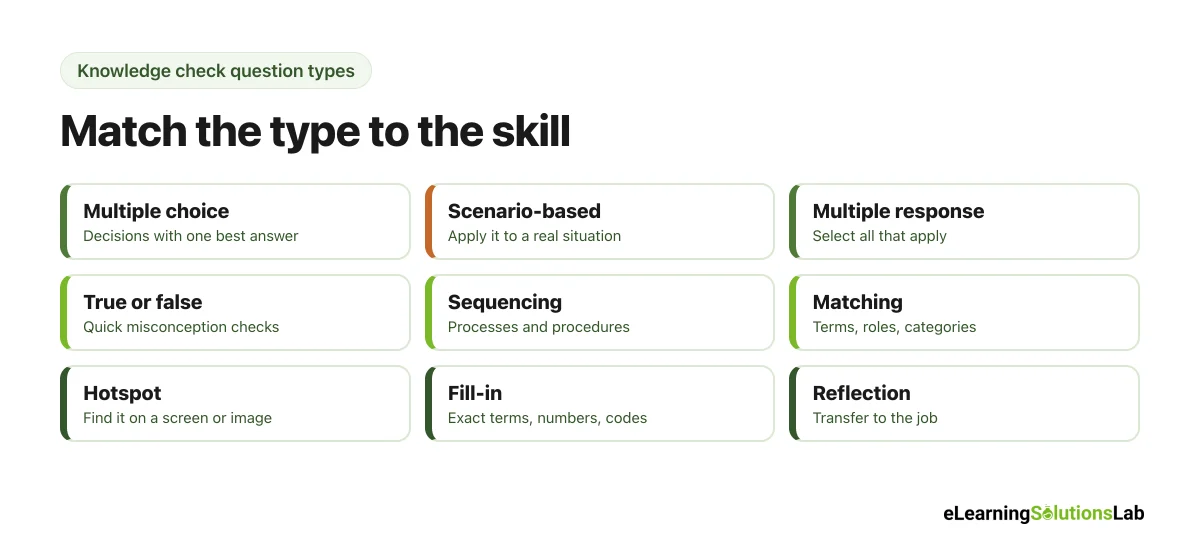
| Question type | Best for | Example |
|---|---|---|
| Multiple choice | Decisions with one best answer | Which response should you give the customer? |
| Multiple response | Selecting all that apply | Which of these items must be in a safety report? |
| True or false | Quick checks of common misconceptions | You can share a customer’s order history by phone. |
| Scenario-based | Applying knowledge to realistic situations | A customer says X. What do you do next? |
| Sequencing | Processes and procedures | Put the 5 lockout steps in order. |
| Matching | Linking terms, roles or categories | Match each data type to its storage rule. |
| Hotspot | Finding things on a screen, image or form | Click the field where the error is. |
| Short answer or fill-in | Exact terms, numbers or codes | Enter the discount code for loyalty members. |
| Reflection | Self-assessment and transfer to the job | How will you use this in your next team meeting? |
In practice, multiple choice and scenario questions do most of the work. But mixing in a few other types, like sequencing for a process or a hotspot for a screen, keeps things varied and often fits the skill better.
How to Write Good Knowledge Check Questions
- Start from the learning objective. If the objective is “decide whether a return qualifies”, the question should ask learners to decide, not to define. Our guide to learning objectives shows how to write them.
- Use realistic situations. Put the question in a short scenario from the job. For instance, a customer request, a safety situation or a screen they use every day.
- Ask one thing at a time. Keep the question stem clear and focused.
- Write plausible distractors. Wrong options should reflect real mistakes people make, not obvious jokes.
- Keep options similar in length and style. The longest, most detailed option shouldn’t always be the right one.
- Avoid “all of the above”, “none of the above” and double negatives. They test reading skills, not knowledge.
- Write feedback that teaches. You have to explain why the right answer is right, and why each wrong answer is wrong.
Knowledge Check Examples: Before and After
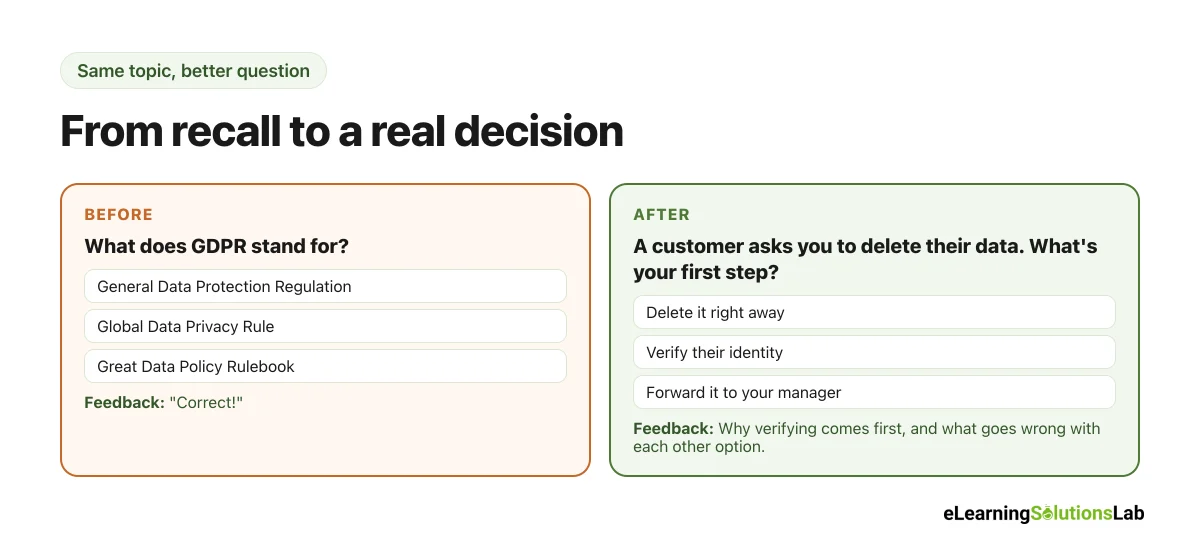
Here’s what improving a typical knowledge check question looks like:
| Before | After | |
|---|---|---|
| Question | “What does GDPR stand for?” | “A customer calls asking you to delete their account data. What’s your first step?” |
| Options | One obvious answer and three silly ones | Four realistic actions, each a common real choice |
| Level | Remember | Apply |
| Feedback | “Correct!” or “Incorrect.” | Why the answer is right, and why each other option causes a problem |
The “after” versions ask learners to apply the knowledge to a situation they’ll really face. And the feedback genuinely teaches, rather than just saying “Correct!” or “Try again”.
The Two Main Types of Knowledge Checks
You’ll also see knowledge checks called comprehension checks, checks for understanding or quick quizzes. In practice, they come in two main types:
- Ungraded self-checks – short questions inside a lesson that let learners test themselves, with instant feedback and no score that counts. These are the most common in eLearning.
- Graded checkpoints – short scored checks at the end of a section, sometimes needed to unlock the next module.
Use self-checks for learning and graded checkpoints only where you really need a record. Either way, the feedback is what does the teaching. For simple, short formats, see our microlearning examples.
Common Knowledge Check Mistakes
- Testing trivia – dates, definitions and wording from slides instead of decisions.
- Obvious answers – if learners can guess without taking the course, the question isn’t doing anything.
- Feedback that only says correct or incorrect – a big missed opportunity to teach.
- Too many questions in one block – 15 questions at the end of a module feels like a test, not practice.
- Locking people out – knowledge checks usually work best when learners can retry.
- Never reviewing the data – question analytics tell you which parts of the course aren’t working.
To give you a concrete example, at eLearning Solutions Lab, we don’t simply add a quiz at the end of each module. We write knowledge checks from the learning objectives, set most of them in short job scenarios, and write feedback for every option, including the wrong ones. Then, once the course is live, we look at which questions people miss most, and use that to improve both the questions and the content.
Free Knowledge Check Question Template (PDF)
Free download – no email needed
Knowledge Check Question Template
A printable PDF to plan each question: the objective it checks, a scenario stem, options with feedback for each, plus a placement plan and a question quality checklist.
In one line: a knowledge check is short, low-stakes practice with feedback, and it works best when the questions ask people to apply what they learned to real situations.
Want courses with questions that actually teach?
At eLearning Solutions Lab, we build courses with scenario-based knowledge checks, meaningful feedback and assessments that match your objectives.
See our custom eLearning development or scenario-based eLearning.
See custom eLearning developmentTalk to us about your course
Related Reading
- Learning objectives – what your questions should check.
- The Ebbinghaus forgetting curve – why recall practice matters.
- Scenario-based eLearning – realistic practice in courses.
- Gamification in eLearning – making practice more engaging.
- The Kirkpatrick model – measuring learning and behavior.
The Author

Book A Discovery Call
Our Learning Advisors are happy to walk you through your project step-by-step — content, timeline, and fixed pricing.
Get Your Free QuoteNo obligation — just a focused conversation. Proposal within 24 hours.
You may also like
The Four Stages of Competence: Examples and How Training Moves People Forward
Think back to learning to drive. At first, you didn't know how much you didn't…
Learning Paths: Types, Examples and How to Build One People Finish
Give a new employee access to a library of 200 courses and say "take what you…