

Short answer: Scenario-based eLearning is a training approach that places learners in realistic workplace situations where they make decisions and see the consequences. Instead of memorizing facts, learners practice applying knowledge in a safe environment, and the feedback they receive builds judgment and job-ready skills.
Your learners passed the quiz, clicked through every slide, scored 90%, and earned a certification. Then on the job, they froze in front of an angry customer – the problem here isn’t effort; it’s that most eLearning teaches people what to know, not what to do.
Scenario-based eLearning closes that gap by putting your learners in realistic situations where they can actually make decisions, see consequences, and learn from their choices without real-world risks.
In this guide, we cover everything you need to build effective scenarios: what scenario-based eLearning is and how it works, when to use mini vs. branching scenarios, a step-by-step creation process with realistic time estimates, and how to design scenarios that work for global audiences.
This guide is tool-neutral, so the process shared below applies whether you build scenario-based e-learning courses in Storyline, Rise, Captivate, Twine, or H5P. Updated September 2026.
In This Article
- What is scenario-based eLearning?
- How scenario-based learning works
- Why scenario-based eLearning works
- Mini-scenarios vs. branching scenarios
- Types of scenarios
- How to create scenario-based eLearning in 7 steps
- How long it takes and what drives the cost
- Common scenario design mistakes
- Designing scenarios for global audiences
- Making branching scenarios accessible
- Tools for building scenario-based eLearning
- How to measure whether your scenario worked
What Is Scenario-Based eLearning?
Scenario-based eLearning is a training approach that places your learners in realistic workplace situations where they can make decisions and see the consequences. Instead of merely memorizing facts, learners can practice applying knowledge in a safe environment, and the feedback they receive builds judgment and job-ready skills.
Traditional eLearning, as we know, presents information and then tests recall. But a scenario reverses that order – your learner here faces a problem first, such as a frustrated customer, a safety hazard, or an ethical gray area, and has to decide what to do. The learning comes from truly making that choice and seeing where it leads.
Ruth Colvin Clark, whose book Scenario-Based e-Learning shaped much of the field, describes it as a guided, inductive learning environment that is built to speed up expertise.
Your learners take on a role and respond to a situation that mirrors real work. The key idea is that expertise normally takes years of on-the-job experience to develop, and scenarios compress that experience into a structured, low-risk format.
How It Compares to Similar Approaches
| Approach | Learner’s role | Typical format | Best for |
|---|---|---|---|
| Scenario-based learning | Makes decisions inside a realistic situation | Interactive choices with consequences | Building judgment and job skills |
| Case-based learning | Analyzes a completed situation from the outside | Case study plus discussion | Critical thinking and reflection |
| Problem-based learning | Solves an open-ended problem, often in a group | Extended project or inquiry | Deep conceptual understanding |
The key difference here is agency. In a case study, your learners analyze what someone else did, while in a scenario, your learners are the ones deciding.
How Scenario-Based Learning Works
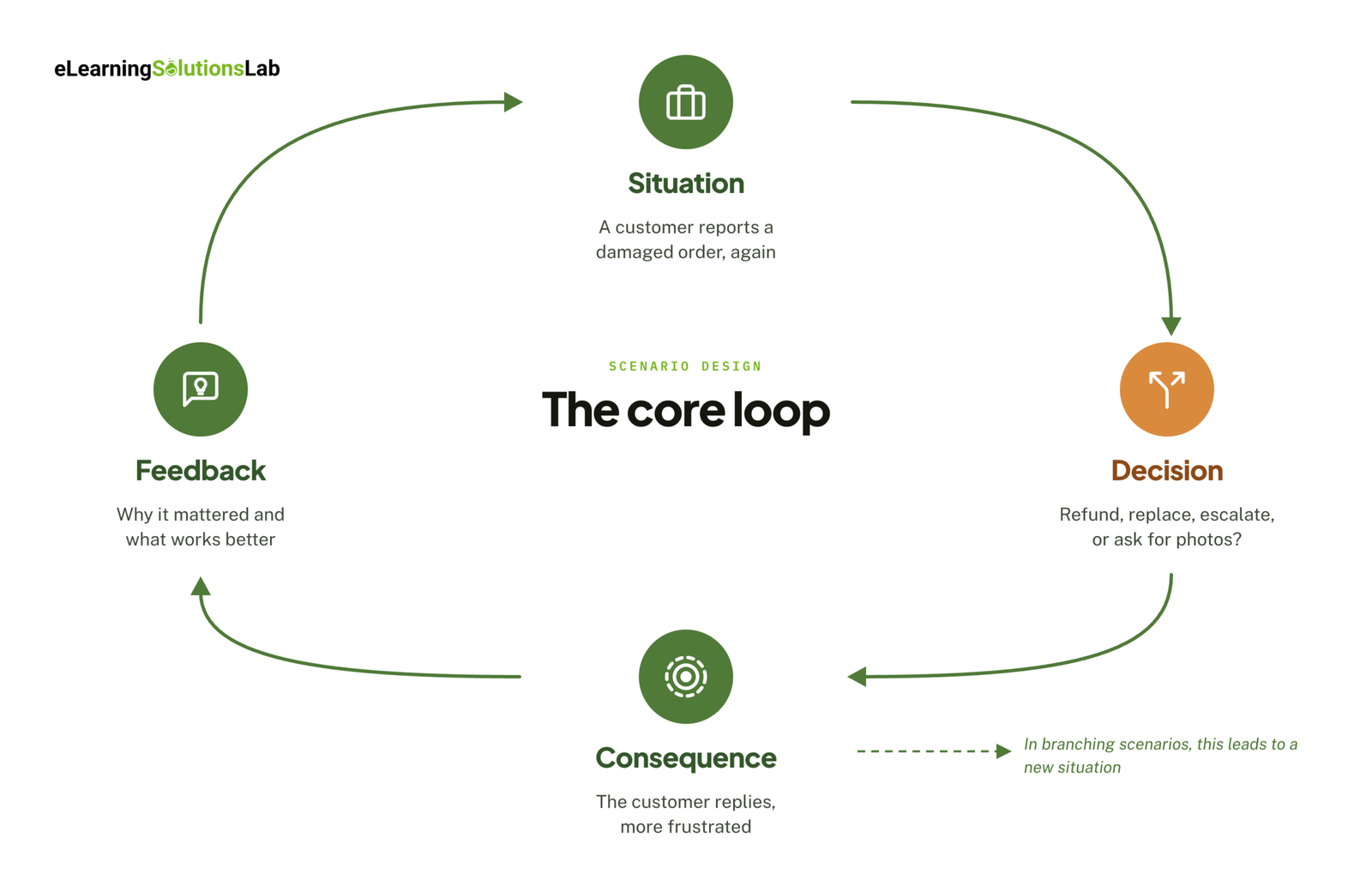 Every scenario runs on the same loop, whether it’s a single question or a 20-screen branching story:
Situation → Decision → Consequence → Feedback
- Situation – your learner steps into a realistic moment from the job. One example is a customer email saying their order arrived damaged, and it’s the second time this month.
- Decision – your learner chooses from several plausible responses. For instance, offer a refund, send a replacement, escalate to a manager, or ask for photos first.
- Consequence – your scenario shows what that choice leads to, like the customer replying, clearly more annoyed, because they already sent photos last time.
- Feedback – your learner sees why the choice mattered and what a stronger response would actually look like.
In a branching scenario, each consequence leads to a new situation and the loop starts again.
Four Components of an Effective Scenario
- A realistic context – the setting, documents, and pressures should match the learner’s actual job. That kind of realism comes from the subject-matter expert’s real cases, not from invented situations.
- A meaningful choice – every option should be something a real employee might do, and the best wrong answers come from the mistakes SMEs see most often.
- A believable consequence – outcomes should follow logically from the choice. That includes delayed consequences, like a promise that may seem helpful today but causes a problem next week.
- Feedback that teaches – your learners should understand why a choice mattered, not just whether it was right or wrong.
Intrinsic vs. Instructive Feedback
The strongest scenarios intentionally use both types of feedback, in this order.
Intrinsic feedback shows the result inside the story, and your learner draws their own conclusion.
Example: “Maria sighs. ‘I already sent photos last time. Do I really have to go through this again?'”
Instructive feedback then states the lesson directly.
Example: “Asking for photos is standard policy, but checking the customer’s history first shows you’re paying attention. Repeat issues call for a faster resolution.”
Now, if your eLearning course has a narrator or guide character, keep them off-screen while the scenario plays out, then bring them back to deliver the instructive feedback. A talking head competing with the story adds cognitive load without adding meaning (Mayer’s coherence principle).
Where the Scenario Sits in a Lesson
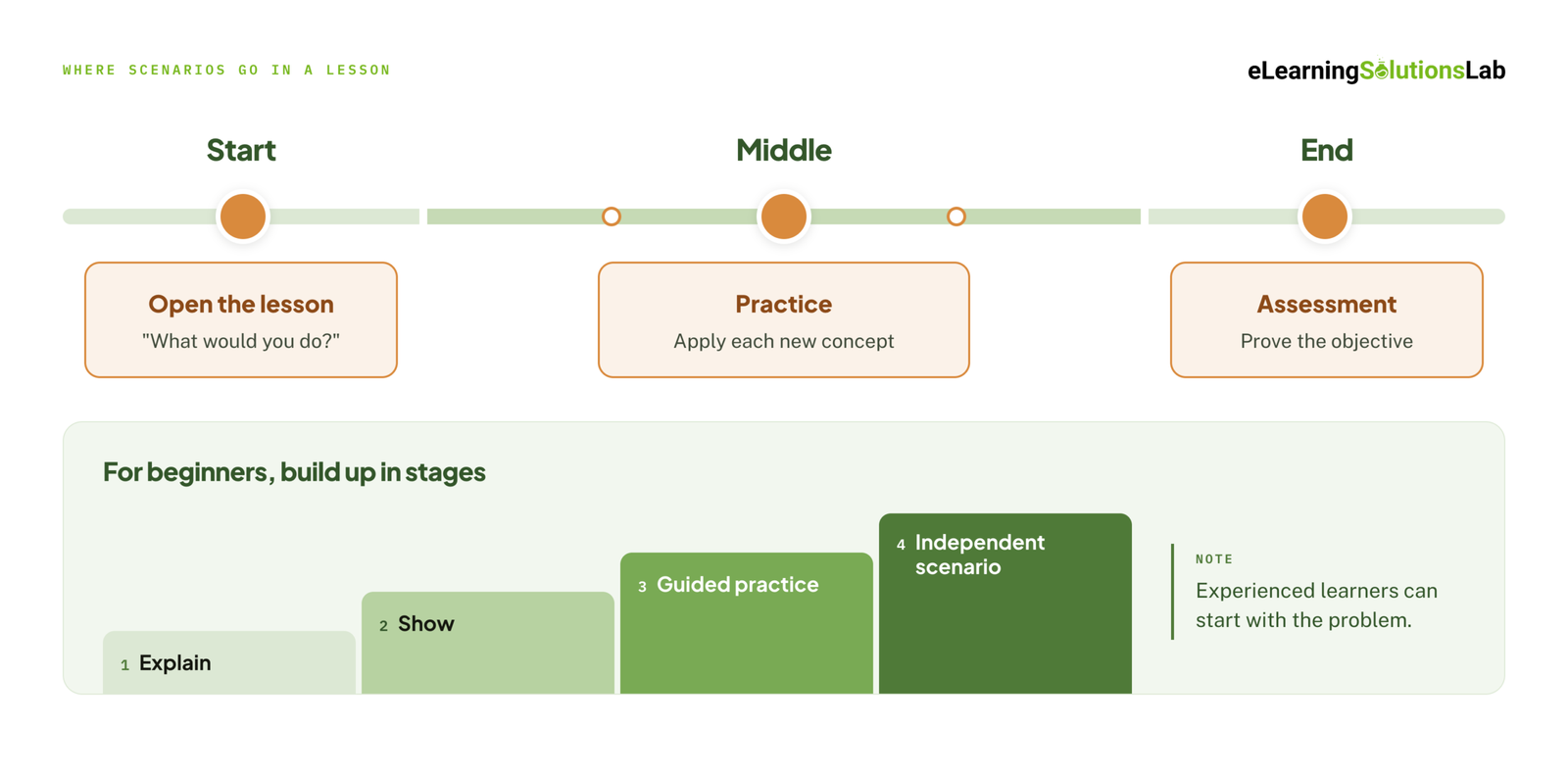 A scenario can do three different jobs:
- Open the lesson – show the problem and ask “What would you do?” before teaching anything. The learning objectives then answer a question the learner is already asking (Gagné’s “gain attention” and Merrill’s problem-centered instruction).
- Serve as practice – put a scenario after each new concept so that your learners apply it right away.
- Serve as the assessment – if an objective says learners will select the right action, they should be assessed by selecting it in a scenario, not by defining terms (Biggs’s constructive alignment).
For beginners, you can work up to the scenario in stages: explain → show → guided practice → independent scenario. In comparison, your experienced learners can start with the problem and look up support only when they need it.
Why Scenario-Based eLearning Works: Benefits Backed by Evidence
Scenarios work because they match how adults learn and how memory works. Each benefit below traces back to an established learning principle.
It Transfers to the Job
People apply knowledge better when they learn it in the setting where they’ll use it – this is the core idea of situated learning (Brown, Collins & Duguid, 1989).
A good example is a policy learned from a slide, which stays abstract, while that same policy practiced on an upset customer becomes a response the learner already knows how to give. Merrill’s First Principles of Instruction (2002) make a similar point: learning is most effective when it’s built around real-world problems.
It Gives Safe Practice for High-Stakes Decisions
Some mistakes are too costly to learn on the job – examples are compliance breaches, safety incidents, or lost clients. A scenario lets your learners make those mistakes where they cost nothing, see each consequence of their decision, and try again.
The evidence here is strongest in healthcare training, which is why scenarios sit at the center of most healthcare elearning solutions. In a 2024 study of nursing and midwifery students, the group taught with scenarios improved significantly in patient-safety knowledge, attitude, and perception, while the lecture-based group showed no significant change.
It Holds Attention and Improves Retention
Adult learning theory (Knowles) holds that adults engage most when learning is relevant, problem-centered, and connected to their own experience. Scenarios deliver all three. Keller’s ARCS model adds that motivation starts with attention and relevance, which is exactly what a realistic problem at the start of a lesson provides.
Scenarios also build in retrieval practice, where every decision makes learners pull knowledge from memory rather than just reread it. In Roediger and Karpicke’s well-known 2006 study, students who practiced recalling material remembered significantly more a week later than students who studied it again.
Mini-Scenarios vs. Branching Scenarios
Not every skill needs a full branching story, so the right format depends on what the learner has to do on the job.
Mini-Scenarios
A mini-scenario is a single decision with immediate feedback: one situation, three or four options, and a consequence for each.
You can use it when the skill is a single decision, like choosing the right policy, spotting a red flag, or picking the next step in a process.
Why it works: Mini-scenarios are fast to write and easy to update, and you can scatter several of these through a module as practice after each new concept. They also fit short formats well, which is why they show up so often in microlearning services.
Branching Scenarios
In a branching scenario, each choice leads to a different next situation, and consequences build over several decisions. A weak early choice might not fail right away, but it may narrow the options later on.
Use it when the skill unfolds over time and depends on earlier moves. Good fits include conversations (a difficult feedback talk or a sales call), troubleshooting, and multistep judgment calls.
Why it works: Real work rarely comes down to one decision, and branching shows learners how small choices add up, which is where your experienced employees and new hires differ most.
Linear Scenarios with Branching Feedback
This is the middle option (and sometimes the right balance). Every learner gets the same storyline, but the consequence and feedback change based on each choice. After each decision, your learners return to the main path.
You can use it when you need scenario realism but have a limited budget or timeline, or when the sequence of events is fixed, like a standard procedure with judgment calls along the way.
Which Do You Need?
Start with what the learner must be able to do:
| If the learner needs to… | Choose |
|---|---|
| Make a single decision | Mini-scenario |
| Apply judgment within a fixed process | Linear with branching feedback |
| Respond to a person in a live conversation | Branching conversation |
| Diagnose and resolve a problem | Branching scenario or scenario chain |
Then, check your constraints:
- Course time – branching scenarios take longer to complete.
- Budget – voiceover, video, and custom characters add cost for every branch.
- Authoring tool and LMS – can they handle variables and report individual choices?
- Learner level – novices may need mini-scenarios first, then a branching scenario once they have the basics.
Types of Scenarios
Most scenarios fall into one of four types. Each one trains a different kind of thinking, so the type you choose should follow from the skill, not the topic.
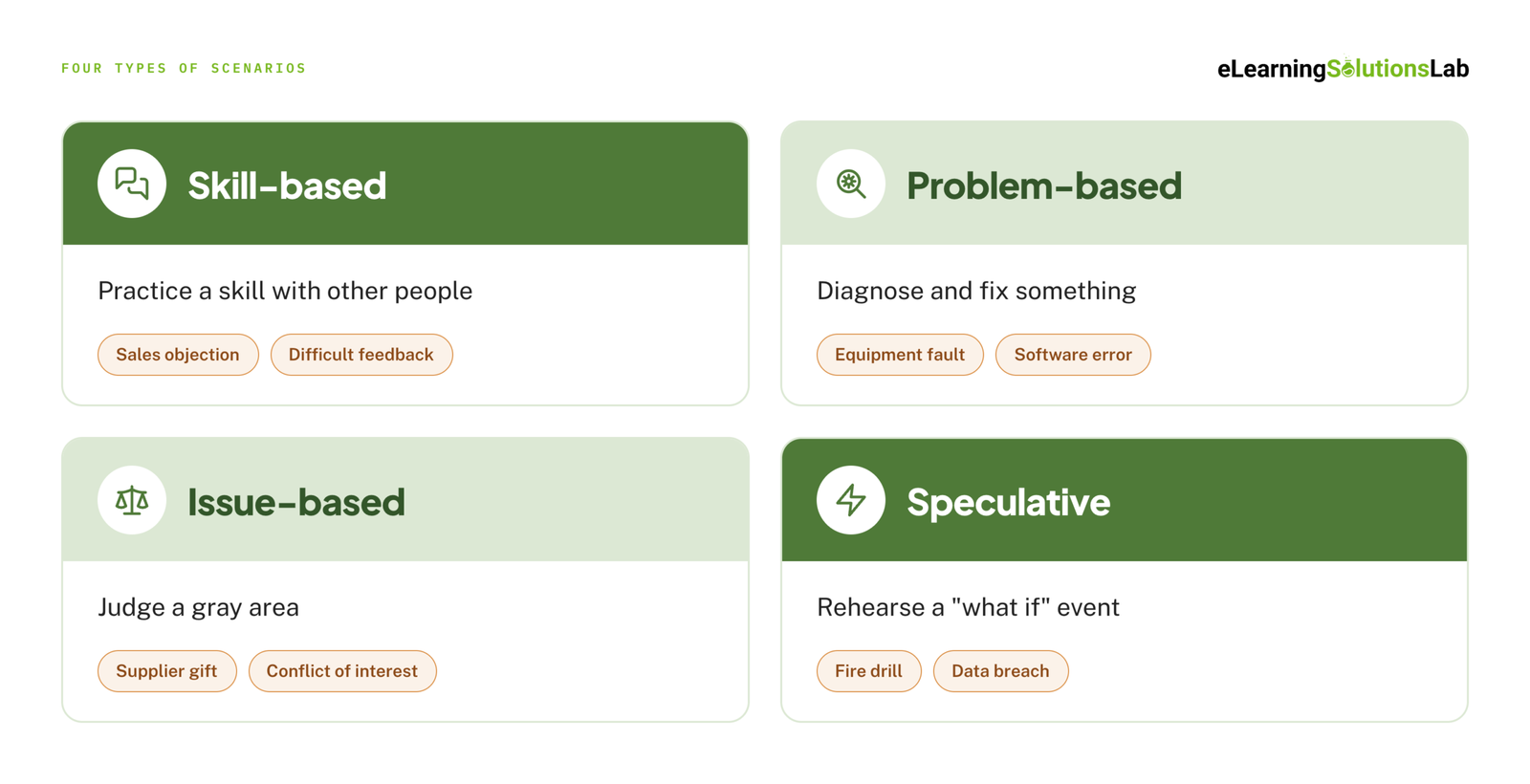 Skill-Based Scenarios
These scenarios train a skill the learner performs with other people, such as handling a sales objection, calming a frustrated customer, or giving difficult feedback. Branching conversations are the usual format, since the other person’s reaction depends on what the learner says. Our guides to elearning sales training and leadership development elearning cover how these conversations fit into larger programs.
Problem-Based Scenarios
These scenarios ask the learner to diagnose and fix something, such as a machine fault, a failed software process, or a patient whose symptoms point in two directions. The learner gathers clues, rules things out, and decides on a fix. When the problem lives inside a software system, an elearning simulation lets learners troubleshoot in a safe copy of the real tool.
Issue-Based Scenarios
These scenarios put the learner in a gray area where the rules don’t give an obvious answer, such as a supplier offering an expensive gift, a conflict of interest, or a data privacy request. The goal is judgment, not recall, so the options should include choices that seem reasonable but create risk. Issue-based scenarios work well as the practice layer of a compliance training plan.
Speculative Scenarios
These “what if” scenarios prepare learners for events they hope never to face, such as a fire, a data breach, or a product recall. Because learners can’t practice these on the job, the scenario is often the only rehearsal they get. Time pressure and cumulative consequences make them feel real, which is why they’re common in elearning safety training services.
How to Create Scenario-Based eLearning in 7 Steps
Good scenarios aren’t written from a blank page. They’re built from a clear performance problem and the real stories of the people who do the job. Here’s the process, from first conversation to final pilot.
1. Start With the Performance Problem
Before looking at any content, define what learners do now and what they should do differently. Then ask the most important question in the whole process: can training fix this? If the real problem is a broken process, missing tools, or a lack of motivation, a scenario won’t solve it.
Also record who the learners are, what they already know, and where they’ll apply the skill. A scenario for new hires looks very different from one for experienced staff.
2. Analyze the SME Content and Mine It for Mistakes
Subject-matter experts usually hand over dense slides, policies, or notes. Sort every topic into one of four groups:
- Keep – learners need it to perform the task.
- Simplify – important, but too detailed or technical as written.
- Resource – useful as a reference, but not essential to the course.
- Clarify – incomplete, confusing, or needs SME confirmation.
Keep a running question log for the SME, and ask one question every scenario designer needs answered: “What mistakes do people make most often, and what happens when they do?” Those answers become your wrong options, your consequences, and your branches.
3. Write Objectives and Choose the Format
Write measurable objectives using action verbs from Bloom’s taxonomy, then decide what evidence proves each one. The verb tells you the evidence you need: “identify” calls for a correct selection, while “respond” calls for a choice in a realistic conversation.
This is also where you choose between a mini-scenario, a linear scenario, or full branching, using the decision table above. The objective, the practice, and the assessment should all ask for the same performance.
4. Write the Scenario
Start with the context: who the learner is, who they’re dealing with, and what pressure they’re under. Then write the decision point and the options.
- Make every option tempting – base wrong answers on real mistakes, not obviously silly choices.
- Keep options similar in length – the longest, most detailed option shouldn’t always be the right one.
- Write consequences before feedback – show what happens in the story first, then explain why.
- Allow partially right answers – real choices are rarely all good or all bad.
AI tools can speed up first drafts of dialogue and distractors, but the realism still has to come from your SME. Our guide to ai for instructional design covers where AI helps and where it doesn’t.
5. Map the Branches and Storyboard
Draw the scenario as a flowchart before writing any screens. This is where you control branch sprawl, since every new choice can double the paths you have to write, build, and test. Three tactics keep it manageable:
- Fold paths back together – let different choices lead to the same next scene when the outcome is similar.
- Limit endings – most scenarios need only three or four endings (strong, acceptable, weak, and failed).
- Offer a recovery path – let learners fix a weak choice, just as they could at work.
Then move each screen into a storyboard. For scenarios, the most important fields are the screen’s purpose, its learning objective, the SME source, on-screen text, voiceover, the interaction, and programming notes, which is where the branch logic lives. Our elearning storyboard template includes all of these fields.
6. Review Before You Build
Changes are cheapest on paper, so run the storyboard through five checks before development starts:
- Instructional design review
- SME accuracy review
- Client or stakeholder review
- Accessibility check
- Technical feasibility check
Track versions and approvals as you go, so no one builds from an outdated file. If your team doesn’t have the capacity for this stage, instructional design services can handle the analysis, writing, and storyboarding.
7. Build, Test, and Iterate
Build the scenario in your chosen tool, then test every path, not just the correct one. Upload a test package to your LMS and check that completions, scores, and choices track correctly. How to create scorm content explains how packaging works.
Finally, pilot the scenario with a small group of real learners. Watch where they hesitate, which wrong options nobody picks, and which feedback they skip. An option no one chooses isn’t doing any work, so replace it with a more tempting one.
How Long It Takes and What Drives the Cost
Development time is the question most guides skip. The most widely cited benchmark comes from a Chapman Alliance study, which measured development hours for every finished hour of eLearning.
| eLearning level | What it includes | Hours per finished hour (average) | Range |
|---|---|---|---|
| Level 1 (basic) | Text, graphics, simple audio or video, test questions | 79 | 49–125 |
| Level 2 (interactive) | Level 1 plus 25% or more interactive exercises and multimedia | 184 | 127–267 |
| Level 3 (advanced) | Highly interactive, simulation or game-based, avatars, custom interactions | 490 | 217–716 |
Mini-scenarios usually sit at Level 2, while full branching scenarios with characters and video sit at Level 3. The study is from 2010, and modern authoring tools and AI have shortened some tasks, but it’s still a useful way to compare formats.
For planning a single scenario, these ballpark ranges cover writing, SME review, build, and testing:
- Mini-scenario (one decision, text and images) – roughly 4–10 hours each.
- Short branching scenario (3–5 decisions, still images) – roughly 40–80 hours.
- Video or character-based branching scenario (voiceover, 10+ decisions) – often 150–400 hours or more.
What Drives the Cost Up
- Number of paths – every unique branch has to be written, reviewed, built, and tested.
- Media – live video, professional voiceover, and custom characters cost more for every branch they appear in.
- SME availability – slow reviews stretch the timeline more than any build task.
- Languages – each language multiplies voiceover, text, and testing effort.
- Tracking needs – reporting on individual choices takes more setup than a simple pass or fail.
To turn hours into a budget, see our breakdown of elearning development costs.
Common Scenario Design Mistakes
- Making the right answer obvious. If one option is clearly correct, learners aren’t practicing judgment, they’re just reading.
- Letting branches sprawl. Unlimited paths look impressive on a flowchart but multiply your writing, build, and testing time.
- Punishing instead of teaching. A “Wrong!” screen tells learners nothing. Show the consequence, then explain what a stronger choice would be.
- Burying the scenario in text. Long paragraphs before every decision turn a scenario back into reading. Keep setups short and let the story carry the context.
- Testing recall inside a story. Asking a character to recite a policy isn’t a scenario. The learner should have to apply the policy, not remember it.
- Skipping the pilot. Designers can’t tell which options are too easy until real learners try them.
For broader course-level guidance, see our guide to elearning development best practices.
Designing Scenarios for Global Audiences
A scenario only works if learners recognize the situation as their own. That’s harder when the same course reaches learners in many countries.
Why US-Centric Scenarios Fall Flat
Many scenarios are written around US workplace norms: direct feedback, first-name informality with managers, and sports or pop-culture references. In a workplace with a stronger hierarchy or more indirect communication, the “right” answer in that scenario may be the wrong one. Learners notice, and the scenario loses credibility.
Side-by-Side Example
| US version | Localized version | |
|---|---|---|
| Situation | A team member, Mike, missed a deadline. You give feedback in a quick one-on-one. | A team member with a locally common name missed a deadline. You arrange a private conversation. |
| “Best” response | State the problem directly, then agree on next steps. | Open with the relationship and context, raise the issue indirectly, and let the person save face. |
| Language | “Let’s touch base. I need you to step up to the plate.” | Plain language with no idioms or sports metaphors. |
| Details | Dollars, MM/DD dates, imperial units | Local currency, date format, and metric units |
Cross-Cultural Design Checklist
- Character names and appearance – reflect the learner population, or use a diverse cast that doesn’t signal one country.
- Gestures and body language – a thumbs-up, direct eye contact, or a pointed finger can mean very different things across cultures.
- Workplace hierarchy and directness – check whether the “correct” answer depends on norms that don’t apply in every region.
- Idioms, humor, and sports metaphors – they rarely translate and often confuse.
- Currency, dates, and units – match local formats, or use neutral ones.
Translation-Friendly Branching
- Plan for text expansion – translated text often runs longer than English, and short labels like button text can double. Leave room in every text box.
- Keep text out of images – text baked into graphics, including many AI-generated images, has to be recreated for every language. Keep all words in editable on-screen text.
- Separate logic from wording – store branch logic in variables and triggers, not in the text itself, so translators can’t break a path by changing a sentence.
- Keep on-screen text and voiceover as separate storyboard fields – translators work from clean source text, and each part can be updated on its own.
Our guide to multilingual elearning covers how to plan for this from the start. When a scenario needs to change for a market, not just be translated, elearning localization services adapt the characters, situations, and responses. For text and voiceover only, see our elearning translation services.
Making Branching Scenarios Accessible
Branching adds accessibility challenges that a linear course doesn’t have, because the screen changes based on what the learner chooses. Plan for accessibility during storyboarding, not after development.
- Keyboard navigation and focus order – every choice should work without a mouse, and after each branch, focus should move to the start of the new content, not stay on the old button.
- Screen reader announcements – when a consequence appears or the situation changes, screen readers need to announce it.
- Captions and transcripts – every video scenario needs captions, and a transcript helps learners who want to review a conversation.
- No timed decisions without an option to extend – time pressure can add realism, but learners must be able to turn it off or extend it.
- No single-sense interactions – learners shouldn’t need to rely only on hovering, dragging, color, or audio to make a choice.
These map to WCAG requirements for keyboard access, focus order, status messages, captions, and adjustable timing. Our guide to accessible elearning covers the full checklist.
Tools for Building Scenario-Based eLearning
The best tool depends on how deep your branching goes, who maintains the course, and what your LMS needs to track.
| Tool | Best for | Branching depth | Learning curve | Cost | SCORM / xAPI | Translation workflow |
|---|---|---|---|---|---|---|
| Articulate Storyline | Custom, complex scenarios | Deep (variables, triggers, layers) | Moderate | Paid subscription | Yes | Export to Word or XLIFF |
| Articulate Rise | Fast, responsive courses with simple scenarios | Limited (scenario block) | Low | Paid subscription | Yes | Export to XLIFF |
| Adobe Captivate | Software simulations and VR-style scenarios | Deep | Moderate to high | Paid subscription | Yes | Text export (varies by version) |
| Twine | Prototyping and text-based branching | Deep (text-first) | Low | Free, open source | Not native (needs a third-party wrapper) | Manual, passage by passage |
| H5P | Simple branching inside an LMS or website | Moderate (Branching Scenario content type) | Low | Free core; paid hosted option | xAPI native; SCORM through third-party tools | Manual, per content item |
Features and pricing change often, so confirm details on each vendor’s site before you commit.
- Solo freelancer – Storyline for client work, with Twine for quick prototypes.
- Enterprise team – Storyline for complex branching and Rise for fast updates, with a clear translation workflow.
- Zero budget – H5P if you need LMS tracking, or Twine for text-based scenarios.
Base the final choice on your project requirements (branching depth, LMS tracking, and any client format rules), not personal preference. Our roundup of the best elearning authoring tools compares more options, articulate elearning goes deeper on Storyline and Rise, and scorm compliance requirements explains what has to be true for your scenario to track correctly.
How to Measure Whether Your Scenario Worked
A completion rate tells you learners reached the end. It doesn’t tell you whether they’ll make better decisions at work. These measures go further.
Path Analytics
Look at which options learners choose most often at each decision point. If most learners pick the same wrong answer, you’ve found a real misconception worth addressing, either in the course or on the job. If nobody picks an option, it’s too easy to rule out.
xAPI Tracking of Individual Decisions
SCORM usually reports only completion and a score. xAPI can record each choice a learner makes, in the order they made it, and send it to a learning record store. That shows you not only whether learners succeeded, but how they got there.
Kirkpatrick’s Four Levels, Applied to Scenarios
| Level | What to measure in a scenario |
|---|---|
| 1. Reaction | Did the situation feel realistic and relevant to the learner’s job? |
| 2. Learning | Did learners choose better paths in a final scenario they hadn’t seen before? |
| 3. Behavior | Do managers or quality reviews see the new behavior on the job? |
| 4. Results | Did the business metric the scenario targeted actually change? |
Link Results to On-the-Job Metrics
Pick the metric before you build, and record a baseline. For a customer service scenario, that might be ticket escalations or repeat complaints. For safety, it might be incidents or near misses. For compliance, it might be policy exceptions. Comparing those numbers before and after launch is the clearest proof that the scenario worked, and elearning roi covers how to turn them into a business case.
Need scenarios, but not the time to write them?
At eLearning Solutions Lab, we turn your SME knowledge and real workplace mistakes into mini-scenarios and branching scenarios that run in your LMS, delivered as SCORM-ready packages. Analysis, scenario writing, storyboarding, development, and QA are handled by one team. Send us your content and we’ll come back with a scope, a price, and a delivery date before you commit to anything.
Related Reading
- Elearning storyboard template – the fields every scenario storyboard needs.
- How to create effective elearning courses – the course-level principles behind good scenarios.
- Gamification in elearning – when points and challenges add to a scenario, and when they don’t.
- Hire elearning designers – what to look for in someone who can write scenarios.
- Best elearning authoring tools – a wider comparison of scenario-ready tools.
- Elearning development costs – what actually drives a content quote.
The Author

Book A Discovery Call
Our Learning Advisors are happy to walk you through your project step-by-step — content, timeline, and fixed pricing.
Get Your Free QuoteNo obligation — just a focused conversation. Proposal within 24 hours.
You may also like
Software for Training Companies: Best Tools and How to Choose (2026 Guide)
Short answer Training companies need a training management system (TMS) to…
How to Choose an LMS: A 7-Step Guide (With Free Scorecard)
Short answer To choose an LMS, define your goals and learners first, then…