


- Published
- Reading time
- 15 min
Filed under eLearningInstructional Design
The use of AI in eLearning has really taken off. It’s now part of almost every eLearning tool on the market. Authoring tools write quiz questions, video tools turn scripts into presenters, and chat assistants draft storyboards in seconds. But most articles on the topic are written by vendors, and they usually stop at a list of benefits.
This guide is different. You’ll get a plain definition, the real use cases mapped to each stage of building a course, a closer look at AI role-play, a neutral tools table, and an honest section on where AI actually fails. So you can decide where it genuinely saves you time, and where you still need people.
Short on time? Jump to the AI use cases by course stage.
Updated November 2026.
In This Article
What is AI in eLearning?
AI in eLearning is the use of artificial intelligence, mainly generative AI and machine learning, to help create, deliver and improve online training. It’s typically used to draft course content and assessments, generate voiceover, video and translations, personalize learning paths, power chat tutors and role-play simulations, and analyze learner data. People still set the goals, check the accuracy and make the final design decisions.
In practice, AI in eLearning usually shows up in two places:
- On the building side – helping instructional designers and subject matter experts (SMEs) go from raw material to a finished course faster.
- On the learner side – adapting what each learner sees, answering their questions, and giving them a safe place to practice.
Most teams start on the building side, given that it’s lower risk and the time savings are easy to see. And the learner side tends to come later, once you trust the tools and have rules in place.
AI in eLearning: Use Cases by Stage of Course Development
Most guides list AI benefits in one long bullet list. But it’s really more useful to look at where AI fits in the actual workflow of building a course. Here’s how it maps to each stage, what it does well, and what you still have to do yourself.
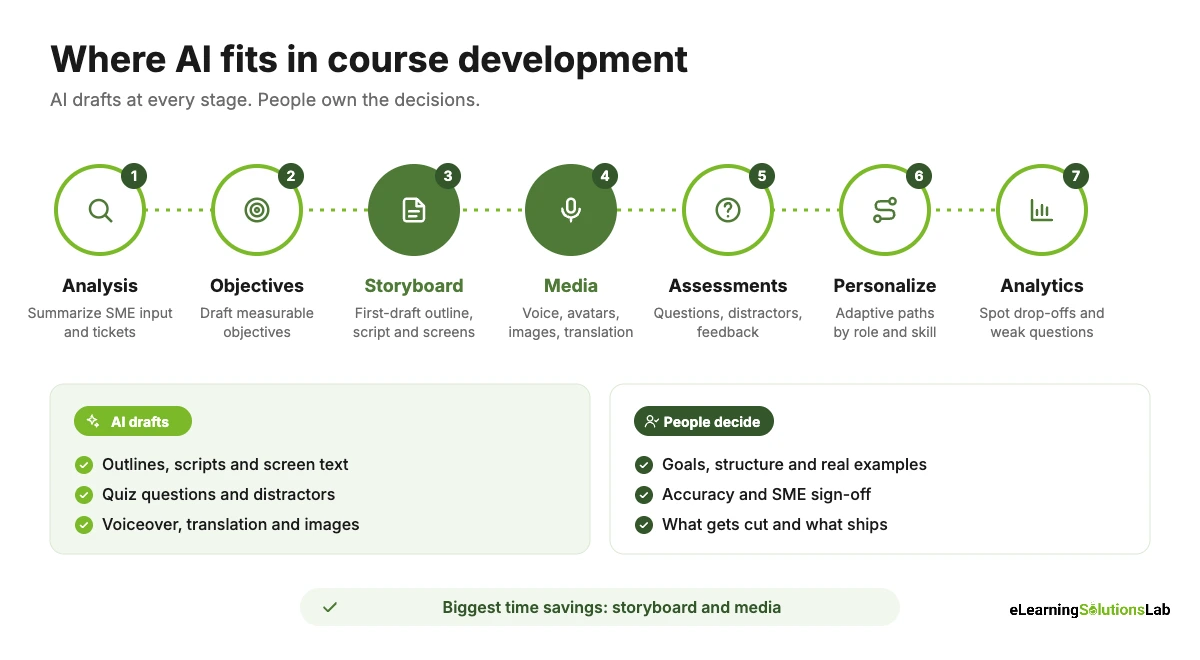
| Stage | What AI can do | What you still own | Typical time saved |
|---|---|---|---|
| 1. Analysis | Summarize SME interviews, survey results and support tickets; suggest likely skill gaps | Deciding if training is even the right fix | Medium |
| 2. Learning objectives | Draft measurable objectives with action verbs | Tying each objective to a real business goal | Low to medium |
| 3. Storyboard and script | Turn source documents into a first-draft outline, screen text and narration script | Structure, examples, tone and accuracy | High |
| 4. Media | AI voiceover, avatar video, images, translation and subtitles | Brand fit, pronunciation, cultural review | High |
| 5. Assessments | Draft quiz questions, distractors, scenarios and feedback | Checking each question actually tests the objective | Medium to high |
| 6. Personalization | Recommend content, skip what a learner already knows, adapt difficulty | Setting the rules and the required core | Ongoing |
| 7. Analytics | Spot drop-off points, weak questions and patterns in open answers | Deciding what to change and why | Medium |
1. Analysis: making sense of the raw material
The analysis stage is often where projects slow down. You have hours of SME interviews, a pile of support tickets and a survey nobody has read in full. AI can summarize that material, group recurring problems and suggest where the skill gaps really are.
Example: You paste 200 anonymized support tickets into a chat assistant and ask it to group them by root cause. Within minutes, you have a short list showing that most tickets come from two steps in a billing process.
What to watch: AI can’t tell you whether the problem is a skills gap, a broken process or a motivation issue. So you have to make that call yourself, ideally with a structured needs analysis.
2. Writing learning objectives
AI is genuinely good at turning a vague goal like “understand the new CRM” into measurable objectives such as “log a new lead with all required fields in under two minutes.” It can also suggest the right action verbs for each level of Bloom’s taxonomy.
What to watch: AI tends to write too many objectives, and some of them sound good but don’t connect to anything the business cares about. You can ask it for five, then cut it down to the two or three that really matter.
3. Storyboarding and scripting
This is usually where teams see the biggest time savings. You can give an AI assistant a policy, an SOP or a slide deck and ask for a draft outline, screen text and narration script in your storyboard format.
Example: A 15-page safety procedure becomes a 6-screen storyboard draft with on-screen text, narration, a knowledge check and notes for visuals, in under an hour instead of a day.
What to watch: First drafts typically read as generic and a bit flat. And AI may fill gaps with confident but wrong details. So the instructional designer still owns the structure, the examples and the final wording. If you need a format to work from, our eLearning storyboard template works well as the target format for AI drafts.
4. Media: voice, avatars, images and translation
AI media tools have improved a lot. In practice, you can now:
- Generate voiceover from a script in many languages and voices, and fix a single line without booking a new recording session.
- Create avatar videos where a digital presenter delivers your script, which can help for short updates and announcements.
- Generate images and illustrations for scenarios, backgrounds and icons.
- Translate and subtitle courses into multiple languages much faster than a fully manual process.
What to watch: AI voices can still mispronounce product names, acronyms and local terms. Avatars can feel cold for sensitive topics like harassment or wellbeing. And machine translation usually needs a native-speaker review for tone and cultural fit. If you’re comparing partners for that step, our roundup of the best eLearning localization services can help. For a deeper look at the trade-offs, see our guide to eLearning voiceover.
5. Assessments and knowledge checks
AI can draft multiple-choice questions, plausible distractors, branching scenarios and feedback for each answer. That’s really useful, given that writing good distractors is one of the slowest parts of assessment design.
What to watch: AI-written questions tend to test recall (“What is step 3?”) rather than application (“What should you do next?”). They also sometimes have more than one correct answer. So every question needs a human check against the objective it’s meant to test. Pairing AI drafts with scenario based eLearning is a good way to push questions toward real decisions.
6. Personalization and adaptive learning paths
Adaptive learning uses learner data, such as pre-test results, role or past activity, to change what each person sees. For instance, an experienced hire who passes a pre-assessment can skip three modules, while a new starter gets extra practice.
What to watch: Personalization only works if the content is broken into small, tagged pieces. And for compliance training, you have to define the required core that everyone sees, no matter what the algorithm suggests.
7. Analytics and continuous improvement
AI can scan LMS data to show where learners drop off, which questions most people get wrong, and what themes come up in open-text feedback. That can help you fix a course in weeks rather than waiting for the annual review.
What to watch: Analytics show you what is happening, not why. You still have to talk to learners and managers. These insights also line up well with the Kirkpatrick model of evaluation if you want a structure for measuring impact.
AI Role-Play and Conversational Simulations
AI role-play is probably the most talked-about use of AI in eLearning right now, and it’s covered a lot in videos and demos. But very few articles actually explain how it works or when to use it.
What it is
In an AI role-play, the learner has a live conversation, by text or voice, with an AI character. The character plays a customer, a patient, an employee or a stakeholder, and it responds to whatever the learner says rather than following a fixed branching script. At the end, the learner usually gets feedback against a rubric.
Example: A new sales rep practices a discovery call with an AI “procurement manager” who is skeptical about price. The rep can try the call five times, get feedback on each attempt, and see how different questions change the conversation.
Where it works well
- Sales and customer service – handling objections, discovery questions, de-escalation.
- Leadership and management – giving feedback, difficult conversations, performance reviews.
- Healthcare and helplines – patient communication and empathy practice.
- Onboarding – practicing a first call or first meeting before doing it for real.
Branching scenarios vs. AI role-play
| Branching scenario | AI role-play | |
|---|---|---|
| How learners respond | Pick from set options | Type or speak in their own words |
| Predictability | Fully predictable and easy to audit | Different every time, harder to audit |
| Best for | Compliance, procedures, decisions with a clear right answer | Soft skills, conversations, open-ended practice |
| Tracking | Standard SCORM/xAPI scores | Rubric scores, often in the vendor’s own platform |
What to watch: AI characters can drift off-script, go easy on the learner, or give feedback that doesn’t match your company’s approach. So you have to write a clear character brief, a scoring rubric and a few test conversations before launch, and review a sample of real sessions after.
Before and After: An SOP Turned Into a Module
Here’s what an AI-assisted build typically looks like in practice. This is an illustrative example based on a common project type, not a single client case.
The starting point: a 12-page warehouse returns SOP, written as dense text, and a request for a 15-minute eLearning module.
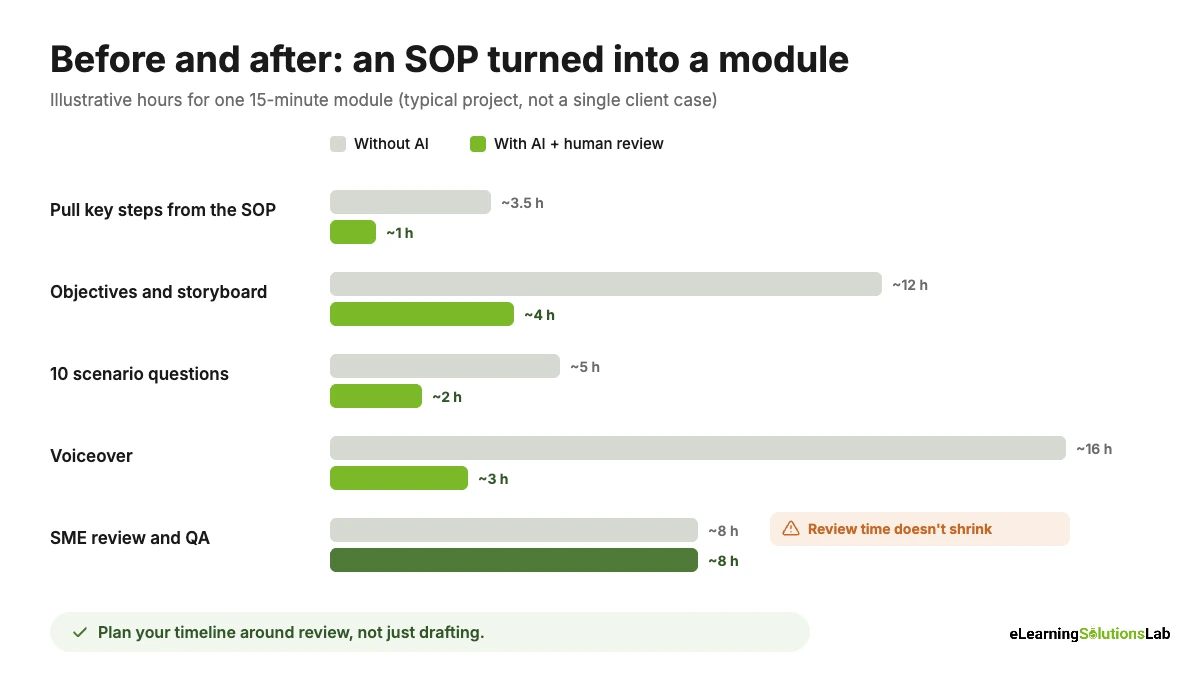
| Task | Without AI | With AI (plus human review) |
|---|---|---|
| Pull key steps and rules from the SOP | 3-4 hours | About 1 hour |
| Draft objectives and storyboard | 1-2 days | Half a day |
| Write 10 scenario questions with feedback | 4-6 hours | About 2 hours |
| Voiceover | Book talent, record, edit (several days) | Generate and fix lines in a few hours |
| SME review and QA | 1 day | 1 day (this doesn’t get shorter) |
The pattern is usually the same: AI cuts the drafting time a lot, but the review time stays the same or even grows a little, given that you’re now checking AI output as well as content. So plan your timeline around review, not just drafting.
QA Checklist for AI-Generated Content
Before any AI-drafted content goes into a course, check it against this list:
- Accuracy – every fact, number and step is checked against the source document or an SME.
- No invented details – no made-up policies, product features, laws or statistics.
- Objective alignment – every screen and question supports a stated learning objective.
- Assessment quality – one clearly correct answer, plausible distractors, questions test application not just recall.
- Tone and brand – it sounds like your organization, not like a generic chatbot.
- Bias and inclusion – names, scenarios and images represent your real workforce fairly.
- Pronunciation – AI voiceover gets product names, acronyms and local terms right.
- Accessibility – alt text, captions and reading order are correct, not just auto-generated.
- Data and rights – no confidential data was pasted into public tools, and you have the rights to use generated media.
To give you a concrete example, at eLearning Solutions Lab, we don’t simply hand AI drafts to clients. We use AI to speed up the first draft of storyboards, questions and voiceover, then an instructional designer and the client’s SME review every screen against a QA checklist like the one above before anything is built.
AI Tools for eLearning, by Job
Most tool lists recommend one product, usually the author’s own. In practice, the right tool really depends on the job you need done. Here’s a neutral overview by tool type. Features change quickly, so always check what’s included in your plan.
| Job | Examples | Pros | Cons |
|---|---|---|---|
| AI in authoring tools | Articulate 360 AI Assistant, Adobe Captivate, iSpring Suite | Works inside the tool you already build in; drafts text, quizzes and images in place | Often an add-on cost; output still needs heavy editing |
| AI-first course builders | Mindsmith, LearningStudioAI | Very fast from document to draft course | Less design control; check export options (SCORM/xAPI) |
| Avatar video | Synthesia, HeyGen | Easy updates and many languages without filming | Can feel impersonal; not ideal for sensitive topics |
| Image generation | Adobe Firefly | Custom illustrations, scenario backgrounds and quick image edits; built for commercial use | Needs a style guide to keep images consistent across a course |
| AI voice | ElevenLabs, voice features in authoring tools | Natural voices; quick line-by-line fixes | Pronunciation and licensing need checking |
| Chat assistants | ChatGPT, Claude, Microsoft Copilot, Gemini | Flexible for analysis, objectives, scripts and questions | Needs good prompts; data privacy rules vary by plan |
| Translation | DeepL, built-in translation in authoring and video tools | Fast first drafts in many languages | Needs native-speaker review for tone and terms |
| AI in your LMS/LXP | AI features in platforms like Docebo, D2L, 360Learning | Recommendations, search, tutoring and analytics in one place | Features vary a lot by plan; can lock you in |
What’s in our own toolkit: at eLearning Solutions Lab, we use Adobe Firefly to create custom illustrations, scenario backgrounds and image edits that actually match each client’s brand, and ElevenLabs for natural-sounding AI voiceover in multiple languages, so that we can fix a single line without booking a new recording session. Both sit inside our normal review process. So every image and every line of narration still gets checked by a designer before it goes into a course.
Example: Screens From a Recent Client Module
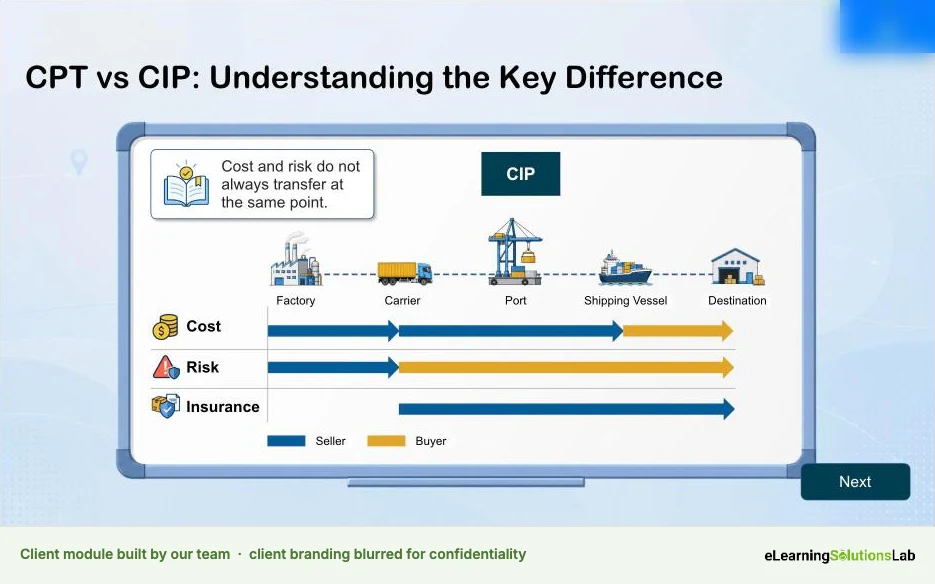
Here’s what AI in eLearning actually looks like in practice. These are a few screens from an Articulate module we recently built for a client. The client’s branding is blurred, given that we work under NDA.

On projects like this, AI typically speeds up the first drafts: the storyboard, custom illustrations and scenario backgrounds in Adobe Firefly, and narration in ElevenLabs. But the parts that make the module work, such as the concept visuals, the animation timing and the QA, still come from our instructional designers and developers.
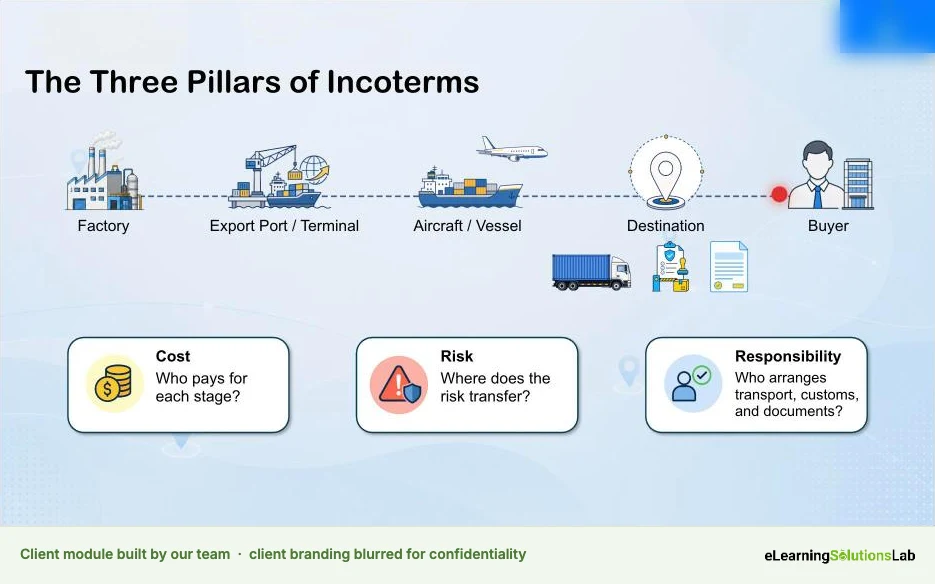
For instance, this comparison screen builds up step by step with animation, so that learners see cost, risk and insurance shift between seller and buyer one layer at a time instead of all at once.
Questions to ask before you buy:
- Is our content used to train the vendor’s AI models, and can we turn that off?
- Where is our data stored, and does it meet our privacy and security rules?
- Can we export what we build (SCORM, xAPI, video files), or is it locked in the platform?
- Who owns the rights to AI-generated voices, avatars and images?
- Which AI features are in our plan, and which cost extra or use credits?
If you’re also reviewing your platform, our guide on how to choose an LMS includes a free scorecard.
AI in Corporate L&D vs. Higher Education
AI in eLearning really means different things in a company and in a university. Most guides mix the two, but the goals, risks and rules are quite different.
| Corporate L&D | Higher education | |
|---|---|---|
| Main goal | Faster course production and better job performance | Student learning, support and academic skills |
| Common uses | Content creation, role-play, localization, onboarding, analytics | AI tutors, feedback on drafts, study support, course design help for faculty |
| Biggest worry | Accuracy, compliance and confidential data | Academic integrity and fair assessment |
| Who sets the rules | L&D, IT, legal and security teams | Institution-wide AI policies and individual course rules |
| How success is measured | Time saved, time-to-proficiency, business results | Grades, retention, student satisfaction |
So if you’re in corporate L&D, the question is usually “how do we build better training faster without losing accuracy?” And in higher education, it’s more often “how do we use AI to support learning without undermining assessment?”
Risks and Disadvantages of AI in eLearning
This is the part most vendor guides skip. But AI has real limits in eLearning, and knowing them up front can save you from an embarrassing course launch.
| Risk | What it looks like | How to handle it |
|---|---|---|
| Inaccurate content | Confident but wrong steps, invented policies or fake statistics | Work from your own source documents and require SME sign-off |
| Bias | Stereotyped names, roles or images in scenarios | Review scenarios and images for representation; set guidelines in prompts |
| Privacy and confidentiality | Staff pasting internal documents or learner data into public tools | Use approved enterprise tools and write a simple AI use policy |
| Generic, samey courses | Every module sounds the same and lacks real examples | Add real stories, cases and SME quotes that AI can’t invent |
| Weak assessments | Recall-only questions or more than one right answer | Review every question against its objective |
| Copyright and rights | Unclear ownership of generated voices, images or avatars | Check vendor terms and keep records of what was generated |
| Over-reliance | Teams skip analysis and go straight to “generate a course” | Keep needs analysis and objectives as required steps |
Where AI in eLearning Usually Fails
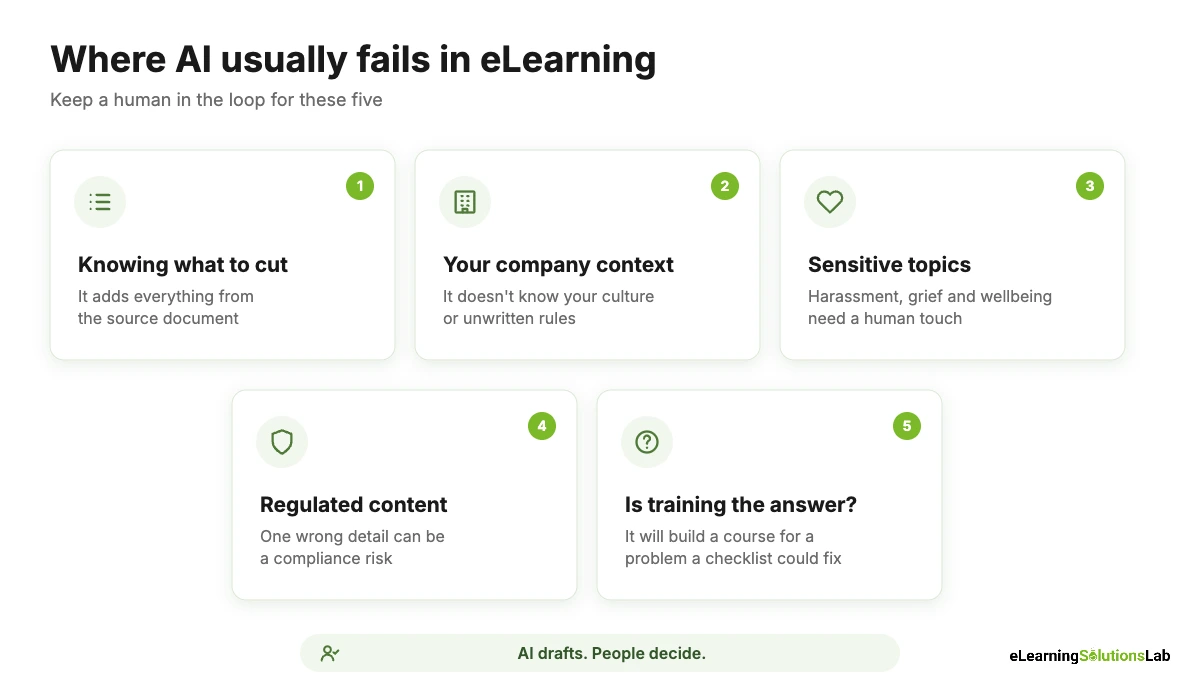
From what we see in real projects, AI tends to struggle most with:
- Knowing what not to include. It typically adds everything from the source document, when a good course actually cuts most of it.
- Your company’s context. It doesn’t know your culture, your unwritten rules or why a process exists.
- Emotional and sensitive topics. Harassment, grief, wellbeing and DEI content usually need a human touch and careful review.
- Regulated content. In healthcare, finance and safety, one wrong detail can be a real compliance risk.
- Judging if training is the answer. AI will happily build a course for a problem that a checklist or a process fix would solve better.
Keeping a Human in the Loop
The simplest rule is that AI drafts and people decide. In practice, that means a named person reviews every piece of AI output before learners see it, SMEs sign off on accuracy, and someone owns the AI use policy. If you want a formal structure for that policy, the NIST AI Risk Management Framework is a useful, free starting point. And for AI tutors and role-plays, you can review a sample of real conversations every month so that problems surface early.
AI in eLearning Implementation Checklist
You don’t need a big AI strategy to start. Here’s a practical checklist you can work through with one course and one team.
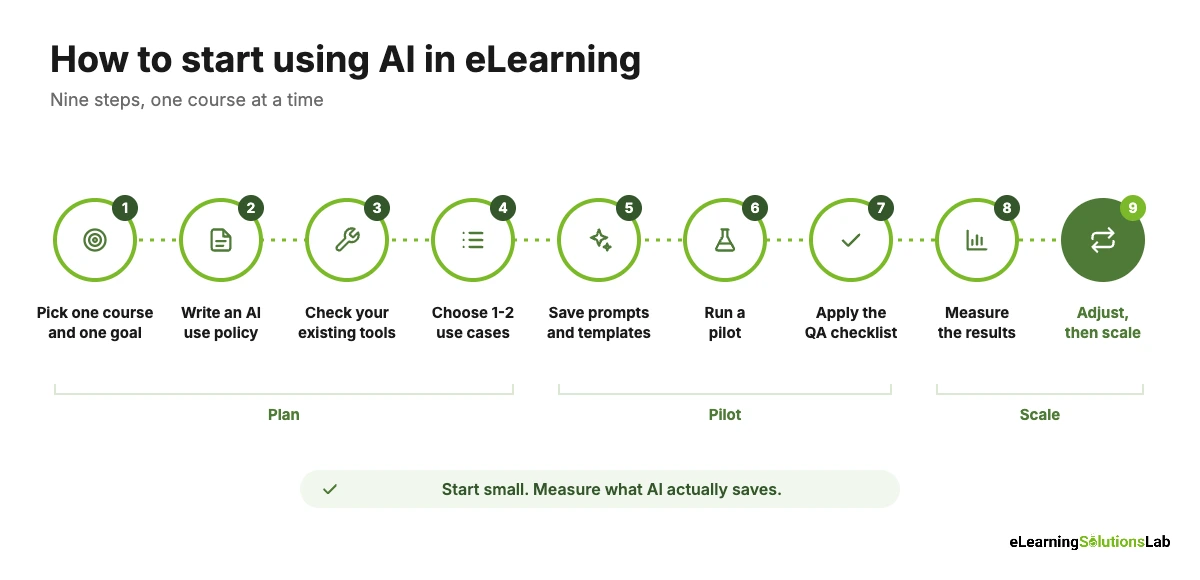
- Pick one course and one goal. For instance, “cut storyboard drafting time in half” or “give new reps five practice calls before their first real one.”
- Write a simple AI use policy. Cover which tools are approved, what data can and can’t be pasted in, and who reviews AI output.
- Check your existing tools first. Your authoring tool or LMS may already have AI features you’re paying for.
- Choose one or two use cases. Storyboard drafts and quiz questions are usually the easiest place to start.
- Build your prompts and templates. Save the prompts that work, along with your storyboard format, tone guidelines and examples.
- Run a pilot. Build one module with AI and track the hours spent on drafting and on review.
- Apply the QA checklist. Check every AI-generated screen, question and media file before launch.
- Measure the results. Compare time saved, review rounds, learner feedback and assessment results with a non-AI course.
- Adjust, then scale. Keep what worked, drop what didn’t, and roll out to the next course or team.
If you want to automate the reminders and workflows around your courses too, see our guide to automated training. And to put a number on the time savings, our eLearning ROI guide walks through the math.
In one line: use AI to speed up drafting, media and analysis at each stage of course building, keep people in charge of goals, accuracy and final decisions, and start with one course so that you can measure what it actually saves.
Want AI speed without losing quality?
At eLearning Solutions Lab, we use AI where it genuinely helps, such as storyboard drafts, assessments and voiceover, and keep experienced instructional designers in charge of every course.
Our custom eLearning development services build the courses, and our instructional design services make sure every AI-assisted module supports a real performance goal.
Explore custom eLearning developmentSee our instructional design services
Related Reading
- Scenario-based eLearning – realistic practice that AI role-play builds on.
- eLearning voiceover – AI voice vs. human talent, and when each fits.
- eLearning storyboard template – a format to give your AI drafts.
- Social eLearning – adding peer learning to your courses.
- Kirkpatrick model of evaluation – measuring training from reaction to results.
- Automated training – workflows that run your training for you.
The Author

Book A Discovery Call
Our Learning Advisors are happy to walk you through your project step-by-step — content, timeline, and fixed pricing.
Get Your Free QuoteNo obligation — just a focused conversation. Proposal within 24 hours.
You may also like
What is a Learning Experience Designer? Role, Skills, Salary and How to Become One (2026)
If you've seen "learning experience designer" on a job board and wondered…
What is VILT? A Practical Guide to Virtual Instructor-Led Training
VILT sounds like a simple acronym. But search for it and you'll get an IT…