

Good narration does a lot of the teaching in your eLearning course. It walks learners through each screen, keeps the pace steady, and lets you put less text on the screen.
However, bad narration does the opposite: flat, rushed, or mispronounced voiceover is one of the fastest ways to lose your learners in their learning process.
So if you’re buying eLearning voiceover for the first time, or deciding whether an AI voice is good enough, this guide will cover what you need to know. You’ll learn what eLearning voiceover typically costs, when AI narration works and when you truly need a human, how to write a script that sounds natural, and file specs your developers would need for Storyline, Captivate, and Rise.
In This Article
What Is eLearning Voiceover?
eLearning voiceover is recorded narration that guides learners through an online course. It actually sets the context for each screen, connects one idea to the next, and paces the lesson.
The best narration does more than just reading the screen aloud. It speaks to your learners the way an experienced colleague would and tells them why the content matters for their job.
To give you a concrete example, at eLearning Solutions Lab, we don’t simply add voiceover after the course is built. Our instructional designers write it into the storyboard, screen by screen, next to the on-screen text, visuals, and animation notes.
Here’s how a narrated welcome screen from one of our safety orientation courses is planned:
Storyboard Example: Welcome Screen
VO 1: “Welcome. Before you get to work, there’s one thing we need to talk about: safety.”
VO 2: “Out here, conditions can change quickly, and the decisions you make can affect you, your crew, and the people around you.”
VO 3: “In this orientation, you’ll work through situations you may face on the job and make decisions about how to handle them safely.”
VO 4: “Let’s get started.”
VO direction: Conversational, confident, and practical. Sound like an experienced field supervisor talking to a new crew member, not a corporate narrator. Target duration: about 30 seconds.
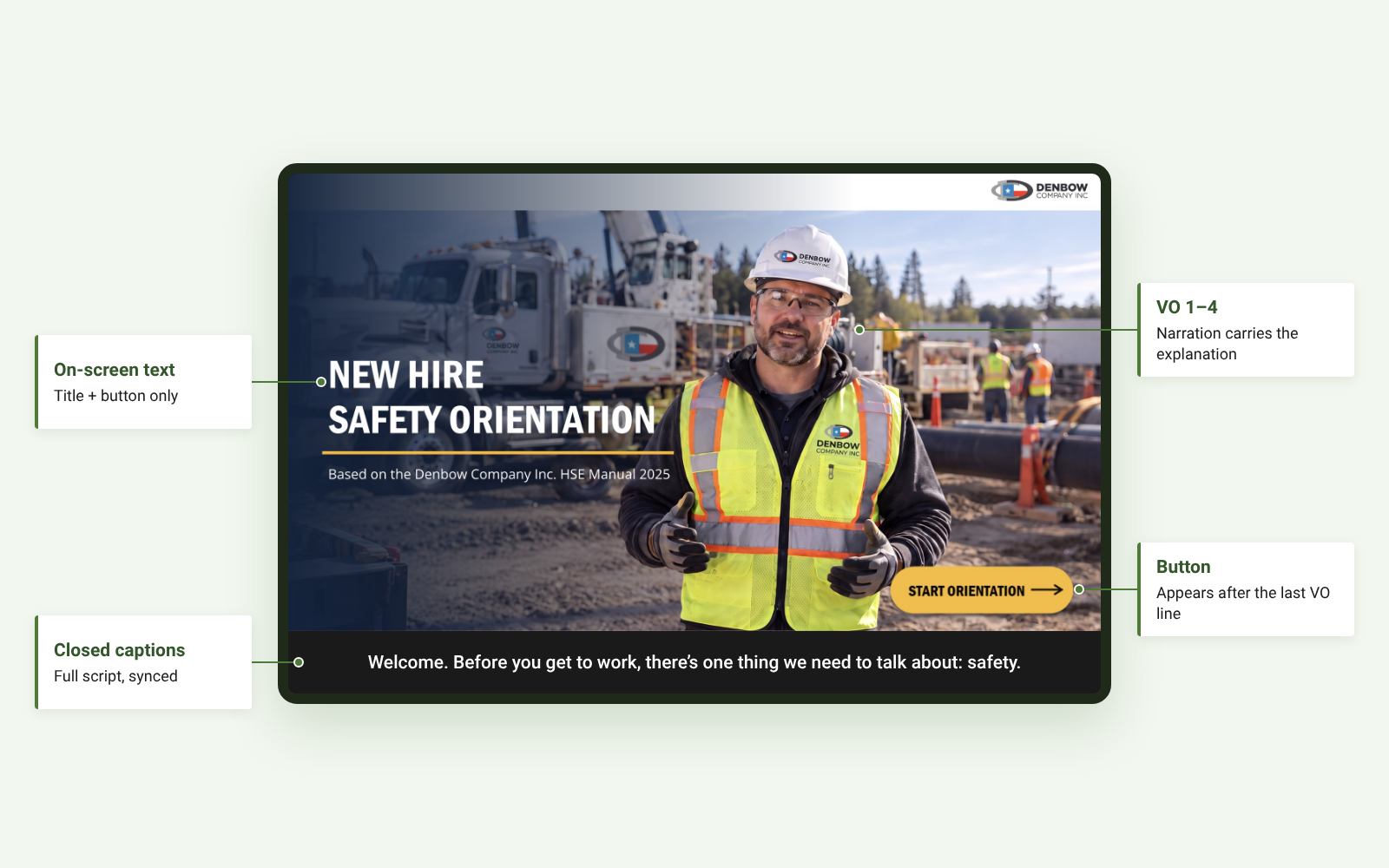
Notice what’s missing from the screen: narration. The only on-screen text is the course title and a Start Orientation button, which appears after the last VO line. The full script is delivered through synchronized closed captions and a transcript, so that your learners listen and watch instead of reading a wall of text.
What Makes eLearning Narration Different?
A 30-second ad would just sell, while eLearning narration teaches (and that’s the ultimate objective), and it often runs across hours of content and dozens of screens. So that changes how it’s written and produced:
- It’s written in short, numbered lines – each VO line matches one animation step, so that your eLearning developers know exactly when each visual appears.
- It has a voice direction – tone and persona are set for every screen, so that your narration stays consistent from the first module to the last.
- It’s timed – each screen has a target duration, which can keep your pacing tight and help estimate the recording length.
- It’s delivered in pieces – audio is split per screen or per VO line, so that every single screen can be updated without re-recording the whole course.
- It’s accessible from the start – your captions, transcripts, and a rule that essential information is never in the audio alone are planned in the storyboard.
Common eLearning Narration Styles
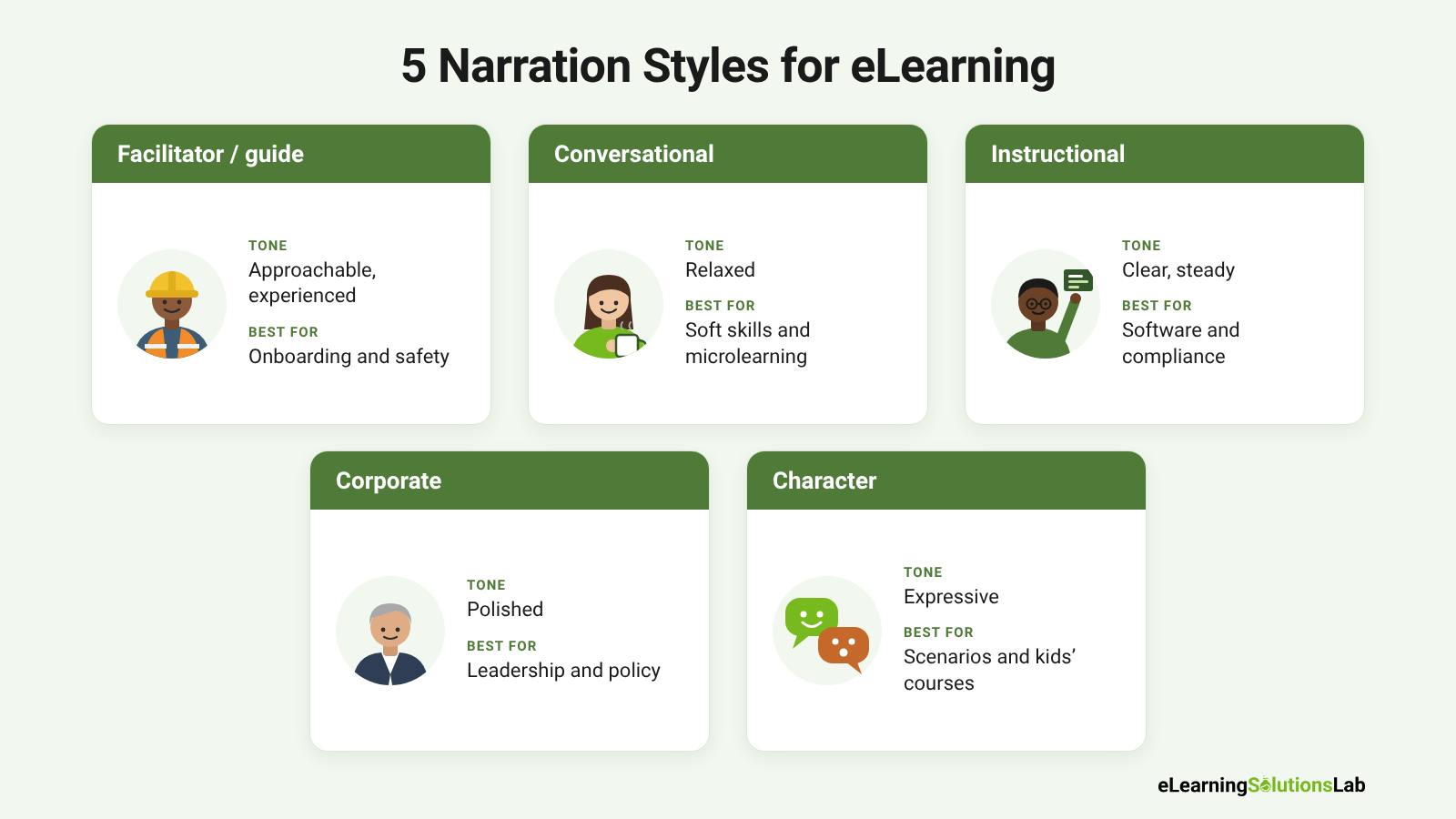
| Style | Tone | Best for |
|---|---|---|
| Facilitator / guide | Approachable, experienced, speaks directly to the learner | Onboarding, safety orientation, scenario-based courses |
| Conversational | Friendly and relaxed, like a helpful colleague | Soft skills, microlearning, internal communications |
| Instructional | Clear, steady, carefully paced | Software tutorials, technical and compliance content |
| Corporate | Professional and polished | Leadership messages, policy, company-wide training |
| Character | Expressive, voiced as a role | Branching scenarios, simulations, children’s courses |
The right style would depend on who’s actually listening. For instance, a safety orientation lands better from someone who sounds like a foreman than from a polished announcer. At the same time, a software walkthrough needs calm, precise pacing. Scenario-based courses often need to use several character voices to make their dialogue feel real – see our scenario based elearning services.
Why Voiceover Improves Learning
Narration only helps when it’s fully planned carefully. Done well, it can help make your course easier to follow, easier to remember, and closer to how people actually learn on the job.
It Lets Learners Listen and Watch at the Same Time
People take in information through two channels: what they see and what they hear. When your screen holds a diagram, jobsite photo, or software walkthrough, your narration can explain it while the learner keeps their eyes on the visual.
If the same explanation is written on the screen instead, your learners have to switch between reading and looking, and both suffer – known in instructional design research as the modality principle.
That’s why our storyboards keep the on-screen text short and put the explanation in the VO. On a typical screen, the OST might be a title and a few key words, while the narration carries the context and captions make it available to everyone. Our elearning storyboard template keeps these two fields separate for exactly this reason.
It Avoids the “Read-Along” Problem
Your learners lose focus quickly when the narrator reads the on-screen text word for word. Hearing and reading the same sentence at once adds effort without truly adding meaning (redundancy principle).
Our rule is simple: the VO explains the screen; it doesn’t repeat it. If a line of your narration matches the OST exactly, one of them gets rewritten.
It Puts a Person in the Course
Having a voice adds tone, warmth, and authority in a way text can’t. In our safety orientation, the facilitator sounds like an experienced field supervisor talking to a new crew member, and that really makes the content feel practical instead of like a policy manual.
Your learners pay more attention when it feels like someone is talking to them. (In research, this is the personalization principle, which really favors a conversational, second-person style.)
It Controls Pacing
Given that each VO line is tied to a step in the animation sequence, the narration decides when each element appears. Your learners will get information in the order that it makes sense, one idea at a time, instead of facing a full screen at once.
Having a target duration for each screen can keep the pace steady across the course.
It Makes Content More Accessible
Your narration helps learners with reading difficulties, learners working in a second language, and anyone who absorbs information better by listening. Paired with synchronized captions and a transcript, it also serves learners who can’t or prefer not to listen.
And for that to work, your audio can never be the only place essential information appears. Our guide to accessible elearning covers the standards behind this.
When Not to Narrate
Voiceover isn’t right for every screen. You have to leave it out or make it optional on:
- Reference content that your learners scan or come back to, like policy summaries, checklists, and glossaries.
- Screens learners need to read at their own pace, like detailed procedures or data tables.
- Knowledge checks, where your narration can give away the answer or rush the learner.
- Self-directed exploration screens, where having a short instruction is enough.
On these screens, a short audio prompt (“Select each hazard to learn more”) or captions alone usually work better than full narration. For more on this, see our elearning development best practices.
How Much Does eLearning Voiceover Cost?
eLearning voiceover rates vary by talent, usage, and how much work goes into the audio after recording. Here’s how pricing works, what typical rates look like, and how to estimate your budget before you request a quote.
How eLearning Voiceover Is Priced
Most eLearning narration is priced in one of four ways:
- Per word – a set rate for every spoken word in the script. It’s predictable, given that you know the cost as soon as the script is final.
- Per finished minute (PFM) – a rate for each minute of edited, delivered audio, not the time spent recording.
- Per hour – used for long or complex projects with a lot of editing, retakes, or directed sessions.
- Per project – a flat fee for a defined scope, which is pretty common with agencies and full-service eLearning partners.
Most narrators also have their project minimum. So for short scripts, that minimum is what you pay.
Typical Rates for Human Narration
The GVAA Rate Guide is the actual reference most US and Canadian narrators use for non-union work. VoiceCrafters, basing its figures on the GVAA guide, lists eLearning at $30-$55 per finished minute or $0.20-$0.35 per word, with a $350-$450 minimum, for training modules used internally within an organization.
Individual narrators publish rates in the same range; one narrator’s rate card, for example, lists $35 per finished minute or $0.25 per word, including clean, edited WAV files, with file splits, syncing to video, and localization quoted separately.
| Option | How it’s usually priced | Best for |
|---|---|---|
| Freelance human narrator | Per word or per finished minute, with a minimum | Most corporate, onboarding, and compliance courses |
| Marketplace (Voices, Voice123, Fiverr) | Per job, set by each talent | Quick casting and smaller budgets |
| Agency or full-service eLearning partner | Per project | Multi-module courses, multiple voices, or languages |
| AI voice or AI video avatar | Subscription or usage-based | Prototypes, frequent updates, internal training |
Rates change every year. You always have to check the current GVAA Rate Guide and request quotes before you set a budget.
What Affects the Price
- Script length – count only the words that will be spoken. In our storyboards, that’s the VO column, not the OST, programming notes, or animation notes.
- Number of files – splitting audio per screen or per VO line may take editing time. A 60-screen course delivered as 200 named files costs more to produce than one continuous track.
- Usage rights – internal training is usually priced lowest. Public-facing courses, customer training, and paid or resold content often cost more.
- Technical content – medical, legal, and software scripts full of terms and acronyms can take longer to record correctly.
- Direction – a live directed session, where your team listens and gives feedback in real time, may add an hourly fee.
- Revisions and pickups – fixes for the narrator’s mistakes are normally free. Changes to an approved script are usually billed.
- Turnaround – rush delivery often adds a fee.
- Languages and voices – each extra language, accent, or character voice is quoted separately. See our elearning localization services.
Estimate Runtime From Your Script
To estimate finished minutes, you can divide the spoken word count by about 150 words per minute. Some designers use 160 or 170, which is the range most narrators speak at.
Slower, more deliberate delivery for technical or compliance content runs closer to 130-140.
Here’s how it works on a real screen. The welcome screen in our safety orientation has four VO lines with about 63 words. At 150 words per minute, that’s roughly 25 seconds of speech. With natural pauses between lines, it lands right on the storyboard’s 30-second target duration. Adding a target duration to every screen in the storyboard makes the runtime estimate for the whole course simple: add them up.
Sample Quote: A 30-Minute Compliance Course
| Item | Assumption | Estimate |
|---|---|---|
| Spoken word count | 4,500 words in the VO column | – |
| Estimated runtime | 4,500 ÷ 150 words per minute | ~30 finished minutes |
| Narration | $0.25 per word | $1,125 |
| File delivery | Split per screen, named to the storyboard | Often included; confirm |
| Revisions | One round of pickups for narrator errors | Included |
| Script changes after recording | Billed per pickup session | Extra |
| Estimated total | About $1,100-$1,300 |
That lines up with the GVAA-based range for a 20-30 minute script of 3,001-4,500 words, which VoiceCrafters lists at $950-$1,250. Voiceover is only one line in a full course budget – our guide to elearning development costs covers the rest.
How to Keep Voiceover Costs Down
- Lock the script before recording – script changes after recording are the most common reason budgets go over. Get the storyboard VO signed off first.
- Send a pronunciation guide with acronyms, product names, and people’s names, so you don’t pay for retakes.
- Cut words that aren’t working – if the VO repeats the OST, trimming it would save money and improve the course.
- Use AI scratch audio for reviews, then record the final narration with a human only after sign-off. AI for instructional design covers where AI fits in the process.
- Bundle modules – narrators often offer better rates for a full course or a series than for one module at a time.
Need narration for your course?
At eLearning Solutions Lab, our instructional designers write the VO script into the storyboard, set the voice direction for every screen, cast the right voice (human or AI), and sync the narration, captions, and transcripts in Storyline, Captivate, or Rise. Send us your content and we’ll come back with a scope, a price, and a delivery date before you commit to anything.
Related Reading
- eLearning storyboard template – the template we write every VO script in.
- Accessible elearning – captions, transcripts, and courses everyone can use.
- Elearning development costs – what actually drives a content quote.
- Elearning localization services – translating and re-voicing courses for global learners.
- AI for instructional design – where AI helps and where a human still matters.
The Author

Book A Discovery Call
Our Learning Advisors are happy to walk you through your project step-by-step — content, timeline, and fixed pricing.
Get Your Free QuoteNo obligation — just a focused conversation. Proposal within 24 hours.
You may also like
Top eLearning Companies (2026): LMS, Content, Edtech and Development Firms Compared
An eLearning company can be one of five different kinds of businesses: firms…
Learning Models Explained: 12 Frameworks, Compared and Evidence-Rated (2026)
When you search for learning models, you'll always find the same five theories…