

Short answer
An LMS adoption strategy gets employees using your learning platform regularly and in ways that support business goals.
Plan it in four phases (pre-launch, launch, first 90 days, and sustain), give managers a clear role, keep communicating long after launch week, and measure adoption with metrics tied to performance, not just logins. This guide includes a phased roadmap, a stakeholder RACI, a 12-week communication calendar, KPI formulas with starting targets, and a free plan template.
Your LMS launch just went live. Invites went out, the dashboard lit up, and logins spiked in week one. But then usage dropped off. In month 3, a few compliance courses are being completed under deadline pressure, and little else is happening. Renewal is coming up, and your leadership wants to know what the investment actually delivered.
This is one of the main reasons LMS projects fail. The technology itself works, but people don’t adopt it.
Implementation means the system is live, while adoption means employees actually use it regularly, managers back it, and learning shows up in real performance.
In this guide, we give you an LMS adoption strategy that you can put to work right away, whether you’re launching a new platform or fixing low adoption on the one you already have.
Short on time? Jump to the phased roadmap.
Updated October 2026.
In This Article
- What is an LMS adoption strategy?
- Why LMS adoption fails: 7 common barriers
- Phased LMS adoption roadmap
- Building your stakeholder and champion model
- LMS communication plan and calendar
- Content and the first-login experience
- LMS adoption metrics: formulas and targets
- Rolling out an LMS globally
- Reaching frontline and deskless workers
- How to fix low adoption on an existing LMS
- Free LMS adoption plan template
What is an LMS Adoption Strategy?
Definition
An LMS adoption strategy is a planned set of actions that gets your employees to use a learning management system regularly and in ways that support business goals.
It primarily covers stakeholder buy-in, communication, content, access, support, and measurement, all the way from pre-launch through the first year and beyond.
A strong strategy treats your LMS as a change in how people work, not just as a new tool to switch on. It answers three main questions for every audience: Why should I use this? How do I get started? What happens if I do?
LMS Implementation vs. LMS Adoption: What’s the Difference?
Many L&D teams treat go-live as the finish line. In practice, it’s actually the starting point. LMS implementation gets the system running, whereas LMS adoption gets people using it in ways that matter.
| LMS Implementation | LMS Adoption | |
|---|---|---|
| Goal | The system is live and working | People use it and it improves performance |
| Owner | IT, LMS admin, vendor | L&D, HR, managers, champions |
| Timeline | Weeks to a few months, then done | Ongoing, from before launch for the life of the platform |
| Key activities | Configuration, SSO, integrations, data migration, content upload | Buy-in, communication, onboarding, relevant content, manager involvement, feedback loops |
| Success looks like | On-time go-live with no technical issues | High active usage, repeat engagement, measurable business impact |
| Typical metrics | Uptime, migration accuracy, launch date met | Activation rate, monthly active users, completion, time-to-competency |
| Common failure | Delays and broken integrations | Usage spikes at launch, then fades |
You need to plan both from day one. A flawless implementation with no adoption plan still ends with an empty platform, and no adoption plan can make up for a slow, clunky login.
Why LMS Adoption Fails: 7 Common Barriers
Low LMS adoption is rarely caused by just one thing. It’s usually a combination of small frictions that add up until logging in feels like more effort than it’s worth. Here are the seven barriers that show up most often.
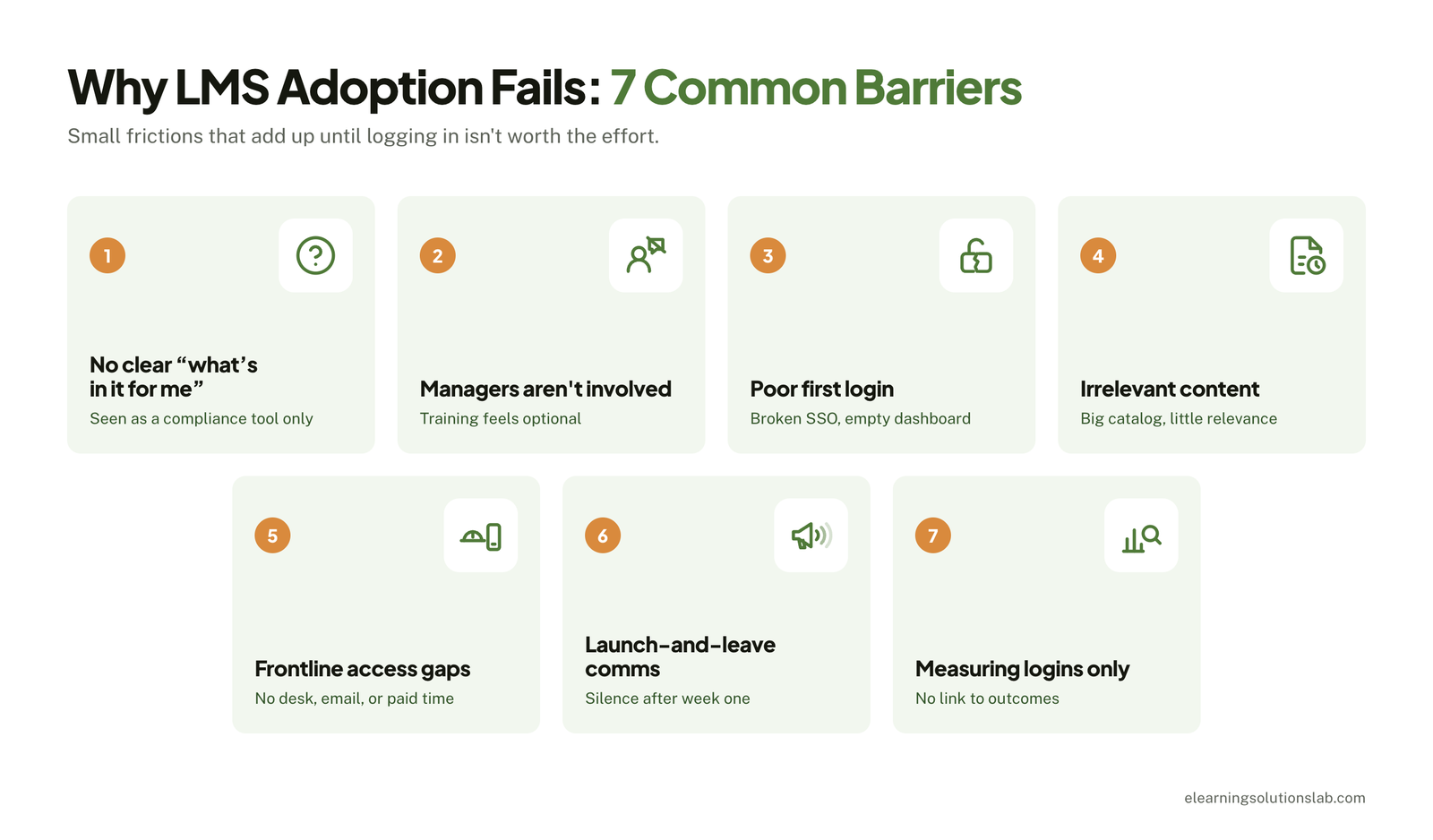 1. No Clear “What’s in It for Me”
If your employees see the LMS only as a compliance tool, they’ll log in when forced to and not otherwise. Launch messages that list features (“1,000+ courses!”) don’t answer what people actually want to know, like how this eLearning course can help them do their job better, grow their career, or save time.
2. Managers Aren’t Involved
Employees often take cues from their direct manager. So when managers never assign learning, discuss it in one-on-ones, or make time for it, the message is that training is optional. Many rollouts brief executives and learners but skip the middle layer, which really matters most.
3. Poor First-Login Experience
The first five minutes genuinely set the tone. Forgotten passwords, a broken SSO link, a confusing interface, or an empty, generic dashboard all signal that the platform isn’t worth the trouble, and many users won’t try a second time.
4. Irrelevant or Outdated Content
Having a huge catalog doesn’t really drive adoption, but relevance does. So if your learners search for something they need and find generic or out-of-date courses, they go back to asking colleagues or searching the web.
5. Access Gaps for Frontline and Mobile Workers
Retail staff, field technicians, nurses, and warehouse teams often lack a company email, a desk, or paid time to learn. If your LMS assumes a laptop and a quiet hour, a huge part of the workforce is shut out from the start.
6. Launch-and-Leave Communication
Many L&D teams put their whole communication budget into launch week, then go quiet. Without ongoing reminders, internal marketing, and success stories, your LMS will fade from view within weeks.
7. Measuring Logins Instead of Outcomes
Tracking only logins and completions can hide the real picture. For instance, a high completion rate on mandatory courses can sit alongside almost no voluntary learning. Without outcome metrics, your L&D team can’t see what’s working or make the case for continued investment.
Quick self-check: is your rollout at risk?
Count how many of these are true for your organization:
- We can explain the LMS’s value to learners in one sentence, without listing features.
- Managers have a defined role in assigning and discussing learning.
- Users can log in with one click, on any device.
- The first screen shows content relevant to each user’s role.
- Frontline and deskless workers have a practical way to access the LMS.
- Our communication plan runs at least 90 days past launch.
- We track at least one metric tied to performance or business outcomes.
Fewer than five? Fix those gaps first. The roadmap below shows where each one fits.
Phased LMS Adoption Roadmap
LMS adoption doesn’t happen at launch. It’s built in stages, each with its own goal. Here’s a roadmap that covers four phases, from 8 weeks before go-live through the first year.
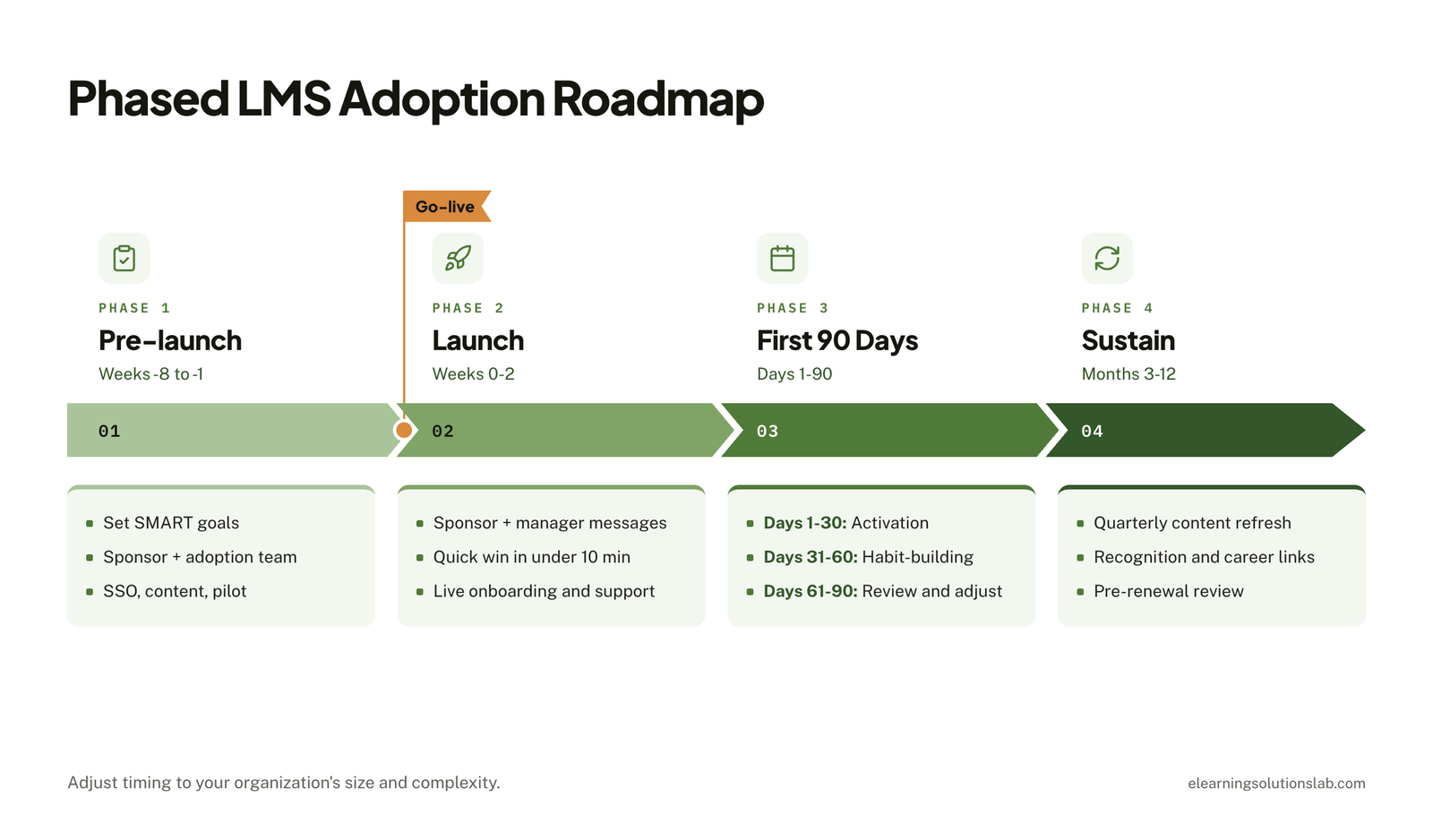 You can use it as a starting framework and adjust the timing to your organization’s size and complexity.
| Phase | Timing | Primary goal | Key output |
|---|---|---|---|
| 1. Pre-launch | Weeks −8 to −1 | Build readiness | Goals, team, tested platform, pilot feedback |
| 2. Launch | Weeks 0–2 | Create a strong first impression | High activation, smooth first logins |
| 3. First 90 days | Days 1–90 | Turn first use into a habit | Repeat engagement, manager involvement |
| 4. Sustain | Months 3–12 | Keep the LMS relevant and valued | Ongoing usage, business impact, renewal case |
Phase 1: Pre-launch (Weeks −8 to −1)
Most LMS adoption problems can be traced back to decisions made, or skipped, before launch. This is the phase where you get the people, platform, and content ready.
Set SMART goals tied to business outcomes.
Begin with your business needs, not just what your LMS can do. For instance, “reduce new-hire time-to-productivity from 90 to 60 days by Q3” is far more useful than a vague “increase training engagement.” Pick 2 to 3 goals and agree on how you’ll measure each.
Secure an executive sponsor and form an adoption team.
Your sponsor provides visible backing and helps remove roadblocks. An adoption team handles the work: typically an L&D lead, an LMS administrator, an IT contact, an HR business partner, a communications partner, and a few manager representatives.
Configure SSO and key integrations.
One-click login is essential. This is where you connect your LMS to your HRIS so users, roles, and teams sync automatically. Where possible, integrate with the tools your employees already use, like Microsoft Teams, Slack, or your intranet, so that learning shows up where actual work happens. Our guide to LMS integration covers the common connections and how each one is set up.
Curate launch content around a few high-value use cases.
Resist launching your LMS with everything. Choose 3 to 5 use cases that solve real problems, like new-hire onboarding, a new product or system rollout, or manager essentials, and make sure that content is polished and easy to find. If your best material still lives in slide decks and trainer notes, ILT to eLearning services can turn it into online courses before launch.
Run a pilot.
The best way to get more buy-in is to test first with one team or department for 2 to 4 weeks. Watch where people get stuck, collect feedback, and fix friction points before a wider rollout. Pilot participants also make good early champions.
Pre-launch checklist:
- Two or three SMART goals agreed and baselined
- Executive sponsor confirmed and LMS adoption team named
- SSO and HRIS integration tested
- Launch content curated and reviewed
- Pilot completed and issues resolved
- Manager toolkit and comms plan ready
Phase 2: Launch (Weeks 0–2)
Launch week is your best chance to earn early attention and sustain it. Your goal is simple: get people to log in, find something useful, and leave with a reason to come back.
Run a coordinated launch campaign.
Open with a short message from the executive sponsor explaining why your LMS matters. Then follow with team-level announcements from managers, who are more trusted than company-wide emails. Teasers in the week before launch can build curiosity.
Design the first login for a quick win.
When users log in, they should immediately see a personalized dashboard with content relevant to their role. Aim for a meaningful win in under 10 minutes, like a short course, a useful resource, or a clear first learning path.
Offer live onboarding and support.
Hold short live sessions or office hours in the first 2 weeks. Then publish a simple FAQ and a clear support channel so that questions get answered quickly. If your team doesn’t have the capacity to cover those first weeks, LMS support services can handle troubleshooting and learner questions.
Launch checklist:
- Executive message sent
- Managers briefed and equipped to announce to their teams
- Personalized dashboards and role-based paths live
- Live sessions and support channel available
- Day-one activation tracked
Phase 3: The First 90 Days
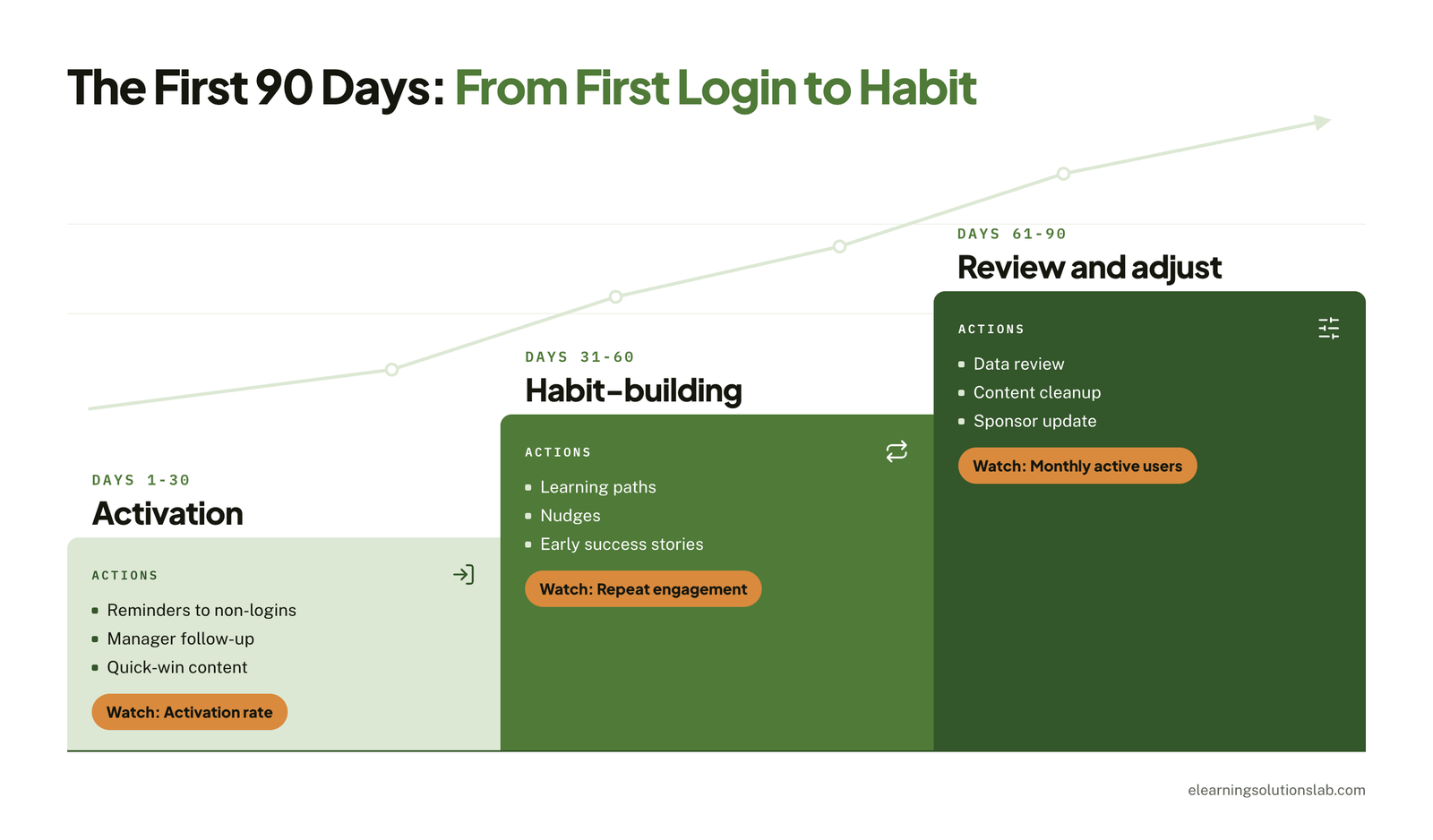
The first 90 days are crucial, as this is when you find out whether your LMS becomes a habit or just a forgotten tab. Break this phase into three 30-day blocks, each with a clear focus.
Days 1–30: Activation.
Get as many users as possible to start their first piece of learning. Send targeted reminders to people who haven’t logged in, and ask managers to follow up with their teams.
Days 31–60: Habit-building.
Start to shift from first use to repeat use. Introduce learning paths, send nudges about new or recommended content, and encourage managers to raise learning in one-on-ones. Share early success stories.
Days 61–90: Review and adjust.
Analyze usage data alongside learner feedback. Retire or replace content nobody uses, double down on what works, and fix any remaining access issues. This is also where you report early results to your sponsor.
| Block | Focus | Key actions | Metric to watch |
|---|---|---|---|
| Days 1–30 | Activation | Reminders, manager follow-up, quick-win content | Activation rate |
| Days 31–60 | Habit-building | Learning paths, nudges, success stories | Repeat engagement |
| Days 61–90 | Review and adjust | Data review, content cleanup, sponsor update | Monthly active users |
 Phase 4: Sustain (Months 3–12)
LMS adoption usually fades without ongoing effort. This is the phase where you keep your LMS relevant, visible, and connected to what your employees care about.
Refresh content quarterly.
Add new content tied to current business priorities, update outdated material, and retire courses that no longer serve a purpose. Announce what’s new so that people have a reason to return. If older courses were built in tools you can no longer edit, legacy content conversion services can rebuild them in a modern, mobile-friendly format.
Connect learning to growth and recognition.
Link learning paths to career progression, certifications, and internal mobility. Recognize active learners and teams, for instance, through manager shout-outs, badges, or leadership updates. Our guide to gamification in eLearning explains how to use badges and challenges without turning learning into a points race.
Keep feedback loops running.
Use short pulse surveys, champion forums, and usage data to spot problems early. Then close the loop by sharing what you changed based on feedback.
Prepare a pre-renewal adoption review.
Two to three months before renewal, compile usage trends, progress on your original goals, and learner feedback. This gives you a clear, evidence-based case for the platform’s value, or a clear view of what needs to change.
Sustain checklist:
- Quarterly content refresh scheduled
- Learning linked to career paths or certifications
- Recognition program in place
- Pulse survey running at least quarterly
- Pre-renewal review planned
Building Your Stakeholder and Champion Model
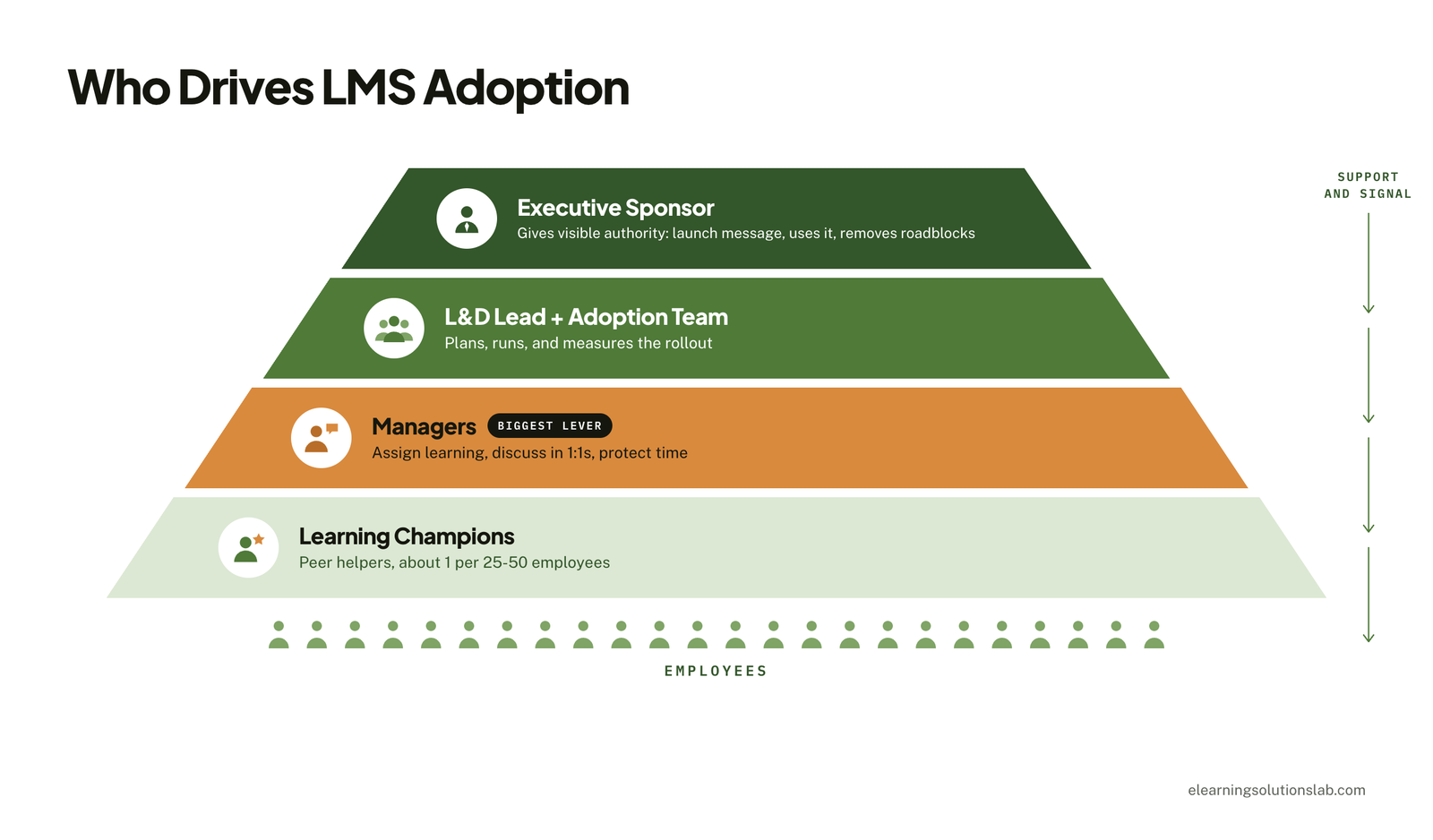
Your LMS can’t be adopted by L&D alone. Lasting usage depends on a network of people at every level who see the platform’s value and help others see it too. Define these roles early, before launch, so that everyone knows what’s expected of them.
 Executive Sponsor’s Role
Your sponsor gives the LMS visible authority. Their job isn’t to manage the rollout but to signal that learning matters. In practice, that means opening the launch with a personal message, mentioning the LMS in leadership meetings and company updates, using it themselves, and removing obstacles like budget, competing priorities, or a lack of time for learning.
One sponsor who participates actively is worth more than a long list who only approve.
Why Managers Are the Biggest Adoption Lever
Line managers decide, often without saying so, whether learning counts as real work. When they assign relevant content, discuss it in one-on-ones, and protect time for it, their teams engage. When they don’t, even well-designed launches stall.
Give managers a specific, lightweight role:
- Assign or recommend one relevant course or path per team member each quarter.
- Raise learning in at least one one-on-one per month.
- Recognize team members who complete meaningful learning.
- Use a manager dashboard, if available, to see team progress.
Support them with a short manager toolkit that includes talking points, a sample team announcement, and a quick guide to the manager view.
Recruiting and Supporting Learning Champions
Champions are peers who help their colleagues get started, answer quick questions, and share what they’ve found useful. They make your LMS feel like part of the team rather than just another HR initiative.
As a starting point, aim for roughly one champion per 25 to 50 employees, adjusted for how dispersed your teams are. Look for people who are respected, curious, and comfortable with technology. They don’t need to be the most senior; pilot participants are often a natural fit.
Keep champions engaged by:
- Giving them early access and a short briefing.
- Running a monthly champion check-in or chat channel.
- Sharing new content with them first.
- Recognizing their contribution publicly and in performance conversations.
Sample LMS Adoption RACI
Use a RACI to make ownership clear. R = Responsible (does the work), A = Accountable (owns the outcome), C = Consulted, I = Informed.
| Activity | Exec Sponsor | L&D Lead | LMS Admin | IT | HR Business Partner | Managers | Champions |
|---|---|---|---|---|---|---|---|
| Set adoption goals | A | R | C | I | C | C | I |
| Configure SSO and integrations | I | C | R | A | I | I | I |
| Curate launch content | I | A | R | I | C | C | C |
| Launch communications | R | A | C | I | C | R | C |
| First-login support | I | A | R | C | I | I | R |
| Assign and discuss learning | I | C | I | I | C | A/R | C |
| Track and report metrics | I | A | R | I | C | I | I |
| Quarterly content refresh | I | A | R | I | C | C | C |
| Pre-renewal review | A | R | R | C | C | I | I |
Adjust the roles to match your structure. What matters is that every activity has exactly one person accountable for it.
Our platform
Give managers and your adoption team the views they need with Levantra LMS
Levantra LMS is our cloud based LMS, and it’s built around the roles in this model:
- For managers – each manager sees only their own groups, so checking team progress before a one-on-one takes a minute.
- For your adoption team – enroll learners in bulk into separate groups by team, department, region, or cohort, then filter and export reports to CSV or Excel for your 90-day and pre-renewal reviews.
- For learners – every completion issues a branded certificate with a unique ID that anyone can verify online.
- For a lean L&D team – setup is done for you and included in every plan, most teams are live in 3 to 4 weeks, and managed LMS administration can be added if you don’t have the capacity to run it day to day.
LMS Communication Plan and Calendar
Communication is what keeps your LMS visible after launch week. A good plan sends the right message to the right audience through the channels they actually use, and it keeps going for at least 90 days.
Choose Channels Your People Already Use
Don’t rely on a single company-wide email. Mix channels to reach every group:
- Email – formal announcements and sponsor messages
- Microsoft Teams or Slack – quick nudges, new-content alerts, and a help channel
- Intranet – a permanent LMS hub with FAQs and how-to guides
- Team meetings and one-on-ones – manager-led messages, which tend to carry the most weight
- Digital signage, QR codes, and shift huddles – essential for frontline and deskless workers
Follow a Clear Message Sequence
Each stage needs a different message:
- Awareness (pre-launch) – something useful is coming, and here’s why it matters to you.
- Launch – it’s live; here’s how to log in and where to start.
- Reminder – haven’t tried it yet? Here’s a five-minute starting point.
- Value and success stories – here’s how a colleague or team used it to solve a real problem.
Keep messages short, specific to each role, and focused on benefits rather than features.
Sample 12-Week Communication Calendar
| Week | Audience | Message | Channel | Owner |
|---|---|---|---|---|
| −2 | Managers | Briefing and manager toolkit | Live session + email | L&D Lead |
| −1 | All employees | Teaser: what’s coming and why | Email, Teams/Slack | Comms |
| 0 | All employees | Sponsor launch message | Email + video | Exec Sponsor |
| 0 | Teams | Team-level launch and first steps | Team meetings | Managers |
| 1 | All employees | How to log in and where to start | Teams/Slack, intranet | LMS Admin |
| 2 | Non-activated users | Five-minute quick-start reminder | LMS Admin | |
| 3 | Frontline workers | QR code access and short courses | Signage, shift huddles | Champions |
| 4 | All employees | First success story | Intranet, Teams/Slack | Comms |
| 6 | All employees | New learning paths available | Email, Teams/Slack | L&D Lead |
| 8 | Managers | Team progress and talking points | L&D Lead | |
| 10 | All employees | Second success story and tips | Intranet, Teams/Slack | Champions |
| 12 | Leadership | 90-day results summary | Leadership meeting | Exec Sponsor + L&D |
After week 12, move to a lighter monthly rhythm: new content announcements, a success story, and a quarterly results update.
Content and the First-Login Experience
Content is what brings people back after the first login. Learners return when they find something that helps with the job in front of them, not because the catalog is big.
Start With Relevance, Not Volume
Audit your launch catalog against the 3 to 5 use cases you picked in pre-launch. Remove duplicates and anything out of date, and check that search returns useful results for the questions people actually ask. If you’re deciding what to buy, license, or build, our guide to building an eLearning content library covers the options. For programs that need to match your own processes and systems, custom eLearning development services can fill the gaps.
Mandatory training still matters, but it works best inside a clear compliance training plan rather than being the only reason people log in.
Build Role-Based Learning Paths
Group content into short paths by role, team, or goal, such as new-hire onboarding, first-time managers, or a product launch. A path gives learners a clear next step instead of an empty search box.
Keep It Short, Mobile-Friendly, and Accessible
Keep most modules under 15 minutes and make sure they work on a phone. Content should also meet basic accessibility standards, like captions, readable contrast, and keyboard navigation; our guide to accessible eLearning explains what that involves. For the design side, see our guide on how to create effective eLearning courses.
First-login checklist:
- One-click login works on desktop and mobile
- Dashboard shows a role-based path or 2 to 3 recommended items
- At least one course can be finished in under 10 minutes
- Search returns useful results for common job tasks
- A visible help link or support channel
- Profile, language, and notification settings are pre-filled where possible
LMS Adoption Metrics: Formulas and Targets
Most guides list adoption metrics without saying how to calculate them or what good looks like. The table below gives you a formula and a starting target for each. Treat the targets as directional: set your own baseline in the first month, then track the trend.
| Metric | Formula | Starting target | When to track |
|---|---|---|---|
| Activation rate | Users who logged in at least once ÷ users invited × 100 | 80%+ by day 30 | Weekly in the first 30 days |
| Monthly active users | Unique users active in the month ÷ total licensed users × 100 | 60%+ in month 1, then holding steady | Monthly |
| Repeat engagement | Users with 2+ sessions in the month ÷ monthly active users × 100 | Rising month over month | Monthly from day 31 |
| Completion rate | Completions ÷ enrollments × 100 | 70%+ for assigned courses | Per course, monthly |
| Voluntary learning share | Self-enrollments ÷ total enrollments × 100 | Rising over time | Quarterly |
| Manager involvement | Managers who assigned or reviewed learning ÷ total managers × 100 | 50%+ | Monthly |
| Time-to-competency | Average days from start or assignment to proficiency sign-off | Below your pre-LMS baseline | Quarterly |
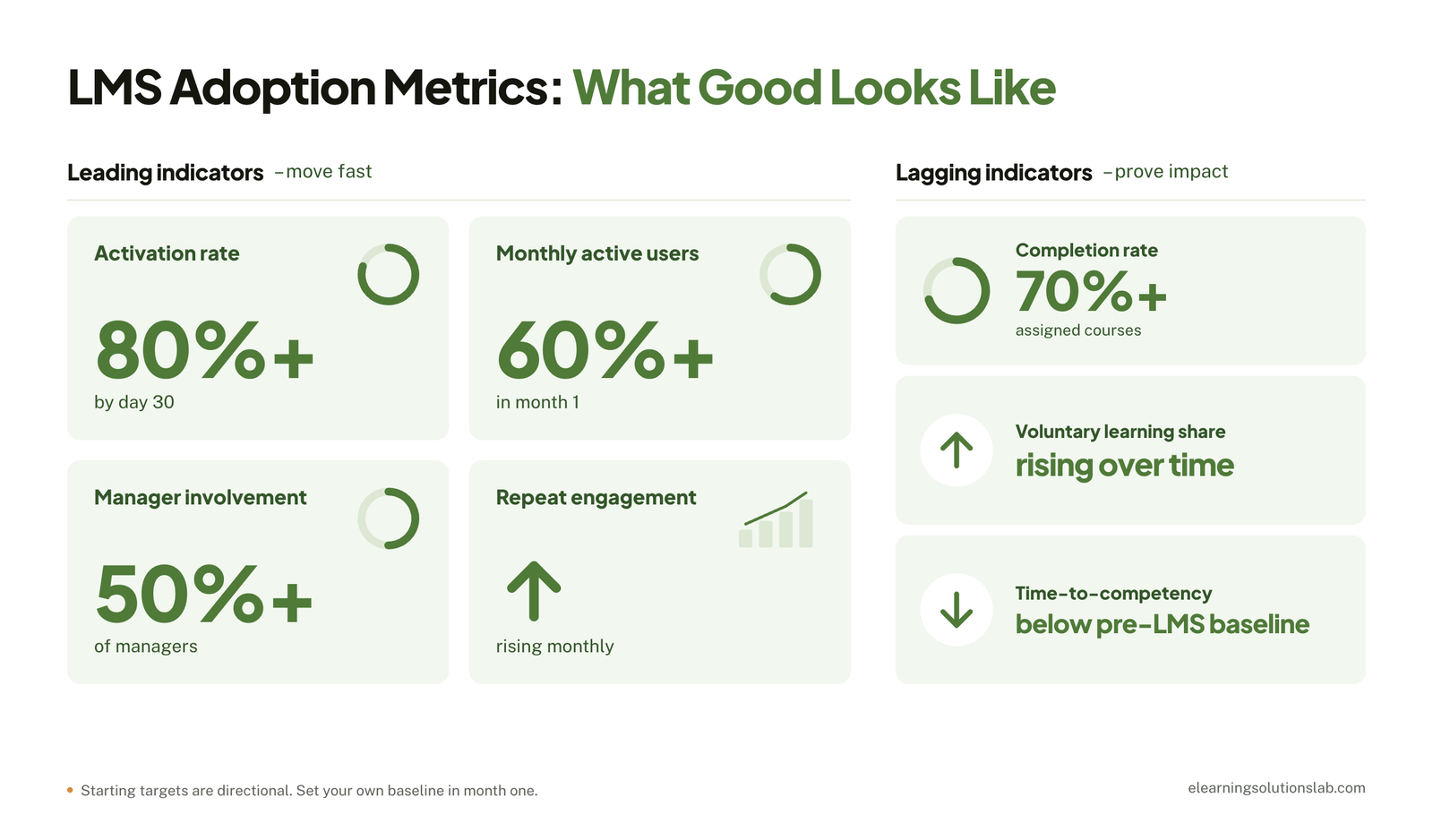 Leading vs. Lagging Indicators
Activation, active users, and manager involvement are leading indicators: they move quickly and tell you whether the rollout is on track. Time-to-competency, performance, and retention are lagging indicators: they take months to shift but prove the business case. Report both, so early wins don’t hide a lack of impact and slow outcomes don’t hide a healthy rollout.
Break the Numbers Down
A healthy company-wide average can hide a region, shift, or department that never logged in. Segment every metric by location, role, and manager so you know exactly where to send reminders, champions, or support.
Connect Learning Data to Business Outcomes
Go back to the SMART goals you set in pre-launch and compare them with the business data they were meant to move, such as onboarding time, error rates, sales ramp time, or audit findings. Our guide to eLearning ROI shows how to put a value on those changes for your pre-renewal review.
Rolling Out an LMS Globally
A rollout that works at headquarters can stall in other regions. Global launches need extra planning in four areas.
Localization and Multilingual Content
Translate the interface, launch messages, and your highest-priority courses before launch, not after. Localization goes beyond words, too: examples, images, units, and regulations should make sense in each market. Our guide to multilingual eLearning covers how to plan it, and eLearning localization services can adapt existing courses for each region.
Time Zones and Launch Waves
A single global launch email lands at midnight for half your workforce. Launch in regional waves instead, schedule live sessions in local working hours, and record them for anyone who can’t attend.
Data Privacy and Local Rules
Check data privacy requirements such as the GDPR in Europe, where learner data is stored, and how long records are kept. In some countries, works councils or employee representatives must be consulted before you roll out a system that tracks employee activity, so involve HR and legal early.
Regional Champions
Recruit champions in every region and language group. They know local working patterns, can flag content that doesn’t translate culturally, and give learners someone to ask in their own language.
| Single-country rollout | Global rollout | |
|---|---|---|
| Language | One language | Interface, comms, and priority content translated and localized |
| Launch timing | One launch date | Regional waves in local working hours |
| Compliance | One set of rules | GDPR and local privacy laws, data residency, works council consultation |
| Champions | By department | By region and language group |
| Content | One catalog | Global core content plus region-specific courses |
| Reporting | Company-wide | Segmented by region, with local targets |
Reaching Frontline and Deskless Workers
Frontline employees often make up most of the workforce, yet LMS rollouts are usually designed for office staff. Adoption here depends on removing practical barriers.
Make Access Effortless
Many frontline workers don’t have a company email address, so offer alternatives such as login by employee ID or phone number, QR codes posted in break rooms, and shared kiosks or tablets on site.
Go Mobile, and Plan for Weak Connections
Make sure the full experience works on a personal phone, and check whether learners can download content to finish offline. Our guide to mobile learning solutions covers the options.
Keep It Short
Five-minute modules fit between tasks and at the start of a shift far better than hour-long courses. If your current content is long, microlearning services can break it into short, focused lessons.
Give People Time to Learn
If learning happens outside paid hours, expect low adoption. Agree with operations leaders when frontline staff can learn on the clock, such as quiet periods or a few minutes built into each shift, and use shift huddles to promote new content.
How to Fix Low Adoption on an Existing LMS
If your LMS has been live for months and usage is still low, you don’t need to start over. A structured relaunch usually works better than more reminder emails.
- Audit the data – find out who never activated, where people drop off, and which regions, roles, or managers have the lowest usage.
- Ask learners and managers – run a short survey and a handful of interviews to learn why people aren’t logging in.
- Diagnose by barrier – map what you find to the seven barriers above, so you fix causes rather than symptoms.
- Fix the basics first – repair login problems, clean up search and the dashboard, and remove outdated content before you invite anyone back.
- Relaunch with a reason – lead with new, relevant content and a refreshed manager toolkit, plus a new sponsor message.
- Run a 30-day recovery sprint – set a clear target for active users and review it weekly with your adoption team.
Sometimes the platform itself is the problem. If the interface is clunky or key integrations are missing, our guide on how to choose an LMS will help you assess whether to switch at renewal. And if adoption dropped because nobody has time to run the system, LMS administration services can take over day-to-day management.
Pro tip
Start your relaunch with the one team or region that has the lowest usage but a supportive manager. A quick turnaround there gives you a success story to share with everyone else.
Free LMS Adoption Plan Template
To put this guide into action, get our free LMS adoption plan template. It turns every checklist, table, and metric in this article into one working spreadsheet you can fill in, share with your adoption team, and update each month.
In one line
Plan adoption before you launch, give managers a real role, keep communicating well past launch week, and measure what changes in performance, not just logins.
Need an LMS people will actually use, or the courses to fill it?
At eLearning Solutions Lab, we offer Levantra LMS, our cloud based LMS that’s set up for you, so your team can focus on adoption instead of configuration. You can enroll learners in bulk into separate groups for each team, department, or cohort, give managers a view of their own groups, and export reports to CSV or Excel for your adoption reviews. Every completion comes with a verifiable certificate. Setup is included in every plan, and most teams are training learners within 3 to 4 weeks.
We also build the courses that keep learners coming back, for Levantra or any platform you use. Design, development, and QA are handled by one team, and managed LMS administration can be added to any plan if you don’t have the capacity to run the platform day to day.
Book a Levantra LMS demoSee our custom elearning development services
Related Reading
- How to choose an LMS – scorecards, demos, and contract terms for picking a platform.
- LMS integration – the common connections and how each one is set up.
- LMS administrator – what the job of running the platform involves.
- eLearning ROI – how to measure and prove the value of your training.
- Microlearning examples – short-format ideas that work for busy and frontline teams.
- Elearning delivery – the ways to get training to your learners.
The Author

Book A Discovery Call
Our Learning Advisors are happy to walk you through your project step-by-step — content, timeline, and fixed pricing.
Get Your Free QuoteNo obligation — just a focused conversation. Proposal within 24 hours.
You may also like
LMS Requirements Checklist: What to Include, How to Weight It, How to Verify It and
Having a useful LMS requirements checklist does three things: it ranks what…
Employee Onboarding and Training: A Practical Guide (+ Free 90-Day Plan)
A new hire's first week usually sets the tone for everything that follows. And…