

Short answer
An LMS administrator is the professional who manages an organization’s learning management system.
The work covers five areas: users and enrollments, courses and content, reporting and compliance, integrations and maintenance, and learner support. The role calls for a mix of platform skills and people skills, pays about $72,000 to $78,000 a year on average in the United States, and is most often reached from IT, HR, L&D, or teaching.
An LMS administrator can keep an organization’s learning management system running: enrolling users, publishing courses, pulling reports, and fixing what breaks. It’s actually a role that sits between L&D, HR, and IT, and demand for it has truly grown as more training moves online.
In this guide, we’ll cover what LMS administrators do day to day, skills and certifications employers ask for, what the role pays in the US and abroad, and how to get into it from IT, HR, or teaching.
Updated October 2026.
In This Article
What is an LMS Administrator?
An LMS administrator is a professional who is responsible for managing an organization’s learning management system. They set up users and courses, keep the platform working, track training data, and support your learners and instructors who actually use it.
In many organizations, the role belongs to the learning and development or HR team, with a close working relationship with IT. And with universities and schools in particular, it tends to fall under the category of academic technology or IT services. In smaller organizations, it is often one part of a broader job, like training coordinator or HR generalist.
The title may also vary from one organization to another; LMS administrator could be advertised as:
- Learning systems administrator
- LMS specialist
- Learning technologist
- Learning management system coordinator
- eLearning administrator
If your organization is still deciding whether it needs a platform at all, our guide to do I need an LMS walks through the decision.
What Does an LMS Administrator Do?
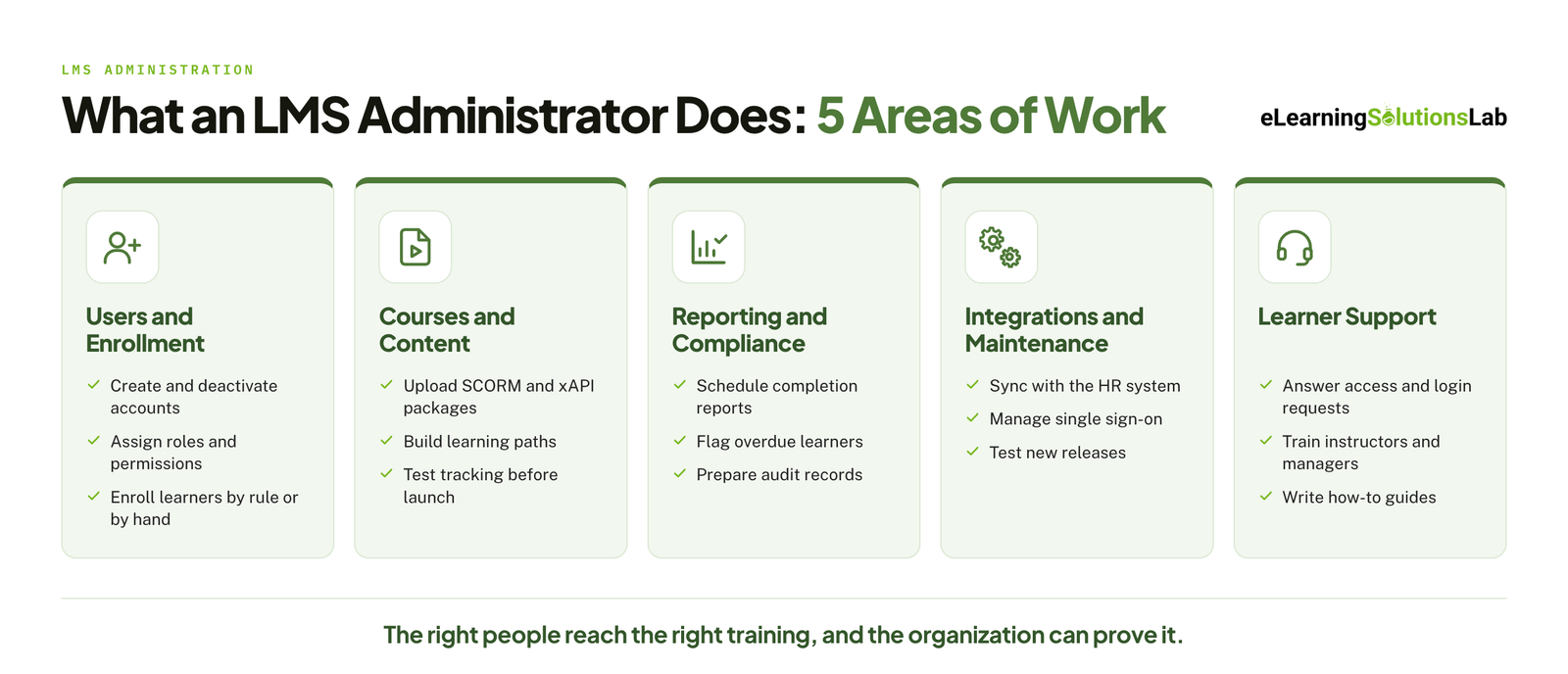
An LMS administrator’s work falls into five areas. The balance depends on the size of your organization and the platform you use, but most roles include some of each.
 User and Enrollment Management
- Creating, updating, and deactivating user accounts.
- Assigning roles and permissions (learner, instructor, manager, and admin).
- Enrolling people in courses, individually or through automated rules.
- Organizing users into groups by department, location, or job role.
Course and Content Management
- Uploading and publishing courses, including SCORM and xAPI packages.
- Building learning paths and setting prerequisites.
- Testing courses before any course launch to confirm they track completion correctly.
- Archiving or updating outdated content.
Most tracking problems start with how the course package was built. Our guides to how to create SCORM content and SCORM compliance requirements explain what a package needs before it reaches the LMS.
Reporting and Compliance Tracking
- Building and scheduling reports on enrollment, completion, and assessment scores.
- Tracking mandatory training and flagging overdue learners.
- Preparing records for audits.
- Sharing dashboards with managers and L&D leaders.
A compliance training plan sets out which courses are mandatory, for whom, and by when, which is what these reports are built to prove.
Integrations and System Maintenance
- Keeping the LMS in sync with your HR system so that user data stays accurate.
- Managing single sign-on and connections to video, webinar, and content tools.
- Testing new releases and features before they actually go live.
- Working with the vendor and IT on bugs, outages and configuration changes.
Our guide to LMS integration covers how these connections work and what to check when one fails.
Learner and Instructor Support
- Answering help requests about logins, access, and course errors.
- Training instructors and managers to use the platform.
- Writing how-to guides and FAQs.
- Collecting feedback and passing it to the L&D team.
When the support queue outgrows one person, some organizations hand part of it to an outside team. See our guide to LMS support services for how that works.
In one line
An LMS administrator makes sure the right people can reach the right training, and that the organization can see who has completed it.
LMS Administrator Skills
Your employers look for a mix of technical ability and people skills. The technical side of it gets you through the screening stage, but the soft skills tend to decide how well someone does in the job, given that so much of the work will involve helping people who are not actually technical themselves.
Technical Skills
- Platform configuration – setting up users, roles, courses, learning paths, and automated rules in at least one major LMS.
- eLearning standards – knowing how SCORM, xAPI and LTI work, and how to troubleshoot a course that is not actually tracking properly.
- Data and reporting – building your reports in the LMS, and working with exports in Excel or a BI tool.
- Integrations – understanding how your LMS can connect to HR systems, single sign-on, and video or webinar tools.
- Basic HTML and CSS – enough to actually fix page formatting and customize templates.
- Testing – checking your courses and platform updates in a test environment before any release.
It also helps to know where course files come from. Our roundup of the best elearning authoring tools covers the software that produces most of the packages an admin uploads.
Soft Skills
- Communication – patiently explaining technical issues in plain language to learners, instructors and managers.
- Troubleshooting – working through a problem methodically when the cause is pretty unclear.
- Attention to detail – catching the wrong due date or permission setting before it can affect hundreds of users.
- Stakeholder management – balancing requests from L&D, HR, IT, and business leaders.
- Organization – keeping track of course launches, deadlines and support requests at the same time.
LMS Administrator Salary
In the United States, the two most cited salary sources put average LMS administrator pay in the low-to-high $70,000s. PayScale reports an average base salary of $71,765 for 2026, with most salaries falling between $52,000 and $96,000. ZipRecruiter reports a higher average of $77,546 a year, or about $37 an hour.
US Salary by Experience Level
| Experience level | Average base salary | Typical range (10th to 90th percentile) |
|---|---|---|
| Entry level | $52,226 | $41,000 – $66,000 |
| Mid-career | $74,297 | $58,000 – $97,000 |
| Experienced | $79,570 | $64,000 – $107,000 |
| All levels | $71,765 | $52,000 – $96,000 |
Source: PayScale, US data for 2026, checked October 2026. Salary sites update often and draw on self-reported data, so treat these as a guide and compare them with current job listings in your own market.
What Affects Pay
- Platform – experience with enterprise systems such as Cornerstone or Workday tends to be paid more than experience with smaller platforms.
- Sector – corporate roles generally pay more than roles in higher education or K-12.
- Scope – roles that include integrations, data analysis, or vendor management tend to pay more than roles focused on support and enrollment.
- Location – major cities and high-cost regions usually pay more.
Pay Outside the US
Salaries differ widely from country to country, and the US figures above do not carry over. Remote roles are usually paid according to the employer’s location or a set regional band, so a remote job with a US company does not always come with a US salary. Check local job listings for your country, and ask how pay is set early in the hiring process.
LMS Administrator Certifications
There is no single industry-wide LMS administrator certification. The credentials employers ask for fall into two groups.
- Platform certifications and admin training – most major vendors, including Cornerstone, Moodle, and Canvas, run their own administrator training, and some award a certificate at the end. These carry the most weight when a job posting names the same platform.
- General learning and development credentials – broader credentials such as the APTD and CPTD from the Association for Talent Development show knowledge of training as a field. They help most if you are coming from IT and need to show the learning side.
Do you need one to get hired? Usually not. Most postings ask for hands-on experience with a named platform first, and a certificate is a bonus. It matters more in two cases: when you have no direct experience to show, and when an employer writes a specific platform certification into the job requirements, which is more common for contract and government roles.
Costs, formats, and names change often, so confirm the current details with the vendor before you enroll.
How to Become an LMS Administrator
There is no single route into LMS administration – and we’ve seen transitions to this role from other departments. Each path below covers the skills to build, how to get hands-on practice, and the first roles that you can aim for.
From IT
You already have the technical foundation, like user management, permissions, integrations, and troubleshooting. So the gap really is on the learning side.
- Skills to build – how training programs are actually designed and delivered, eLearning standards (SCORM, xAPI, LTI), and how your L&D teams measure results.
- Hands-on practice – offer to support your company’s LMS, especially on integrations, single sign-on, or data sync issues. You can set up a free Moodle site to learn course and enrollment setup from the admin side of things.
- First roles to target – LMS administrator, learning systems analyst, or learning technology specialist.
From HR or L&D
You already understand training needs, compliance requirements, and the people who use the system. The gap here is technical depth.
- Skills to build – platform configuration, reporting and data handling in Excel, basic HTML, and how your LMS can connect to the HR system.
- Hands-on practice – you can ask for admin access to your current LMS and take on tasks such as enrollments, report building, and course uploads. You may also volunteer for the next platform update or migration project.
- First roles to target – LMS administrator, L&D coordinator with LMS responsibilities, or training operations specialist.
From Teaching or Education
You have used an LMS daily as an instructor, and you exactly know what learners struggle with. The gap here is the back end of the system and, for corporate roles, the business context itself.
- Skills to build – admin-level configuration (beyond the instructor view), reporting, user management at scale, and corporate training terms like compliance and onboarding.
- Hands-on practice – become the go-to LMS person at your school, join a platform rollout committee, or run training sessions for colleagues. You can take the admin training that’s offered by your school’s platform.
- First roles to target – LMS administrator in higher education or K-12, academic technology specialist, instructional technology coordinator, then in corporate roles once you have admin experience.
With No Related Experience
This is the longest route, as we know, but it’s actually realistic given that the main platforms can be learned without an employer.
- Skills to build – start with one platform and learn it thoroughly, then add eLearning standards, Excel reporting, and basic HTML.
- Hands-on practice – you may install Moodle or use a free trial of a commercial LMS. Build a sample course, enroll test users, set up a learning path, and run reports. You can also document the project as a portfolio piece and try volunteering to run an LMS for a nonprofit or community group, which can give you real users and a reference.
- First roles to target – LMS support specialist, training coordinator, eLearning assistant, or help desk roles at an LMS vendor.
If you need a platform to practice on, our list of affordable LMS systems is a starting point for finding one to try.
LMS Administrator vs Instructional Designer vs L&D Manager
These three roles work closely together and are often confused, especially in small teams where one person covers more than one of them.
| LMS administrator | Instructional designer | L&D manager | |
|---|---|---|---|
| Main focus | The platform that delivers and tracks training | The courses themselves | The training strategy, budget, and team |
| Typical tasks | Enrollments, publishing, reports, integrations, support | Learning objectives, storyboards, course builds, assessments | Needs analysis, planning, vendor selection, reporting to leadership |
| Core skills | Platform configuration, data, troubleshooting | Learning theory, writing, authoring tools | Leadership, budgeting, stakeholder management |
| Answers the question | Can people reach the training, and can we prove they completed it? | Does the training actually teach what it should? | Are we training the right people on the right things? |
Teams that have an administrator but no designer often bring in instructional design services for course work, and those short on platform hands for a rollout or migration sometimes use staff augmentation for L&D to fill the gap.
Career Path and How AI Is Changing the Role
 Where the Role Leads
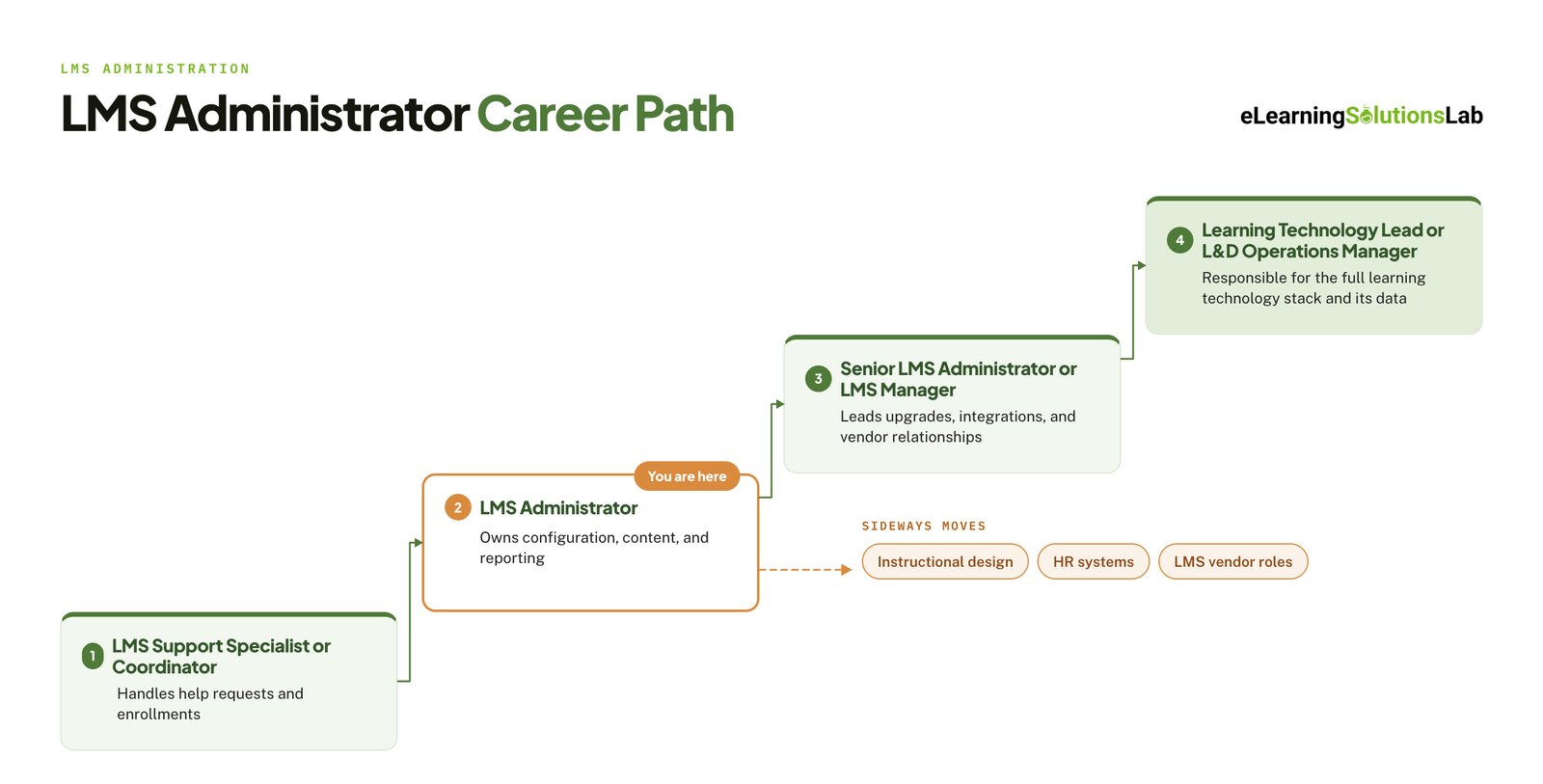
LMS administration is a starting point as much as a destination. A common progression looks like this:
- LMS support specialist or coordinator – handling help requests and enrollments.
- LMS administrator – owning day-to-day configuration, content, and reporting.
- Senior LMS administrator or LMS manager – leading upgrades, integrations, and vendor relationships.
- Learning technology lead or L&D operations manager – responsible for the whole learning technology stack and the data it produces.
Some administrators move sideways instead, into instructional design, HR systems, or implementation and customer success roles at LMS vendors.
How AI Is Changing the Work
Many LMS platforms now include AI features, and they are starting to shift where an administrator’s time goes.
- Routine tasks are being automated – enrollment rules, content tagging, report generation, and first-line answers to learner questions are common targets.
- Oversight is becoming part of the job – someone has to check that automated recommendations and assignments are correct, and that is usually the administrator.
- Data quality matters more – AI features are only as good as the user and course data behind them, which puts clean records and sound integrations at the center of the role.
The likely result is less time on manual administration and more on configuration, data, and governance. For the content side of the same shift, see our guide to AI for instructional design, and our roundup of elearning trends for the wider picture.
Need courses that work in your LMS the first time?
At eLearning Solutions Lab, we build custom courses in the format your LMS needs, test the published package in your LMS, and confirm that completion and scores report correctly – so your administrator is not left troubleshooting on launch day. Design, development, and QA are handled by one team. Send us your content and we’ll come back with a scope, a price, and a delivery date before you commit to anything.
Related Reading
- LMS integration – how an LMS connects to HR systems, single sign-on, and content tools.
- LMS support services – options for outsourcing platform administration and help desk work.
- SCORM compliance requirements – what a course package needs to track correctly.
- Best LMS for training companies – platforms compared for organizations that sell training.
- Affordable LMS systems – lower-cost platforms for smaller teams.
- Elearning delivery – the channels for getting courses to learners, compared side by side.
The Author

Book A Discovery Call
Our Learning Advisors are happy to walk you through your project step-by-step — content, timeline, and fixed pricing.
Get Your Free QuoteNo obligation — just a focused conversation. Proposal within 24 hours.
You may also like
Software for Training Companies: Best Tools and How to Choose (2026 Guide)
Short answer Training companies need a training management system (TMS) to…
How to Choose an LMS: A 7-Step Guide (With Free Scorecard)
Short answer To choose an LMS, define your goals and learners first, then…