

Do I need an LMS?
Short answer: You need one if you have to prove who completed training, whether for compliance, certification, or an audit, or if you’re training more people than you can track by hand. If you only need to share content and nobody needs a record of who finished it, a cheaper setup will usually do the job. Take the scorecard below to find out in five minutes.
So if you’re asking “do I need an LMS?”, you’ve probably reached the point where training is getting harder to manage. Maybe the spreadsheets you’re using to track completions no longer match reality, a compliance deadline is coming up, or a new hire asked where the onboarding course lives.
In this guide, we take a neutral approach – you’ll get clear thresholds for when an LMS pays off, a scorecard that gives you a yes or no, cheaper alternatives if you don’t need one, and a rough cost comparison.
In This Article
What an LMS Actually Does
A learning management system is software that handles five jobs:
- Hosts and delivers courses like videos, slides, SCORM packages, and quizzes, all in one place.
- Assigns training to the right people – it enrolls learners by role, team, or start date, and can send reminders automatically.
- Tracks progress, recording who started, who finished, how they scored, and how long it took.
- Reports and keeps records, producing completion reports and audit trails that you can hand to a manager, client, or regulator.
- Manages certifications, issuing certificates and flagging when they’re due for renewal.
What an LMS really gives you is tracking and proof. You can host content almost anywhere, so the real question behind “do I need an LMS?” isn’t “where will our training live?” It’s “do we need a reliable record of who completed it?”
Signs You Need an LMS
If one or more of these describes your current situation, an LMS will likely pay for itself.
You Have Compliance or Regulatory Training
If any of your training programs are legally required, you need more than just proof that your material exists. You need proof that each person completed it, and when. Common examples include workplace safety training, anti-harassment training (mandatory in several US states), and industry-specific requirements in industries like healthcare, finance, and manufacturing.
Your LMS will keep timestamped records, send reminders before deadlines, and give you an audit-ready report in minutes. If you’re still mapping out deadlines and evidence, a compliance training plan is worth drafting before you choose any tool.
You’re Training More People Than You Can Manually Track
There’s no absolute number, but a rule of thumb is around 50 learners or 10 courses. Below that, you can just use spreadsheets. Above it, manual tracking may start to break down.
You Issue Certifications or Have Recertification Cycles
Certificates typically expire, so whether those are annual safety refreshers, product certifications, or continuing education credits, they’re really hard to manage without any automation. An LMS can help track expiry dates, reassign training when it’s due, and issue new certificates automatically.
You Train Customers, Partners, or Resellers
When you train people outside your organization, you normally add complexity: separate portals for different audiences, access that has to be granted and revoked, and in most cases, payment systems.
Many LMSs are actually built for this kind of extended enterprise training, whether that’s customer onboarding training or elearning for franchises and reseller networks.
Training Is Connected to HR, Onboarding, or Performance
If you want your training to be assigned automatically when someone joins or changes roles, or you want completion data to show up in either your HR system or manager reports – this is where you need lms integration.
Bottom line: The more of these situations apply to your context, the stronger the case. If only one applies, especially the learner-count one, a lightweight or free LMS may be enough to start with, and affordable lms systems covers what’s available at the lower end of the market.
Signs You Don’t Need an LMS (and What to Use Instead)
Here are the most common situations where you don’t actually need an LMS:
Your Team Is Small, and Training Is Informal
A good example of this is a team of 10 or 20 people learning on the job; an LMS will mostly just add admin work. You only need to put your materials in a shared drive, add a short quiz, and track completions in a spreadsheet.
You’re Sharing Knowledge, Not Running Courses
Process guides, how-to articles, and company policies are all reference materials that people look up when they need them rather than working through them in order. A wiki or knowledge base such as Notion or Confluence is a better fit – it’s much easier to search and update, and doesn’t force a course structure onto the content. This kind of on demand training works best when people can find the answer in the moment.
You’re Selling Courses to Individuals
If you own a training company or consultancy firm, what you mostly need are systems for checkouts, landing pages, and email – so a course platform is a better fit than a business LMS. If you sell to both individuals and corporate clients, best lms for training companies compares platforms that handle both.
Training Happens Occasionally
Let’s say you run a handful of sessions in a year; the time you spend choosing, setting up, and maintaining an LMS will likely exceed the value of purchasing one. Live or recorded sessions with sign-in sheets or attendance forms will cover it.
You Only Need the Learning Data
Some teams may already have content in authoring tools or on their own websites, and simply want to know who actually engages with it. A learning record store (LRS) can collect that activity through the xAPI standard without replacing where the content lives. If you haven’t chosen a tool yet, best elearning authoring tools compares the main options.
Quick Reference: What to Use Instead
| Your situation | Why an LMS is overkill | Cheaper setup |
|---|---|---|
| Small team, informal training | Nobody needs formal records | Shared drive + form-based quizzes + spreadsheet |
| Internal knowledge sharing | It’s reference material, not courses | Wiki or knowledge base (Notion, Confluence) |
| Selling courses to individuals | Sales tools matter more than compliance | Course platform |
| Occasional training | Setup outweighs the benefit | Live sessions + attendance form |
| You only need learning data | The content already lives somewhere | Authoring tool + LRS via xAPI |
The honest test: if you don’t need to track results, or an instructor or manager can track them by hand without much trouble, you don’t need an LMS yet. Moving to one later is easier than paying for one you don’t use.
Do I Need an LMS? Take the Scorecard
You can answer each question yes or no – add up the points for every yes, then check your score against the results below. Some questions carry more weight, given that they’re the strongest signs you need an LMS.
| # | Question | Points if yes |
|---|---|---|
| 1 | Is any of your training legally or contractually required? | 3 |
| 2 | Do you need to prove completion to an auditor, client, or regulator? | 3 |
| 3 | Do you train more than 50 people a year? | 2 |
| 4 | Do you have certifications that expire and need renewing? | 2 |
| 5 | Do you train people outside your organization (customers, partners, resellers)? | 2 |
| 6 | Do you run more than 10 courses or modules? | 1 |
| 7 | Do you want training assigned automatically when someone joins or changes roles? | 1 |
| 8 | Do you need training data in your HR system or in manager reports? | 1 |
| 9 | Do you train people in more than one language or country? | 1 |
| 10 | Does someone spend more than a few hours a month tracking training by hand? | 1 |
Maximum score: 17
What Your Score Means
0–4: You probably don’t need an LMS.
Your training needs are light enough for a simple setup. Use the quick-reference table above to pick the cheapest option that fits, and come back to this scorecard if your team or requirements grow.
5–8: You’re on the fence.
You have some real tracking needs, but a full-featured platform may be more than you need. You can start with a free or lightweight LMS, or a well-organized DIY setup with strict record-keeping, and see whether it holds up for a couple of months. If you answered yes to both questions 1 and 2, lean toward an LMS.
9 or more: You need an LMS.
Manual tracking is already costing you time, or will soon, and you have requirements a shared drive can’t reliably meet.
Tip: If you score close to a boundary, look at which questions you said yes to. A score of 6 from compliance and audit questions, for instance, is a stronger case than a 6 from team size and course count.
What Does an LMS Cost Compared With the Alternatives?
Published pricing is scarce in this market, so treat the figures below as planning brackets rather than quotes. What matters more than the number is the shape of the spend: an LMS is a recurring cost that grows with headcount, while most alternatives use tools you already pay for.
| Setup | How it’s priced | Typical planning bracket | What moves the number |
|---|---|---|---|
| DIY (shared drive + forms + spreadsheet) | Tools you already license | Usually no new license cost | Admin hours, and the risk of missing or wrong records |
| Wiki or knowledge base | Per user per month | Low, and often already in place | Number of seats, and the plan tier |
| Course platform | Monthly plan, sometimes plus transaction fees | Low to mid | Sales volume, features, number of admins |
| Free or open-source LMS (e.g., Moodle) | Free to license, paid to run | Hosting and upkeep, plus internal or contractor time | Hosting, plugins, updates, security, who maintains it |
| Commercial LMS | Per user per year, or per active user per month | Low single-digit dollars per user per month at volume, rising steeply for enterprise tiers | Headcount, SSO and integrations, implementation and support tier |
| Learning record store (LRS) | Subscription, often by data volume | Low to mid | Number of learners and tracked activities |
The Costs That Don’t Appear in the Quote
- Implementation. Setup, SSO, user provisioning, and migrating old records can take weeks to months.
- Admin time. Someone has to run the platform: enrollments, reports, user issues, and updates.
- Content. An LMS is an empty shell until you put courses in it. Building or buying them is a separate budget, and elearning development costs breaks down what drives a quote.
- Switching costs. Moving to another LMS later means migrating users, records, and content, which is why standards support matters.
Before you commit, set a baseline for what training costs you now, including hours spent tracking by hand. elearning roi covers how to compare that against what an LMS would save.
Already Have an LMS? The Problem May Be the Content
A lot of people who ask “do I need an LMS?” already own one. They’re asking because the current setup isn’t working: courses nobody finishes, outdated modules, or slide decks that were never turned into proper training.
The mistake to avoid is buying a new platform to solve a content problem. If your courses are the thing failing, a new LMS just gives you a nicer place to store courses that still fail. Before you shop for a replacement, check which of these is actually the issue:
- The content is outdated or can’t be edited. Old courses without source files can’t be updated, only rebuilt, and legacy content conversion services exist for exactly that situation.
- The training is still stuck in slide decks. PowerPoint files uploaded to an LMS don’t track or engage well. convert powerpoint to elearning services turn an existing deck backlog into tracked, interactive modules.
- The content is generic. Broad compliance or soft-skills topics can come from a library, and off the shelf elearning covers where that approach holds up. Training on your own processes, systems, or products usually needs to be built.
- The platform is badly configured. Broken enrollments, missing reports, or confusing navigation are often setup problems, not reasons to switch. lms support services usually resolve those faster than a migration.
Training a Global Team? Extra Considerations
Now, if everyone you train is in one country and speaks one language, you may skip this section. If not, these are things you need to consider when deciding whether you need an LMS and which one will work.
Multilingual Delivery
Course translation is just part of the job; your learners also need to navigate the platform itself, so you need to check whether menus, buttons, notifications, and certificates can be shown in their language.
For instance, if you train in Arabic, Hebrew, Urdu, or Persian, you need to confirm that the platform can support right-to-left layouts properly. It would also help if your system can assign the right language version to each learner automatically and report on all versions as one course.
multilingual elearning covers those design decisions. When volume is high, elearning localization services handle the build and testing per language, and where you only need the text changed, elearning translation services are the narrower option.
Data Privacy and Where Records Are Stored
Training records are mostly personal data: names, email addresses, scores, and sometimes job roles or performance information. So if you train people in the EU or UK, the GDPR (and the UK’s version of it) sets rules on how that data is collected, stored, accessed, and deleted.
Some countries go even further and may require certain data to be stored on servers inside their borders. Before you choose any tool, including a DIY setup, you need to ask:
- In which country or region is learner data stored, and can you choose?
- Can you export or delete an individual’s records on request?
- Does the vendor offer a data processing agreement?
In some countries, such as Germany, employee representatives may also need to approve systems that track employee activity. You have to build that into your timeline.
Standards: SCORM, xAPI and cmi5
These are all standards that determine how training content talks to the system that tracks it. They matter most if you might switch tools later, given that content built to a standard can move with you.
- SCORM is the oldest and most widely supported. It tracks completion, scores, and time within an LMS.
- xAPI can track learning that happens almost anywhere: apps, simulations, websites, on the job. It sends data to a learning record store (LRS).
- cmi5 combines the two: it uses xAPI’s richer tracking, with clear rules for launching content from an LMS the way SCORM does.
If your content already uses one of these, you have to make sure any tool you consider supports it. If you’re starting fresh, choosing your standard now keeps your options open. scorm compliance requirements covers what has to be true for courses to track correctly.
US vs. Global Compliance
Requirements for compliance vary more than many teams expect. In the US, training rules come from federal agencies and individual states. For instance, anti-harassment training is mandatory in some states and not others.
Elsewhere, requirements often come from national workplace laws, industry regulators, and data protection rules, and they can differ from one country to the next. So if you operate in several regions, you have to list each location’s requirements before deciding what LMS to purchase. The more varied they are, the more useful an LMS becomes for assigning the right training to the right people and keeping separate records.
This section is general guidance, not legal advice. Check specific requirements with a legal or compliance professional in each region where you operate.
Do I Need an LMS? A Quick Decision Path
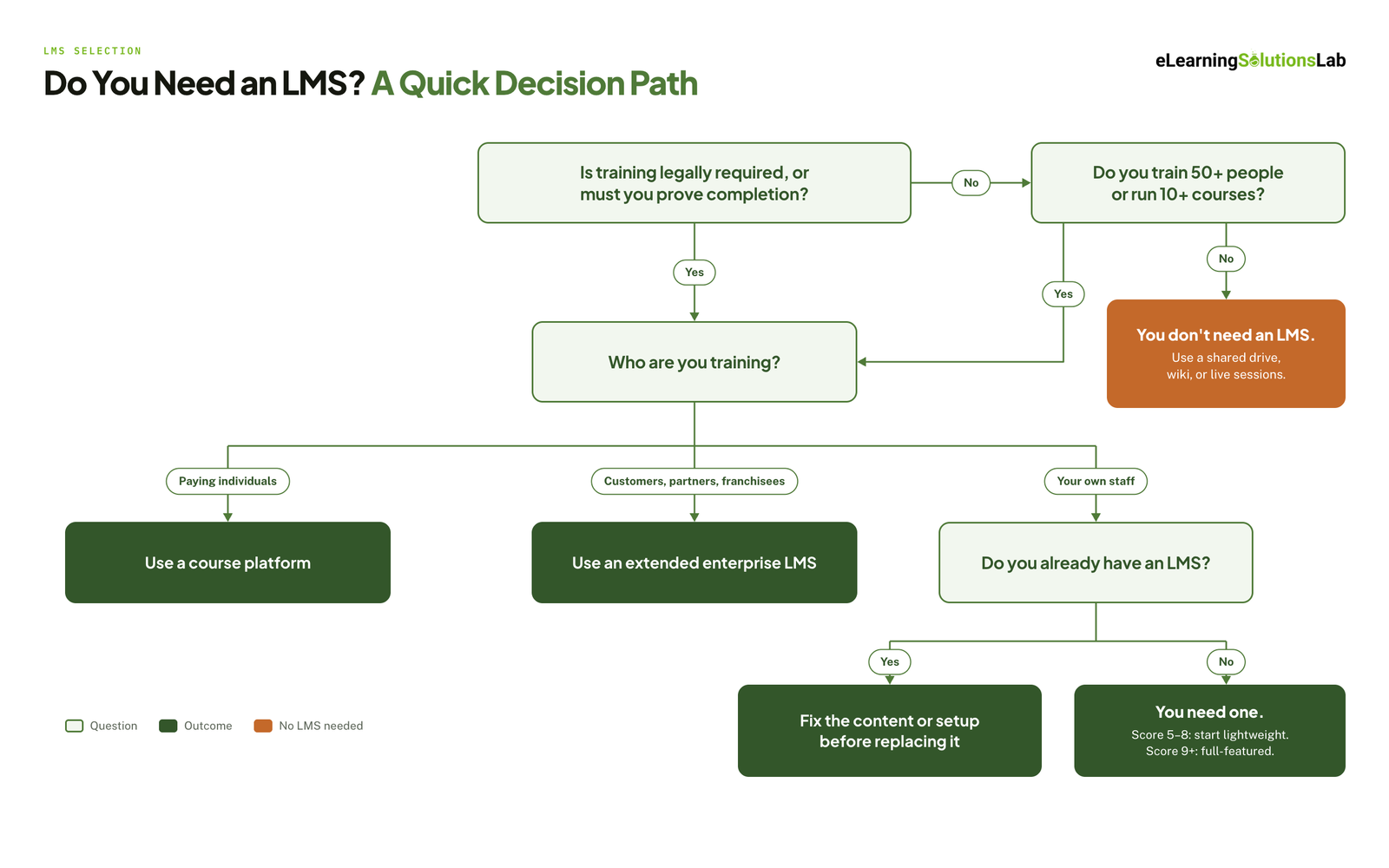 If you’d rather not add up a score, answer these four questions in order.
1. Is your training legally required, or do you have to prove completion to someone?
Yes: go to question 3. No: go to question 2.
2. Do you train more than about 50 people, or run more than 10 courses?
No: you don’t need an LMS. Use a shared drive, a wiki, or live sessions. Yes: go to question 3.
3. Who are you training?
Individuals who pay for courses: use a course platform. Customers, partners, or franchisees: look for an LMS built for extended enterprise training. Your own staff: go to question 4.
4. Do you already have an LMS?
Yes: fix the content or configuration before you replace it. No: you need one. Start lightweight if you scored 5–8 on the scorecard, and go full-featured if you scored 9 or more.
If You Do Need an LMS: What to Look For
Once the answer is yes, take this list into demos. Ask each vendor to show you, not just say yes.
- Reporting and audit trails. Can you pull a completion report by team, location, and date in a few clicks, and export it?
- Integrations. Does it connect to your HR system and single sign-on, or will someone be uploading user lists by hand?
- Standards support. Which versions of SCORM, xAPI, and cmi5 does it support, and does resume work after an interrupted session?
- Mobile access. If your people aren’t at desks, check for a real app with offline access, not just a resized website. mobile learning solutions covers what to test.
- Language and data location. If you train across countries, confirm the interface languages and where learner data is stored.
- Pricing model. Per registered user and per active user can produce very different bills for the same team.
- Ease of admin. Ask the person who will run it day to day to sit in on the demo.
If you’d like a neutral view before you talk to vendors, an elearning consultant can help you set requirements and shortlist platforms.
Have an LMS, but the courses aren’t working?
We build and convert SCORM-ready courses that run in the LMS you already have – fixed price, fixed timeline, from $1,500 in 3-5 weeks. Send us a course that isn’t working and we’ll come back with a scope, a price, and a delivery date before you commit to anything.
Related Reading
- Affordable lms systems – what’s available at the lower end of the market.
- Lms integration – connecting your LMS to HR and single sign-on.
- Compliance training plan – scheduling and evidence for required training.
- Elearning development costs – what actually drives a content quote.
- Scorm compliance requirements – what has to be true for courses to track correctly.
- Elearning roi – proving training pays for itself.
The Author

Book A Discovery Call
Our Learning Advisors are happy to walk you through your project step-by-step — content, timeline, and fixed pricing.
Get Your Free QuoteNo obligation — just a focused conversation. Proposal within 24 hours.
You may also like
Software for Training Companies: Best Tools and How to Choose (2026 Guide)
Short answer Training companies need a training management system (TMS) to…
How to Choose an LMS: A 7-Step Guide (With Free Scorecard)
Short answer To choose an LMS, define your goals and learners first, then…