


- Published
- Reading time
- 11 min
Filed under eLearningInstructional Design
Asynchronous learning gets a mixed reputation. Students love the flexibility, but a lot of instructors say it turns into “watch the videos, click the quiz, forget everything.” And honestly, both sides are right. It really depends on how the course is designed.
In this guide, you’ll get a plain definition, how asynchronous learning actually works week to week, how it compares with synchronous and blended learning, 12 real examples for colleges, schools and workplaces, and what the research says. You’ll also see how to fix the three biggest complaints (no feedback, “easy A” courses and AI cheating), and you can download a free activity and feedback template, no email needed.
Short on time? Jump to the 12 asynchronous learning examples or download the free template.
Updated November 2026.
In This Article
- What is asynchronous learning?
- How asynchronous learning works
- Synchronous vs. asynchronous learning
- 12 asynchronous learning examples
- Benefits and challenges (with fixes)
- How to make asynchronous learning actually work
- How to design an asynchronous course in 6 steps
- Time zones and global teams
- What the research says
- Free activity and feedback template
What is Asynchronous Learning?
Asynchronous learning is learning that doesn’t happen at the same time for everyone. Learners work through recorded lessons, readings, activities and discussions on their own schedule, usually within weekly deadlines, and the instructor responds over time instead of live. It’s the opposite of synchronous learning, where everyone meets at a set time.
The word simply means “not at the same time.” So in practice, an asynchronous course is one where you can log in at 6 a.m. or 11 p.m. and still do the same work as everyone else, as long as you meet the deadlines.
Here’s how that answers the questions people ask most often:
- Does asynchronous mean no Zoom? Usually, yes. A fully asynchronous course has no required live sessions. Some courses add optional live office hours, but you won’t miss anything essential if you can’t attend.
- Is asynchronous the same as online? Not quite. Online learning can be live (synchronous) or self-scheduled (asynchronous). Asynchronous is one way of running an online course, not another word for it.
- Is asynchronous learning face-to-face? No. By definition, there’s no shared live time, so it almost always happens online. But it can be one part of a blended program that also has in-person sessions.
- What is an asynchronous learning day? It’s a school day, often used by K-12 districts for weather days or teacher training, when students complete assigned work at home instead of attending classes.
How Asynchronous Learning Works
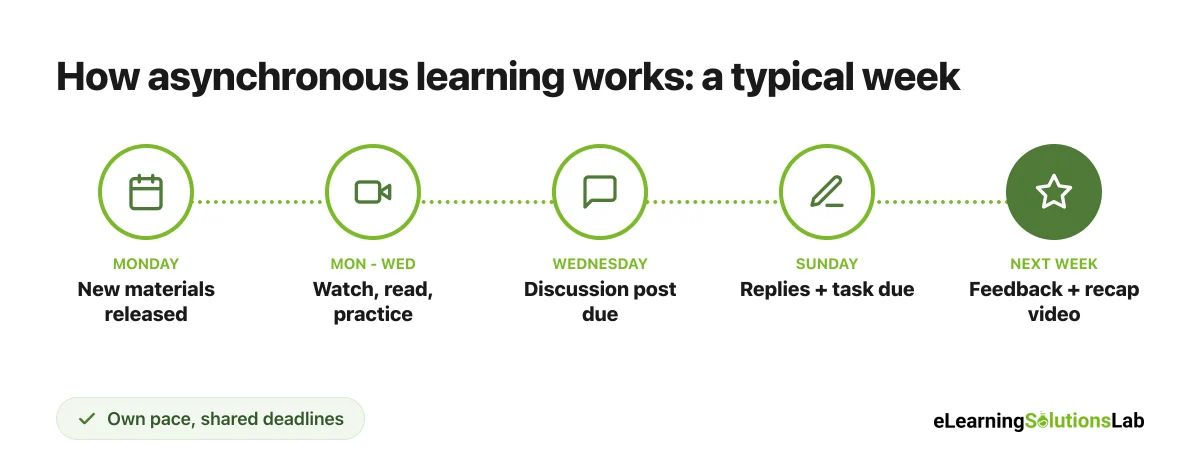
Most asynchronous courses run on a weekly rhythm inside an LMS. Learners get the week’s materials, work through them at their own pace, join a discussion, submit something, and get feedback before the next week starts.
| Part | What it is | Common tools |
|---|---|---|
| Content | Short recorded videos, readings, slides or interactive modules | LMS pages, video platform, SCORM modules |
| Activities | Practice tasks, case studies, quizzes, projects | LMS quizzes, assignments, H5P |
| Discussion | Written or video posts that learners reply to over a few days | Discussion boards, Teams or Slack channels, Padlet |
| Feedback | Comments, grades and recaps from the instructor and peers | Rubrics, comment banks, short recap videos |
| Deadlines | Weekly due dates that keep everyone moving together | LMS calendar, reminders, progress tracking |
The deadlines are really what hold the whole thing together. Without them, “learn at your own pace” quickly turns into “learn at no pace,” given that there’s no class time to nudge people along.
Synchronous vs. Asynchronous Learning
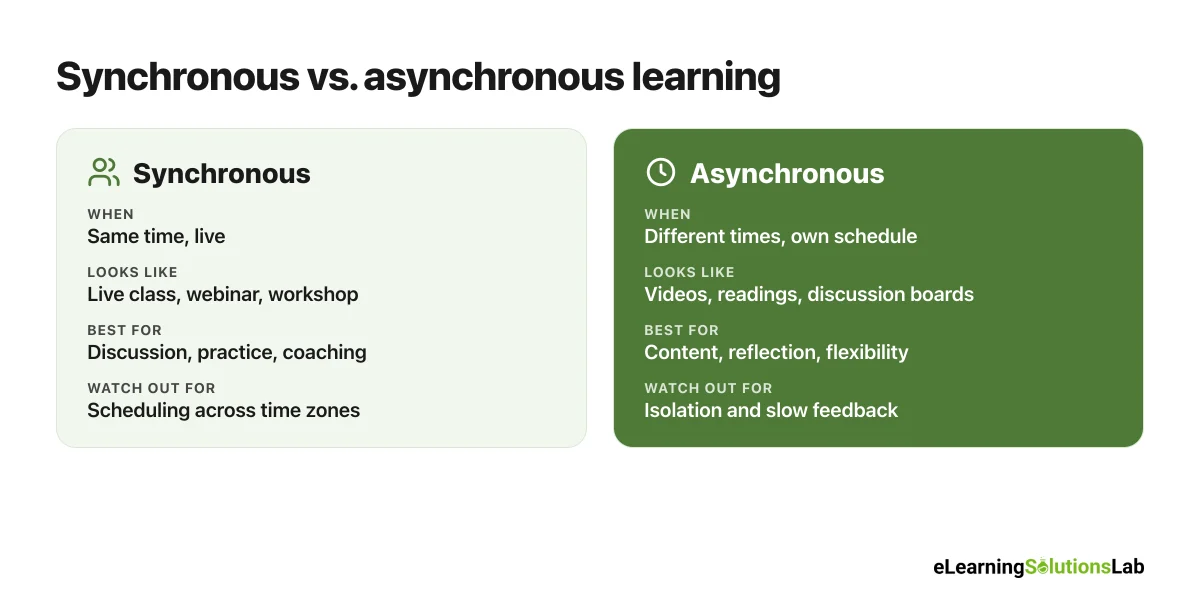
The simplest way to tell them apart: synchronous learning happens at the same time, and asynchronous learning happens at different times. Here’s how they compare, along with the two formats that mix them.
| Format | When learners meet | Best for | Watch out for |
|---|---|---|---|
| Synchronous | Everyone at the same time, live (in person or on video) | Discussion, practice, coaching, relationships | Hard to schedule across time zones and shifts |
| Asynchronous | Never at the same time; each person works on their own schedule | Content, reflection, flexibility, large or global groups | Isolation, slow feedback, procrastination |
| Blended | A planned mix of asynchronous work and live sessions | Most programs that need both content and practice | More design work to connect the two parts |
| Hybrid | Some people in the room and others joining the same live session online | Mixed in-person and remote groups | Remote participants can feel left out |
So which is better? Neither, on its own. Synchronous learning is great for discussion, practice and building relationships. Asynchronous learning is great for content, reflection and flexibility. And most strong programs actually use both, which is what blended learning is all about.
12 Asynchronous Learning Examples
Most guides list the same three examples (recorded lectures, discussion boards, quizzes). So here are 12 you can actually copy, split by setting, with a tip for each.
Higher education
| Example | What it looks like | Tip |
|---|---|---|
| 1. Chunked lecture videos | A 50-minute lecture split into five 8-minute videos, each with a 2-question check | Put the key takeaway in the video title |
| 2. Discussion with a twist | Learners post a response to a case by Wednesday, then reply to two classmates who disagree with them | Ask for a position, not a summary |
| 3. Annotated reading | The class annotates the same article together in a shared tool, adding questions and examples | Seed it with two or three questions of your own |
| 4. Staged project | A research paper submitted as a topic, outline, draft and final, with feedback at each stage | Grade the stages, not just the final paper |
K-12 schools
| Example | What it looks like | Tip |
|---|---|---|
| 5. Asynchronous learning day | On a snow day, students complete a short video lesson, a practice sheet and a reading log at home | Keep it to about half a normal school day’s work |
| 6. Video response | Students record a 1-minute explanation of how they solved a math problem | Give a simple checklist for what to include |
| 7. Choice board | A grid of 9 activities (read, watch, build, write) where students pick 3 to complete in the week | Mark which ones are required |
| 8. Digital portfolio | Students add one piece of work each week with a short reflection on what they learned | Share good examples so students see what “good” looks like |
Corporate and workplace training
| Example | What it looks like | Tip |
|---|---|---|
| 9. Onboarding path | New hires work through short modules on tools, policies and products over their first two weeks | Pair it with a buddy for questions |
| 10. Compliance refresher | A 15-minute annual course with scenarios and a short assessment | Use realistic scenarios, not just policy text |
| 11. Product update micro-course | A 5-minute video and quiz released to sales and support on launch day | Add a one-page job aid people can keep |
| 12. “How I used it” post | 30 days after a course, learners share one real example of applying it in a team channel | Ask managers to react to posts |
For more on the workplace side, see our guides to on-demand training and microlearning examples.
Benefits and Challenges of Asynchronous Learning
Benefits
- Flexibility – learners fit study around work, family and different time zones.
- Self-pacing – people can rewatch what’s hard and move quickly through what they already know.
- Time to think – written discussions usually get more considered answers than a live “any questions?”
- Accessibility – captions, transcripts and replay genuinely help learners with disabilities and second-language speakers.
- Scale – one well-built course can serve 20 or 20,000 people.
- A record of learning – posts, submissions and quiz data show who is on track.
Challenges and how to fix them
| Challenge | Practical fix |
|---|---|
| Feeling isolated | Weekly discussion or peer review, plus a short welcome video from the instructor |
| Procrastination | Weekly deadlines, a progress bar and reminder emails before each due date |
| Slow or missing feedback | A published feedback schedule (for instance, replies within 48 hours) and weekly recap videos |
| Low engagement with videos | Videos under 10 minutes, each followed by a task or question |
| Academic integrity and AI | Personal, applied and staged assessments (see the next section) |
| Tech and access problems | Mobile-friendly design, transcripts and a simple “how this course works” page |
How to Make Asynchronous Learning Actually Work
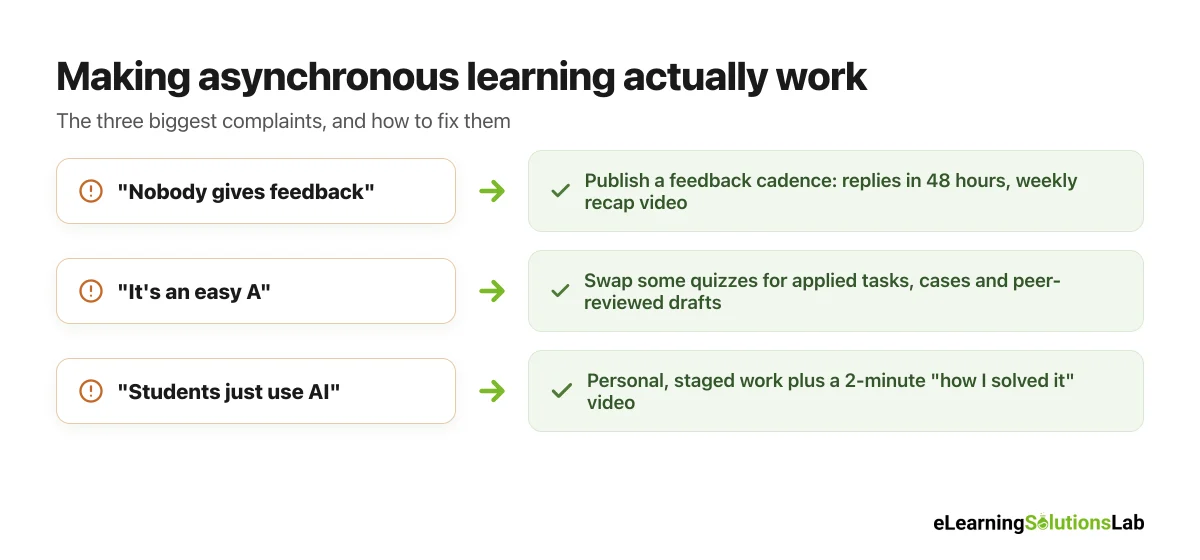
If you read what students and faculty say about async courses on forums like Reddit’s r/Professors, the same three complaints come up again and again. Here’s how to fix each one.
1. “Nobody ever gives feedback”
This is the number one complaint from learners. You can fix it with a simple, published feedback cadence:
- Reply to discussion posts within 48 hours on weekdays, even briefly.
- Post a 3-minute weekly recap video covering common mistakes and good examples from the week.
- Return graded work within a week, so that learners can use the feedback on the next task.
- Use rubrics and comment banks to keep feedback fast and consistent.
2. “It’s an easy A”
Faculty worry that async courses turn into click-through quizzes. But the fix isn’t more quizzes. It’s better tasks. You can replace some multiple-choice checks with short applied work: a case analysis, a worked problem with reasoning, a peer-reviewed draft or a short recorded explanation.
3. “Students just use AI to do it”
You can’t really ban AI in an asynchronous course, given that nobody is watching. So the more useful question is how to design assessments that still show real learning:
- Make it personal – ask learners to apply the idea to their own job, school or community.
- Grade the process – collect an outline, a draft and a final version, not just the final answer.
- Add a short voice or video explanation – 2 minutes on “how I solved this” is hard to fake.
- Use course-specific material – refer to the week’s discussion, case or data set.
- Be clear about allowed AI use – for instance, “AI is fine for brainstorming, but cite it and explain what you changed.”
To give you a concrete example, at eLearning Solutions Lab, we don’t simply turn slides into self-paced modules. We plan the feedback points and the applied tasks into the storyboard first, so that every module ends with something learners actually have to do and someone actually responds to.
How to Design an Effective Asynchronous Course in 6 Steps
Step 1: Start with what learners should be able to do
Write 3 to 5 outcomes as actions, for example “write a customer apology email that follows the 4-step model.” Everything else in the course should build toward them.
Step 2: Set a weekly rhythm
Pick the same release day and deadlines every week, so that learners can plan around them. A common pattern is: materials on Monday, discussion post by Wednesday, replies and task by Sunday.
Step 3: Keep content short and chunked
Break lectures into videos of about 5 to 10 minutes, each with one clear point and a quick check. Long recordings are usually where async learners drop off.
Step 4: Build in interaction
Plan at least one peer interaction per week: a discussion prompt, a peer review or a group task. Our guide to social eLearning has 10 ideas you can use.
Step 5: Plan feedback before you build
Decide when and how learners will hear from you each week, and put it in the course calendar. You have to treat feedback as part of the design, not an extra.
Step 6: Track and nudge
Check LMS data each week for people who haven’t logged in or are falling behind, and send a short personal message. In practice, a quick “noticed you haven’t started module 3, need anything?” really does bring people back.
Asynchronous Learning Across Time Zones and Global Teams
Asynchronous learning truly shines when your learners are spread across the world. A team in Manila, London and New York will never share a convenient live hour, but they can all work in the same course.
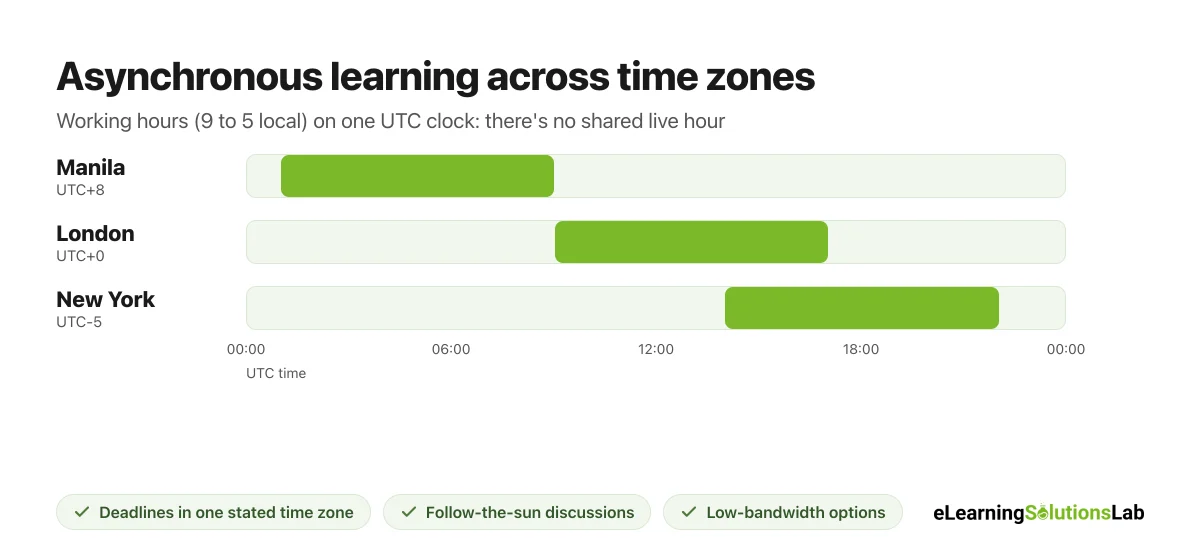
- Set deadlines in one time zone and say which one – for instance, “Fridays, 11:59 p.m. UTC.”
- Use “follow-the-sun” discussions – each region adds to the thread during its own day, so the conversation keeps moving.
- Design for low bandwidth – offer transcripts, audio-only versions and downloadable PDFs alongside video.
- Write plainly – short sentences and fewer idioms help second-language learners and make translation easier.
- Rotate any optional live sessions – so that the same region isn’t always joining at midnight.
If you’re rolling out training in several languages, our guide to multilingual eLearning covers the localization side.
What the Research Says About Asynchronous Learning
The evidence is genuinely mixed, and it’s worth knowing why.
| Study | What it found | What it means for you |
|---|---|---|
| U.S. Department of Education meta-analysis (2010) | Purely online learning and face-to-face learning produced similar results on average (effect size +0.05) | Online and async formats can work as well as the classroom |
| Community College Research Center (Xu and Jaggars, 2011-2014) | Community college students in online courses had higher dropout rates and lower grades than in face-to-face sections | Less-prepared learners usually need more structure and support |
| CCRC, Los Angeles community colleges (2025) | The negative effects of online courses on completion and passing lessened or disappeared after the pandemic | Better-designed online courses can close the gap |
| MIT and Harvard MOOC data (Reich and Ruipérez-Valiente, 2019) | Low completion rates in open online courses hadn’t improved over six years | Fully self-directed courses with no support tend to lose most learners |
So the honest takeaway is this: asynchronous learning can work as well as classroom learning, but it doesn’t happen automatically. Learners who are less experienced, busy or less confident tend to need more structure, more feedback and more human contact, not less. That’s exactly why the fixes in this guide matter.
Free Asynchronous Learning Activity and Feedback Template (PDF)
Free download – no email needed
Asynchronous Learning Activity and Feedback Template
A printable template with a weekly rhythm planner, a library of 12 asynchronous activities, a feedback cadence plan, an AI-resistant assessment checklist and a time-zone checklist, so that you can plan your next async course or module in one sitting.
In one line: asynchronous learning lets people learn on their own schedule, and it really works when you add a steady weekly rhythm, real applied tasks and feedback that actually arrives on time.
Want self-paced courses people actually finish?
At eLearning Solutions Lab, we design asynchronous courses with short modules, applied tasks and built-in feedback points, so that learners stay engaged without a live session.
Our custom eLearning development services build the courses, and our instructional design services make sure every module supports a real performance goal.
Explore custom eLearning developmentSee our instructional design services
Related Reading
- Blended learning – mixing asynchronous work with live sessions.
- On-demand training – self-paced learning for the workplace.
- eLearning delivery – 7 delivery methods and how to choose.
- Social eLearning – adding peer learning to self-paced courses.
- Scenario-based eLearning – applied practice that’s hard to fake.
- AI in eLearning – using AI well in course design.
The Author

Book A Discovery Call
Our Learning Advisors are happy to walk you through your project step-by-step — content, timeline, and fixed pricing.
Get Your Free QuoteNo obligation — just a focused conversation. Proposal within 24 hours.
You may also like
What is a Learning Experience Designer? Role, Skills, Salary and How to Become One (2026)
If you've seen "learning experience designer" on a job board and wondered…
What is VILT? A Practical Guide to Virtual Instructor-Led Training
VILT sounds like a simple acronym. But search for it and you'll get an IT…