

You can ask most managers who on their team can run a paid campaign, analyze a dataset, or step in when a key person leaves, and you’ll often get a pause followed by just a guess. That gap alone usually surfaces at the worst time, like when a project stalls, a deadline slips, or someone hands in their notice.
Skills mapping replaces that guesswork with a clear picture of the skills that your people have, skills your roles and goals need, and where the two don’t usually line up.
In this guide, we explain what skills mapping is and how it differs from a skills matrix and competency mapping. It then walks through how to build one step by step, and actually includes a free template you can copy.
Short on time? Grab the free template.
Updated October 2026.
In This Article
What is Skills Mapping?
Skills mapping is the process of identifying the skills a team or organization has, comparing them with the skills its roles and goals require, and recording the result in a visual map or matrix. Organizations can use it to spot gaps and plan training, hiring, and internal moves.
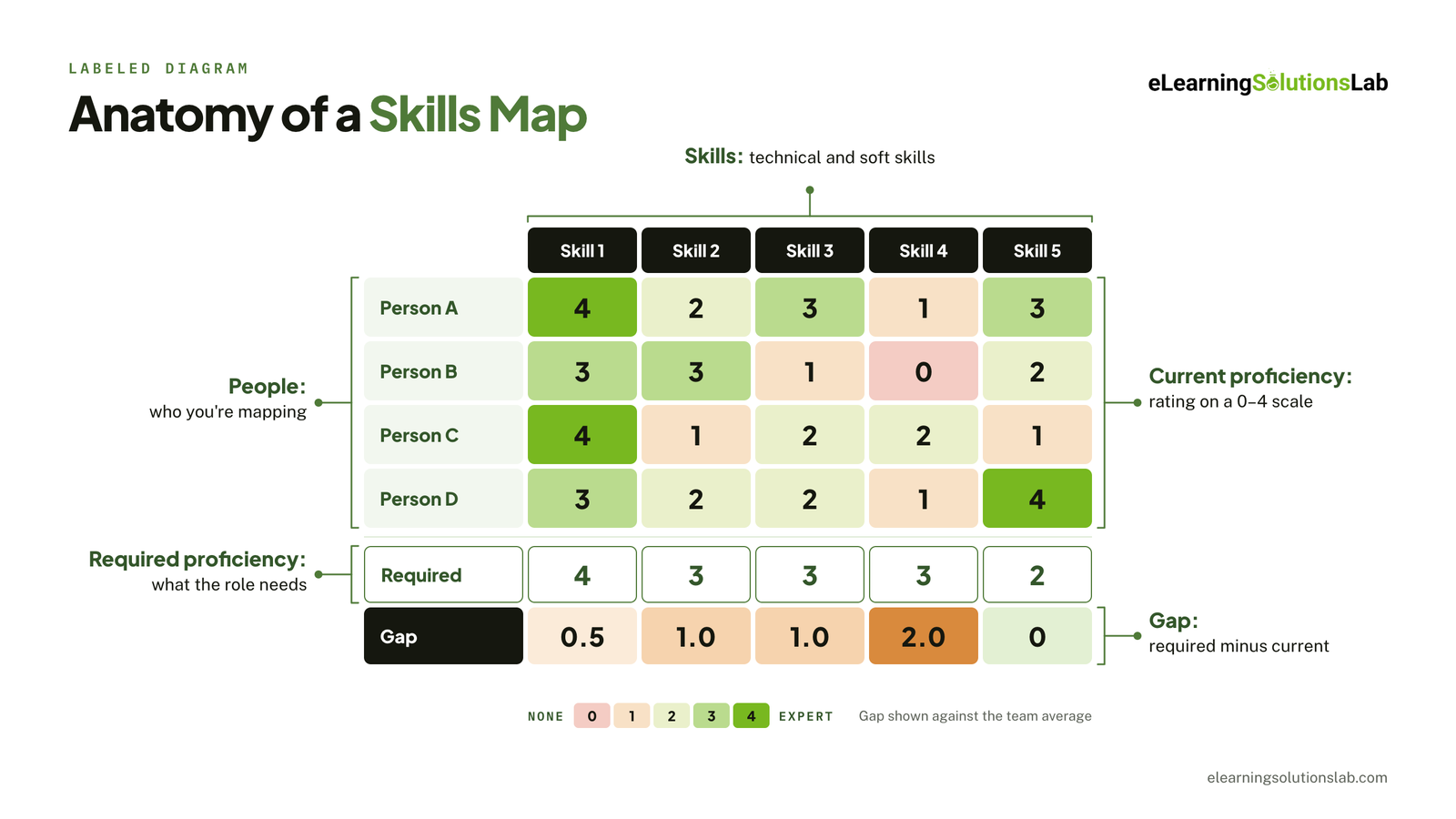 In practice, a skills map is usually a grid, where people are listed down one side, skills across the top, and each cell shows a proficiency rating. It’s a useful map that records five things:
- People – individuals or roles being mapped.
- Skills – technical and soft skills that matter for the work.
- Current proficiency – each person’s present level, on a defined scale.
- Required proficiency – level the role or goal calls for.
- Gaps – difference between the required and current levels.
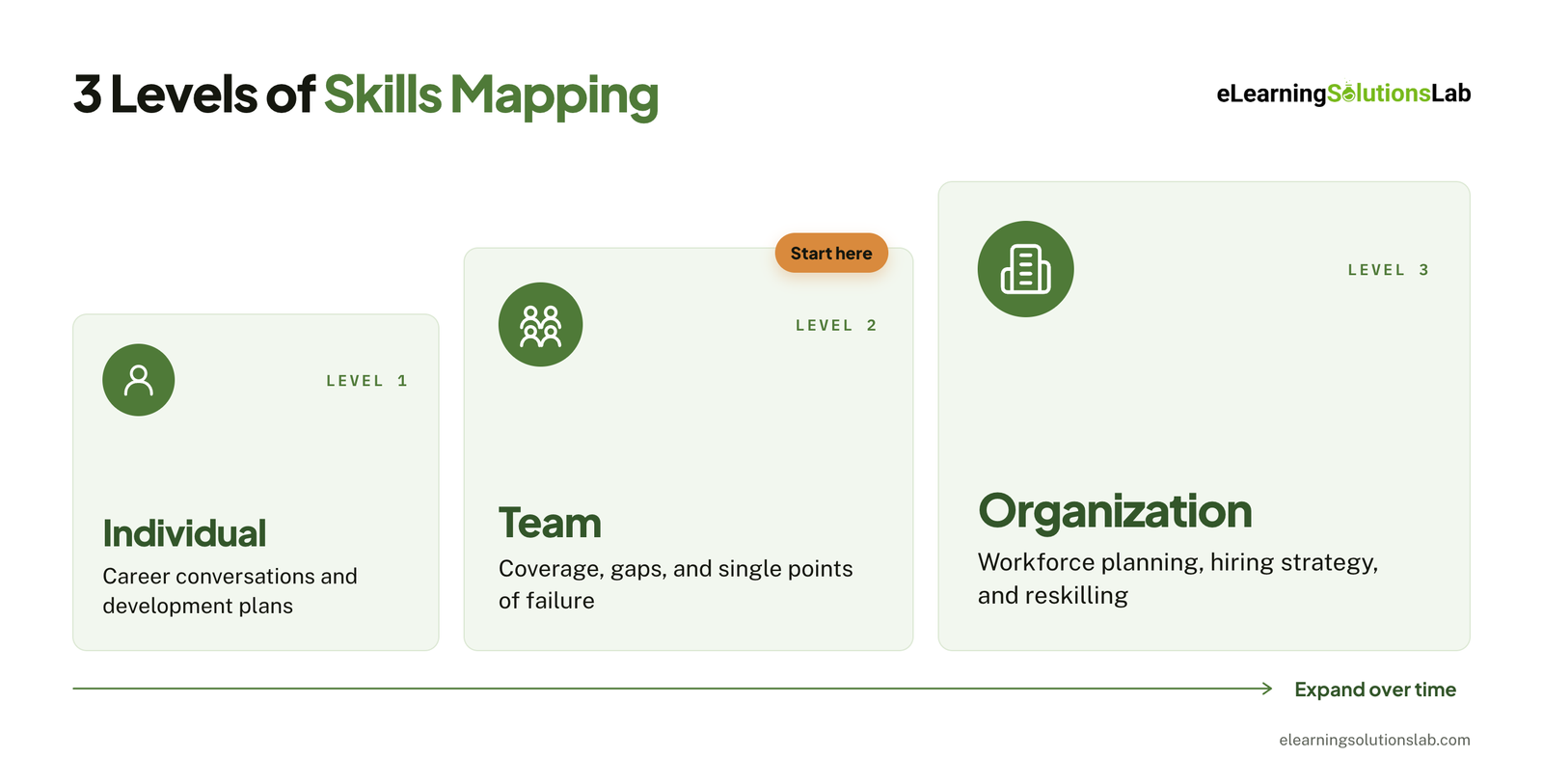
You can actually map skills at three levels: an individual map to help support career conversations and development plans, a team map to show coverage, gaps, and single points of failure, and an organization-wide map to help inform workforce planning, hiring strategy, and reskilling programs.
Most companies would start with one team and expand from there.
Skills Mapping vs. Skills Matrix vs. Competency Mapping vs. Skills Gap Analysis
These four terms are often used interchangeably, so knowing the exact difference can help you choose the right approach and explain it clearly to your stakeholders.
| Term | What it is | Main output | When to use it |
|---|---|---|---|
| Skills mapping | The overall process of identifying the skills you have and the skills you need, then comparing the two | A complete picture of skills, levels, and gaps across people or roles | Planning training, hiring, restructuring, or a new strategic initiative |
| Skills matrix | The grid or tool that records the map, with people in rows, skills in columns, and ratings in the cells | A spreadsheet or visual heatmap | Day-to-day tracking of who can do what, and for staffing projects |
| Competency mapping | A broader version of mapping that covers behaviors, knowledge, and attitudes tied to a role, not just skills | Role profiles or competency frameworks | Defining what “good” looks like for a role, for performance reviews, and for leadership development |
| Skills gap analysis | The comparison step: the required level minus the current level | A prioritized list of gaps with recommended actions | Deciding where to invest in training or hiring |
This is how they fit together: skills mapping is the end-to-end process, while skills matrix is where you record the actual results, and skills gap analysis, essentially, is how you interpret them.
Competency mapping may sit alongside all three and is pretty useful when your role depends as much on how someone works as on what they can do. Like having a project manager’s ability to handle stakeholders is one example.
In short
The matrix is the artifact, mapping is the process, and gap analysis is what you do with the result.
Why Skills Mapping Matters
A skills map is truly worth building if it actually changes decisions. Here’s where it typically pays off.
1. It surfaces gaps before they hurt delivery. You can see which skills are missing or thin before your project depends on them, rather than just discovering the problem mid-launch.
2. It makes training spend targeted. Instead of simply sending everyone on the same generic course, you can direct budget to specific skills and people where the gap matters most. That focus also makes it easier to prove eLearning ROI, since you can show exactly which gaps each program closed.
3. It informs hiring decisions. Having a clear map will show whether to build a skill through training, buy it through hiring, or borrow it through contractors or another team. It also helps hiring managers write job descriptions around the skills they actually need. Once new people join, the same map shows what their employee onboarding and training should cover first.
4. It reduces single points of failure. If only one person can do a critical task, your skills map makes that risk visible. You can then plan cross-training or succession before that person moves on.
5. It supports internal mobility and career growth. When your employees can see which skills their role requires, they may know what to develop to get there. Organizations would also fill roles internally by finding these people with adjacent skills, then preparing them for the next step through programs like leadership development eLearning.
6. It keeps pace with changing work. As roles evolve, especially with the growth of AI and data tools, you need a map that’s regularly updated and shows which emerging skills your team already has and which ones you need to build.
How to Create a Skills Map in 7 Steps
Here is a step-by-step process for creating a skills map.
1. Define the Goal and Scope
You can start with the decision of what the map needs to support, like planning your next year’s training budget, staffing a new initiative, preparing for a reorganization, or building succession plans.
The main goal is to determine which skills you need to map and how much detail you need.
Then, set the scope, given that mapping one team first is usually the best way to test your scale and template before rolling it out more widely.
2. Identify the Required Skills
List all the skills the work needs now and over the next 12 to 18 months – you can get them from useful sources, including:
- Role profiles and job descriptions
- Business strategy and team goals
- Recent job postings for similar roles
- Conversations with managers and top performers
You need to aim for 8 to 15 skills per team. And group them as technical and soft skills, and be specific about each: like “paid social advertising” is easier to rate than “digital marketing” skills.
3. Choose a Proficiency Scale
Most organizations will use four or five levels, but what really matters most is that each level is defined in observable terms, like “works independently on complex tasks,” rather than just vague labels like “good” or “advanced.”
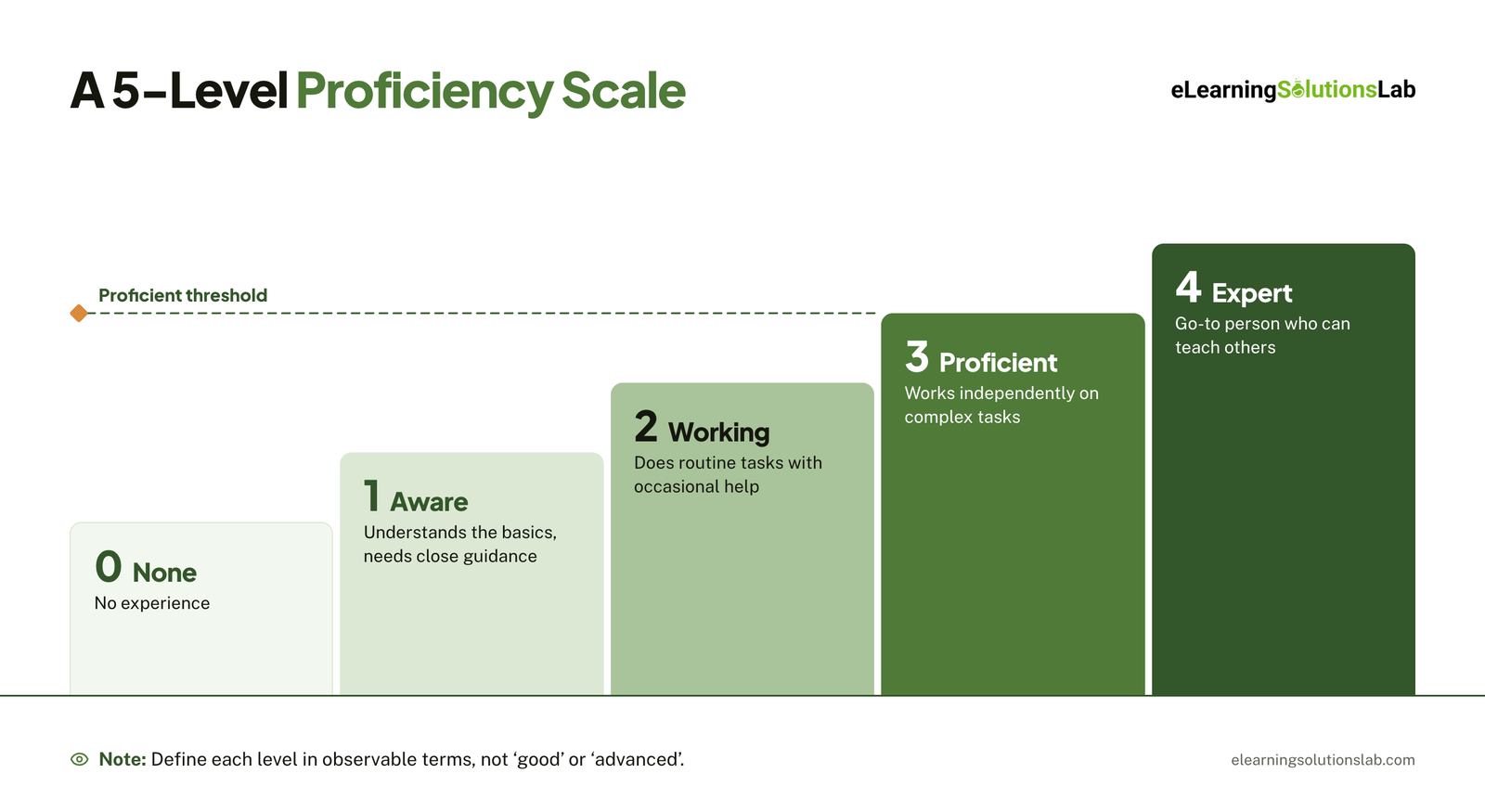 Clear definitions can really make ratings consistent across people and managers.
At this stage, you also have to set the required level for each skill, either per role or as a team target, like “at least two people at level 3.”
4. Collect Current Skills Data
You can gather ratings for each person against each skill. For instance, a combination usually works best: employee self-assessment, manager review, and evidence like certifications or work samples for their critical skills.
Then explain the purpose to employees before you start. People would rate themselves more honestly when they know that the skills map is for development and planning, not just performance reviews.
5. Build the Skills Map
You can enter the data into a matrix with people in rows, skills in columns, and ratings in the cells. Then add rows for the number of people at the required level and target, and simply use conditional formatting to turn the grid into a heatmap.
6. Analyze the Gaps
You can read the map at three levels:
- Individual gaps – where a person falls short of their role’s requirements.
- Team gaps – where too few people meet the target for a skill.
- Risk gaps – where a critical skill depends on a single person.
You can then prioritize gaps by business impact. For instance, a missing skill that blocks next quarter’s goal matters more than just a small shortfall in a nice-to-have.
 7. Act and Review
You can turn each priority gap into an action with an owner and a deadline. The common options are to train through courses or certification, mentor by pairing with an internal expert, hire for skills you need permanently, or borrow through contractors or another team.
When training is the right fix, build it around the specific gap rather than a general topic. Our guide on how to create effective eLearning courses walks through the process, and choosing the right learning models helps match the format to the skill, such as hands-on practice for technical skills and coaching for soft skills. If your team doesn’t have the capacity to design this in-house, instructional design services can turn priority gaps into targeted training.
Finally, you have to schedule a review. Then refresh the skills map every 6 to 12 months, and also after major changes like a new strategy, team restructuring, or new tools. Between reviews, track completions and results so you can see which gaps are actually closing. Our guide on how to track employee training covers the metrics worth capturing.
Free Skills Mapping Template
Skip the setup and start mapping right away. Our free skills mapping template follows the 7 steps above, with the formulas, dropdowns, and formatting already built in, so you can map your first team in under an hour.
How to Use It
- Make a copy and start with the “Start Here” tab, then replace the sample skills, roles, and scale definitions with your own.
- Enter your team and collect ratings using self-assessment, manager review, and evidence.
- Set a target for each skill, then review the dashboard and gap analysis and fill in the action plan.
The template works best for a single team or up to a few dozen people.
How to Collect Accurate Skills Data
A skills map is only as reliable as the ratings in it. So having inflated or inconsistent data will lead to the wrong training, wrong hires, and gaps that don’t really appear until it’s too late. Using several sources of data makes the entire skills map much more trustworthy.
Self-Assessment
You can ask employees to rate themselves – which is the fastest way to collect data and gives people enough voice in the process. The weakness here apparently is bias.
Given that people with less experience in a skill may often overrate themselves because they don’t yet know what expertise looks like. Strong performers would sometimes underrate themselves for the opposite reason.
You can reduce this bias by:
- Defining each level with concrete, observable examples rather than just labels like “intermediate”.
- Asking people to give recent examples of using the skill at the level they chose.
- Making it clear that ratings are for development and planning, not just for pay or performance reviews.
Manager Validation
You can have each manager review their team’s self-ratings and add a second rating. Given that most ratings will match or be close. So when they differ by two or more levels, you can have a short conversation to agree on a final rating.
These discussions would often surface useful information, like skills a manager didn’t know about or work an employee is underselling.
Evidence-Based Signals
For skills that are very critical to the business, back up ratings with evidence:
- Certifications and completed training
- Work samples or portfolios
- Project history, such as who led or delivered similar work
- Short practical tests or skills assessments, such as scenario based eLearning exercises that show how someone handles a realistic task
Evidence takes more effort than usual, so you need to focus on the skills where an inaccurate rating would be most costly.
AI-Inferred Skills
Some skills platforms may now infer skills automatically from résumés, job histories, learning records, and work systems. This is actually useful at scale given that it can create a starting map for hundreds or thousands of people without having to do manual surveys.
However, inferred skills can also be outdated or incomplete, so you have to treat them as a draft that employees and managers confirm.
Recommended Combination
For most teams, the most practical approach is having self-assessment plus manager validation for every skill, and evidence for critical skills. It’s usually fast enough to repeat each review cycle and accurate enough to make decisions with.
In one line
Define the skills you need, rate your people on a clear scale, compare the two, act on the biggest gaps, and refresh the map regularly so it stays useful.
Ready to turn skill gaps into training that closes them?
At eLearning Solutions Lab, we design and build targeted courses around the gaps your skills map uncovers, for office, remote, frontline, and global teams. Our custom eLearning development services cover design, development, and QA in one team.
Need somewhere to deliver and track it? Levantra LMS, our cloud based LMS, assigns training paths by role or location, gives managers a view of their own teams, and issues verifiable certificates for every completion.
See our custom eLearning development servicesBook a Levantra LMS demo
Related Reading
- Learning models – 12 frameworks for designing training that works.
- How to create effective eLearning courses – a step-by-step guide from objectives to launch.
- How to track employee training – the metrics worth capturing after training.
- Leadership development eLearning – preparing people for their next role.
- eLearning ROI – how to connect training to business results.
The Author

Book A Discovery Call
Our Learning Advisors are happy to walk you through your project step-by-step — content, timeline, and fixed pricing.
Get Your Free QuoteNo obligation — just a focused conversation. Proposal within 24 hours.
You may also like
Skills Matrix Template: How to Build One (+ Free Excel & Google Sheets Templates)
When someone calls in sick, your project needs a specialist, or an auditor asks…
How to Track Employee Training: 4 Methods + Free Tracker (2026)
Quick answer To track employee training, list each employee and the training…