

L&D staff augmentation is a staffing model where an external eLearning provider supplies their vetted learning professionals (their in-house eLearning specialists) — instructional designers, eLearning developers, LMS admins, and facilitators — who will work under your direction, inside your team and processes, for a defined period of time.
You manage the work, but the eLearning provider handles sourcing, payroll, benefits, and employment compliance.
In this guide, we cover whether staff augmentation for L&D works for you, what it costs, when it’s the wrong call, and the disqualifiers most eLearning vendors leave out.
In This Article
- What is L&D staff augmentation?
- Augmentation vs. outsourcing vs. managed services vs. permanent hire
- When L&D staff augmentation is the right call
- When L&D staff augmentation is the wrong call
- What does L&D staff augmentation cost?
- Contractor vs. permanent hire: the break-even math
- Roles you can augment and what to specify
- How to vet an L&D staff augmentation provider
- Contracts, compliance, and who owns the source files
- The first 30 days
What is L&D Staff Augmentation?
An L&D augmented professional is embedded in your team. They attend your standups, use your templates, get assigned work in your project track, and directly report to your L&D manager.
Functionally, they actually operate like an employee, but the eLearning provider is the employer of record, carrying payroll, taxes, benefits, and misclassification risk, while you fully keep direction of the work.
What L&D staff augmentation isn’t:
- Not outsourcing — in outsourcing, you basically hand over a deliverable and a deadline; the vendor will decide how to get there, whereas in augmentation, you decide and you stay accountable for the output. If handing over the deliverable is what you actually want, elearning outsourcing is the model to compare against, not this one.
- Not managed learning services — MLS providers take over a whole function or program area under their own leadership, while augmentation adds capacity to yours.
- Not temp staffing — the screening bar is higher here, and roles are specialists only, so you’re filling a skill, not just a seat in the room.
- Not a recruiter — no placement fees, no permanent req; most eLearning providers will let you convert someone later for a fee.
Typical engagements run three to twelve months, at anything from two days a week to full-time equivalent. Shorter than about eight weeks and ramp-up eats the value. Longer than eighteen months and you should be asking whether you’re renting something you ought to own.
Augmentation vs. Outsourcing vs. Managed Services vs. Permanent Hire
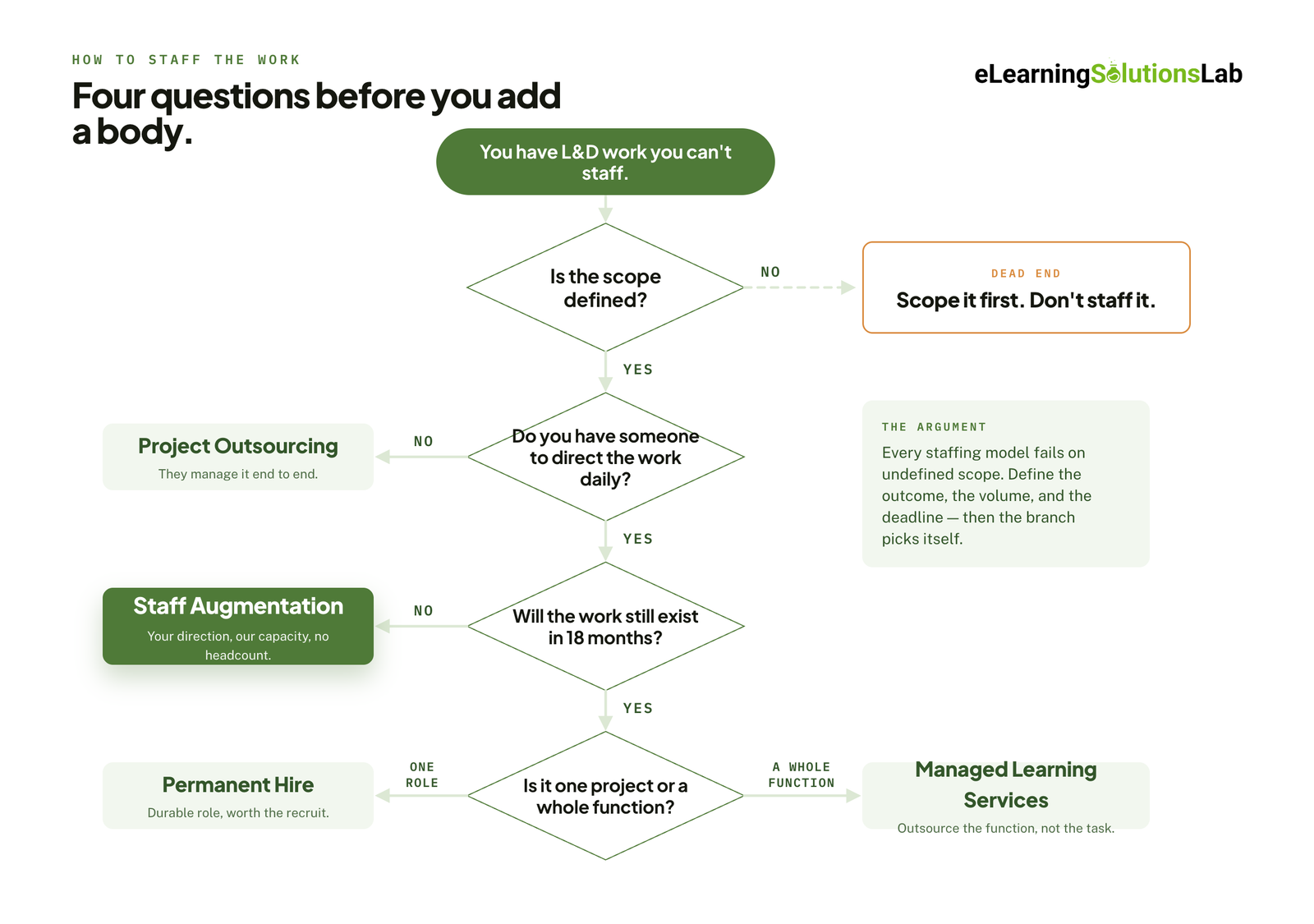
Here’s a quick comparison of these four models solving four different problems.
| Staff Augmentation | Project Outsourcing | Managed Learning Services | Permanent Hire | |
|---|---|---|---|---|
| Who directs the work | You | Vendor | Vendor, under an agreed scope | You |
| Cost structure | Variable — hourly or monthly FTE rate | Fixed fee per project or deliverable | Retainer, often per-learner or per-program | Fixed — salary plus loaded costs |
| Time to start | 1–3 weeks | 4–8 weeks (scoping and SOW) | 2–4 months | 3–6 months |
| Ramp-up burden | On you — onboarding, context, review cycles | Minimal | Low after transition, heavy during it | Highest — 60–90 days to full productivity |
| Best fit | Known scope, missing hands or a specific skill | Discrete deliverable you don’t want to manage | An entire function you want off your plate | Steady, permanent workload central to strategy |
| Exit cost | Low — notice period, typically 2–4 weeks | None past delivery | High — transition-out is a project of its own | Highest — severance, lost knowledge, re-hiring |
Staff augmentation wins when you actually know what needs building and often lack the capacity or specialized skills to build eLearning courses. So you keep quality control, institutional context stays in-house, and you stop paying when any surge ends.
Project outsourcing wins when the actual deliverables are well-defined and self-contained, like having 12 compliance modules from an existing script. Here, you trade control for not having to manage it all.
Managed learning services win at scale, so when the problem is that L&D operations consume your team instead of having a single project. Typically, it’s a multi-year commitment with real transition costs on both ends.
A permanent hire is best whenever the work is ongoing and strategic. Nothing here argues otherwise — augmentation is what you do while the req is open, or instead of opening one you’ll have to close again in a year.
The mistake worth naming: buying managed services to solve a capacity spike. It’s slower to start, harder to exit, and priced for a problem you don’t have.
 When L&D Staff Augmentation Is the Right Call
These are five situations where it clearly says L&D staff augmentation is the correct model.
1. Training demand spike with a hard date
For instance, having a compliance deadline, LMS go-live, M&A integration, or a product launch with a training dependency — all of this work has a deadline, and missing the date really might cost more than hiring an eLearning provider. Where the spike is about volume rather than complexity, compare this against rapid elearning services, which solves the same deadline with throughput instead of headcount.
2. A specialist skill you need once, not forever
xAPI implementation, a VR build, a Rise-to-Storyline migration, accessibility remediation across a legacy library — all these require skills you’ll use for 4 months only instead of a long-term period like 4 years. A Storyline migration in particular needs someone who has actually shipped in the tool, which is a narrower pool than articulate elearning experience on a résumé suggests. And if the “legacy library” is a shared drive rather than a handful of modules, price it as legacy content conversion services before you staff it hourly.
3. Frozen headcount, available project budget
This is pretty common and frustrating, and probably the top reason L&D staff augmentation is needed. Contractors usually sit in opex or project budget, which means that the work can proceed while the req stays closed. So it’s worth confirming the L&D budget first before you build any plan on it.
4. Covering a leave without losing the roadmap
Parental or medical leave on a team, for instance, might mean the roadmap may stop. So having an augmented eLearning designer will hold the line until the returning employee comes back — to progress instead of a backlog.
5. Testing a role before committing to a req
You may suspect you’ll actually need a full-time learning technologist, but six months of augmented capacity will give you enough evidence, and most eLearning providers will allow conversion if the answer turns out to be yes.
The pattern across all five: the work is real and defined, but the need is bounded.
When L&D Staff Augmentation Is the Wrong Call
L&D staff augmentation isn’t the right fit, and could be expensive, if you’re currently in any of these contexts or situations.
1. Your scope isn’t defined yet
If you can’t have someone write down what “done” really looks like for you, you’ll pay a senior premium rate for discovery work you should actually be doing yourself. Augmented staff will execute well against clear direction and burn money if it’s vague. Start scoping first, then staff second — and if the scoping itself is the gap, buy instructional design services for the objectives and storyboard rather than hourly build capacity.
2. Nobody internally has capacity to direct the work
Probably the most common failure — as L&D staff augmentation is essentially managed labor: someone has to answer questions, review drafts, and unblock. So if your only available manager is already at 110%, you haven’t added real capacity; you’ve just added more dependency.
3. The work runs on institutional relationships
For instance, when you facilitate a leadership training program where the value really is in the facilitator’s history with those leaders, or a needs analysis that depends on knowing which VP actually decides — all these are examples of institutional relationships that hinder the effectiveness of L&D staff augmentation. A contractor can learn your LMS in a week and your politics in about nine months.
4. It’s steady-state, permanent-volume work
So if the workload has been constant for 2 years, let’s say, you’re just renting what you should own — at a premium, with no retained knowledge when the contract ends. Take the hiring fight to your CFO instead, and take elearning roi numbers with you when you do.
5. Your compliance or IP environment can’t accommodate non-employees
There is classified work, certain regulated environments, and systems that legal won’t open to external parties. And in reality, you need to find this out before you even onboard any augmented L&D staff.
Three Signs You Picked the Wrong Model
You’re spending more time managing the contractor than the work would have taken you. The engagement keeps extending without a new scope each time. You’re on your third contractor for the same role. Any of those means the problem is structural, not personnel — and changing contractors won’t fix it.
What Does L&D Staff Augmentation Cost?
Almost nothing published on this topic tells you what augmentation costs. Here are the actual numbers. The ranges move by market and by specialization, but the structure doesn’t, and knowing the structure is what lets you compare two quotes that look nothing alike. For project-priced work rather than hourly capacity, elearning development costs breaks down what moves the number on a custom build.
Bill Rates by Role and Seniority
US onshore, hourly bill rate — it’s what you pay your eLearning provider, not what the contractor takes home.
| Role | Junior (0–3 yrs) | Mid (3–7 yrs) | Senior (7+ yrs) |
|---|---|---|---|
| Instructional designer | $45–65 | $65–95 | $95–140 |
| eLearning developer | $55–75 | $75–105 | $105–150 |
| Learning experience designer | $60–80 | $80–110 | $110–160 |
| LMS / LXP administrator | $45–60 | $60–85 | $85–120 |
| Learning project manager | $60–80 | $80–110 | $110–145 |
| Video / media producer | $55–75 | $75–105 | $105–140 |
| Learning strategist | — | $110–150 | $150–225 |
| Facilitator (day rate) | $900–1,500 | $1,500–2,500 | $2,500–5,000+ |
At full-time equivalent, a mid-level instructional designer at $80 per hour runs roughly $13,800 per month, or $166,000 annualized. That number looks alarming next to a salary line — the break-even section below explains why it isn’t the comparison you want.
Where Does the Money Go?
An example would be a $90/hr bill rate, which typically breaks down something like this:
| Component | Share | On $90/hr |
|---|---|---|
| Contractor pay rate | 60–70% | $54–63 |
| Employer taxes, insurance, benefits | 10–15% | $9–14 |
| Provider overhead (recruiting, screening, admin) | 8–12% | $7–11 |
| Provider margin | 12–20% | $11–18 |
Markup over pay rate usually lands between 1.35× and 1.6×. Below 1.3×, the eLearning provider is either sourcing thin or cutting screening. Above 1.7×, you should really ask what you’re getting for it. It’s a fair question to put to any provider directly, and how they answer tells you a lot.
What Moves a Rate?
- Tool specificity — specialization in the best elearning authoring tools like Storyline, or any specific LMS, can add 10 to 20% over any generalist ID work.
- Regulated industry or clearance — specialty in industries like pharma or financial services adds 15 to 30% to costs.
- Location model — nearshore typically sits 30 to 50% below onshore and offshore 50 to 70%, though timezone and review-cycle costs don’t show up on the invoice. An elearning solutions company philippines engagement is the most common offshore shape for English-language L&D work, and overlap hours matter more than the rate does.
- Duration and volume — a 12-month or multi-resource commitment should earn you 5 to 15% off list.
- Urgency — a two-week start costs more than a six-week one.
- Exclusivity and notice terms — longer notice periods are actually worth negotiating the rate against.
Pricing Models
Hourly time-and-materials is best when scope is likely to move. Cap it with a not-to-exceed figure.
Monthly FTE retainer gives cleaner budgeting for engagements over three months, and usually comes in 5 to 10% cheaper than hourly.
Fixed-fee SOW only works when scope is genuinely locked. You’re buying certainty and paying a risk premium for it.
Temp-to-perm conversion fees typically run 15 to 25% of first-year salary, often waived after 6 to 12 months on assignment. Negotiate this at signing, not at conversion.
Contractor vs. Permanent Hire: The Break-Even Math
“$166,000 annualized” only means something next to the fully loaded cost of the employee you’d hire instead — not next to their base salary, which is the comparison most budget conversations accidentally make.
A permanent senior instructional designer at $110,000 base actually costs roughly:
- Employer taxes and benefits at ~28%: $30,800
- Equipment, authoring licenses, software: $3,000
- Recruiting cost, year one: $16,500
- Ramp cost — 60 to 90 days at partial productivity: ~$18,000
Year-one total: roughly $178,000, arriving three to six months after you open the req. Steady-state from year two: about $144,000.
Against a senior contractor at $120/hr, full-time:
| Duration | Augmented contractor | Permanent hire (loaded) | Verdict |
|---|---|---|---|
| 3 months | ~$62,400 | Not yet hired | Augmentation, clearly |
| 6 months | ~$124,800 | ~$89,000, at partial output | Augmentation, on delivered work |
| 12 months | ~$249,600 | ~$178,000 | Permanent pulls ahead |
| 24 months | ~$499,200 | ~$322,000 | Permanent, decisively |
The crossover sits around nine months at these inputs. Three variables move it:
- Utilization. You pay a contractor only for hours worked. You pay an employee through the quiet weeks too.
- The cost of the hiring lag. Four months of a stalled roadmap is a real number, and it usually doesn’t appear in the comparison at all.
- Duration certainty. If the work might end at month seven, the permanent hire’s exit cost belongs in the model.
The honest conclusion: under about nine months, augmentation is cheaper. Over about eighteen, it isn’t, and the gap widens every month. In between, cost isn’t the deciding factor — certainty is.
Pro Tip
If a finance stakeholder pushes back on the hourly rate, don’t defend the rate — reframe the comparison. The rate is not competing with a salary; it’s competing with a loaded cost that starts four months later. Bring the table above to that meeting, not the invoice.
Roles You Can Augment and What to Specify
The most common mis-hire in L&D augmentation comes from writing the req by job title. “Instructional designer” describes at least four different jobs. Specify the output and the toolchain.
Instructional designer — needs analysis, objectives, storyboards, assessment design. Specify the model you work in (ADDIE, SAM, action mapping), whether they’re writing or reviewing, and what a storyboard means at your organization. The frequent mis-hire is a strong builder with weak design judgment.
eLearning developer — builds the storyboard into a working module. Name the tool explicitly (Storyline, Rise, Captivate, Lectora, iSpring), name the LMS, and name the publishing standard. Ask for source files in their portfolio, not just published links. This role sits closest to custom elearning content development work, and a developer who has only built templated modules will struggle with bespoke interactions.
LMS / LXP administrator — user provisioning, enrollments, SCORM troubleshooting, reporting. Specify the platform by name and version; Cornerstone experience does not transfer to Docebo. Where the need is ongoing rather than a migration, lms support services is usually a cheaper structure than an augmented admin.
Learning strategist — capability mapping, program architecture, measurement design. Senior and expensive, and usually needed in short bursts rather than full-time. If the engagement is under 60 days, an elearning consultant on a defined scope will cost less than an augmented FTE.
Facilitator — delivery, virtual or in-room. Specify audience seniority, session length, and whether they’re delivering your material or adapting it. Adaptation is a design task priced as delivery more often than it should be.
Learning project manager — the role most often skipped and most often needed. If you’re running three or more augmented resources, this is the one that pays for itself.
Need the capacity without the twelve-week req?
We place vetted instructional designers, eLearning developers, and LMS specialists into L&D teams on defined engagements — working in your tools, your templates, and your review cycle, under your direction. Tell us the scope, the toolchain, and the deadline, and we’ll come back with the shortlist and the rate.
How to Vet an L&D Staff Augmentation Provider
Every provider’s website says “vetted.” Here’s how to find out whether that means anything. Ten questions, and the answers matter more than the rate card.
- Do you have a bench, or do you recruit after I sign? Both are legitimate. Only one starts in two weeks.
- Who screens, and what does the screen involve? A portfolio review isn’t screening. A build task or design critique is.
- Can I see the individual’s work, not the agency’s? Agency showreels tell you nothing about the person you’re getting.
- What’s the replacement guarantee, and how fast? Ask for it in the contract with a named timeframe.
- What’s your time-to-shortlist? A specific number, measured, not “quickly.”
- What’s your markup? Providers who won’t answer are telling you something.
- What’s the conversion fee, and when does it lapse? Settle this before day one.
- Who owns the source files? Covered below — it’s the L&D-specific trap.
- Can I speak to a client with an L&D team my size? Enterprise references don’t predict how they’ll handle a team of four.
- What happens when someone underperforms? Ask for the process, not the reassurance.
If you’re running a broader comparison before shortlisting, our roundups of the top elearning vendors and top elearning content providers cover which firms run genuine benches versus which subcontract on demand.
Contracts, Compliance, and Who Owns the Source Files
The part nobody writes about, and the part that costs money when it goes wrong.
W2, 1099, or agency-of-record. Through a provider, the contractor is normally the provider’s W2 employee, and the provider carries misclassification risk. Engage a 1099 contractor directly and that risk is yours. The savings are real and so is the exposure — in the US, misclassification penalties run to back taxes, benefits, and interest.
Co-employment. Directing a contractor’s daily work while the provider employs them creates a joint-employer question. Four practical guardrails: keep the engagement term defined, don’t put them in the performance review cycle, don’t give them internal-only employee benefits or titles, and route HR matters through the provider.
SOW vs. time-and-materials. T&M protects you when scope moves, which in L&D it usually does. A fixed SOW protects you when scope is locked and the risk is overrun. Signing a fixed SOW against an undefined scope combines the worst of both.
Source files — the L&D-specific trap. Your contract should say you own the editable project files, not just the published output. A SCORM package you can’t edit is a course with a one-year shelf life. Name the formats explicitly: .story, .aprj, Rise blocks, script documents, raw audio and video, and any Figma or design source. Get it in the MSA, not in an email.
Global engagements. UK work brings IR35 status determination. EU and UK engagements bring GDPR data-residency questions if the contractor touches learner records. Offshore engagements need an employer-of-record arrangement, which most established providers already have — ask which entity actually employs the person.
First 30 Days
Augmentation fails on onboarding far more often than on talent. Most of that is avoidable in one prep afternoon.
Before day one. System access requested and approved (this alone loses a week at most enterprises). Authoring tool licenses assigned. Brand and style guide, template library, and any existing course exemplars shared. One named internal owner who is accountable for unblocking them.
Week one. Walk the scope, not the org chart. Introduce the SMEs in person or on a call — an email introduction gets ignored. Then assign one small, shippable deliverable, finished and reviewed inside the first week. It calibrates quality expectations while the cost of being wrong is still an afternoon.
Weeks two to four. Set a fixed review cadence and a written definition of done, including your review-round limit. Require handover documentation from day one rather than at the end of the engagement, when the person is already half-committed to their next client. The file naming convention, the version control approach, and the decisions log should all exist before there’s anything to record in them.
The pattern underneath all of it: augmentation gives you capacity, not context. Context is the thing you still have to supply, and the 30 days you spend supplying it properly determine whether the other eleven months are worth what you paid.
Related Services
- Custom eLearning development services — when the build is the gap, not the headcount.
- Instructional design services — objectives, assessment, and storyboard before anything gets staffed.
- Rapid eLearning services — when volume and deadline matter more than added headcount.
- Legacy content conversion services — for a back catalogue rather than a project.
- eLearning outsourcing — how the alternative model is normally structured.
- eLearning development costs — what moves the number on a project-priced build.
The Author

Book A Discovery Call
Our Learning Advisors are happy to walk you through your project step-by-step — content, timeline, and fixed pricing.
Get Your Free QuoteNo obligation — just a focused conversation. Proposal within 24 hours.
You may also like

eLearning Voiceover: Complete Buyer’s Guide (2026)
eLearning DevelopmentInstructional DesignOutsourcing & VendorseLearning…
Top eLearning Companies (2026): LMS, Content, Edtech and Development Firms Compared
An eLearning company can be one of five different kinds of businesses: firms…