


- Published
- Reading time
- 7 min
Filed under Corporate TrainingLMS & Platforms
Every support ticket that says “How do I…?” is a small sign that a customer didn’t learn something they needed. Multiply that by hundreds of customers and you have slower adoption, more tickets, frustrated users and, eventually, churn. That’s the problem customer education is meant to solve.
So here’s a practical guide to customer education. You’ll get a clear definition, how it differs from onboarding and support, why it matters, the types of programs companies typically run, what to look for in a customer training LMS, a step-by-step way to build your program, and the metrics that show it’s working. You can also download a free customer education program planner, no email needed.
Short on time? Jump to the definition, see the 7 steps or download the planner.
Updated November 2026.
In This Article
- What is customer education?
- Customer education vs. onboarding vs. support
- Why customer education matters
- Customer education across the customer journey
- Program types and formats
- Choosing a customer training LMS
- How to build a program in 7 steps
- Metrics that matter
- Customer Education Examples
- Free program planner
What is Customer Education?
Customer education is the structured training a company provides to its customers (and often partners) so that they can use its product or service successfully. It typically includes onboarding courses, how-to videos, a help center, live training, certifications and a customer academy, all designed to help customers get value faster and keep getting it.
It’s sometimes called customer training, customer enablement or a customer academy. In practice, the names overlap, and what matters is the goal: customers who know how to succeed with what they bought.
Customer Education vs. Onboarding vs. Support
| Customer onboarding | Customer education | Customer support | |
|---|---|---|---|
| When | First days and weeks | The whole customer lifecycle | When a problem comes up |
| Goal | First success with the product | Ongoing skill, adoption and value | Fix a specific issue |
| Approach | Guided setup and a short path | Courses, paths, certifications, live sessions | Tickets, chat and calls |
| Scale | Often one-to-one or small group | One-to-many, self-paced | One-to-one |
So onboarding is one part of customer education, and support is what customers need when education hasn’t reached them yet. Our guide to customer onboarding training covers the first-weeks part in detail. This guide looks at the whole program.
Why Customer Education Matters
A good customer education program typically pays off in four places:
- Faster time to value. Customers who learn the product quickly see results sooner, and are more likely to stay.
- Fewer support tickets. Every “how do I” question answered by a course or guide is one less ticket.
- Higher adoption. Customers who know more features tend to use more of the product.
- Retention and expansion. Customers who get real value are easier to renew and upsell.
And it scales in a way people truly can’t, given that one good course can be reused for every new customer. A customer success manager can only run so many calls each week. But a well-built course can train thousands of users at the same time.
Customer Education Across the Customer Journey
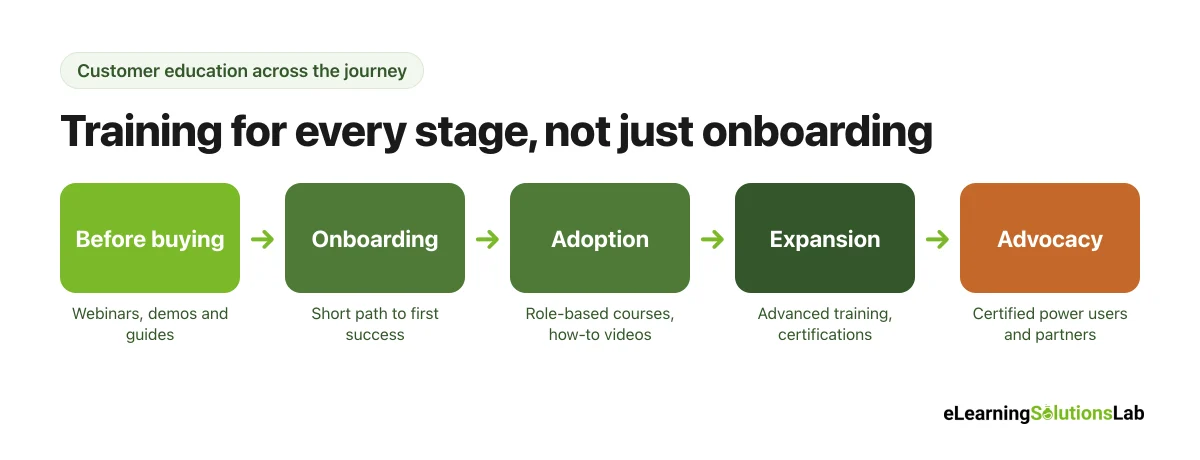
- Before buying: webinars, demos and guides that show what the product can do.
- Onboarding: a short learning path that gets new users to their first success.
- Adoption: role-based courses and how-to videos for deeper features.
- Expansion: advanced training, new feature updates and certifications.
- Advocacy: certified power users and partners who help train others.
Customer Education Program Types and Formats

| Format | Best for | Example |
|---|---|---|
| Self-paced courses | Core skills every user needs | A 20-minute “Getting started” path |
| Video walkthroughs | Showing how to do specific tasks | A 3-minute video on building a report |
| Help center articles | Quick answers at the moment of need | Step-by-step guides with screenshots |
| Live webinars | New features and Q&A | A monthly “What’s new” session |
| Certifications | Power users, admins and partners | A certified administrator program |
| In-app guidance | Learning inside the product | Tooltips and guided tours |
| Customer academy | Bringing it all together | A branded learning portal for all customers |
Most programs genuinely work best as a mix. For instance, a short onboarding path in an LMS, a searchable help center for quick answers, and monthly live sessions for new features.
Choosing a Customer Training LMS
Training customers is different from training employees. You don’t control who they are, they’re not required to take your training, and different customers often need to see different content. So a customer training LMS typically needs:
| Feature | Why it matters for customer training |
|---|---|
| Self-registration or join links | Customers can sign up without you creating every account |
| Separate groups or portals | Each customer or partner sees only their own content |
| Branding | Training looks like part of your product, not a third-party tool |
| Certificates | Recognize admins, power users and partners |
| Reporting by customer | See which accounts are trained and which aren’t |
| Easy content updates | Products change often, so courses have to keep up |
| Mobile access | Customers learn on whatever device they have |
| Integrations (optional) | CRM, product analytics or ecommerce, depending on your model |
If you train customers, resellers or franchisees and want each group to see only its own courses, Learnwick LMS is worth a look. Each customer, reseller or franchisee can have its own group with its own manager and join link, and certificates can carry the partner’s logo and colors. There’s a free plan for up to 30 learners. To be clear about fit, Learnwick doesn’t sell courses or take payments, and it doesn’t currently connect to Salesforce, so if you need paid courses or deep CRM integration, a dedicated customer education platform is the better choice.
How to Build a Customer Education Program (7 Steps)
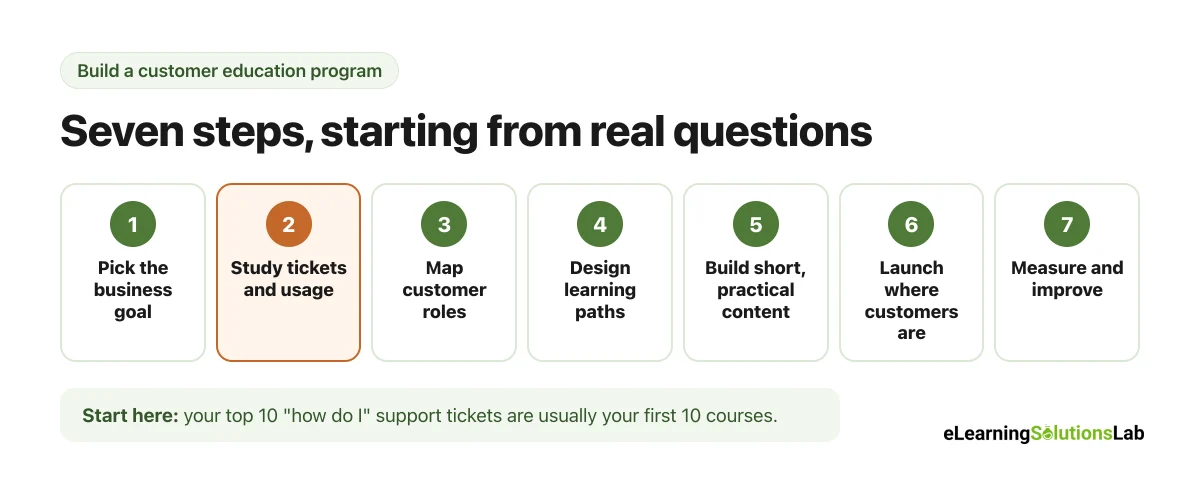
- Find the business goal. Fewer tickets? Faster onboarding? Better renewals? Pick one or two to start.
- Study the data. Look at support tickets, churn reasons and feature usage. The top ten “how do I” questions are usually your first courses.
- Map customer roles. Admins, end users and managers usually need different training.
- Design learning paths. Start with a short path to first success, then add deeper courses.
- Build short, practical content. Video walkthroughs, interactive demos and short courses tied to real tasks.
- Launch where customers already are. Link to training from the product, welcome emails and the help center.
- Measure and improve. You have to keep content current, so track the metrics below and update content as the product changes.
To give you a concrete example, at eLearning Solutions Lab, we don’t simply turn product documentation into a long course. We start with the support tickets and the moments where customers get stuck, then build short, task-based modules for those exact moments, and set them up in a customer-facing LMS with separate groups for each client or partner. So the first courses customers see are the ones that answer what they were about to ask support.
Customer Education Metrics That Matter
| Metric | What it shows |
|---|---|
| Course enrollments and completions | Whether customers are finding and finishing training |
| Time to first value | How fast trained customers reach their first success |
| Support tickets per customer | Whether trained customers need less help |
| Feature adoption | Whether trained customers use more of the product |
| Renewal and expansion rates | The long-term business impact |
| Customer satisfaction (CSAT or NPS) | How customers feel about the product and training |
The strongest evidence usually comes from comparing trained and untrained customers. If trained customers open fewer tickets and renew more often, you have a really clear business case.
Customer Education Examples
Customer education looks different depending on the product and the customer. Here are common formats that actually work, and what each one is good for:
- An online academy – a library of short courses organized by role or product area, often with learning paths for new customers.
- Certification programs – for power users, admins or partners, which also build loyalty and advocacy.
- In-product guidance – tooltips and walkthroughs that teach at the moment of use.
- Live onboarding webinars – group sessions for new customers, recorded for later.
- Short how-to videos – one task per video, easy to find from the help center.
- A searchable knowledge base – written answers for quick, specific questions.
In practice, most strong programs combine three or four of these, so that customers can learn at their own pace and still get help when they need it. For a related approach, see our guide to customer onboarding training.
Free Customer Education Program Planner (PDF)
Free download – no email needed
Customer Education Program Planner
A printable PDF to plan your program: goals, top customer questions, roles and learning paths, formats, an LMS checklist and the metrics to track.
In one line: customer education is structured training that helps customers succeed with your product, and the best programs start from the questions customers are already asking support.
Ready to train your customers at scale?
At eLearning Solutions Lab, we build customer and partner training, from short product walkthroughs to full customer academies, and set it up in an LMS your customers can actually use.
Try Learnwick LMS free, or see our product training eLearning.
Related Reading
- Customer onboarding training – the first weeks, in detail.
- Product training program – building product knowledge.
- How to choose an LMS – what to look for in a platform.
- Video-based eLearning – walkthroughs customers will watch.
- eLearning for franchises – training partners and franchisees.
The Author

Book A Discovery Call
Our Learning Advisors are happy to walk you through your project step-by-step — content, timeline, and fixed pricing.
Get Your Free QuoteNo obligation — just a focused conversation. Proposal within 24 hours.
You may also like
Learning Paths: Types, Examples and How to Build One People Finish
Give a new employee access to a library of 200 courses and say "take what you…
Training Curriculum Development: 8 Steps, Components and a Sample Map
A single course can teach a skill. But most roles need much more than one…