

A new sales rep freezes when a customer gets angry. A nurse hesitates at a critical decision point. A technician just clicked the wrong field in unfamiliar software.
In a classroom, these kinds of mistakes can cost nothing but an awkward silence – so on the job, they cost deals, trust, or worse.
An eLearning simulation closes that gap by letting people practice the actual tasks, make real decisions, and actually see the consequences play out, all before it counts for real.
Unlike any video they simply watch or a quiz to guess through, a simulation puts learners in the situation and asks them to act.
This guide covers what an eLearning simulation is, its main types, when to use it (and when to skip it), and the step-by-step process for actually building your own, and tools to make it happen.
What is an eLearning simulation?
So instead of plainly reading about what to do, learners can do it in a safe digital environment that can mirror the conditions and consequences of the real thing.
Now, this is what separates a simulation from other formats often confused with: like a passive demo that can show the learner what happens while they watch, and a standard quiz checks whether they can remember a fact, but a simulation will truly require them to act and then respond to what they did.
How simulations differ from scenarios and branching scenarios
These three terms can get used interchangeably, but they often describe different things – and getting the distinction will rightly shape how you design your eLearning courses.
A scenario is a story or context that you drop a learner into: a customer complaint, a patient intake, a compliance dilemma. It actually sets the stage but doesn’t necessarily react to choices.
A branching scenario can add decisions, such that the learner can pick a path, and the story can change based on what they choose, often through several layers of consequences.
A simulation goes a step further by actually replicating the actual environment and mechanics of a task, not just the narrative around it. Clicking through the real (or realistic) interface of a software tool is a simulation. Like choosing what to say next in a written customer conversation is a branching scenario.
For instance, in practice, the lines blur, and many of the best courses combine them – so a branching scenario is a kind of simulation when the conversation it models is the skill being trained.
So the useful question isn’t, “which label is correct?” but “how closely does doing this need to mirror the real task?”. Now, the higher the stakes, of course, and the more the doing matters, the further you push toward true simulation.
Types of eLearning simulations
Most eLearning simulations fall into one of four categories. They actually differ in what they replicate, how much they cost to build, and the kind of skill they’re really best at training.
Knowing which type fits your goal saves you from truly over-engineering a simple task or under-building a high-stakes one.
Scenario or dialogue simulations
These replicate a conversation or interpersonal situation that will put the learner in a role and ask them what they’d say or do next. So the system will respond to each choice the way a real person might, so learners feel the difference between a tactful answer and a tone deaf one.
Scenarios are best for go-to skills, including sales, leadership, customer service, and difficult conversations.
Software or systems simulations
These recreate an interface of an application or system so that learners can practice using it without actually touching live data or production environments. So they typically just follow “watch, try to do” progression: learners see the task demonstrated, attempt it with guidance, then actually perform it unaided.
It’s ideal for onboarding people onto a CRM, ERP, point-of-sale system, or any complex tool.
Branching decision simulations
These can present a situation with multiple decision points, where each choice can open a different path and lead to different consequences. The value here is in the consequences – so learners can see how an early decision plays out several steps later, which can build judgment rather than rote recall.
It is best for compliance, ethics, diagnostics, and any task where the decision quality matters more than speed.
Immersive and VR/AR simulations
These will use virtual or augmented reality to place learners in a three-dimensional, physically realistic environment. They actually offer the highest fidelity – and the highest cost – so they’re reserved for situations where physical presence, spatial awareness, or muscle memory genuinely matter.
Think of a hazardous environment, medical procedures, or equipment operation where a flat screen can’t capture what the body needs to learn.
When to use an eLearning simulation (and when not to)
Simulations are powerful, but they’re also among the most expensive and time-consuming formats you can build in an eLearning course. Reaching for one when a simpler approach would do is a common, costly mistake.
So the deciding question is the one from earlier: how much does it matter that learners can actually do the task, not just know about it?. And when your answer is “a lot”, then a simulation earns its right. When it’s “not much”, well, something lighter will serve you better.
When a simulation is worth it
A simulation is the right call when the stakes of getting it wrong are real, and skills only develop through practice:
- Mistakes are expensive or dangerous. Errors that can cost money, safety, compliance, or trust justify the investment in safe rehearsal.
- Tasks require judgment, not just facts. When actual learners have to weigh trade-offs and read a situation, they actually need to practice deciding, not memorize a rule.
- Procedural fluency matters. Tasks people must perform smoothly and repeatedly (operating software, following a protocol) benefit from hands-on, repeatable practice.
- Real-world practice is hard to arrange. When you rehearse on a job, it’s too risky, costly, or rare, but a simulation can create reps that wouldn’t otherwise exist.
When to skip it
Just as often, a simulation is overkill – and a quiz, job, aid, video, or short interactive that can do the job for a fraction of the effort:
- Goal is simple recall. If your learners just need to remember all facts or definitions, a well-designed quiz is much faster to build and just as effective.
- Content changes frequently. Simulations are pretty expensive to update. And so if the underlying process can shift every few months, you’ll be rebuilding constantly.
- Budget or timeline is tight. For instance, a rushed, low-fidelity simulation often teaches worse than any clear video or guide – so half a simulation is usually worse than any good alternative.
- Task is low-stakes. So when getting it wrong can cost almost nothing, the safe practice value of a simulation mostly evaporates.
Here’s the rule of thumb: you can build a simulation when the doing is the point, and the cost of failure is pretty high. For everything else, you can use the lightest format that can get learners to the same outcome.
eLearning Simulation Examples
It’s one thing to read about simulations and another to use one. So, here are working examples you can try right now, followed by a few more across the other types.
Interactive · Try it yourself
Mini-simulation: Handle an upset customer
Customer rapport
A live example of a scenario / dialogue simulation, the kind we build at eLearningSolutionsLab.
Interactive · Try it yourself
Software simulation: Issue a refund
A live example of a software / systems simulation, the watch-try-do model we build at eLearningSolutionsLab.
Interactive · Try it yourself
Branching simulation: A compliance call
A live example of a branching decision simulation, where an early choice surfaces later, the way it does on the job.
How to build an eLearning simulation (step by step)
Now, most guides will just stop at “simulations are great!” – so do it. This is the part they actually skip, in my opinion. So building one isn’t mysterious – the work involved will determine whether a simulation succeeds, which happens before you actually open any authoring tool, and it tracks closely with broader eLearning development best practices.
So, here’s the actual process:
1. Define the performance objective and the real task
You can start with what the learner must be able to do on the job – stated likely as an observable action – not just “understand the refund policy” – to give you an example.
You can go watch or interview people who do the task well (job observations). You’re looking here for actual steps, common mistakes, and decision points where people might go wrong. And that last group also matters here: the places people struggle in real life are exactly what your simulation should rehearse.
2. Map the interaction flow (storyboard)
Before you build anything, you need to sketch the path the learner takes: every screen, decision point, and branch. So a simple flowchart or storyboard does this: as each box is a moment of action, each narrows a possible choice.
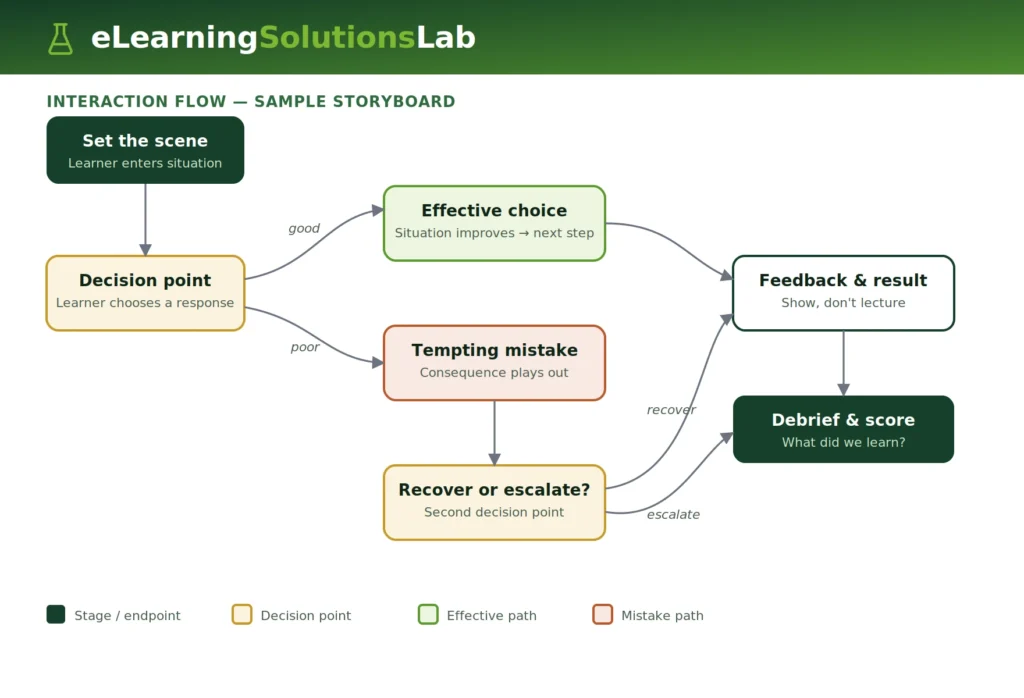
Start to map it on paper or in a doc first, surface gaps and dead ends while they’re cheap to fix – so instead of after you’ve built the entire eLearning course.
3. Write realistic content and feedback for each path
Now you fill in the flow. So for each decision point, write the options a learner might genuinely choose, including wrong-but-tempting ones, given that plausible mistakes are what make a simulation teach.
Then, write the consequences and feedback for each choice.
The golden rule here is this: feedback should show the result, not lecture. As a custom who grows colder after a tactless reply can teach more than a pop-up that says “incorrect”.
4. Choose your build approach
And with the flow and content ready, you need to pick how you’ll build it. The main options:
- Best authoring tools (Articulate Storyline, Adobe Captivate, iSpring) – it’s the standard choice for scenario, branching, and software simulations – flexible and no coding required.
- Video or AI-based platforms (e.g., Colossyan) – much faster for dialogue-driven simulations where realistic talking-head video actually carries the experience.
- Custom development services– it’s done for highly specific software or systems simulations that off-the-shelf tools can’t easily replicate.
Then, match the tool to the type of simulation you mapped, not the other way around.
5. Build in meaningful feedback and consequences
As you actually assemble the simulation, you need to make sure every choice actually leads somewhere different. And one of the most common failure modes is a “simulation” where all paths quietly funnel to the same outcome – like a quiz in disguise.
Real consequences (a lost sale, flagged compliance issue, frustrated patient, etc) are what convert a click-through into a learning experience.
And where it helps, it captures a short-screen recording or GIF of the working interaction to show readers what “good” really looks like.
6. Test, pilot, and iterate
You need to run a simulation past real members of your audience before any launch. You’re watching for two things: places where learners can get confused by mechanics (a usability problem) and places where they make intended mistakes and actually learn from them (design success).
Start fixing the former, keep the latter. Pilot with small groups, and gather where they stumble, and then refine – so the first version is rarely the one that ships.
Frequently Asked Questions
How much does it cost to build an eLearning simulation?
Most eLearning simulations can start around $5,000 and go up from there, which depends on the type and fidelity. (For a fuller breakdown, see our guide to eLearning development costs.) Scenario or dialogue simulations are built in an authoring tool that can sit at the lower end, software, and branching simulations in the middle, and custom-developed, or VR/AR simulations at the top.
The biggest cost drivers are the number of decision branches, the amount of custom media, and whether off-the-shelf tools can handle the build or if it needs custom development.
What tools are used to create eLearning simulations?
Most simulations are actually built with one of three approaches. Starting with authoring tools like Articulate Storyline, Adobe Captivate, and iSpring that can handle scenarios, branching, and software simulations without code.
Video or AI-based platforms that can suit dialogue-driven simulations. Custom development covers highly specific systems that other off-the-shelf tools can’t replicate. So the right choice depends on the simulation type, not the other way around.
Are eLearning simulations better than traditional eLearning?
Not universally – they’re better for different things. Traditional eLearning (slides, video, quizzes) is effective for building knowledge and recall.
Simulations are stronger when the actual goal is doing something like applying judgment, practicing a procedure, or rehearsing a high-stakes task.
The best programs actually combine them, using lighter formats to teach concepts and simulations to practice skills that actually matter on the job.
The Author

Book A Discovery Call
Our Learning Advisors are happy to walk you through your project step-by-step — content, timeline, and fixed pricing.
Get Your Free QuoteNo obligation — just a focused conversation. Proposal within 24 hours.
You may also like
Staff Augmentation for L&D: Buyer’s Guide, Costs & Fit
L&D staff augmentation is a staffing model where an external eLearning…
How to Convert PowerPoint to eLearning (2026 Guide)
You have a 60-slide deck that worked pretty well in a live session. Now it…