


- Published
- Reading time
- 10 min
Filed under Corporate TrainingeLearning
VILT sounds like a simple acronym. But search for it and you’ll get an IT company, an AI model, a Swedish metal band and the Dutch word for felt. So let’s clear that up first, and then get into what really matters: how to run virtual instructor-led training that people actually stay awake for.
In this guide, you’ll get a plain definition of VILT, how it compares with classroom training, webinars and eLearning, a neutral comparison of the main platforms, a step-by-step way to design a session, a sample 60-minute agenda you can copy, and the engagement techniques that genuinely work online. You can also download free facilitator and tech checklists, no email needed.
Short on time? Jump to the sample 60-minute VILT agenda or download the free checklists.
Updated November 2026.
In This Article
- What is VILT?
- VILT vs. ILT vs. webinars vs. eLearning
- Why organizations use VILT (with current data)
- Benefits and drawbacks
- VILT platforms and tools compared
- How to design and run a VILT session
- Sample 60-minute VILT agenda
- Engagement techniques that work
- How to measure VILT
- Common VILT Mistakes (and How to Avoid Them)
- Free facilitator and tech checklists
What is VILT?
VILT (virtual instructor-led training) is live training delivered online by an instructor, in real time, to learners in different locations. It uses a video platform like Zoom or Microsoft Teams, and it keeps the interaction of a classroom, such as questions, discussion, breakouts and practice, without anyone having to travel.
Here’s how that answers the questions people ask most often:
- What does VILT mean? In training and L&D, it stands for virtual instructor-led training. You’ll also see it written as vILT.
- What do ILT and VILT mean? ILT is instructor-led training in a physical classroom. VILT is the same idea, delivered live online.
- Is “vilt” a word? In English, it’s only an acronym. But in Dutch, “vilt” is a real word: it means felt, the fabric.
Looking for a different “VILT”?
- ViLT – a Vision-and-Language Transformer, a machine learning model that works with images and text.
- VILT Group – an IT and customer experience company.
- VILT – a Swedish metal band.
- vilt – the Dutch word for felt (and the name of a Belgian farming news site).
This guide is about the training meaning.
VILT vs. ILT vs. Webinars vs. eLearning
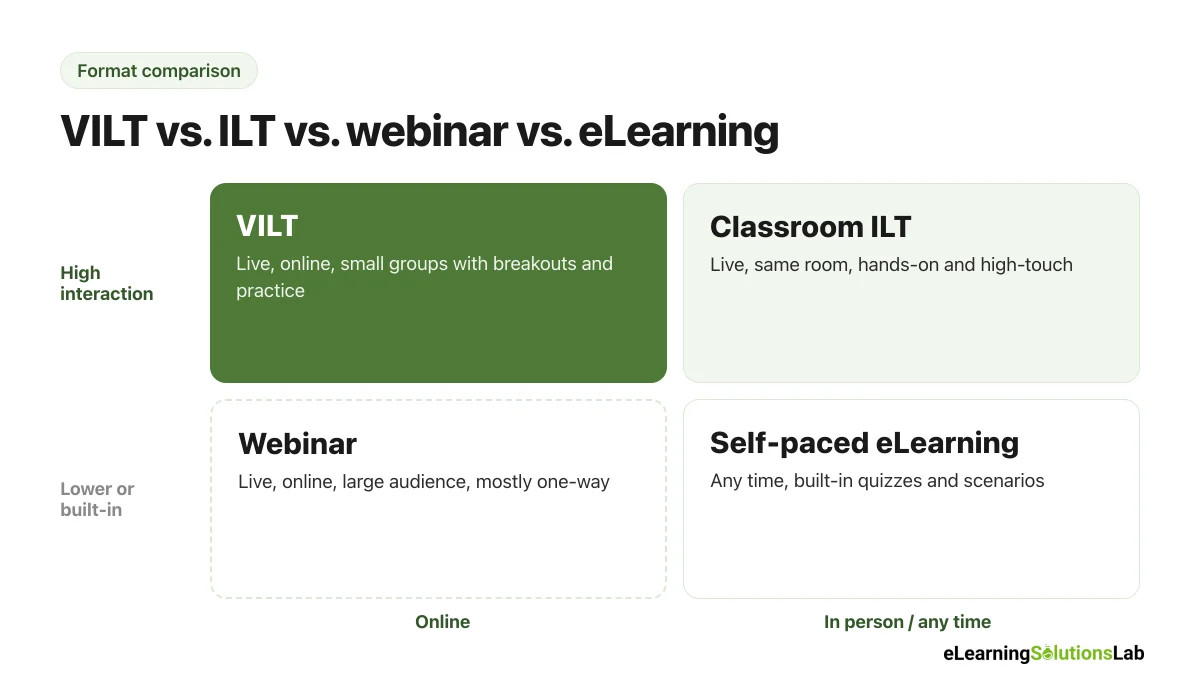
These four formats often get lumped together, but they really work differently. The biggest differences are whether it’s live, how much learners interact, and where they are.
| VILT | Classroom ILT | Webinar | Self-paced eLearning | |
|---|---|---|---|---|
| Live? | Yes, in real time | Yes, in real time | Yes (or recorded) | No, learners go at their own pace |
| Where learners are | Anywhere, online | Same room | Anywhere, online | Anywhere, any time |
| Typical group size | 8 to 25 | 8 to 25 | 50 to 1,000+ | Unlimited |
| Interaction | High: breakouts, polls, practice | High: discussion, hands-on work | Low: mostly Q&A | Built in: quizzes, scenarios |
| Typical length | 60 to 120 minutes per session | Half day to multiple days | 30 to 60 minutes | 5 to 30 minutes per module |
| Cost per learner | Medium (no travel) | High (venue, travel) | Low | Higher to build, low to run at scale |
| Best for | Skills practice, discussion, coaching | Hands-on, high-touch, team building | Announcements, product updates | Knowledge, compliance, reference |
VILT vs. a webinar: a webinar is usually a one-way presentation to a large audience, with a few questions at the end. VILT is a smaller, interactive class where learners practice and talk to each other. So if your session has 200 people and no breakouts, it’s typically a webinar, not VILT.
Why Organizations Use VILT
VILT isn’t a pandemic leftover. It’s now a standard part of most training programs:
- In ATD’s 2024 State of the Industry report, live virtual classrooms were the most common content delivery method, with an average of 68 learners per session but a most common size of just 20.
- The same report found that large organizations tended to favor virtual classrooms, while small and medium organizations used in-person classrooms more often.
- ATD’s 2026 report links lower training costs partly to greater use of virtual classrooms, given that they cut instructor travel.
In practice, most teams now use both: in-person sessions for high-touch or hands-on skills, and VILT for everything that works well on a screen.
Benefits and Drawbacks of VILT
| Benefits | Drawbacks | |
|---|---|---|
| Cost | No travel or venue costs for learners or instructors | Platform licences, and a producer for bigger groups |
| Reach | Learners can join from any office, home or country | Time zones can make one session time hard to find |
| Interaction | Live questions, breakouts and practice, unlike self-paced courses | It’s typically harder to read the room on a screen |
| Scheduling | Short sessions fit around work more easily than a full day out | People tend to multitask, and attendance can drop |
| Tech | Uses tools most people already have | Bandwidth, audio and login issues can derail a session |
| Hands-on skills | Works well for software, communication and decision skills | Not ideal for physical skills that need equipment |
Most of the drawbacks really come down to design. A lecture that worked in a room usually won’t work on Zoom as-is, so you have to rebuild it for the screen.
VILT Platforms and Tools Compared
Most vendor guides only recommend their own product. So here’s a neutral view of the platforms people use most, with what each is typically good at.
| Platform | Typically good for | Watch out for |
|---|---|---|
| Zoom Workplace | Familiar to most learners, reliable breakout rooms, polls and reactions | Advanced features usually need a paid plan, and some orgs restrict installs |
| Microsoft Teams | Organizations already on Microsoft 365, attendance reports, breakout rooms | Settings can be split between meeting and org admin controls |
| Webex | Larger enterprise sessions, structured events and training-focused features | Learners may be less familiar with the interface |
| Google Meet | Teams on Google Workspace, joining from a browser with no install | Breakouts, polls and attendance tend to need higher Workspace editions |
| Dedicated virtual classroom tools | Programs that run a lot of VILT and want engagement tracking | Extra cost, and another login for learners |
Features and plan limits change often, so check the current plan details before you commit. Breakout rooms, polls and attendance reports are usually on paid plans.
Add-on whiteboards: tools like Miro, Mural, FigJam and Lucidspark work with most platforms and are great for group activities. Google’s own Jamboard was discontinued at the end of 2024, so Google Meet now relies on partner whiteboards like these.
Which should you pick? Simply start with the platform your organization already uses, given that learners won’t have to install anything new. Then add a whiteboard tool for activities. A dedicated virtual classroom tool usually only makes sense if you run a lot of VILT and need features like persistent rooms or detailed engagement tracking.
How to Design and Run a VILT Session in 7 Steps
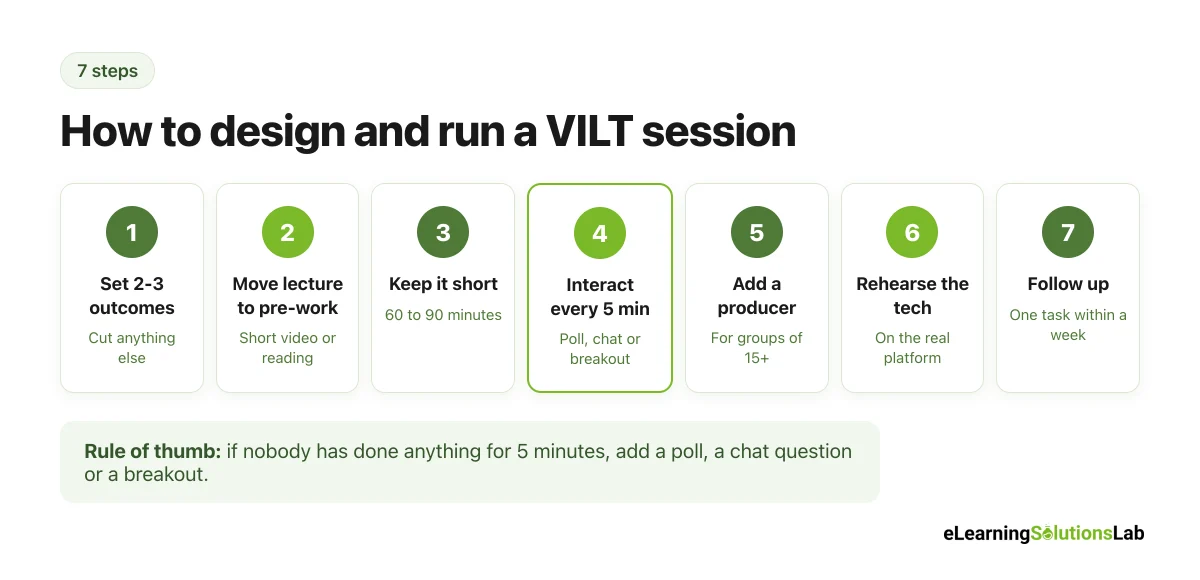
Step 1: Start with what learners should be able to do
Write 2 or 3 outcomes for the session. Then cut any content that doesn’t support them, given that online attention is shorter than in a room.
Step 2: Move the lecture out of the session
Put background content in a short pre-work video or reading, so that live time goes to practice and discussion. This is basically a blended learning approach, and it really makes VILT sessions shorter and better.
Step 3: Keep sessions short
Aim for 60 to 90 minutes per session. If you need a full day of content, split it into two or three shorter sessions across a week.
Step 4: Plan an interaction every 5 minutes
Map out a poll, chat question, breakout or whiteboard task at least every 5 minutes or so. If a slide has been up for more than a few minutes with nobody doing anything, people usually drift to their email.
Step 5: Add a producer
You have to split the work for groups bigger than about 15. A producer (sometimes called a co-facilitator) handles tech issues, breakout rooms, polls and the chat, so that the facilitator can focus on teaching.
Step 6: Rehearse with the real tech
Do a full run-through on the actual platform: polls, breakouts, screen share, video with sound. Most VILT problems are tech problems that a 30-minute rehearsal would have caught.
Step 7: Follow up
Send the recording, slides and one small task to apply what they learned within a week. And check in on that task in the next session or with managers.
To give you a concrete example, at eLearning Solutions Lab, we don’t simply put classroom slides on Zoom. We redesign each session around activities, write a minute-by-minute facilitator guide with producer cues, and build the pre-work as short eLearning, so that the live time is spent on practice.
Sample 60-Minute VILT Agenda
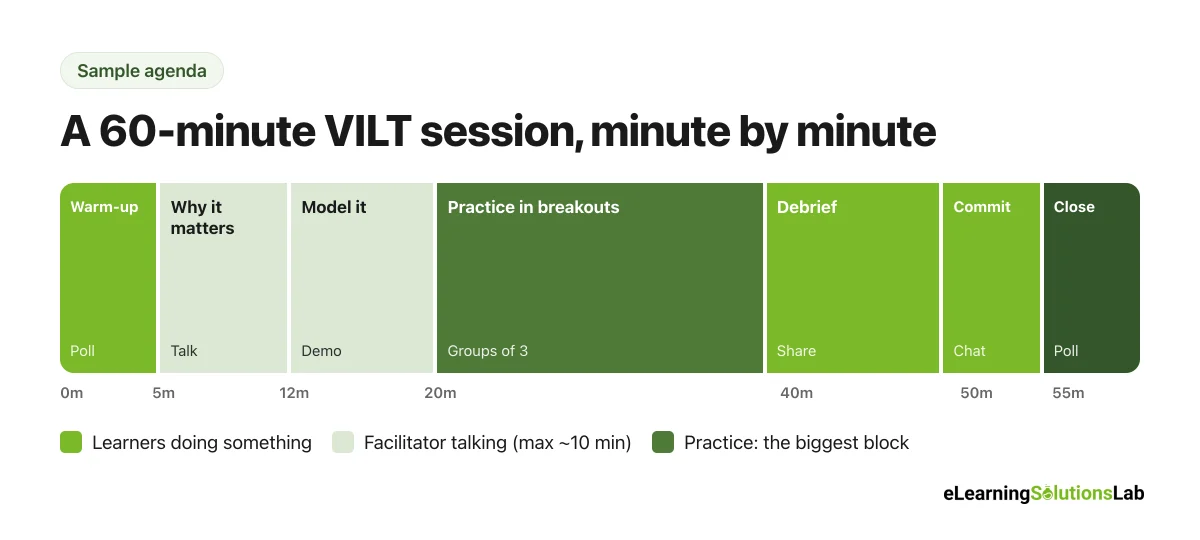
Here’s a session plan you can copy and adapt. This one is for a “giving useful feedback” session for new managers, with about 15 participants.
| Time | Block | What happens | Who |
|---|---|---|---|
| 0:00 – 0:05 | Welcome and warm-up | Quick poll: “How confident are you giving feedback?” (1 to 5) | Facilitator, producer launches poll |
| 0:05 – 0:12 | Why it matters | Short story plus two slides on what useful feedback looks like | Facilitator |
| 0:12 – 0:20 | Model it | Facilitator demos a feedback conversation, learners note what worked in chat | Facilitator, producer watches chat |
| 0:20 – 0:40 | Practice in breakouts | Groups of 3: giver, receiver, observer, rotating roles with a scenario card | Producer opens rooms and broadcasts time |
| 0:40 – 0:50 | Debrief | Each group shares one thing that was hard, facilitator adds tips | Facilitator |
| 0:50 – 0:55 | Commit | Everyone types one feedback conversation they’ll have this week | Facilitator, producer saves chat |
| 0:55 – 1:00 | Close | Repeat the opening poll, share follow-up task and resources | Facilitator, producer launches poll |
You can see how the facilitator talks for no more than about 10 minutes at a time. And the practice block, the part people actually remember, gets the biggest share of the hour.
VILT Engagement Techniques That Work
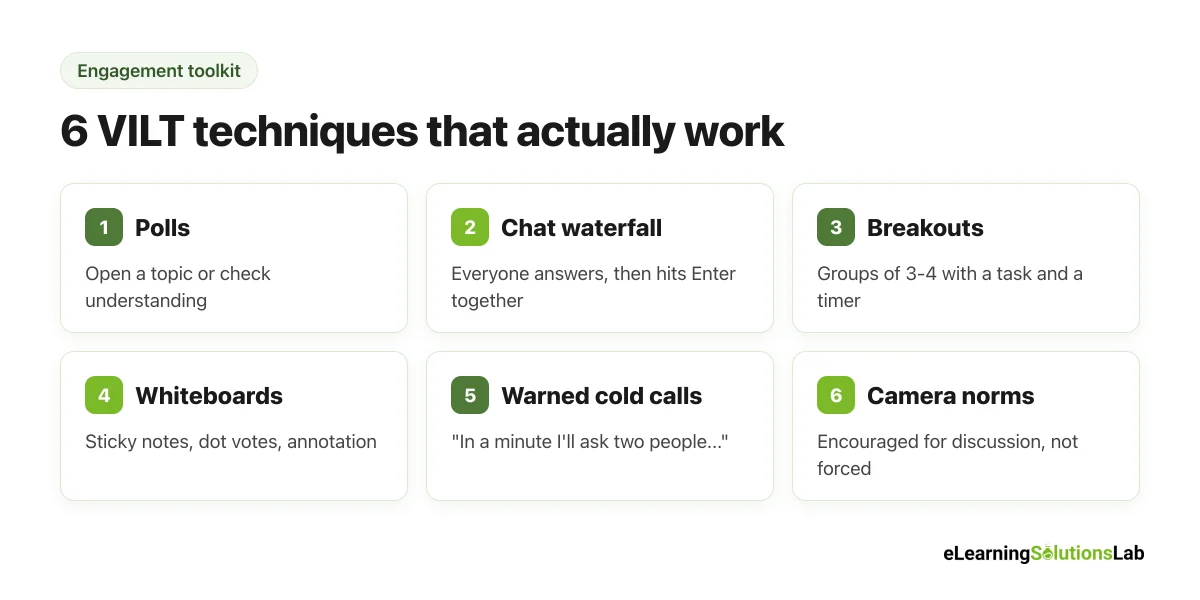
- Polls – quick to run and great for opening a topic or checking understanding. Show the results and react to them.
- Chat waterfall – everyone types an answer but waits to hit Enter until you say “go,” so that answers aren’t copied.
- Breakout rooms – groups of 3 or 4 work best. Give a clear task, a time limit and a role (for instance, one person shares back).
- Whiteboards and annotation – let people add sticky notes, vote with dots or mark up a screen.
- Cold calls with warning – say “In a minute I’ll ask two people to share,” so that people get ready instead of freezing.
- Camera norms – encourage cameras on for discussion and breakouts, but don’t make them mandatory. Some people have genuine bandwidth, privacy or accessibility reasons.
- Names on screen – use people’s names often. It truly makes a large online group feel smaller.
If you want more ideas for building interaction into the course around the live sessions, see our guides to social eLearning and scenario-based eLearning.
How to Measure VILT Effectiveness
You can measure VILT the same way as any training, at four levels:
| Level | What to measure | How to measure it in VILT |
|---|---|---|
| 1. Reaction | Did learners find it useful and engaging? | A 2 or 3 question poll at the end, or a short survey |
| 2. Learning | Did they gain the knowledge or skill? | Before-and-after polls, quick quizzes, breakout outputs |
| 3. Behavior | Are they using it on the job? | Manager check-ins or a follow-up task 2 to 4 weeks later |
| 4. Results | Did it affect business metrics? | Compare a relevant KPI before and after, such as error rates or engagement scores |
These levels follow the Kirkpatrick model of evaluation. One tip: track participation (polls answered, chat posts, breakout outputs) as well as attendance, given that “logged in” and “took part” are really not the same thing.
Common VILT Mistakes (and How to Avoid Them)
Most VILT problems aren’t technical. They’re design problems, and you can actually fix them before the session starts:
- Turning a classroom day into a webinar marathon – break it into 60 to 90 minute sessions spread over several days.
- Talking for 20 minutes straight – plan an interaction every 5 to 10 minutes: a poll, a chat question or a breakout.
- No producer – for groups over 15, a second person to handle tech, chat and breakouts frees the facilitator to teach.
- Skipping pre-work – short self-paced content before the session means live time goes to practice, not slides.
- No follow-up – send a summary and one task to apply within a week, so that the session carries into real work.
To combine live sessions with self-paced work, see our guide to blended learning.
Free VILT Facilitator and Tech Checklists (PDF)
Free download – no email needed
VILT Facilitator and Tech Checklists
A printable PDF with a session planner, a blank 60-minute agenda, a facilitator checklist, a producer checklist and a tech setup checklist for before, during and after each session.
In one line: VILT is live, interactive training delivered online, and it works when you move the lecture into pre-work, keep sessions short, plan an interaction every few minutes and give the facilitator a producer.
Want VILT sessions people actually engage with?
At eLearning Solutions Lab, we redesign classroom training for live online delivery, with facilitator guides, producer cues, activities and pre-work built in.
See our VILT solutions, or explore our instructional design services.
Related Reading
- Blended learning – combining VILT with self-paced eLearning.
- Asynchronous learning – the self-paced side of the mix.
- eLearning delivery – 7 delivery methods and how to choose.
- ILT to eLearning conversion – turning classroom courses into online training.
- Kirkpatrick model of evaluation – measuring any training format.
- Leadership development eLearning – where VILT cohorts work well.
The Author

Book A Discovery Call
Our Learning Advisors are happy to walk you through your project step-by-step — content, timeline, and fixed pricing.
Get Your Free QuoteNo obligation — just a focused conversation. Proposal within 24 hours.
You may also like
What is a Learning Experience Designer? Role, Skills, Salary and How to Become One (2026)
If you've seen "learning experience designer" on a job board and wondered…

Top eLearning Companies in the Philippines (2026 Guide)
Looking for the top eLearning companies in the Philippines? Here's the thing:…