


- Published
- Reading time
- 17 min
Filed under eLearning Development
Most “open source eLearning authoring tools” lists mix in freemium apps, paid tools with a free tier, and even LMSs. So it’s really hard to tell which tools you can actually download, self-host and keep using without a license fee.
Here’s how this guide is different: it only covers tools whose source code is published under an open-source license. For each one, you’ll see the license, what it exports (SCORM 1.2, SCORM 2004, xAPI, cmi5), whether you need your own server, how actively it’s maintained, and who it suits best.
Short on time? Jump to the quick-pick table.
Updated November 2026. Release dates and licenses checked against each project’s own site or code repository.
In This Article
- Quick-pick table: 8 open source authoring tools compared
- Open source vs. free: what counts (and what doesn’t)
- The 8 tools, one by one
- SCORM 1.2 vs. 2004 vs. xAPI vs. cmi5: which tools export what
- Self-hosting and setup: what each tool really takes
- LMS compatibility: Moodle, Canvas, WordPress, Open edX
- How to choose, by team type
What Is an Open Source eLearning Authoring Tool?
An open source eLearning authoring tool is software for building online courses, quizzes and interactive activities whose source code is published under an open-source license, such as MIT, Apache, BSD, GPL or AGPL. You can use it without a license fee, host it yourself, and change the code. Most can package your course as SCORM or xAPI so it runs in an LMS.
An authoring tool is where you build the course. An LMS (learning management system) is where learners take it and where results are tracked. Moodle, Open LMS and Open edX are open-source LMSs, not authoring tools, which is why they aren’t on this list. Some LMSs have authoring features built in. But if you need a course you can move between platforms, you’ll usually want a separate authoring tool.
Quick-Pick Table: 8 Open Source Authoring Tools Compared
Here’s the short version, so that you can compare the tools at a glance. “Project health” is our read of how actively each project is maintained, based on its most recent releases and code activity as of November 2026.
| Tool | License | Web or desktop | SCORM / xAPI / cmi5 | Self-host needed? | Latest release | Project health | Best for |
|---|---|---|---|---|---|---|---|
| H5P | MIT | Web (inside Moodle, WordPress, Drupal); Lumi desktop app | xAPI built in; SCORM only through Lumi; no cmi5 | Yes, a host platform (or use Lumi) | New look and feel, Feb 2026 | Active | Interactive activities inside an LMS or website |
| Adapt | GPL-3.0 | Framework (code); authoring tool (web app) | SCORM 1.2 and 2004; xAPI plugin; no official cmi5 | Authoring tool: yes (Node.js + MongoDB) | Framework code updated Feb 2026 | Active (framework); slower (authoring tool) | Responsive corporate courses built by a team with developers |
| eXeLearning | AGPL-3.0 (v3 and later) | Desktop and web | SCORM 1.2 and 2004, IMS, EPUB3; no xAPI or cmi5 | No (optional server or Docker) | 4.0.0, Apr 2026 (4.0.1, Jun 2026) | Very active | Teachers and schools, especially on Moodle |
| Xerte Online Toolkits | Apache 2.0 | Web (your server) | SCORM 1.2 and 2004, xAPI, LTI; no cmi5 | Yes (PHP + MySQL) | 3.15, Dec 2025 | Active (two releases a year) | Universities and colleges that want accessible content |
| Open eLearning | Open source (license not clearly stated) | Desktop (Windows, Mac, Linux) | SCORM (version not stated), HTML5 | No | 1.6.5 is the newest we could confirm (2023) | Slow | Solo authors who want a free offline course builder |
| LiaScript | BSD-3 | Browser (Markdown files) + command-line exporter | SCORM 1.2 and 2004, IMS, xAPI; no cmi5 | No | Exporter v3, updated through 2026 | Active | Technical teams who write in Markdown and use Git |
| Scaffold | AGPL-3.0 | Web, inside Moodle or Open edX | No SCORM yet; optional xAPI-style events | Yes (Moodle or Open edX) | 0.1.2 alpha | Early (pre-alpha) | Early adopters who want to test a new editor |
| VR Builder | Apache 2.0 (core) | Unity plugin (desktop) | None; builds VR apps | No server, but needs Unity and a headset | Maintained alongside a paid Pro version | Active | Hands-on procedural training in VR |
The short answer: eXeLearning is the easiest place to start. Adapt gives you the most polished, responsive corporate courses if you have developer help. H5P is the best choice for single interactive activities inside a platform you already run.
Open Source vs. Free: What Counts (and What Doesn’t)
“Free” and “open source” aren’t really the same thing. And most lists treat them as if they were.
- Open source means the source code is published under a license that lets you use, study, change and share it. You can run it on your own computer or server indefinitely, even if the company behind it disappears.
- Free (freeware) means you don’t pay, but the code is closed. The vendor can change the terms, limit features or shut it down.
- Freemium means a free tier with limits (number of projects, learners, watermarks or export formats), designed to move you to a paid plan.
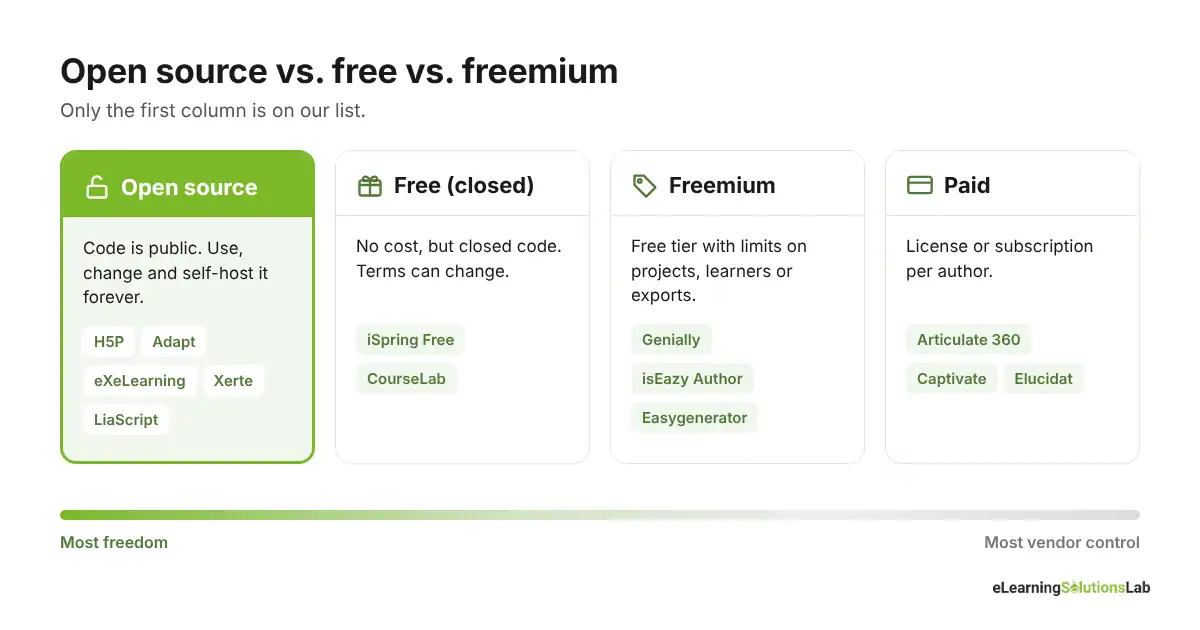
That’s why some well-known tools aren’t on this list:
- iSpring Free is a free PowerPoint add-in, but it’s closed-source.
- Genially, isEazy Author and Easygenerator offer free plans, but they’re proprietary, cloud-hosted products.
- CourseLab has been free to download for years, but it isn’t open source.
- Articulate, Captivate and Elucidat are paid tools. See our best eLearning authoring tools guide if you’re comparing commercial options.
You also have to watch for one more pattern: several open-source projects also sell a hosted version. H5P.com, Lumi Cloud and Scaffold Plus are paid services built on open-source code. The open-source version stays free; you’re paying for hosting, support and extra features.
What the License Means for You
Open-source licenses fall into two groups:
| License type | Tools on this list | What it means in practice |
|---|---|---|
| Permissive (MIT, BSD, Apache 2.0) | H5P, LiaScript, Xerte, VR Builder | Use and modify freely, including inside commercial products. Keep the copyright notice. |
| Copyleft (GPL, AGPL) | Adapt (GPL-3.0), eXeLearning and Scaffold (AGPL-3.0) | Use freely. If you distribute a modified version of the tool, you must share your changes under the same license. AGPL extends this to modified versions you run as an online service. |
In practice, for most training teams, the license doesn’t limit day-to-day use: you can build and sell courses with any of these tools. It matters if you plan to modify the tool itself, or bundle it into a product you sell. In that case, check with your legal team. (We’re an eLearning company, not lawyers.)
The 8 Open Source eLearning Authoring Tools
1. H5P
License: MIT · Runs: inside Moodle, WordPress or Drupal, or on your desktop with Lumi · Exports: .h5p files, xAPI events; SCORM via Lumi
H5P is typically the first open-source tool people find for interactive content, and it’s the most widely used. It gives you dozens of content types (interactive video, drag and drop, branching scenarios, course presentations, flashcards, quizzes and Interactive Book), and you build them inside a platform you already run. Moodle has H5P support built in, and there are plugins for WordPress and Drupal.
In February 2026, the open-source H5P content types got a new look and feel, with cleaner layouts and accessibility fixes. H5P also moved to a new Content Type Hub, so older installations need to update their hub address to keep getting updates.
Pros
- Large library of ready-made interaction types
- Works inside Moodle with no extra install
- Sends xAPI statements, so you can track detailed interactions with an LRS
- MIT license, the most permissive on this list
Cons
- Builds activities, not full courses with menus and navigation
- No native SCORM export. You need the Lumi desktop app to convert, and some users reported failed SCORM exports in Lumi in 2026
- Canvas, Blackboard and Brightspace connections (LTI) come through the paid H5P.com service
Setup effort: Low if you already run Moodle or WordPress. Install the plugin, then enable content types from the hub.
Best for: adding interactive practice to an existing LMS or website.
2. Adapt (Framework and Authoring Tool)
License: GPL-3.0 · Runs: code framework, or a web-based authoring tool on your own server · Exports: SCORM 1.2 and SCORM 2004 4th Edition, xAPI (plugin)
Adapt produces fully responsive HTML5 courses that work on phones, tablets and desktops from a single build. It was created by Kineo and is now run by an open-source community. Several commercial vendors build their products on it, which tends to be a good sign of its quality.
But here’s the confusing part: “Adapt” actually means two things:
- The Adapt framework is the engine. You edit course content in JSON files and build it from the command line. No server is needed, but you need to be comfortable with code.
- The Adapt authoring tool is a web app with a visual editor that sits on top of the framework. It runs on Node.js and MongoDB, so someone has to install and maintain a server. A rebuilt version 1.0 has been through a long alpha and release-candidate process, so check the project’s GitHub releases for the current status before you plan around it.
Course tracking is handled by an extension called Spoor, which ships with the framework and supports SCORM 1.2 and SCORM 2004 4th Edition. xAPI tracking is available as a plugin. There’s no official cmi5 support.
Pros
- Polished, responsive course output that looks like a commercial tool’s
- Strong accessibility focus and a large plugin library
- Active core framework (core code updated in 2026)
Cons
- The visual authoring tool needs a server and technical upkeep
- Steeper learning curve than desktop tools
- Layouts follow Adapt’s page, article, block and component structure, so free-form slide designs are harder
Setup effort: High for the authoring tool (server, Node.js, MongoDB). Medium for the framework if you have a developer.
Best for: corporate L&D teams with developer support who want responsive courses without per-seat fees.
3. eXeLearning
License: AGPL-3.0 (versions 3 and later; older versions were GPL-2) · Runs: desktop app (Windows, Mac, Linux) or online · Exports: SCORM 1.2, SCORM 2004, IMS Content Package, EPUB3, website
eXeLearning is one of the longest-running open-source authoring tools, and right now it’s genuinely one of the most active. It’s maintained by a project led by Spain’s Ministry of Education. Version 3.0, a full rebuild, became stable in October 2025, and version 4.0.0 followed in April 2026, with 4.0.1 in June 2026.
You build a course as a tree of pages and add “iDevices” (text, quizzes, activities, media) to each page. It’s simple to learn, and you can export to almost every packaging format an LMS accepts. There are also Moodle plugins that let teachers create and edit SCORM packages directly inside Moodle.
Pros
- Easiest tool on this list for non-technical authors
- Works offline as a desktop app, or on a server with Docker
- Broad export options, including EPUB for e-books
- Frequent releases in 2025 and 2026
Cons
- Output looks more like a structured website than a designed course
- No xAPI or cmi5
- Its community and documentation lean toward Spanish-speaking schools
Setup effort: Low. Download the desktop app and start building.
Best for: teachers, K-12 and higher education, and anyone who wants to start building today.
4. Xerte Online Toolkits
License: Apache 2.0 · Runs: on your web server (PHP and MySQL) · Exports: SCORM 1.2, SCORM 2004 (3rd Edition), standalone web packages; tracks with SCORM, xAPI or LTI
Xerte began at the University of Nottingham in 2004 and is now an Apereo Foundation project. It’s a browser-based tool that lets several authors build and edit learning objects together, using templates and page wizards. Accessibility has always been a real priority. For instance, learners can change fonts, colors and text size.
Xerte has released twice a year for several years. Version 3.14 came out in June 2025, and 3.15, which adds optional generative AI features, came out on December 31, 2025.
Pros
- Collaborative, web-based editing for teams
- Strong accessibility features built in
- SCORM, xAPI and LTI tracking options
- Regular, predictable releases
Cons
- You need a server (Linux, Apache, MySQL or MariaDB, PHP) and someone to maintain it
- The editor interface looks dated next to commercial tools
- The responsive Bootstrap (website) template doesn’t export SCORM; use the standard learning object templates for LMS tracking
Setup effort: Medium. A standard PHP web stack plus a setup wizard.
Best for: universities and colleges with IT support that want a shared, accessible authoring platform.
5. Open eLearning
License: described as free and open source (the project site doesn’t clearly state which license) · Runs: desktop app (Windows, Mac, Linux) · Exports: SCORM packages (the project doesn’t say which version), HTML5
Open eLearning is a free, offline desktop tool for building slide-based courses with text, images, video and quizzes. It’s popular with beginners because it looks and works like a simple presentation editor, and it ranks near the top of Google for this topic.
So what’s the concern? Maintenance. The newest version we could confirm is 1.6.5, released around 2023. That doesn’t necessarily mean the project is abandoned. But you should check the download page for recent updates before you build a library of courses on it.
Pros
- Works offline, with no server or account
- Familiar slide-style editor
- Exports SCORM packages for any LMS
Cons
- No recent releases we could verify
- License isn’t clearly published, which matters if you plan to modify or redistribute it
- Limited interaction types compared to H5P or Adapt
Setup effort: Low. Download and install.
Best for: solo authors who need a quick, free course and are happy with basic interactions.
6. LiaScript
License: BSD-3 · Runs: in the browser from a Markdown file; command-line or web exporter · Exports: SCORM 1.2, SCORM 2004, IMS, xAPI, web, PDF, EPUB and more
LiaScript takes a truly different approach: you write your course in Markdown, a plain-text format, and LiaScript turns it into an interactive course in the browser. Quizzes, surveys, code exercises, slides and text-to-speech are all written in text.
Given that courses are plain text files, you can store them in Git, review changes, and let several people contribute, just like software. The LiaScript Exporter packages the same file for different LMSs and even includes presets for Moodle 3 and 4, ILIAS and OPAL.
Pros
- No server needed; a course can live on GitHub
- Exports SCORM 1.2, SCORM 2004 and xAPI from the same source
- Version control and easy translation, since everything is text
Cons
- No visual editor; authors must be comfortable with Markdown
- Design control is limited compared to visual tools
Setup effort: Low for authors who know Markdown. High for everyone else.
Best for: technical training, developer documentation and “docs-as-code” teams.
7. Scaffold (New)
License: AGPL-3.0 · Runs: inside Moodle (activity module) or Open edX (XBlock) · Exports: no SCORM yet; optional xAPI-compatible learning events
Scaffold is the newest tool on this list, and it’s been showing up in Reddit threads and AI Overviews. It’s a browser-based editor for pages, slideshows and quizzes (multiple choice, matching, sequencing, fill in the blanks and image hotspots), designed to show authors the content exactly as learners will see it.
But it’s still very early. The project describes itself as pre-alpha, with version 0.1.2 alpha on its website, and warns that its document format can change before 1.0. A paid hosted version, Scaffold Plus, is aimed at teams.
Pros
- Modern editor built on current web technology
- Runs inside Moodle or Open edX, so learners stay in your LMS
- Answer keys aren’t sent to the learner’s browser
Cons
- Pre-alpha: not ready for important production courses
- No SCORM export, so content can’t move to other LMSs yet
Setup effort: Medium to high. You need a Moodle or Open edX site and someone to install the plugin.
Best for: Moodle and Open edX teams who want to test it and give feedback, not for a course that has to launch next month.
8. VR Builder
License: Apache 2.0 (open-source core) · Runs: as a plugin in the Unity game engine · Exports: VR applications for headsets (no SCORM)
VR Builder, from the German company MindPort, lets you build VR training without writing code. You lay out a process step by step in a visual workflow editor (“pick up the tool,” “open the valve,” “check the gauge”), and VR Builder turns it into an interactive VR app that works with all major headsets.
It’s really the only open-source option on this list for procedural VR training. The core is free and open source; a paid Pro version on the Unity Asset Store adds extra behaviors and features.
Pros
- No-code process editor for VR training
- Supports all major VR headsets
- Developers can extend it with their own code
Cons
- You need Unity, 3D assets and VR hardware
- No SCORM or LMS tracking out of the box
Setup effort: High. Expect a learning curve with Unity, even without coding.
Best for: manufacturing, maintenance, safety and healthcare training where people need to practice a physical procedure.
Also Worth Knowing
- Lumi is a free, open-source desktop editor for H5P content. It’s the easiest way to build H5P without a server, and it can export to HTML and SCORM.
- CourseCode is a newer open-source framework that says it exports SCORM 1.2, SCORM 2004, cmi5 and LTI from one codebase. It’s code-first, but it’s one of the few open-source options that names cmi5.
SCORM 1.2 vs. 2004 vs. xAPI vs. cmi5: Which Tools Export What
Your LMS decides which standard you need, so you have to check what it supports before you pick a tool. Here’s what each standard does:
- SCORM 1.2 is the most widely supported. It tracks completion, score and time. It can only store a limited amount of progress data (4,096 characters), which can be a problem for long courses that need to save a learner’s place.
- SCORM 2004 adds sequencing rules and stores far more progress data (64,000 characters in the 3rd and 4th Editions). Not every LMS supports every edition, so test before you roll out.
- xAPI tracks almost any learning activity, inside or outside an LMS, and sends it to a Learning Record Store (LRS). You need an LRS to get value from it.
- cmi5 is xAPI with rules for how an LMS launches and tracks a course. It’s the closest thing to a modern SCORM replacement, but support is still growing.
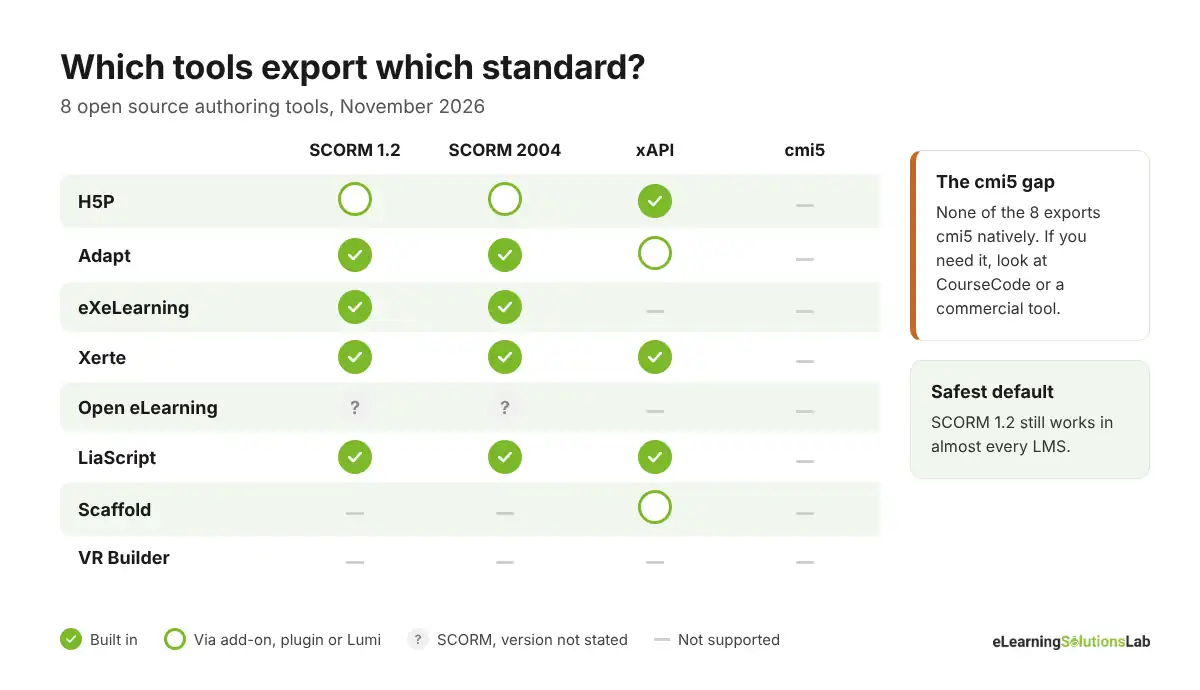
The gap: none of the eight main tools exports cmi5 natively. If cmi5 is a hard requirement, look at CourseCode or a commercial tool. For most LMSs today, SCORM 1.2 is usually still the safest choice. Our SCORM compliance requirements checklist explains what to test before you upload, and how to create SCORM content walks through packaging step by step.
Self-Hosting and Setup: What Each Tool Really Takes
“Free” doesn’t simply mean “no cost.” With open-source tools, you typically pay in setup time and maintenance instead of license fees. Here’s what to expect, from least to most effort:
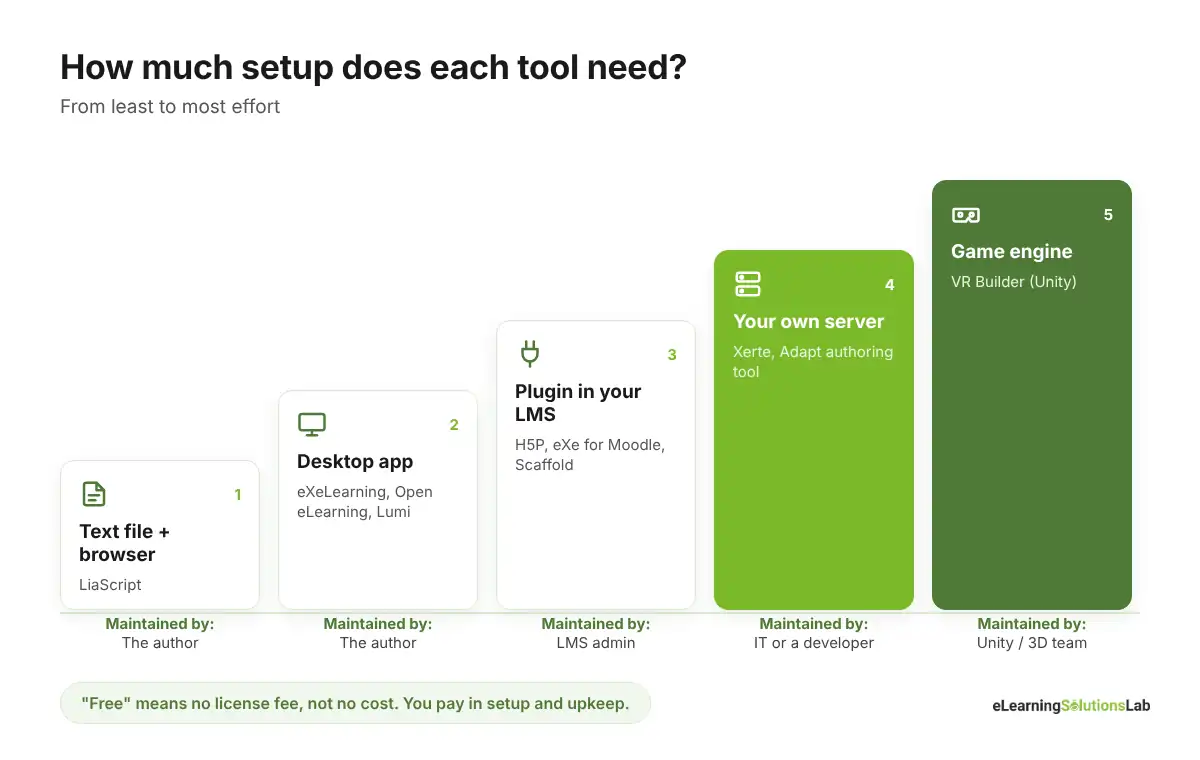
| Setup type | Tools | What you need | Who maintains it |
|---|---|---|---|
| Text file + browser | LiaScript | A text editor and somewhere to host the file (GitHub works) | The author |
| Desktop app | eXeLearning, Open eLearning, Lumi (H5P) | A Windows, Mac or Linux computer | The author (just keep it updated) |
| Plugin in a platform you already run | H5P, eXeLearning for Moodle, Scaffold | Admin access to Moodle, WordPress, Drupal or Open edX | Your LMS administrator |
| Your own server | Xerte (PHP + MySQL), Adapt authoring tool (Node.js + MongoDB) | A server or cloud instance, backups, security updates | IT or a developer |
| Game engine | VR Builder | Unity, 3D assets, VR headsets | A Unity developer or 3D team |
Before you self-host, plan for:
- Security updates. A web-based authoring tool on your server is another system to patch.
- Backups. Your course source files live on that server. If it fails, so does your library.
- Upgrades. Major versions (such as eXeLearning 2 to 3, or Adapt’s authoring tool 1.0) can change file formats. Test old courses before you upgrade.
- A named owner. Open-source tools have community forums, not a support desk. So someone on your team needs to own it.
LMS Compatibility: Moodle, Canvas, WordPress, Open edX
| Platform | Easiest open-source option | How it connects |
|---|---|---|
| Moodle | H5P (built in), eXeLearning plugins, Scaffold | Native H5P activity; eXeLearning edits SCORM inside Moodle; any SCORM package from the other tools uploads as a SCORM activity |
| Canvas | Adapt, eXeLearning, Xerte, LiaScript | SCORM package upload; Xerte also supports LTI. H5P needs Lumi (SCORM export) or the paid H5P.com LTI connection |
| WordPress | H5P | H5P plugin embeds activities in posts and pages. Running SCORM packages in WordPress needs an LMS plugin with SCORM support |
| Open edX | Scaffold, or SCORM from any tool | Scaffold XBlock; SCORM through a SCORM XBlock |
| Corporate LMS (Docebo, TalentLMS, Cornerstone, etc.) | Adapt, eXeLearning, Xerte | SCORM 1.2 or 2004 upload; xAPI if your LMS has an LRS |
If you’re still choosing a platform, our affordable LMS systems guide and LMS integration guide cover what to check.
How to Choose: Which Open Source Authoring Tool Fits Your Team?
K-12 and Higher Education
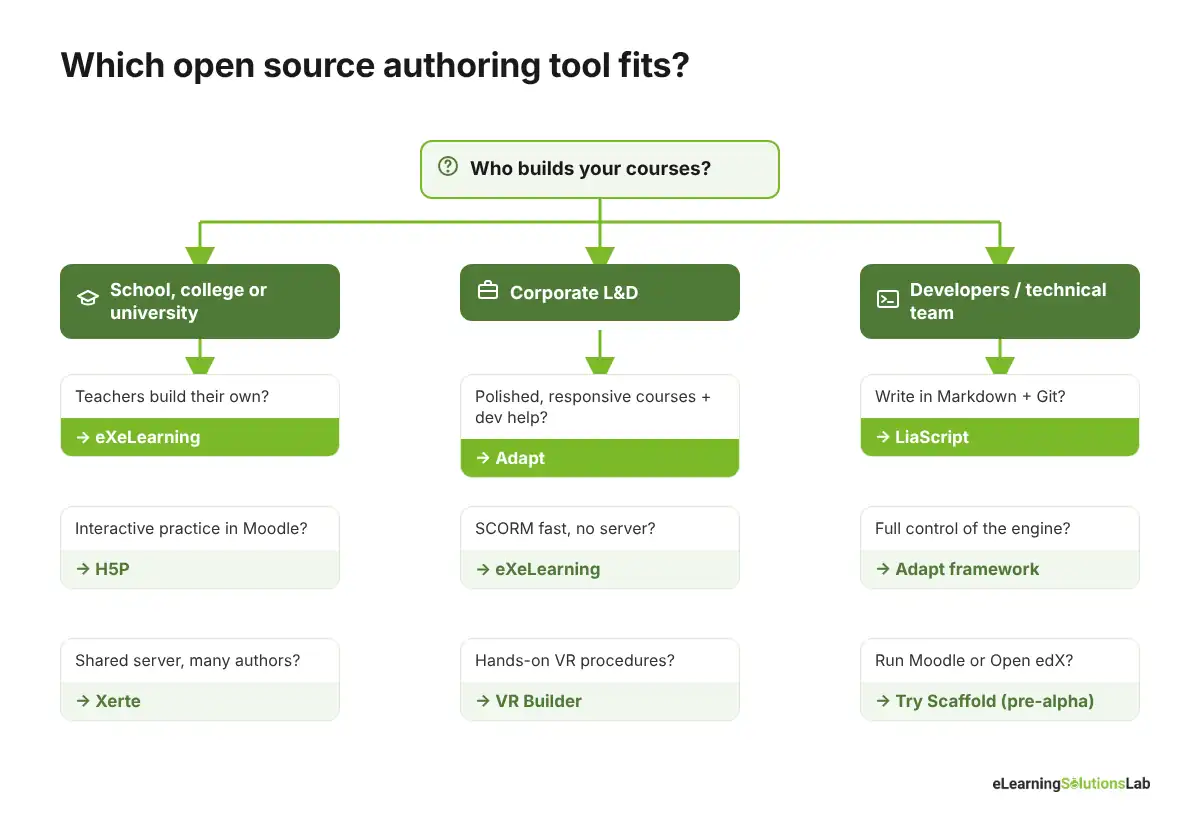
You can start with eXeLearning if teachers build their own materials, especially on Moodle. Use H5P for interactive practice inside the course. If your IT team can run a server and several staff need to collaborate, Xerte is a strong shared platform with good accessibility.
Corporate L&D
Choose Adapt if you want responsive courses that look professionally designed and you have a developer or IT partner to run it. Choose eXeLearning if you need SCORM packages quickly and design matters less. For VR procedural training, VR Builder is the open-source route.
Developers and Technical Teams
LiaScript fits teams that already work in Markdown and Git. The Adapt framework (without the authoring tool) gives developers full control over a responsive course engine. Keep an eye on Scaffold if you run Moodle or Open edX.
How We Approach It
To give you a concrete example, at eLearning Solutions Lab, we don’t simply pick the tool with the longest feature list. We start with the LMS and the people who’ll maintain the course after launch. In practice, that usually means eXeLearning or Adapt for SCORM courses a client team will update themselves, and H5P when the goal is adding quick practice activities inside an existing Moodle site. And we always run a test package through the client’s LMS before we build the full course.
Five Questions to Ask Before You Commit
- Which standard does our LMS need? SCORM 1.2, SCORM 2004, xAPI or LTI.
- Who will maintain it? A desktop app needs nobody; a server-based tool needs IT.
- Is the project still active? Check the date of the last release and recent code activity on GitHub.
- Who are the authors? Instructional designers, teachers, subject matter experts or developers.
- Do we need to change the tool’s code? If yes, read the license carefully.
Tip: before you choose, build the same 5-minute module in your top two tools, upload both SCORM packages to your LMS, and check that completion, score and bookmarking all work. An hour of testing can help you avoid a painful migration later.
In one line: check the license and the last release date first, match the export standard to your LMS, and choose the tool your team can actually maintain: eXeLearning for speed, Adapt for polish, H5P for interactions.
Want open-source courses without the setup work?
At eLearning Solutions Lab, we build SCORM and xAPI courses that run in your LMS, using the tool that fits your team, open source or commercial.
Our custom eLearning development services handle the build and testing, and our instructional design services make sure every course supports a real learning goal.
Explore custom eLearning developmentSee our instructional design services
Related Reading
- Best eLearning authoring tools – commercial tools compared.
- How to create SCORM content – packaging your course step by step.
- SCORM compliance requirements – what to test before you upload.
- Accessible eLearning – making courses WCAG-compliant.
- eLearning development costs – what you’ll spend beyond the tool.
The Author

Book A Discovery Call
Our Learning Advisors are happy to walk you through your project step-by-step — content, timeline, and fixed pricing.
Get Your Free QuoteNo obligation — just a focused conversation. Proposal within 24 hours.
You may also like
Top eLearning Companies in the Philippines (2026 Guide)
Looking for the top eLearning companies in the Philippines? Here's the thing:…
The ADDIE Model: 5 Phases Explained With a Worked Example (and Free Template)
Almost every guide to the ADDIE model says the same thing: five phases, a short…