

No doubt, AI can draft a full course outline in 90 seconds. But what it can’t do is to tell you whether that outline will actually teach anyone anything – and that gap is the whole job.
Instructional designers already know this. In a 2026 survey of 587 practitioners, Dr. Luke Hobson found that 73% use AI tools often or daily, yet the same instructional designers overwhelmingly believe the core of their craft can’t be automated away. It’s now how to use AI well.
AI for instructional design means you apply generative tools to specific tasks across the design workflow – research, objectives, content drafting, assessments, and media – while a human keeps ownership of the instructional judgment, accuracy, and learner experience that define professional instructional design services.
We walk you through where AI fits in each phase of the ADDIE workflow, hand you a copy-and-paste prompt library, and compare tools designers actually use.
Let’s get started.
What AI Can and Can’t Do in Instructional Design
Needless to say, AI is good at speed and drafts, yet it’s poor at judgment. So that distinction is the fault line that’s running through everything below, and it’s why the most AI-heavy designers are often the most confident about their own value.
In Hobson’s 2026 survey, practitioners rated their worth to their organizations at a mean of 3.97 out of 5, and their belief that core ID competencies can’t be replaced even higher at 4.07.
Notably, their optimism about the profession’s future was more tempered, at 3.52. Read together, essentially, that’s a field that trusts its own craft more than it trusts the market around it, and that’s the right instinct.
Here’s a practical split.
So, can AI replace instructional designers?
Not on current evidence, and people closest to the work will agree.
The tasks AI can do well cluster around production and first drafts: tasks that will define the role – like diagnosing the real problem, designing for a specific human audience, and judging whether learning can happen – are exactly the ones it can’t own.
The realistic framing here isn’t AI versus designers – it’s designers who can use AI deliberately versus those who don’t.
How Instructional Designers Use AI Across the ADDIE Workflow
If you want to know where AI can actually earn its place, you need to follow tasks, not the hype.
Hobson’s data is clear that adoption of AI concentrates on the thinking phases of design, not the production ones. For instance, designers reported using AI mostly for assessments (64%), research (62%), and learning outcomes (62%), while media work like voiceover trailed at around 21%.
In other words, AI has moved deepest into the cognitive core of the job and only lightly into media.
Each phase in the ADDIE cycle follows the same pattern: tasks, AI use, a real prompt you can steal, and some limitations to consider.
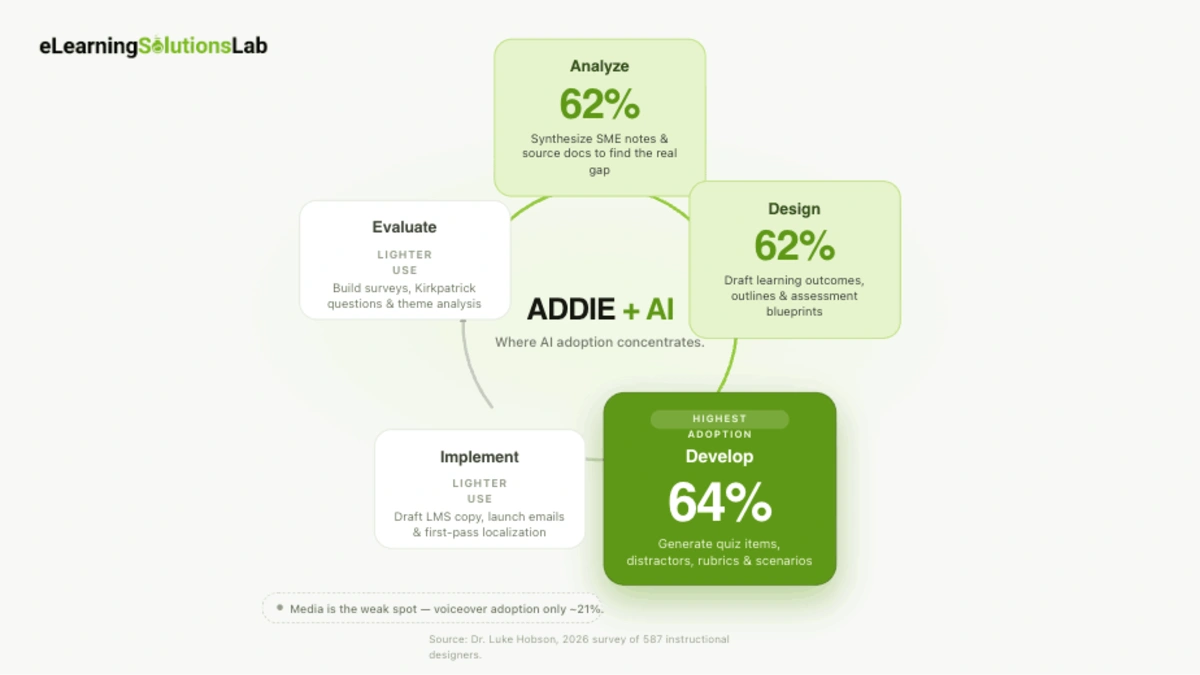 Analyze
The task is to make sense of raw inputs like SME braindumps, existing docs, audience signals, and find the real performance gaps.
Where instructional designers can use AI in the Analyze phase is in summarizing dense or disorganized source material and turning cryptic SME slides into something coherent.
So using research-oriented tools (Elicit, Consensus, ChatPDF) that can pull themes from documents and surface what’s really missing.
Prompt:
“You’re helping me scope a training project. Here are the SME’s notes [paste]. Summarize the key points, list what’s unclear or contradictory, and give me five questions I should ask the SME to close the gaps.”
Where it breaks is when you get permissions before uploading any client or SME document, as much of this material is confidential or proprietary. And you can treat AI’s read or a “gap” as a hypothesis, not a diagnosis. In other words, needs analysis is still your call.
Design
In this phase, you turn analysis into learning objectives, course structure, and an assessment plan.
Where you can use AI is with drafting learning outcomes, outlines, storyboards, and assessment blueprints – one of the highest-adoption areas in the field.
Prompt:
“Write four measurable learning objectives for a 30-minute module on [topic] for [audience]. Use Bloom’s action verbs, avoid ‘understand’ and ‘know,’ and map each objective to a matching assessment method.”
Where it breaks is when AI will generate objectives that may sound right but aren’t aligned with the actual business problem or learner reality. So you own alignment – as AI just gives you a faster first pass to correct.
Develop
This is where you produce the actual content: scripts, scenarios, assessment items, and media.
And with AI, you can draft content, write branching scenarios – the backbone of most scenario-based eLearning services – and generate quiz items with distractors and rubrics. One practitioner described using Claude to write assessments from instructions and learning outcomes, build constructively aligned rubrics, summarize content, and generate quiz questions – a good snapshot of what a day-to-day use looks like.
Prompt:
“Write five multiple-choice questions for [learning objective]. Each needs one correct answer and three plausible distractors based on common misconceptions. Then write a short rubric explaining why each distractor is wrong.”
Where it breaks is that these distractors are only as good as the misconceptions AI can guess at – so you need to verify them against real learner errors. And AI-drafted content can drift toward generic – so if you don’t prompt for voice, you’ll get bland.
Media, of course, is the weakest link here: text-to-speech and video avatar tools will save time, but as reviewers will consistently note, everything they’ll produce needs tweaking before it actually ships.
Implement
Get the course into the world – this is where LMS copy, launch comms, facilitator guides, and localization come in.
With AI, you can do fast drafting of supporting text: enrollment blurbs, launch emails, facilitator notes, and first-pass translations for localization. For courses going global, this is the handoff point to eLearning localization services and eLearning translation services, where native and subject-matter review actually happens.
Prompt:
“Write a 120-word course announcement email for [audience] launching [course]. Warm but professional tone, one clear call to action, and a subject line.”
Where it breaks here is machine translation and localization that still need a native or subject matter reviewer – nuance, idiom, and cultural fit that are exactly where AI slips.
Evaluate
The evaluation stage is where you measure whether the training worked, and it feeds back into the iteration.
In here, you use AI to draft evaluation surveys, write Kirkpatrick-aligned questions, and help analyze open-response feedback for themes.
Prompt:
“Draft a post-course survey for [course]. Include three Level 1 reaction questions and three Level 2 learning questions aligned to these objectives [paste]. Keep it under five minutes to complete.”
Where it actually breaks is when AI clusters qualitative feedback quickly, as it will confidently over-summarize and miss some outlier comments that actually matter. So you have to read the raw responses too – and the signal is often in the ones AI smooths over.
Rather not build it yourself?
We build AI-accelerated eLearning end to end
The prompts and tools above speed up your drafts — but instructional design, production, and QA still take a team. From learner analysis and scenario design to SCORM-ready packaging, we handle the whole build so your courses ship faster and actually change behavior.
Copy-Paste AI Prompt Library for Instructional Design
The instructional designers will get real results and are more deliberate – they’ve learned that how you really prompt matters as much as what you ask.
So before any phase-by-phase library, three techniques worth internalizing, drawn from Connie Malamed’s work on writing with AI:
- Structured prompts front-load context: state the purpose, audience, tone, and formats before the actual requests – as they consistently outperform one-line asks.
- Multistep prompts can break a big request into smaller sequential steps instead of just demanding everything at once.
- Depth-laddering pushes past shallow output. So when a response is thin, you can respond: “That was a superficial Level 1 response. Now give me Level 2 and Level 3 responses.”
Now for the AI prompt library. You can swap anything in [brackets] for your specifics.
Click to select
Click to select
Click to select
Click to select
Click to select
Click to select
Click to select
Click to select
Click to select
Click to select
Click to select
Click to select
Best AI Tools for Instructional Design (Honest Comparison)
Pricing shifts here constantly – as the general-purpose AI market has converged on a near-identical $20/month tier, with providers changing plans more than just once in the last six months. ChatGPT Plus is $20/month, Claude Pro is $20/month, and Google AI Pro (its plan formerly called Gemini Advanced) is $19.99/month.
You can just treat every number here as a starting point and confirm on the vendor’s page.
General-purpose LLMs
For most ID tasks, including research synthesis, objectives, drafting, assessments, and prompting, a single general LLM does the bulk of the work. The three big options sit at the same price with different strengths: broadly, one leans toward ecosystem and tooling – so one towards writing quality and careful reasoning,g and one leaning on Google-app integration and very long context.
So you can pick based on where you already work and which voice you prefer. So at $20 per month, the differences really are about fit, not capability tiers.
Specialized Tools (Research, Video, Audio)
These genuinely earn their place for production work:
For video specifically, you have to keep expectations calibrated: reviewers can consistently find that avatar and course tools will save real time, but that everything they produce will need tweaking before it will ship. t.
How to Choose (a ranking is the wrong question)
Don’t ask, “What’s the best AI tool for instructional design? But ask, “What’s the best tool for this task?” Let me give you a practical sequence:
- Start with one general LLM for thinking and drafting work, as it covers the majority of the ADDIE workflow.
- You can add a research tool only if you regularly synthesize papers or dense SME documents.
- Add video or audio tools only when a project actually calls for narrated or avatar-led media – as these are the priciest and least essential.
- Layer in some editing tools for polishing, with the voice caveat above. And keep in mind these AI tools complement – not replace – the best eLearning authoring tools you build and publish courses in.
Most instructional designers need one or two of these – not the whole shelf. The tool stack that looks impressive on a slide is rarely one that ships courses faster.
Ethics, Accuracy, and Keeping a Human in the Loop
You still do the judging. The moment AI output goes into a course unchecked, the efficiency gain just becomes a liability. So the checks go into separating designers who use AI well from those who just paste and pray.
Accuracy
AI is a confident liar – it may produce fluent, plausible, well-formatted text that’s sometimes implicitly wrong – and instructional content is exactly the wrong place for those hidden errors.
Two rules worth practicing here:
First, outside of dedicated research tools, citations AI can generate are frequently unreliable – she treats them as leads to check, not just facts to cite.
Second, you have to double-check every AI-generated report or summary against the source. So if you can’t reach the full journal article, at least compare the AI’s claims against the abstract.
Intellectual Property and Consent
Two IP issues sit inside a normal ID workflow. The first one is inbound: get explicit permission before uploading client or SME documents into any AI tool – much of that material is actually confidential or proprietary, and when you upload it, it can be a violation.
Second is outbound: image-generator question from the tools section – as many of these generators are trained on artists’ work without actual credit or compensation – which is why some designers deliberately avoid them.
Bias and Accessibility
AI reflects patterns in its training data, which means it can quietly reproduce bias – in some examples, names, scenarios, and imagery – and it has no innate sense of accessibility.
So it won’t flag, for instance, that your scenario assumes a physical ability or that your reading level has crept up.
It requires a human pass for inclusive language, representative examples, and accessibility standards – all as non-negotiable.
Pre-ship Review Checklist
Before anything AI-assisted goes live, you have to run it against these:
- Accuracy – every fact, statistic, and citation is verified against a real source
- Alignment – content still maps to the actual learning objectives, not just the topic
- Voice – it reads like your organization, not generic AI prose
- Bias and accessibility – inclusive examples, appropriate reading level, accessibility standards met
- IP and consent – permission secured for all uploaded source material – no unlicensed assets
- Human judgment – a person has decided this is good.
Frequently Asked Questions
How is AI used in instructional design?
Instructional designers use AI across the entire workflow: to synthesize research and SME notes, draft learning objectives and outlines, generate assessment items and rubrics, write scenarios, and produce voiceover or video.
Why do instructional designers use AI?
Mostly to save time. In Hobson’s survey, 79% cited time savings as a primary reason, ahead of improving quality at 58%. AI can help remove the blank page problem and speed up the first drafts of objectives, assessments, and content – which frees up instructional designers to spend more time on judgment-heavy work.
Is it ethical to use AI in instructional design?
Yes, with guardrails. You need to verify every AI-generated fact and citation, get permissions before uploading any confidential client or SME materials, as you need to check for bias and accessibility, and be actually transparent where appropriate.
How are instructional designers keeping up with AI?
Largely informally. Hobson found that learning is mostly peer-to-peer: 65% track AI developments through social media and 57% through colleagues, while only 27% rely on formal professional development. So if your organization offers no structured training, you’re in the majority of instructional designers who want to build a personal learning network instead.
The Author

Book A Discovery Call
Our Learning Advisors are happy to walk you through your project step-by-step — content, timeline, and fixed pricing.
Get Your Free QuoteNo obligation — just a focused conversation. Proposal within 24 hours.
You may also like
Learning Models Explained: 12 Frameworks, Compared and Evidence-Rated (2026)
When you search for learning models, you'll always find the same five theories…
12 Real Microlearning Examples You Can Copy
Short answer A microlearning example is a short lesson, usually 2 to 5…