


- Published
- Reading time
- 6 min
Filed under eLearning Development
“Click next to continue.” If that’s the main thing learners do in your course, it isn’t really interactive, no matter how polished it looks. And people can tell. Passive courses tend to get skimmed, forgotten and complained about, even when the content is truly important.
So here’s a practical guide to interactive eLearning. You’ll get a clear definition, the four levels of interactivity, the most useful types of interactions, examples by training topic, how to choose the right level for your budget and goals, and the mistakes that make “interactive” courses feel like busywork. You can also download a free interaction planner, no email needed.
Short on time? Jump to the 4 levels, see the interaction types or download the planner.
Updated November 2026.
In This Article
What is Interactive eLearning?
Interactive eLearning is online training that asks learners to do something meaningful, like make decisions, practice tasks, explore, or respond to feedback, rather than just read, watch and click next. The interactions are there to help people think and practice, not to decorate the screen.
The key word is meaningful. Dragging a label to a box is interactive in a technical sense. But it only helps learning if the action mirrors something learners actually need to think about or do on the job.
Why Interactivity Matters
- Practice builds skill. People get better at decisions by making decisions, not by reading about them.
- Active learning sticks. Recalling and applying information strengthens memory far more than passive review. Our guide to the forgetting curve explains why.
- Feedback corrects mistakes early. Learners find out what they got wrong in a safe place, so that the first mistake doesn’t happen on the job.
- Attention stays higher. When a decision is coming, people pay attention to the content before it.
The 4 Levels of Interactivity
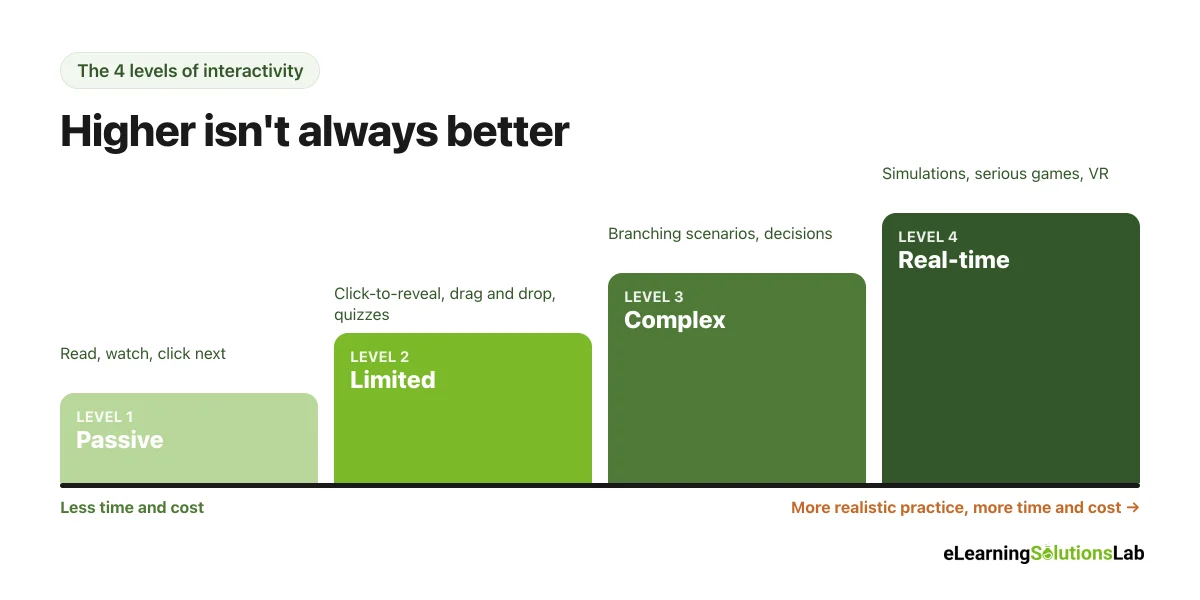
eLearning is commonly grouped into four levels of interactivity. The levels aren’t an official standard, but they’re a really useful shorthand for scoping projects with vendors and stakeholders:
| Level | What learners do | Typical examples | Best for |
|---|---|---|---|
| Level 1: Passive | Read, watch and click next | Text and images, narrated slides, video | Awareness and simple information |
| Level 2: Limited | Simple interactions and knowledge checks | Click-to-reveal, tabs, drag and drop, quizzes | Most policy, process and product content |
| Level 3: Complex | Make decisions with consequences | Branching scenarios, case studies, software practice | Judgment, customer conversations, troubleshooting |
| Level 4: Real-time | Practice in realistic, immersive environments | Simulations, serious games, VR | High-risk, complex or expensive-to-practice skills |
Higher isn’t automatically better. A Level 4 simulation for a simple policy update is wasted money. A Level 1 course for a high-risk safety procedure is genuinely risky. So the right level depends on the skill, the stakes and the budget.
Types of eLearning Interactions

| Interaction | What learners do | Best used for |
|---|---|---|
| Branching scenario | Choose responses and see the consequences | Decisions, conversations, judgment |
| Software simulation | Practice tasks in a copy of the real system | System and tool training |
| Drag and drop | Sort, match or place items | Categorizing, sequencing, labeling |
| Hotspot | Find and click areas on an image or screen | Spotting hazards, errors or features |
| Click-to-reveal and tabs | Explore information at their own pace | Breaking up dense content |
| Interactive video | Make choices that change what happens next | Soft skills and realistic situations |
| Knowledge checks | Answer questions with feedback | Recall and application |
| Gamified challenges | Earn points, beat a timer or complete levels | Motivation and repeated practice |
In practice, branching scenarios and realistic practice tasks do most of the heavy lifting in good courses. The others work best as supporting pieces, given that their job is usually to help people explore or check understanding.
Interactive eLearning Examples by Topic
| Topic | Passive version | Interactive version |
|---|---|---|
| Customer service | Slides listing complaint-handling steps | A branching conversation with an upset customer |
| Safety | A video of hazards | A hotspot activity: find 6 hazards in a warehouse photo |
| Software | Screenshots with captions | Practice the task in a simulated version of the system |
| Compliance | A summary of the policy | Scenarios where learners decide if an action breaks the rules |
| Sales | Product feature list | Match the right product to three customer profiles |
| Leadership | Reading on feedback models | Interactive video: choose how to give feedback to a team member |
Our guides to scenario-based eLearning, eLearning simulations and gamification go deeper into each approach.
How to Choose the Right Level of Interactivity
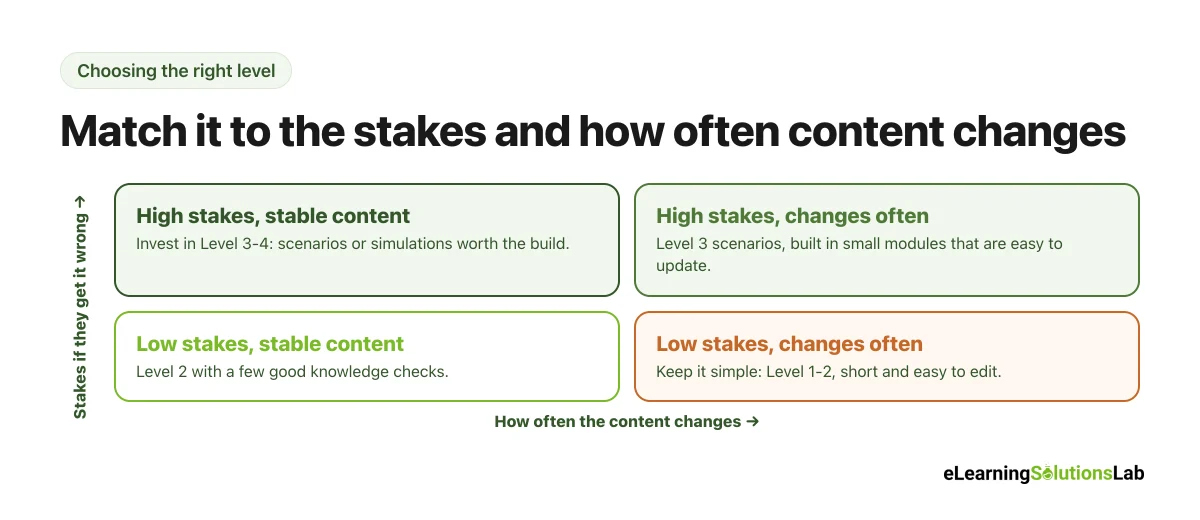
You have to decide this part by part, not for the whole course at once. For instance, a compliance course might need a few hard scenarios and a lot of simple content. Ask these questions for each part:
- What will learners actually do on the job? If it’s a decision, practice the decision. If it’s a procedure, practice the steps. Start from your learning objectives.
- What happens if they get it wrong? Higher stakes usually justify more realistic practice.
- How often will the content change? Content that changes every few months is usually better at Level 2, given that complex builds are expensive to update.
- How many people will take it? A course for 5,000 people can justify more investment than one for 20.
- What’s the budget and timeline? Each level typically takes more development time than the one before it.
You don’t have to pick one level for the whole course. Most effective courses are mostly Level 2, with Level 3 scenarios for the decisions that matter most. That mix is usually the best value.
Tools for Building Interactive eLearning
Here’s the thing: the tool doesn’t make a course interactive. Your design does. But the right tool really does make good interactions faster to build. In practice, most teams pick from three groups:
- Full authoring tools – Articulate Storyline, Adobe Captivate and iSpring Suite. These give you triggers, variables and branching, so that you can build real scenarios and simulations.
- Rapid, template-based tools – Articulate Rise, Elucidat and similar. You can build clean, responsive lessons with ready-made interactions like flip cards, sorting activities and knowledge checks.
- Free and open-source tools – H5P and Adapt. They’re genuinely useful for simple interactions, given that you don’t need deep branching logic.
So start with the interaction you actually need, then pick the tool. For instance, if learners have to practice a tricky customer call, you need branching, and a template tool simply won’t cut it. For a full comparison, see our guide to the best eLearning authoring tools.
Common Interactive eLearning Mistakes
- Clicking for the sake of clicking – “click to reveal” on every screen adds effort, not learning.
- Interactions that don’t match the job – a drag-and-drop matching game for a skill that’s really about judgment.
- Feedback that only says right or wrong – good feedback explains why.
- Scenarios with obvious answers – if the right choice is obvious, there’s nothing to practice.
- Overbuilding – expensive animations and simulations for content that will change next quarter.
- Ignoring accessibility – drag-and-drop and hotspots need keyboard and screen reader alternatives. See our accessible eLearning guide.
To give you a concrete example, at eLearning Solutions Lab, we don’t simply add interactions to make a course look busy. We start with the two or three decisions that matter most on the job and turn those into realistic scenarios with feedback, then keep the rest of the course lean and clear. So learners spend their time practicing what matters, and clients spend their budget where it actually changes performance.
Free Interaction Planner (PDF)
Free download – no email needed
Interactive eLearning Planner
A printable PDF to plan interactions for any course: a level picker, an objective-to-interaction planning table, an interaction type cheat sheet and a quality checklist.
In one line: interactive eLearning asks learners to practice what they’ll actually do on the job, and the right level of interactivity is the one that matches the skill and the stakes, not the highest one you can afford.
Want eLearning that’s interactive for the right reasons?
At eLearning Solutions Lab, we build scenario-based, interactive courses focused on the decisions and tasks that matter most in your learners’ jobs.
See our custom eLearning development or eLearning gamification services.
See custom eLearning developmentTalk to us about your course
Related Reading
- Scenario-based eLearning – decision practice that sticks.
- eLearning simulations – Level 4 practice explained.
- Knowledge checks – questions that teach.
- Gamification in eLearning – game elements that help.
- eLearning development costs – what each level typically costs.
The Author

Book A Discovery Call
Our Learning Advisors are happy to walk you through your project step-by-step — content, timeline, and fixed pricing.
Get Your Free QuoteNo obligation — just a focused conversation. Proposal within 24 hours.
You may also like
Knowledge Checks: Question Types, Examples and How to Write Them
Most eLearning courses have quiz questions. But a lot of them are there simply…
ADDIE vs. SAM: Key Differences, When to Use Each, and One Course Planned Both Ways (2026)
ADDIE vs. SAM is one of those debates that never really ends. Search for it and…